5 Tips for Hosting Google+ Hangouts

January 30, 2012

My Google+ Profile: http://gplus.to/dshiao

Introduction

A bunch of us started a digital book club. On a regular basis (well, soon to be a regular basis), we meet via Google+ Hangouts. We recently held our first meeting, for which I was the host of the Hangout. I learned a lot from my first Hangout, so I thought I’d share these five tips.

1) Do a dry run in advance.

Another way of saying this is, “when hosting your first Hangout, don’t enter the Hangout five minutes prior to the start.” Similar to hosting a webinar, you need a dry run prior to the “live date.” I discovered that one browser crashed [perhaps I need to install the latest version], while on another browser, the Google Talk plugin seemed to consume 100% of my CPU, rendering my laptop (and the Hangout itself) unusable. I ended up moving to a better equipped laptop, but in shutting down the Hangout, it bumped everyone else out.

2) Have a backup host.

In the off-chance that you experience technical difficulties, have a designated “backup host” who can fire up a new Hangout. You know how some events publish a “rain date” in advance? Do the same with your Hangout and let your target audience know about your backup host (e.g. “for any technical difficulties, be sure to join a new Hangout that <BACKUP> will create”).

3) Create a Circle of your Hangout’s participants.

In the case of our book club, we asked interested people to “opt in” to our club. Once they did, I added them to a Google+ Circle that I created. I then “shared” the Circle with its members, allowing them to conveniently add the same Circle to their Google+ account. The Circle makes it easy to invite “members” to the Hangout – when the Hangout begins, you can invite the members of the Circle to join.

4) Encourage use of the “Chat” tab.

Text chat can add an entirely new dimension to a multi-party conversation. While one person is making a good point, others can write “Thumbs up!” in the chat area. Or, they can provide a related comment, or perhaps a hyperlink to a relevant article. In this way, the chat creates “more bandwidth” within the Hangout, without the “overhead” of switching from one speaker to another.

5) Set expectations in advance.

Participants in your Hangout ought to have a clear expectation of the agenda and flow. If you want to have 30 minutes of completely free form discussion, state that up front. For our book club, I created an agenda that included introductions, discussion points and a wrap up. Of course, I didn’t do my dry run, so my first Hangout didn’t follow the agenda as outlined.

Conclusion

My first Google+ Hangout was a lot of fun. They happen to be a great tool for digital book clubs. Use the comments area below to let us know your tips for hosting Hangouts.

Note: I invite you to connect with me on .


The Biggest Virtual Events Opportunity No One Is Focusing On

January 23, 2012

Introduction

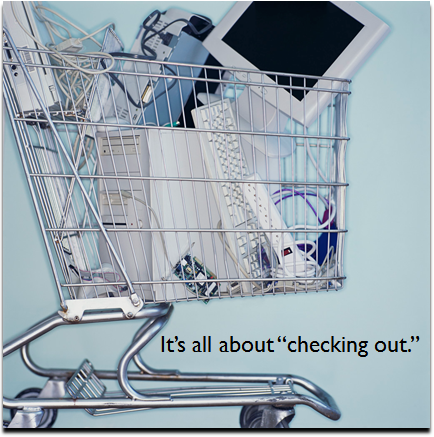
Let’s talk opportunity, by way of an analogy. Amazon.com. Consider that at this moment in time, Amazon’s users have thousands (if not millions) of items in their shopping carts. Combined, I have to believe that the aggregate (but untapped) value of Amazon users’ shopping carts is in the millions of dollars.

Now, let’s consider virtual events. For public-facing virtual events, the average attendance rate is 35-50%. If a virtual event generates 10,000 registrations, let’s be generous and say that half of those registrants (5,000) attend the live event.

E-tailers like Amazon would love for you to take the contents of your shopping cart and “check out.” Virtual event planners need to focus on the 5,000 users who didn’t attend the live event and get them to “check out” (the on-demand archive of the event).

These “no shows” are an enormous opportunity for every virtual event planner, but I don’t see enough effort around this opportunity. So here are tips to get your registrants to “check out” (your event).

The basics: a follow-up email.

Imagine that users registered for your virtual events two months prior to the live date. You’ve scheduled reminder emails, but the users missed them. When your live event comes around, users have forgotten about it. This means that they’re also not aware that an “on-demand archive” exists. Sending a “Sorry we missed you” email is easy to do and gets you immediate results. Invite your “no shows” to experience your event “any day, any time.”

Scheduled webcasts.

Plan an editorial calendar in advance, which includes a few presentations after the live date of your event. Did you covet particular speakers, but they weren’t available on your event’s date? If so, plug them in to the post-event schedule. And, make sure you invite not just the “no shows,” but folks who attended your live event as well.

Scheduled chats (Experts).

Re-feature some of your presenters and invite them back for a 2-hour, text-based chat in your environment. Invite attendees to return and promote this opportunity to “no shows” (e.g. “A great opportunity to interact directly with our featured industry expert.”)

Scheduled chats (Sponsors).

Schedule a few dates to allow sponsors to host chats in the on-demand environment. This could be a nice up-sell feature in your sponsor packages. Note that sponsors tend to generate less response (attendance) as your experts, so plan accordingly.

Email Alerts for New Content.

Did sponsors upload fresh content? Or, perhaps a featured presenter provided an updated slide deck from her webinar. Send an email out, alerting users that new content is available in the environment. Don’t do this too often, of course – and, be sure to include an opt-out link, so recipients can be removed from subsequent mailings.

Activate Social Games.

Find some prizes, then activate a few social games. The games require that users login to the environment, engage with content and engage with one another. It creates fun for the users and active engagement for you (and your sponsors).

Conclusion

Just because users took the time to complete your registration page, doesn’t mean they’re “sold” when your event comes around. Utilize your event and its content, however, to “re-sell” the event to non-attendees. If you sell it well, your users will empty their shopping carts … and buy in.

Note: I invite you to connect with me on .


5 Ways Face-to-Face Events Are Like Family Reunions

January 13, 2012

Introduction

This week, I attended my fourth Virtual Edge Summit and my second PCMA Convening Leaders. The two events were collocated with one another at the San Diego Convention Center. As I made my way throughout the event, I kept noticing the same thing: people embracing one another in enthusiastic hugs.

I noticed the hugs just about everywhere: in the hallways, on the elevators, on line for coffee and in the session areas. I made the realization that members of an industry comprise a family – and with our busy schedules these days, the “family” may see each other a few times per year. Or perhaps, a few times every five years!

Let’s consider how face-to-face events are like family reunions.

1) Scheduled time together.

At a family reunion, there’s the luncheon, picnic or perhaps a tea party at grandma’s house. There’s the obligatory group photo. Face-to-face events are largely defined by their scheduled activities: sessions, demonstrations, meals, classroom learning and evening networking events.

2) Unscheduled time spent in smaller groups.

A face-to-face event is wonderful at creating serendipity and somewhat random encounters: running into an old colleague while walking from one session to the next; meeting a like-minded professional on the food line; bumping into your former boss on the elevator.

While an event’s scheduled activities are valuable, a lot of enjoyment comes from the meetings and interactions we have during the unscheduled activities, which we tend to experience in smaller groups. Family reunions are similar. The one-on-one time with a cousin or aunt are great, as you reminisce about the “good old days.”

3) Nothing’s the same as face-to-face.

Families have Skype, Facebook and email to stay in touch. Industries have blogs, online communities, Twitter and Google+. All of these tools are very effective for keeping up with one another and staying in touch.

But nothing can reproduce the experiences, dynamics and value of meeting face-to-face. I’ve developed relationships with others online, but it’s not until I spend time with them face-to-face that I truly feel like I “know” them. Industries, like families, need to convene face-to-face from time to time.

4) You realize how quickly the kids grow up.

Kids grow up way too quickly. Go two years without seeing a young niece, nephew or cousin and you may not even recognize them. With business moving as quickly as ever, our friends and colleagues may get promoted or switch jobs without us knowing (although LinkedIn does a great job about letting us know!). It’s at events that we can see how the kids (and colleagues!) are growing.

5) It’s hard to say goodbye.

It’s hard to say goodbye at the end of a family reunion. After spending 2-3+ intense days at a face-to-face event, it’s equally tough to say bye. You’ve spent hours speaking, learning, (hugging) and socializing with a close-knit group of individuals. When it’s time for everyone to head to the airport, you wish that the event lasted one more day.

Conclusion

I had a great week with “family” in San Diego. For some, it’s my hope that I’ll see them again during 2012. For others, I may have to wait for 12 months. Perhaps I’ll combine the face-to-face event with a family reunion – Convening Leaders 2013 takes place in Orlando.

Note: I invite you to connect with me on .


10 Lead Generation Tips for Digital Events

January 12, 2012

Introduction

At Virtual Edge Summit / PCMA Convening Leaders in San Diego, I gave a Learning Lounge talk titled “Digital Events: 10 Tips for Generating Leads for Your Exhibitors.”

Ten Lead Generation Tips

My ten tips are:

  1. Content Marketing (You).
  2. Content Marketing (Your Exhibitors).
  3. Social Media (You).
  4. Social Media (Your Exhibitors).
  5. Leverage Speakers for promotion.
  6. Utilize social sharing buttons.
  7. Start promoting early.
  8. Leverage your partners.
  9. Issue a press release.
  10. Supplement with paid media.

The Presentation

Here are the slides from my presentation.


My 2012 New Year’s Resolutions for Social Media

January 9, 2012

Introduction

On the one hand, social and mobile technologies have made a huge and positive impact on my life: I can read and share content wherever I am. I’ve met and discovered new people that otherwise would not have been possible.

On the other hand, I now stare immediately into my iPhone when I enter an elevator. When I walk to grab a sandwich for lunch, I stare into the same iPhone, despite the presence of clear and sunny skies. When I’m at home, I find myself checking on tweets, rather than enjoying quality time with my family.

In short, I need a better balance between “online and offline.” As I begin 2012, here are my 3 resolutions related to my use of social media.

More books, less tweets.

If you follow enough people on Twitter, have a bunch of folks “circled” on Google+ and connect with friends and family on Facebook, then you could view streams on your social networks for days without end. Content flows like a waterfall and the social media waterfall never runs dry.

I still plan to stay current with my tweeps, find interesting content and do quite a bit of tweeting and plus’ing. But, I won’t be obsessive about it. No checking tweets immediately before going to sleep and then again when I wake up (although I admit, I still check email immediately after the alarm goes off in the morning.)

When at home, I’ll now leave my iPhone (and laptop) in another room for extended periods of time, making me “offline.” To fill the “gap,” I plan to read more books in 2012. And yeah, I’m referring to books printed on paper and not e-ink.

Friends over followers.

I’m flattered that folks want to follow me on social networks. Like I said earlier, being followed and following others has allowed me to “meet” lots of interesting people. Connecting and interacting online can be quite fun and rewarding.

But if I’m successful with these resolutions, I’ll establish more meaningful relationships “in real life” compared to online followers. That being said, “connections” that I make online have led to “meeting in person,” and that’s been great. I’d love to do more of that in 2012.

More enjoyment of destinations.

When I visit a new museum, try a new restaurant or go to the ballpark, I’ll look to see if they’re promoting their social media channels. I’ll then spend time checking out the activity on those channels (via my iPhone), follow them on the spot and tweet to them.

The result is less attention and energy towards truly enjoying the destination. Instead, I’m again immersed into my smartphone. In 2012, I resolve to remember the social channels promoted and save the tweeting and browsing until after I return home. I resolve to focus on the exhibit, enjoy the grub and savor my seats (not tweets).

Conclusion

Yes, I consider myself a social media junkie. For 2012, I need some therapy. For now, I’ve set out a personally assembled plan. Let’s see how well I keep to my resolutions. I think it’ll help bring more enjoyment of … life! Use the comments section below to share thoughts on your own use of social media. Thanks!

Note: I invite you to connect with me on .


It’s All Virtual: 2011 In Review

January 2, 2012

The WordPress.com stats helper monkeys prepared a 2011 annual report for this blog.

Here’s an excerpt:

The concert hall at the Syndey Opera House holds 2,700 people. This blog was viewed about 27,000 times in 2011. If it were a concert at Sydney Opera House, it would take about 10 sold-out performances for that many people to see it.

Click here to see the complete report.