
Source: Lenovo eLounge (screen capture of author's avatar)
Lenovo today unveiled a virtual world called eLounge, which is powered by Nortel’s recently announced virtual world platform, web.alive. Lenovo appears to be using this venue as a social and interactive platform for providing information on their products and services (notably, their laptops). Here’s Lenovo’s description of eLounge:
Experience a truly virtual 3D on-line shopping experience. Ask your friends to join you, and together explore and learn about lenovo products. It is similar to shopping in a retail store except you are on-line and in control of your real time interactive shopping experience.
* Create your own personal avatar
* Browse and interact with our virtual products
* Walk around and share your experience with customers from around the globe
* Get support from one of our virtual avatar product specialists
I reviewed eLounge on a Dell Latitude D630 running Windows Vista Business on Firefox 3.0.5 (perhaps I should have been on a Lenovo Thinkpad instead?). eLounge runs within a browser, but first requires a download of Nortel’s web.alive software. Here are the system requirements:
To help ensure that you receive the best possible experience, we recommend the following minimum computer set up:
* Windows XP/Vista
* Intel 945 integrated graphics or better
* 1 GB RAM, 1.50GHz CPU
* Broadband network connection (e.g., cable/DSL)
* USB stereo headset with microphone
Shortly after my download completed and I ran the executable, the eLounge virtual world appeared in the Firefox browser tab from which I initiated the download. On initial entry, I saw 7-10 other avatars in the immediate vicinity and heard a female avatar ask, “How do I leave?”. A Lenovo staffer politely addressed this inquiry and off she went. As I got myself acclimated to the environment, I enjoyed viewing my auto-selected avatar – a svelte-looking, 5′ 5”, 150 pound male (image above).
After lounging in the environment and observing the avatar passersby, I was greeted by an avatar named Nicholas – turns out this was Nicholas Sauriol, the Venture Leader of Project Chainsaw at Nortel, the initiative at Nortel behind web.alive. Nicholas gave me an extensive tour of eLounge, starting with some stations where Lenovo Thinkpads were on display. By left-clicking on the mouse and hitting “w” on the keyboard, I was able to walk toward a Thinkpad, at which point its full configuration appeared on my screen.
At the bottom of the description was a link lableled (“Customize and buy”) — neat idea. Nicoholas then walked me to a separate room – an auditorium where a few avatars were hanging out and an image of a Star Trek spaceship appeared on stage. This is an area designated for product launches and announcements – leveraging a feature of web.alive called OmniVoice. Typically in web.alive, sound volume correlates to your proximity to an avatar. With Nicholas up close, I could hear him fine – but if he walked away, his voice would start to get faint. With OmniVoice, the speaker gets the equivalent of a microphone, so her voice is projected throughout the area (auditorium).
Side conversations could still occur while the presenter was speaking (in the same way that you can chat (whisper!) with your colleague during a physical presentation). Nicholas then escorted me into a private room that he likened to an executive briefing center:

Source: Lenovo eLounge (with presenter Nic Sauriol)
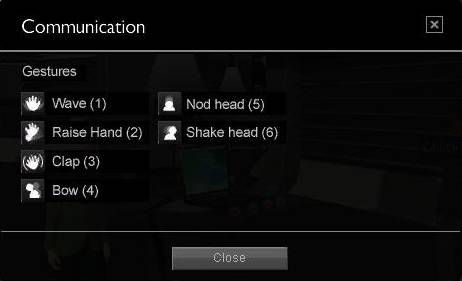
In this area, Lenovo can utilize PDF, PowerPoint, etc. to present to clients. So the large displays (above) can render a PowerPoint, just like using a projector in a conference room. Overall, I found the user interface of web.alive (and eLounge) to be quite intuitive. I was immediately able to pick up on the relevant commands – the use of “overlay” text that appears transparently on top of the screen was useful. And menus like this are handy:
Source: Lenovo eLounge
The numbers (above) represent keyboard shortcuts that allow you to “emote”.
The web.alive platform is built on top of the Unreal Engine from Epic Games. Virtual Worlds News has some good coverage of eLounge, along with Nortel’s licensing of Unreal:
http://www.virtualworldsnews.com/2009/01/lenovo-using-nortels-webalive-for-ecommerce.html
In Summary
For a “Day 1” experience, I found Lenovo eLounge (and web.alive) to be quite good – I’m sure Nicholas and team at Nortel will continue to build it out with more features. It will be interesting to see the applications that other companies may have for web.alive. According to Sauriol, Lenovo is the first public launch of a web.alive client – there will be other public launches forthcoming – and there are a number of clients using web.alive behind the firewall (which we won’t hear about).
I’ll also be interested to hear how Lenovo is driving users into eLounge (i.e. generating interest / demand), along with what sort of ROI they’re looking to generate from this investment. Kudos on a good start to both Project Chainsaw (Nortel) and Lenovo.
UPDATE: Some supplementary information about the underlying technologies:
- A YouTube video featuring Arn Hynman, web.alive chief architect
- A podcast interview featuring Hynman, along with Mark Rein, vice president of Epic Games


 Posted by Dennis Shiao




 It's All Virtual