Post Your Slogan for Virtual Event Experiences

April 26, 2012

Photo source: mckaysavage on flickr.

Introduction

Recently, Mike Swift published an interesting article in The Mercury News, “Ship code or ship out: Bootcamp for new Facebook engineers.”

The article provided a fascinating, behind-the-scenes look at Facebook’s boot camp for new engineers. I loved reading about the slogans that Facebook reinforces within its team. As Swift notes, “Facebook recruits are exposed to a series of slogans that are intended to encapsulate the company’s values.”

Facebook’s Slogans

Swift’s article lists the following Facebook slogans:

Move Fast and Break Things
What Would You Do If You Weren’t Afraid?
The Foolish Wait
Our Work Is Never Over
We Hack Therefore We Are
Are You Fearless?
Done Is Better Than Perfect
Code Wins Arguments

Slogans for Virtual Events

It occurred to me that we should develop slogans regarding what virtual event experiences should aspire to. So fresh off reading Swift’s article, I went to Twitter to ask. After all, for soliciting slogans, what better a place than one that deals in 140 characters or less?

And the Twittersphere spoke:

“Think big and be creative!”  — @EmilieBarta
“Where less is more”   — @scottlum
“Less steps, less windows, less mess = less stress!”  — @EmilieBarta
“DIY-Do It Yourself”  — @virtualpioneer
“Be Effective. There’s too much doing too little reasoning” — @webcaston
“Connect everywhere, anytime with everyone”  — @mike_arias
“Content Engagement”  — @firstlegion
“Make Every Seat The Front Row” — @bXbOnline

And here are my slogans:

Minimize Load Times
Simple Always Wins
Less Clicks
Connect People to People
Connect People to the Right Content
Make Them Want to Come Back
Delight and Overdeliver

Let’s Hear From You

There’s got to be plenty of great slogans out there. Use the Comments section below to leave your slogan. Thanks!


Why (and How) Realistic Avatars Can Be More Effective

April 23, 2012

The following is a guest post from Craig McAllister of Integrated Virtual Networks (IVN). Craig discusses the effectiveness of realistic (vs. graphical) avatars and introduces us to Silhouette, technology that his company has developed to render realistic avatars within a 3D virtual world. Be sure to check out the video demo (below), as I think this could be a game changer.

Introduction

To many people, today’s avatars represent elaborate animations. Recently, however, much fanfare has been made about new technologies enabling animated avatars to mimic a wide range of users’ facial expressions. If you smile, your avatar smiles with you. If you frown, your avatar frowns. This development allegedly translates into greater realism. But is this realism “real” enough? If the objective is to make an avatar truly “real”, why not have it actually be real?

Animated Avatars

Certainly there exists specific segments of the Virtual world population for whom animated avatars are preferred. These groups might include children under 10; teenaged gamers; and non-gaming adults in virtual worlds like Second life. In each of these examples, customization, fantasy, and/or anonymity take precedence over true realism.

Realistic Avatars

There are, however, a number of possible virtual world environments where users are likely to be interested in seeing avatars that are as realistic as possible.  In fact, wouldn’t a live streaming video avatar of an actual person be a viable alternative to the currently available animations? This technology would allow for real time, face-to-face meetings in virtual worlds. People could actually see each other.

Realistic Avatars for Online Dating

One example of a real need for this technology is in the area of virtual world dating. As Violetta Krawczyk-Wasilewska and Andrew Ross said in their paper entitled “Matchmaking Through Avatars: Social Aspects of Online Dating”, “Once you have experienced the virtual delights of avatar dating in an online venue, taking that last fateful step and going for a real, physical, face-to-face meeting with your avatar date can only be a let-down.”

Talk about a blind date! How could you even be certain of the gender of the animated avatar you were dating, let alone know what that person actually looks like in the real world?

Realistic Avatars for Online Job Interviews

Another good example of the value of realistic avatars would be virtual world job interviews. Recently, at a state government job fair in Second life, an applicant “came to the job fair as a” tiny cat with a red bow tie on.” How can anyone really know for sure whom they are actually talking to? For all you know, you could be interviewing some kid’s Dad!

How about social networking? Imagine virtually attending your 10th high school reunion, and being able to see your fellow classmates face-to-face (how did that cute girl/guy who used to sit next to you turn out?) Instead of experiencing an animated depiction fixing you with a facsimile smile, you could see your classmates actually laughing. The experience using a live streaming video avatar would be totally different, and potentially a lot more satisfying.

Realistic Avatars for Distance Learning

Distance learning and virtual campuses are other areas with enormous potential. Teachers and students could see each others’ actual faces in the virtual world, thereby facilitating a much richer and personally interactive learning experience.

Imagine playing online poker with a table full of animated avatars. There is no way to read your opponents’ “tells” that you would otherwise pick up in a face-to-face situation. Given that the human face is capable of making over 50,000 different individual expressions, real time avatars clearly provide the advantage in such a nuanced environment. Otherwise, everyone will have their avatars set to “poker face”.  So much for nuance.

Lastly, imagine engaging in sensitive and/or high stakes business negotiations with “a tiny cat wearing a red bow tie…” N’uff said.

Introducing Silhouette

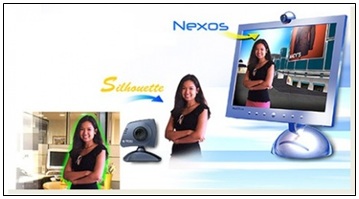
Ultimately, the list of situations where it would be preferable to have real time avatars is almost limitless.  So the question becomes, when can we expect to see live video avatars? The answer is… now. A company called Integrated Virtual Networks (IVN) has been developing patented live video avatar software called Silhouette.

With Silhouette, each user in a virtual world is able to see and be seen as a live streaming video avatar at real time frame rates, along with synchronized audio. Silhouette works with a single high-speed web camera to extract a user’s video image from the user’s actual environment, without the need for a monochromatic (e.g. blue or green screen) background. Silhouette could be used for all those virtual world situations where “real” actually needs to be real.

You can see the direction IVN is going with its live video avatar software by looking at its rough in-house “proof of concept” video which was done completely in-world:

As indicated in the beginning of this post, live video avatars will not be for everyone, but once the technology is fully developed, it could bring a needed dose of reality to virtual worlds.

About the Author

Craig McAllister is affiliated with Integrated Virtual Networks (IVN) in Los Angeles, CA.


What The @NFL Can Teach You About Virtual Events

April 20, 2012

Introduction

News flash: The National Football League (NFL) is an event planning organization. And they happen to be among the best in the universe. The NFL runs a year-long series of events, from mini-events, to large scale events to mega events (e.g. The Super Bowl).

Recently, the release of the NFL’s 2012 schedule coincided with 3-hour, prime time specials on both ESPN and NFL Network. Wow. Unlike any other major sport, the NFL is top of mind (in their fans’ minds) 365 days a year, 24×7.

While I’m not suggesting that your virtual event become a year-round, round-the-clock sort of thing, I do think the NFL can teach you some things. Instead of your annual virtual event being a “one and done” experience, steal some ideas from the NFL to extend your event’s livelihood. Let’s take a further look.

The Ecosystem

While the NFL is the arbiter of its brand, it relies on an ecosystem of partners to extend and reinforce that brand. The ecosystem includes:

  1. Individual teams
  2. Broadcast partners
  3. The Press
  4. Related content providers
  5. Merchandise retailers

The point here is that the NFL can’t do it alone. Where would it be without CBS, FOX and ESPN? Similarly, consider your virtual event. Your ecosystem includes:

  1. Exhibitors and sponsors
  2. Speakers and presenters
  3. Content providers
  4. Service providers

Be sure to fully leverage your own ecosystem in areas like monetization, audience generation, buzz building and media coverage.

Owned Media

The NFL, over the past several years, concluded that it needed to beef up its owned media, to complement its ecosystem. Have you visited NFL.com recently? It has as much original content as its ecosystem partners (e.g. ESPN.com, SI.com, SportingNews.com, etc.), written by a growing team of writers.

And of course, there’s NFL Network, which launched in 2003 and is carried on cable and satellite TV systems. With its talented team of analysts, I often find myself tuning in to NFL Network before and after games, when I’d formerly watch ESPN.

As a virtual event planner, you need to consider owned media, too. This could take the form of an event web site, a related blog and social media channels. If you run an annual, mid/large scale virtual event, realize that you’re now in the publishing business. Devise an Editorial calendar and start banging out content. Start by linking to and commenting on existing articles, then consider developing content of your own.

Generate Online Chatter

Is there any other sports league where the release of the season schedule is an event in and of itself? That’s the genius of the NFL. For an organization where most of the action takes place on the field, the NFL finds ways to create action (and generate related commentary and discussion) off the field.

The release of the 2012 schedule is an example of using its ecosystem (e.g. ESPN) and its owned media (e.g. NFL Network) to create an event (“2012 Schedule Prime Time Special!”). The prime time specials were the “main event” and it generated a wealth of discussion and commentary online, in the form of social networks, blogs and web coverage.

Think of similar ways to create news about your event that results in online chatter.

Select and Announce Speakers
Speaking of which, how about generating buzz around the selection of speakers for your virtual event? Madden NFL (from EA Sports), a key partner in the NFL’s ecosystem, runs an online tournament to select the player to appear on the game’s cover.

This not only puts the power in the hands of its fans, but generates buzz and chatter about the upcoming season’s game. Why not do the same for your virtual event? Allow your attendees to vote for the speakers they’d like to see and build some buzz at the same time. You could generate additional registrations, while creating a loyal attendee base at the same time (which will help your attendance rate).

Create an Off-Season Schedule

If your virtual event makes up your season, consider how you engage with your audience during the remaining 11+ months of the year. The NFL loves to generate online chatter, but it also knows that it needs to connect directly with fans via off-season events. Consider the following “mini events,” which occur after The Super Bowl:

  1. NFL Combine
  2. NFL Draft
  3. Training Camp
  4. Pre-season Games

Fans are invited to attend each of these events and all build up quite nicely to opening day. Like I said, with the NFL, it’s a year-round schedule that doesn’t have an end. Consider ways in which your virtual event can be complemented with off-season events. Speaking of which..

Re-broadcast (i.e. re-purpose) key content

Ever notice how NFL Network re-broadcasts a selected game from the prior week’s action? They don’t re-broadcast the entire game, mind you. They edit out the “between play” action, where players stand up, walk back to the huddle, etc. If you missed the game, this makes it quite convenient to view the action you missed.

In virtual events, you can provide access to all sessions for on-demand viewing, but why not take it a step further? Create abridged versions of the sessions (e.g. the top 10 slides from the presentation), then schedule a mini event during which the presenters appear (online) to engage with the audience.

Further Monetize Your Audience

The NFL has numerous ways to monetize its audience, in the form of ticket sales, merchandise sales and corporate sponsorships. There’s also TV commercials, the content of which has nothing to do with football.

According to Wikipedia, NBC generated $75MM in advertising sales for the Super Bowl XLVI broadcast (2012). The NFL benefited in the form of broadcast rights paid by NBC. Consider ways in which you can leverage your ecosystem to generate additional revenue from your audience. Hint: it could be in the form of unrelated content!

Conclusion: This takes work.

I can hear you already: you’ll tell me that your organization has nowhere near the resources to pull any of this off. And I’ll agree, somewhat. All of this takes work, which involves resources. You must first analyze how much you’re willing to invest (dollars, head count, etc.) and whether the anticipated ROI is there.

The NFL decided it was. It now employs writers, analysts, broadcast engineers (and more) – but, it continues to wisely tap into its ecosystem to widen its reach. Leverage your ecosystem to make this year’s Super Bowl your best ever.

Note: I invite you to connect with me on .


How I Curate (and Share) Content on Twitter

April 13, 2012

Book store / library image.

Introduction

I once had a pile of old books that I no longer wanted. I brought them into a bookstore that buys and sells used books. After placing my pile of books on the counter, the owner proceeded to examine each one. He carefully examined the cover, opened the book to read the chapter of contents, and then skimmed quickly through a few pages.

I was expecting him to accept each of my books, but he only took a third of them. When I asked him about his evaluation process, he told me that it’s driven by limited shelf space, along with his understanding of what his customers want.

To become a regarded sharer of content on Twitter, you need to act like the used book shop owner. His shelf space has a fixed amount of space, in the same way that your Twitter followers have a fixed amount of attention. The store owner can’t sell every used book he comes across and you can’t (well, shouldn’t) share every single link you find.

So speaking of sharing, I thought I’d share the process I use for curating and sharing content on Twitter.

Curation

The Process

Like many of you, I have a daily “surfing routine,” in which I visit a number of “go to” sites each morning. For the national (and global) scene, my favorite site is NYTimes.com, for which I gladly pay to gain access. For the local tech scene here in the Bay Area, I visit SiliconValley.com, a web site of the San Jose Mercury News.

In addition to these go-to sites, I use the somewhat old fashioned method of maintaining 40+ RSS feeds, which I read via Google Reader.

I then behave like the used book store owner. To gain credibility and respect, I like to share links (content) that my followers (and even folks who are not following me) find useful. If I blindly tweet out a large volume of tweets and my followers don’t find them useful, then I’m sure to lose followers.

Content Review

While I’ve committed the sin of tweeting an article solely based on a captivating headline, I prefer to read the article entirely – or, at minimum, to skim the article to get a sense for it. Recall that the book store owner did the same thing.

When you read the article, it helps you understand what you’re sharing. Wouldn’t it be embarrassing to share an article in which the body didn’t match the title at all? Yes, that could annoy followers who clicked on the link.

Another benefit to reading the article? Including a fact or quote from the article in your tweet. I like to include my own thought(s) in my tweets, rather than just tweeting the article title and link. In short, I believe that “curate and comment” is better than just “curate.”

Selection Criteria

For something to be shareable, I look for the following:

Timely: I prefer to share content that’s been published in the past 0-2 weeks. If I find a really useful article that’s 1+ year old, I mention that in my tweet (e.g. “From 2010, but still quite relevant”). Timely also refers to “what’s hot” (a trending topic, if you will). Timely topics that I’ve shared of late include Pinterest, Instagram, mobile apps and Google+.

Interesting: If everyone is writing about Pinterest (and they are), I prefer to share bloggers or journalists who provide a unique spin on the latest trend. Early on during the trend, however, an “introduction to” or a “how to get started” article is, in fact, interesting.

Useful: Related to the introductory articles that I mention above, I like to share content that helps my followers learn something new or do their job better. I often use the rule that if I find it useful, that you may as well.

Sharing

Tweet Button

I estimate that 60-70% of my tweets come from the Tweet button. Almost every site that I frequent (including most blogs) has social sharing buttons. So I share as I read. It’s efficient, because I share as I surf – and, because the Tweet button makes it so easy.

Attribute Authors

If the Tweet button doesn’t include the author’s Twitter handle, I like to search for the authors, to see if they have Twitter accounts. If they do, I like to include their handles in the tweet. This is useful for your followers (i.e. they can follow the author, if they like) and, it lets the authors know that you’ve tweeted their article.

Buffer

I’ll also use a neat tool called Buffer to schedule certain tweets be sent out at particular times. There can be times where sharing becomes too frequent. Buffer allows me to “save up” a bunch of tweets and send them at a later time or date.

You can even schedule tweets with Buffer directly from Google Reader, which I find quite useful.

Retweets

Retweeting (“RT”) is even easier than the Tweet button, as you can perform the action directly from your Twitter client, or from Twitter.com. I use the same selection criteria (listed above) when retweeting. There’s an added benefit here: the act “sends a little love,” if you will, to the person who posted the original tweet.

Conclusion

And there you have it. If you’re still with me, then I hope this insider’s look at my processes (and thought process) was useful. Use the comments section below to tell me how you go about curating and sharing on Twitter.

Note: I invite you to connect with me on .


New Book: 42 Rules of Product Marketing

April 2, 2012

Book: 42 Rules of Product Marketing

Introduction

A great new product marketing book has been published. It’s called “24 Rules of Product Marketing,” and it was assembled by Phil Burton, Gary Parker and Brian Lawley.

You get to hear from 42 product marketers, who share rules, tips and insights from the product marketing trenches. According to the listing at Amazon, “This book will expose you to the experience and knowledge of a group of the world’s leading product marketing experts with a range of perspectives in both consumer and business markets.”

In addition, the book includes some “bonus rules” from Phil, Gary and Brian.

My Top 10 Favorite Rules

Here are my Top 10 favorite rules from the book:

  1. Learn from Your Customers’ Digital Body Language
  2. Help Your Prospect Know “What’s In It For Me?”
  3. Make Your CFO a Social Media Fan
  4. Remember Your Internal Customers
  5. Use Online Metrics for Product Marketing Success
  6. Help Your Sales Team Communicate Your Message
  7. Always Test Your Message
  8. Speak in the Customer’s Language
  9. Turn Your Audience into Advocates
  10. Create Simple Messages for Complex Products

My Contribution

In the interest of disclosure, I contributed to the book. I authored Rule #10, “Make Social Media a Listening Platform.”

While product marketers can drive value (and results) by tweeting, posting to Facebook and uploading videos to YouTube, I suggested that we spend an equal amount of time listening.

I made the analogy that in any conversation, I learn more by listening than I do by speaking. Social media can provide an effective listening platform for market research, insights and pain points, that can all be used to inform you marketing language, launch plans and strategy.

You can purchase the book at Amazon:

http://www.amazon.com/42-Rules-Product-Marketing-Leading/dp/1607730804

Note: I invite you to connect with me on .