It's All Virtual

Virtual Events and A Whole Lot More.
  • Home
  • About
  • Featured Posts
  • Virtual Events 101: Learn Virtual
  • Virtual Events Calendar
 

How to Share Content on Social Media in 5 Minutes a Day

November 2, 2013

Photo credit: Flickr User purplemattfish via photopin cc

Introduction

Recently, I participated in a webinar produced by Leadtail and DNN. In the webinar, Leadtail presented findings from a recently published Social Insights report. Leadtail analyzed tweets from 500 North American B2B marketers over a 90-day period. One of their findings was a list of the Top 50 People Most Mentioned by B2B Marketers (on Twitter).

Leadtail then analyzed the Twitter activity of these “most mentioned” users and shared insights on WHY they were so frequently mentioned. One of their findings was: “Top influencers tweet a LOT: 10-20+ times daily.”

Finding Time for Social Sharing

During the Q&A portion of the webinar, a very good question was posed to us. The viewer observed that she simply doesn’t have the time to tweet 10-20+ times per day. We answered by saying that the 10-20+ frequency was not set in stone – and that B2B vendors (who aim to reach and influence thought leaders in their market) ought to tweet (and share) at a frequency that’s comfortable to them.

The goal of this post is to show you how to get started with social media sharing in as little as five minutes a day. The post is geared towards individuals (rather than brands), although some tips certainly apply to brands.

If you can find five minutes in your day, I’ve got a system just for you. This is a system that’s proven to work (or your money back). There are a few prerequisites to complete first.

Prerequisites to Complete First

Minimum Completion Time: 2 hours.

Avoid the Twitter egg in your profile

Photo credit: Flickr User The Daring Librarian via photopin cc

Sorry to bust your time budget here, but take the time here to do a thorough job with your profiles. If you implement this system well, you’ll be generating attention. And the last thing you want to do is drive attention to half-populated social profiles. Friends don’t let friends leave the default “egg” on their Twitter profile.

Here are the simple steps:

  1. If you don’t have one already, create a Twitter account.
  2. Populate your Twitter profile. Here’s a useful guide on how to do just that.
  3. If you don’t have one already, create a LinkedIn account.
  4. Populate your LinkedIn profile. The LinkedIn blog provides some good tips on this.
  5. If you don’t have one already, create a SlideShare account.
  6. Populate your SlideShare profile. The SlideShare blog provides a good set of tips to get started.
  7. Connect your SlideShare and LinkedIn accounts. Here’s the page to make that happen.

If you already have accounts on Twitter, LinkedIn or SlideShare, I encourage you to check out these articles (above). Still spend the two hours here to complete and optimize your profiles. Believe me, your social sharing will be the better for it.

Sharing Content in 5 Minutes a Day

1) Review presentations on the SlideShare home page (3 minutes)

Top Presentations on SlideShare

Visit SlideShare.net. If you’re already logged in, you may get re-directed to your “Newsfeed” page. If so, simply click the SlideShare logo in the upper left to go to the home page. The first place I look is “Top Presentations of the Day,” a set of three presentations curated by the editors at SlideShare.

From there, I proceed in “top to bottom” order, checking out “Featured,” followed by “Hot on Facebook,” followed by “Hot on Twitter,” followed by “Hot on LinkedIn.” Presentations in these lists got there for a reason: they’re good. So it won’t be difficult to find a few that (a) interest you and (b) are worthy of sharing.

Some of the things that catch my attention are (a) an appealing image on the cover slide, (b) a compelling title and (c) slides that give me actionable information.

So take the full 3 minutes here to find interesting presentations and flip through the slides. Every time I do this, I learn something new!

2) Identify the handful of presentations that are share-worthy (1 minute)

Go for quality over quantity. If you share 15 SlideShare’s during a 5 minute burst each day, followers on social media are likely to tune you out (or unfollow you entirely). I recommend going with a set of 2-3 presentations that you found the most interesting.

3) “Like” the presentations on SlideShare (30 seconds)

Like a presentation on SlideShare

There are two ways to “Like” a presentation on SlideShare. The first is to find the button at the top of the SlideShare. The second is to mouse over the thumbnail image (e.g. from the SlideShare home page) and click on the “Like” icon that appears.

If you’ve connected your SlideShare and LinkedIn accounts, then the “Like” (on SlideShare) will automatically appear on your LinkedIn profile. This, in turn, “publishes” that update to the Newsfeed of all your Connections on LinkedIn. Guess what? You just shared content on social media.

4) Click the “Tweet” button on each SlideShare (30 seconds)

Clicking the “Tweet” button launches a new browser window with a pre-composed tweet ready for you to review. SlideShare does just about everything you need: it includes the presentation title, auto-generated hash tags and the Twitter handle of the presentation author (if available). All you need to do is review the tweet, ensure there’s at least 10 characters to spare (to make it retweet-friendly), then click “Tweet.” More sharing on social media, completed.

CONGRATULATIONS.

In 5 minutes, you’ve completed Day 1 of this proven program. You’ve successfully shared interesting information on social media.

Benefits of Social Sharing

1) Let the world know what interests you.

In working closely with people, I get to learn about their capabilities and competencies. Tools like Twitter and LinkedIn help round out the picture: I get to better understand their interests and passions. By sharing on social media, the world around you gets to know you better. And that’s a good thing.

2) Become a useful resource.

If you consistently share information that informs others, you’ll become a useful resource to them. Do this consistently over long stretches and you’ll become a trusted advisor. You add equity to your personal brand and you increase the likelihood of being consulted or contacted in the future.

3) Generate some social credibility.

The more you generate Likes, comments, retweets and mentions, the more you become known on social media. From there, the more followers you’ll naturally accrue.

Like via LinkedIn Newsfeed

Side note: on LinkedIn, I’ve discovered that “Liking” a presentation on SlideShare will generate more LinkedIn likes (from my Connections there) than my sharing of articles there. How do you “Like” that?

Advanced Activities: Going Beyond 5 Minutes a Day


1) Publish your own SlideShares.

Have you recently provided a webinar or an “in person” presentation? Consider uploading the slides to your SlideShare channel. Remove the logistical slides (e.g. the “Webinar Q&A” slide), so that what remains is the “meat” of your presentation. This can take as little as 5 minutes per presentation. Feel free to tweet your SlideShare, but I’d hold off on “Liking” it (out of concern for being called a narcissist).

Side note: at DNN, we’ve assembled a content-generating machine by simply posting all of our webinar slides to our SlideShare channel.

2) Pre-schedule your social sharing.

Instead of doing all your sharing in a five minute burst each day, you may want to spread things more evenly during the course of the day. This is especially true as you assemble larger collections of content (e.g. more than the 2-3 SlideShares). Experiment with tools like Buffer and HootSuite, which make pre-scheduling a cinch. In addition, if you’re a customer of Twitter Ad Products, you can now do scheduling directly within Twitter.

3) Mix it up: content.

Once you have this formula down pat with SlideShares, expand the five minutes you’re spending each day to branch out into other types of content. For instance, as I read blog posts and articles throughout the day, I ask myself whether to click the “Tweet” button to share the article on Twitter. Make sharing part of your reading routine.

4) Mix it up: destinations.

This post has revolved around SlideShare, LinkedIn and Twitter. Look to share content in other social networks, such as Google+ and Pinterest. Also, consider sharing content to particular LinkedIn Groups in which you’re a member.

5) Add commentary to your shares.

Go above and beyond the “default” share text and include some of your own thoughts. If you find a particular SlideShare compelling, tell us why via the tweet text.

Conclusion

It might seem intimidating (or excessive) to consider doing 10-20+ tweets per day. In reality, sharing content on social media can be quite easy, especially if you make it a part of your consumption routine. For newbies, I recommend starting off with five minutes a day and then building up from there.

I began this post by referring to a Leadtail presentation. I’ve included the full slide deck below.

Share this:

  • Click to share on X (Opens in new window) X
  • Click to share on Pinterest (Opens in new window) Pinterest
  • Click to share on LinkedIn (Opens in new window) LinkedIn
Like Loading...

Leave a Comment » | Social Media | Tagged: 5 minutes, Google, Leadtail, Leadtail webinar, Like, Linkedin, SlideShare, Social Insights Report, social media, social sharing, tweet, tweet button, Twitter | Permalink
Posted by Dennis Shiao


How to Do Product Marketing Without Marketing Your Product

January 14, 2013

How to Do Product Marketing Without Marketing Your Product

Introduction

It’s 2013. Do you know where your customers are? I can tell you one thing: they’re more elusive than ever before. They don’t open your emails. They don’t answer your phone calls. They ignore your marketing. They’re in complete control and they’ll only engage with you when they’re ready. As a marketer, you simply come along for the ride. If you’re lucky.

Today’s Purchasing Decision Process

It’s a trend that began with the web, intensified with search engines and was compounded with the rise of blogs and social media. Buyers researching a product purchase have a wealth of tools at their disposal. Your web site, your product literature, your marketing? They’ll get to that last, if at all.

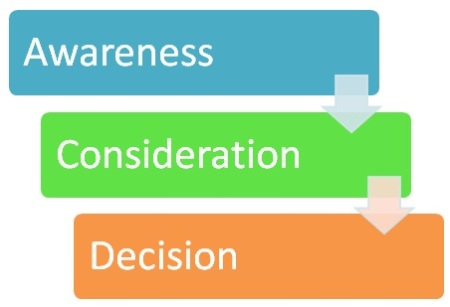
Let’s consider typical steps made during phases of the buying cycle.

The buying process: from awareness to consideration to decision

Awareness (aka Research)

  1. Search engines
  2. Blogs
  3. Industry web sites
  4. Social media (e.g. follow industry thought leaders on Twitter)

Consideration

  1. Outreach to peers and colleagues (email, social media, etc.)
  2. Industry conferences and trade shows
  3. Visit and register for online communities related to the industry
  4. Join relevant LinkedIn Groups and ask group members for input
  5. Research from analyst firms

Decision

  1. Vendor web sites, collateral and pricing information
  2. Vendor pitches, demos and sales meetings
  3. Hands-on interaction with assorted vendor product offerings (if applicable)

What This Means to Product Marketers

As you can see above, the buyer is saying, “Don’t call me, I’ll call you. When I’m ready.” In the past, marketers controlled the buying process: the messaging, the timing, the delivery. Today, control has been ceded to buyers.

Because they research on their schedule, the marketing model has inverted: the outbound world has shifted completely to inbound. Your job, as a marketer, is to leave breadcrumbs that forge a trail to your web site, landing pages or social channels.

Product Marketing in 2013: There’s More To It

Now don’t get me wrong: traditional elements of product marketing are still very important: messaging, positioning, content marketing, social media, product collateral, etc. But given how empowered today’s buyer has become, product marketers need to go beyond traditional product marketing to help facilitate the sale. Let’s consider ways to do this.

Product Marketing Without the “Marketing”

Build a Great Product.

A great product markets itself: Apple's iPad

I see iPad commercials on TV and I wonder whether Apple really needs to be advertise there. The iPad, like Girl Scout cookies, is a product that sells itself. You buy an iPad, you love it – and in fact, your use of the product becomes ingrained into your daily life.

You buy one for each child, then you buy one for your parents to share. Then, the iPad Mini comes out and you buy one of those, just because. Note: this is a hypothetical example and does not reflect my own household.

Great products market and sell themselves. So the more time you spend on building a great product, the less time you’ll need to market it.

Use Content Marketing to Build Thought Leadership.

Remember how I started this post asking if you knew where your customers are? If you produce great content, they’ll come finding you. The great content, however, should not be “marketing content.” Don’t market your product. Instead, market your knowledge and your industry. In addition, provide resources that enable your prospects and customers to do their job more effectively.

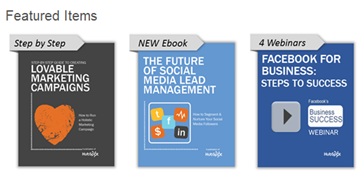
Featured marketing resources from HubSpot

The best example I can give is the marketing automation space, in which Marketo, Eloqua and HubSpot (among others) provide a seemingly endless collection of valuable marketing resources. If I downloaded every content asset from these three vendors, I could read them (continuously) well past retirement.

Check them out – and note how they promote their “space” (marketing), rather than their products:

  1. Resources for the Modern Marketer from Marketo
  2. Resources from Eloqua
  3. Marketing Resources from HubSpot

As you can see by the depth and breadth of the content on these pages, content marketing can be a full-time job. And it also includes a heavy dose of blogging. If you ask Marketo, Eloqua or Hubspot, however, I’m sure they’ll tell you that the investment in content marketing (and thought leadership) is worth it. In fact, they’ll probably tell you they wouldn’t be where they are without it.

Host an Online Community for Customers and Prospects.

We’re seeing a Yelp-ification in B2B purchasing decisions. Let me explain. When I’m considering a meal at a new restaurant, the first thing I’ll do is visit it’s Yelp page to read what Yelpers had to say about the food and service. I’ll consider the number of reviews, the number of “stars” and skim through the comments from reviewers.

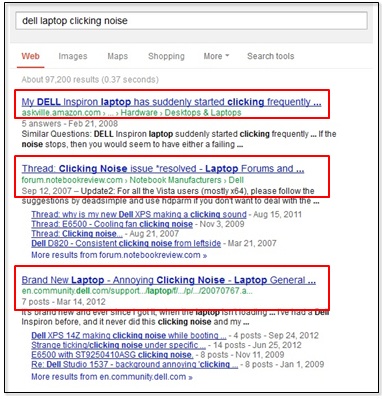
Online communities provide answers to product questions

Now, consider a B2B purchase. During the research or consideration phases, buyers are bound to search for the product (or company name) in a search engine. What are they likely to find on Page 1 of the search results? Forums and online communities (like Yelp) in which customers are “talking about” the product.

Facilitate the Conversation.

It’s unavoidable that users will write about your service (online). One measure of control (at your disposal) is for you to host and facilitate these conversations. Companies such as DNN, Jive, Lithium and Get Satisfaction provide solutions that enable you to create and host your own online community.

(Disclosure: I’m employed by DNN.)

Be careful, however. Don’t think that you’re now “in control” or that you can use this community to deploy your marketing messages. Your role is the “steward.” You’re there to facilitate conversation and be a secondary participant in them (when needed).

Allow your biggest fans to market your product (on your behalf) and provide insights to prospective customers who are looking for solutions. Online communities are a great resource for the buyer – and at the same time, they provide you (the marketer) with a great listening tool into the hearts and minds of your end users. In other words, you can gain insights to improve your product.

Invite Customers to Market Your Product.

This post is all about doing product marketing without marketing your product. But that doesn’t mean your customers can’t market your product! Prospective customers may not believe a word you say (or write), but they will believe your customers. After all, your customers are quite often their industry peers.

Just a few ways you can facilitate this:

  1. Case studies (written)
  2. Case studies (video)
  3. Webinars
  4. Testimonials (quotes)
  5. Testimonials (videos)
  6. Media coverage (featuring your customers using your products)
  7. Connecting industry analysts with your customers (and their use cases)
  8. Highlighting “top contributors” (customers) in your online community
  9. Putting prospects in touch with customer references
  10. Guest posts (from customers) on your blog

Allow Prospects to Experience the Product.

Experience Apple products at Apple Stores

Photo source: Robert Gaal on flickr.

I mentioned the iPad earlier and how great products sell themselves. Marketers can facilitate this “self selling” by putting the product directly in the hands of prospects. Apple does this via Apple Stores, in which 80+% of the store real estate is allocated towards hands-on use of Apple products.

If your product is delivered via the web, consider allowing prospects to register for a free trial. The free trial becomes a form of “experience-based lead generation,” in which your sales reps call on prospects who have already experienced the product.

Alternatively, consider a “freemium” based product strategy (a la Yammer or Yousendit), in which your base product is completely free, but users “pay up” for additional features or capabilities. These sort of “try it before you buy” arrangements are the purest form of “product marketing without the marketing.”

Product Marketing in 2013.

Some miscellaneous tips for product marketing in 2013.

Design for mobile first.

Before long, no one will consume your marketing content on desktop or laptops. They’ll consume instead on tablets, smartphones and whatever else is in store down the road. Have your web designers format your product content for mobile first, then work from there to support devices with more screen real estate. If I had to choose one over the other, I’d rather have a web site that looks great on mobile vs. one that looks great on a laptop.

Enable social sharing on all content.

How to do product marketing without the marketing? Let your customers and prospects do it for you. Web pages, videos, blog postings, etc. should all contain Tweet buttons, Like/Recommend buttons, “Pin it” buttons, you name it. And don’t forget your PDF-based product collateral – embed sharing links within the PDF, too.

Downsize product launch events.

Take the money you might spend on a glitzy product launch and re-invest it back into the product (e.g. R&D, additional developers, etc.). Product launch events can be done quite affordably online (or even in social media). Better yet, make your new product available to everyone (for free) and allow customer usage to help shape and define the launch itself.

Enable customers to talk about how you solved their challenges.

Related to “customers marketing your product,” stick to the thought leadership approach, rather than the “product endorsement” approach. Instead of having customers go into detail on how they used your product, let them tell a story. The story begins with their business challenge and ends with the wonderful solution (enabled by your product, of course).

Conclusion

In 2013, your product marketing must adapt to a fundamental shift that has taken place (and will continue to evolve): the power and control of the purchaser.

While you’ll need to continue traditional product marketing practices – more than ever, you now need to market your product without marketing your product. Today, your role is more facilitator and steward than it is marketer. You’ll no longer market your way to a product sale, you’ll now facilitate the process that leads to it.

Note: I invite you to connect with me on Google+.

Share this:

  • Click to share on X (Opens in new window) X
  • Click to share on Pinterest (Opens in new window) Pinterest
  • Click to share on LinkedIn (Opens in new window) LinkedIn
Like Loading...

7 Comments | Product Marketing | Tagged: 2013, Apple, buying process, Eloqua, free trial, Freemium, Get Satisfaction, HubSpot, iPad, Jive, lead generation, Lithium, Marketing, Marketo, online community, Product Marketing, purchase decision, social sharing | Permalink
Posted by Dennis Shiao


Conference Networking with @MeetMeme Social Trading Cards at #jw11

October 5, 2011

Pictured: My social trading card at JiveWorld11.

Introduction

I think I’ve seen the future of networking sessions. And the future is now, enabled by social trading cards from Meet-Meme. At JiveWorld11, personalized Meet-Meme cards were provided to all attendees. You receive your deck of cards when you pick up your badge and are encouraged to use the cards at the networking events.

They Work!

At a networking event and the welcome reception, a lot of trading cards were exchanged. In fact, after the sessions, I noticed that my deck of cards was running low and tweeted the following:

@JiveSoftware @MeetMeme Networking at #jw11 has been so productive that I may need another deck of social trading cards

Let’s dive into why these trading cards are so effective.

Integrated into the Event’s Registration Form

Make it easy and seamless for attendees. For my JiveWorld11 trading cards, all the information printed on them was collected during registration. I wondered why the registration form asked me to list “Special Powers.” Now I know why.

Having the cards printed in advance (and handed out during badge pick-up) makes it easy for attendees to participate. If attendees needed to voluntarily create their cards on-site, adoption would have been much lower.

Encourages Card Exchanges

Because the concept of social trading cards is new and novel, attendees found it natural to “trade cards” immediately after saying “hello.”

An exchange of conventional business cards tends to happen only after a meaningful exchange of business information occurs. The trading cards created the opposite effect – you exchanged cards first, then “traded” information with each other.

Spurs Conversation

And that leads to the next benefit. Whereas conventional business cards are staid and “stuffy,” the social trading cards allowed you to list “Special Powers,” which spurs conversation.

One of my listed powers is “Master Dancer,” which had many attendees asking me to demonstrate those skills. I loved how the cards shifted conversations from “what company are you with?” and “what do you do there?” to, “tell me about this unique aspect of your personality?”

Social Sharing Made Easy

The cards had a QR code printed on one side. Once scanned, the QR code brought you to the user’s Meet-Meme profile page. Here’s mine:

http://mtme.me/823867

From the profile page, you have the option of sharing on Twitter and Facebook. Here are examples of #jw11 tweets that were generated from this feature:

Added: Trading Card as Badge

Forgot to mention: the Meet-Meme trading card also serves as your badge. The front of the card lists your “role” (e.g. Attendee, Partner, Exhibitor, Speaker, etc.). Neat.

Additional Ideas

How could Meet-Meme evolve their service? I bet they’ve already got several things in the works, including some of the items I’m about to mention:

  1. LinkedIn integration. With credit to a JiveWorld11 attendee, who tweeted this idea: once you trade cards, make it easy to connect with one another on LinkedIn.
  2. Integrate with digital event platforms. For hybrid events, integrate to digital event platforms, so that digital (virtual) attendees can also participate (i.e. digital trading cards?).
  3. Provide an API for app integration. Allow event apps (e.g. the JiveWorld11 app) to integrate with the service via an API.
  4. Build follower/following system. Allow Meet-Meme users to follow one another (within the system) once they trade cards.
  5. Build social games around the cards. Sounds like this one’s already in the works. Allow event planners to assign attendees to teams and use the trading cards to facilitate team-oriented games (e.g. trade cards with the most people outside of your own team).

Conclusion

Kudos to Jive and Meet-Meme for combining to create great networking experiences at JiveWorld11. It all started with a very basic concept (trading cards) and then layered on available technology (social sharing, QR codes, etc.) to enhance the effectiveness. I’m looking forward to seeing how services like this evolve – and, how they benefit networking events.

Related Resources

  1. The JiveWorld11 event page.
  2. The Meet-Meme web page.
  3. How Meet-Meme can turn up the volume on the networking part of your events

Share this:

  • Click to share on X (Opens in new window) X
  • Click to share on Pinterest (Opens in new window) Pinterest
  • Click to share on LinkedIn (Opens in new window) LinkedIn
Like Loading...

Leave a Comment » | General | Tagged: Facebook, hybrid events, Jive Software, JiveWorld11, Meet-Meme, networking events, social sharing, social trading cards, trading cards, Twitter | Permalink
Posted by Dennis Shiao


  • Subscribe

    From an RSS reader
  • Receive an email for every new posting.

    Join 172 other subscribers
  • View My Presentations

    View My SlideShare presentations
  • Buy The Book


    - More Info
    - Buy the Paperback
    - Review: EXHIBITOR magazine

    Disclosure: Affiliate links in use.

  • Download eBooks


    - Virtual Events: Ready, Set, Go
    - Social Media and Virtual Events
    - How To Build Virtual Exhibits
    - An Introduction to Google+
  • Recent Posts

    • Virtual Events in 2009: Then vs. Now
    • Interviewing Techniques to Extract Deeper Insights
    • Networking Event Hacks to Introduce Yourself, Meet People and Spur Conversation
    • How Events Fuel the Content Marketing Fire
    • Content Marketing Lesson from an Evening in Venice


Blog at WordPress.com.

Privacy & Cookies: This site uses cookies. By continuing to use this website, you agree to their use.
To find out more, including how to control cookies, see here: Cookie Policy
  • Subscribe Subscribed
    • It's All Virtual
    • Join 172 other subscribers
    • Already have a WordPress.com account? Log in now.
    • It's All Virtual
    • Subscribe Subscribed
    • Sign up
    • Log in
    • Report this content
    • View site in Reader
    • Manage subscriptions
    • Collapse this bar
 

Loading Comments...
 

    %d