Bringing The Physical Event Experience To Virtual Events

March 30, 2010

Source: flickr (User: cafebiz08)

Virtual trade shows got their start by creating 2D graphical replicas of physical trade shows: exhibit halls, booths, auditoriums, lounges, etc.  Most users are “wowed” in their first experience attending a virtual trade show – they enjoy the quality of the user interface and often comment that they felt like “they were  there” at a physical event.

Exhibitors, too, find the virtual trade show experience to be quite enjoyable – at the same time, they often highlight important differences between exhibiting virtually vs. physically.  In a physical event, for instance, you have some amount of guaranteed foot traffic on the show floor – a portion of which will naturally wander into your booth.  The “efficiency” of a virtual event means that users only enter your booth by explicitly clicking into it.  In a physical event, exhibitors can greet prospects with a friendly handshake – in a virtual event, the exhibitor may never see the prospect’s face.

How can virtual event platforms incorporate aspects of the physical event experience?   Let’s consider a few ideas.

Source: flickr (User: ExhibitPeople)

How To: Gain Virtual Foot Traffic to Booths

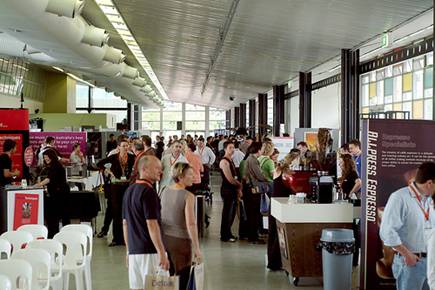
On a crowded show floor at a physical event, an exhibitor knows that some percentage of attendees will visit their booth – additionally, exhibitors can increase their investment and receive strategic placement on the floor (e.g. near the entrance, near areas where food and drink are served, etc.).  In a physical event, as attendees walk towards (or past) your booth, there are tactics to catch their attention (e.g. making eye contact, telling them about a special sales offer, showing T-shirts that you’re giving away, complementing them on their laptop bag, etc.).  In a virtual event, you never see someone “passing by” your booth – they click directly to where they want to go.

The Guided Random Walk

Virtual event platforms could re-create the leisurely stroll down the show floor aisles.  Clicking on a “take me on a guided booth tour” button could allow the platform to become the auto-pilot and guide the attendee to the “store front” of randomly selected  booths.  At each  “stop”, the attendee is presented with an overview of the exhibitor, the products/services they provide and a list of staffers with whom they can engage.  The attendee can click to enter the booth – or, continue on with the “walk”.

Once they enter a booth, attendees would see a “resume walk” button to return to the guided tour.  Additionally, the virtual event platform could collect “interests” on the registration form (or on the attendee’s profile) to more efficiently recommend exhibitors (on the tour) to attendees.  Since most virtual attendees prefer to visit only those areas that interest them, this service would be completely optional.

Strategic Offer Placement

Virtual event platforms provide many avenues and areas for exhibitor branding and promotion (e.g. banner ads, jumbotron, etc.) – similar to a physical booth located near the food and drink, virtual event show hosts could map out the event hot spots (e.g. lobby, auditorium, etc.) and provide sponsorship opportunities for exhibitors.  For instance, the Auditorium could display banner ads that drive traffic to premium sponsors’ booths.  Since the virtual attendee is bound to navigate through key areas  (e.g. the Auditorium), promotions in those areas creates the equivalent of “passerby traffic” in a physical event.

Webcast Exit Actions

Imagine taking all attendees of a physical conference session and teleporting them to a specific sponsor’s booth at the conclusion of the session.  Well, a virtual event makes such teleporting possible.  If an exhibitor is presenting in one of the event’s Webcasts, have the virtual event platform provide an “exit action” to drive Webcast viewers to the exhibitor’s booth when it concludes.   Be sure to instruct the Webcast presenter(s) to inform viewers that additional questions can be addressed within the booth at the conclusion of the Webcast.  And, be sure those presenters also “exit” into their booth to provide the answers!
Source: flickr (User: SESConferenceSeries)

How To: Gauge Visitor Interest

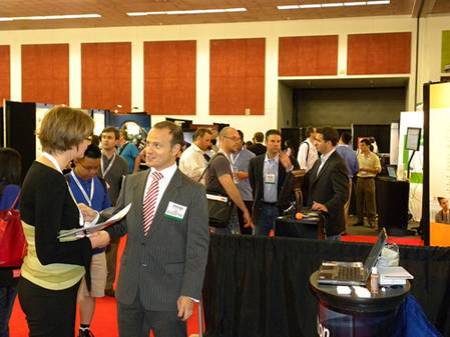
When an attendee visits your physical booth, you can quickly judge their interest level based on facial expression and body language.  While these signals are not available from virtual booth visitors, you certainly can decipher interest based on the visitors’ mouse clicks.  Eloqua developed the concept of digital body language – and it applies directly to virtual booth visitors – “Digital body language can arm sales people with deep insights into the areas and levels of interest of every prospect.” (source: Eloqua)

The virtual event platform could provide real-time profiling of booth visitors, based on the actions they’re taking within the booths.  Inactive visitors can probably be left alone, whereas highly active users (lots of document views, document downloads, web site views, chat requests, etc.) may literally be raising their hand to engage in a conversation.

The virtual event platform could first characterize the nature of the prospect’s interest (e.g. map the requested documents to high level “interest categories” defined by the show host) and then place a subtle offer in front of the visitor (e.g. “An online representative is available to answer questions about telepresence - click here to engage in a 1:1 chat”).

Since this feature could be deemed too “Big Brother” by attendees, it would have to be tested (to gather feedback) and/or have an explicit opt-in setting that allows attendees to enable or disable the feature.

How To: Connect with Interested Attendees

During periods of high activity in a physical booth, visitors often walk up, see that all staffers are speaking with other attendees and decide to move on to the next booth.  Perhaps  later in the day, the same visitor returns to see if any staffers are available.  The observant exhibitor may recognize the visitor (from her prior visit) – and if so, provide special attention to her (since she made the effort to visit the booth and return a second time).

In a virtual event, all activity is tracked, which means that observant exhibitors need only turn to the services of the platform to let them know about repeat visitors.  Virtual event platforms ought to explicitly track repeat visitors and alert booth staff accordingly – perhaps the platform plays one audio alert for the first time visit  – and separate audio alert for the repeat visitor.

Additionally, the platform could allow exhibitors to build in rules and offers based on the amount of repeat visits.  For instance, on the fifth visit to the booth (within the same day), the visitor could be offered to download a free copy of the exhibitor’s software.  Exhibitors  could then leverage the resulting action to qualify the worthiness of the prospect (e.g. visited my booth 5 times + downloaded a copy of my software = have a sales rep follow up tomorrow).
Source: flickr (User: bilateral)

How To: Create Better Attendee Networking

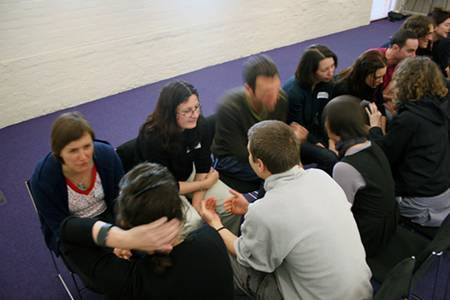
One of the key attractions to an event is the ability for attendees to network with like-minded professionals – exchanging ideas, thoughts and business cards.  In a physical event, there are many “transitory phases”, where attendees migrate from one locale to another.  These phases create opportunities to meet or “bump into” random strangers.

That being said, meeting at a physical event is largely inefficient, based on the random nature of the meet-up.  Who knows if you’ll meet someone aligned with your interests or an uninteresting individual who’s there only for the free cocktails?  A virtual event can leverage the information available in user profiles to make meet-ups a bit less random – and far better “matched”.

In virtual, we can skip past the not-so-subtle glance at another attendee’s badge label – instead, we can auto-recommend like-minded individuals.  In my mind, the single most effective feature of LinkedIn is the “People You May Know” listing in the upper right of your LinkedIn home page.  Virtual events ought to create recommendations (of other attendees) with the same effectiveness.

The recommendation engine could be combined with an interface similar to ChatRoulette – whereby attendees enable their webcam and rotate through and chat with other attendees in roulette-type fashion.  It may not be quite the same as the physical experience, but the use of webcam can add a whole lot more than just text chat.

Conclusion

While it’s still true that virtual events can never replace the handshake – there are benefits of physical events that if modeled and implemented properly, can be a boon for virtual events.


The Business Benefits Of Second Life

March 23, 2010

Veronica Butler-Borrer

The following is a guest post by Veronica Butler-Borrer, known in-world as Pooky Amsterdam (@PookyMedia).

AVATAR started off being the word of the new decade, and for good reason.  The blockbuster movie, which allows a man to take on a completely new form through a kind of mental transfer, has made hundreds of millions of dollars. It also speaks to the new decade in terms of new possibilities.

While Second Life has been part of the Internet for a while, recent changes and upgrades have made it more compelling as a business and media platform.  Recent economic conditions have also required new strategy to save money on travel costs.  And increased attention to environmental changes has required us to look more closely at green alternatives to business.  Facts and figures plus improved opportunities are now encouraging us as a business community to re-examine Second Life.

Pooky Amsterdam's Second Life avatar

What makes doing business as an avatar in Second Life a good choice?

  1. You can virtually meet people from anywhere in the world easily and inexpensively
  2. Your Avatar can be an extension of yourself and increase personal investment for you and the business community you are addressing
  3. VoIP puts you in the same room with those you need to speak with
  4. You can share any documents you need to
  5. You can work in real time on those shared documents
  6. Any 3D product or place can be re-created cost-effectively and to scale for business decision making
  7. You save on time and travel expense by just logging in from your computer
  8. You can establish a secure environment by restricting access to your location
  9. Training and Education done in virtual worlds returns great results
  10. Video created in Virtual Worlds (known as Machinima) or cinema done on machine will get your message to the public through regular distribution channels (e.g. YouTube).  In addition, it will be available as video content on your web site, plus be something you can include in your video emails

These are the main reasons to think about doing business virtually.  Let’s look into this a bit further.

Analysis: Benefits of Doing Business Virtually

That’s right, once you download the free client which is Second Life, you can enter a 3D world where you can meet by prearrangement, those whom you would like to, from anywhere in the world.  Of course this will take some organization, but that is easy to facilitate.

Your Avatar is an identity that you construct to carry out your work in a virtual world.  Allowing this creation to personify you means you invest yourself in it, and interact as well.  This is also not a bad thing, as in creating an other self which is “better, faster, stronger” will also result in your being able to transfer some of those properties to your real world person.  If you saw a digital image of yourself running on a virtual treadmill, would you feel like going to the gym? Probably so, according to a Stanford study showing that personalized avatars can motivate people to exercise and eat right.

It doesn’t yet beat Skype for number of chat minutes a month, but the VoIP technology in Second Life is excellent, and has served over a billion minutes of voice chat a month.  That means you can speak to people anywhere in the world, in the same virtual room, sharing important documents or any 3D representation for absolutely free.

Second Life Viewer 2

The latest viewer for Second Life (Viewer 2) also allows for shared media within this Virtual World and that means you can view ANY content on the web in real time with people from (or outside of) your organization.

This includes of course, Google Docs and Etherpad.  So you can make decisions together from your office, or home, without having to fly anywhere.  This is a remarkable opportunity that is afforded people who are on this site.  Plus, being able to recreate objects in 3 Dimensions means you can build anything to scale, whether it be a building or an engine, and have your people discuss this matter, again in real time and vocally.

When you have your own location, you can also set permissions to that landing point and area so you are the only ones who have access to it. This will not compromise your security at all, when you are discussing matters of confidentiality.

Second Life Case Study

Consider the case study entitled, “Virtual World Simulation Training Prepares Real Guards on the US-Canadian Border: Loyalist College in Second Life,”

The executive summary reads:

Before September 11, 2001, Customs and Immigration students at Loyalist College spent three weeks closely tailing professional border guards to experience the daily routine of their future job. In a post-911 environment however, this was no longer allowed. Training suffered until the Director of Educational Technology at Loyalist College catalyzed a virtual border crossing simulation in Second Life for Loyalist students.

The amazing results of the training and simulation program have led to significantly improved grades on students’ critical skills tests, taking scores from a 56% success in 2007, to 95% at the end of 2008 after the simulation was instituted.

This is proof positive that training in a Virtual World environment has documented benefits.

I present a video which my company made to show you some of the amazing opportunities that the Virtual World of Second Life can afford.  Video is a hallmark of professionalism, and being able to have content on your website, and/or through video email is an important way to integrate your customer base.

Before embarking on a Second Life journey, you may want to seek expert help; it will save you time and ultimately money if you begin your investment with those who are knowledgeable about the world you are about to enter for business.  Just of course if you wanted to have a meeting in Paris, you would need concierge services there.  Pookymedia can help you get started.

Please feel free to contact Pooky Amsterdam at info@pookymedia.com.

Tweet this posting:


How To Use Twitter For Virtual Event User Support

March 8, 2010

End user support for virtual events has traditionally been provided via a small number of channels: email and telephone support (which is especially useful for users having issues entering the virtual event) and “in-show support”, which is typically provided in a “help booth” within the virtual event.  With growing use of social media, however, attendees are leveraging their social network tools to request (and receive) user support.

From my observations, Twitter is the most widely used social network for virtual event support requests (today) – however, I wouldn’t be surprised to see increased “calls for help” via Facebook and LinkedIn.  This posting provides tips and best practices on providing virtual event end user support via Twitter.

Create/Establish a Twitter Account

Users can’t find you on Twitter if you’re not there, which means that if you don’t already have a presence on Twitter, you’ll need to create one.  I recommend a Twitter ID that incorporates your company name – or, the product, platform or service that you provide (if that’s different from your company name).  In addition, be transparent about the contributors (employees) who tweet on behalf of your company and brand.

Create A Real-Time Dashboard (of  tweets)

Configure your Twitter client (e.g. TweetDeck, Seesmic, etc.) with the relevant search terms and hash tags related to your virtual event.  At minimum, you’ll want to monitor the following:

  1. @Replies sent to your Twitter account (in TweetDeck, the column is labeled “Mentions”)
  2. A search on the hash tag for your virtual event
  3. A search on your company name – or, the name of your platform, product or service
  4. A search on the virtual event’s name or title

If it helps you stay more focused, delete columns that are unrelated to the virtual event – the result will be a single app that consolidates all “chatter” related to your event.  I recommend that you monitor for new tweets every 15 minutes while the event is live.

Allocate Proper Staffing & Get Started Early

In the same manner that you allocate support staff to booths, email inboxes and telephones, be sure to allocate staff to “Twitter support”.  You want to get up and running early – I recommend monitoring Twitter at least one full hour before the official opening of your virtual event.  Virtual event producers typically allow exhibitors into the environment prior to attendees – so during the “early period”, be on the look-out for tweets from exhibitors who may need assistance finding their way into their virtual booths.

Have at least one person who is “primary” for Twitter support throughout the event day.  And, know that Twitter users expect quick turnaround to their tweets.  Trend setters such as @comcastcares have provided highly responsive and immediate customer care on Twitter, which has raised the bar for everyone else.  Users on Twitter have come to expect similar care and responsiveness.

If you do not respond within 15-20 minutes of users’ original tweet, they may issue a subsequent tweet, letting the “world” (e.g. their followers + users who are following the event’s hash tag) know that they’ve received no response from the event provider.  So be sure to provide prompt service – if your customer care is prompt and effective, you’ll be rewarded.  Users are just as quick to say “thanks” (on Twitter) and acknowledge the great service you provide.

Following Up With A User

I prefer to handle support issues via 1-on-1 care.  Before you contact the user, review their Twitter profile – as background to your upcoming dialog, it’s good to know the user’s company, title and number of Twitter followers.  I like to know if the user has an audience of 100 on Twitter – or, an audience of 100,000.  In addition, read the user’s last 10-15 tweets, to get to know his/her interests, hot buttons, etc.

Now you’re ready to make contact.  I prefer to connect directly – a direct message on Twitter (if the user is following you), a direct email (if you have his/her email address) or a private chat within the virtual event (if the user is logged in at the time).  If none of these channels are available to you, send the user a public message on Twitter and provide your direct contact info (e.g. your email address).

It’s important to personalize your brand, letting users know that there are “real people” behind your corporate Twitter account – and, providing them with a direct means for getting in touch.

1-on-1 Triage

To prepare you for a “triage session” with your end user, I like the have the following information available via URLs that I can provide to the user:

  1. Technical requirements for accessing/attending the virtual event
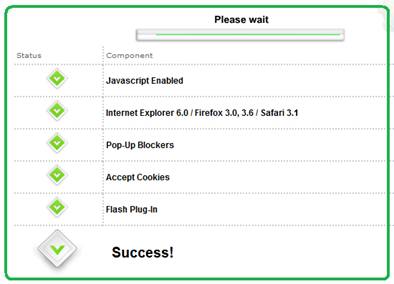
  2. Automated system check that allows a user to test their system
  3. Frequently Asked Questions (FAQ) related to the virtual event
  4. A “contact us” page related to end user support (e.g. providing an email address, phone number, etc.)

In addition, be sure to have higher level “support experts” available in case you need to delegate a sophisticated system issue.  The experts should be available within the virtual event – or, be available “on call” to jump in as needed.

Post-Resolution

Once you’ve resolved a user’s issue, follow them on Twitter – this allows them to send you direct messages.  And, it allows you to be quickly apprised of any subsequent issues they may come across.  Later on in the day, check if the user is logged in to the virtual event – if so, send a private chat request and politely ask how the event is going.  It’s always good for users to know that you’re actively supporting the event and genuinely interested in their satisfaction.

On Twitter, respond to each and every end user “tweet” – mention that the issue is resolved and invite the user to contact you back as needed.  Be careful, however, not to include the event’s hash tag on all of these follow-up tweets.  As the virtual event platform, you do not want to have a significant presence in the hash tag’s tweetstream.  Rather, only include the hash tag if your tweet relates to system-wide updates (applicable to all or most users).

The occasional update (with the hash tag) shows users that you’re listening – and replying to every single tweet shows your followers that you are responsive to each issue that arises.

The Entire Team Contributes

If your virtual event support staff is comprised of active Twitter users, encourage them to tweet about the event – have them highlight interesting sessions, pass along comments from enthusiastic attendees or simply state that they’re having a great time.  This helps promote the event itself – and, highlights the depth of the team behind the event support.  Take it a step further and create a Twitter List of your staff – allowing interested users to follow your employees tweets via a list.

Conclusion

The world is going social, which means that user support and customer service need to be “socially listening” (and responding).  Get ahead of the curve – be sure to support your next virtual event on Twitter.

Tweet this posting:


COMDEX Re-Launches As A Virtual Trade Show

March 4, 2010

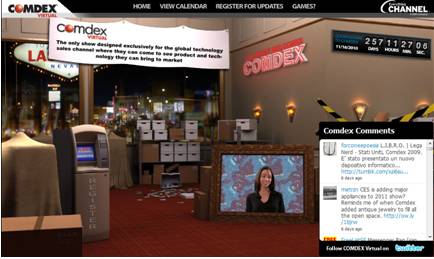
The virtual events industry had a lot of exciting moments over the past two years.  I believe we’ll look back upon today, however, as an one of the most important and historic moments for our industry.  Everything Channel (a UBM company) announced that they’re re-launching COMDEX as a 100% virtual trade show.

Press Release: Introducing the New COMDEX, the Next Generation in Virtual Events

During its heyday, COMDEX was the “go to” trade show in the computer and technology industry, “where all levels of manufacturers and developers of computers, peripherals, software, components and accessories came in direct contact with retailers, consultants and their competitors” (source: Wikipedia)

COMDEX was discontinued in 2004.  In 2006, UBM acquired the event assets of COMDEX via their purchase of MediaLive International Inc.  COMDEX Virtual will fit nicely in UBM’s Everything Channel business, whose objective is “accelerating technology sales” and whose publications include Channelweb and CRN.  This is very exciting news – I gave some thought to what this means to our industry.

Game Changer and Turning Point

Today’s news is nothing short of a game changer and turning point for our industry.  Virtual events have enjoyed growing adoption – initially from B2B publishers and recently from corporations.  Adoption rates have been particularly strong from the same technology vendors who used to exhibit at COMDEX.  Now, however, one of the most widely known event brands has made the move to embrace virtual.

COMDEX Virtual will be watched (and attended) closely by related event brands – its success will incent many more well-known event brands to come on board virtually.  Staying within the technology space, CES and Macworld may be encouraged to consider a hybrid model for their events, adding a virtual component to complement their in-person event.  Discontinued event brands may similarly move to re-launch as a virtual-only experience.

Confirmed: Options and Flexibility with Going Virtual

Virtual event technology afforded Everything Channel with a flexible way to bring back the COMDEX brand.  First, the costs are lower.  Second, the financial commitment around a physical event venue was avoided.  Third, a virtual event affords exhibitors with a convenient and cost-effective means to return to COMDEX.

Re-sellers and systems integrators tend to be small-to-medium sized businesses (SMB) – they operate “lean and mean” without an abundance of marketing budget.  In the past, their entire year’s marketing spend may have been put towards COMDEX.  Now, the same exhibitors can exhibit virtually and avoid the travel costs and “out of office” costs of sending their company representatives to Las Vegas – affording them remaining marketing dollars to use elsewhere.

With the flexibility afforded, COMDEX Virtual allows Everything Channel a convenient and efficient way to bring COMDEX back to life.  If the virtual event exceeds expectations, more options become available, such as a physical component to complement the virtual – creating a hybrid event after first testing the waters virtually.

Virtual Extensions

Industry observers have noted that more focused events (e.g. CES in consumer electronics and Interop in computer networking) began to steal interest away from COMDEX – many believed that it had become too broad.  Subsequent to its November 2010 launch, COMDEX Virtual may want to consider a series of smaller and more focused virtual events – around industry sectors or by specific geographies.

Additionally, virtual affords COMDEX the option of extending its presence globally – both via participation from a global audience, as well as regionalized virtual events that cater to specific regions (e.g. EMEA, Asia Pacific, etc.).  With the localization capabilities provided by virtual event platforms, attendees can choose the language in which they experience the event.

Unique, Branded Experiences

COMDEX had a unique brand – with COMDEX Virtual, there seems to be a clear desire to create a unique experience that carries unique and distinctive branding.  Put another way, COMDEX Virtual should not look like any other virtual event – it needs to stand apart.  As such, UBM Studios, a “creative and strategic marketing agency” will create original and highly engaging event areas for COMDEX Virtual, including the Grand Hall of Masters, Hospitality Suites and the CRN Test Center.

This is part of a continuing trend in our industry – the desire (and capability) of show hosts to create highly engaging and unique experiences that adhere to their branding guidelines – or, create new brand experiences.  As such, clients with the budget (or capabilities) will “in-source” the creative development and look to the virtual event platforms to “carry the payload” – providing the foundation on which the event rides, along with essential platform features and services.

Taking the game to the next level

To support the size and scale of COMDEX (virtually), event platforms will need to bring their “A game”.  If the event will house hundreds of exhibitors interacting with tens of thousands of attendees, the virtual event platform will need to deliver on performance, reliability and scalability.  In addition, useful platform features need to enable exhibitors to demonstrate their products and services.

Match-making tools should enable exhibitors to find the “right” attendees and for attendees to find and make useful business contacts.  Lastly, the platforms need to enable pervasive use of video – both on-demand video and live-streamed video.  After all, a key element of past COMDEX events was the ability to see, hear and engage (visually) with others.

Conclusion

The “countdown to COMDEX” is on – between now and November, I’m sure there’s plenty of work and planning to get done.  In the meantime, with today’s announcement alone, a bit of history has already been made.

Tweet this posting:


Follow

Get every new post delivered to your Inbox.

Join 2,077 other followers