Adding Game Mechanics to Your Event

May 27, 2011

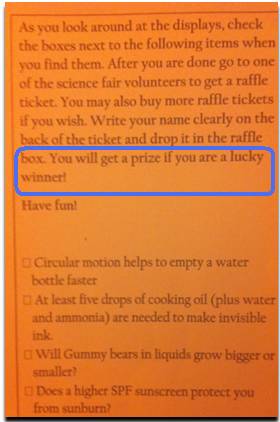
Pictured: A game card employed at an elementary school science fair.

Introduction

I recently attended my child’s elementary school science fair and was intrigued to find game mechanics employed by the fair’s planners. The fair had several rows of “exhibits” (students’ science projects) and a number of students were seen walking studiously from project to project, with a rectangular slip of paper. It turns out the paper was a game card (pictured above), with a list of projects that students needed to find (and check off the list).

The Challenge and Completion Dynamics

I was struck by how many students were participating in the “game,” all under the premise of “you will get a prize if you are a lucky winner.” Adoption was strong because it tapped into a challenge dynamic. Kids were presented with a challenge (“go find these exhibits”). And importantly, there was a structure behind the challenge: the completion dynamic (“find all of the exhibits, then return the card to a volunteer”).

Since a completed card merely got a student a raffle ticket (after which they’d need to hold a winning ticket to gain a prize), motivation was driven by the challenge dynamic – something to keep in mind as it relates to B2B events (i.e. understanding and taking advantage of attendees’ motivations, rather than simply offering up iPads as prizes).

Pros and Cons

Pros: Participants in the game reviewed many more projects than they otherwise would have. Case in point: some students who did not play the game could be found lounging outside the fair, socializing on the patio.

Cons: More a consideration than a negative – game designers need to understand the “completion dynamics.” For the science fair, it’s a good thing for game players to visit many exhibits. The ideal visit is one where the visitor reads through the science project and gains an appreciation for the hypothesis and the result.

The non-optimal visit is the “drive by,” where the visitor is purely motivated by finding another item to check off the list. Good game design will motivate players to immerse themselves in the game, rather than play the game solely to achieve the end result.

How this Applies to Physical & Virtual Events

  1. Motivating participation: when incorporating game mechanics, discover ways to encourage participation beyond the prize.
  2. Contextual relevance: connect the game activities directly to the event content. The science fair did this perfectly.
  3. Encourage immersion and enjoyment: participation needs to go “beyond the result” – participants need to place a higher value on the activity (itself) over the achievement of status or completion.

Related

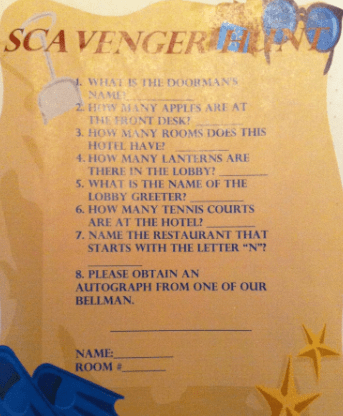
Pictured: a kid-themed scavenger hunt provided by the Ritz Carlton in Half Moon Bay, CA.


Virtual Events and Mainstream Adoption

May 21, 2011

Photo credit: FINALMETAL on flickr.

Introduction

Recently, I had time to spare before a flight home and decided to grab a bite and a drink at a restaurant’s bar at the airport.  While enjoying my food and beverage, I met two traveling salesmen in their 50’s.

We got to talking about our jobs and when it came my turn, I described virtual events. Neither of the gentlemen had heard of virtual events before and their reactions led me to think more about virtual events and mainstream adoption.

We’re Far From “There”

For those of us working in the industry day in and day out, it feels like we’re undergoing rapid growth and increasing adoption – and we are. But for mainstream adoption, “there” is more like the 600MM users on Facebook, not the few million people who have attended a virtual event (my very rough approximation).

In addition, my definition of “mainstream adoption” includes regular use of the technology (by the mainstream).  While there are plenty of “repeat users” across virtual events today, I believe the average user is one who attended a single virtual event and has not yet returned to a subsequent event.

Perception: The Technology is Complicated

Mainstream adoption means traveling salesmen. It means the postal carrier, the hair stylist and Mom and Dad. It doesn’t refer to early adopter, technology-savvy power users. The reaction of the first traveling salesmen at the bar was, “that sounds complicated.”

Now consider the typical, mid-50’s traveling salesman – and for the sake of this example, one who does not sell technology products. The salesman criss-crosses the country every other week and is more proud of his frequent flyer miles than his virtual crops in FarmVille. He uses a laptop for email, but isn’t particularly tech savvy.

To gain mainstream adoption, the user experience for a virtual event needs to be simple and easy.  A grandmother who can create a Facebook account and modify her Facebook profile ought to be able to do the same sort of activity in a virtual event. This would be an interesting scenario to study – could grandma modify her profile on today’s virtual event platforms?

Technology Displaces the Human Connection and … It’s Not Fun

The second traveling salesman conveyed his concern that today’s technologies can disrupt and displace face-to-face connections and interactions. Earlier in the day, he had lunch at a bar at another airport and arrived to find five other bar customers, each immersed in their smartphone. He commented, “I guess I’ll have to get out my device,” got everyone to chuckle and engaged with all of them, to the point where they put down their phones.

When this salesman heard about virtual events, he responded, “that doesn’t sound like fun.” And to a large degree, he’s right.  Virtual trade shows will never replace the handshake or the night out on the town.  This salesman will always choose the physical trade show. But what about his daughter’s college graduation? A virtual option can come in handy then.

Gaining adoption from this salesman will be less about any technology hurdle and more about finding him the right scenario and then making sure he has expectations set properly about what he’ll get out of the experience. Virtual attendance will allow him to experience the content (sessions, speakers, exhibitors, peers) in a convenient fashion, while skipping the cocktails and dinner.

Related: Introducing Virtual Trade Show 2.0

Conclusion

I love to describe virtual events to folks who have never heard of them. The reactions are varied and they tell me a lot about where our market is today and what hurdles we need to address to gain further adoption. Leave a comment below to share your thoughts on how virtual events can reach mainstream adoption.


How I Use Twitter in 2011

May 14, 2011

The Many Uses of Twitter

Introduction

I use Twitter much differently today than I did in 2008. Three years ago, I was just getting my feet on the ground, trying to understand the difference between an at-reply and a direct message. My primary goals were to share content on a single topic (virtual events) and to drive traffic to this blog, which I had just launched. Fast forward to 2011 and I look to Twitter as a swiss army knife – many, many uses.

Notable Changes Since 2008

My mindset on Twitter has been evolving. Some notable changes since 2008:

  1. Mix it up.  I wanted my tweetstream to be focused on virtual events content, so I maintained a 98/2 balance on virtual events and “other” tweets. Today, the balance is more like 85/15, in favor of “other.”
  2. Open up.  I used to stay laser focused on business topics, fearing that including personal interests would cause me to lose followers. But then I saw prominent tweeps (on the business side) do otherwise, so now I’ll include occasional tweets about my Yankees (MLB) or Sharks (NHL) – or, other personal interests.
  3. Make people laugh or think.  10% of my tweets are now conceived while I’m in the shower, where I generate random thoughts (ask a though-provoking question) or random observations (make you laugh [or so I hope!]).
  4. Follow back and interact.  I used to believe that “followers” should be a far greater count than “following.” I also believed that I just couldn’t keep up when following 250+ tweeps. Then I realized that by not following, I’d be missing out. So now I follow back many users who follow me. And, I use at-replies more often, to engage directly with other tweeps.

My other uses of Twitter…

Content Sharing

Whenever I read something interesting, I like to share it with on Twitter. The topics I share tend to be on events (virtual, face-to-face and hybrid), social media and start-ups.  2010 was a big step forward for my sharing abilities, due to a key new feature from Twitter: the tweet button (which you now find on most web sites).

Now, sharing is done with one click. When I share, I like to add my a thought or comment, so that it’s a bit personal and customized. Of course, other tweeps are finding great content, too. So when I see something I find interesting, I’ll often retweet (“RT”). I like to use the official retweet function (from Twitter), so that I don’t have to worry about keeping the RT under 140 characters.

Content Discovery

Being part of “Twitterville” allows me to discover great content. But the most powerful aspect is discovering the content by way of interesting people.  So for me, “discovery” is as much about the people I follow (and connect with) as it is about the wisdom they share.  In this way, Twitter has changed the world.

Twitter’s “unidirectional” following model (i.e. I can follow you without you following me) means that people can share thoughts and insights with “me”, which otherwise would never have happened.

Yes, Hollywood celebrities are cool to follow, but for me, it’s the founder of a great company, the author of a book I’ve just read or an A-list blogger. In fact, Twitter has turned some users into celebrities in their own right, with larger (and more engaged) followings than the celebrities from Hollywood.

Sidebar: Following New Tweeps

As an aside, here’s how I follow new tweeps:

  1. Content: When I read an interesting article, I look to see if the author’s Twitter handle is listed. If so, I immediately follow. If not, I’ll Google the author’s Twitter handle and follow her.
  2. Businesses: If I see “interesting” businesses (or brands) active on Twitter, I’ll follow them.
  3. Athletes: It’s great to see so many athletes take up Twitter in a big way. If my favorite teams have active Twitter users, I’ll follow those athletes.

Events

When I attend an event, whether it’s face-to-face or digital, the first thing I check for is the event hash tag. Twitter has forever changed events, in a good way. It allows me to put a finger on the pulse of the event, from the attendees’ point of view. I’ll find a session that I otherwise would have missed and I’ll often find 20-30 new people to follow. For weeks after the event is over, I’ll continue to watch the hash tag for interesting content. Twitter has helped extend the shelf life of events.

Selling Books

In 2010, I wrote a book on virtual events and placed a link to the Amazon listing page in my Twitter profile. The topic of the book piqued the curiosity of Adam Penenberg (@Penenberg), so we exchanged a few Twitter direct messages (DM) about it. The DM exchange concluded with Adam writing, “Just bought it, you can thank Twitter for the sale.”

Adam listed his own book (“Viral Loop”) in his Twitter profile. Adam’s book “examines the engine driving the growth of web 2.0 businesses,” which aligned perfectly with my interests.  So I bought his book (here’s my review of Viral Loop). It’s fascinating what Twitter enables: content discovery, people discovery and book sales.

Conclusion

First and foremost, thank you, Twitter – you’ve been a big part of my life the past few years. I’m excited to continue using (and adapting) the service and curious to see, in 2013, what I’ll write about regarding my usage patterns.

Leave a comment below, to share thoughts on how you use Twitter. And finally, feel free to follow me – I’m @dshiao. Chances are good that I’ll follow you back.


Take a Survey on The Use of Virtual Technologies In The Workplace

May 12, 2011


Take the survey: http://bit.ly/k0DAoR

Introduction

Virtual Edge Institute (VEI) has announced a comprehensive survey to understand the work-related uses of virtual technologies and digital environments. The Professional Convention Management Association (PCMA) and UBM Studios have teamed up with VEI to conduct and analyze the data for the study.

Survey Details – And a Prize

This survey is dedicated to work-related use of virtual technologies like:

  1. Virtual event, meeting, and virtual learning technologies as well as video streaming, and webcasting
  2. Virtual environments (2D and 3D) such as virtual events, virtual trade shows, conferences, and perpetual (365 days per year) business environments.

According to Michael Doyle, Executive Director of Virtual Edge Institute (VEI), “VEI is giving away two iPads, as well as access to the survey results and our library of on-demand Virtual Edge Summit sessions to ensure strong participation.”

Take the survey: http://bit.ly/k0DAoR

Video: Example of Virtual Environments

The following video from VEI shows examples of the virtual environments covered in their survey.


Second Annual Trends in Data and Security Event

May 10, 2011

Disclosure: I’m a FountainBlue Program Adviser.

Introduction

FountainBlue’s annual trends in data security and storage event will feature the latest advances in technologies and business processes in the storage and security space. We will feature a corporate panel, speaking on its strategic direction and innovations, and an entrepreneur panel, featuring some up-and-coming technology in the storage and security space.

Overview

FountainBlue’s Second Annual Trends in Data and Security Event

Date & time: Friday, May 27, 2011, from 8:30 until 11:30 a.m.
Location: EMC, 2831 Mission College Boulevard, Santa Clara
Cost: Register by May 25 at noon: $32 members, $42 partners, $52 general
Late and On-Site Registration: $52 for members, $62 for non-members

Members and Prospective Members can register at http://fountainblue.shuttlepod.org/hightech
Registration Link: http://www.sventrepreneurs.com

To add questions, answers and resources on this and other FountainBlue topics, visit our crowdsourcing resource at Quora http://www.quora.com/Linda-Holroyd/questions

Audience: Entrepreneurs, Intrapreneurs and Investors only. No service providers please.

Agenda

8:30    Registration and Networking
9:00   Welcomes and Thank Yous
9:15   Today’s Storage and Technology Innovations: An Update on What’s New and What’s Coming

Facilitator Sheri Osborn, MineSeeker
Panelist Sheryl Chamberlain, Senior Director, Strategic Alliances, EMC
Panelist Gerhard Eschelbeck, CTO, WebRoot
Panelist Nasrin Rezai, Senior Director, Information Security, Cisco
Panelist Prasenjit Sarkar, Research Staff Member and Master Inventor, IBM Almaden Research Center
Panelist from VMWare, to be confirmed

10:15  Morning Break
10:30  Entrepreneurial Storage and Security Solutions

Facilitator Sandy Orlando, VP Marketing, IP Infusion
Panelist Tyler Bengston, Director of Product Management, IronKey (secure thumb drives)
Panelist Anthony Gioeli, EVP, Sales and Marketing, PanTerra Networks (cloud-based SaaS services)
Panelist Andrés Kohn, Vice President of Technology for Proofpoint (secure e-mailing and archiving)
Panelist Ryo Koyama, CEO, YOICS (remote computer and network management)
Panelist from IronKey to be confirmed (secure thumb drives)
Panelist from WatchDox to be confirmed (secure file storage)

11:30  Adjourn and Further Networking until 12:00

About FountainBlue’s High Tech Entrepreneurs’ Forum

FountainBlue’s High Tech Entrepreneurs’ Forum was launched in March 2006 and provides ongoing networking and program benefits for 40-150 entrepreneurs, intrapreneurs and investors across Silicon Valley and beyond.

For this series, we run an annual high-tech funding trends panel in January, an annual cloud and security event in May, an annual virtual worlds conference in September and a bimonthly business analytics series, culminating in an annual business analytics trends event in December. Each event will feature either one or two panels of entrepreneurs, intrapreneurs and investors speaking on challenges and opportunities, providing advice for information to all.


Social Media Integration for Your Virtual Events

May 9, 2011

Integrate Social Networks into Your Virtual Events

Photo credit: seotips2011 on flickr.

Introduction

Aside from private, “invitation only” virtual events, most other virtual events can benefit from the integration of social media channels.  Integrating social media is a win/win because it increases and augments the degree of engagement within the event.

And, it enables your attendees to promote the event on your behalf.  Awareness extends to your attendees’ friends and followers.  A few retweets and likes later, and the visibility of your event can increase to “near viral” proportions.  Social media integration should not be about slapping up Twitter and Facebook icons throughout the event.  In this posting, I outline READ the FULL POST on the Event Manager Blog.

To Read the Remainder of This Post

The full post is available at The Event Manager Blog (from Julius Solaris).  You can read the full post here:

http://www.eventmanagerblog.com/marketing/virtual-events


Introducing Virtual Trade Show 2.0

May 7, 2011

Photo credit: “LAUNCH Music Conference” on flickr.

Introduction

In the virtual extension of this booth (above), will I be able to play all those cool-looking guitars?

Previously, I wrote about ways in which the physical event experience can be brought to virtual events.  Then, I attended one of the world’s largest and most prominent trade shows, NAB Show in Las Vegas.  Based on that experience, I’ve concluded that there’s so much more that virtual trade shows should be offering.

There’s nothing quite like the face-to-face experience of a physical trade show. Whether you’re producing a 100% virtual trade show or providing a digital extension to your physical trade show, I build upon my previous  post to consider additional ways to bring face-to-face experiences online.  That’s right, it’s Virtual Trade Show 2.0.

Private Meeting Rooms for Key Clients & Prospects

Physical trade shows are great for providing TLC for your VIP (“tender love & care” for your “very important people”).  When your executives invite key prospects, clients or partners into a private meeting room, it results in some “intimacy” (away from the hustle and bustle of your booth) and it signals to visitors that they’re important. In this way, trade shows are great for establishing, and then developing relationships.

In a virtual trade show, private meeting rooms could be a feature for premium-level exhibitor sponsorships. They’d allow you to have “multi party” dialog (i.e. your executives and your visitors), in an area that’s separate from the virtual booth.  To encourage the “intimacy,” all parties should be encouraged to enable their webcam, so that they can be seen and heard. Sight and sound builds relationships better than the keyboard.

Touch and Feel the Products


What do you sell?” – in a virtual trade show, you explain your product offerings – or, you point to documents and links in your booth. In a physical trade show, you bring your products to the prospects and have them touch and feel them. Throughout NAB Show, exhibitors were doing demos of their software, removing line cards from servers and showing off their latest chips, devices and doo-dads.

Virtual trade shows need to provide a better “touch and feel” experience.  Exhibitors should have the capability of placing 2D, interactive representations of their products in their virtual booth and allow exhibit staff to show visitors how the product works.  To date, virtual trade shows are all about the “tell”, but they should move to the “show and tell” and then the “show, tell and play.”

Relevant Technologies

Some technologies that may enable this include Equipment Simulations, LLC – check out their LiveDrive demo, which allows you to interact with a fire engine.  Another technology to watch is Kaon v-Stream – Kaon pioneered the use of interactive kiosks and v-Stream now enables a similar experience, delivered over the web.

Exhibitors Make an Impact by Delivering Core Services

Too often in virtual trade shows, there’s a “wall” that separates the core elements of the show from the exhibitors. The problem here is that exhibitors “fund” the show, which means that the show won’t go on without happy exhibitors.  As such, exhibitors ought to be integrated into the experience, so that they become “core” to the show.

As an example, the image (above) is not the food court at NAB Show. It’s one half of an exhibitor’s booth!  Judging by the crowd that stopped by for a bite or a drink, this exhibitor became a “core element.”  And you can bet that after many visitors finished their snack, they walked across the way to learn more about the exhibitor’s products and services.

Virtual trade show producers will need to find ways to integrate exhibitors into the core experience, without allowing the exhibitors to be too promotional (it’s a delicate balance).  Sponsoring a “virtual food court” would be one thing, but having exhibitor staff “hound” all visitors with private chat requests would not be wise.

Conclusion

Trade shows have a rich history that goes back hundreds (thousands?) of years.  Virtual trade shows have a history of less than ten years. It’s time to draw upon history to help shape the future.  Leave a comment below and share your thoughts on how you’d design virtual trade show 2.0!


For Virtual Events, The Mobile Revolution Has Arrived

May 4, 2011

Introduction

In the early days of virtual events (i.e. a few years ago), we used to say that users could attend a virtual event “from anywhere.” Of course, that wasn’t entirely true, as “anywhere” usually meant at a location with “fixed” (vs. roaming) Internet connectivity and “chained” to a desktop or laptop on a desk.

Tablet devices are quickly becoming pervasive and I believe (as do the analysts) that they’ll come to dominate the enterprise in short order.  Many of the emails I receive (at work) these days are stamped with “Sent from my iPad” or “Sent from my Android device”.

The Power of the Tablet

In the enterprise, we may very well be experiencing the last cycle for desktops and laptops. When the tenure of your current laptop “expires,” your IT Department may be moving you to a tablet device, such as the iPad, or one of the many Android-based tablets.  These tablets come packed with a number of key features:

  1. A form factor that further enables mobility
  2. A form factor that encourages simultaneous, “multi person” use
  3. Location awareness
  4. Pervasive connectivity, via 3G (and other) networks

What This Means for Virtual Events

For virtual events, this truly means that one can attend “from anywhere” – on the treadmill at the gym, walking along a sandy beach or sitting on your  train commute into the city.  Mobile access to virtual events mean added convenience for attendees – and, potentially higher ROI for event organizers and exhibitors.

Why?  Because mobile can create higher attendance rates.  And, exhibitors can now staff their booth and engage with visitors from anywhere.  In fact, at a hybrid event, a marketer can staff her physical booth, walk down the show floor (with tablet in hand) and staff the virtual booth at the same time!

Location Innovation

As more users attend virtual events from tablets, expect to see innovation in how events leverage users’ location data (when users opt in to share that information, of course).  Ever enter a virtual event’s Networking Lounge and observe how users are asking where everyone else is from?

Now, imagine a Google Map that shows where all virtual attendees are located geographically.  In addition, imagine hybrid events, where on-site attendees could use a tablet application to show virtual attendees where (on the show floor) they happen to be.

Demo Time

In the video (below), my INXPO colleague John Leahy shows how you can attend a virtual trade show from the iPad.


Follow

Get every new post delivered to your Inbox.

Join 2,077 other followers