Join A Group To Collaborate On Virtual Events

February 23, 2009

Over the past few months, I’ve observed an increasing amount of chatter within Twitter (the popular micro-blogging service) regarding virtual events and virtual tradeshows.  In many cases, Twitter users who are considering their first virtual event will submit a tweet such as, “considering my first virtual event.  Anyone have information on best practices?”.  I chime in when I can, but Twitter and its 140 character limit does not facilitate much in the way of extended dialog.

In fact, when two or more Twitter users need to delve deep on a topic, the next step is usually to “connect offline”.  Similarly, this blog is a useful vehicle for the communication of my thoughts and ideas – but isn’t great for facilitating discussion.  Despite the comment feature of blogs, there hasn’t been much extended discussion here, by way of commenters.

So I decided to create a Facebook Group to address these challenges – it’s called Virtual Event Strategists and is open to anyone interested (you need a Facebook account to join).  Here’s a snapshot of the group page:
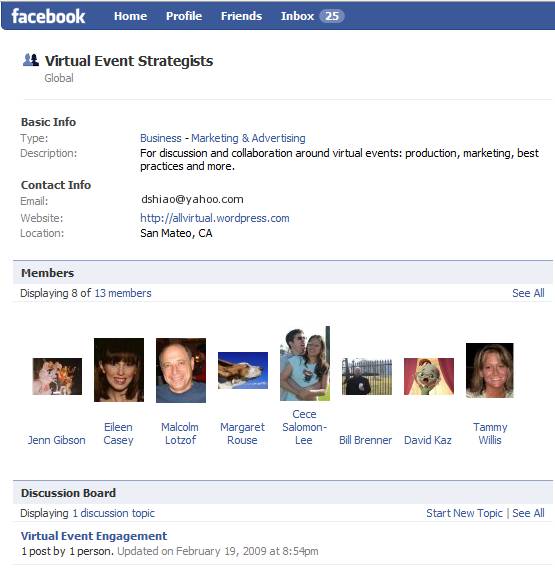
Source: Virtual Event Strategists' Group Page

Source: Virtual Event Strategists' Group Page

Why a Facebook Group?  A few reasons:

  1. The 175MM active users (of Facebook) – most readers of this blog are likely on Facebook – if not, let me know why not!
  2. Threaded discussions – are you a first-timer in virtual events?  Well, starting up a threaded discussion may be just the thing to do
  3. The Wall – post miscellaneous thoughts and ideas about virtual events
  4. Post Links – let us know what interesting blogs or articles you’re reading about virtual events
  5. Post Video – Facebook has a convenient video recording and hosting capability – plug in a webcam and start using it

In fact, I’ll be doing brief “Virtual Event Tip of the Day” video clips on the Group page.  Here’s one of my first video clips, where I talk about the use of prizes in virtual events:

fb_video

I’ve seeded the site with some initial content – but, what I’d most like is to hear from all of you.  So, start some discussions, post some videos, post some links.  The group page is:

http://www.new.facebook.com/group.php?gid=52325833170#/home.php?ref=home

Let’s collaborate and learn together – see you there!


Virtual Events In A Wireless World

February 21, 2009

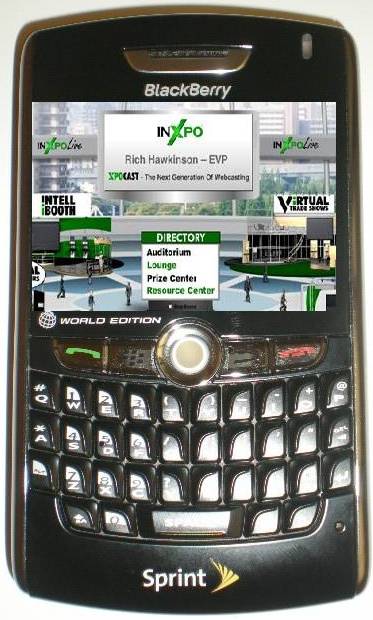
Some day soon: virtual event on PDA?

Some day soon: virtual event on PDA?

Whether it’s business use or personal use, we’ve begun to expect that applications on our PDA’s mirror those available on our PC’s and laptops.  For business, it’s largely corporate email today – the ability to read and respond  (around the clock, I might add!).  For personal use, it’s email (e.g. Yahoo Mail, Gmail, etc.), instant messaging, web browsing and (of course) interacting with our social media sites.

I recently purchased a BlackBerry 8830 – my first step (after verifying that calls to my cellular number were ported over to the BlackBerry) was to set up access to my corporate email.  After that, the series of steps I embarked on were not unlike the set-up of a new PC or laptop – downloading applications that I’ve become accustomed to.  The short list so far is:

  1. AOL Instant Messenger (AIM)
  2. A Twitter client (I selected TwitterBerry)
  3. The Facebook client for BlackBerry

With this collection of apps, I’m able to be on the go, but stay connected with corporate and personal email, stay in touch with friends and colleagues via AIM and keep tabs on my social networks (next up: the BlackBerry client for Netflix).  Virtual events are a combination of business and social networking applications.  Thus, I believe that pretty soon, business users will come to expect virtual events to work on their PDA’s.

Attendees would be able to visit vendor booths and peruse vendor content (while on the go) and exhibitors would be able to interact with booth visitors via a wireless connection.  The “live date” of a virtual event is often planned months in advance – and often times, scheduling conflicts arise for exhibitors – whether it be an important client meeting or attendance at a physical event.  I’m sure that exhibitors would value the convenience of doing basic booth duty from their PDA.

But how do we get there? First, formats like Flash (Adobe), Silverlight (Microsoft) and even JavaFX (Sun) will need stronger support and adoptoin onto PDA devices.  From doing a quick set of Google searches, the adoption (and support) doesn’t seem quite there today.  Here’s hopinng for a better tomorrow – where I’ll be seeing you at a virtual event … from our PDA’s.


Virtual Events For Online Dating

February 21, 2009

Source: Match.com

Source: Match.com

The Internet Dating industry has a conference called iDate.  This year, iDate 2009 is scheduled for Los Angeles, London and Miami.  The event is billed as “the largest conference that covers the business management for the Internet Dating and Social Networking Industries.”  iDate has launched a virtual conference to complement their physical events [see press release].

Perhaps at the iDate 2009 events, industry players can collaborate on leveraging virtual event platforms to faciliate online matchmaking.  What are some of the challenges of online matchmaking today?

  1. Interaction is via asynchronous messaging (either via email – or, via messaging within the service’s web site)
  2. You never get to learn much about potential mates besides what they’ve chosen to provide in their online profile
  3. You’re never sure if that uploaded picture is “true” – for singles of a more advanced age, perhaps the picture is one from 10 years ago
  4. You don’t truly get a feel for your potential mate prior to a phone call or in-person meet-up

So for the likes of eHarmony, Match.com, Yahoo Personals, etc. – why not organize virtual events for online matchmaking!  There would be numerous benefits:

  1. The game changer: webcams – require all participants to utilize a webcam.  Without one, you truly won’t know who’s on the other end of a chat window.  With one, you’ll be able to discover whether the picture (that attracted your attention) matches up with the individual who uploaded it.  And, you’re able to interact via spoken word to other attendees – and see their facial expressions.
  2. Global access, from home – the event would have elements of a physical meet-up, but attendees could participate from anywhere.  That being said, regionalized virtual events may be necessary, to facilitate match making of individuals within close geographic proximity.
  3. Profile matchmaking – some virtual event platforms already have this feature – for online dating, this is the secret sauce that differentiates one service over another.  For an eHarmony, perhaps they integrate their sophisticated algorithms into the event platform, so that attendees can be paired up in the virtual event like they are on eHarmony.com.
  4. Speed dating via webcam – facilitate five minute private webcam sessions between two attendees – after which, they’re rotated to brand new webcam partners.
  5. Post-event data portal – after the event, participants can login to a personalized web-based portal, where they can review all the interactions they had with other attendees.  If you met over 20 people online, you might need such a feature to remember whom you really liked!
  6. Find mates by observing – topical chat rooms could be organized (e.g. Music, Sports, Food, Travel), where attendees could congregate to chat about their hobbies and interests.  The chat need not be restricted to text – some platforms support multi-webcam rooms, where participants can speak and see the other participants.  By observing, one might find someone interesting/attractive – and later on, you can connect with that person privately (e.g. in a 1-on-1 chat).

For the online matchmaking service providers, virtual events provide a nice up-sell opportunity to complement subscription-based revenue.  To avoid canibalization of the subscription business, perhaps you only allow access to the virtual event for existing subscribers.

The virtual events could also serve to generate new subscriptions – imagine tying the event into Facebook’s ~175MM active users via Facebook Connect.  Attendees could see which of their Facebook friends are in the event – and, post updates back to their Wall, driving new users into the event (and hence, new subscriptions to your service).

So, time to get moving – millions of singles across the globe await!


Product Comparison Guides 2.0

February 20, 2009

In the world of Enterprise IT, sales cycles for IT products and services tend to be long and complex.  Decisions are made by committee (vs. by an individual) and the process follows an extended cycle that begins with problem definition, progresses to vendor selection and arrives at a final destination of price negotiation and purchase.  Once the problem has been defined, the committee identifies the set of vendors who provide applicable solutions.

It’s at this stage where technology publishers can often help, with the publication of product reviews and comparison guides.  Here’s an example of a product comparison guide for Hosted CRM, published by InsideCRM.com:

Source: InsideCRM.com (partial view of comparison guide)

Source: InsideCRM.com (partial view of comparison guide)

So this is Product Comparison Guide 1.0.  For version 1.5, you might host this guide on a web site (rather than a PDF) and allow readers to click over to the vendor’s web site — perhaps the vendor’s product page for their Hosted CRM offering.  Maybe you host a registration page and drive sales leads to the Hosted CRM providers.

Now, let’s take it to the next step.  Product Comparison Guide 2.0 is an interactive community site that’s powered by a virtual event platform.  Let’s imagine the same Hosted CRM guide – published as an SEO-friendly HTML page.  Perhaps you leave the high level product information on this page – just enough to entice the reader to continue.  The purpose of this page, then, is to drive traffic into your interactive comparison guide.

Once a user enters the interactive site, you collect some basic demographic information – enough to uniquely identify the user (and contact her), but not too much that the user abandons and leaves your site (e.g. first name, last name, title, email address).  And now, the full product details behind each solution is provided not by you – but, by the vendors themselves – in their product showcase virtual booth!

Within the booth, a vendor might provide:

  1. Detailed specifications about the product
  2. White Papers that describe how the product solves a given technology challenge
  3. Case Studies that describe how customers have used the product
  4. On-Demand Video and Webinars related to the product
  5. Sales and Marketing staff who staff the booth during business hours
  6. Group chat to allow visitors to interact with the vendor – and with each other

Especially in this economic environment, decisions on IT purchases are not taken lightly, even if the offering is a SaaS solution like Hosted CRM.  And what better way to connect with qualified sales prospects than engaging with them while they’re reviewing the solution space?  Having a user enter your staffed booth (to engage with you)  is a much stronger proposition than sending them to your corporate web site to peruse your content.

So vendors “win” in this scenario.  The publisher also wins!  The publisher can sell sponsorships of Product Comparison Guide 2.0, allowing vendors an assortment of features in the environment (e.g. vendor booth, advertising placements, speaking opportunities, etc.).  I’m sure that most vendors listed in your Product Comparison Guide 1.0 (that SEO-friendly web page) will feel pressured to have a virtual booth in the interactive environment – after all, what happens when users click into the environment and interact with your competitors?  Your absence results in a lost opportunity.

With Product Comparison Guide 2.0, the jobs of buyers and sellers now become much easier.


How To Market Your Virtual Event

February 18, 2009

marketing_sherpa

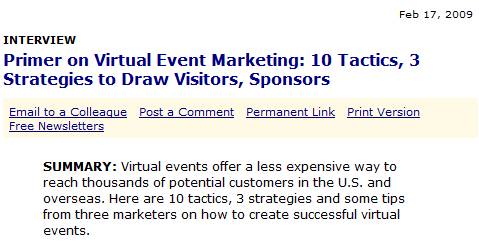
MarketingSherpa published an excellent primer on Virtual Event Marketing.  The 10 tactics listed were:

  1. Partner with assocations
  2. Invest in PR
  3. Get exhibitors involved
  4. Advertise on relevant web sites
  5. Market to internal email database
  6. Email registrants the day before and the day of an event
  7. Use social media to attract attendees
  8. Emphasize the value of the event
  9. Use the virtual event’s microsite
  10. Use sweepstakes as an incentive

Based on my involvement in marketing virtual events to an Information Technology (IT) audience, I’d like to add the following:

  1. Promote early and often – get your microsite launched up to 2 months prior to the live event.  Time is critical, because it gives you options to try different tactics, measure response rates and adapt accordingly.  If you leave yourself too little time, your flexibility is limited and your registrations will suffer.
  2. Invest in search engine optimization (SEO) – make sure your registration page and microsite are optimized for SEO.  For more insights into SEO for virtual events, see this blog posting: https://allvirtual.wordpress.com/2009/02/02/search-engine-optimization-seo-for-virtual-events/
  3. Invest in search engine marketing (SEM) – just like you’d buy keywords to drive visitors to your corporate web site – figure out which search terms are relevant to your virtual event and spend a little of your budget purchasing search engine keywords to drive clicks to your virtual event microsite or registration page.
  4. Use interactive technologies to draw attention – with the amount of email received by your target audience, it’s harder and harder to stick out from the crowd.  To do so, use interactive visuals like a screencast (to give users a sneak preview of what your virtual event environment looks like) or a short video clip embedded within an HTML email.
  5. Use a variety of promotional vehicles – email is the most heavily used, but not all of your users pay attention to promotional emails.  So try display ads, placement in e-Newsletters, text links on publisher web sites and sponsorship of relevant sections of web sites.
  6. Highlight the prominence of expert speakers – in some industries, a well-known speaker can generate the audience all by herself.  If you’ve secured such a speaker, be sure to promote her prominently.  In fact, use her name right in the Subject heading of your promotional emails.
  7. Highlight the ability to interact with executives and experts – once you landed that expert speaker, invite her to participate in the virtual event after her speaking appearance.  In fact, in lieu of a Q&A after the Webcast/Videocast, have her appear in the Networking Lounge to answer questions there (via text chat), interacting directly with the audience.  In addition, invite your executives to participate and interact with the audience.
  8. Display the list of exhibitors – as you sell sponsorships, display the list of companies who will be exhibiting.  That may convince some users that they need to attend – what better a way to narrow your purchasing decision than to “meet” with the candidate solutions providers in one fell swoop?
  9. Provide a sales contact for potential exhibitors – some registrants of your virtual event may represent companies who’d like to exhibit (sponsor).  So give them an email address or phone number and you might have just sold an additional sponsorship.

What has worked well in promoting your virtual events?


Virtual Events 101 For Corporations

February 16, 2009

Some of us learn through observation – and I’ve had the privilege of observing (and learning from) many corporations in their use of virtual events and virtual worlds. First, I will provide “newbie” corporations with some pointers on how to best leverage virtual events (by way of links to some past blog posts).  Then, I will summarize some recent examples of virtual events (and virtual worlds) by corporations – all of which I admired.

How to Leverage Virtual Events

  1. Get closer to your customers – by understanding customers’ current challenges (which may differ from the challenges they faced when they originally purchased your product), you can create solutions, make your customers more satisfied and generate additional revenue (https://allvirtual.wordpress.com/2008/12/16/get-closer-to-your-customer-with-virtual-tradeshows/)
  2. Launch your next product – whether you complement your physical launch – or, do it exclusively online, the virtual event platform allows you to conveniently launch your next product online to a global audience – and, track all the interactions generated with customers, sales prospects and analysts/press (https://allvirtual.wordpress.com/2008/12/22/launch-your-next-product-online/)

Virtual Events: How Corporations Are Leveraging Them

  1. Quest Software produces an annual virtual event titled Quest Connect to provide information on their products and services (https://allvirtual.wordpress.com/2009/01/02/marketers-as-event-organizers/)
  2. Lenovo utilized Nortel’s 3D-based web.alive platform to drive interest and product sales of its laptops during (and after) CES 2009 (https://allvirtual.wordpress.com/2009/01/08/review-lenovos-elounge-virtual-world/)
  3. Adobe held a virtual product launch in Second Life to complement their real-world launch of eLearning Suite (https://allvirtual.wordpress.com/2009/01/25/adobes-real-world-launch-is-suppplemented-with-virtual-launch/)
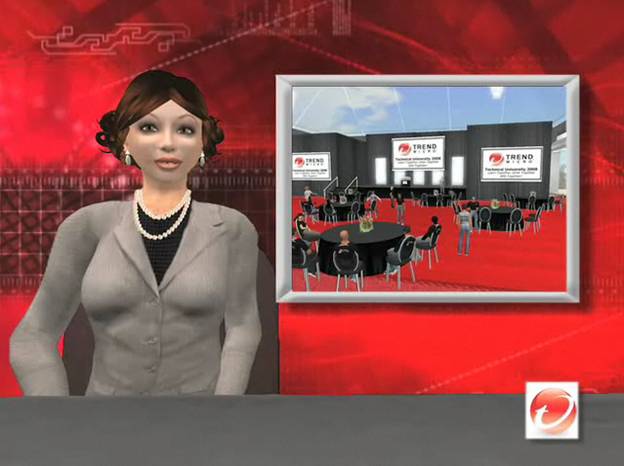
  4. Trend Micro teamed with Virtualis to host an internal training event titled Trend Technical University in Second Life (https://allvirtual.wordpress.com/2009/02/05/virtualis-and-trend-micro-put-on-quite-a-show/)
  5. VMware launched an online companion to their physical VMworld conference, running on Jive Software’s platform (https://allvirtual.wordpress.com/2009/02/07/vmworld-complements-physical-conference-with-virtual-conference/)

So if you’re a newbie on virtual events, read up on what these companies have done – and decide whether (and how) virtual events and virtual worlds can benefit your company.  Better yet, if you have ideas on new ways corporations can leverage virtual events, be sure to leave a comment below.  Either way, I’m excited to see and hear about the new things that are in store.


The Future Of Newspapers: Online, Interactive Communities

February 14, 2009

NYTimes.com

Source: NYTimes.com

There’s been much discussion about the future of newspapers.  Some have shuttered, others are struggling for their survival.  Business analysts and bloggers have even speculated on the future of The New York Times.  NYTimes.com had 14 million unique visitors in August 2008 (according to this Wikipedia entry).  Many web-centric businesses have been able to build large market capitalizations off a base of 14+M users.  So how can NYTimes.com monetize their users beyond display advertising?

Let’s see.  How about creating a community around these 14+M readers – and creating an interactive, real-time newspaper?  That’s right, folks.  I’m proposing that NYTimes.com be powered by a virtual event platform.  I’m NOT proposing a 3D environment with avatars.  Instead, I’m proposing a 2D “tradeshow-like” platform that would enable a business that’s rich in content (and, deep in Editorial talent) to best monetize their resources.

So let’s break down what this might look like:

  1. The newspaper’s main sections each map to “booths” within the platform – Of course, we’re not going to call these booths – I’m just drawing a parallel to the virtual tradeshow (VTS) model.  But, the functions and features here are the same that power a VTS booth.  So for NYTimes.com, there are “booths” labeled World, U.S., Politics, Business, Sports, etc. – you get the idea.
  2. The booth is the central holding place for that section’s content – Just like a newspaper has a front page – in a booth, the day’s content is rendered prominently as you enter – and, Editors swap out stale content (into the booth’s archive) for fresh content.
  3. Editors staff the booth and connect with readers – To me, this is the real game changer with this concept.  Editors (when time permits) can login to the environment and interact in real-time with readers.  What better a way to find out what your readers are interested in?  And, what better a way to find and connect with sources for you and your reporters?
  4. Readers interact with other readers – Another game changer here, as the platform would allow readers to tap into social networking to interact with other readers, all in the context of your content.  Valuable interactions keep those readers coming back in for more, creating site loyalty.

So imagine I enter the NYTimes.com Sports Booth – and I see this:

NYTimes.com

Source: NYTimes.com

I can click on Harvey Araton’s profile and read about Harvey’s interests and specialties.  If Harvey is online, perhaps I initiate a chat session with him – or, I drop him an in-show email to tell him I read his articles.  This provides a benefit for both of us – I feel directly connected with NYTimes.com – and, Harvey is able to efficiently connect directly with his readers.

Now granted, with 14+M people, it may be quite a challenge for Times Editors to spend time in an online community, juggling between user-initiated chats and their “real job”.  However, what if each attendee of this environment was a paying member?  Perhaps that changes the equation a bit.  So let’s talk about monetization opportunities:

  1. Advertising – NYTimes can sell “run of booth” or “run of platform” ads – and also offer up specific areas of the environnment for sponsorship (e.g. Networking Lounge sponsored by American Express).
  2. Direct Response – The platform (using a pay per click model) could house placements of advertiser content and drive clicks to advertiser web sites
  3. Subscription – Start off with a freemium model – anyone can access the environment at no cost, but certain features (e.g. access to premium content, ability to chat 1-on-1 with a Times Editor, ability to participate in real-time Q&A sessions, etc.) require a paid subscription
  4. A la carte content monetization – Why not create “booths” that house the entire archive of New York Times content.  Staff these booths with digital archivists, who can search through the virtual microfilm and find you the article you need.  Only premium (paid) members get access to these booths – and, you pay for each article that’s delivered from the archive.
NYTimes.com

Source: NYTimes.com

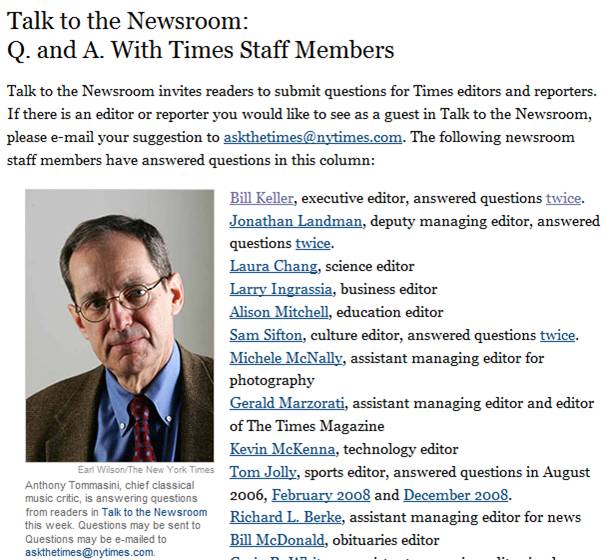
Now, let’s talk about the social media angle.  The Times could support the “Talk to the Newsroom” feature (above) via a real-time, text-based grroup chat!  They could even have the host be visible via a webcam, if so desired.  Here are some possibilities:

  1. Scheduled chat sessions with Editors, Publishers, executives, etc. (e.g. “Talk to the Newsroom”)
  2. Columnist and subscriber blogs – Published directly within the environment, with support for comments
  3. Forums around the paper’s main topics
  4. Presence indication – Provides readers with the feeling that they’re part of a global community. Reading the newspaper (which used to be a somewhat private experience) now becomes a communal one, where you’re reading, you’re sharing and you’re interacting – with other interested parties from around the world
  5. Real-time briefing rooms or crisis centers – Recall how quickly Twitter spread the news about the Mumbai terrorist attacks.  Why not have ad-hoc briefing rooms where NYTimes.com readers can engage around breaking news and current events?  In this scenario, the “daily newspaper” transforms into a real-time, 7×24 “always on” environment.

So some day, when I get my morning coffee and sit down with NYTimes.com, I’m hoping I’ll see you “there”.


Real World Meetings In A Virtual Office

February 11, 2009

Amanda Van Nuys, Linden Labs’ Director of Enterprise Marketing (and known in-world as Amanda Linden) has an interesting blog posting titled “Working in the Virtual World“.  Amanda describes her use of Second Life for work-related meetings and collaboration.  A neat physical/virtual tie-in was done with a conference room:

The physical conference room—Isabel—has a virtual counterpart that is an exact replica—Virtual Isabel. A camera in Isabel captures what’s happening in the room and displays it in the virtual space. Simultaneously, the participants in Virtual Isabel are projected on the wall of physical Isabel. The result is a seamless experience—two conference spaces, one real and one virtual, merge into one.

As for Amanda’s use of Second Life for meetings, she describes it as such:

These days, I’m spending at least 2-3 hours a day in Second Life, meeting with my colleagues distributed all over the world—collaborating, brainstorming, learning, and decorating my new office space in LindenWorld.

For companies with a highly distributed workforce, virtual worlds and their associated virtual meeting places can be a win-win scenario. I once met an employee of a Fortune 500 company who noted that he’d never met his manager, nor had he met any member of his entire team — except that he’ “met” them online, in web meetings, conference calls, Skype sessions, etc.

I’m a remote worker – I’m in the Bay Area, while the majority of my company is in the Chicago area.  Fortunately for me, my company provides an internal virtual office platform that serves as an interactive intranet plus meeting and collaboration space.  The virtual office is simply an application that rides on top of same platform that services virtual tradeshows, virtual career fairs and virtual sales meetings.

To be set up for a virtual meeting on our platform, here’s what I do:

  1. Login to the virtual office platform (via the web) – my co-workers and I do this as our first task once the computer boots up
  2. Activate my webcam
  3. Put on earbuds (so that the folks you’re speaking with don’t hear their voices reflect back into their sessions)
  4. Request a meeting with a co-worker within the platform

It’s as simple as that.  I tend to have a few meetings per week in the virtual office, mixed with the more conventional meeting via telephony conference call.  Here are the efficiencies I’ve seen with virtual office meetings:

  1. Lower overhead to start a meeting – since the virtual office provides presence indication, I know when a colleague is logged in.  I can initiate a webcam session with a colleague in the same manner that I’d start up an Instant Messaging session.  Compare this to the typical meeting “set-up”, where emails and Outlook invitations are sent and the meeting organizer awaits replies.
  2. Facilitates ad hoc, spur of the moment collaboration – similar to the gathering at the water cooler – or, the spontaneous brainstorming session around the whiteboard.  But in the virtual office, the spontaneity occurs while you’re still at your desk.  Additionally, requesting a virtual meeting session is very convenient – compare it to walking over to a colleague and tapping her on the shoulder.  Here, your colleague accepts/declines the session with the click of a mouse.  If she’s busy, she goes right back to what she was doing.  It’s like IM’ing a colleague rather than calling her on the phone.
  3. Material related to the meeting is at your fingertips (or a mouse-click away) – my virtual office session is simply a tab in my Firefox browser.  Information I need for a meeting is likely in another browser tab – or, in an application like Excel or Word.  It’s highly convenient to toggle between these apps and have the information I need at my fingertips.
  4. Immediacy – ever attend a face-to-face meeting and  take on an action item to send out a URL to all the meeting participants (when you get back to your desk)? In a virtual meeting, you can find that URL and copy/paste it into your messaging session. Now, your colleague(s) can review the URL in real-time and you can resolve issues (or obtain the necessary feedback) sooner.
  5. True facial expressions – in an avatar-based virtual space, I can emote via gestures or text comments. In a webcam-based virtual meeting, however, my colleagues can read my true facial expression.  The virtual office platform that I use supports multi-user webcam chats (of up to 9 participants), so we can all see one another, as if we all piled into the same conference room.

I haven’t even mentioned the savings in carbon emissions and cost (i.e. the use of IP technologies and the bypass of the telephony network).  I’ll always want to connect with colleagues in person – but, today’s technologies help remote workers get the job done – while increasing efficiency and productivity.  A long day in the (virtual) office never felt so good!


VMworld Complements Physical Conference With Virtual Conference

February 7, 2009

VMworld

Source: VMworld

What do you do when you produce the world’s leading virtualization conference?  You make it better, of course!  VMware teamed with Jive Software to take the once-per-year VMworld conference and extended it (online) into a 365-day-per-year, always-on community.  A Case Study on this initiative can be found here:

http://www.jivesoftware.com/customers/case-studies/vmware

And this quote from Eric Nielsen of VMware sums it all up:

We expanded the VMworld conference from a three day event for 15,000 to a 365 day/year destination for 50,000 virtualization professionals.   — Eric Nielsen, Director of Web Communities, VMware

So that’s a triple play for VMworld – by complementing their event online, they’ve generated a more than 3x increase of participating virtualization professionals.  As quoted in the Case Study, the VMworld.com community has 35,000 active members, generates 35,000 page views per day and 2,000 video views per day.

Quite an impressive level of activity.  A clear example of an active community at work – 35,000 page views (in a single day) is hard to come by with traditional b-to-b content.  However, in a highly active social community, the blog posts, discussion board entries, podcast downloads, video views, “ask the expert” questions, etc. – all contribute to traffic generation.

Just have a look at the volume of Discussion Board traffic:

VMworld.com - Discussion Board

Source: VMworld.com - Discussion Board

Now that’s an active community at work.  But there’s a chicken and egg problem – how do you generate an active community in the first place?  Well, the organizers of VMworld.com made the wise move to integrate a full suite of social networking tools – essentially building a mini-Facebook around the conference.  Tools available include:

  1. Discussion Boards
  2. Podcasts – both those produced for the conference, as well as third party / external podcasts
  3. Integration with social networking sites (e.g. Facebook, Twitter, etc.)
  4. Blogs – both in-house and third party
  5. Ask The Expert sessions and content
  6. Video
  7. Photo Wall (with pictures from the physical event)

VMworld.com also leveraged neat tools within Jive Software’s platform to encourage activity.  For instance, on a blog post, a user can click on “Watch This Blog Post” and be notified when comments are appended to that post.  Additionally, most content pages have a left-hand sidebar titled “More Like This”, which certainly encourages additional clicks and page views (it worked for me!).

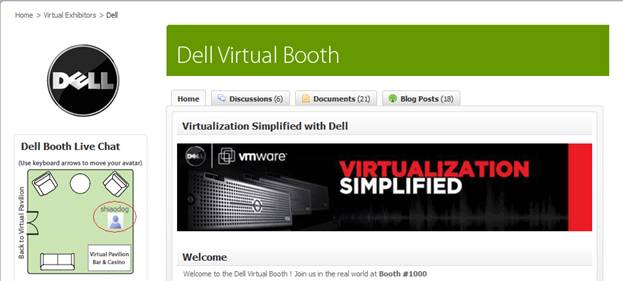
VMworld created virtual conference sponsorship packages for exhibitors, with pricing discounted if you’re already exhibiting at the VMworld physical conference.  3D style booths are planned – the current community features 2D style booths.  Here’s the Dell booth:

VMworld.com - Dell's Booth

Source: VMworld.com - Dell's Booth

This shows the top third of the booth – below it is Dell content, along with community content (blogs, discussion posts, etc.) around Dell topics. You’ll notice a “floor map” of the booth, which shows the physical location of my avatar.  Users utilize the arrow keys on their keyboard to move around within the booth.

VMworld Europe “floors” later this month (February 24-26) in Cannes.  If you’re lucky enough to get to Cannes, enjoy the show.  If you’re not able to attend, then go online and enjoy the online networking.  Registration for VMworld Europe can be found here:

http://vmworld.com/community/conferences/europe2009/


Virtualis and Trend Micro Put On Quite A Show

February 5, 2009

Trend Micro

Source: Trend Micro

The Virtualis Convention and Learning Center is an island within Second Life that’s produced by California-based Corporate Planners Unlimited.  Trend Micro, a technology provider of endpoint, messaging and web security, recently hosted a 2-day live event within the Virtualis’ Second Life convention center.  Virtual Worlds News has detailed coverage of the event here:

http://www.virtualworldsnews.com/2009/02/corporate-planners-unlimited-growing-virtual-events-in-second-life.html

Dan Parks, President and Creative Director at Corporate Planners Unlimited (and Founder of Virtualis) is quoted extensively in this article regarding the demand for virtual events (and Virtualis), their cost efficiency and uses of Virtualis by other clients of his.  As interesting as the technology is (and it sure is cool), I found the virtual event planning (by Virtualis and Trend Micro) to be most interesting.

In the Virtual Worlds News article, you can view a 2 minute video overview of the event (given by a Second Life avatar / news reporter, no less).  Alternatively, the same video is available on this page: http://silverandgoldie.com/trendmicro.htm (Machinima by Silver & Goldie, who [presumably] produced this nifty segment).

Virtualis and Trend Micro named the event Trend Micro Virtual Technical University – an internal-facing training venue for 75 Trend employees (also called Trenders) across 5 locations.  Day 1 started with an introduction (and keynote of sorts) by Harry Coit, Trend Micro’s Director of Technical Support, North America.  Harry welcomed the Trenders, who sat around round tables in folding chairs.  Harry’s goals for the 2 days:

  • Collaborate
  • Building strong relationships
  • Have some fun

The in-world sessions were spread across two tracks – product sessions and educational sessions.  The product sessions provided product updates on emerging technologies, along with case studies on the latest web threats.  The educations sessions included creativity sessions, which were held in futuristic settings (where avatars sat around in Jetson-like furniture).

Trend Micro

Source: Trend Micro / Virtualis

For fun, the event included four unique technical challenges.  In a parachute challenge, avatars descended from the sky in parachutes and had to score points by grabbing balls that flew by.  A treasure hunt challenged participants to find specified items throughout the island – scores were tabulated and the top 2 teams squared off in a Trend Micro Tech Challenge – a live game show that was played in front of the entire audience.

Trend Micro

Source: Trend Micro / Virtualis

At the end of the first day, a night club hosted dancing, along with music from “one of Second Life’s most popular entertainers”.  All in all, quite a show.  I admire the attention to detail paid by Virtualis and Trend Micro in planning the events – this was truly a melding of virtual world benefits with the full trappings of an all-day physical (corporate) outing.  The typical applications of virtual worlds and virtual tradeshows –  lead generation, marketing, exhibiting products and services, internal training – has now taken on a new angle.  We’re now seeing internal training, complete with virtual team building!