The Real Reason Google Spent $1B to Acquire Waze

July 27, 2013

Google and Waze: perfect together

Introduction

According to their website, Waze is “the world’s fastest-growing community-based traffic and navigation app.” In June 2013, Google acquired Waze for $1B. One might speculate that the acquisition was based around:

  1. The navigation app.
  2. The potential to integrate the technology into Google Maps.
  3. Bringing social networking to navigation.
  4. The loyal following of the user base.

These items don’t add up to one billion dollars, however. Here’s my take on the acquisition:

Google’s acquisition of Waze is an investment (and bet) on where technology is headed.

In other words, Waze fits into Google’s product vision.

A Personal Story

I was driving home from Lake Tahoe with friends. We wanted to stop for dinner. Spread across three cars, we decided to meet directly at the restaurant. I had never been to this particular restaurant, so I entered the address into Waze.

My friends had been to the restaurant, so they were not using navigation. A major traffic jam developed on Interstate 80. Meanwhile, Waze routed me around the jam by taking me towards Sacramento, directing me down Highway 5, then connecting back to Interstate 80.

Life is good. Traffic is not.

Photo credit: Flickr user epSos.de via photopin cc

I bypassed the entire traffic jam and arrived at the restaurant 45 minutes before my friends. They had to sit in stop-and-go traffic for 45 minutes. I got to avoid it. For this particular moment, Waze improved my quality of life.

Waze has intelligently re-routed me a few more times since then. Often, the re-routing occurs before you even see the onset of traffic. Waze notifies you of the route change and lists the estimated amount of time you’ll save on the new route. It’s amazing.

How Waze Relates to Google’s Future

Recall Google’s mission:

To organize the world’s information and make it universally accessible and useful.

This is precisely where Waze comes into play.
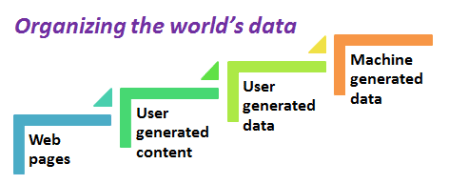
Organizing the world's data

In Web 1.0, the world’s information was published online via the World Wide Web. Some ten years later, Web 2.0 emerged, in which web content was supplemented by user generated content.

Today, we’re starting to evolve into Web 3.0: user and machine-generated data.

And that’s what Waze is all about. As you drive, you generate data (accident reports, traffic reports, validation of accident reports) and your phone generates data by way of the “machine” (your car) it’s traveling in (direction, route and speed).

The value in Waze is its ability to organize this information and make it accessible and useful to its users.

Google acquired Waze for its real-time, back-end tracking system that intelligently manages data flows from millions of simultaneous users (and makes sense out of that data).

In other words, it organizes the (driving) world’s information and makes it universally accessible and useful. This sophisticated and intelligent data management system can be applied to many other use cases beyond navigation.

The Future of Organizing Data

To date, Google has been wildly successful at organizing the web’s information. Going forward, they’ll look to extend beyond the web to any entity that emits data (e.g. devices, people, etc.). And the $1B “bet” on Waze fits this vision. Let’s consider how this relates to navigation:

The evolution of navigation

In Navigation 1.0, the GPS system got you to your destination. With apps like Waze, you get there quicker. Next, “organizing data” will help us find interesting stops (along the way to our destination) and help us build better highways.

Where might Google venture from here? The first one is quite obvious:

  1. Driverless cars.
  2. Healthcare.
  3. Smart homes.
  4. Local or national government.
  5. Sporting events.

[Related article: A Self-Driving Car Will Create 1 Gigabyte of Data Per Second]

Imagine a “Waze-like app” inside each driverless car. As the driverless cars drive, they’ll generate the same sort of data that Waze users do today and receive similar benefits (e.g. where to turn, where to park, where to go when the gas is low, etc.).

Conclusion

Ever sit in traffic for an hour? It’s so frustrating. It’s not just wasted time, it’s also the stop-and-go activity of driving that wears you out. Waze can help me avoid the traffic and give me back an hour of my day. That’s a quality of life improvement.

To date, Google organized data to help me find information on the web. Going forward, they’ll organize data to help improve quality of life.

Commentary from the Community

I invited Twitter users to chime in with their opinions on why Google acquired Waze. Here’s what they tweeted.


Who’s On Your Marketing Team? Everyone.

July 13, 2013

Your Marketing Team

Photo credit: Flickr user WorldSkills via photopin cc

Introduction

Whether you write code, collect payment, negotiate contracts or recruit new employees, we’re all in Marketing. Wikipedia defines Marketing as “the process of communicating the value of a product or service to customers, for the purpose of selling the product or service.”

While this definition is suited for businesses, cause-based organizations (e.g. non-profits, schools, universities, etc.) have Marketing teams as well. For them, the first half of the definition applies: “the process of communicating value.”

Explicit vs. Implicit Communication

Communicating value

Photo credit: Flickr user Saint Huck via photopin cc

We often think of “communicating” as an explicit action: I’m speaking to you or sending you an email; communication, however, is quite often implicit. Think about body language. It’s not an explicit form of communication. In fact, you’re often not conscious of what your body is “saying.” But body language tells us all a lot about how you’re feeling.

The same holds true for Marketing:

Explicit Marketing
Marketing
Sales
Support

Implicit Marketing
Finance
Legal
Human Resources
Engineering & Development
IT

Now, let’s consider these functions individually.

Explicit

Marketing

I suppose it’s a given that the Marketing team does marketing. But here’s something some marketers may not consider: while you can help fuel demand for product and facilitate the sale, your job doesn’t end there. Marketing can play a strategic role in the important post-sale activities of onboarding and retention. Even after a sale is made, Marketing needs to continue the “process of communicating value.”

Sales

What does Sales do? They sell. They close. But Marketing does a little selling. And Sales does a little Marketing. Sales is most effective when “the process of communicating value” occurs throughout the selling process and continues post-sale. And that means the sales rep is continually doing “marketing.”

Support

The Support Team (Marketing)

Photo credit: Flickr user EcoVirtual via photopin cc

I place Support in the explicit camp, but they really straddle both camps. They’re explicit in the amount of direct communication they provide. They’re implicit, though, in their communication of value. They don’t actively “pitch” or “market,” but they communicate (deliver) value in the actions they provide and the effectiveness of their service.

Implicit

Finance

Finance

Photo credit: Flickr user Dave Dugdale via photopin cc

Finance has far more touch points with customers than many think. They negotiate payment terms, collect payments and get in touch with customers when payment is overdue. The process by which a customer interacts with Finance can be as important as the underlying product.

For instance, an online ordering and payment system (set up by Finance) can simplify the process of doing business, thereby retaining more customers. The presentation of information on an invoice (and its accuracy!) can be important to some customers. In both cases, Finance provides an implicit communication (delivery) of value.

Legal

Similar to Finance, the touch points from the Legal team shape the customer experience. Everything from the manner in which a contract is negotiated (to the contract itself) is an implicit communication of value.

Human Resources

The HR team partners with the executive team to help define and shape the culture of the organization. When HR recruits new members to the team, they’re doing marketing. To convince candidates to accept job offers, HR needs to communicate the “value” that the organization provides.

In addition, the culture that HR helps shape is fundamental to the value (both explicit and implicit) that gets communicated and delivered to prospects and customers.

Engineering & Development

Good products market themselves and result in repeat customers. Yes, developers: the hundreds of lines of code you wrote today? That was, in a sense, marketing. Welcome to the team.

Information Technology (IT)

Information Technology can “touch” both inward-facing and outside-facing systems.  For inward-facing systems, IT provides the critical resources that “Marketing” depends on. Legal, Sales, Finance, etc. cannot communicate value if these systems are not available.

For outside-facing systems (e.g. the infrastructure supporting a SaaS business), IT directly impacts the value delivered to the end customer, in the form of service availability and performance.

Conclusion

The next time someone asks what you do for a living, tell them: “Marketing.” Then, explain why.


A New Way to Follow Up with Attendees after Events

July 6, 2013

The New Way

Photo credit: Flickr user bernatcg via photopin cc

Introduction

Recently, I attended a virtual event. The event had a large number of sessions and virtual booths (exhibitors). Due to a number of meetings I had scheduled that day, I couldn’t stay too long. I attended one session and visited a few booths to see what was going on.

The Current Way

A day after the event, I received an email from the event organizer. They thanked me for attending and invited me to log back in to view all of the sessions on-demand. So far, so good.

And then it started. Over the next two weeks, I received emails from exhibitor after exhibitor. I recalled visiting some of the exhibitors’ booths. For others emailing me, I had no idea they were even part of the show.

The New Way

I don’t like the current way. It results in too many emails, most of which aren’t relevant to me. So here’s the new way.

Warning: this takes extra work on the part of the event organizer. But in the end, I think everyone wins.

1) An exhibitor can only email an attendee when the attendee requests it, on the event website.

2) All post-event emails come from the event organizer (only).

3) The event organizer becomes an Editor of sorts, assembling emails that pair vendor-neutral content (the on-demand sessions) adjacent to vendor information (product listings that relate to a session).

4) Continuing the Editor role, the event organizer builds sections of the event website (or, the virtual event environment itself) segmented by “solution type.” As attendees view on-demand sessions, they’re able to view lists of vendors within each solution type.

5) In this way, it’s the event organizer who’s helping move attendees along the sales cycle!

Benefits of The New Way

More Credible Emails

In The New Way, the emails come from a credible source. I attended the event, so I’m likely to consider the event organizer credible. An exhibitor I never heard of that’s decided to start emailing me? Not so credible.

Better Email Management

We receive far too much email

Photo credit: Flickr user deltaMike via photopin cc

The New Way results in far less emails. By centralizing the sending from a single source, attendees have one opt-out to manage, rather than 5, 10 or 15 opt-outs from all the exhibitors. With a single opt-out, the stakes are also raised for the event organizer.

More Effective Emails

Today’s approach (from exhibitors) amounts to a shot in the dark. The recipe for the email is:

You attended event X. I sell a product, Y that has some relation to X. Want to buy?

With The New Way, the emails focus on the content of the event and attendees are invited to self-select their follow-up paths. They do so based on the sessions they view, the pages they visit and the requests they submit for more information.

More Qualified Leads

The New Way can invert the process: instead of exhibitors pursuing attendees, the attendees can be the ones asking for appointments with the exhibitors. It’s the job of the event organizer to facilitate this match-making: NOT to simply hand over lists of email addresses to exhibitors.

For bonus points: event organizers can create multiple “email tracks” (by topic) and invite attendees to select the track(s) most relevant to them. Combine this with email analytics and marketing automation to tailor subsequent content down to an individual basis.

Conclusion

It’s up to you, event organizers. By adopting The New Way, you can make your attendees much happier. And if done right, you can enable your exhibitors to achieve higher ROI than they’re getting today. Let’s leave the shot in the dark emails to those selling snake oil.


10 Ways Your Tweets Continue to Be Seen

June 30, 2013

Tweets can stick around for a while

Photo credit: Flickr user mkhmarketing via photopin cc

Introduction

Conventional wisdom is that Twitter is the essence of the real-time web: a here and now, in the moment medium. If you’re tweeting when your followers aren’t online, then they won’t see those tweets. That’s how the thinking goes.

In May, I tweeted about the San Jose Sharks. A few times this week, users have “favorited” that tweet. The NHL season is long over. In fact, what’s getting “favorited” was a tweet from May 19th, well over a month ago.

The conclusion? Your tweets can live on for far longer than you think. Let’s consider ten ways that can happen.

1) “Activity” on your tweet from other users.

When you access the “Activity” area on Twitter.com (Home -> Discover -> Activity), you see activities taken by the people you follow: whom they just followed, what tweets they favorited, what tweets they retweeted, etc.

If someone came across your “old” tweet and favorited it, that becomes a form of “re-promotion,” as that activity can be seen by many others. Because of hash tags, search, etc. the “favorite” (and all of the subsequent favorites) may come from users who don’t even follow you.

2) Views of tweets on your profile page.

Active tweeters get noticed, which leads to “views” of their Twitter profile pages. On my Twitter profile page, you can see all of my recent tweets.

When you scroll to the very bottom of the page, you’ll notice an “endless scroll” feature, where the page updates with the next set of tweets – and this continues on and on, the more you scroll. So in this manner, you can find my San Jose Sharks tweets from May, if you’re willing to scroll that much.

3) Twitter Cards.

See what I did (above)? I used a Twitter Card to embed a tweet in this blog post. These cards make it super convenient for writers, bloggers, etc. to re-publish tweet content. And the card makes it easy to reply, retweet, etc., directly from it.

4) Getting a Retweet (RT).

Users who retweet (RT) re-surface your tweet to all of their followers. While the RT will preserve the timestamp of your original tweet, the tweet will appear in timelines based on the time of the retweet. The tweet from last week that you thought was forgotten? It could gain a new life via an RT.

5) Search (and hash tags).

Following the eventprofs hash tag is done via Twitter search

Twitter users will often perform searches. They might be looking for something specific – or, they may like to “follow” a hash tag. To follow the popular #eventprofs hash tag (for meeting and event professionals), you’re actually performing a Twitter search. And people checking out #eventprofs activity may see your tweet from one week ago (or perhaps one month ago).

6) Twitter Ads.

Promoted Tweet from Samsung Mobile

Users (and brands) can buy a form of Twitter Ads called Promoted Tweets. They select from existing tweets and mark them for promotion (advertising). In this way, they’re able to take “old” tweets and can keep them “top of mind” by advertising that tweet. As you can see above, the tweet promoted by Samsung Mobile was posted over a month ago.

7) Screen shots.

Celebrities have been receiving a lot of notoriety lately with their use of Twitter. When a celebrity tweets something controversial or inappropriate, they’ll often delete the tweet or shut down their account altogether.

The “undo button” doesn’t entirely work on Twitter, however, as users can take screen shots of the tweets (for posterity). See this Huffington Post article on Alec Baldwin, which mentions his inappropriate tweets (including a screen shot of them).

8) Being seen in a Twitter List.

You’ve probably been added to one or more Twitter Lists. I have a Twitter List of people I’ve met in real life. As users discover new Lists and peruse the related tweets, they may find tweets (of your’s ) from weeks or months earlier.

9) Being seen in a user’s Interactions list.

If you “mention” other users on Twitter, you’ll appear in their “Interactions” area. Twitter users LOVE to see mentions and interactions. So a tweet you consider old may live on in another user’s “Interactions” area. Don’t be surprised if you receive a reply today from your tweet from last month.

10) The Library of Congress.

Via a partnership with Twitter, the Library of Congress is building a digital archive of tweets. In January 2013, the Library of Congress announced that they had archived 170 billion tweets! So behave yourself: your tweets are now a matter of public record in the annals of the Federal government.


Life Is Good: 6 Things We Take for Granted

June 22, 2013

Life is good, but we take some things for granted

Photo credit: Flickr user Gamma Man via photopin cc

Introduction

Recently, I had work done on my car. It was a weekday, which means that I had to find a place to check email and do some work. So I dropped the car off at the garage and found my way to the closest place that (a) serves breakfast and (b) has free WiFi.

As I flipped my laptop open and connected to the WiFi network, I remembered the days when WiFi didn’t exist. You had to get a colleague to give you rides to and from the mechanic. That made me realize how easy it is to take things for granted.

Life is good. Let’s appreciate some things we often take for granted.

1) WiFi.

One thing we take for granted: free WiFi

There was a time when the Internet and the web didn’t exist. Later, there was a time when you only had Internet access at work. Then came dial-up modems. I remember the day I got DSL installed: I didn’t think a web page could load any faster.

Today, we have WiFi in businesses, we have 4G data in the palm of our hands and if we pay for it, we even have WiFi when we fly across the country.

2) Abundant computing power.

It’s been said that today’s smartphone has more computing power than the world’s top supercomputer of 25 years ago. Computers have become so powerful that technology was invented (virtualization) to take advantage of excess computing cycles.

My first computer was an IBM PC, back in high school. Back then, the “mega” in “megabyte” had yet to exist. Also, fast runners could complete a mile before a computer booted up.

3) GPS.

The U.S. DoD

Image via: Wikipedia.

Thank you, U.S. Department of Defense! Your Defense Advanced Research Projects Agency (DARPA) was instrumental in building the Internet.

Later, you gave us the Global Positioning System (GPS). I have a horrible sense of direction. And I’m not the stereotypical guy: I ask for directions (often at gas stations). GPS first came to life on the dashboard of our car. Now, we have fully functional GPS apps on our smartphones.

4) Facebook.

Facebook has its ups and downs in the court of public opinion. Privacy changes, the roll-out and withdrawal of Beacon, etc. I use it to stay connected with family, friends, colleagues, ex-colleagues, high school classmates and college classmates. There’s no other social network (or online service) that makes this possible. Thank you, Zuck and team.

5) Individuals as publishers.

It’s never been easier to share your thoughts and expertise and find an audience willing to listen. Blogging, microblogging, video blogging – it’s free, it’s easy and it’s fun.

I used to publish a New York Yankees blog. I sent a posting to a local reporter and got selected as the “Blog of the Week” in his Sunday column. What a thrill! Through blogging, Twitter and other online platforms, I’ve learned a lot and met a great number of great people.

6) On-demand media.

Children now grow up with tablets

Photo credit: Flickr user Toca Boca via photopin cc

My kid’s generation was born into a world of on-demand media. Once they reach grade school, they’re using their parents’ iPads to consume content any time of day, from wherever they are.

I remember the day when the “prime” in “prime time TV” really meant something. On-demand media amounted to your VCR. Today, content is available in many forms, on whatever device we want it.

Conclusion

Life is good. Let’s not forget that.


6 Reasons Lists are Awesome for Content Marketing

June 15, 2013

We all love lists

Photo credit: Flickr user born1945 via photopin cc

Introduction

Whether it’s a blog posting or a webinar, list-based content draws well. In fact, there’s a chance you clicked through to this posting because of the “6 Reasons” in the title (admit it). What makes list-based content so popular? Let’s count the ways.

1) They’re tangible.

Before you even click through to read a list-based piece of content, you already know that you can put your arms around it. By its very nature, a list makes a piece of content self-contained. It tells you up front what you’re getting: 5 of this or 15 of that.

2) Gives you a sense of pace.

Very rarely do I see a list-based piece of content in which each piece is overly long. You expect a rather brisk pace, as the author moves from one list element to another. Sort of like what I’m doing here!

3) Gives you a sense of progression.

Related to pace, list-based content ensures that you know precisely where you are. Let’s take a webinar. If the webinar has “5 Tips” in the title and the presenter is on tip number 3, then you know that you’re roughly 60% through her presentation.

4) Gives you a fixed beginning and ending.

Sometimes, you never know how long a piece of content will go on. List-based content tells you the ending point before you start. Even with a long list (e.g. “100 Reasons I Love New York”), you know when the piece ends.

And, if there’s a lot of content to consume, you know to pace yourself accordingly. With the “100 Reasons,” I’m apt to skim the list much quicker than “5 Reasons.”

5) Gives you the opportunity to pick and choose.

Consider a very long article. The further I progress, the greater the challenge for the article to “hold” me and keep me interested. If I know an article is 10 pages long and I’m not engaged by page 2, you’ve likely lost me.

Here’s where the “chunking” of list-based articles has an advantage. The first 10 of your Top 100 list may have lost my interest, but I can continue scanning through the list to pick out (and read) items of interest. I’m much more likely to make it to item 100.

6) Gives you convenient reference points.

In this era of social sharing, list-based content provides convenient reference points when sharing a post. For instance, if you like this particular point, you may be inclined to tweet this post and say, “I like number 6.” (feel free to tweet that now).

Conclusion

As a final point, my unscientific analysis tells me that list-based content tends to be shorter. So I’ve kept each point succinct, which makes this post short and sweet.


6 Steps to More Effective Content Curation

June 8, 2013

A plan for curating content

Introduction

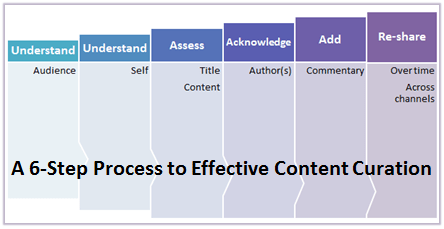
Whether you’re a corporate brand or a personal brand, it’s important to effectively curate (and share) good content. Effective curation builds influence and authority: share information that enables your audience to learn (and do their job better) and they’ll come back for more. Here’s my six step plan for more effective content curation.

1) Understand your audience.

Keep your captive audience captive

Photo credit: Flickr user Anirudh Koul via photopin cc

Rather than using analytical tools, I build an understanding of my audience less formally. On social media, a portion of my following includes those whom I followed (and they, in turn, followed me back). This segment I know fairly well, since I followed them in the first place.

For others, I develop an understanding based upon interactions: replies to my tweets, comments they add to retweets, etc. In using Twitter over the years, I’ve come to understand that my followers are interested in social media, technology, events and sports. And that’s not surprising, because those are my interests as well!

2) Understand yourself.

You may be saying “of course I understand myself!” And while I’m sure that’s true, this step is really about defining your brand and what it represents. The understanding of your audience is reciprocal: they’re also developing an understanding of what you represent.

Let’s say you’ve been sharing articles on science and technology for the past 12 months and just developed an interest in baking cupcakes. In the past, your tweets were 80% science and technology. Today, it’s 20% science and technology and 70% cupcake recipes.

The shift in interest is fine, but understand that many of your followers “found” you because of your science and technology tweets. This means that you’re less influential (to them) on that topic. If that’s not what you wanted, then you’ll need to re-balance your content sharing back towards useful science and technology.

If cupcakes are indeed your new thing, then I like chocolate peanut butter varieties.

3) Assess title AND content.

Assese both the title and the content

[Make sure both the meat and the gravy are savory.]

The title of an article (or post) is crucial. On Twitter, it’s the only thing your followers may see. I look for a combination of subject matter and compelling headline. Good headlines draw you in, while answering the “what’s in it for me” question at the same time. Of the following two options:

Blogging Tips from an Expert Blogger
10 Tips to Make Your Blog Take off Like a Rocket Ship

I prefer the latter.

Titles: to change or not to change.

Occasionally, I’ll share a worthy piece of content for which the title lacks a bit of punch. In my mind, the title doesn’t do the piece justice. So instead of tweeting the article with the supplied title, I’ll share the essence of the article in the tweet. If I’m short on characters, I’ll delete the original title. Doing this results in a higher likelihood of people clicking on the link.

The content (aka meat)

Now that we’ve covered the title, it’s critical to actually read the content (or at least skim it). If the content doesn’t match the title, or if the content quality isn’t up to par, then don’t share it.

Favor quality over quantity when it comes to curation. Even if you’ve “sold” me on a great title, I avoid sharing these types of content:

  1. Content that was written solely for SEO (you know what I’m referring to, right?).
  2. Blogs that have an imbalance between banner/search ads and content.
  3. Slide show content (i.e. want to read our Top 10 list? Click “Next” nine times).
  4. Content that’s too short (e.g. 1-2 paragraphs in total).
  5. Content that my audience would not value (despite the strong title).

4) Acknowledge the author(s).

On Twitter, list the author’s Twitter handle in the tweet. On Facebook, tag the author – or, tag the Facebook Page of the organization that published the article.

Acknowledging the source is a common courtesy, while linking to their profile sends them a little love. Authors will see that you’ve acknowledged them – and in turn, they may follow you, retweet you and share some of your content.

5) Add a splash of commentary.

When users share my tweets or blog posts, I appreciate it when they add their own thoughts within the tweet. Let’s face it: if you’re “merely” sharing article after article, just listing the title and link, you could be an automaton (rather than a human being). So try this:

For every 5 articles you share, include a comment in 1 of them

Here’s an example where I combine commentary (albeit brief) with acknowledgement:

In addition to commentary, feel free to insert relevant hash tags. For instance, if a tweet about event technology doesn’t already contain it, I often add the #eventprofs hash tag. I then change the “RT” to an “MT,” to indicate that it’s a Modified Tweet.

6) Re-share and re-distribute.

For curated content that you really love, re-share it again later on (but not TOO often). I’d love for my Twitter followers to read the great article I just shared, but the reality is that 90% of them missed my tweet.

In addition to re-sharing, provide additional distribution by publishing the content on other social networks. For instance, for an article you tweet, selectively share it:

  1. On Google+.
  2. On your LinkedIn profile.
  3. Pin an image (from the article) to one of your Pinterest boards.
  4. On Facebook.
  5. Write a blog posting and link to the piece.

Conclusion

Think of yourself like a museum curator. Hundreds (or thousands) of people are coming to your exhibit. Select (and show off) the pieces of fine art that you’ve assembled. Leave the lesser pieces behind the curtain.


3 Simple (Yet Powerful) Features Every Webinar Platform Should Consider Adding

June 1, 2013

My advice for webinar platform providers

Photo credit: User laughlin on flickr via photopin cc

Introduction

I’ve planned many webinars and attended a whole lot more. Webinars are a tried and true vehicle for communication, lead generation, training and more. That being said, the user experience could be even better. Let’s cover three features every webinar platform should consider adding.

1) Scrolling tickers.

Scrolling tickers would be useful in webinars

If you’ve ever presented a webinar, you know that without fail, these two questions are asked every time:

“Will this webinar be available on-demand?”
“Will the slides be made available for download?”

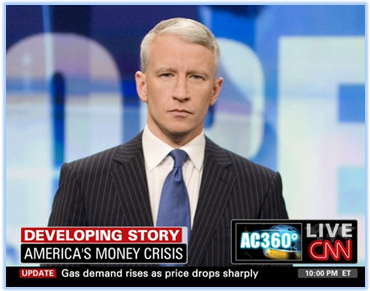
This information should be provided to viewers at the beginning of the program (or, throughout it) – NOT during the Q&A portion at the end. But how can this be accomplished? With a scrolling ticker placed within the webinar console (a la CNN, as shown above).

Pre-programmed ticker messages.

The ticker could be programmed with a set of messages to be run in rotation. With regard to the slides, the messages could be:

“The presenter’s slides are available in the ‘files’ folder [above]”
“Slides will be posted to our blog immediately after today’s webinar”
“Slides will be emailed to you right after today’s program”

You’d program a similar message with regard to the on-demand archive.

On-the-fly ticker messages.

Webinar planners (or moderators) could then submit ticker messages on the fly, providing comments in context to the presentation.

Examples:

Re-share a great quote the presenter just said
Remind viewers to submit questions
Invite viewers to visit the presenter’s web site
Invite viewers to visit your web site

2) Enhance the “Q&A Slide”

How most webinars end

[Do I really need to stare at this for 25 minutes?]

Let’s say a webinar is 45 minutes long. The presenters complete their slides in 20 minutes and spend the next 25 minutes on Q&A. This means that the ending “Q&A slide” remains on the screen, unchanged, for 25 consecutive minutes!

This is a pet peeve of mine.

So here’s how to address this: dynamic slides. When presenters select a question to answer, they click an element in the presenters’ console. A new slide is rendered containing the question text. The webinar planner can choose a setting which determines whether the submitter’s name is shown next to the question.

Now, as viewers join the webinar in the middle of a presenter’s answer, they’re able to see the precise question being answered. Use this with the “on the fly” ticker messages and your Q&A session just got 200% more effective.

3) Copy SportsCenter’s rundown graphic.

Add a rundown to your webinars

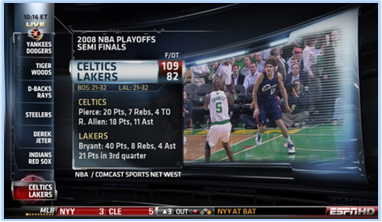
In 2007, according to Wikipedia, ESPN’s SportsCenter introduced a “rundown” on the right side of the screen (later moved to the left). The rundown listed, from bottom to top, the upcoming highlights (or stories). If you see your team’s highlights listed in the rundown, you’ll stick around and wait to see it, thus keeping you viewing SportsCenter longer.

I’m NOT suggesting that a webinar rundown simply list the heading of each slide, a la the slide outline in PowerPoint. Instead, presenters should be asked to map out the primary segments of the webinar. And it’s these segments that should be listed in a rundown.

In a live webinar, the idea is to interest viewers in subsequent segments (to keep them around). In the on-demand archive, the rundown segments are clickable, allowing viewers to navigate directly to that segment.

Conclusion

OK, so perhaps these features aren’t as simple to implement as I might think. But they are powerful. Add these three features to your platform and I guarantee that your customers will produce more effective webinars.


10 Lists of 10: Insights on Social Media, Product Marketing and More

May 27, 2013

Top 10 Lists on social media, product marketing and more

Introduction

Because “lists of 10” is a popular format on this blog, I decided to round up a “list of 10 covering the lists of 10.” Without further ado, I present you with my ten favorite lists of ten.

1) 10 Reasons Print Rules in The Digital Age

Call me old fashioned: this post provides ten reasons why I enjoy magazine subscriptions to The Economist and SI.

2) 10 Steps to Creating Blog Posts Your Readers Will Love

My ten step process for writing blog posts. Since this post is a compilation of past posts, I didn’t use the process this time.

3) 10 Reasons Texting Has Taken Over the World

10 reasons texting has taken over the world

Texting is not limited to the younger generation – in fact, texting is taking over the world.

4) Unable to Attend an Event? 10 Ways Twitter Fills the Gap

You simply can’t make it to all events. And when you can’t, turn to Twitter to fill the gap.

5) 10 Reasons Storytelling is The New Product Marketing

Storytelling is the new product marketing

Calling all product marketers: tell good stories.

6) 10 Reasons to Skip the Web Site in Favor of Twitter (When Researching a Company)

When I research a company, I find it more useful to skim through their home page, then jump directly to their Twitter profile.

7) Top 10 Tips for Social Media Time Management

How to manage your time on social media

Intimidated by the amount of time social media consumes? Check out this list of tips on social media time management.

8) The 10 Things Marketers Should Do When Starting a New Job

When Marketers start a new job, they should engage with Sales right away, among other things.

9) 10 Reasons Social Media Addicts Should Go Camping

Camping lets you take a break from social media

Want to get off the grid and disconnect from social media? Go camping.

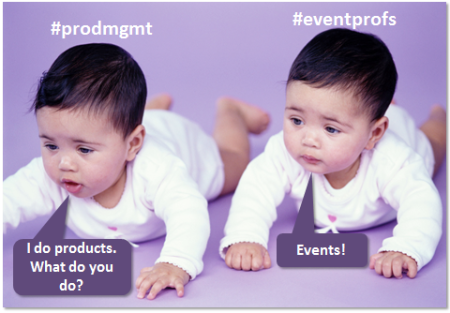
10) 10 Reasons Product Managers and Event Managers are Kindred Spirits

How product managers and event managers are alike

This list argues that documents how: product managers and event managers do a lot of the same things.


The 10 Things Marketers Should Do When Starting a New Job

May 25, 2013

Do these 10 things when starting a new marketing job

Photo credit: Courtney Dirks via photopin cc

Introduction

Recently, I started a new job at DotNetNuke, a leading web content management platform. As a product marketer, part of my role is to help tell the story of the great products we sell – and, in a broader way, the great company we are.

As a result, I wanted to meet everyone in the organization, from Sales to Legal, from Engineering to Finance and from HR to Customer Support.

Here are the ten things marketers should do when starting a new job.

1) Introduce yourself to everyone.

Meet everyone at your new company

Photo credit: Flickr user: screenpunk via photopin cc

Depending on the size of your organization, it may be challenging to meet “everyone.” I’m based at headquarters, with about 40 other team members. I was taken “on the rounds” to meet everyone. If you don’t have the benefit of being taken around, be sure to introduce yourself to everyone you come across.

2) Ask for an org chart.

I was provided an org chart on my first day, which helps on a number of levels. First, it gives me a list of everyone in the organization. Next, as I meet people, I’m able to look them up on the chart to confirm their role. And finally, it gives me an early sense of whom I’ll be working closely with (e.g. account managers, account execs, etc.).

3) Engage with Sales right away.

Sales and Marketing alignment begins with a “hello.” Introduce yourself to as many sales reps as you can. The first week is primarily an “existence proof,” so Sales knows your name and begins to recognize your face. It’s the beginning of a long-standing (and important) relationship.

4) Focus on completing the “logistics.”

Filling out the W-2, reading the employee handbook and enrolling in benefits are important and necessary steps. Spend the time early on to complete these steps. If you can get them done on Day 1 or 2, the rest of your first week (and beyond) is set up for success.

5) Schedule video conferences with remote teams.

Meet remote teams via video

Photo credit: Flickr user: oxmour via photopin cc

Since our Engineering and Support teams reside in a different location, I was scheduled on orientation briefings with the leaders of those teams. We used a Polycom video conferencing system, which allowed us to see each other. If you don’t have such a system in your organization, go with Skype or Google+ Hangouts.

6) Attend as many internal meetings as you can.

Ask for permission to attend as many internal meetings as your schedule permits. Because you’re new, you’re guaranteed to learn something in each meeting. I attended a daily scrum meeting and got to hear details around the current product release. It also gave me a feel for how the Engineering team works.

7) Tell Sales what you plan to do for them (informally).

I boiled it down to this: I want to enable Sales to sell more. Define your objective up front and communicate it. That helps shape everything else you do. Communicate the “what,” then work to define the “how.” Sales will be sure to help you with the “when.”

8) Ask for the fire hose to be turned on.

Ask your peers to send you as much information as they can: email threads, project plans, existing marketing content, etc. It’s better to have the fire hose be turned on than to be lacking in water. You’ll need to prioritize what you consume and review – but as a marketer, you’re skilled in working with (and prioritizing) massive amounts of content.

9) Attend sales calls as a silent observer.

It’s good to see product demos from peers, but it’s priceless to observe a sales call (and demo) with prospects and customers. You get to learn a lot about your products. And importantly, you get to see how Sales is positioning and selling the products. During your first week or two, you may not be ready to have a speaking role on these calls. So let Sales know up front that you’ll focus on listening.

10) Develop a short-term plan.

Your boss will probably provide you with a short-term plan. Take that plan and compress it down to an even shorter timeframe (e.g. your first 1-2 weeks). This helps you prioritize at a more tactical level, to ensure your first 1-2 weeks are as effective as possible.