Insights And Experiences From Virtual Worlds Experts

March 9, 2009

On Monday evening, I attended FountainBlue’s High Tech Entrepreneurs’ Forum at Microsoft’s Mountain View (CA) campus – the event was titled Virtual Worlds: The Hype, The Reality, The In-Between and was sponsored by Microsoft and TIPS Group.  FountainBlue, a “membership-based, for-profit, collaborative organization designed to positively impact the way people, businesses and organizations work,” has organized a new sub-group around virtual worlds, which officially launched coincident with Monday evening’s event.

FountainBlue landed a true All-Star panel of Virtual Worlds visionaries and experts.  Each panel member provided thoughts on virtual worlds and then took questions from the audience.  A summary of each panelist’s thoughts follows.

UPDATE: FountainBlue has posted a summary of this event on their blog.

Steve Nelson – EVP, Chief Strategy Officer, Clear Ink

Steve is EVP and Co-Founder of Clear Ink, an interactive agency based in Berkeley, CA, who has many “claims to fame” in Second Life development. Among their Second Life projects was a simulcast of the 2008 TED Conference (in Monterey), an appearance by Newt Gingrich in-world, the development of a virtual headquarters for Linden Labs and an in-world island in conjunction with the popular sitcom The Office.

Steve started with his definition of “virtual world” – a social platform that’s immediate and immersive – quite a relevant and apt definition, if you ask me.  Steve stressed the immersiveness of 3D virtual worlds by comparing a webinar viewed “standalone” with one viewed in-world.  Steve noted higher retention and recall rates of the in-world viewing – as viewers of traditional webinars are far from immersed – instead, they’re checking their email and multitasking with other apps on their workstation.

Steve noted that Clear Ink assists companies in virtual worlds via three e’s:

  1. Expectations
  2. Experience
  3. Experimentation

In closing, Steve noted five business models for generating revenue with virtual worlds:

  1. Own the virtual world platform
  2. Sell virtual goods
  3. Create virtual worlds tools and utilities
  4. Be an agency – design, consulting, etc.
  5. Use virtual worlds effectively as an enterprise – save money and be a more effective company

Robin Harper – Former VP of Marketing and Community Development, Linden Labs

Robin took us back to the very early days of Second Life and noted that in the initial development stage, Linden Labs thought the platform was about facilitating entertainment.  Fast forward to today and Robin believes that virtual worlds are so much more than entertainment.  In the past 18 months alone, Robin notes that growth in Second Life has been driven by education and enterprise (which each have grown by 2x in that period).  There is an increased use for simulation, prototyping, design and experiential learning.  60,000 residents are profitable (meaning they generate revenue that exceeds their land costs) and the top resident grossed over $1.7MM in US dollars (real money) by selling virtual shoes.

Robin notes that the power of virtual worlds lies in the collaborative tools that are provided with minimal constraints. She compared the development of virtual worlds to the development of third world countries – growth is facilitated by allowing residents to own their own land, own the intellectual property (of their land assets) and participate in an economy that fuels commerce.  Important areas of development today are “behind the firewall” applications, as well as interoperability across worlds.

UPDATE from Robin Harper: I’d like to clarify the statement attributed to me above. The figures I reported were originally estimates based on one quarter of data, so should not be taken as more than an annualized estimate. In addition, my reference to the sale of virtual shoes was in the context of the types of industries that are generating return in Second Life. In the top group of earners based on the estimates, most were involved in the land business, and a couple were in other businesses like events management and retail/virtual goods, including shoes. For more information, please see my blog: http://couldtherebewhales.blogspot.com/2009/03/correction.html

Michael Gialis – New Business Development, Sun Microsystems

Michael works in Sun Labs, with a focus on online gaming and virtual worlds.  Sun’s technologies in this space are Project Darkstar, Project Wonderland and Project Sun SPOT.  Michael notes that the #1 barrier to virtual worlds adoption is the non-intuitive nature of the client application.  Michael’s comments stirred some discussion among the panel regarding enhanced client capabilities, such as the use of sensors in lieu of keystrokes.  Robin noted that Mitch Kapor is experimenting with a 3D camera – when you smile, your avatar smiles. Some panelists, however, noted that some contexts may require separation between your true feelings and your avatar’s expressions – for instance, in a learning environment, you may not always want your true emotions to be on display.

Anne-Marie Roussel – Business Development Director, Microsoft

Anne-Marie manages Microsoft’s digital media portfolio, which includes Xbox, Zune and MediaRoom.  Anne-Marie noted Microsoft’s early efforts in the virtual world with its Flight Simulator game – which in turn led to the development of a product called Microsoft ESP (for 3D visualization).  Anne-Marie gave the interesting example of leveraging virtual worlds for training sales staff – if you sell Ferraris, then your clientele are much different from those buying Fords, so a virtual world can train sales staff on how to interact with prospective customers and face the sorts of questions/issues that Ferrari buyers are sure to present you with.  Anne-Marie spoke of Microsoft Virtual Earth and noted work being done to marry its 3D visual maps with crime scene data (to assist local law enforcement).

Susan Stucky – Manager, Service System Design, IBM Almaden Research Center

Susan noted that IBM’s involvement in virtual worlds is not to be a platform provider – instead, IBM is platform agnostic.  Susan’s interest in the virtual world is to achieve results that would be harder to accomplish in the real world.  One example noted was the practicing of negotiations of complex deals – reviewers (of the deal maker) could provide a virtual thumbs up or thumbs down.  Trainees could then replay the segment and view the feedback as it occurred.  Susan spoke of the need to capture data to better understand in-world behavior.  IBM Researchers developed technology to take audio chat, utilize voice-to-text to transcribe it and then perform unstructured text analysis to decipher patterns of behavior.  Susan also spoke of IBM’s Sametime 3D initiative and referenced the use of Second Life to facilitate a virtual meeting for IBM’s Academy of Technology.

If you’re interested in related events from FountainBlue, have a look at their events calendar.


Interview With Nic Sauriol, Venture Lead on Nortel’s web.alive Platform

March 1, 2009

Nic Sauriol, Venture Lead of web.alive

Nic Sauriol, Venture Lead of web.alive

Related Links:

  1. Lenovo eLounge
  2. Project Chainsaw
  3. My review of Lenovo eLounge

Amidst great fanfare in January at CES 2009, Lenovo unveiled the Lenovo eLounge virtual environment. Powered by Nortel’s web.alive platform, eLounge allowed users to enter a 3D virtual world to learn about Lenovo Thinkpad notebook computers (with an option to purchase), interact with other visitors and “meet” with representatives from Lenovo and Nortel.

Nic Sauriol is the Venture Lead for web.alive (also referred to as Project Chainsaw).  Nic co-founded the project a few years ago with Arn Hyndman, the chief architect.  I sat down (virtually) with Nic to get his thoughts on web.alive, eLounge, enterprise virtual worlds and more.  Here’s the interview.

If you met someone on the street, how would you describe (or explain) the web.alive platform to him/her?

Nic: web.alive is a collaboration platform designed to integrate into an existing website much like flash. When a web site has web.alive and people visit that site, they can experience a rich and immersive environment and interact with other users – including the website’s employees/staff who are also on that site . They can interact in an immersive and fluid way thanks to real world positional audio. Fundamentally, web.alive is about bringing live, immersive and interactive communications to connect people in real-time via the web.

It’s designed to be a very engaging and entertaining experience – great for social networking efforts. A social experience of the web where a group of friends could meet up on Facebook or LinkedIn and then go visit a few stores like the Lenovo eLounge, watch some shows in Hulu and then comment on the news at Yahoo is what web.alive is about in this context.

web.alive also offers tremendous potential as a tool to facilitate collaborative learning.  Gone are the days of an instructor broadcasting content in one direction – today’s learning requirements call for more collaborative work between instructors and students.  web.alive provides engaging and collaborative environments to make this mode of learning a reality.

In the enterprise, web.alive offers a new world of opportunities to change in a positive way how people communicate. Moving away from calendar based meetings and formal phone calls, to a much more dynamic means of interaction. A place where employees from all over the world can go, bump into each other, exchange ideas, grab a meeting room to discuss and collaborate etc. Simply embedding the web.alive client into existing intranet web sites, integrating into a UC [unified communications] solution (visit Nortel if you don’t already have one) and suddenly your employees are collaborating as though they were collocated.

Nortel and Lenovo received quite a bit of buzz regarding Lenovo’s eLounge and its use of Nortel’s web.alive platform – what do you view as the successes of the launch – and, what were some of the challenges that you had to address?

Nic: The beta launch at CES of the Lenovo eLounge was a tremendous success from our perspective. We saw a great opportunity to help Lenovo take their customer service to an entirely new level. Significantly more users than we had expected visited the beta launch (articles and blogs like yours were a significant factor) and most importantly we saw the kinds of metrics we could have only hoped for. I personally assisted a number of customers who toured the eLounge to browse Lenovo’s laptops. What is most important is that these  – for the most part  – were purchases that otherwise may not have happened, at least not on a traditional retail web site. In addition, we have seen excellent retention rates. Even when users don’t make purchases, they spend a lot of time surrounded by Lenovo’s brand – over time this will also help conversions.

Obviously there are customers that go to the Lenovo web site that intend to make a purchase, and various tools facilitate that. While we are excited to help in that regard, what we always hoped would happen was that users would visit the site that did not have a specific intention of making a purchase, and would otherwise have bought from a retail store (likely helping a competitor to Lenovo) and instead they make the purchase from the eLounge as a result of an unplanned/informal conversation with a sales person or some other person like myself who just happens to be there.

In terms of challenges, there have been many. While the majority of users have had a smooth experience, some users encountered a variety of different bugs which we are fixing as they arrive (users send us e-mails at support@projectchainsaw.com with their bugs). Most users were able to get in and navigate without any specific help, but here have been some that required assistance, so we are working to make interaction even more intuitive and fluid. One really notable challenge was that Lenovo sales staff had to adjust their mode of operation. Call centers wait for a customer to call to initiate a dialogue, unlike the real world where we can reach out to shoppers.

We had to spend time honing that skill to get the right balance of support (i.e. not jump in someone’s face when they first arrive, but make certain that they know you are there and available to assist if you need help). The biggest challenge of all is that people want more, a lot more.

Have there been any new developments with eLounge since the time of the CES 2009 launch?

Nic: Yes, there have been a number of new developments, some deployed others coming soon. Most importantly, Lenovo has seen the positive metrics we had hoped for and have committed to coming out of beta and doing a full supported launch (coming soon!). Changes that have been deployed include a large number of bug fixes, a few new features in the client (like notification when new users arrive via a desktop balloon) with many more coming. While there have been a few minor content updates, there will be many more coming when the site launches out of beta.

Tell us about other enterprise use of web.alive?

Nic: There has been a tremendous interest in web.alive from an enterprise perspective. Whether it be as a global water cooler (e.g. as an enterprise, place web.alive on your global internal home page to enable informal/accidental collaboration and discussion between your employees) or as an alternative for internal meetings (in particular those that would require travel). We have been particularly happy with the tremendous support and pull from within Nortel and have slowly been rolling out web.alive for internal use. We have also been building a number of features to better support internal collaboration beyond just positional voice and slides etc.

Our ultimate goal is to find ways that we can make web.alive collaboration more effective than face to face. The seams ambitious, but there are a number of challenges with face to face communication, let alone current telecommunication technologies that we believe we can address. The simplest example is knowing who you are speaking to or who is talking – this is often a challenge even face to face. More exciting examples include detecting and displaying emotion – there are people who don’t communicate very effectively because they are not skilled at detecting emotion (in the extreme, people with forms of autism) – we believe that over time we can augment and provide that kind of information.

Has there been any existing or planned consumer use of web.alive?

Nic: We are actively working on models to support low-end deployments of web.alive. I have always stated as a goal that my mother in-law should be able to embed web.alive in her personal web site. While technically we support a simple embed tag (in theory she could embed the eLounge on her page), we have yet to deploy a single environment built for this purpose. Most challenging of course if establishing the right business model for this, which is something we are actively working on. We will have something this year that will support small businesses.

What are customers telling you they’d like to see in web.alive?

Nic: This is a really difficult question to answer because we have talked to so many people, whether they be casual users in the eLounge or companies that we have talked with. Common themes would include a higher degree of interaction (e.g. shaking hands, more fluid and realistic animation, taking apart laptops etc.); more audio controls like the ‘cone of silence’ for private discussions; means to invite friends and better ways of staying connected.

What’s on the feature roadmap for web.alive?

Nic: We will be working to further optimize the new user experience (from client optimizations in size and speed to usability etc.), enable small businesses, enhance collaboration and make the whole experience much more immersive and interactive. We are also looking to start rolling out our community (user and developer) in 2009 to enable more contribution and an eco-system of value co-creation.

What does the future hold for enterprise focused virtual environments?

Nic: There is no question in my mind that immersive positional audio will fundamentally transform how we communicate. I believe we will start to see the kind of connectionless (from a user perspective) communications that happen in web.alive that enable “accidental collaboration” to permeate how enterprise users interact with each other, their suppliers and their customers. Eventually, calendar based meetings will become significantly less frequent as issues are resolved on the fly. Ultimately, I am convinced that virtual environments will facilitate this way of communicating by enabling rich immersive and dynamic collaboration. Just consider how an enterprise could use web.alive to improve their brand awareness by letting their customers hold virtual events or get-togethers with their network of friends, family and associates.

The best part if that we have a number of surprises (well, if you’re a techie like me they are surprises 🙂 – features that have not been rolled out but that we have built and are playing with. I won’t expand on what they are just yet, but we will roll some of them out over the coming weeks and months, and I assure you they are exciting. These features will really help incentivize enterprises into taking the leap and jumping into this kind of technology by doing things that can only be done with the kind of architecture.


Real World Meetings In A Virtual Office

February 11, 2009

Amanda Van Nuys, Linden Labs’ Director of Enterprise Marketing (and known in-world as Amanda Linden) has an interesting blog posting titled “Working in the Virtual World“.  Amanda describes her use of Second Life for work-related meetings and collaboration.  A neat physical/virtual tie-in was done with a conference room:

The physical conference room—Isabel—has a virtual counterpart that is an exact replica—Virtual Isabel. A camera in Isabel captures what’s happening in the room and displays it in the virtual space. Simultaneously, the participants in Virtual Isabel are projected on the wall of physical Isabel. The result is a seamless experience—two conference spaces, one real and one virtual, merge into one.

As for Amanda’s use of Second Life for meetings, she describes it as such:

These days, I’m spending at least 2-3 hours a day in Second Life, meeting with my colleagues distributed all over the world—collaborating, brainstorming, learning, and decorating my new office space in LindenWorld.

For companies with a highly distributed workforce, virtual worlds and their associated virtual meeting places can be a win-win scenario. I once met an employee of a Fortune 500 company who noted that he’d never met his manager, nor had he met any member of his entire team — except that he’ “met” them online, in web meetings, conference calls, Skype sessions, etc.

I’m a remote worker – I’m in the Bay Area, while the majority of my company is in the Chicago area.  Fortunately for me, my company provides an internal virtual office platform that serves as an interactive intranet plus meeting and collaboration space.  The virtual office is simply an application that rides on top of same platform that services virtual tradeshows, virtual career fairs and virtual sales meetings.

To be set up for a virtual meeting on our platform, here’s what I do:

  1. Login to the virtual office platform (via the web) – my co-workers and I do this as our first task once the computer boots up
  2. Activate my webcam
  3. Put on earbuds (so that the folks you’re speaking with don’t hear their voices reflect back into their sessions)
  4. Request a meeting with a co-worker within the platform

It’s as simple as that.  I tend to have a few meetings per week in the virtual office, mixed with the more conventional meeting via telephony conference call.  Here are the efficiencies I’ve seen with virtual office meetings:

  1. Lower overhead to start a meeting – since the virtual office provides presence indication, I know when a colleague is logged in.  I can initiate a webcam session with a colleague in the same manner that I’d start up an Instant Messaging session.  Compare this to the typical meeting “set-up”, where emails and Outlook invitations are sent and the meeting organizer awaits replies.
  2. Facilitates ad hoc, spur of the moment collaboration – similar to the gathering at the water cooler – or, the spontaneous brainstorming session around the whiteboard.  But in the virtual office, the spontaneity occurs while you’re still at your desk.  Additionally, requesting a virtual meeting session is very convenient – compare it to walking over to a colleague and tapping her on the shoulder.  Here, your colleague accepts/declines the session with the click of a mouse.  If she’s busy, she goes right back to what she was doing.  It’s like IM’ing a colleague rather than calling her on the phone.
  3. Material related to the meeting is at your fingertips (or a mouse-click away) – my virtual office session is simply a tab in my Firefox browser.  Information I need for a meeting is likely in another browser tab – or, in an application like Excel or Word.  It’s highly convenient to toggle between these apps and have the information I need at my fingertips.
  4. Immediacy – ever attend a face-to-face meeting and  take on an action item to send out a URL to all the meeting participants (when you get back to your desk)? In a virtual meeting, you can find that URL and copy/paste it into your messaging session. Now, your colleague(s) can review the URL in real-time and you can resolve issues (or obtain the necessary feedback) sooner.
  5. True facial expressions – in an avatar-based virtual space, I can emote via gestures or text comments. In a webcam-based virtual meeting, however, my colleagues can read my true facial expression.  The virtual office platform that I use supports multi-user webcam chats (of up to 9 participants), so we can all see one another, as if we all piled into the same conference room.

I haven’t even mentioned the savings in carbon emissions and cost (i.e. the use of IP technologies and the bypass of the telephony network).  I’ll always want to connect with colleagues in person – but, today’s technologies help remote workers get the job done – while increasing efficiency and productivity.  A long day in the (virtual) office never felt so good!


Virtualis and Trend Micro Put On Quite A Show

February 5, 2009

Trend Micro

Source: Trend Micro

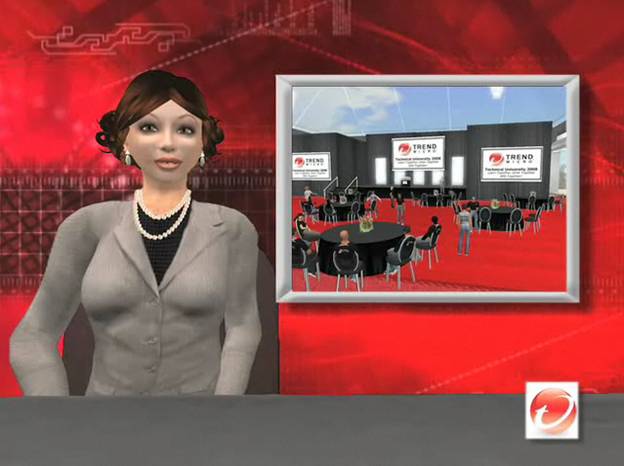
The Virtualis Convention and Learning Center is an island within Second Life that’s produced by California-based Corporate Planners Unlimited.  Trend Micro, a technology provider of endpoint, messaging and web security, recently hosted a 2-day live event within the Virtualis’ Second Life convention center.  Virtual Worlds News has detailed coverage of the event here:

http://www.virtualworldsnews.com/2009/02/corporate-planners-unlimited-growing-virtual-events-in-second-life.html

Dan Parks, President and Creative Director at Corporate Planners Unlimited (and Founder of Virtualis) is quoted extensively in this article regarding the demand for virtual events (and Virtualis), their cost efficiency and uses of Virtualis by other clients of his.  As interesting as the technology is (and it sure is cool), I found the virtual event planning (by Virtualis and Trend Micro) to be most interesting.

In the Virtual Worlds News article, you can view a 2 minute video overview of the event (given by a Second Life avatar / news reporter, no less).  Alternatively, the same video is available on this page: http://silverandgoldie.com/trendmicro.htm (Machinima by Silver & Goldie, who [presumably] produced this nifty segment).

Virtualis and Trend Micro named the event Trend Micro Virtual Technical University – an internal-facing training venue for 75 Trend employees (also called Trenders) across 5 locations.  Day 1 started with an introduction (and keynote of sorts) by Harry Coit, Trend Micro’s Director of Technical Support, North America.  Harry welcomed the Trenders, who sat around round tables in folding chairs.  Harry’s goals for the 2 days:

  • Collaborate
  • Building strong relationships
  • Have some fun

The in-world sessions were spread across two tracks – product sessions and educational sessions.  The product sessions provided product updates on emerging technologies, along with case studies on the latest web threats.  The educations sessions included creativity sessions, which were held in futuristic settings (where avatars sat around in Jetson-like furniture).

Trend Micro

Source: Trend Micro / Virtualis

For fun, the event included four unique technical challenges.  In a parachute challenge, avatars descended from the sky in parachutes and had to score points by grabbing balls that flew by.  A treasure hunt challenged participants to find specified items throughout the island – scores were tabulated and the top 2 teams squared off in a Trend Micro Tech Challenge – a live game show that was played in front of the entire audience.

Trend Micro

Source: Trend Micro / Virtualis

At the end of the first day, a night club hosted dancing, along with music from “one of Second Life’s most popular entertainers”.  All in all, quite a show.  I admire the attention to detail paid by Virtualis and Trend Micro in planning the events – this was truly a melding of virtual world benefits with the full trappings of an all-day physical (corporate) outing.  The typical applications of virtual worlds and virtual tradeshows –  lead generation, marketing, exhibiting products and services, internal training – has now taken on a new angle.  We’re now seeing internal training, complete with virtual team building!


Home Depot’s EXPO Design Centers Should Go Virtual

January 29, 2009

In a press release issued this week, Home Depot announced that it’s shuttering its doors on all 34 EXPO Design Center stores:

The EXPO business has not performed well financially and is not expected to anytime soon. Even during the recent housing boom, it was not a strong business. It has weakened significantly as the demand for big ticket design and decor projects has declined in the current economic environment. Continuing this business would divert focus and resources from the Company’s core “orange box” stores. Therefore, over the next two months, the Company will be closing 34 EXPO Design Center stores, five YardBIRDS stores, two Design Center stores and a bath remodeling business known as HD Bath, with seven locations.

But wait!  Let’s not be too quick to liquidate all the inventory and tear down the walls.  Images and footage can be captured from the existing design centers — and placed online.  With a Virtual EXPO Design Center, Home Depot can:

  1. Generate leads/business to their core orange box stores
  2. Facilitate e-commerce transactions directly within the virtual design center
  3. Bring the design center to the entire world (and not just those in the vicinity of the 34 physical stores)
  4. Differentiate from the competition

And, they can do all of this for fairly low cost – much lower than their costs for maintaining the original 34 physical design centers.  The concept here is a mashup between Realtor.com and Amazon.  With Realtor.com, prospective home buyers search for homes, view photos and take 360 degree tours.

With Amazon, shoppers of goods peruse, search and eventually purchase (online).  With a virtual design center, you facilitate both activities – prospects search for particular appliances and take 360 degree tours of model kitchens and baths.  By clicking on a particular item, the user can be provided with its full specifications (dimensions, weight, etc.) and  be taken to homedepot.com to purchase it immediately.

So visit the showrooms that are still standing and capture photos, videos and 360 tours.  There are many affordable solutions for capturing and rendering 360 views, such as IPIX and 360iSight.  Next, go interview some of the 5,000 employees you were planning to lay off and find the ones who are most personable and most “online savvy”.

Offer selected employees positions to remain with the company – as virtual showroom staff.  In their new role, their job is to be an embassador (online), answer questions in online chat and discussion forums (within the virtual design center) and help facilitate e-commerce or real-world sales.  To mix in some fun, outfit their avatars with the Home Depot orange apron (and yes, I know, that’s from the orange box stores – but, we’re having fun – and, it might help reinforce the brand).

To provide value to your ecosystem of partners and vendors, allow selected vendors (e.g. GE, Maytag, Kohler) to have booths within the virtual design center, which would provide a centralized collection of the vendor’s products.  Feel free to charge these vendors for their booth, so that you recoup some of your costs for building this environment.

Vendors could provide their own employees to staff the booth.  And once a week, allow a selected vendor to provide a live presentation (webinar or videocast) in the design center’s Auditorium.  Instead of driving clicks to the vendor’s web sites, allow users to click into homedepot.com to purchase the vendor’s products there.

Now, if you have leftover budget or time, mix in more fun into the environment – provide interactive areas where users can interact with kitchen or bath appliances.  Allow a user to turn on/off a stove; set an oven timer; open/close cabinets; fill up a jacuzzi tub with water.  Features like this increase the stickiness of the site and may keep users coming back.  I’m sure there’s much more than can be done – so whether it’s Home Depot or another retailer, I’m expecting to see this concept (virtual design center) become a reality in 2009.

Viking range?  $1,099.99.  LG refrigerator?  $799.99.  Online leads, interactivity and e-commerce?  Priceless.


Economic Downturn To Spur Virtual Job Fairs

January 10, 2009

On Friday, the U.S. Bureau of Labor Statistics reported that the nation’s unemployment rate hit a 16-year high of 7.2%, with 11.1 million Americans out of work.  Many of the unemployed are turning to sites like Yahoo HotJobs, Monster.com, Dice.com and Linkedin.  With such a wide pool of available talent, companies looking to fill positions will receive no shortage of attention (and job submissions). While this is a good thing for the hiring companies, they’ll be challenged to efficiently filter through the submissions and find the right candidates for the jobs.

Let’s consider today’s dynamic for hiring companies:

  1. Large potential applicant base (11.1 million unemployed)
  2. Applicants are cash-strapped
  3. Hundreds (or thousands) of submissions generated for a given job posting

What’s a good solution to address this combination of factors?  The virtual job fair.  With the unemployed less likely to incur expense to attend a physical job fair, placing the event online means that you’ll attract a larger (and potentially global) audience.  And while you won’t be face-to-face with potential hires, there are plenty of advantages of flooring such an event virtually.

First, let’s consider your job at the job fair. While your ultimate goal is to source attractive candidates, it’s just as important to sell your company (amd the benefits of working there) to these candidates. Some possibilities to consider for the virtual job fair:

  1. Place detailed information about the job (and your company) in your virtual booth – supplement with external links (back to your corporate site)
  2. Invite senior executives to the event (not just the hiring manager, but the hiring manager’s manager) – including your CEO!  Your CEO’s participation is quite possible with a virtual event, but may not be practical at a physical event
  3. Invite employees who hold the same (or similar) position – and have them network with candidates
  4. Host presentations about your company (e.g. webinars)
  5. Include on-demand video in your booth – so that candidates can hear (and see) from your company representatives
  6. Host sesssions in the event that show candidates how your company operates.  For instance, if you’re supplementing your software development team, stage a developer meeting for folks to observe. Virtual worlds like Second Life or web.alive can facilitate such a session. 

As for filtering through the candidates, you’ll want to review the chat transcripts that they had with your company representatives and review activity reports (e.g. booth visits, documents downloaded) to gauge their interest level in your company.  Additionally, work with your platform provider on applications you might leverage, such as surveys or quizzes to differentiate candidates.

On the attendee side, I recommend the following:

  1. Carefully select your avatar, since it’s a representation of you in the virtual world.  You’re sending a signal to your potential employer. Picking an unsuitable avatar is equivalent to attending a physical job fair unshowered and in your pajamas
  2. Take care in all your touchpoints.  Potential employers will be able to pick up on your writing abilities within text chat, for instance. Does your resume claim, “excellent written communication skills”?  Well, be sure to demonstrate them!
  3. Bring useful and relevant resources to supplement your candidacy – e.g. writing samples, code excerpts, etc. Additionally, look up potential employers online (e.g. on Linkedin) for additional context.

TMP Worldwide (parent company of Monster.com) hosted a number of virtual job fairs in Second Life during 2007.  EMC, Accenture, GE and U.S. Cellular exhibited, among other companies.  You can still visit the Network in World site here.

On January 14, 2009, P&G is hosting a U.S. Diversity Virtual Career Fair (full disclosure: my employer [InXpo] is powering this event).  I expect to see several more virtual job fairs in 2009, especially as job openings begin to pick up again from hiring companies.  If you have plans to attend or exhibit at a virtual job fair this year, leave a comment below with some details!


Review: Lenovo’s eLounge Virtual World

January 8, 2009

Lenovo eLounge (screen capture of author's avatar)

Source: Lenovo eLounge (screen capture of author's avatar)

Lenovo today unveiled a virtual world called eLounge, which is powered by Nortel’s recently announced virtual world platform, web.alive.  Lenovo appears to be using this venue as a social and interactive platform for providing information on their products and services (notably, their laptops).  Here’s Lenovo’s description of eLounge:

Experience a truly virtual 3D on-line shopping experience. Ask your friends to join you, and together explore and learn about lenovo products. It is similar to shopping in a retail store except you are on-line and in control of your real time interactive shopping experience.

* Create your own personal avatar
* Browse and interact with our virtual products
* Walk around and share your experience with customers from around the globe
* Get support from one of our virtual avatar product specialists

I reviewed eLounge on a Dell Latitude D630 running Windows Vista Business on Firefox 3.0.5 (perhaps I should have been on a Lenovo Thinkpad instead?).  eLounge runs within a browser, but first requires a download of Nortel’s web.alive software.  Here are the system requirements:

To help ensure that you receive the best possible experience, we recommend the following minimum computer set up:

* Windows XP/Vista
* Intel 945 integrated graphics or better
* 1 GB RAM, 1.50GHz CPU
* Broadband network connection (e.g., cable/DSL)
* USB stereo headset with microphone

Shortly after my download completed and I ran the executable, the eLounge virtual world appeared in the Firefox browser tab from which I initiated the download.  On initial entry, I saw 7-10 other avatars in the immediate vicinity and heard a female avatar ask, “How do I leave?”.  A Lenovo staffer politely addressed this inquiry and off she went.  As I got myself acclimated to the environment, I enjoyed viewing my auto-selected avatar – a svelte-looking, 5′ 5”, 150 pound male (image above).

After lounging in the environment and observing the avatar passersby, I was greeted by an avatar named Nicholas – turns out this was Nicholas Sauriol, the Venture Leader of Project Chainsaw at Nortel, the initiative at Nortel behind web.alive.  Nicholas gave me an extensive tour of eLounge, starting with some stations where Lenovo Thinkpads were on display.  By left-clicking on the mouse and hitting “w” on the keyboard, I was able to walk toward a Thinkpad, at which point its full configuration appeared on my screen.

At the bottom of the description was a link lableled (“Customize and buy”) — neat idea.  Nicoholas then walked me to a separate room – an auditorium where a few avatars were hanging out and an image of a Star Trek spaceship appeared on stage.  This is an area designated for product launches and announcements – leveraging a feature of web.alive called OmniVoice.  Typically in web.alive, sound volume correlates to your proximity to an avatar.  With Nicholas up close, I could hear him fine – but if he walked away, his voice would start to get faint.  With OmniVoice, the speaker gets the equivalent of a microphone, so  her voice is projected throughout the area (auditorium).

Side conversations could still occur while the presenter was speaking (in the same way that you can chat (whisper!) with your colleague during a physical presentation).  Nicholas then escorted me into a private room that he likened to an executive briefing center:

Lenovo eLounge (screen capture of private room)

Source: Lenovo eLounge (with presenter Nic Sauriol)

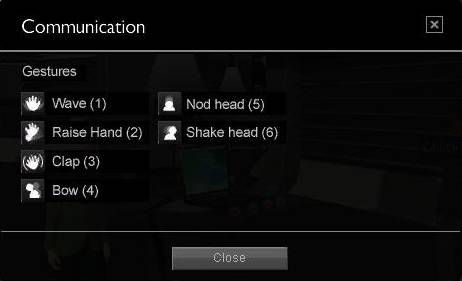
In this area, Lenovo can utilize PDF, PowerPoint, etc. to present to clients.  So the large displays (above) can render a PowerPoint, just like using a projector in a conference room.  Overall, I found the user interface of web.alive (and eLounge) to be quite intuitive.  I was immediately able to pick up on the relevant commands – the use of “overlay” text that appears transparently on top of the screen was useful.  And menus like this are handy:

Lenovo eLounge

Source: Lenovo eLounge

The numbers (above) represent keyboard shortcuts that allow you to “emote”.

The web.alive platform is built on top of the Unreal Engine from Epic Games.  Virtual Worlds News has some good coverage of eLounge, along with Nortel’s licensing of Unreal:

http://www.virtualworldsnews.com/2009/01/lenovo-using-nortels-webalive-for-ecommerce.html

http://www.virtualworldsnews.com/2009/01/nortel-licenses-unreal-engine-for-webalive-opening-up-to-development-community.html

In Summary

For a “Day 1” experience, I found Lenovo eLounge (and web.alive) to be quite good – I’m sure Nicholas and team at Nortel will continue to build it out with more features.  It will be interesting to see the applications that other companies may have for web.alive.  According to Sauriol, Lenovo is the first public launch of a web.alive client – there will be other public launches forthcoming – and there are a number of clients using web.alive behind the firewall (which we won’t hear about).

I’ll also be interested to hear how Lenovo is driving users into eLounge  (i.e. generating interest / demand), along with what sort of ROI they’re looking to generate from this investment.  Kudos on a good start to both Project Chainsaw (Nortel) and Lenovo.

UPDATE: Some supplementary information about the underlying technologies:


A Real Government Goes Virtual

January 4, 2009

Washington Post

Source: Washington Post

O Brave New World That Has Such Avatars in It! That’s the title of a Sunday article in The Washington Post by Michael Laris, in which he describes the efforts of the Arlington County (Virginia) government to create a presence in Second Life.  Here’s the basic idea:

Curious executives can swing by to gather market research aimed at luring grocery chains to Arlington. County officials can conduct presentations on an interactive white board as they promote the region to corporate prospects. And later this month, anyone interested will be able to join a confab on how to launch a business in Arlington.

Apparently, the Washington area has become a hotbed activity for virtual worlds:

The Bethesda-based National Library of Medicine, for instance, has created in Second Life a potentially noxious world of everyday health hazards called Tox Town, where clicking on a tower in a dusty construction site produces a list of the chemical properties of neighborhood runoff.

At the University of the District of Columbia, criminal justice students practice investigations and patrols and deal with such imaginary perp behavior as the attempted theft of Professor Angelyn Flowers’s pink convertible.

Other designers have created in Second Life a virtual Capitol Hill, where plans are afoot for a white-tie inaugural ball Jan. 20. Instructions are forthcoming on how to find a good tux.

I admire this initiative by Arlington County and encourage other governments (local, county, State and Federal) to follow suit.  I see the following benefits:

  1. The world becomes flatter and smaller, as governments get closer to their constituents (and vice versa)
  2. Governments may be able to save costs (imagine that) by utilizing the online/virtual world to connect with residents, rather than connecting in person at physical locations
  3. Assuming a critical mass of audience within the virtual world (I know, we’re not yet there), governments can efficiently distribute information, in the form of updated rules/regulations/bylaws, government news.  Also, how about regular visits by the County Executive within the virtual world
  4. Residents/constituents will feel more connected to their government, which will spur increased involvement in the community

The man behind Arlington’s virtual presence if John Feather, who is volunteering his time to make it happen.  For me, the following quote from Feather hits home:

For Feather, helping nudge the county into Second Life has opened a creative spigot.

In November, he started working on a 3D map of Arlington’s major buildings. Touching images on the map calls up Web pages about them, and he and his colleagues want to add real-time rent data and detailed visuals from architects and developers so that “when you click on that building, you go in the door.”

Such technology will eclipse standard Web sites, including the county’s, Feather said. “You’ll start to walk around places instead of going to flat pages.”

I agree – web pages will increasingly have the same 3D and interactive elements found in virtual worlds.  Web 2.0 has been fun, but the next phase of the Internet is going to be Web 3D-dot-oh.