Comparing Virtual Events and Virtual Communities

April 30, 2009

While virtual event platforms can certainly support a 365 day-per-year virtual community, my estimate is that 95% of the use case (today) on these platforms is for the single day or multi-day live virtual event.  I’ve seen some pick-up in the “ongoing community” concept and I believe that by this time next year, the 5% share (for virtual communities) will be more like 15 or 20%.  As I’ve written several times before, there are plenty of ways in which a virtual event platform can support a virtual community:

  1. The future of newspapers as virtual communities
  2. Online dating, powered by a virtual event platform
  3. An ongoing virtual crisis center to combat swine flu

There are important distinctions to keep in mind when considering a virtual community.  If you’re a veteran of virtual events and want to consider the community concept, I outline five key differences between the two – differences that will change the way you fundamentally plan and execute each one.

  1. Outbound marketing vs. inbound marketing – with a live virtual event, 90% of your registrant and attendee base will come from outbound marketing.  And today, most of that outbound marketing comes in the form of email blasts to assorted lists.  With a virtual community site that’s available 365 days a year, attracting an audience is more about inbound marketing – such as search engine optimization (SEO) to attract visitors to your community from search engines.  You’ ll want to complement the inbound marketing with some outbound promotion, but you’ll start to wear out your lists by promoting your virtual community site too often.  One common tactic is to use social media (e.g. Facebook fan page, Linkedin Events listing, Twitter, etc.) to drive visitors and attendees to your virtual event and virtual community.
  2. Local vs. global access – most live events take place during the course of a business day – and typically within a narrow timezone (e.g. the schedule is arranged around a US/Eastern or US/Pacific schedule for US-based events).  While I’ve seen attendance at North American work-day events from visitors across the globe, it’s the middle of the night for these folks – so 60-80% of the audience participate from the local timezone(s).  So for live events, the top priority of the virtual event platform is to support the local language at that timezone (e.g. English).  For a virtual community, access is 7x24x365, which means that all languages can apply.  As such, the virtual event platform ought to support rendering in as many languages as possible, both single and double byte.
  3. Concentrated vs. intermittent audience – live events are great, because a large and captivated audience can result in valuable interactions between attendee and attendee, as well as between attendee and exhibitor.  For a virtual community, a large, ongoing and engaged audience is nirvana – but, the more likely experience is that a few attendees will be in the environment at the same time you are.  This places more onus on the community organizer to provide compelling content and useful asynchronous tools (e.g. blogs, message boards, etc.) to keep the visitor from wandering away and logging out.
  4. Large staffing commitment vs. minimal staffing commitment – for a live event, you want an entire team of booth reps who can “man” your booth for the extent of the live show.  For a 7x24x365 virtual community, it’s not practical to have booth reps online in the environment around the clock.  Here’s where technology innovation can help – virtual event platforms that support an auto-attendant, for instance – a “chat bot” that engages visitors in text chat, which attempts to provide automated answers to common questions.  Or, perhaps some auto-triggered notifications to booth reps.  For instance, 5 visitors happen to be in my booth right now – so I receive an email alert that encourages me to login to the environment right away.
  5. Intra-day support vs. ongoing support – for the virtual event producer, the priority is to provide support for the duration of the live event.  For a virtual community, you want to ensure the service has 100% availability, but it’s not practical to personally monitor the environment at all times.  Here, you might want to rely on automation to continually monitor key indicators and send you email alerts (or text messages) when exceptions occur.

Here’s a thought – do a little of both (above) – think of your virtual event as an experience that has a repeatable schedule.  Once a live event has concluded, it transforms into a 7x24x365 virtual community.  And when it’s time for the next live event, you simply “light up” the live features within the community.  Then, when the live activities have concluded, you dim the lights and return to the community focus.  Either way, make sure you think about the importance differences I’ve outlined.  And have fun!


How To Use Social Media To Stay Current On Virtual Events And Virtual Worlds

April 21, 2009

In 2009, I’ve seen a surge in the volume of content published around virtual events and virtual worlds – coverage in mainstream media, blog postings, videos, podcasts and even entirely new web sites developed to cover these specific industries.  It’s all great – but with a rising volume of information comes the challenge of how to efficiently stay current.  I’ll highlight a few social media services that I use to keep current on events, track emerging technologies and find relevant commentary on all things virtual.

  1. Twitter (http://www.twitter.com)  – I published a prior blog posting regarding some of the specific people I follow on Twitter for virtual worlds information. To stay current on virtual worlds, find the authorities in that space and start reading their blogs or articles.  If you like what you find, see if they publish their Twitter handle – or, search for it yourself – and start following them.  I can easily stay current on virtual worlds by following a few select experts.  Their posts to interesting content serve as a virtual wire service for me (pun intended).
  2. Tweetbeep (http://www.tweetbeep.com) – I follow over 300 people on Twitter.  And as you may know, some of the A-level Tweeps obtain that status because of  their verbosity.  I tend to notice that a core set of 15-20 people (that I’m following) contribute about 80% of the tweets that I scan at any moment.  What’s the downside to this?  Well, that virtual events pioneer who only sends 2 tweets per day gets lost in the shuffle, as I’ll miss his tweets.  That’s why I use Tweetbeep to set up Twitter alerts by email – it’s like a Google Alerts for Twitter.  I set up search terms such as “virtual event”, “virtual tradeshow”, “virtual worlds” – and when I wake up in the morning, the alerts are there in my email inbox.  Now, if that pioneer tweets about virtual events, I’ll know what he said.  Also, I do have parallel Google Alerts configured, so that I learn about new content that Google has crawled on these same search terms.
  3. Google Reader (http://google.com/reader) – I’ll find blogs and web sites that focus on virtual – and subscribe to them (via RSS) in Google Reader.  This requires a bit more time, to skim through RSS headlines and determine what’s worth reading (similar to scanning an email inbox).  So it’s not quite as efficient as Tweetbeep or Google Alerts, but very valuable nonetheless.
  4. Friendfeed (http://friendfeed.com) – similar to Twitter, but also different – I find myself following a unique set of people on Friendfeed – and the neat thing with this service is that I can see not only their tweets, but links they’re reading via Google Reader and pages they’ve bookmarked with del.icio.us, to name a few.  In addition, I’ll check in on a Friendfeed Room called Metaverse News, where Gaby Benkwitz posts links to interesting articles about the virtual world.
  5. Facebook (http://facebook.com) – I created a Virtual Events Strategists Facebook Group – so I’ll check in there from time to time to see what’s been posted by group members (articles, images, questions, etc.) – and I’ll try to contribute to the group by posting articles that I’m reading about the industry.  I’ve also noticed that virtual event producers are leveraging Facebook Groups to promote their event – which is neat.
  6. Linkedin (http://linkedin.com) – I’ll use Linkedin to connect with folks I meet in the industry – and to keep current, I’ll check in on a few Linkedin Groups when I can (e.g. Virtual Worlds, Virtual Edge, Virtuual Events Forum, Event Managers, etc.).  Some groups tend to be more “spammy” than others – so I’ll find those with the best signal-to-noise-ratio and receive postings via a weekly digest email.

All in all, this probably involves a bit more effort than it needs to – that’s why I think the future of staying current will be about services like Tweetbeep and Google Alerts – you configure what you want to see and an “agent” goes out, finds it and delivers it to your doorstep.  Virtually, of course!


How A UC Davis Professor Leverages Second Life For Research

April 8, 2009

Professor Peter Yellowlees of UC Davis

Professor Peter Yellowlees of UC Davis

Dr. Peter Yellowlees, professor of psychiatry at UC Davis, has done some innovative work using Second Life to help educate people on schizophrenia.  I referenced Professor Yellowlees in an earlier blog posting about virtual worlds technologies that benefit the real world.  I contacted Peter to get some more information about his research and his thoughts on virtual worlds, Web 2.0 and the future.

  1. Tell us a little bit about yourself? I am a professor of psychiatry at UC Davis in Sacramento California, and I also run the UCD Health Informatics Graduate program, where we currently have over 40 graduate students enrolled in our masters and certificate programs. I trained in medicine in London, England, then spent 20 years in Australia, before being offered a position at UC 5 years ago. I am married to Barb and we have 4 grown children, and one “furry daughter” – a puppy called Lucy who  thinks she is human.
  2. Tell us how you are using technology (including virtual worlds) in your research? I use it to teach about the experience of schizophrenia. It is hard for students to imagine what it is like to hallucinate – to hear voices and see visions – and the capacity to have the avatar undergo those experiences is very helpful for the students and lets them understand about the lived experience of psychosis.
  3. When you heard of the concept of a virtual world, what was your first thought? I have been working with virtual reality for more than 10 years – I started with a CAVE (collaborative virtual environment) in Australia and developed software applications for that type of environment, and then moved “downscale” to the much cheaper more available internet environment when I came to the US.
  4. Besides Second Life, do you participate in other virtual worlds? Not currently, although I am constantly looking at other software systems, particularly the ones used by USC to model the Iraq war environment and treat PTSD.
  5. What’s missing in virtual worlds technologies that could benefit your research efforts? In SL the main missing element is the relative lack of realism of the environment – it is still rather cartoon-like and can’t compete for “reality” with the very expensive VR games that are now widely available. I would also like to see the avatars being able to change more easily on the fly, although the creation of avatar bots is great.
  6. What Web 2.0 services or social networks do you participate in? I blog regularly at http://informationagehealth.blogspot.com and am also on facebook and twitter. I have recently published a couple of ebooks at www.smashwords.com ( one of them is free) and have my own website at www.informationagehealth.com that is set up to both support patients that I see in the real world, as well as to promote my book on internet healthcare – “your health in the information age” published by iUniverse and available through Amazon and most online and f2f bookstores
  7. Do you see benefits of social networks as they relate to your research interests? I am very interested in them and would really like your readers to comment on how they think that social networks could be used in healthcare – they clearly can be a support and information system for patients but I feel they should have more capacity than this and am looking at how they can be combined with mobile environments –  I carry both a blackberry and an iPhone for instance, and am interested in how they could be used for monitoring behavior and symptoms.
  8. What are related fields of science that could benefit from virtual worlds? Certainly the social sciences – also probably genetics, by allowing us to link with unknown family members better…and many others…
  9. What does the future hold? Read my book!!!! – go to www.informationagehealth.com – the last chapter is all about the future of healthcare on the internet – lots of fascinating areas, and I think visualization of large data sets is particularly important – in 3D in virtual worlds – allowing scientists to literally get inside their data – amazing possibilities.

Identity And Access Management In The Virtual World

March 18, 2009

In the physical world, it’s quite easy and simple to separate your work identity from your personnal identity.  Work is at the office – and for some, work stays in the office.  Your personal life and family are in your home.  Similarly, access rules apply within the same structure – you have access to work-related  information in the office (even though we know that’s extended to your PDA these days) and you spend quality time with family members around the home.  It’s simple, black and white.  As we spend more time online these days (and virtual), our worlds begin to merge and what was once black and white becomes gray.

There’s no better example of this merging world than the desktop or notebook you use for work.  Let’s list out the applications you run during the work day, segmented by business vs. personal:

Business

  1. Email client
  2. Instant messaging (IM) client
  3. Browser tabs: Intranet, corporate reporting system, CRM system, ERP system, etc.

Personal

  1. Email client (e.g. Yahoo Mail, Gmail, etc.)
  2. Instant messaging (IM) client [possibly the same client you use for business purposes]
  3. Browser tabs: Facebook, Twitter, eBay, NCAA picks, etc.

Now, let’s say I’m doing a desktop sharing session  – I’m running through a demo of a virtual event and I’ve forgotten to sign out of my personal IM client.  My mother, not knowing that I’m sharing my desktop, decides to send me an instant message.  What happens is that my audience of ten gets to see a reminder from Mom to call Uncle Jasper to wish him a Happy Birthday.  A bit embarassing, but all too possible when access to your business and personal profiles are enabled by a common resource (your PC).

To provide for a separation, one solution is to utilize virtualization – run one virtual machine (VM) with all of your business applications and a different VM with all of your personal applications.  The hassle here is the need to toggle between the two – but hey, perhaps you get more work done.

Now, let’s extend things a bit – as the business use of social media and virtual worlds grows, I think the same need for separation (e.g. identity and access management) applies.  For instance, many tell me that Facebook is strictly for friends and family, while Linkedin and Twitter are used strictly for business associates.  So users are using a manual configuration to separate their social network identities (and access to those identities).

But perhaps there’s a cleaner way – something I think of as identity virtualization.  Similar in concept to virtual machines, users of social networking and virtual worlds should be able to have a base profile (information that’s globally available and applies to all identities), along with specific identities suited for a defined purpose (e.g. business, personal, etc.).  Perhaps your virtual worlds identity (for business) uses your real name, whereas your virtual worlds identity (for personal) uses a fictional name (a la Second Life).

For this to work across your social network sites, they’d all need to work together against a common standard (for profiles).  In the meantime, this concept is precisely what Facebook was thinking, when they rolled out recent changes to help users better segment updates across their Facebook friends.  So while I certainly don’t have all the answers, my simple thought is that, as use of social networks and virtual worlds grows, the identity and access management issue will become more and more important.


Bringing Virtual Benefits To Business Travel

March 14, 2009

Source: Virgin America

Source: Virgin America

Recently, I embarked an a now-uncommon routine (for me) of a business trip – flying round trip on Virgin America, one of my favorite airlines.  Since most of my business these days is conducted virtually, the logistics of checking in at the airport, waiting in the security line, boarding the plane, checking into the hotel, etc. – gave me plenty of time to reflect on the dynamics of business travel.  Here are some observations:

  1. By its nature, business travel means that you’re constantly in close proximity to other businesspeople – some of whom are in your industry – or, could benefit you as a business partner (or vice versa)
  2. Those who are less outgoing / personable may only meet 2% of the fellow businesspeople they travel with – and really get to know only 1% (or less!)
  3. On my return flight to SFO, I’d guess that 1 out of every 15 people was a Silicon Valley entrepreneur.  If you were a start-up entrepreneur and on that flight, I’d guess that 1 out of every 25 on that plane was a Silicon Valley venture capitalist – or, someone who had funds to invest in your company

And while we’ve all heard stories about the sales deal or business partnership that was sourced by the “person next to me on the plane”, how many other business connections fall by the wayside because two or more individuals never connected?  Lots, I’m sure.  Technology helps flatten the world – but it can also be a further flattener to enable strangers in physical proximity to connect.

We do know that business travelers are quite active on social networks.  There are plenty of business travel blogs out there.  And, users of Facebook and Twitter are quite active while traveling.  They’re constantly chiming in from airports, conferences, hotels and restaurants.  They’ll also tell you whom they’re about to go in to meet with – and how it went.  So we know that busniesspeople are active on social networks during travel – but, how often are they engaging socially in person?

And there’s the irony – social media allows you to connect and socialize globally – but while you’re tweeting from your BlackBerry in the hotel lobby, might you be missing out on an introduction to a potential business partner who’s about to grab a cab to the same place you’re going?  Here’s where localized social media –  targeted at the local business traveler – could be a big win.

Some ideas:

  1. Virtual Flight Lounge, powered by Virgin America RED – when booking your Virgin America reservation online, Virgin asks you to opt in to their Linkedin connector – by opting in and supplying your Linkedin credentials, Virgin is able to capture key data from your Linkedin profile – and, obtain a list of your Linkedin connections.  Once on board, you pull up RED (Virgin’s in-flight entertainment system) and it displays Linkedin connections of your’s who are on the flight.  Additionally, it recommends business partners (with their seat numbers) based on a comparison of your profile against other profiles of passengers who also opted in.  If you’re interested, you can engage in RED’s seat-to-seat chat with your new-found friend.
  2. Marriott Virtual Lobby – when making your Marriott reservation online, you’re prompted to opt in to the hotel’s business networking feature.  You’re asked to provide information to populate a profile, such as what business you’re conducting, what business opportunities are you interested in, what are your food preferences, what are you in the market to purchase, etc.  Once you arrive at the hotel (and connect to the hotel’s paid wireless service, of course), you’re invited into a virtual lobby (similar to a virtual event), where you’re able to see all other guests who have opted in to the service.  You’re able to perform search, view guest profiles and participate in private and group chat (either via text or webcam).

In each scenario, the idea is that two or more potential business partners could discover one another (via their published profiles) – connect virutally and then arrange for the old-fashioned cocktail at the hotel bar or a steak dinner downtown.  That’s right, virtual begets physical.

Why would Virgin or Marriott do this?  The costs are fairly low (and fixed) – and can earn a high and recurring return – that being customer satisfaction and retention, which sure has a high ROI in this economic environment.  And what’s the value to the business traveler in opting in and using such a service?  Well, what’s the value of a new business partner or a new client?  I’m sure it’s much higher than the hard cost (zero) and worth the time and effort.

The concept here is similar to the popular “Who’s Close To Me” service provided by TripIt – but the difference is that here, you’re sourcing brand new business contacts, as opposed to discovering if your existing contacts are nearby.  So if I don’t bump into you in the security check at SFO, perhaps I’ll connect with you virtually and then grab a coffee with you in person.


Videos On Virtual Event Best Practices

February 26, 2009

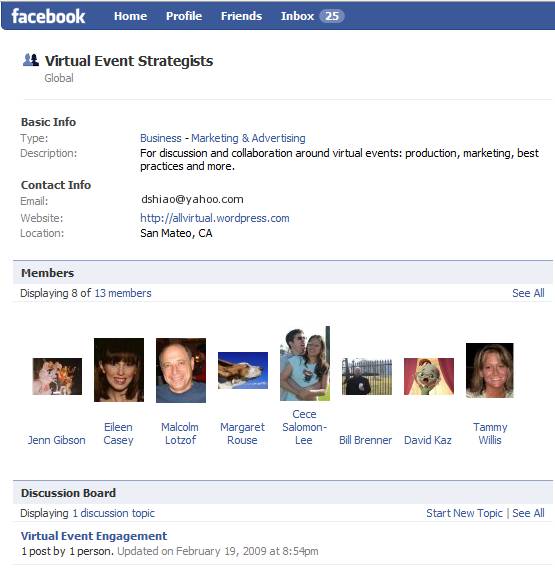
I created an open Facebook group for Virtual Event Strategists – my goal with this group is to foster discussion and collaboration around virtual event strategies and best practices.  I’ve seeded the content on the group page by developing a series of Virtual Event Best Practices videos – short, 2-3 minute clips where I cover one particular best practice each day.

Since Facebook provides a very convenient video recording and upload utility (right there from the Group page – for anyone who has a webcam), my hope is that other group members will start contributing their own thoughts via video.  Or, start posing questions to the group via video (if not text).  A YouTube-like channel for Virtual Events sounds good to me!

I thought I’d post links to some of the videos I’ve produced to date.  Of course, to view subsequent videos, be sure to become a member of the Group – it’s open for anyone to join.

bestpract_2

In this first video (click on the image above), I talk about how to effectively use prize giveaways in your virtual event.

bestpract_3

In this video (above), I discuss the importance of “promotion source” tracking and data analysis.

bestpract_4

And in this final video (where I got all dressed up), I talk about ways to dress up your virtual event.

If you view the videos, be sure to let me know what you liked or disliked – thanks!


Join A Group To Collaborate On Virtual Events

February 23, 2009

Over the past few months, I’ve observed an increasing amount of chatter within Twitter (the popular micro-blogging service) regarding virtual events and virtual tradeshows.  In many cases, Twitter users who are considering their first virtual event will submit a tweet such as, “considering my first virtual event.  Anyone have information on best practices?”.  I chime in when I can, but Twitter and its 140 character limit does not facilitate much in the way of extended dialog.

In fact, when two or more Twitter users need to delve deep on a topic, the next step is usually to “connect offline”.  Similarly, this blog is a useful vehicle for the communication of my thoughts and ideas – but isn’t great for facilitating discussion.  Despite the comment feature of blogs, there hasn’t been much extended discussion here, by way of commenters.

So I decided to create a Facebook Group to address these challenges – it’s called Virtual Event Strategists and is open to anyone interested (you need a Facebook account to join).  Here’s a snapshot of the group page:

Source: Virtual Event Strategists' Group Page

Source: Virtual Event Strategists' Group Page

Why a Facebook Group?  A few reasons:

  1. The 175MM active users (of Facebook) – most readers of this blog are likely on Facebook – if not, let me know why not!
  2. Threaded discussions – are you a first-timer in virtual events?  Well, starting up a threaded discussion may be just the thing to do
  3. The Wall – post miscellaneous thoughts and ideas about virtual events
  4. Post Links – let us know what interesting blogs or articles you’re reading about virtual events
  5. Post Video – Facebook has a convenient video recording and hosting capability – plug in a webcam and start using it

In fact, I’ll be doing brief “Virtual Event Tip of the Day” video clips on the Group page.  Here’s one of my first video clips, where I talk about the use of prizes in virtual events:

fb_video

I’ve seeded the site with some initial content – but, what I’d most like is to hear from all of you.  So, start some discussions, post some videos, post some links.  The group page is:

http://www.new.facebook.com/group.php?gid=52325833170#/home.php?ref=home

Let’s collaborate and learn together – see you there!


Virtual Events For Online Dating

February 21, 2009

Source: Match.com

Source: Match.com

The Internet Dating industry has a conference called iDate.  This year, iDate 2009 is scheduled for Los Angeles, London and Miami.  The event is billed as “the largest conference that covers the business management for the Internet Dating and Social Networking Industries.”  iDate has launched a virtual conference to complement their physical events [see press release].

Perhaps at the iDate 2009 events, industry players can collaborate on leveraging virtual event platforms to faciliate online matchmaking.  What are some of the challenges of online matchmaking today?

  1. Interaction is via asynchronous messaging (either via email – or, via messaging within the service’s web site)
  2. You never get to learn much about potential mates besides what they’ve chosen to provide in their online profile
  3. You’re never sure if that uploaded picture is “true” – for singles of a more advanced age, perhaps the picture is one from 10 years ago
  4. You don’t truly get a feel for your potential mate prior to a phone call or in-person meet-up

So for the likes of eHarmony, Match.com, Yahoo Personals, etc. – why not organize virtual events for online matchmaking!  There would be numerous benefits:

  1. The game changer: webcams – require all participants to utilize a webcam.  Without one, you truly won’t know who’s on the other end of a chat window.  With one, you’ll be able to discover whether the picture (that attracted your attention) matches up with the individual who uploaded it.  And, you’re able to interact via spoken word to other attendees – and see their facial expressions.
  2. Global access, from home – the event would have elements of a physical meet-up, but attendees could participate from anywhere.  That being said, regionalized virtual events may be necessary, to facilitate match making of individuals within close geographic proximity.
  3. Profile matchmaking – some virtual event platforms already have this feature – for online dating, this is the secret sauce that differentiates one service over another.  For an eHarmony, perhaps they integrate their sophisticated algorithms into the event platform, so that attendees can be paired up in the virtual event like they are on eHarmony.com.
  4. Speed dating via webcam – facilitate five minute private webcam sessions between two attendees – after which, they’re rotated to brand new webcam partners.
  5. Post-event data portal – after the event, participants can login to a personalized web-based portal, where they can review all the interactions they had with other attendees.  If you met over 20 people online, you might need such a feature to remember whom you really liked!
  6. Find mates by observing – topical chat rooms could be organized (e.g. Music, Sports, Food, Travel), where attendees could congregate to chat about their hobbies and interests.  The chat need not be restricted to text – some platforms support multi-webcam rooms, where participants can speak and see the other participants.  By observing, one might find someone interesting/attractive – and later on, you can connect with that person privately (e.g. in a 1-on-1 chat).

For the online matchmaking service providers, virtual events provide a nice up-sell opportunity to complement subscription-based revenue.  To avoid canibalization of the subscription business, perhaps you only allow access to the virtual event for existing subscribers.

The virtual events could also serve to generate new subscriptions – imagine tying the event into Facebook’s ~175MM active users via Facebook Connect.  Attendees could see which of their Facebook friends are in the event – and, post updates back to their Wall, driving new users into the event (and hence, new subscriptions to your service).

So, time to get moving – millions of singles across the globe await!


VMworld Complements Physical Conference With Virtual Conference

February 7, 2009

VMworld

Source: VMworld

What do you do when you produce the world’s leading virtualization conference?  You make it better, of course!  VMware teamed with Jive Software to take the once-per-year VMworld conference and extended it (online) into a 365-day-per-year, always-on community.  A Case Study on this initiative can be found here:

http://www.jivesoftware.com/customers/case-studies/vmware

And this quote from Eric Nielsen of VMware sums it all up:

We expanded the VMworld conference from a three day event for 15,000 to a 365 day/year destination for 50,000 virtualization professionals.   — Eric Nielsen, Director of Web Communities, VMware

So that’s a triple play for VMworld – by complementing their event online, they’ve generated a more than 3x increase of participating virtualization professionals.  As quoted in the Case Study, the VMworld.com community has 35,000 active members, generates 35,000 page views per day and 2,000 video views per day.

Quite an impressive level of activity.  A clear example of an active community at work – 35,000 page views (in a single day) is hard to come by with traditional b-to-b content.  However, in a highly active social community, the blog posts, discussion board entries, podcast downloads, video views, “ask the expert” questions, etc. – all contribute to traffic generation.

Just have a look at the volume of Discussion Board traffic:

VMworld.com - Discussion Board

Source: VMworld.com - Discussion Board

Now that’s an active community at work.  But there’s a chicken and egg problem – how do you generate an active community in the first place?  Well, the organizers of VMworld.com made the wise move to integrate a full suite of social networking tools – essentially building a mini-Facebook around the conference.  Tools available include:

  1. Discussion Boards
  2. Podcasts – both those produced for the conference, as well as third party / external podcasts
  3. Integration with social networking sites (e.g. Facebook, Twitter, etc.)
  4. Blogs – both in-house and third party
  5. Ask The Expert sessions and content
  6. Video
  7. Photo Wall (with pictures from the physical event)

VMworld.com also leveraged neat tools within Jive Software’s platform to encourage activity.  For instance, on a blog post, a user can click on “Watch This Blog Post” and be notified when comments are appended to that post.  Additionally, most content pages have a left-hand sidebar titled “More Like This”, which certainly encourages additional clicks and page views (it worked for me!).

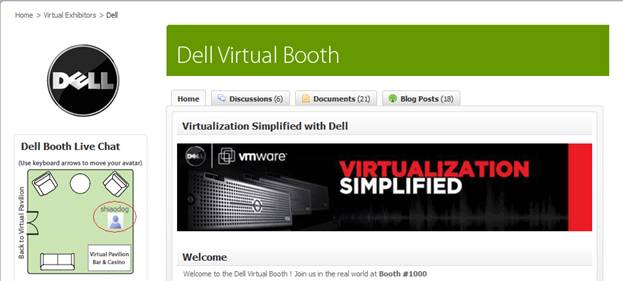
VMworld created virtual conference sponsorship packages for exhibitors, with pricing discounted if you’re already exhibiting at the VMworld physical conference.  3D style booths are planned – the current community features 2D style booths.  Here’s the Dell booth:

VMworld.com - Dell's Booth

Source: VMworld.com - Dell's Booth

This shows the top third of the booth – below it is Dell content, along with community content (blogs, discussion posts, etc.) around Dell topics. You’ll notice a “floor map” of the booth, which shows the physical location of my avatar.  Users utilize the arrow keys on their keyboard to move around within the booth.

VMworld Europe “floors” later this month (February 24-26) in Cannes.  If you’re lucky enough to get to Cannes, enjoy the show.  If you’re not able to attend, then go online and enjoy the online networking.  Registration for VMworld Europe can be found here:

http://vmworld.com/community/conferences/europe2009/


Search Engine Optimization (SEO) For Virtual Events

February 2, 2009

Flickr (martin.canchola)

Source: Flickr (martin.canchola)

These days, any publisher of information on the web is very keen to Search Engine Optimization (SEO).  If you build it (SEO) into your pages, they will come.  If you don’t, then you’re missing out on page views.  But, with all the effort we place on optimizing our web sites (e.g. corporate web sites, content sites, social media sites, etc.), how much SEO effort do we put into our virtual event pages?  I get the feeling that the answer today is “not much”.

For the external (non-private) virtual event, show organizers and exhibitors often judge success based on the number of registrations, attendees and interactions.  Basically, “the more, the better”.  However, what’s the largest source of registrations for most virtual events?  Outbound email promotions to (usually) large lists of users – where you’re hoping that some percentage of users open your email, click on the email and convert into a pre-registered attendee.  Very low on the list today is organic traffic from search engines like Google, Yahoo or MSN.

So the opportunity is quite large – improve the SEO of your virtual event and you can make a big impact on registrations, attendees and exhibitor satisfaction.  But where to start?  Well, first identify the pages on which to apply your SEO tactics.  For a virtual event, we’re usually talking about the microsite that describes your event – date, hours, speaker bios, etc..  The microsite often has separate tabs to list the event’s agenda, existing exhibitors, contacts for sponsorship info and (importantly) the event’s registration page.  All of these pages/tabs should have SEO applied.

A nice overview on SEO is titled “Search Engine Optimization 101” by Marketleap, a division of Acxiom Digital.  You’ll want to apply some of the basic concepts discussed here – including the right content on your virtual event pages; the use of meta tags; how to write good titles and strategic use of keywords.

Next, you’ll want to foster in-bound links to your virtual event microsite.  Promote the virtual event on your corporate web site (with a link).  Place links to the virtual event in your social networks (e.g. Twitter, Facebook, Linkedin, etc.).  Find blogs related to your industry and leave comments there.  Don’t blatantly promote your virtual event in the blog comment, but refer back to it (e.g. when leaving the comment, have your name be hyperlinked back to your virtual event’s microsite).  The more inbound links you can create, the higher your microsite will rank with the search engines.

Correction: comments you leave on other blogs can help with clicks (back to your blog), but do not help with SEO – most blog sites utilize a nofollow directive on the anchor tag, so search engines do not “follow” hyperlinks left in blog comments.

Finally, if your virtual event is not behind a registration wall (e.g. maybe it’s a 365 day, open environment), then make sure you provide “search engine friendly” content pages within the platform that search engine spiders can index.  Stay away from the Flash-heavy page and go with a flat, content-rich page.  Users will land here (from search engines), so be sure to provide easy navigation from this page to the main areas of the event (or environment).

For b-to-b virtual tradeshows, I’d estimate that well south of 10% of registrants are sourced from search engine traffic today.  Make it a goal at your next event to hit the 10% mark.  Your email lists will thank you.