How To Use Twitter For Virtual Event User Support

March 8, 2010

End user support for virtual events has traditionally been provided via a small number of channels: email and telephone support (which is especially useful for users having issues entering the virtual event) and “in-show support”, which is typically provided in a “help booth” within the virtual event.  With growing use of social media, however, attendees are leveraging their social network tools to request (and receive) user support.

From my observations, Twitter is the most widely used social network for virtual event support requests (today) – however, I wouldn’t be surprised to see increased “calls for help” via Facebook and LinkedIn.  This posting provides tips and best practices on providing virtual event end user support via Twitter.
Create/Establish a Twitter Account

Users can’t find you on Twitter if you’re not there, which means that if you don’t already have a presence on Twitter, you’ll need to create one.  I recommend a Twitter ID that incorporates your company name – or, the product, platform or service that you provide (if that’s different from your company name).  In addition, be transparent about the contributors (employees) who tweet on behalf of your company and brand.

Create A Real-Time Dashboard (of  tweets)

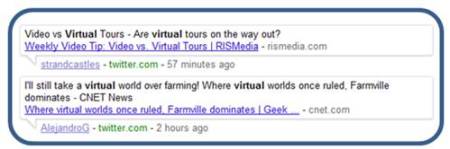
Configure your Twitter client (e.g. TweetDeck, Seesmic, etc.) with the relevant search terms and hash tags related to your virtual event.  At minimum, you’ll want to monitor the following:

  1. @Replies sent to your Twitter account (in TweetDeck, the column is labeled “Mentions”)
  2. A search on the hash tag for your virtual event
  3. A search on your company name – or, the name of your platform, product or service
  4. A search on the virtual event’s name or title

If it helps you stay more focused, delete columns that are unrelated to the virtual event – the result will be a single app that consolidates all “chatter” related to your event.  I recommend that you monitor for new tweets every 15 minutes while the event is live.

Allocate Proper Staffing & Get Started Early

In the same manner that you allocate support staff to booths, email inboxes and telephones, be sure to allocate staff to “Twitter support”.  You want to get up and running early – I recommend monitoring Twitter at least one full hour before the official opening of your virtual event.  Virtual event producers typically allow exhibitors into the environment prior to attendees – so during the “early period”, be on the look-out for tweets from exhibitors who may need assistance finding their way into their virtual booths.

Have at least one person who is “primary” for Twitter support throughout the event day.  And, know that Twitter users expect quick turnaround to their tweets.  Trend setters such as @comcastcares have provided highly responsive and immediate customer care on Twitter, which has raised the bar for everyone else.  Users on Twitter have come to expect similar care and responsiveness.

If you do not respond within 15-20 minutes of users’ original tweet, they may issue a subsequent tweet, letting the “world” (e.g. their followers + users who are following the event’s hash tag) know that they’ve received no response from the event provider.  So be sure to provide prompt service – if your customer care is prompt and effective, you’ll be rewarded.  Users are just as quick to say “thanks” (on Twitter) and acknowledge the great service you provide.

Following Up With A User

I prefer to handle support issues via 1-on-1 care.  Before you contact the user, review their Twitter profile – as background to your upcoming dialog, it’s good to know the user’s company, title and number of Twitter followers.  I like to know if the user has an audience of 100 on Twitter – or, an audience of 100,000.  In addition, read the user’s last 10-15 tweets, to get to know his/her interests, hot buttons, etc.

Now you’re ready to make contact.  I prefer to connect directly – a direct message on Twitter (if the user is following you), a direct email (if you have his/her email address) or a private chat within the virtual event (if the user is logged in at the time).  If none of these channels are available to you, send the user a public message on Twitter and provide your direct contact info (e.g. your email address).

It’s important to personalize your brand, letting users know that there are “real people” behind your corporate Twitter account – and, providing them with a direct means for getting in touch.
1-on-1 Triage

To prepare you for a “triage session” with your end user, I like the have the following information available via URLs that I can provide to the user:

  1. Technical requirements for accessing/attending the virtual event
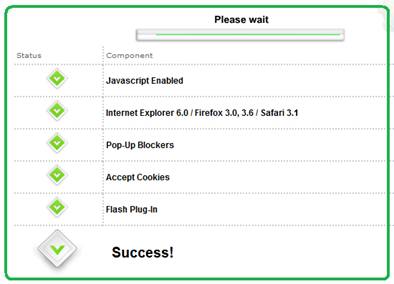
  2. Automated system check that allows a user to test their system
  3. Frequently Asked Questions (FAQ) related to the virtual event
  4. A “contact us” page related to end user support (e.g. providing an email address, phone number, etc.)

In addition, be sure to have higher level “support experts” available in case you need to delegate a sophisticated system issue.  The experts should be available within the virtual event – or, be available “on call” to jump in as needed.

Post-Resolution

Once you’ve resolved a user’s issue, follow them on Twitter – this allows them to send you direct messages.  And, it allows you to be quickly apprised of any subsequent issues they may come across.  Later on in the day, check if the user is logged in to the virtual event – if so, send a private chat request and politely ask how the event is going.  It’s always good for users to know that you’re actively supporting the event and genuinely interested in their satisfaction.

On Twitter, respond to each and every end user “tweet” – mention that the issue is resolved and invite the user to contact you back as needed.  Be careful, however, not to include the event’s hash tag on all of these follow-up tweets.  As the virtual event platform, you do not want to have a significant presence in the hash tag’s tweetstream.  Rather, only include the hash tag if your tweet relates to system-wide updates (applicable to all or most users).

The occasional update (with the hash tag) shows users that you’re listening – and replying to every single tweet shows your followers that you are responsive to each issue that arises.

The Entire Team Contributes

If your virtual event support staff is comprised of active Twitter users, encourage them to tweet about the event – have them highlight interesting sessions, pass along comments from enthusiastic attendees or simply state that they’re having a great time.  This helps promote the event itself – and, highlights the depth of the team behind the event support.  Take it a step further and create a Twitter List of your staff – allowing interested users to follow your employees tweets via a list.

Conclusion

The world is going social, which means that user support and customer service need to be “socially listening” (and responding).  Get ahead of the curve – be sure to support your next virtual event on Twitter.

Tweet this posting:


Evolving The Virtual Event Group Chat

February 26, 2010

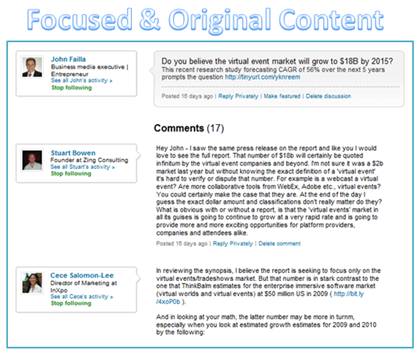
Excerpt of LinkedIn Discussion ("Virtual Events Forum")

For me, the best content in LinkedIn is found in Discussion threads in LinkedIn Groups to which I belong.  Why is the content so good?

  1. It has a precise focus that’s aligned with the charter or focus area of the group
  2. It’s based around timely topics (i.e. what group members are currently interested in discussing)
  3. It’s interactive with a loopback mechanism – there’s a dialog that unfolds – someone making a wild claim will be called on it and will need to return to the discussion to justify the claim (or, lose credibility by remaining silent)
  4. It’s the best form of “user generated content” – from subject matter experts and hands-on practitioners

As such, some content in LinkedIn Discussions can prove to be more useful and valuable than comparable content in related industry publications and web sites.  The LinkedIn Discussion thread is a great example of the “wisdom of the crowds” surpassing the knowledge of a handful of individuals.

Virtual Event Group Chat

While allowing for the fact that a portion of virtual event group chat is logistics-related (e.g. “I don’t hear the audio on the Live Webcast”), chat content related to the event’s theme (topic) comprises some of the most useful and compelling content in the entire event.  Why is that?  It’s for all the same reasons I list (above) for the LinkedIn discussion.

The challenge in leveraging an event’s group chat, however, is this:

If I’m not actively monitoring the group chat, how do I participate?

In my mind, the virtual event group chat needs to evolve to better serve attendees.

Group Chat Threading

Attendees may visit a group chat area (e.g. Networking Lounge), with an interest to discuss numerous topics (see example with LinkedIn Discussion topics, above).  In an unstructured group chat, the introductory chat message (to start the discussion) is likely to be “interrupted” with other, unrelated messages.  The result is some “scattering” of the chat content, with the possibility that a meaningful discussion (on the original topic) never happens.

Today’s “Wild, Wild West” of group chat needs to become threaded – the group chat’s user interface needs to allow participants to denote which message(s) they are commenting on – with the resulting “chat window” nesting (or otherwise grouping) messages within the same thread.  Additionally, the chat system should auto-populate information on which user one is responding to.  This way, participants no longer need to preface their comment with the name of the person they’re responding to.

A wealth of additional features become possible once this sort of threading feature is enabled.

Embraces and extends chat topics

I submit a chat message, asking if folks are interested in “Topic X”.  If no one answers me back within the next 10 minutes, that chat topic is dead.  Threaded chat, however, allows attendees to bring topics back from the dead.  If a visitor enters three hours later and decides to reply to my original message, that section of “threaded chat” can be moved to the “current timeline” in the group chat area – much in the same way a comment on a friend’s Facebook posting moves the original posting “up” in your News Feed.

Real-Time Search!

If I’m not able to dedicate the time to visit and monitor a group chat area, the next best thing would be a virtual event search function that provides real-time (or near-real-time) indexing of the group chat content.  Imagine the following capabilities:

  1. Exhibitor: perform searches on my company name – allows me to determine whether I need to enter the group chat to repsond
  2. Attendee: perform searches on topics that interest me – and be able to see the entire discussion thread on that topic
  3. Attendee: search on other attendees in my Buddy List – show me chat comments posted by my buddies
  4. Attendee: search discussion threads for comments posted subsequent to my own comments

Content Re-Use

For a B2B publisher – and, for some corporations – the content of selected discussion threads could be re-used and posted on the web as original (or, semi-original) content.  B2B sites often publish “how to guides” and best practices articles – discussion thread content (with the “right” mix of contributors) can be re-published on the web – or, used as the basis for a more in-depth article.

Conclusion

With group chat being one of the most valuable components of a virtual event, its features should evolve to better leverage the “wisdom of the crowds”.

Tweet this posting:


2010 Trend Watch: Virtual Events

February 25, 2010

Source: flickr (User: b.frahm)

For the virtual events industry, the premier face-to-face event of the year is Virtual Edge Summit, the “summit on virtual events, marketing & communities”.  Virtual Edge 2010 concluded earlier this week – the face-to-face event floored in Santa Clara, CA, while several vendors provided virtual components, allowing remote (virtual) attendees to participate in the experience.  The event saw record crowds from attendees, exhibitors and presenters.

From my observations at this year’s event, the following are a set of emerging trends in the industry.

Beyond Novelty Phase

Judging by the turn-out alone, the virtual event industry has officially “graduated” beyond the novelty phase.  Awareness of virtual events has broadened – now, when I meet someone at a social gathering and describe what I do for a living, the blank stare of years past has become a “oh yes, I’ve attended one of those”.

The increase of awareness (and, perceived importance) could be seen in the amount of coverage that Virtual Edge 2010 received – an increase in the number of publications (on-site), bloggers (both on-site and virtually) and analysts (both on-site and virtually).  Lastly, the volume of tweets (via hash tag: #ve10) was 5-10 times greater than last year – with more tweets per person and many more people tweeting.

With that being said, there are enormous untapped and unexplored markets, which will provide the industry much of its growth in 2010 and beyond.

More Players Emerge

I noticed a near doubling in the number of exhibitors this year, which means that new/emerging vendors significantly developed (or expanded) their virtual event capabilities – or, from a marketing standpoint, they determined it was the right time to get their products and services in front of this audience.

Last year, the exhibitors were fairly homogeneous – they provide apples-to-apples solutions and directly compete with one another.  This year, the breadth of solutions offerings (from the exhibitors) has expanded – some exhibitors do not necessarily compete directly with one another.

In some cases, a client may use one vendor for a particular type of virtual event and a different vendor in another type of event.  The result?  More “burden” on the attendees (buyers) to understand the solutions offered and determine which solution best fits their needs.  This affords some  industry players (agencies, consultants) a great opportunity to help clients and prospects navigate the waters.

Early Adopters Become Industry Thought Leaders

Practitioners (especially some of the early adopters in our industry) are quickly becoming the thought leaders and “go to source” for ideas, expertise and wisdom.  Many of these thought-leading practitioners were on stage this week – they were very generous with their sharing of experiences.  And, more than ever, they know precisely what they want from their vendors (which is a great thing for those in the vendor space).

In the early days, the practitioner would ask the vendor, “show me what you have” or “show me what you can do’.  Today, the tables have been turned.  Practitioners (clients) are now telling the vendors, “let me tell you what I need” or “make this experiential vision come to life for me”. This is an important aspect of the industry’s evolution – vendors crafting innovation via direct input from practitioners (as opposed to creating “innovation in a vacuum”).

3D Immersiveness

Interest in 3D immersiveness is picking up.  In fact, at Virtual Edge this year, roughly 20% of the session content involved 3D / immersiveness and a formal “Business 3Di” track was created.  The 3Di track featured practitioners, along with vendors such as Linden Lab, Teleplace, Altadyn, Digitell and web.alive (Avaya).  Like last year, Digitell provided a simulcast of the event proceedings into their 3D immersive platform (VirtualU).

Those are the “pure play” immersive environments.  In addition, virtual event platforms are coming on board as well.  In my 2010 predictions on virtual events, I wrote, “(virtual event) platforms take first step towards immersiveness”.  This prediction has come true.

It’s interesting, however – some vendors have a clear vision of what immersiveness enables for exhibitors and attendees of virtual events, while others appear to be adding immersiveness for the sake of adding it (i.e. lacking a clear and compelling use case).  It’s in the best interest of virtual event vendors to explore and enable immersiveness via specific client use cases – this way, the capabilities are added to meet a client need – and, serve as a reference (to the rest of the industry) on the true value delivered via immersiveness.

Social Media Integration

2009 was a monumental year in the evolution of both social media and virtual events.  In 2010, there continues to be a lot of talk about both topics – including discussion around how they integrate with one another.  Social media (and related social networks) were central to the discussion in many workshops and breakout sessions.

And of course, social networking was flourishing in and around the event, with a high volume of tweets, a fair number of Facebook status updates and (I’m sure) lots of LinkedIn connections made.  While I am not aware of any groundbreaking announcements from Virtual Edge on social media integration, I’d expect that platforms enable more and more social networking as 2010 unfolds.  I expect to see the platforms themselves becomes more social (natively) and increase the depth of their integration with third party social networks.  Twitter, Facebook and LinkedIn are commonly mentioned – but expect to see industry-specific, niche networks and communities integrated as well.

Industry Ecosystem Begins to Take Shape

Virtual event platform vendors have established a number of strategic partnerships to extend account/client reach and grow/scale business opportunities.  Most of those partners were present at Virtual Edge – and a number of partners had prominent speaking roles in the sessions.  By this time next year, even more partners will enter the space and appear at the event.

Additionally, smaller businesses (and individuals as well) are seeking to leverage opportunities within virtual events to bring in new business – or sign on for consulting roles.  The list includes video production companies, design agencies, digital signage providers, freelance producers/writers/story-tellers, streaming providers and emerging social network / community sites.  As these “players” look to get a small piece of the industry pie, they serve to grow the overall ecosystem of this industry.

Finally, hands-on practitioners are finding a fluid and welcoming job market, despite the less inviting macro job environment.  Virtual events are still new enough that production staff, developers and strategic consultants have highly specialized knowledge and skills – as such, they’re able to quickly transition from their existing (or past) role to a new vendor, service provider or practitioner (client side).  Most of the vendors in the space are aggressively hiring, which means that savvy job seekers leveraged the conference to generate meaningful employment leads.

Conclusion

It’s an exciting time in our industry – I’m looking forward to seeing how things shape up for Virtual Edge 2011.

Tweet this posting:


How Location Awareness And Augmented Reality Can Be Leveraged For Events

November 24, 2009

Photo source: Layar.com

With the addition of a compass, GPS and associated software, the PDA/smartphone has become as powerful as ever.  Services are emerging that blend social networking and location awareness (e.g. Foursquare, Google Latitude) – in addition, augmented reality has received a lot of recent attention.  Amsterdam-based Layar has interesting technology that they call Layar Reality Browser – Version 2.0 (a mobile, augmented reality browser).

How could location awareness and augmented reality apply to events and trade shows?

Event Check-In

Source: flickr (User: Buckeye Beth)

Event planners could partner with location awareness providers to determine which registrants have appeared on site.  Attendees would need to register and opt-in to the location awareness service – but once they do, the technology can determine who’s on site and provide automated check-in.  Imagine arriving at the event, skipping past the long check-in line and going straight to a self-service kiosk, where you can print your event badge.  Once you have your badge printed, perhaps the event planner disables the location service, to give attendees the reassurance that they’re not being watched, a la Big Brother.

Eco-friendly maps

Photo source: Layar.com

You’re at the main lobby of the event – imagine holding up your PDA and having a map appear of the venue.  You no longer need to ask where the keynote session is being held – your PDA can map it for you – and perhaps guide you right there via its GPS function.  Such a service would make support overhead more efficient (less staff required to direct attendees) and be eco-friendly, since the printed event guide (and map) may no longer be required.

Augmented Reality at Exhibitor Booths

For trade shows that include exhibitor booths, augmented reality provides for some interesting possibilities.  I’m standing at the event’s most popular booth – the event staff is swarmed with visitors and I have to wait in line to speak to the exhibitor and/or get my product demo.  While I’m waiting, I bring up the augmented reality app on my PDA – it shows an image of the physical booth (right in front of me) with the following information overlaid:

  1. Related content from the exhibitor that I can view (right now) from my PDA – documents, white papers, on-demand videos, etc.
  2. Bios/profiles of event staffers who are in the booth right now – so I know that the most popular demo is being given by the exhibitor company’s Senior Product Manager for Mobile – I can view his LinkedIn profile, so that when my turn comes, I already know that we have a connection in common.
  3. An option to view the demo – perhaps the physical booth demos are being streamed out to the web – e.g.  into a hybrid virtual event.  With a click, I’m able to view the live stream of the demo via my PDA.  I’ll admit, it’s an odd thought to watch a live demo that’s occurring a few feet from you – but sometimes at events, it is truly hard to see the demo from the back of an assembled crowd.
  4. An option to join a text chat with a virtual booth staffer – again, in a concurrent virtual event, perhaps the exhibitor supplements their physical staffers with online staffers in the virtual environment.

Social gaming and following friends/colleagues

Events could incorporate a gaming aspect, with points tied to actions – and activity tracked via location awareness.  Exhibitors no longer need to scan an attendee’s badge – instead, the location awareness service tracks which booths they’ve visited.  Safeguards need to be established, of course, to ensure that a booth visit was real/substantial, as opposed to a “drive by”.  To use a Foursquare analogy, perhaps exhibitors offer a grand prize (e.g. HDTV) and award that to the attendee who holds the title of “mayor” (of that booth) at the conclusion of the event.

In a sales meeting, on the other hand, you often have colleagues who want to attend sessions together – instead of texting or IM’ing to coordinate meet-ups, a location awareness service (think Google Latitude) can allow opted-in attendees to track one another’s location on the show floor.  If your colleague is spending too long on line for coffee, go grab him so that you’re both not late to your boss’ presentation.

The important stuff – food!

Photo source: Layar.com

Layar, Yelp and Urbanspoon have all released augmented reality apps related to restaurants.  Whether it’s lunch during the event or dinner afterwards, you’ll always be a few augmented clicks away from knowing where’s the best burger, steak or burrito.

Perhaps what we need is a conference on augmented reality and location awareness – where all of this becomes reality!


To Promote Your Physical Or Virtual Event, Think Outside The Inbox

November 21, 2009

Source: flickr (User: Mzelle Biscotte)

For many, email is a constant stream, an endless loop – we receive too much of it, both “important” emails addressed directly to us and marketing emails that are sent as a result of opting in (or not) to past content, webinars, white papers and marketing lists.  Outbound, push-based email promotions face the following challenges:

  1. Imperfect delivery rates (mail server outages, spam filters, etc.)
  2. Decreasing open rates
  3. Perception of spam – if recipients don’t remember opting in to your list (even though they did), they’ll ignore your email – or, opt out from your list
  4. List fatigue due to overuse of marketing lists
  5. Decreasing click-thru rates (CTR) – once you’ve made it past delivery and open, recipients are clicking less on your embedded offers

Adding to this mix is the fact that many users now interact with brands (and by extension, promotional offers from brands) via their social networks, instead of email.  A user is more inclined to respond to an @reply or direct message (on Twitter) compared to a conventional email blast from a marketer.

Given all this, it surprises me that email is still a primary vehicle for promoting physical and virtual events.  Event marketers have much to gain by thinking outside the inbox.

Social media and social sharing

Your first step outside the inbox should be in the direction of social networks.  Build a presence in social communities and you’ll find that you naturally generate interest and awareness to your event.  Previously, I wrote about leveraging Twitter to promote your virtual event.  As Ian McGonnigal (GPJ) astutely pointed out, those same tactics apply quite well to physical events as well.

In addition to Twitter, consider the following:

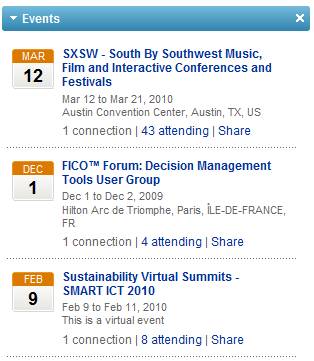
Create a LinkedIn Event entry for your event

  1. Create a LinkedIn Event for your event – a LinkedIn Event page allows you to post relevant information about your event on LinkedIn (e.g. date, event content, etc.) – LinkedIn members can then indicate whether they’ll be attending, not attending or “interested”.  This can be quite useful, as folks often attend events based on knowing whom else will be attending.  By creating a LinkedIn Event, you’ll receive the benefit of having LinkedIn auto-recommend your event to other members, assuming their profile is a “match” with the profile of your event.  Members may also utilize search and find your event.  More info can be found on the LinkedIn blog page announcing the Event feature.
  2. Post videos to YouTube – it’s the #2 search engine after all (behind parent Google), so having event videos posted on the site will generate traffic from the millions of folks who visit YouTube.com each day.  Record videos of your host, keynote speaker, group publisher, etc. talking about your upcoming event – if your keynote speaker has a prominent name, your videos will attract interest from users who search on that name.  When you have a critical mass of videos, create a YouTube channel.  About.com has a neat guide on how to do just that.
  3. Create a Facebook Fan page for your event – with a fan page, you’ll generate interest for your upcoming event – and, you’ll build an ongoing community that you’ll be able to continuously leverage!  The All Facebook blog has a nice guide on how to build a Facebook fan page.
  4. Leverage blogs – author a blog posting on your corporate blog – or, if you don’t have one, ask a relevant industry blog site whether you can author a guest posting.  Alternatively, leave a comment on postings from relevant industry blogs with a pointer (link) to your event.  The key here is not to over-promote your event – your first goal is to provide useful and relevant content/commentary with your event being a secondary (and subtle) mention.

SEO and in-bound links

If you pay attention to search engine optimization (SEO), your event page(s) will receive “organic” traffic – that is, traffic that finds you, rather than you finding the traffic (i.e. the “pull” from users searching, rather than the “push” from your email promotions).  Think about the search keywords that you’d want to associate with your event [e.g. when users are performing searches] and make sure the content on your event page is rich in those keywords.

To increase the page rank of your event page, increase the number of inbound links that point to your page.  A few simple ideas:

  1. For all of your social media efforts (listed above), make sure they provide links to your event page – shazam, you’ve just created a number of inbound links
  2. For event staff (especially those with large followings on Twitter), ask them to temporarily point the “web site” URL in their Twitter profile to the event page
  3. Ask partners, associates, even clients to post a URL from their web site(s) to your event page
  4. Add a “Share on Facebook” capability on your event page – this may result in page rank benefit as search engines begin to index Facebook wall posts – until then, what this really does is generate awareness and outreach of your event to users’ Facebook friends.  If a potential attendee visits your event page and shares the page with her 100 Facebook friends, then you’ve just received 100 free advertising impressions

Advertise

Some affordable options to consider:

  1. Facebook advertising – purchase targeted ads on Facebook.  For a physical event, you can target by geography (e.g. starting with users who are geographically close to your event site).  For a virtual event, geography is less important, so you may want to target based on attributes in the users’ Facebook profiles.  You can pay per view (of the ad) or per click (on the ad), so the terms are flexible.  eHow has a good overview on Facebook advertising.
  2. Content syndication – purchase web syndication with online publishers in your industry – get your event listed in their directories, content sites, etc.  They may charge you per click or per lead (completed registration).  Not only can this generate registrants for your event, but it also improves your page rank by generating more inbound links to your event page.

Hopefully I’ve covered a few “outside the inbox” options for you to consider – certainly continue to promote your event via email – however, use some of these options to lighten the load a bit on your email marketing lists.


Leverage Twitter Lists For Your Physical Or Virtual Event

November 7, 2009

twitterList_img

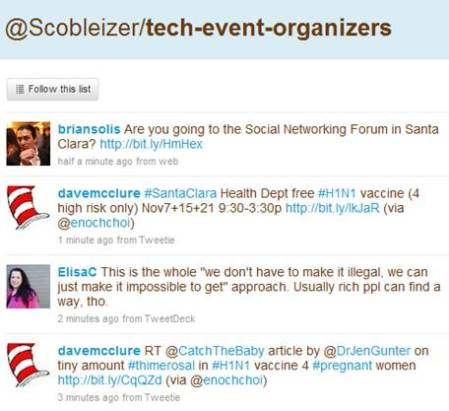
Robert Scoble's tech-event-organizers Twitter List

What’s a very simple yet effective way to integrate the new Twitter Lists feature into your event?  Here’s what you can do:

  1. Define your event hash tag (a “must do” for any event!)
  2. Create a Twitter List for your event
  3. If your company or event already has a Twitter ID (“brand”), connect it to that ID (e.g. twitter.com/<your-brand>/<your-event-list>)
  4. On your registration page, ask registrants to supply their Twitter ID
  5. Manually or automatically populate your Twitter List directly from registration!

As part of the Twitter API, there are methods in place to interact with Twitter Lists (look in the documentation for List Methods, List Members Methods, List Subscribers Methods).  As such, you could automate this process by having your registration page utilize the Twitter List API to auto-populate your list directly from registration.

In addition, you could use the Twitter API to inform registrants which of their Twitter friends or followers are (a) also registered and (b) already a member of the Twitter List.  Here are benefits of leveraging a Twitter List for you event:

Registrants promote the event on your behalf

It’s the crowdsourcing method for generating awareness – allow the participants to spread the word on their own.  After all, the combined reach of your registrants is far greater than your own.  By referencing your Twitter list on your registration page, users who supply their Twitter ID will likely go straight from registration completion to the Twitter list to (a) confirm that they’re now a member of the list and (b) skim through the pre-existing messages.

The concept is similar to a pre-event bulletin board or forum – the beauty of using Twitter, however, is that unlike a forum (which needs a critical mass of initial postings before it really takes off), a Twitter list is “pre-seeded” from the natural activity of the list members’ tweets.  You can be sure that as users register for your event, they’ll first tweet that they “just registered” – and then, continue to tweet about the event (especially as the event date draws near).  You’ll want to encourage all registrants to include your event hash tag when they tweet.

Facilitates pre-event networking among registrants

Whether physical or virtual, a key reason people attend events is the networking aspect – being able to meet, connect and interact with others, to discuss common business challenges – and to extend their social graphs.  Too often, however, one arrives at an event with no idea whom else is attending.  A Twitter List changes the game – you’ll not only know the identity of folks who are attending, but you’ll feel like you know them very well.

Consider friends or family members that you follow on Twitter or Facebook – do you find that you come to learn and understand them more via status updates than interacting with them day-to-day (or over the years)?  It’s remarkable how social network connections can generate a more complete picture of an individual.  With pre-registrants to an event, you may find that you’re really getting to know individuals, based on their intra-day status updates and industry thoughts.

This will lead to events whereby attendees will have pre-arranged meet-ups and appointments (with other attendees) in advance, making their event experience more rewarding.  Perhaps someone will build an integration from Twitter List pages to LinkedIn, so that event registrants can also extend their LinkedIn connections directly from the event’s Twitter List.

Allows exhibitors to get to know registrants/attendees

This will need to be managed/handled properly, as registrants surely wouldn’t welcome unsolicited pitches from exhibitors before they’ve even attended the event – but, imagine the potential for exhibitors.  You get to know the users who are attending the event.  Perhaps you create booth content or special offers that are tailored to what you’ve learned about your upcoming booth visitors.  Did they talk about pricing challenges in your market?  Well, how about an event-exclusive price break on your product, which you announce at the event?

If users commented about technical challenges using your product, bring the right specialists into your booth so that you directly address this pre-event feedback.  Lastly, exhibitors can seed some “must meet” lists based on the registrants who are tweeting within the list – build a profile of interesting users and ask your booth reps to be on alert if those individuals visit your booth.

Can you believe it?  Something as simple as a Twitter List can go a long way to making everyone happy: registrants/attendees, exhibitors and … YOU.

Related links

  1. 10 Ways You Can Use Twitter Lists (Mashable)
  2. Five Essential Twitter Lists For Every Event (CrowdVine)

Virtual And Social Technologies: A Perfect Fit

August 12, 2009

virtual_social

Jeremiah Owyang has an interesting posting on his Web Strategy blog titled “Web Strategy: How To Integrate Social Technologies with Virtual Events“.  Jeremiah notes that the integration of social technologies should apply to both virtual and physical events – by way of these principles:

Three Principles Of Modern Events
To be successful, virtual –and real world– event planners must abide by the following principles:
1. Events should integrate with existing communities and social networks where they exist.
2. Events should have a strategy that includes the before and after –not just during.
3. The audience can assert control over the event, so encourage audience participation and know when to get out of the way.

I left the following comment for Jeremiah:

blog_comment

I’m a big fan of social networks – today, my primary networks are Twitter, Facebook and Linkedin.  That being said, I’ve considered today’s social networks to be a Version 1.0 of Web 2.0.  Now that social networks have built a critical mass of audience/community, I think that some key technologies can advance us to Version 2.0 of Web 2.0.  Some examples:

  1. Presence Indication – While Jeremiah blogs that email was the first social network, I think of instant messaging as the dawn of social networking.  So all the way back in the mid 90’s, we had a technology to allow us to connect with friends, family and colleagues – and, provide presence indication.  I knew if my mom, colleague or best friend was online – and if they were online, they could indicate to me whether they were available or “Away from my desk”.  While some social network sites include in-page presence indication (including Facebook, with its Facebook Chat), I’m surprised that presence indication (and chat) have not been more tightly integrated into the core service of social networks.  If I’m running a social network site, but my users are using AOL IM or Skype for presence indication and text/webcam chat, then I’d want to build better presence/chat tools into my core platform.  Or, integrate existing technology, so that my users launch their IM client within my service.
  2. Personalized Spaces – Facebook has done a great job in allowing me to post pictures, videos, links, status updates, etc.  What about blending the existing technologies/applications within Facebook with virtual world technologies to create a virtual room (for personal use) or a virtual office (for b-to-b use).  Vivaty is thinking along these lines, as they’ve integrated their 3D virtal world technology into Facebook.  So within Facebook, I can build a personalized room with Vivaty and invite my friends (or colleagues) to visit and interact with the objects I’ve placed in that room (e.g. perhaps a link to a movie review).
  3. Profile Matchmaking to Extend Your Network – Virtual Event technologies have their roots in b-to-b use, in which virtual event show hosts tend to collect a deep registration profile on attendees.  This provides data points that allow the virtual event platform to recommend  like-minded attendees (who have similar profiles).  For personal use of social networks, matchmaking may not be relevant – you know whom your friends and family are and you’re probably not inclined to go find new friends (with the exception of a social site for online dating).  In a b-to-b setting, however (e.g. Linkedin), profile matching can be very powerful, as it allows you the potential to extend your network.  B-to-b networking sites that combine presence with matchmaking can create a powerful combination – imagine that I find like-minded people.  Instead of pressuring them to accept me as a connection, I can chat with them (based on presence indication) and introduce myself.  Later, both parties may be comfortable enough to become connections within that social network.

I’d be interested in your thoughts – what related technologies should social network sites look to build or integrate?


Case Study: How ExpoNZ Created A Virtual, Global Showcase

July 8, 2009

skinlight3

For many locations around the globe, the country of New Zealand is many miles (and oceans) away.  As such, businesses in New Zealand have the challenge of reaching and connecting with a global audience.  In 2008, Virtual Expos New Zealand Limited was faced with helping businesses  address this challenge.  The economic environment presented a number of obstacles – rising costs, shaky exchange rates and the need to drive new business as the economy was sputtering.

On the flip side, virtual event technologies had emerged, while New Zealand companies were under pressure to uphold a clean green brand and consider their carbon footprint.  The decision became clear for Virtual Expos New Zealand Limited – build a virtual event to “showcase and sell the best of New Zealand to a global audience and to enable people everywhere to get a taste of what New Zealand is all about.”

mc_networking

The virtual environment was named ExpoNZ and configured as a 365 dayper year online community – with live events scheduled throughout the year. Marie-Claire Andrews, ExpoNZ’s Vice President and Head of Sales notes, “Through our expo, New Zealand businesses no longer face the tyranny of distance – the costs and inconvenience of reaching markets a thousand miles away.  A year round schedule of live events, B2B opportunities, huge support from the dedicated team in New Zealand and round the world, plus a half million dollar marketing budget all make this a pretty compelling way for NZ to face down the global credit crunch and do more business.”

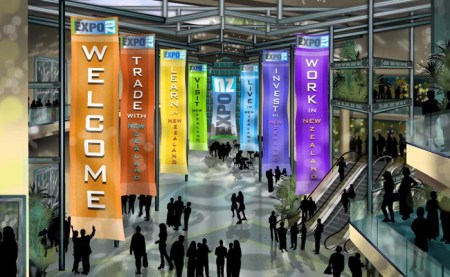
ExpoNZ neatly segemented the event content into halls – allowing visitors to select their desired activity: Trade, Learn, Visit, Live, Invest, Work:

ExpoNZ Plaza

This provides an intuitive entry area – it clearly highlights the available exhibition areas and encourages visitors to determine (on the spot) their objecctive.  If I want to visit or live in New Zealand, then I’ll visit those two halls – perhaps returning at a later date for investment opportunities.

The virtual event platform for ExpoNZ is powered by US-based Expos2 – via their partnership, ExpoNZ is an authorized reseller of the Expos2 platform in New Zealand.  According to Andrews, the sponsorship cost to exhibitors is “$12,000NZD per year or $2750NZD for seven weeks around a specific live event and we’re also signing up sponsors for the halls, the lectures and supporting infrastructure.”

Like many virtual event organizers, Andrews belives in the power and value of social media integration, but notes that “it’s all about consistency, relevancy and immediacy”.  Andrews has leveraged Twitter to uncover potential sponsors and clients – and for generating buzz around launch events.  She also reads a number of industry blogs and finds connecting via Linkedin Groups to be particularly valuable.

What were some of the technical and logistical challenges faced by ExpoNZ?  First and foremost, Andrews notes that “it has taken a while for internet bandwidth here to catch up with the rest of the world.”  As such, she had to “be creative” with media servers in the U.S. to support North American visitors.  Secondly, ExpoNZ faced a perception issue – business is done in a very personal fashion in New Zealand, so “there’s a belief that face- to- face is generally best.  We have to demonstrate that business can be done virtually – and with our integrated video conferencing you do get face to face – if only digital.”

Live Event – July 16, 2009

Registration is now open for a Live Event on the morning of July 16, 2009 (which is July 15th in the U.S.).  The start time for the event:

  1. 7AM NZT
  2. 12PM PDT (July 15)
  3. 2PM CDT (July 15)
  4. 3PM EDT (July 15)

According to ExpoNZ:

You can’t enter the Expo before the day, but visitors can pre-register at http://www.exponz.co.nz and we’ll send updates about the show.

All the information including presentations and job listings will still be available afterwards because ExpoNZ is ‘always on’ 365 days a year round the clock. So visitors can come back as often as they like after the event; to make appointments to talk to exhibitors in their booths, to re-view presentations at leisure.

We’ve a cohort of over 15 ICT companies and supporting organisations (eg Immigration) and eight speakers lined up so the live conference will run till around 11am NZT.  We expect to have several hundred job seekers from the UK, US, Canada and Australia primarily.

For New Zealand visitors, Andrews’ personal recommendations are as follows:

On the web, you can’t go past the virtual Encyclopedia of New Zealand (http://www.teara.govt.nz/) or our beautiful tourism site (http://www.newzealand.com/) where you can book your next trip.

Best places to visit:  A wine tour in Marlborough, diving in the Bay of Islands, ski-ing in Wanaka, hot pools in Rotorua and culture, coffee and creativity in my fantastic home town, Wellington of course!…..

Related Links

  1. ExpoNZ’s home page
  2. Follow ExpoNZ on Twitter
  3. Read the ExpoNZ blog

Comparing Virtual Events and Virtual Communities

April 30, 2009

While virtual event platforms can certainly support a 365 day-per-year virtual community, my estimate is that 95% of the use case (today) on these platforms is for the single day or multi-day live virtual event.  I’ve seen some pick-up in the “ongoing community” concept and I believe that by this time next year, the 5% share (for virtual communities) will be more like 15 or 20%.  As I’ve written several times before, there are plenty of ways in which a virtual event platform can support a virtual community:

  1. The future of newspapers as virtual communities
  2. Online dating, powered by a virtual event platform
  3. An ongoing virtual crisis center to combat swine flu

There are important distinctions to keep in mind when considering a virtual community.  If you’re a veteran of virtual events and want to consider the community concept, I outline five key differences between the two – differences that will change the way you fundamentally plan and execute each one.

  1. Outbound marketing vs. inbound marketing – with a live virtual event, 90% of your registrant and attendee base will come from outbound marketing.  And today, most of that outbound marketing comes in the form of email blasts to assorted lists.  With a virtual community site that’s available 365 days a year, attracting an audience is more about inbound marketing – such as search engine optimization (SEO) to attract visitors to your community from search engines.  You’ ll want to complement the inbound marketing with some outbound promotion, but you’ll start to wear out your lists by promoting your virtual community site too often.  One common tactic is to use social media (e.g. Facebook fan page, Linkedin Events listing, Twitter, etc.) to drive visitors and attendees to your virtual event and virtual community.
  2. Local vs. global access – most live events take place during the course of a business day – and typically within a narrow timezone (e.g. the schedule is arranged around a US/Eastern or US/Pacific schedule for US-based events).  While I’ve seen attendance at North American work-day events from visitors across the globe, it’s the middle of the night for these folks – so 60-80% of the audience participate from the local timezone(s).  So for live events, the top priority of the virtual event platform is to support the local language at that timezone (e.g. English).  For a virtual community, access is 7x24x365, which means that all languages can apply.  As such, the virtual event platform ought to support rendering in as many languages as possible, both single and double byte.
  3. Concentrated vs. intermittent audience – live events are great, because a large and captivated audience can result in valuable interactions between attendee and attendee, as well as between attendee and exhibitor.  For a virtual community, a large, ongoing and engaged audience is nirvana – but, the more likely experience is that a few attendees will be in the environment at the same time you are.  This places more onus on the community organizer to provide compelling content and useful asynchronous tools (e.g. blogs, message boards, etc.) to keep the visitor from wandering away and logging out.
  4. Large staffing commitment vs. minimal staffing commitment – for a live event, you want an entire team of booth reps who can “man” your booth for the extent of the live show.  For a 7x24x365 virtual community, it’s not practical to have booth reps online in the environment around the clock.  Here’s where technology innovation can help – virtual event platforms that support an auto-attendant, for instance – a “chat bot” that engages visitors in text chat, which attempts to provide automated answers to common questions.  Or, perhaps some auto-triggered notifications to booth reps.  For instance, 5 visitors happen to be in my booth right now – so I receive an email alert that encourages me to login to the environment right away.
  5. Intra-day support vs. ongoing support – for the virtual event producer, the priority is to provide support for the duration of the live event.  For a virtual community, you want to ensure the service has 100% availability, but it’s not practical to personally monitor the environment at all times.  Here, you might want to rely on automation to continually monitor key indicators and send you email alerts (or text messages) when exceptions occur.

Here’s a thought – do a little of both (above) – think of your virtual event as an experience that has a repeatable schedule.  Once a live event has concluded, it transforms into a 7x24x365 virtual community.  And when it’s time for the next live event, you simply “light up” the live features within the community.  Then, when the live activities have concluded, you dim the lights and return to the community focus.  Either way, make sure you think about the importance differences I’ve outlined.  And have fun!


How To Use Social Media To Stay Current On Virtual Events And Virtual Worlds

April 21, 2009

In 2009, I’ve seen a surge in the volume of content published around virtual events and virtual worlds – coverage in mainstream media, blog postings, videos, podcasts and even entirely new web sites developed to cover these specific industries.  It’s all great – but with a rising volume of information comes the challenge of how to efficiently stay current.  I’ll highlight a few social media services that I use to keep current on events, track emerging technologies and find relevant commentary on all things virtual.

  1. Twitter (http://www.twitter.com)  – I published a prior blog posting regarding some of the specific people I follow on Twitter for virtual worlds information. To stay current on virtual worlds, find the authorities in that space and start reading their blogs or articles.  If you like what you find, see if they publish their Twitter handle – or, search for it yourself – and start following them.  I can easily stay current on virtual worlds by following a few select experts.  Their posts to interesting content serve as a virtual wire service for me (pun intended).
  2. Tweetbeep (http://www.tweetbeep.com) – I follow over 300 people on Twitter.  And as you may know, some of the A-level Tweeps obtain that status because of  their verbosity.  I tend to notice that a core set of 15-20 people (that I’m following) contribute about 80% of the tweets that I scan at any moment.  What’s the downside to this?  Well, that virtual events pioneer who only sends 2 tweets per day gets lost in the shuffle, as I’ll miss his tweets.  That’s why I use Tweetbeep to set up Twitter alerts by email – it’s like a Google Alerts for Twitter.  I set up search terms such as “virtual event”, “virtual tradeshow”, “virtual worlds” – and when I wake up in the morning, the alerts are there in my email inbox.  Now, if that pioneer tweets about virtual events, I’ll know what he said.  Also, I do have parallel Google Alerts configured, so that I learn about new content that Google has crawled on these same search terms.
  3. Google Reader (http://google.com/reader) – I’ll find blogs and web sites that focus on virtual – and subscribe to them (via RSS) in Google Reader.  This requires a bit more time, to skim through RSS headlines and determine what’s worth reading (similar to scanning an email inbox).  So it’s not quite as efficient as Tweetbeep or Google Alerts, but very valuable nonetheless.
  4. Friendfeed (http://friendfeed.com) – similar to Twitter, but also different – I find myself following a unique set of people on Friendfeed – and the neat thing with this service is that I can see not only their tweets, but links they’re reading via Google Reader and pages they’ve bookmarked with del.icio.us, to name a few.  In addition, I’ll check in on a Friendfeed Room called Metaverse News, where Gaby Benkwitz posts links to interesting articles about the virtual world.
  5. Facebook (http://facebook.com) – I created a Virtual Events Strategists Facebook Group – so I’ll check in there from time to time to see what’s been posted by group members (articles, images, questions, etc.) – and I’ll try to contribute to the group by posting articles that I’m reading about the industry.  I’ve also noticed that virtual event producers are leveraging Facebook Groups to promote their event – which is neat.
  6. Linkedin (http://linkedin.com) – I’ll use Linkedin to connect with folks I meet in the industry – and to keep current, I’ll check in on a few Linkedin Groups when I can (e.g. Virtual Worlds, Virtual Edge, Virtuual Events Forum, Event Managers, etc.).  Some groups tend to be more “spammy” than others – so I’ll find those with the best signal-to-noise-ratio and receive postings via a weekly digest email.

All in all, this probably involves a bit more effort than it needs to – that’s why I think the future of staying current will be about services like Tweetbeep and Google Alerts – you configure what you want to see and an “agent” goes out, finds it and delivers it to your doorstep.  Virtually, of course!