Leverage Twitter Lists For Your Physical Or Virtual Event

November 7, 2009

twitterList_img

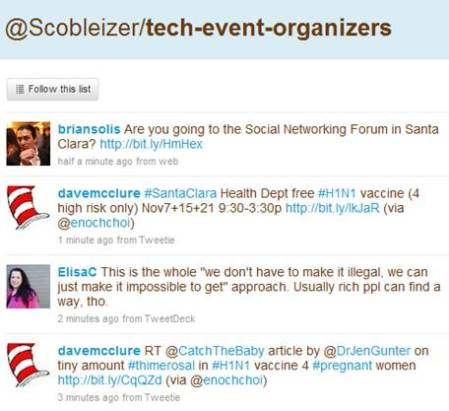
Robert Scoble's tech-event-organizers Twitter List

What’s a very simple yet effective way to integrate the new Twitter Lists feature into your event?  Here’s what you can do:

  1. Define your event hash tag (a “must do” for any event!)
  2. Create a Twitter List for your event
  3. If your company or event already has a Twitter ID (“brand”), connect it to that ID (e.g. twitter.com/<your-brand>/<your-event-list>)
  4. On your registration page, ask registrants to supply their Twitter ID
  5. Manually or automatically populate your Twitter List directly from registration!

As part of the Twitter API, there are methods in place to interact with Twitter Lists (look in the documentation for List Methods, List Members Methods, List Subscribers Methods).  As such, you could automate this process by having your registration page utilize the Twitter List API to auto-populate your list directly from registration.

In addition, you could use the Twitter API to inform registrants which of their Twitter friends or followers are (a) also registered and (b) already a member of the Twitter List.  Here are benefits of leveraging a Twitter List for you event:

Registrants promote the event on your behalf

It’s the crowdsourcing method for generating awareness – allow the participants to spread the word on their own.  After all, the combined reach of your registrants is far greater than your own.  By referencing your Twitter list on your registration page, users who supply their Twitter ID will likely go straight from registration completion to the Twitter list to (a) confirm that they’re now a member of the list and (b) skim through the pre-existing messages.

The concept is similar to a pre-event bulletin board or forum – the beauty of using Twitter, however, is that unlike a forum (which needs a critical mass of initial postings before it really takes off), a Twitter list is “pre-seeded” from the natural activity of the list members’ tweets.  You can be sure that as users register for your event, they’ll first tweet that they “just registered” – and then, continue to tweet about the event (especially as the event date draws near).  You’ll want to encourage all registrants to include your event hash tag when they tweet.

Facilitates pre-event networking among registrants

Whether physical or virtual, a key reason people attend events is the networking aspect – being able to meet, connect and interact with others, to discuss common business challenges – and to extend their social graphs.  Too often, however, one arrives at an event with no idea whom else is attending.  A Twitter List changes the game – you’ll not only know the identity of folks who are attending, but you’ll feel like you know them very well.

Consider friends or family members that you follow on Twitter or Facebook – do you find that you come to learn and understand them more via status updates than interacting with them day-to-day (or over the years)?  It’s remarkable how social network connections can generate a more complete picture of an individual.  With pre-registrants to an event, you may find that you’re really getting to know individuals, based on their intra-day status updates and industry thoughts.

This will lead to events whereby attendees will have pre-arranged meet-ups and appointments (with other attendees) in advance, making their event experience more rewarding.  Perhaps someone will build an integration from Twitter List pages to LinkedIn, so that event registrants can also extend their LinkedIn connections directly from the event’s Twitter List.

Allows exhibitors to get to know registrants/attendees

This will need to be managed/handled properly, as registrants surely wouldn’t welcome unsolicited pitches from exhibitors before they’ve even attended the event – but, imagine the potential for exhibitors.  You get to know the users who are attending the event.  Perhaps you create booth content or special offers that are tailored to what you’ve learned about your upcoming booth visitors.  Did they talk about pricing challenges in your market?  Well, how about an event-exclusive price break on your product, which you announce at the event?

If users commented about technical challenges using your product, bring the right specialists into your booth so that you directly address this pre-event feedback.  Lastly, exhibitors can seed some “must meet” lists based on the registrants who are tweeting within the list – build a profile of interesting users and ask your booth reps to be on alert if those individuals visit your booth.

Can you believe it?  Something as simple as a Twitter List can go a long way to making everyone happy: registrants/attendees, exhibitors and … YOU.

Related links

  1. 10 Ways You Can Use Twitter Lists (Mashable)
  2. Five Essential Twitter Lists For Every Event (CrowdVine)

From Web 2.0 to Webinar 2.0

September 28, 2009

Source: flickr (User: Werkplay)

Source: flickr (User: Werkplay)

In this age of social sharing, participation, “users as publishers”, Facebook updates and Twitter tweets, the webinar is a seeming anachronism.  In your typical 60 minute webinar, the presenters speak for 45-50 minutes – and the only “participation” from the audience occurs when the presenter selects your question to be answered.  Users are not able to see questions submitted by other viewers – in fact, they rarely know how many other users are also viewing the webinar.

At the Feeding the SAP Ecosystem blog, there’s an interesting posting titled “SAP Virtual Events: A Work in Progress“.  Here’s a great quote about webinars:

Or the presenters drone on too long, overloading the audience with slides and not coming up for air until there is a few minutes left and the participants are too burned out to even attempt a last minute question. Webinars that incorporate reader chat and questions throughout the broadcast, rather than exiling them to a shrinking time slot at the end, are much more effective.

I agree wholeheartedly with this observation.  I believe that webinars can be much more engaging if they adopted an unconference model.  According to Wikipedia, “an unconference is a facilitated, participant-driven conference centered around a theme or purpose”.  As a webinar presenter (or sponsor), you’ll still want to define the topic and prepare a set of slides to reinforce your speaking points and presentation objectives.

But, what if you were to hand over some control back to the audience?  It requires a leap of faith, I know.  But when the audience is directly involved, I think you create a more rewarding user experience – and, you stand to benefit as well.  User involvement should directly result in engagement, retention and satisfaction.

Here are some simple ideas from Web 2.0 that can be applied to create Webinar 2.0:

  1. Audience drives the content selection – the presenter flips through two potential slides to the audience and then pushes out a survey to the audience.  The survey prompts the audience to select which slide they’d like to see covered.  The presenter then publishes the survey results and advances to the slide that won the vote.  This addresses one issue I’ve had with webinars – I attended the live webinar because the topic intrigued me; however, the content didn’t quite hit the mark.  If presenters gave more control and input to the audience, they’d have a better chance of giving viewers what they want.
  2. Audience members render their own slides – akin to a virtual meeting (e.g. WebEx, GoToMeeting, Adobe Connect), where the meeting host passes control to another participant, who then shares his/her desktop.  For webinar platforms that support this, imagine how powerful this could be.  Viewers would need to know to come prepared with slide content – but imagine the presenter asking for real-world case studies of a given technology and allowing a viewer to render a slide about his real-world implementation experience.  Again, this is a leap of faith and a “risk factor” in surrendering control of the content.  However, isn’t that what Web 2.0 is all about?
  3. Better balance between PowerPoint content and Q&A – a typical webinar has an 80/20 split (or more) between the PowerPoint presentation and Q&A.  I think it should be more like 50/50.  Scheduling frequent pauses (to answer questions) provides a lot of value to viewers – it means that they don’t have to wait until the 50 minute mark to have questions answered – and it signals to the audience that the presenters are “listening” to them.  Along these same lines, the webinar platform should allow all viewers to see all questions submitted by attendees.  And to cap it all off, follow up after the webinar by publishing an FAQ – list commonly asked questions along with their answers.
  4. Answer questions coming from the statusphere – define a Twitter hashtag for your webinar and have staff available to monitor the tweets – then, have presenters address and answer interesting questions that were posed via Twitter (and other social tools).  This allows you to extend the audience of your webinar – and engage with users who might not be able to attend.  Additionally, have staff members tweet back (with the answers), so that users monitoring the tweet stream know that you’re not only listening, but participating back.

I’m sure we’ve just gotten started – what tactics do you have to recommend for bringing Web 2.0 to Webinar 2.0?


Coming To A Physical Event Web Site Near You: Video, Blogs, Social Networks

July 23, 2009

Source: BtoB Media Business

Source: BtoB Media Business

In the current issue of BtoB Media Business, Charlotte Woodward published a cleverly named article, “Face to Facebook“, that highlights the incorporation (by physical event organizers) of digital technologies into the once-static event web site.  The inclusion of these technologies is helping show hosts extend the life of their events and support a 365 day/year experience – with a (hopefully) engaged online community to go along with it.

The article references the latest CEIR / GPJ research report:

Digital sponsorships contribute only about 7% of an event’s marketing budget, according to a recent report from the Center for Exhibition Industry Research and George P. Johnson. The study, “Digital+Exhibiting Marketing Insights 2009,” conducted online in April and May, surveyed 287 event managers and corporate brand exhibitors about the use of digital media.

As a result of the trends noted in the article, my belief is that in next year’s report, the percent of event marketing budget allocated  to digital will climb to 15-20%.  Why?  Because online/virtual will become a standard component of physical events.  The “new” event web sites of today – that include video, blogs, social networking, trackability, additional “impressions” for exhibitors, additional revenue for event organizers, etc. – could stand to benefit by leveraging a virtual event platform.  So rather than building your own event web site from scratch, you leverage virtual event/tradeshow technology to power the next generation “site”.

For the event organizer, the business model seems rather straightforward:

  1. Bundle sponsorship of the online community with the physical event sponsorship – upsell those low/mid-level sponsorship packages into a premium package, which includes a presence in the virtual component (e.g. full-blown virtual booth, signage within the environment, etc.).  You can create a “presence” for all of your physical event sponsors, but only those who have signed on for the full bundle will have real content behind the virtual booth storefront.  Those who opt not to purchase the bundle will have only their logo in the environment – a great way to incent the non-believers to enter the fray.
  2. Create value to attract online attendees – the online venue cannot solely be an area to appease exhibitors/sponsors.  In the same way you attract attendees to your physical event, you need to make it valuable for online attendees to visit your virtual community.  For me, this means a combination of compelling content (e.g. videos, articles, external links, etc.) and effective social/sharing tools (e.g. blogs, message boards, chat, etc.).

The incorporation (blending) of physical and virtual events creates very exciting possibilities.  Let’s consider what b-to-b publisher Hanley Wood is doing:

Additional improvements also integrate all the customer data Hanley Wood has collected, demonstrating to exhibitors and attendees who register that Hanley Wood remembers them and allowing the company to make recommendations based on a customer’s profile and history of participation at its events.

“We can put together some cross-show marketing, as well as up-sell the events that these people participate in,” Buraglio said.

The aggregation of attendee data from physical + virtual creates value:

  1. Attendees – by better understanding all of the touch points by an attendee (across physical + virtual), event organizers can more effectively package and target content that’s uniquely tailored to that attendee.  Give attendees precisely what they want (or need) and you create a more satisfied user, who will be more likely to stay engaged and return to the site frequently.
  2. Exhibitors/Advertisers – by building a complete picture of physical + virtual engagement from attendees, you can more intelligently plan and execute your lead follow-up paths.  If a user had her badge scanned at your physical booth, then entered your virtual booth to download 3 separate documents, she’s probably an advanced lead / “A” lead.

Related links

  1. Blog posting: The ABC’s Of Lead Follow-Up For Virtual Events
  2. Blog posting: The Convergence Of Physical Events And Virtual Events

Case Study: How ExpoNZ Created A Virtual, Global Showcase

July 8, 2009

skinlight3

For many locations around the globe, the country of New Zealand is many miles (and oceans) away.  As such, businesses in New Zealand have the challenge of reaching and connecting with a global audience.  In 2008, Virtual Expos New Zealand Limited was faced with helping businesses  address this challenge.  The economic environment presented a number of obstacles – rising costs, shaky exchange rates and the need to drive new business as the economy was sputtering.

On the flip side, virtual event technologies had emerged, while New Zealand companies were under pressure to uphold a clean green brand and consider their carbon footprint.  The decision became clear for Virtual Expos New Zealand Limited – build a virtual event to “showcase and sell the best of New Zealand to a global audience and to enable people everywhere to get a taste of what New Zealand is all about.”

mc_networking

The virtual environment was named ExpoNZ and configured as a 365 dayper year online community – with live events scheduled throughout the year. Marie-Claire Andrews, ExpoNZ’s Vice President and Head of Sales notes, “Through our expo, New Zealand businesses no longer face the tyranny of distance – the costs and inconvenience of reaching markets a thousand miles away.  A year round schedule of live events, B2B opportunities, huge support from the dedicated team in New Zealand and round the world, plus a half million dollar marketing budget all make this a pretty compelling way for NZ to face down the global credit crunch and do more business.”

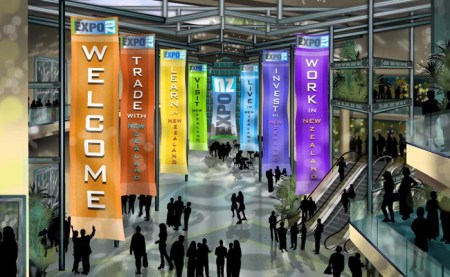
ExpoNZ neatly segemented the event content into halls – allowing visitors to select their desired activity: Trade, Learn, Visit, Live, Invest, Work:

ExpoNZ Plaza

This provides an intuitive entry area – it clearly highlights the available exhibition areas and encourages visitors to determine (on the spot) their objecctive.  If I want to visit or live in New Zealand, then I’ll visit those two halls – perhaps returning at a later date for investment opportunities.

The virtual event platform for ExpoNZ is powered by US-based Expos2 – via their partnership, ExpoNZ is an authorized reseller of the Expos2 platform in New Zealand.  According to Andrews, the sponsorship cost to exhibitors is “$12,000NZD per year or $2750NZD for seven weeks around a specific live event and we’re also signing up sponsors for the halls, the lectures and supporting infrastructure.”

Like many virtual event organizers, Andrews belives in the power and value of social media integration, but notes that “it’s all about consistency, relevancy and immediacy”.  Andrews has leveraged Twitter to uncover potential sponsors and clients – and for generating buzz around launch events.  She also reads a number of industry blogs and finds connecting via Linkedin Groups to be particularly valuable.

What were some of the technical and logistical challenges faced by ExpoNZ?  First and foremost, Andrews notes that “it has taken a while for internet bandwidth here to catch up with the rest of the world.”  As such, she had to “be creative” with media servers in the U.S. to support North American visitors.  Secondly, ExpoNZ faced a perception issue – business is done in a very personal fashion in New Zealand, so “there’s a belief that face- to- face is generally best.  We have to demonstrate that business can be done virtually – and with our integrated video conferencing you do get face to face – if only digital.”

Live Event – July 16, 2009

Registration is now open for a Live Event on the morning of July 16, 2009 (which is July 15th in the U.S.).  The start time for the event:

  1. 7AM NZT
  2. 12PM PDT (July 15)
  3. 2PM CDT (July 15)
  4. 3PM EDT (July 15)

According to ExpoNZ:

You can’t enter the Expo before the day, but visitors can pre-register at http://www.exponz.co.nz and we’ll send updates about the show.

All the information including presentations and job listings will still be available afterwards because ExpoNZ is ‘always on’ 365 days a year round the clock. So visitors can come back as often as they like after the event; to make appointments to talk to exhibitors in their booths, to re-view presentations at leisure.

We’ve a cohort of over 15 ICT companies and supporting organisations (eg Immigration) and eight speakers lined up so the live conference will run till around 11am NZT.  We expect to have several hundred job seekers from the UK, US, Canada and Australia primarily.

For New Zealand visitors, Andrews’ personal recommendations are as follows:

On the web, you can’t go past the virtual Encyclopedia of New Zealand (http://www.teara.govt.nz/) or our beautiful tourism site (http://www.newzealand.com/) where you can book your next trip.

Best places to visit:  A wine tour in Marlborough, diving in the Bay of Islands, ski-ing in Wanaka, hot pools in Rotorua and culture, coffee and creativity in my fantastic home town, Wellington of course!…..

Related Links

  1. ExpoNZ’s home page
  2. Follow ExpoNZ on Twitter
  3. Read the ExpoNZ blog

Draft The Right Team For A Successful Virtual Event

June 28, 2009

draft_team

Last week, the National Basketball Association (NBA) held its annual draft in New York City’s Madison Square Garden.  Some teams were looking for the missing link to their 2010 NBA title aspirations – while others were looking to build a new foundation from scratch.

In either case, it’s important to know what you need – and then make the right talent evaluations to select the players that best fit your needs.  Similarities exist when planning a virtual event – draft and assemble the right team and you have the potential to bring home the championship.  Build your team incorrectly and you’ll miss the playoffs.

Continuing with the basketball analogy, here’s how I’d assemble my virtual event team:

  1. The Center – for many teams, both the offense and defense revolve around the important center position.  For a virtual event, the Center is your content – the theme, the independent expert presenters, the presentations themselves, etc. Make this your number one draft pick – identify the target audience for your virtual event and then select the best players who will deliver the most compelling content to that audience.  Be sure to make this a slam dunk (pun intended).
  2. The Point Guard – the point guard is often considered the surrogate coach on the floor – s/he dribbles the ball up the court and commands the offense.  In a virtual event, the point guard is the Event Host or Event Planner – the person who’s responsible for coordinating all the various parties involved in the execution of the event.  Rookie point guards rarely excel in the NBA – so make sure you have a veteran player running point in your virtual event.  If you have rookies on board, have them play the understudy role, so that they can grow into a starting role for the next virtual event.  A virtual event is best produced by someone who’s run the show many times before.
  3. The Shooting Guard, Small Forward and Power Forward – these players round out your squad – in basketball, they do a combination of scoring, defending, shooting, passing and rebounding – just about everything.  In a virtual event, these are your production assistants, project managers, webcasting engineers, video engineers, campaign managers, quality assurance engineers, etc.  As with any top team, this portion of your roster needs to have talent and depth – when one player becomes unavailable, the next one must step right in.  Championships cannot wait – and neither can the virtual event that’s one month away.

As general managers are astutely aware, assembling the right pieces is no guarantee of success.  As in sports, virtual events depend on the following:

  1. Team Chemistry – if pairs of groups have worked well in the past, keep them together for subsequent events.   This way, they don’t have to re-learn each others’ working habits and personalities.  As in sports, team continuity improves the likelihood that you’ll win over and over.  On the client-facing side, identify team members whom specific clients love – and keep them on those same client accounts – they’ll thank you for it.
  2. The Front Office – in sports, a front office that puts a good team on the field often reaps the benefits of strong ticket sales.  In virtual events, the quality of the team is independent of attendee interest.  Here, you need talented and knowledgeable front office staff to handle the audience generation for the virtual event – email blasts, web site syndication, social media integration, etc.  The best  (execution) team on the planet is useless if your virtual attendance is poor – so the audience generation crew is critical.
  3. In-Season Moves – championships are often won and lost by in-season moves – trades, player signings, managerial firings/hirings, etc.  For virtual events, you’ll find many inflection points where critical decisions need to be made.  Whether it’s a shift in the audience generation strategy or a change to the content/theme – making the right decision can make or break the event.  Make sure you weigh all decisions as a team – and remember, virtual event decisions do not need to be approved by the league office (ha ha).

With the virtual event season in full swing – best of luck to you all – bring home a winner!


Four Ways To Make Virtual Conferences Better

June 9, 2009

Nick Morgan, on the Conversation Starter blog at Harvard Business Publishing, wrote a recent posting titled “Three Ways To Make Conferences Better“.  To summarize, Nick’s suggestions are:

  1. Tell a unique story
  2. Make attendees active participants, rather than onlookers
  3. Leverage the gathered group to give something back to the community in which the conference is held

Nick’s blog posting served as inspiration for me – I’d like to cover ways to make virtual conferences better.  Virtual conferences (along with virtual tradeshows, virtual job fairs, etc.) do allow attendees to participate – in fact, some of the more interesting “content” in a virtual conference is the free form text chat that occurs in areas like the Networking Lounge.

And by its nature, a virtual conference gives back to the community in the form of carbon emission avoidance, time savings, convenience and productivity gains.  As for telling a unique story – that’s something I have not seen virtual conferences achieve.  But at the same time, I don’t think physical conferences do a good job of  this, either.

Without further ado, here’s my list:

  1. Leverage a Requests For Proposal (RFP) Tool for attendees – in a b-to-b virtual conference, you often find that the exhibitors offer a common set of products and services (they’re direct competitors).  As an attendee, the virtual conference affords me with a convenient and efficient means for comparison shopping.  So if I’m in the market for blade servers, I might want to spend time visiting numerous booths, downloading product collateral and chatting with some booth reps.  Instead, what if I could fill out an online form (within the virtual conference) and tell prospective vendors what I’m looking for?  Perhaps I need 1U blade servers with redundant power supplies and are remotely manageable.  I fill out my RFP form, check off the exhibitors that I’d like to receive my request and click “Submit”.  I then receive responses within the virtual conference environment from exhibitors – and start to create my short list, based on those responses.  As one can imagine, such a tool could greatly benefit attendees and exhibitors.
  2. Play some games – making games available within the virtual conference creates a sense of fun, which increases attendee satisfaction – this, in turn, increases retention and session time (attendees remain in the environment longer).  And of course, you’re not hosting the game solely for the sake of fun – you’re forcing participants to perform desired activities (e.g. visit a booth, view a Webcast, etc.) in order to advance within the game.  Again, win-win scenario – attendees and exhibitors benefit.
  3. Incorporate social media – attendees at physical conferences generate lots of Twitter, Facebook, etc. updates  from their PDAs.  In a virtual conference, it’s all too easy to remain well-connected with your social networks.  That being said, don’t force attendees to leave the virtual environment – instead, provide interfaces for them to post a status update directly from the virtual conference platform!  They should be able to tweet directly from the virtual conference, update their Facebook wall, etc.  This provides a convenience to the attendee and generates no-cost “PR” of the virtual conference across social networks.
  4. Embark with an Aardvark – a new service that describes itself this way —  “just send Aardvark a message through IM, like you do when talking to a friend.  Aardvark figures out who might be able to answer, and asks on your behalf — Aardvark is the hub.”  While it might be interesting to consider an integration directly from the virtual conference to the Aardvark service, it’s the concept that most interests me.  And that is, tapping into the collective wisdom assembled at a virtual conference in order to help attendees answer questions.  After all, most b-to-b virtual conference audiences login to the event with a common set of business or technical challenges.
Source: Aardvark (vark.com)

Source: Aardvark (vark.com)

Related Links

  1. Blog posting: Three Ways To Make Conferences Better
  2. Blog posting: Virtual Events And The Power Of Social Media (authored by me on my company’s blog)
  3. Blog posting: Cisco has integrated Twitter into their Cisco Live Virtual event
  4. About Us page: Aardvark

Bringing Virtual Benefits To Business Travel

March 14, 2009

Source: Virgin America

Source: Virgin America

Recently, I embarked an a now-uncommon routine (for me) of a business trip – flying round trip on Virgin America, one of my favorite airlines.  Since most of my business these days is conducted virtually, the logistics of checking in at the airport, waiting in the security line, boarding the plane, checking into the hotel, etc. – gave me plenty of time to reflect on the dynamics of business travel.  Here are some observations:

  1. By its nature, business travel means that you’re constantly in close proximity to other businesspeople – some of whom are in your industry – or, could benefit you as a business partner (or vice versa)
  2. Those who are less outgoing / personable may only meet 2% of the fellow businesspeople they travel with – and really get to know only 1% (or less!)
  3. On my return flight to SFO, I’d guess that 1 out of every 15 people was a Silicon Valley entrepreneur.  If you were a start-up entrepreneur and on that flight, I’d guess that 1 out of every 25 on that plane was a Silicon Valley venture capitalist – or, someone who had funds to invest in your company

And while we’ve all heard stories about the sales deal or business partnership that was sourced by the “person next to me on the plane”, how many other business connections fall by the wayside because two or more individuals never connected?  Lots, I’m sure.  Technology helps flatten the world – but it can also be a further flattener to enable strangers in physical proximity to connect.

We do know that business travelers are quite active on social networks.  There are plenty of business travel blogs out there.  And, users of Facebook and Twitter are quite active while traveling.  They’re constantly chiming in from airports, conferences, hotels and restaurants.  They’ll also tell you whom they’re about to go in to meet with – and how it went.  So we know that busniesspeople are active on social networks during travel – but, how often are they engaging socially in person?

And there’s the irony – social media allows you to connect and socialize globally – but while you’re tweeting from your BlackBerry in the hotel lobby, might you be missing out on an introduction to a potential business partner who’s about to grab a cab to the same place you’re going?  Here’s where localized social media –  targeted at the local business traveler – could be a big win.

Some ideas:

  1. Virtual Flight Lounge, powered by Virgin America RED – when booking your Virgin America reservation online, Virgin asks you to opt in to their Linkedin connector – by opting in and supplying your Linkedin credentials, Virgin is able to capture key data from your Linkedin profile – and, obtain a list of your Linkedin connections.  Once on board, you pull up RED (Virgin’s in-flight entertainment system) and it displays Linkedin connections of your’s who are on the flight.  Additionally, it recommends business partners (with their seat numbers) based on a comparison of your profile against other profiles of passengers who also opted in.  If you’re interested, you can engage in RED’s seat-to-seat chat with your new-found friend.
  2. Marriott Virtual Lobby – when making your Marriott reservation online, you’re prompted to opt in to the hotel’s business networking feature.  You’re asked to provide information to populate a profile, such as what business you’re conducting, what business opportunities are you interested in, what are your food preferences, what are you in the market to purchase, etc.  Once you arrive at the hotel (and connect to the hotel’s paid wireless service, of course), you’re invited into a virtual lobby (similar to a virtual event), where you’re able to see all other guests who have opted in to the service.  You’re able to perform search, view guest profiles and participate in private and group chat (either via text or webcam).

In each scenario, the idea is that two or more potential business partners could discover one another (via their published profiles) – connect virutally and then arrange for the old-fashioned cocktail at the hotel bar or a steak dinner downtown.  That’s right, virtual begets physical.

Why would Virgin or Marriott do this?  The costs are fairly low (and fixed) – and can earn a high and recurring return – that being customer satisfaction and retention, which sure has a high ROI in this economic environment.  And what’s the value to the business traveler in opting in and using such a service?  Well, what’s the value of a new business partner or a new client?  I’m sure it’s much higher than the hard cost (zero) and worth the time and effort.

The concept here is similar to the popular “Who’s Close To Me” service provided by TripIt – but the difference is that here, you’re sourcing brand new business contacts, as opposed to discovering if your existing contacts are nearby.  So if I don’t bump into you in the security check at SFO, perhaps I’ll connect with you virtually and then grab a coffee with you in person.