A Virtual Battle To Combat Swine Flu

April 28, 2009

Source: US Centers for Disease Control & Prevention

Source: US Centers for Disease Control & Prevention

The number of deaths in Mexico has surpassed 150.  The Department of Homeland Security has delcared a public health emergency in the United States.  The European Union’s health commission urged people to avoid non-essential travel to the affected areas.  Confirmed cases have now been reported in the Middle East and Asia Pacific regions.

Clearly, the rapid spread of swine flu has become a serious, global issue.  With scientists and government officials (across the globe) leaping into action, now is the time to leverage web and virtual technologies to faciliate the global effort to combat the disease and outbreak.

To get through a crisis, information sharing is paramount.  To combat swine flu, it will be critical to faciliate:

  1. Information distribution – real-time updates, to help all parties have a global view of the situation.  We need to understand where the illness has spread, along with in-country updates on how (and how severe) the illness is affecting the local population
  2. Information exchange – experts in the field of medicine, outbreak, crisis management, etc. need to provide their insights to those who need it
  3. Collaboration and dialog – related to information exchange – key parties need to have real-time dialog and collaboration to discuss current conditions and strategize on next steps

Here’s why a virtual event platform would be effective as a crisis management platform:

  1. Global access – with travel a limited option, participants can access this platform from any location with an Internet connection.
  2. Simple technical requirements – a basic PC (or Mac) with Adobe Flash should do the trick, which means that most Internet-connected computers will be fine.
  3. Tracking and transcripts – collaboration among participants can be tracked, with transcripts of communications saved for later review.
  4. Facilitates document sharing and access control – virtual event platforms can store, index and catalog documents, presentations, rich media, etc.  In addition, some platforms provide for user-level access controls, which allow the administrator to provide sensitive or confidential documents to a selected set of participants.  While I’d argue that in a crisis, all information should be shared, there may be certain information during this crisis that is provided early on to selected members, to review before others.
  5. Facilitates ad-hoc discussions – place 25 scientists and government officials into a text-based group chat area (giving some the option to participate via webcam) and I think that many benefits will follow.

Here are some of the primary components that the platform could offer:

  1. Resource Center – make the platform the “home page” for crisis management.  Have the US CDC (Centers for Disease Control and Prevention) and the WHO (World Health Organization) place updates, documents, links, presentations, etc. into a folder structure – and, provide a robust search capability for participants to find the information they need.  As new information becomes available, it is placed in the Resource Center.
  2. Auditorium – allow those same organizations to provide live, streaming broadcasts (audio or video) to participants, to cover breaking news, status of the outbreak globally, etc.  In addition, representatives from the pharmaceutical industry can provide updates on the development of a vaccine to combat swine flu.
  3. Lounge – create structured chat areas for participants to exchange information and collaborate.
  4. Private Chat – for conversation that need to happen outside of the Lounge, private, one-on-one chat can be faciliated.
  5. End User Search – during times of crisis, it’s often useful to find and connect with others, who may be able to provide information, assistance, etc.  You might need to find an in-country expert in Asia Pac to help assess the situation there.  Or, you might be in need of an expert to analyze conditions that are unique to your region.  With the virtual platform, a robust end user search (based on users’ profile information) can facilitate these connections.

What are your thoughts – would such a platform be useful to help battle swine flu – and, how could this be organized in order to faciliate global participation?

Note: The World Health Organization has a useful FAQ on swine flu here: http://www.who.int/csr/swine_flu/swine_flu_faq.pdf


How Virtual Worlds Technologies Benefit The Real World

April 5, 2009

Source: Hopecam

Source: Hopecam

Let’s play word association.  “Webcam” – for me, the association is about keeping in touch with family or perhaps collaborating with colleagues and partners on business topics.  “Virtual Worlds” – my association here is 3D, fantasy, escapism and gaming.  While those associations will likely remain that way for quite some time, there have been numerous uses of virtual worlds technologies that go beyond the “neat and fun”.  It’s not an overstatement to say that they are helping humanity.

Take, for instance,  Hopecam, whose motto is “Connecting Homebound Children to LIFE”.  Founded in 2003, this Virginia-based non-profit connects children (undergoing treatment for cancer) with their friends at school with nothing more than a laptop, webcam and high speed Internet connection.  Hopecam has brought this “connection” to over 75 homebound children.  Their web site has an “Our Kids” section that profiles some of these children – and on this page, you can make an online donation to the organization.

Note: I did an earlier interview with a similar, Ireland-based non-profit, Vizitant.

The Washington Post published an article titled “Webcams Allow Students to Stay Connected“, which profiles 7-year-old Becky Wilson, who’s able to virtually attend class at Jamestown Elementary School in Arlington County via a webcam.  Becky, who was diagnosed with leukemia, is a full participant in classroom activities, according to her teacher, Lainie Ortiz:

The webcam has exceeded Ortiz’s expectations as an academic tool. When Becky tunes in for class and has a question, she raises her hand and Ortiz calls on her. During story time, Ortiz will bring the book she’s reading up to the computer, so Becky can see the pictures, too.

At the Baylor College of Medicine in Houston, Texas, researchers are leveraging a grant from the US Department of Education to “develop an intervention program in Second Life® that focuses on self-esteem, a critical element in health and wellness.”  For women with disabilities, virtual world technologies mean that access to rehabilitation services require nothing more than a computer, an Internet connection and a virtual world application:

“Second Life® allows women with disabilities to experience virtual life as an able bodied person,” said Dr. Margaret Nosek, professor of physical medicine and rehabilitation at BCM. “They can be who they want to be in the virtual world rather than living by the standards set by others,” said Nosek.

“Second Life® allows them to interact with other women while learning and practicing new self-esteem building skills in the virtual world,” she said.

The program will be available in late 2009 – the Baylor College of Medicine published a news article about this virtual intervention program.

Finally, a BBC News article titled “What it’s like to have schizophrenia” tells the fascinating story of Dr. Peter Yellowlees, professor of psychiatry at the University of California, Davis, who is leveraging Second Life to take you inside the mind of someone afflicted with schizophrenia.  Currently on a password-protected island, the purpose of this initiative is to educate people on the condition – there are clear benefits to understanding what it’s like to be afflicted schizophrenia:

“We welcome anything that proposes better understanding.”

“It broadens people’s experiences and narrows the gap between ‘us and them’.”

UPDATE: I published an interview with Professor Yellowlees regarding his use of Second Life.

The next time I login to Skype or Second Life, I’ll be thinking about the wonderful applications of these technologies and how they’re able to deeply improve the human condition.


Join A Group To Collaborate On Virtual Events

February 23, 2009

Over the past few months, I’ve observed an increasing amount of chatter within Twitter (the popular micro-blogging service) regarding virtual events and virtual tradeshows.  In many cases, Twitter users who are considering their first virtual event will submit a tweet such as, “considering my first virtual event.  Anyone have information on best practices?”.  I chime in when I can, but Twitter and its 140 character limit does not facilitate much in the way of extended dialog.

In fact, when two or more Twitter users need to delve deep on a topic, the next step is usually to “connect offline”.  Similarly, this blog is a useful vehicle for the communication of my thoughts and ideas – but isn’t great for facilitating discussion.  Despite the comment feature of blogs, there hasn’t been much extended discussion here, by way of commenters.

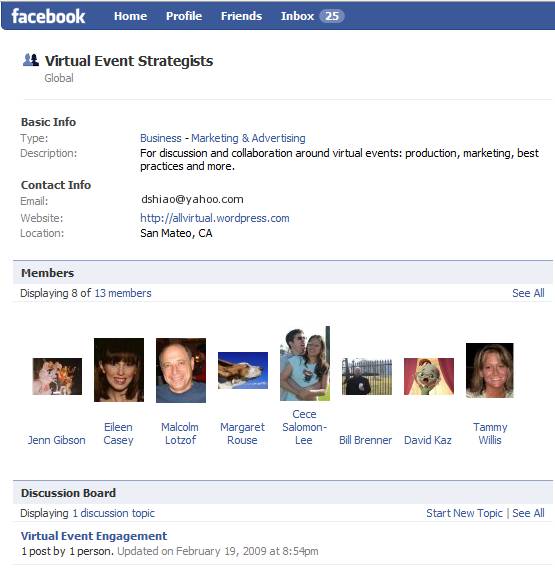
So I decided to create a Facebook Group to address these challenges – it’s called Virtual Event Strategists and is open to anyone interested (you need a Facebook account to join).  Here’s a snapshot of the group page:

Source: Virtual Event Strategists' Group Page

Source: Virtual Event Strategists' Group Page

Why a Facebook Group?  A few reasons:

  1. The 175MM active users (of Facebook) – most readers of this blog are likely on Facebook – if not, let me know why not!
  2. Threaded discussions – are you a first-timer in virtual events?  Well, starting up a threaded discussion may be just the thing to do
  3. The Wall – post miscellaneous thoughts and ideas about virtual events
  4. Post Links – let us know what interesting blogs or articles you’re reading about virtual events
  5. Post Video – Facebook has a convenient video recording and hosting capability – plug in a webcam and start using it

In fact, I’ll be doing brief “Virtual Event Tip of the Day” video clips on the Group page.  Here’s one of my first video clips, where I talk about the use of prizes in virtual events:

fb_video

I’ve seeded the site with some initial content – but, what I’d most like is to hear from all of you.  So, start some discussions, post some videos, post some links.  The group page is:

http://www.new.facebook.com/group.php?gid=52325833170#/home.php?ref=home

Let’s collaborate and learn together – see you there!


Virtual Events For Online Dating

February 21, 2009

Source: Match.com

Source: Match.com

The Internet Dating industry has a conference called iDate.  This year, iDate 2009 is scheduled for Los Angeles, London and Miami.  The event is billed as “the largest conference that covers the business management for the Internet Dating and Social Networking Industries.”  iDate has launched a virtual conference to complement their physical events [see press release].

Perhaps at the iDate 2009 events, industry players can collaborate on leveraging virtual event platforms to faciliate online matchmaking.  What are some of the challenges of online matchmaking today?

  1. Interaction is via asynchronous messaging (either via email – or, via messaging within the service’s web site)
  2. You never get to learn much about potential mates besides what they’ve chosen to provide in their online profile
  3. You’re never sure if that uploaded picture is “true” – for singles of a more advanced age, perhaps the picture is one from 10 years ago
  4. You don’t truly get a feel for your potential mate prior to a phone call or in-person meet-up

So for the likes of eHarmony, Match.com, Yahoo Personals, etc. – why not organize virtual events for online matchmaking!  There would be numerous benefits:

  1. The game changer: webcams – require all participants to utilize a webcam.  Without one, you truly won’t know who’s on the other end of a chat window.  With one, you’ll be able to discover whether the picture (that attracted your attention) matches up with the individual who uploaded it.  And, you’re able to interact via spoken word to other attendees – and see their facial expressions.
  2. Global access, from home – the event would have elements of a physical meet-up, but attendees could participate from anywhere.  That being said, regionalized virtual events may be necessary, to facilitate match making of individuals within close geographic proximity.
  3. Profile matchmaking – some virtual event platforms already have this feature – for online dating, this is the secret sauce that differentiates one service over another.  For an eHarmony, perhaps they integrate their sophisticated algorithms into the event platform, so that attendees can be paired up in the virtual event like they are on eHarmony.com.
  4. Speed dating via webcam – facilitate five minute private webcam sessions between two attendees – after which, they’re rotated to brand new webcam partners.
  5. Post-event data portal – after the event, participants can login to a personalized web-based portal, where they can review all the interactions they had with other attendees.  If you met over 20 people online, you might need such a feature to remember whom you really liked!
  6. Find mates by observing – topical chat rooms could be organized (e.g. Music, Sports, Food, Travel), where attendees could congregate to chat about their hobbies and interests.  The chat need not be restricted to text – some platforms support multi-webcam rooms, where participants can speak and see the other participants.  By observing, one might find someone interesting/attractive – and later on, you can connect with that person privately (e.g. in a 1-on-1 chat).

For the online matchmaking service providers, virtual events provide a nice up-sell opportunity to complement subscription-based revenue.  To avoid canibalization of the subscription business, perhaps you only allow access to the virtual event for existing subscribers.

The virtual events could also serve to generate new subscriptions – imagine tying the event into Facebook’s ~175MM active users via Facebook Connect.  Attendees could see which of their Facebook friends are in the event – and, post updates back to their Wall, driving new users into the event (and hence, new subscriptions to your service).

So, time to get moving – millions of singles across the globe await!


The Future Of Newspapers: Online, Interactive Communities

February 14, 2009

NYTimes.com

Source: NYTimes.com

There’s been much discussion about the future of newspapers.  Some have shuttered, others are struggling for their survival.  Business analysts and bloggers have even speculated on the future of The New York Times.  NYTimes.com had 14 million unique visitors in August 2008 (according to this Wikipedia entry).  Many web-centric businesses have been able to build large market capitalizations off a base of 14+M users.  So how can NYTimes.com monetize their users beyond display advertising?

Let’s see.  How about creating a community around these 14+M readers – and creating an interactive, real-time newspaper?  That’s right, folks.  I’m proposing that NYTimes.com be powered by a virtual event platform.  I’m NOT proposing a 3D environment with avatars.  Instead, I’m proposing a 2D “tradeshow-like” platform that would enable a business that’s rich in content (and, deep in Editorial talent) to best monetize their resources.

So let’s break down what this might look like:

  1. The newspaper’s main sections each map to “booths” within the platform – Of course, we’re not going to call these booths – I’m just drawing a parallel to the virtual tradeshow (VTS) model.  But, the functions and features here are the same that power a VTS booth.  So for NYTimes.com, there are “booths” labeled World, U.S., Politics, Business, Sports, etc. – you get the idea.
  2. The booth is the central holding place for that section’s content – Just like a newspaper has a front page – in a booth, the day’s content is rendered prominently as you enter – and, Editors swap out stale content (into the booth’s archive) for fresh content.
  3. Editors staff the booth and connect with readers – To me, this is the real game changer with this concept.  Editors (when time permits) can login to the environment and interact in real-time with readers.  What better a way to find out what your readers are interested in?  And, what better a way to find and connect with sources for you and your reporters?
  4. Readers interact with other readers – Another game changer here, as the platform would allow readers to tap into social networking to interact with other readers, all in the context of your content.  Valuable interactions keep those readers coming back in for more, creating site loyalty.

So imagine I enter the NYTimes.com Sports Booth – and I see this:

NYTimes.com

Source: NYTimes.com

I can click on Harvey Araton’s profile and read about Harvey’s interests and specialties.  If Harvey is online, perhaps I initiate a chat session with him – or, I drop him an in-show email to tell him I read his articles.  This provides a benefit for both of us – I feel directly connected with NYTimes.com – and, Harvey is able to efficiently connect directly with his readers.

Now granted, with 14+M people, it may be quite a challenge for Times Editors to spend time in an online community, juggling between user-initiated chats and their “real job”.  However, what if each attendee of this environment was a paying member?  Perhaps that changes the equation a bit.  So let’s talk about monetization opportunities:

  1. Advertising – NYTimes can sell “run of booth” or “run of platform” ads – and also offer up specific areas of the environnment for sponsorship (e.g. Networking Lounge sponsored by American Express).
  2. Direct Response – The platform (using a pay per click model) could house placements of advertiser content and drive clicks to advertiser web sites
  3. Subscription – Start off with a freemium model – anyone can access the environment at no cost, but certain features (e.g. access to premium content, ability to chat 1-on-1 with a Times Editor, ability to participate in real-time Q&A sessions, etc.) require a paid subscription
  4. A la carte content monetization – Why not create “booths” that house the entire archive of New York Times content.  Staff these booths with digital archivists, who can search through the virtual microfilm and find you the article you need.  Only premium (paid) members get access to these booths – and, you pay for each article that’s delivered from the archive.
NYTimes.com

Source: NYTimes.com

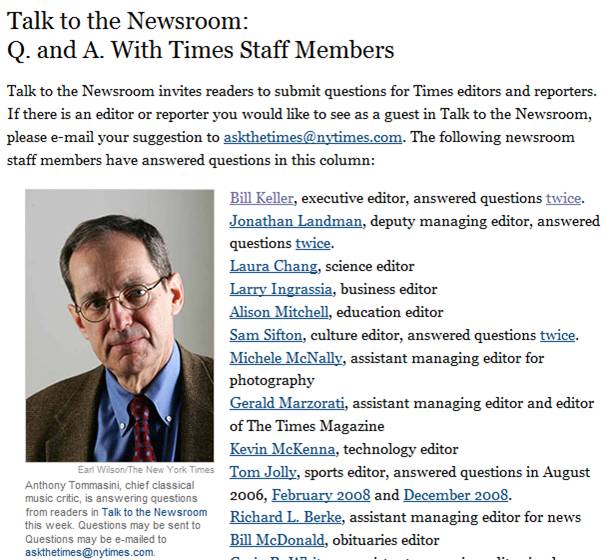
Now, let’s talk about the social media angle.  The Times could support the “Talk to the Newsroom” feature (above) via a real-time, text-based grroup chat!  They could even have the host be visible via a webcam, if so desired.  Here are some possibilities:

  1. Scheduled chat sessions with Editors, Publishers, executives, etc. (e.g. “Talk to the Newsroom”)
  2. Columnist and subscriber blogs – Published directly within the environment, with support for comments
  3. Forums around the paper’s main topics
  4. Presence indication – Provides readers with the feeling that they’re part of a global community. Reading the newspaper (which used to be a somewhat private experience) now becomes a communal one, where you’re reading, you’re sharing and you’re interacting – with other interested parties from around the world
  5. Real-time briefing rooms or crisis centers – Recall how quickly Twitter spread the news about the Mumbai terrorist attacks.  Why not have ad-hoc briefing rooms where NYTimes.com readers can engage around breaking news and current events?  In this scenario, the “daily newspaper” transforms into a real-time, 7×24 “always on” environment.

So some day, when I get my morning coffee and sit down with NYTimes.com, I’m hoping I’ll see you “there”.


Real World Meetings In A Virtual Office

February 11, 2009

Amanda Van Nuys, Linden Labs’ Director of Enterprise Marketing (and known in-world as Amanda Linden) has an interesting blog posting titled “Working in the Virtual World“.  Amanda describes her use of Second Life for work-related meetings and collaboration.  A neat physical/virtual tie-in was done with a conference room:

The physical conference room—Isabel—has a virtual counterpart that is an exact replica—Virtual Isabel. A camera in Isabel captures what’s happening in the room and displays it in the virtual space. Simultaneously, the participants in Virtual Isabel are projected on the wall of physical Isabel. The result is a seamless experience—two conference spaces, one real and one virtual, merge into one.

As for Amanda’s use of Second Life for meetings, she describes it as such:

These days, I’m spending at least 2-3 hours a day in Second Life, meeting with my colleagues distributed all over the world—collaborating, brainstorming, learning, and decorating my new office space in LindenWorld.

For companies with a highly distributed workforce, virtual worlds and their associated virtual meeting places can be a win-win scenario. I once met an employee of a Fortune 500 company who noted that he’d never met his manager, nor had he met any member of his entire team — except that he’ “met” them online, in web meetings, conference calls, Skype sessions, etc.

I’m a remote worker – I’m in the Bay Area, while the majority of my company is in the Chicago area.  Fortunately for me, my company provides an internal virtual office platform that serves as an interactive intranet plus meeting and collaboration space.  The virtual office is simply an application that rides on top of same platform that services virtual tradeshows, virtual career fairs and virtual sales meetings.

To be set up for a virtual meeting on our platform, here’s what I do:

  1. Login to the virtual office platform (via the web) – my co-workers and I do this as our first task once the computer boots up
  2. Activate my webcam
  3. Put on earbuds (so that the folks you’re speaking with don’t hear their voices reflect back into their sessions)
  4. Request a meeting with a co-worker within the platform

It’s as simple as that.  I tend to have a few meetings per week in the virtual office, mixed with the more conventional meeting via telephony conference call.  Here are the efficiencies I’ve seen with virtual office meetings:

  1. Lower overhead to start a meeting – since the virtual office provides presence indication, I know when a colleague is logged in.  I can initiate a webcam session with a colleague in the same manner that I’d start up an Instant Messaging session.  Compare this to the typical meeting “set-up”, where emails and Outlook invitations are sent and the meeting organizer awaits replies.
  2. Facilitates ad hoc, spur of the moment collaboration – similar to the gathering at the water cooler – or, the spontaneous brainstorming session around the whiteboard.  But in the virtual office, the spontaneity occurs while you’re still at your desk.  Additionally, requesting a virtual meeting session is very convenient – compare it to walking over to a colleague and tapping her on the shoulder.  Here, your colleague accepts/declines the session with the click of a mouse.  If she’s busy, she goes right back to what she was doing.  It’s like IM’ing a colleague rather than calling her on the phone.
  3. Material related to the meeting is at your fingertips (or a mouse-click away) – my virtual office session is simply a tab in my Firefox browser.  Information I need for a meeting is likely in another browser tab – or, in an application like Excel or Word.  It’s highly convenient to toggle between these apps and have the information I need at my fingertips.
  4. Immediacy – ever attend a face-to-face meeting and  take on an action item to send out a URL to all the meeting participants (when you get back to your desk)? In a virtual meeting, you can find that URL and copy/paste it into your messaging session. Now, your colleague(s) can review the URL in real-time and you can resolve issues (or obtain the necessary feedback) sooner.
  5. True facial expressions – in an avatar-based virtual space, I can emote via gestures or text comments. In a webcam-based virtual meeting, however, my colleagues can read my true facial expression.  The virtual office platform that I use supports multi-user webcam chats (of up to 9 participants), so we can all see one another, as if we all piled into the same conference room.

I haven’t even mentioned the savings in carbon emissions and cost (i.e. the use of IP technologies and the bypass of the telephony network).  I’ll always want to connect with colleagues in person – but, today’s technologies help remote workers get the job done – while increasing efficiency and productivity.  A long day in the (virtual) office never felt so good!


A House Call Via Webcam

January 6, 2009

Flickr (neverland_rose)

Source: Flickr (neverland_rose)

While channel surfing during the holidays, I came across a re-run of House, the excellent medical drama on FOX.  In this particular episode, Dr. Gregory House was performing some patient triage over a webcam.  I thought to myself, “that’s a really neat application of video calling technology”.  Today, I read an article in the New York Times by Claire Cain Miller, “Doctors Will Make Web Calls in Hawaii”.  The company enabling this service is American Well, a Boston-based start-up who is pioneering the “New Healthcare Marketplace”.  The web call service in Hawaii works like this:

Patients use the service by logging on to participating health plans’ Web sites. Doctors hold 10-minute appointments, which can be extended for a fee, and can file prescriptions and view patients’ medical histories through the system. American Well is working with HealthVault, Microsoft’s electronic medical records service, and ActiveHealth Management, a subsidiary of Aetna, which scans patients’ medical history for gaps in their previous care and alerts doctors during their American Well appointment.

For patients insured by Hawaii Medical Service Association (American Well’s customer), the cost is $10 to use the service.  How affordable.  Back when gas prices were sky high, one might spend this same amount just to make the drive to the doctor’s office!  And in Hawaii, as the article notes, the islands are remote, which means that getting to see one’s physician may truly be a journey.

There are concerns, however, with such an approach:

However, some critics of doctor visits via webcam worry that doctors will miss important symptoms if they do not see patients in person. Others doubt that the poor and uninsured will have the broadband connection and webcams to use the service. .

“It’s a tool to help doctors do better, the way a stethoscope is a tool,” said Robert Sussman, a family practice doctor on Oahu. “You still have to use your common sense, your medical knowledge.”

I agree with Dr. Sussman – this technology does not replace the house call or doctor’s visit, but it does create a convenient, cost effective and carbon friendly “tool” for receiving health care.

Perhaps some medical insurers will create a network of Telepresence centers, where residents in certain locations (e.g. who live far from their physician) can travel a shorter distance to receive a “web call” via a high-tech, high definition solution. Of course, the doctor would need to use a Telepresence station on her end as well (so, some details need to be worked out!).

Or some day, perhaps you’ll beam a 3D representation of yourself into a virtual world and ask Dr. House to meet you there (for your check-up).  The possibilities await!


Video Calling: Easier Done Than Said

December 27, 2008

Video calling has gotten to be very easy and convenient.  Chris O’Brien, in a Mercury News article, tells us about his mother’s adoption of Skype for video calls.  I have a similar arrangement, whereby we ring up my East Coast based parents for weekly Skype video calls (we’re on the West Coast).  It’s great to not only hear from family on a regular basis, but to see them as well – smiles, body language, their latest purchase, the kid’s latest art project, etc.  When our parents’ generation can configure and activate a service (like Skype), then it becomes prime time for widescale adoption.

And, technology is going to make it easier and easier.  I see desktop and laptop manufacturers bundling webcams and associated software, so that video calling is ready to go upon initial power-on of a new computer.  When I purchased an Acer Aspire One netbook this month, I noticed (only when opening the box) that it includes a built-in webcam.

With SightSpeed now part of Logitech, I wouldn’t be surprised to see a Logitech-powered bundle of video calling capabilities included in some makes of PCs or laptops.  I expect to see increased use of video calling in 2009, primarily at a consumer level.  It will be interesting to see if video calling emerges in the corporate space and whether it becomes useful (or popular) in venues like B-to-B virtual tradeshows.

Gotta go now – the parents are ringing me on Skype.