Create More Effective Virtual Events With Web Analytics

July 31, 2009

Source: flickr (User: kantan2007a)

Source: flickr (User: kantan2007a)

Melinda Kendall wrote an interesting posting on her Event View blog titled, “Improving event flow“.  Her blog posting begins:

Run across ethnoMetrics yet?  They put 45 video cameras with 360-degree panning in the ceiling of a convention center and watch what really happens at an event.  A lot of the value comes in analyzing the behavior of attendees at individual booths…information that, if acted on, could really improve an exhibitor’s results from an event.

Melinda references a May 2009 issue of Expo that highlights optimizations and improvements made by the RSNA (Radiological Society of North America) event team for their conference.  For me, the technology from ethnoMetrics is intriguing, but what most interests me is their methodology – that is, capture detailed information from an event (that otherwise would have been “lost”) and perform in-depth analysis to improve an event’s ROI.

Can an equivalent approach of analysis be applied to virtual events?  Of course – because virtual event platforms already track all activities – meaning the 360-degree panning ceiling cameras area already installed.  Today, however, most virtual event show hosts view event data in a tactical, results-based manner.  Important metrics include number of registrants/attendees, number of visits per booth, number of viewers per Webcast, number of chats, number of document downloads, etc.

And while that’s all fine and good, both the show host and virtual event platform provider might want to take a step back (once the event is done) and analyze the overall attendee experience.  I’ll call this Web Analytics for your Virtual Event.  For content and e-commerce sites, web analytics can be a very effective tool to increase page views (content site) or online purchases (e-commerce site).  So in the same way that an e-tailer may analyze “shopping cart abandonments”, a virtual event show host (and provider) may want to analyze why the average visit time to an exhibitor’s booth was only 5 minutes long.

Other analytics exercises that come to mind:

  1. Greenscreen video –  did you invest a lot of time and money to have your CEO welcome visitors to your booth?  Have a look at average view time of that greenscreen unit.  Then, look at the number of return visitors who “clicked to play” to replay the greenscreen video a second time.  If you score a lot of replays, your use of greenscreen was effective.
  2. Where is my traffic coming from –  or, where is it not coming from?  On the web, we frequently look at “referral URL” – for virtual events, the same need applies.  If I had 1,000 booth visits, did they come from the Exhibit Hall?  Or, did they come from a search result – or, somewhere else?  If 70% of my booth visits came from sources other than the Exhibit Hall, then I need to assess (a) the amount of traffic to the Exhibit Hall in the first place and (b) the effectiveness of my Exhibit Hall layout.
  3. Biological tracking – this obviously adds to your costs, but consider pairing your web analytics with physical instrumentation – have a panel of users experience your virtual event and track eye movement, heart rate, facial expressions, etc.  If I spent 2 months creating a visually rich 3D environment, did it make an emotional impact on the user who saw it for the first time?  Are users looking at areas of the event that I want them to?  Or, are they skipping past the important areas?

The possibilities are nearly endless.  This is an important next step for the  industry – with video monitors already installed, tapping into the existing data will be a key to creating better and more effective virtual events.

Related links:

  1. Event View blog
  2. ethnoMetrics home page
  3. Wikipedia entry on web analytics
  4. NY Times article: Lab Watches Web Surfers to See Which Ads Work

A Look Inside Virtual Job Fairs With IMASTE

July 28, 2009

IMASTE Co-Founders: Miguel Fernandez Lapique, Aitor Zabala, Miguel Arias

IMASTE Co-Founders: Miguel Fernandez Lapique, Aitor Zabala, Miguel Arias

Founded in 2003 and headquartered in Madrid, Spain, IMASTE has a mission statement that reads, “We create innovative contact platforms for our customers and their potential users”.  According to Miguel Arias, Director-Partner at IMASTE, “We founded IMASTE with the purpose of enabling a bridge between companies and university graduates. We first started organizing real events and after two years we became the Spanish leader in university recruitment events in Spain.”  As technologies began to emerge, IMASTE found it natural to leverage the web to complement their physical recruitment events with virtual job fairs.

Today, IMASTE has three primary product categories:

  1. Virtual Fairs – Virtual Job Fairs have been produced in Spain, France, UK, Brazil and Portugal – and IMASTE is working on a sustainability virtual fair in France.
  2. Virtual Environments Lab – based on Adobe Flex, IMASTE builds rich internet applications for clients.  Arias notes, “We have developed the virtual corporate office for Deloitte, the virtual campus for Everis, a virtual music festival for Universia and a virtual petrol station for CEPSA.”
  3. On-Campus (Physical) Job Fairs – IMASTE organizes more than ten Spanish university job fairs, a primary source for Spanish employers to tap into a pool of young graduates.
Monster Edays Event, Powered by IMASTE

Monster Edays Event, Powered by IMASTE

IMASTE worked with Monster to produce Monster Edays, a 2-week virtual job fair that leveraged instant messaging and video chat and enabled more than 90 online company presentations.  IMASTE leveraged Adobe Flex for 3D renderings and animations, as well as the Red5 video conferencing application.  With the event targeting the French market, IMASTE enabled French language support in their platform and coordinated video production activities from Paris.

According to a Case Study posted on the IMASTE web site:

With more than 35 participating companies, over 100,000 unique visitors and over 8,000 collected CVs, the project was a huge success. The media buzz generated more than 350 referring sites and great blogger reviews.  Thus increasing heavily the brand awareness among jobseekers.

Like many providers of virtual events and virtual event technology, IMASTE has a fairly healthy schedule of events.  In the Fall of 2009 alone, they have virtual fairs planned in Croatia, France, Spain, UK and Ireland – with a second edition of a Brazilian virtual job fair scheduled as well.

Speaking of the European market, Arias notes that Europe encompasses many countries, languages and cultures – for virtual event success, “one needs to take into account the cultural differences of each country and localize your platform to each specific need.”  Sprinkling in a bit of humor, Arias concludes, “Therefore, you need to be very flexible and code a lot.”

Arias believes that vast growth opportunities lie ahead, since the European market has not yet fully embraced virtual events – “corporate and marketing executives are not so keen of web innovations and there is a very strong culture of the importance of physical events to enable networking.”

Perhaps IMASTE should leverage their physical job fair business – and prove the ROI and benefits to the European market by turning them into hybrid (phyical+virtual) events.  This way, European exhibitors/sponsors still experience a comfort level (with the physical event sponsorship) and begin to experience the corresponding benefits of the virtual experience.

Related links

  1. A list of IMASTE’s products
  2. The IMASTE blog
  3. The IMASTE Team
  4. IMASTE blog posting on SEO and social networks
  5. Blog posting: For Virtual Events, Globalization Means Localization

Coming To A Physical Event Web Site Near You: Video, Blogs, Social Networks

July 23, 2009

Source: BtoB Media Business

Source: BtoB Media Business

In the current issue of BtoB Media Business, Charlotte Woodward published a cleverly named article, “Face to Facebook“, that highlights the incorporation (by physical event organizers) of digital technologies into the once-static event web site.  The inclusion of these technologies is helping show hosts extend the life of their events and support a 365 day/year experience – with a (hopefully) engaged online community to go along with it.

The article references the latest CEIR / GPJ research report:

Digital sponsorships contribute only about 7% of an event’s marketing budget, according to a recent report from the Center for Exhibition Industry Research and George P. Johnson. The study, “Digital+Exhibiting Marketing Insights 2009,” conducted online in April and May, surveyed 287 event managers and corporate brand exhibitors about the use of digital media.

As a result of the trends noted in the article, my belief is that in next year’s report, the percent of event marketing budget allocated  to digital will climb to 15-20%.  Why?  Because online/virtual will become a standard component of physical events.  The “new” event web sites of today – that include video, blogs, social networking, trackability, additional “impressions” for exhibitors, additional revenue for event organizers, etc. – could stand to benefit by leveraging a virtual event platform.  So rather than building your own event web site from scratch, you leverage virtual event/tradeshow technology to power the next generation “site”.

For the event organizer, the business model seems rather straightforward:

  1. Bundle sponsorship of the online community with the physical event sponsorship – upsell those low/mid-level sponsorship packages into a premium package, which includes a presence in the virtual component (e.g. full-blown virtual booth, signage within the environment, etc.).  You can create a “presence” for all of your physical event sponsors, but only those who have signed on for the full bundle will have real content behind the virtual booth storefront.  Those who opt not to purchase the bundle will have only their logo in the environment – a great way to incent the non-believers to enter the fray.
  2. Create value to attract online attendees – the online venue cannot solely be an area to appease exhibitors/sponsors.  In the same way you attract attendees to your physical event, you need to make it valuable for online attendees to visit your virtual community.  For me, this means a combination of compelling content (e.g. videos, articles, external links, etc.) and effective social/sharing tools (e.g. blogs, message boards, chat, etc.).

The incorporation (blending) of physical and virtual events creates very exciting possibilities.  Let’s consider what b-to-b publisher Hanley Wood is doing:

Additional improvements also integrate all the customer data Hanley Wood has collected, demonstrating to exhibitors and attendees who register that Hanley Wood remembers them and allowing the company to make recommendations based on a customer’s profile and history of participation at its events.

“We can put together some cross-show marketing, as well as up-sell the events that these people participate in,” Buraglio said.

The aggregation of attendee data from physical + virtual creates value:

  1. Attendees – by better understanding all of the touch points by an attendee (across physical + virtual), event organizers can more effectively package and target content that’s uniquely tailored to that attendee.  Give attendees precisely what they want (or need) and you create a more satisfied user, who will be more likely to stay engaged and return to the site frequently.
  2. Exhibitors/Advertisers – by building a complete picture of physical + virtual engagement from attendees, you can more intelligently plan and execute your lead follow-up paths.  If a user had her badge scanned at your physical booth, then entered your virtual booth to download 3 separate documents, she’s probably an advanced lead / “A” lead.

Related links

  1. Blog posting: The ABC’s Of Lead Follow-Up For Virtual Events
  2. Blog posting: The Convergence Of Physical Events And Virtual Events

Case Study: How ExpoNZ Created A Virtual, Global Showcase

July 8, 2009

skinlight3

For many locations around the globe, the country of New Zealand is many miles (and oceans) away.  As such, businesses in New Zealand have the challenge of reaching and connecting with a global audience.  In 2008, Virtual Expos New Zealand Limited was faced with helping businesses  address this challenge.  The economic environment presented a number of obstacles – rising costs, shaky exchange rates and the need to drive new business as the economy was sputtering.

On the flip side, virtual event technologies had emerged, while New Zealand companies were under pressure to uphold a clean green brand and consider their carbon footprint.  The decision became clear for Virtual Expos New Zealand Limited – build a virtual event to “showcase and sell the best of New Zealand to a global audience and to enable people everywhere to get a taste of what New Zealand is all about.”

mc_networking

The virtual environment was named ExpoNZ and configured as a 365 dayper year online community – with live events scheduled throughout the year. Marie-Claire Andrews, ExpoNZ’s Vice President and Head of Sales notes, “Through our expo, New Zealand businesses no longer face the tyranny of distance – the costs and inconvenience of reaching markets a thousand miles away.  A year round schedule of live events, B2B opportunities, huge support from the dedicated team in New Zealand and round the world, plus a half million dollar marketing budget all make this a pretty compelling way for NZ to face down the global credit crunch and do more business.”

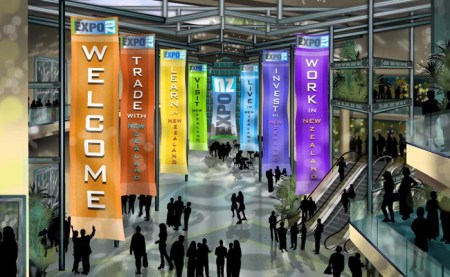
ExpoNZ neatly segemented the event content into halls – allowing visitors to select their desired activity: Trade, Learn, Visit, Live, Invest, Work:

ExpoNZ Plaza

This provides an intuitive entry area – it clearly highlights the available exhibition areas and encourages visitors to determine (on the spot) their objecctive.  If I want to visit or live in New Zealand, then I’ll visit those two halls – perhaps returning at a later date for investment opportunities.

The virtual event platform for ExpoNZ is powered by US-based Expos2 – via their partnership, ExpoNZ is an authorized reseller of the Expos2 platform in New Zealand.  According to Andrews, the sponsorship cost to exhibitors is “$12,000NZD per year or $2750NZD for seven weeks around a specific live event and we’re also signing up sponsors for the halls, the lectures and supporting infrastructure.”

Like many virtual event organizers, Andrews belives in the power and value of social media integration, but notes that “it’s all about consistency, relevancy and immediacy”.  Andrews has leveraged Twitter to uncover potential sponsors and clients – and for generating buzz around launch events.  She also reads a number of industry blogs and finds connecting via Linkedin Groups to be particularly valuable.

What were some of the technical and logistical challenges faced by ExpoNZ?  First and foremost, Andrews notes that “it has taken a while for internet bandwidth here to catch up with the rest of the world.”  As such, she had to “be creative” with media servers in the U.S. to support North American visitors.  Secondly, ExpoNZ faced a perception issue – business is done in a very personal fashion in New Zealand, so “there’s a belief that face- to- face is generally best.  We have to demonstrate that business can be done virtually – and with our integrated video conferencing you do get face to face – if only digital.”

Live Event – July 16, 2009

Registration is now open for a Live Event on the morning of July 16, 2009 (which is July 15th in the U.S.).  The start time for the event:

  1. 7AM NZT
  2. 12PM PDT (July 15)
  3. 2PM CDT (July 15)
  4. 3PM EDT (July 15)

According to ExpoNZ:

You can’t enter the Expo before the day, but visitors can pre-register at http://www.exponz.co.nz and we’ll send updates about the show.

All the information including presentations and job listings will still be available afterwards because ExpoNZ is ‘always on’ 365 days a year round the clock. So visitors can come back as often as they like after the event; to make appointments to talk to exhibitors in their booths, to re-view presentations at leisure.

We’ve a cohort of over 15 ICT companies and supporting organisations (eg Immigration) and eight speakers lined up so the live conference will run till around 11am NZT.  We expect to have several hundred job seekers from the UK, US, Canada and Australia primarily.

For New Zealand visitors, Andrews’ personal recommendations are as follows:

On the web, you can’t go past the virtual Encyclopedia of New Zealand (http://www.teara.govt.nz/) or our beautiful tourism site (http://www.newzealand.com/) where you can book your next trip.

Best places to visit:  A wine tour in Marlborough, diving in the Bay of Islands, ski-ing in Wanaka, hot pools in Rotorua and culture, coffee and creativity in my fantastic home town, Wellington of course!…..

Related Links

  1. ExpoNZ’s home page
  2. Follow ExpoNZ on Twitter
  3. Read the ExpoNZ blog

The ABC’s Of Lead Follow-Up For Virtual Events

July 4, 2009

Image Source: flickr (user: k1rsty)

Image Source: flickr (user: k1rsty)

Suggestion to Virtual Event Exhibitors: Don’t treat your lead list like a telemarketing list!

With the wealth of attendee engagement data generated (and stored) at virtual events, exhibitors have unique insights regarding the worthiness of their lead pool, giving them the ability to intelligently segment their leads and generate unique follow-up paths.  All too often, however, exhibitors treat their virtual event leads as a single pool, applying the same follow-up activities to the entire pool.  In a Virtual Edge posting titled “Don’t Overwhelm Your Attendees“, Michael Doyle writes about aggressive email follow-up by virtual event exhibitors.  I’ve observed the same behavior as Michael describes – in addition, I’ve attended a number of virtual events that resulted in follow-up via phone call.

A colleague of mine once received a follow-up phone call from a virtual event exhibitor – the call was placed by a telemarketing staffer, who had no knowledge of the virtual event (that my colleague attended).  The staffer simply had a name and phone number, with a goal of generating interest in the company’s products and services.  In my opinion, virtual event exhibitors will not be effective in handling lead follow-up in this manner.  Virtual event leads should not be treated like a generic lead list!

I recommend that exhibitors segment their leads into A, B and C categories.  Be forewarned – this is going to take some effort, but it will pay off in the long run with stronger ROI.  Here goes:

  1. The “A” leads – typically, your top 10% of leads.  They registered and attended the live virtual event.  They generated numerous touch points with your booth, your booth reps and your content (e.g. 8 booth visits, 20 document downloads, 5 chat sessions with your booth reps).  They generated at least one meaningful chat session with you – whether it was private, 1:1 chat with one of your booth reps – or, a meaningful chat/dialog via group chat in your booth or a lounge.  The “A leads” are requesting a follow-up engagement with your sales team – either implicitly with their level of engagement with you, or explicitly by requesting a sales follow-up via chat or email.
  2. The “B” leads – the bulk of your leads – they registered and attended the live virtual event and had at least one booth visit or one view/download of your content.  So yes, they interacted with you, but didn’t do enough to gain “A lead” status.
  3. The “C” leads – folks who registered but didn’t attend; attended but didn’t visit your booth; or, folks from other exhibitors or from the virtual event show host or vendor.  Note: based on the structure of the virtual event sponsorship tiers, you may or may not gain access to these leads.  Intelligent follow-up is based on intelligent segmentation – exhibitors should certainly review their lead list to identify leads they should not be following up with – and those leads should be removed from the “C lead” pool.  There’s no use in following up with attendees from other exhibitors, attendees from the virtual event host or the platform vendor company.  In fact, doing so only makes your company look disorganized.

Now that the important task of segmentation is complete, follow-up paths can be identified for each pool.  Here are my suggestions:

  1. A leads – schedule immediate sales engagements, via phone, virtual meeting or in-person.  If the “A lead” had extended engagement with a sales rep in the virtual event, have that sales rep present during the engagement, to continue the conversation and carry over the context from the virtual event.  If the “A lead” had great discussions with a product marketer or product manager, invite that person to join your sales rep(s) on that initial call.  For any explicit requests (pricing proposal, additional documents, etc.) – make sure to send the information over in advance of the engagement.  Think of the “A leads” as ROI waiting to happen – so treat them like royalty.
  2. B leads – it’s important to be strategic with the “B leads” – don’t hand them over to telemarketing for a vanilla phone call and don’t start sending them generic email blasts about your products.  Instead, study their behavior at the virtual event – what content interests them?  Then, create communications that deliver value and personalize the content based on their activities – for instance, send them a White Paper that provides additional information to the Case Study that they downloaded from your booth.  Again – this is going to take work on your part, but it’s work that’s well worth it.
  3. C leads – this may sound counterintuitive, but – don’t follow up with the “C leads”.  Instead, build a new profile in your CRM system (or, update the existing profile) and associate the information you learned [e.g. they’re interested in the topic of the virtual event, but did not attend].  Your job as a marketer, then, is to match subsequent interest (from the “C leads”) back to their user record.  What you’re trying to do is assemble an engagement profile over time – perhaps the “C lead” does attend the next virtual event and visits your booth – or, the “C lead” registers for a podcast you’ve syndicated with a tech publisher.  Now, you have so much more data for your sales team.  Don’t feel like the acquisition of a “first time C lead” gives you the right to start bombarding her with phone calls and emails.  Consider the “C leads” as potential – where the value is to be delivered (with subsequent engagements).

In summary, your sales team should receive only the “A leads”.  The “B and C” lead pool remains under the auspices of Marketing, until a point where any of them reaches an A list eligibility.  This approach should make everyone happy – Marketing, Sales and even the atttendees/leads!


The Convergence Of Physical Events And Virtual Events

July 1, 2009

convergence

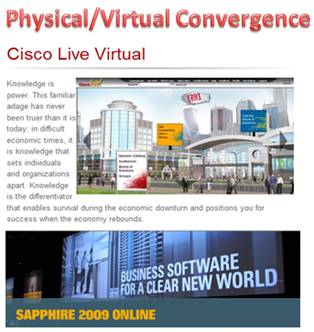
In May, SAP’s annual SAPPHIRE conference (SAPPHIRE 09) floored physically in Orlando, Florida, with a concurrent virtual event online.  This week, Cisco’s annual Cisco Live conference followed suit, with a physical event in San Francisco, California and a concurrent virtual event online.

Full disclosure: My company (InXpo) was the virtual event platform provider for both the SAPPHIRE and Cisco Live virtual events – and, I worked on the Cisco Live virtual event.

During a presentation at the Virtual Edge Summit in May, a presenter from SAP noted that considerations were made concerning the potential of cannibalization – whereby physical attendees may stay at home to attend virtually instead.  However, he noted that in reality, a combination of physical and virtual event extended the overall reach – and the virtual component served to augment the overall attendance count.  When combined (physical+virtual), this year’s attendee count for SAPPHIRE was the largest ever.

This week, I attended Cisco Live on-site, but spent most of my time online to support the virtual event.  However, in experiencing all the touch points of the event, it quickly occurred to me that the entire notion of physical vs. virtual is blurring – they’re coming together to form an aggregate attendee experience.

Some participants are not able to travel to the event’s venue – and as such, their only choice is to participate in a virtual component.  For those on-site, they can choose the attendee path that suits their preferences.  Perhaps that means attending the John Chambers keynote in person, grabbing a cup of coffee, visiting the World of Solutions (exhibit floor) and then returning to the hotel room to login to the virtual event, to follow up with a few exhibitors in their virtual booth.  Later, that same attendee may visit the customer apprecation event in Second Life, and then attend a tweetup at a nightclub (in person).  Here’s an image of my Second Life avatar at the Tuesday evening Second Life dance party:

The author's avatar with right hand raised

The author's avatar with right hand raised

To make this convergence really work, I believe the following should be done:

  1. Create a unique value proposition for each venue – virtual event, virtual world, physical event – do not simply re-purpose one into the other.  Dannette Veale explains it quite well in a Cisco Virtual Worlds blog entry, The Value of Virtual Events.
  2. Tie the venues together in a logical fashion – link the venues together where it makes sense.  Convergence should happen for a good reason – and not for the sake of convergence.
  3. Give the attendees freedom to choose – allow attendees to choose their own attendee path, without forcing them down any one direction.  Leave the hooks in place and each attendee will follow their own path.  Some physical event attendees may opt out of any convergence and focus 100% on the physical event.  Others may actively engage in the virtual event while on-site physically.  Either path is fine.
  4. Integrate social media across the spectrum – whether it’s Visible  Tweets displayed on a physical monitor or Facebook integration with the virtual event – integrating social media increases engagement within the attendee experience and also extends the reach of the event to networks of social networks.  Here’s an interesting example of user generated, social media at the physical event – a physical whiteboard that asked attendees to write about where they were in 1989:

whiteboard

In Cisco Live Virtual, elements of the physical event were streamed into the virtual event.  By doing so, virtual event attendees (who could not travel to San Francisco) were still able to get a taste of the physical event experience.  For instance, webcams were deployed throughout the physical event to stream in live feeds from the show floor – and to host personalized webcam chats with Cisco executives.  One of the webcams was pointed at this Solutions Theater – from which virtual event attendees had a continous live stream of presentations given throughout the day:

solutionstheater

Here are some of the ways I experienced physical/virtual event convergence:

  1. Watching John Chambers’ keynote presentation online, via a Live Webcast streamed into the virtual event (by On24).
  2. Viewing a Cisco Live Second Life session (LIVE!) from a booth in the virtual event – the session was broadcast by treet.tv in Quicktime – so users needed the Quicktime player but not the Second Life client application.
  3. Watching a live (physical) demo of Telepresence, which was broadcast via a Live Video Webcast, which was carried within the virtual event (many layers of convergence there).
  4. Participating in live chat sessions that Cisco executives (Carlos Dominguez and Padmasree Warrior [separately]) attended via webcam.  Attendees typed their questions (via text) and the executives answered via webcam / audio.  The executives answered just about every question posed, so it felt like a personal meet and greet with the executives.
  5. Walking past the NetQoS physical booth – and noticing one of their demo workstations displaying their booth in the virtual event.  Quite a good idea – host visitors to your physical booth and remind them of your presence in the virtual event.  That prospect can’t return to your physical booth next week (when the event is over), but they sure can visit your booth in the virtual event [at any time] to find the needed information.
  6. Reading one user’s in-show blog, where he asked physical attendees to name the “one [physical] booth that should not be missed”.  This particular user was not able to attend physically – but, he may be able to visit the virtual booths of the vendors recommended by his peers.

Moving forward, I expect to see many more events follow this model – whereby physical events will leverage virtual event and virtual worlds technologies to accomplish the following:

  1. Deliver additional value to the physical event
  2. Extend the reach of the event to a global audience
  3. Blend physical and virtual components to create a more compelling experience
  4. Drive stronger event revenue and ROI!

I hope to see you at a future event – I haven’t decided whether I’ll be there physically, virtually or both.


Draft The Right Team For A Successful Virtual Event

June 28, 2009

draft_team

Last week, the National Basketball Association (NBA) held its annual draft in New York City’s Madison Square Garden.  Some teams were looking for the missing link to their 2010 NBA title aspirations – while others were looking to build a new foundation from scratch.

In either case, it’s important to know what you need – and then make the right talent evaluations to select the players that best fit your needs.  Similarities exist when planning a virtual event – draft and assemble the right team and you have the potential to bring home the championship.  Build your team incorrectly and you’ll miss the playoffs.

Continuing with the basketball analogy, here’s how I’d assemble my virtual event team:

  1. The Center – for many teams, both the offense and defense revolve around the important center position.  For a virtual event, the Center is your content – the theme, the independent expert presenters, the presentations themselves, etc. Make this your number one draft pick – identify the target audience for your virtual event and then select the best players who will deliver the most compelling content to that audience.  Be sure to make this a slam dunk (pun intended).
  2. The Point Guard – the point guard is often considered the surrogate coach on the floor – s/he dribbles the ball up the court and commands the offense.  In a virtual event, the point guard is the Event Host or Event Planner – the person who’s responsible for coordinating all the various parties involved in the execution of the event.  Rookie point guards rarely excel in the NBA – so make sure you have a veteran player running point in your virtual event.  If you have rookies on board, have them play the understudy role, so that they can grow into a starting role for the next virtual event.  A virtual event is best produced by someone who’s run the show many times before.
  3. The Shooting Guard, Small Forward and Power Forward – these players round out your squad – in basketball, they do a combination of scoring, defending, shooting, passing and rebounding – just about everything.  In a virtual event, these are your production assistants, project managers, webcasting engineers, video engineers, campaign managers, quality assurance engineers, etc.  As with any top team, this portion of your roster needs to have talent and depth – when one player becomes unavailable, the next one must step right in.  Championships cannot wait – and neither can the virtual event that’s one month away.

As general managers are astutely aware, assembling the right pieces is no guarantee of success.  As in sports, virtual events depend on the following:

  1. Team Chemistry – if pairs of groups have worked well in the past, keep them together for subsequent events.   This way, they don’t have to re-learn each others’ working habits and personalities.  As in sports, team continuity improves the likelihood that you’ll win over and over.  On the client-facing side, identify team members whom specific clients love – and keep them on those same client accounts – they’ll thank you for it.
  2. The Front Office – in sports, a front office that puts a good team on the field often reaps the benefits of strong ticket sales.  In virtual events, the quality of the team is independent of attendee interest.  Here, you need talented and knowledgeable front office staff to handle the audience generation for the virtual event – email blasts, web site syndication, social media integration, etc.  The best  (execution) team on the planet is useless if your virtual attendance is poor – so the audience generation crew is critical.
  3. In-Season Moves – championships are often won and lost by in-season moves – trades, player signings, managerial firings/hirings, etc.  For virtual events, you’ll find many inflection points where critical decisions need to be made.  Whether it’s a shift in the audience generation strategy or a change to the content/theme – making the right decision can make or break the event.  Make sure you weigh all decisions as a team – and remember, virtual event decisions do not need to be approved by the league office (ha ha).

With the virtual event season in full swing – best of luck to you all – bring home a winner!


A Virtual Event For All Seasons

June 17, 2009

Scheduling of large physical events seems to follow a seasonal pattern.  With the exception of CES (Jaunuary 7-10 2010) and Macworld (February 9-13 2010), there are fewer events at the very start of a calendar year – many event planners are probably thinking that fresh off the holidays, potential attendees are less inclined to travel.

The event schedule then picks up a little steam in February and March and by spring time, we’re in full bloom.  The summer seems to get its fair share of events – but at the same time, some event planners may scale back on a summer schedule due to vacation schedules (and the fact that kids are home from school).  As we head towards the Thanksgiving holiday in the U.S., the event schedule seems to taper – and during the December holidays (Christmas, Hanukkah, etc.) there seem to be very few physical events scheduled.

Virtual events follow a similar seasonal pattern. There were virtual events in January and February of this year, but the pace seemed to pick up in March – with a build-up to June, which could be our high water mark for virtual events this year.  I maintain an informal Virtual Events Calendar, which lists 21 virtual events in June, with only 3 currently listed for July.

Seasonality

Do virtual events really need to follow seasonal patterns?  Here are my thoughts:

  1. Consider the convenience factors – virtual events are convenient for all parties involved (virtual event planners, exhibitors, attendees) – there are no travel arrangements to be made and no booth materials to ship.  For booth material, one can leverage existing White Papers, Product Collateral, etc. – and not have to send hundreds of documents to the color printer.  For exhibiting or attending, one can login from anywhere (in pajamas).  As such, the traditional danger zones (e.g. Thanksgiving week, Christmas week, etc.) may be less relevant for virtual.
  2. Use virtual to complement physical – would I place all my bets on a successful virtual event on December 23rd?  No.  But, I might want to floor a virtual event on December 23rd that complements another physical or virtual event.  Additionally, I may want to leverage the virtual event platform to power a business community that’s open year-round, rather than being “live” on a given date.

The key to the success of a virtual business community will be a critical mass of participants.  Live virtual events are successful because a critical mass of live attendees gather to view content and interact with one another.  If I login to an virtual community and no one else is online, it means I have no ability to interact with someone in real-time.

I’ll be able to view content and participate in message boards, blogs, etc. – but at that point, it’s no different from using a conventional social networking site.  All in all, the possibilities are very exciting.  I know that my own calendar is booked solid (virtually) through the end of the year.


Real-Time Search For Virtual Events

June 15, 2009

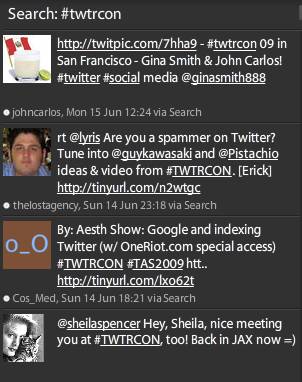
Among its many uses, Twitter has become an indispensable technology for event planners – whether the events are physical, virtual or mesh/hybrid.  Just about every event today defines a Twitter hashtag, which allows Twitter users (“tweeps”) to associate their tweets with the event.  If you want to follow comments about TWTRCON SF 09 (which is now over), just search for the hash tag “#twtrcon” in the Twitter client of your choosing.  Here’s how it looks for me in Tweetdeck:

tweetdeck_twtrcon

The great thing about Tweetdeck is that the “search view” updates in near-real-time, which means that as new tweets are posted with that hashtag, I see them appear in this particular search pane.  Periodically glancing at a hashtag search in Tweetdeck allows me to keep my finger on the pulse of a live event that might be occurring hundreds of miles away.

Similarly, I’ve attended physical events where I’ve spotted Tweetdeck running on attendees’ laptops – clearly, they’re tweeting about panel discussions, keynote presentations, etc. right there from the event itself.  Those who left their laptops tucked away are likely sending status updates from a Twitter client on their smartphone.

The beauty of Twitter is not just in its capability for organizing a global discussion around particular events – it’s also great for tracking what’s being discussed around a topic.  For a b-to-b marketer, you might want to know what’s being said about your products and services.  For a salesperson, you might want to know how the competition is positioning themselves.  Twitter allows you to search for that chatter in real-time – and, third party services (e.g. tweetbeep, twilert, etc.) allow you to set up agents to send you search results via email.

Now, let’s consider a virtual event.  With all due respect to great White Papers, Case Studies and Product Collateral, I find that the most interesting content at a virtual event is the group chat that occurs in booths and lounges (e.g. the Networking Lounge).  If microblogging content occurs in the statusphere, then I think of a virtual event’s chat content as the chat-o-sphere.

In a very active/engaging virtual event (e.g. lots of activity, plus a number of interesting Webcasts/Videocasts), it can be hard to keep up with all the interesting discussion in the chat-o-sphere.  If I’ve attended a 50-minute Webcast and return to the Lounge, I’ll often find 100 chat entries added since my last visit – it can be challenging to read through what I’ve missed.

Virtual event platforms may need to consider Twitter-like capabilities to search the chat-o-sphere in real-time – and, provide Tweetdeck-like widgets to keep real-time views on specific tags or search terms.  Exhibitors at a virtual event may be interested in real-time searches on the following terms (within a Lounge chat):

  1. Mentions of my company’s name
  2. Mentions of my own name
  3. Mentions of my competitor companies’ names
  4. Mentions of my products
  5. Mentions of my compentitors companies’ products

An exhibitor tracking these search terms can quickly send a product marketer, sales engineer, etc. into the Lounge to quickly address questions being posed – or, simply participate in the discussion.

What do you think about the chat-o-sphere in virtual events – is there value in real-time search against it?

Related Links

  1. NY Times: Hey, Just a Minute (or Why Google Isn’t Twitter)
  2. Blog posting: For Virtual Worlds Info, Here’s Whom I Follow on Twitter (and Why)
  3. Blog posting: Leverage Twitter for Virtual Tradeshow Outreach

Four Ways To Make Virtual Conferences Better

June 9, 2009

Nick Morgan, on the Conversation Starter blog at Harvard Business Publishing, wrote a recent posting titled “Three Ways To Make Conferences Better“.  To summarize, Nick’s suggestions are:

  1. Tell a unique story
  2. Make attendees active participants, rather than onlookers
  3. Leverage the gathered group to give something back to the community in which the conference is held

Nick’s blog posting served as inspiration for me – I’d like to cover ways to make virtual conferences better.  Virtual conferences (along with virtual tradeshows, virtual job fairs, etc.) do allow attendees to participate – in fact, some of the more interesting “content” in a virtual conference is the free form text chat that occurs in areas like the Networking Lounge.

And by its nature, a virtual conference gives back to the community in the form of carbon emission avoidance, time savings, convenience and productivity gains.  As for telling a unique story – that’s something I have not seen virtual conferences achieve.  But at the same time, I don’t think physical conferences do a good job of  this, either.

Without further ado, here’s my list:

  1. Leverage a Requests For Proposal (RFP) Tool for attendees – in a b-to-b virtual conference, you often find that the exhibitors offer a common set of products and services (they’re direct competitors).  As an attendee, the virtual conference affords me with a convenient and efficient means for comparison shopping.  So if I’m in the market for blade servers, I might want to spend time visiting numerous booths, downloading product collateral and chatting with some booth reps.  Instead, what if I could fill out an online form (within the virtual conference) and tell prospective vendors what I’m looking for?  Perhaps I need 1U blade servers with redundant power supplies and are remotely manageable.  I fill out my RFP form, check off the exhibitors that I’d like to receive my request and click “Submit”.  I then receive responses within the virtual conference environment from exhibitors – and start to create my short list, based on those responses.  As one can imagine, such a tool could greatly benefit attendees and exhibitors.
  2. Play some games – making games available within the virtual conference creates a sense of fun, which increases attendee satisfaction – this, in turn, increases retention and session time (attendees remain in the environment longer).  And of course, you’re not hosting the game solely for the sake of fun – you’re forcing participants to perform desired activities (e.g. visit a booth, view a Webcast, etc.) in order to advance within the game.  Again, win-win scenario – attendees and exhibitors benefit.
  3. Incorporate social media – attendees at physical conferences generate lots of Twitter, Facebook, etc. updates  from their PDAs.  In a virtual conference, it’s all too easy to remain well-connected with your social networks.  That being said, don’t force attendees to leave the virtual environment – instead, provide interfaces for them to post a status update directly from the virtual conference platform!  They should be able to tweet directly from the virtual conference, update their Facebook wall, etc.  This provides a convenience to the attendee and generates no-cost “PR” of the virtual conference across social networks.
  4. Embark with an Aardvark – a new service that describes itself this way —  “just send Aardvark a message through IM, like you do when talking to a friend.  Aardvark figures out who might be able to answer, and asks on your behalf — Aardvark is the hub.”  While it might be interesting to consider an integration directly from the virtual conference to the Aardvark service, it’s the concept that most interests me.  And that is, tapping into the collective wisdom assembled at a virtual conference in order to help attendees answer questions.  After all, most b-to-b virtual conference audiences login to the event with a common set of business or technical challenges.
Source: Aardvark (vark.com)

Source: Aardvark (vark.com)

Related Links

  1. Blog posting: Three Ways To Make Conferences Better
  2. Blog posting: Virtual Events And The Power Of Social Media (authored by me on my company’s blog)
  3. Blog posting: Cisco has integrated Twitter into their Cisco Live Virtual event
  4. About Us page: Aardvark