Stanford Media X Event: Virtual Worlds Entrepreneurs Show The Way

August 20, 2010

Introduction

Media X at Stanford University hosted a workshop titled “Cashing In on Virtual Worlds: Entrepreneurial Insights for the Healthcare Industry.” The workshop was organized by Parvati Dev and Laura Kusumoto, who combine leading edge research, expertise and hands-on experience with virtual worlds and virtual worlds platforms.

In her introductory remarks, Ms. Kusumoto provided a perspective on the current state of virtual worlds. While the consumer-focused virtual worlds have seen notable platform closures (e.g. Google Lively, Metaplace, There.com, etc.), there has been positive activity on the enterprise side of virtual worlds, including virtual events and virtual trade shows.

Virtual Worlds: On An Upswing?

Kusumoto referenced a recent Gartner Hype Cycle Report that positioned “public virtual worlds” in a phase of “Trough of Disillusionment.”  The good news is that the subsequent phases are called “Slope of Enlightenment” and “Plateau of Productivity.”  Web 2.0, Tablet PCs and Wikis are positioned in this “Slope of Enlightenment” phase in Gartner’s cycle.

In the afternoon, we heard 5-minute pitches from entrepreneurs who were looking to launch virtual worlds businesses related to health care. These entrepreneurs showed me how virtual worlds (and notably, the surviving virtual worlds platforms) can embark on an upward path towards enlightenment.  Here’s my view on how virtual worlds are evolving:

Circling back to the Gartner Hype Cycle, I look back at the following progression:

  1. Technology Trigger: Artists and Hobbyists discover this technology for self-expression
  2. Peak of Inflated Expectations: Fortune 500 brands enter the mix, expecting a transformation of marketing and advertising
  3. Trough of Disillusionment: An assortment of virtual worlds platforms fold
  4. Slope of Enlightenment: Entrepreneurs develop innovative businesses that ride on top of virtual worlds platforms

The entrepreneurs who presented are leading the way towards enlightenment and the virtual worlds platforms (e.g. Second Life, Unity, OLIVE, etc.) stand to benefit.  The new business model is the purchasing of virtual land (or, the licensing of virtual world platform technology) that entrepreneurs leverage to drive monetization and revenue.

In a sense, this is similar to the smartphone app store – the entrepreneur creates intellectual property that rides on top of a “platform”.  The entrepreneur then leverages that platform to drive revenue to a direct sales channel (customers).

Noted Entrepreneurs

I’d like to highlight some of the presenting entrepreneurs (and their businesses).

Club One Island

Lose weight in a virtual world, on Club One IslandCeleste DeVaneaux gave a fascinating overview of how participation in a virtual world program can facilitate habit change.  It’s one thing to urge people to eat slower – it’s another thing to show them how.  And, to have their own avatars practice the habit of doing so.  Club One Island runs on top of the Second Life platform.

Related: How I lost 20 pounds in Second Life (featuring Club One Island – by Hypergrid Business)

CliniSpace


CliniSpace is a collaborative virtual medical environment created by Innovation in Learning, Inc. (the company led by Parvati Dev, one of the event’s organizers).  The goal of CliniSpace is to provide virtual world-based training to physicians, nursing students, etc.  A virtual patient can start out completely healthy, but then be programmed to worsen, such that s/he requires CPR within 15 minutes.  The service runs on top of the Unity platform.

InWorld Solutions


InWorld Solutions “incorporates a wide range of avatars, content and features specifically designed to facilitate clinical and educational applications.”  InWorld can facilitate treatment for substance abuse by having patients in a virtual world, with their doctors observing from the same physical space – or, from within the virtual world.  Patients can experience peer pressure (virtually) and be advised and coached on how to respond.  InWorld runs on top of Forterra’s OLIVE platform.

Conclusion

These were just a few of the innovative business concepts brewing in one particular industry (health care) around virtual worlds.  As more entrepreneurs launch virtual worlds businesses, the platform vendors (e.g. Linden Lab / Second Life, Unity, Forterra / OLIVE) stand to benefit.  And importantly in this vertical, another entity stands to benefit: the human condition.

Tweet this posting:


Virtual Events 101: Tips For Building Your Virtual Booth

April 13, 2010

Your company is exhibiting at a virtual event and you’ve been assigned the responsibility of building your company’s virtual booth.  You’ve had plenty of experience assembling a physical booth, but never before have you built one virtually.  What’s your first step?  To immediately resist the urge to start the virtual build.

Set/Confirm Objectives & Goals

The objectives and goals for your virtual booth should align with the goals for your company’s participation in the virtual event. If you do not set the direction yourself, be sure to round up the necessary decision makers and have a documented set of goals – publish them internally and be sure that all stakeholders have a copy.  Sample goals include:

  1. Obtain contact information from “X” number of prospects
  2. Generate “Y” number of meaningful prospect engagements in-booth
  3. Yield “Z” number of qualified sales opportunities
  4. Generate “X%” of brand uplift, as measured by “Y”

It’s absolutely critical that goal definition be your first step, as it drives the decisions you make regarding the build-out of your virtual booth.

Content is King

The main elements of a virtual booth are (1) content [e.g. images, signage, videos, documents, links, etc.] and (2) virtual booth staffers.  Your first job is “content curator” – review all content available and be selective about which content you’ll place in your booth.  It all goes back to the defined goals – the content you select should align with the goals.

So if your goal is demand generation, find the same White Papers that your marketing team is using to generate sales leads across the web.  If your goal is driving awareness around a product launch, grab that 2 minute video of your product manager and have it auto-play when visitors enter your booth.  Besides documents in your marketing library, be sure to cobble together useful links on your web site, along with third party articles, blog postings and product reviews that reinforce your objectives.

Booth Labels Are Like Headlines

Content in a booth is typically housed behind a set of “booth labels”.  Your next job is one of headline writer – you’ll want to craft captivating “headlines” for the booth label, along with attention-grabbing titles (and descriptions) for the underlying content items.  You’re like the home page editor for your favorite content site – you need to figure out how to write headlines (titles) that will grab your visitors’ attention.

While you certainly want to avoid the “bait and switch” (e.g. writing a label/title that intentionally deceives), your labels need not literally reflect the underlying content. For example, if you assemble a set of blog postings from your company’s blog, you need not label these “Blog Postings”. Instead, organize the blog postings into themes – a set of postings on best practices could simply be labeled “Best Practices” in your booth.

While I suggest you do not change booth labels while the event is live (that would significantly confuse your booth’s repeat visitors), you’ll want to review the activity reports from your booth to learn from the labeling decisions that you made.  You’ll begin to figure out what worked and what didn’t – and can use those learnings for your next event to more effectively use labels/headlines to achieve your goals.

Use A Call To Action – Not A Declaration

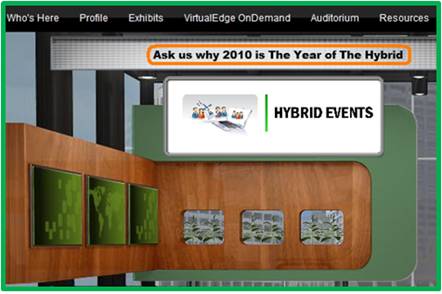
For signage within the virtual booth, I prefer to use a call to action (e.g. “Ask Us Why 2010 is The Year of The Hybrid” above) over a declaration. So instead of declaring, “The world’s leading producer of plastic widgets”, try a call to action, “Ask us why plastic widgets are the new metal widgets”.  The call to action initiates a conversation with your visitors, rather than telling them what they should know.  If visitors enter your booth’s group chat and proactively ask the question stated in your call to action, then give yourself a pat on the back.

Stand Out From The Crowd

You’ll likely have competitors exhibiting in their own virtual booths, which means that a key part of your job is to figure out how to separate your booth (and company) from the crowd.  Greenscreen video (aka an embedded video greeter) has been used at enough virtual booths that it won’t make your booth any different.

Instead, try an offbeat video that’s not yet made its way to YouTube.  Or, how about an avatar of your CEO whose mouth movements are synchronized to the words s/he is speaking.  Perhaps an animated avatar is the new greenscreen.  Thinking further outside the box, how about bringing one of your products to life – personalizing that product to the point where it speaks and delivers a message to visitors.  A good example (in general – not in a virtual event) is the DCX Man character created by Brocade:

Source: Brocade (dcxman.com)

Further information can be found here: http://www.dcxman.com/whois_dcxman.html

Optimize Your Content For Search

Search Engine Optimization (SEO) is not the sole domain of your web site or blog – it applies to virtual events as well.  How can this be?  Well, most virtual event platforms provide basic and advance search capabilities – they index all content in the event (e.g. documents, links, Webcasts, etc.) and some platforms even index the contents of uploaded documents.

As a result, keep SEO in mind for selecting documents to include in your booth, along with the labels, titles and abstracts that you use to catalog your booth content.  Taking a step back, be sure to write an SEO-optimized description for your company and booth – if attendees search for a key term and your booth is at the top of the search results, then all is good in the world.

Subject Matter Experts as Booth Staffers

While you’ll certainly want sales reps and sales engineers as booth staffers, it’s critical to work subject matter experts into the staffing schedule.  A visitor who asks specific product or service questions is a hot prospect – and telling that prospect “let me get back to you with an answer to your question” becomes a lost opportunity.  Even worse, that opportunity could fall into the lap of your competitor, whose booth is only one click away.

If you’re a technology vendor, try to have your product manager, chief engineer or event your CTO available within the booth.  While some technology folks may not be comfortable face-to-face with a customer, most feel quite at home in a text chat session.

Optimizing For: Demand Generation

If you’re looking to generate sales leads, cobble up all your best lead gen content – the latest White Papers, Case Studies, product sheets, videos, podcasts, customer testimonials, etc.  Be liberal and selective at the same time – that is, ensure there is a good mix of content choices, but be religious in making sure the content you select aligns with your goals – and relates to the theme of the virtual event.  The beauty of a virtual event is that registration occurs once – but all activity with your content is tracked.  So you’ll have rich activity profiles at your disposal to help you separate the cream of the crop leads from the visitors who came simply to enter your prize drawing.

Optimizing For: Thought Leadership

Are some of your co-workers experts or luminaries within your industry?  If yes, then have them be staffers within your booth!  Visitors will have a natural inclination to engage with them – and they’ll be able to funnel the ripest opportunities to sales reps within your booth.  If your employees have not achieved rock star status within your industry, leverage some of the luminaries to produce content on your behalf.

Perhaps it’s a research report authored by an industry expert – or, a video interview (hosted by the expert) with your CEO.  Better yet, a Webcast within the virtual event that features the expert(s) who provide a presentation prior to your own speakers.  If the experts are available to attend the virtual event, invite them to provide Q&A within your booth, as they’ll serve to draw interest and engagement from visitors.

Conclusion

While much of the logistics occur “online”, building a virtual booth will take longer than you think (if done right).  Be sure to clearly define your goals first – then, make sure your booth achieves those goals.  Take planned breaks from the virtual build to assess whether your booth aligns with the stated goals.  Finally, be sure to study activity data from the live event so you can make improvements for your next event!

Related Links

  1. Browse the Virtual Events 101 Index Page
  2. Download the eBook, “Virtual Events: Ready, Set, Go

Note: I invite you to connect with me on .


The Business Benefits Of Second Life

March 23, 2010

Veronica Butler-Borrer

The following is a guest post by Veronica Butler-Borrer, known in-world as Pooky Amsterdam (@PookyMedia).

AVATAR started off being the word of the new decade, and for good reason.  The blockbuster movie, which allows a man to take on a completely new form through a kind of mental transfer, has made hundreds of millions of dollars. It also speaks to the new decade in terms of new possibilities.

While Second Life has been part of the Internet for a while, recent changes and upgrades have made it more compelling as a business and media platform.  Recent economic conditions have also required new strategy to save money on travel costs.  And increased attention to environmental changes has required us to look more closely at green alternatives to business.  Facts and figures plus improved opportunities are now encouraging us as a business community to re-examine Second Life.

Pooky Amsterdam's Second Life avatar

What makes doing business as an avatar in Second Life a good choice?

  1. You can virtually meet people from anywhere in the world easily and inexpensively
  2. Your Avatar can be an extension of yourself and increase personal investment for you and the business community you are addressing
  3. VoIP puts you in the same room with those you need to speak with
  4. You can share any documents you need to
  5. You can work in real time on those shared documents
  6. Any 3D product or place can be re-created cost-effectively and to scale for business decision making
  7. You save on time and travel expense by just logging in from your computer
  8. You can establish a secure environment by restricting access to your location
  9. Training and Education done in virtual worlds returns great results
  10. Video created in Virtual Worlds (known as Machinima) or cinema done on machine will get your message to the public through regular distribution channels (e.g. YouTube).  In addition, it will be available as video content on your web site, plus be something you can include in your video emails

These are the main reasons to think about doing business virtually.  Let’s look into this a bit further.

Analysis: Benefits of Doing Business Virtually

That’s right, once you download the free client which is Second Life, you can enter a 3D world where you can meet by prearrangement, those whom you would like to, from anywhere in the world.  Of course this will take some organization, but that is easy to facilitate.

Your Avatar is an identity that you construct to carry out your work in a virtual world.  Allowing this creation to personify you means you invest yourself in it, and interact as well.  This is also not a bad thing, as in creating an other self which is “better, faster, stronger” will also result in your being able to transfer some of those properties to your real world person.  If you saw a digital image of yourself running on a virtual treadmill, would you feel like going to the gym? Probably so, according to a Stanford study showing that personalized avatars can motivate people to exercise and eat right.

It doesn’t yet beat Skype for number of chat minutes a month, but the VoIP technology in Second Life is excellent, and has served over a billion minutes of voice chat a month.  That means you can speak to people anywhere in the world, in the same virtual room, sharing important documents or any 3D representation for absolutely free.

Second Life Viewer 2

The latest viewer for Second Life (Viewer 2) also allows for shared media within this Virtual World and that means you can view ANY content on the web in real time with people from (or outside of) your organization.

This includes of course, Google Docs and Etherpad.  So you can make decisions together from your office, or home, without having to fly anywhere.  This is a remarkable opportunity that is afforded people who are on this site.  Plus, being able to recreate objects in 3 Dimensions means you can build anything to scale, whether it be a building or an engine, and have your people discuss this matter, again in real time and vocally.

When you have your own location, you can also set permissions to that landing point and area so you are the only ones who have access to it. This will not compromise your security at all, when you are discussing matters of confidentiality.

Second Life Case Study

Consider the case study entitled, “Virtual World Simulation Training Prepares Real Guards on the US-Canadian Border: Loyalist College in Second Life,”

The executive summary reads:

Before September 11, 2001, Customs and Immigration students at Loyalist College spent three weeks closely tailing professional border guards to experience the daily routine of their future job. In a post-911 environment however, this was no longer allowed. Training suffered until the Director of Educational Technology at Loyalist College catalyzed a virtual border crossing simulation in Second Life for Loyalist students.

The amazing results of the training and simulation program have led to significantly improved grades on students’ critical skills tests, taking scores from a 56% success in 2007, to 95% at the end of 2008 after the simulation was instituted.

This is proof positive that training in a Virtual World environment has documented benefits.

I present a video which my company made to show you some of the amazing opportunities that the Virtual World of Second Life can afford.  Video is a hallmark of professionalism, and being able to have content on your website, and/or through video email is an important way to integrate your customer base.

Before embarking on a Second Life journey, you may want to seek expert help; it will save you time and ultimately money if you begin your investment with those who are knowledgeable about the world you are about to enter for business.  Just of course if you wanted to have a meeting in Paris, you would need concierge services there.  Pookymedia can help you get started.

Please feel free to contact Pooky Amsterdam at info@pookymedia.com.

Tweet this posting:


How 3D Virtual Worlds Can Be More Like Twitter And Facebook

February 8, 2010

3D Virtual Worlds Diagram

Facebook and Twitter have taught us that people of all ages love to utilize the web for self-expression, connecting and staying in touch.  3D virtual worlds have similar characteristics: the ability for self-expression via customized avatars and the creation of your own ‘island’; the ability to connect with friends (or meet people you’d never get a chance to meet in the real world); and the ability to be part of a vibrant community.

In addition, 3D virtual worlds offer a fully immersive environment, that allows you to escape from the real world – and, experience virtual representations of real-world locations. For virtual worlds experiencing declining usage, however, “community” becomes a challenge to maintain (i.e. imagine using Facebook when none of your friends or family are using it).

Mark Kingdon (in-world: “M Linden“), the CEO of Linden Lab, laid out his vision of Second Life’s evolution, tying it in with the recent acquisition of Avatars United.

M. Linden on Community:

“When we talk to the users who sign up but then decide not to stay, they say they left, in part, because they had a hard time finding people to hang out with. Either their friends weren’t there, or they have a hard time meeting new ones inworld, or sometimes both.  We need to fix this.”

M. Linden on Social Sharing:

“Another part of the “social glue” of any community is the concept of sharing.  Inworld, it’s easy to share and we’ll make it even easier.  But sharing between Second Life and the larger social Web is not as easy.  As an avid photographer (well, aspiring to be avid), I’d love to be able to easily share my snapshots from Second Life with my friends on other Web services, and be able to watch a feed of the people I’m interested in.”

Reaction

Kingdon’s blog posting generated a wealth of comments from the Second Life community – I’d characterize the comments as mixed to fairly positive.  My own reaction to the blog posting was very positive – my use of Second Life (and other virtual worlds) would increase based on my knowledge of in-world events/happenings attended by members of my social graph.

Here are my thoughts on how to increase community engagement and social sharing in a 3D virtual world.

Facebook and Twitter

Direct Integration with Twitter, Facebook

With Avatars United, according to Kingdon, “you’ll start to build an activity feed (similar to Facebook or Twitter) that keeps you in closer touch with the people you’re connected to in Second Life.” While I see value in a single feed that aggregates content from multiple social networks, I see equal (if not more) value in direct integration of Twitter, Facebook, etc., into the virtual world.

The Twitter API and Facebook Connect make doing so fairly straightforward.  A B2B company with an island in Second Life may want to integrate a Twitter stream that displays tweets related to the company.  Similarly, the company could prompt visitors to tweet about their visit and have that message be distributed to all of the visitor’s followers on Twitter.

By enabling this, the owner of the island generates “free” promotion to the social web – and, the underlying platform gains wider reach as well.  A relevant analogy is Ustream’s Social Stream, which allows viewers to “chat with your friends over Twitter” while they’re viewing a live video.

On the Facebook front, imagine if the virtual world platform enabled Facebook Connect, thus allowing residents to sign in to Facebook and find a list of their Facebook friends who are also residents.  Then, imagine showing users a real-time list of their Facebook friends who are in-world right now, with “links” to teleport to the friends’ locations.

Borrowing from another popular service (Foursquare or Gowalla), the virtual world platform could enable residents to “check in” at different locations (islands).  Broadcasting their whereabouts to their social graph may result in more “planned encounters” within the virtual world.  If my friends just checked in to “virtual island”, I may choose to teleport and join them there if I happen to be free.

“I Like It!”

Virtual worlds could create a stronger “shared experience” by allowing visitors to leave a trail of breadcrumbs reflecting their visited locations.  If I “friend” someone in-world – or, if an in-world resident is a Facebook friend of mine, then I might want to follow the path they took during their last session.  Additionally, the platform could support location endorsements, in the same way Facebook allows me to “like” a friend’s wall posting.

As I enter a location in the virtual world, I can see whether members of my social graph previously visited – and, what their comments were.  Alternatively, I could see a list of all past visitors – with a link to view their in-world avatar and profile.  If a past visitor panned a location, but I enjoyed it, allow me to send an offline message to that user, who can read my message the next time she logs in.  This allows me to connect with other users even when they’re not online (a form of virtual world email).

Source: flickr (User: Indiewench)

Virtual World Closed-Circuit TV

Business owners leverage closed-circuit TV technology to perform surveillance of their store front or office.  Wouldn’t a similar service be useful for virtual world residents, especially those who “own” an island?  While we tend to be online during our waking hours, it may not be practical to be in-world all the time.  How about a virtual world thin client – it provides a read-only “view” of a given location, similar to closed-circuit TV.

Since it doesn’t allow you to navigate, teleport, interact with others, etc. – the client is entirely lightweight and can sit in a corner of your desktop with only a portion of the CPU/RAM consumed by the full-blown client.  So if you’re interested in a given location, the closed-circuit TV can alert you to visitors – and with one click, the thin client can launch the full client and teleport you to the location.

Services (like this one) that can instantaneously connect users are a win-win – they generate more logins to the platform and enable more connections, upon which a stronger sense of community develops.  Alternatively, the virtual world platform can provide even more lightweight notification mechanisms: it can generate an email, Twitter direct message or Facebook email whenever a user enters a designated space.  The notification could contain a link that teleports the recipient into that space to connect with the current visitor(s).

Embed Web Content In-World

As Twitter and Facebook have demonstrated, users of social services are inclined to share interesting content, often in the form of web links.  Within a virtual world, “sharing” often results in the launching of a web browser to render the shared page.  Why not provide sharing capabilities that render the shared content on an in-world wall or projection screen?  This keeps users engaged, while retaining their attention in-world.  Building upon this, I may want to look up Facebook friends and be taken to all locations in which they shared content in-world (as I have an interest in what my friends are reading and sharing).

On Demand TV (for Virtual Worlds)

Facebook has a great utility that allows me to record a video on my laptop’s webcam, upload it to Facebook and share it on Facebook.  Virtual world platforms should enable users to press a “record” button and have their current session saved for later playback.  Perhaps I’m attending an in-world concert or watching a keynote presentation – capturing a recording of the session allows me to share it with members of my social graph who weren’t able to attend.  Treet TV provides similar services (with professional quality) – this capability empowers end users to create on-demand programming with the click of a mouse.

Conclusion

3D virtual worlds have a lot to offer already – by adopting useful social sharing services, they can tap into the phenomenon (social media) that’s the force behind many of today’s most popular web sites.

Related Links

  1. Wagner James Au in New World Notes, “How To Make Second Life Truly Mass Market, Part 1: Deep Integration With Facebook

Tweet this posting:


College Recruiting 2.0: The Virtual Campus Experience

October 7, 2009

Source: flickr (User: Heidi SeraKorea)

Source: flickr (User: Heidi SeraKorea)

I read an interesting article in the New York Times this week – titled “M.I.T. Taking Student Blogs to Nth Degree“, the article describes how M.I.T. (and other colleges and universities) is leveraging student blogs as a recruiting tool.  The idea is that the blogs allow prospective students to get a glimpse into life on campus – and help them determine whether they’d like to apply for admission.

The dean of admissions at Haverford College was quoted in the article: “High school students read the blogs, and they come in and say ‘I can’t believe Haverford students get to do such interesting things with their summers.  There’s no better way for students to learn about a college than from other students.”

While I’m certainly a big fan of blogs, it occurred to me that virtual world and virtual event technologies could extend this concept to a whole new level.

3D Virtual Worlds

Hundreds of colleges and universities have a presence in Second Life (and other 3D virtual worlds).  Professors have been using 3D virtual worlds to complement their real-world classes – and in some cases, classes have moved entirely into a virtual world.  Universities who created 3D replicas of their campus (in Second Life, for example) could leverage the existing island(s) as a recruiting tool.  One could provide links from the student blogs, inviting high school students (who are so inclined) to enter the virtual campus for a real-time and interactive experience.

Recruitment activities you could facilitate in a 3D virtual world:

  1. Student-led virtual campus tour – the same exact concept as the real-world – prospective students meet the student guide at a designated place and time and the guide takes visitors (and their parents!) on a tour of the campus.  Of course, in a 3D virtual world, visitors would be required to download the client (if needed) and familiarize themselves with the user interface – they’d also need to teleport to the tour site and learn the basics of navigation / walking.  For colleges who built extensive campus replicas, however, the virtual tour gives prospective students a great feel for the real-world campus.  Later, prospective students can return at their own leisure to explore the campus at their own pace – and have random encounters with enrolled students or other prospective students.
  2. Student blogs -> 3D virtual dorm rooms – existing student bloggers can create “in-world content” to complement their blogs.  How about an in-world replica of your real-world dorm room?  It would come complete with in-world residents (you and your roomates), along with renderings of your wall posters, unwashed clothes (strewn across the floor), collection of beer cans, etc.  What better way to give a taste of campus life than taking prospective students into some 3D virtual dorms?

Virtual Event Platform

While the 3D virtual worlds facilitate outreach from enrolled students to prospective students, virtual event technologies could be leveraged by admissions and administration (of the university).  Instead of an immersive 3D environment, admissions and administration could utilize a 2.5D rendering of the campus in a virtual tradeshow fashion:

  1. University Departments as “booths” – Admissions, Administration, Law, Chemistry, Mathematics, etc. – each department could have a “booth” in the virtual environment, where they provide information on the department – and, representatives can staff the booth to greet and interact with prospective students via text or webcam chat.
  2. University Resource Center – a convenient one-stop-shop for all content placed in the department booths, allowing students to find the documents, web pages, videos, podcasts, etc. that interest them.
  3. Auditorium – allows your administration and departments to put a face and voice to your university – by way of live (or on-demand) video, podcasts, etc.  How about a monthly live videocast from your University president, provost or dean of admissions?  Prospective students would get a lot of value from that.
  4. “Lead” and engagement tracking – by requiring prospective students to provide a minimum amount of demographic information, you can use activity reports (provided by the virtual event platform) as a gauge of applicants’ interest level in your university.  This type of data may be quite relevant to the admissions department.

I don’t think that virtual worlds and virtual events will be adopted by all prospective students – there will still be quite a few who prefer the simplicity and low-overhead of browsing blogs.  That being said, those who are so inclined to participate virtually may signify the more “engaged” of the prospective student base – and next Fall, they’ll be the ones leading the virtual campus tour.


Low Cost Options For Virtual Events And Communities

August 5, 2009

Source: flickr (User: businesspictures)

Source: flickr (User: businesspictures)

Can you run a virtual event with zero budget?  Maybe, but maybe not.  Let’s consider one use case – the B-to-B Editor or Editorial Director.  For the Editorial side of b-to-b publications, virtual events can be quite productive and rewarding.  They put you in direct contact with your readers, allowing you to engage via interactive tools (e.g. text or webcam chat) while both parties remain in the comfort of their office or home.

During the virtual event, attendees (who often come from across the globe, no matter what the time of day) can provide direct feedback to Editors regarding the event content, theme, speakers, presentations, etc.  Often, Editors will also receive input regarding the online content they’re publishing (on their web site) – and even find sources for upcoming articles.  I’ve spoken to a number of Editors who were thrilled about the attendee/reader interactions they experienced at a virtual event.

There’s an economic model to a virtual event, however – and that rests on the fact that the event needs to generate revenue – enough to cover the cost of the event, with room for a profit margin.  Thus, at a b-to-b publisher, it’s not the Editor that drives the virtual event, but rather the Publisher, VP Sales or Sales Director.  If there’s no forecasted revenue around a particular event topic, budget isn’t approved and the event has no funding to move forward.

I was recently contacted by an Editor, who was interested in pursuing virtual events (or virtual communities) – he wanted to facilitate interactions around new topics.  However, as with many new topics, they were not mature enough to achieve the right revenue model for the Publisher.  As such, the Editor asked me for available low cost (or no-cost) options.  Here were my initial responses:

  1. OpenSim – according to the FAQ, “OpenSim is a platform for operating a virtual world, and supports multiple independent regions connecting to a single centralized grid. This is somewhat similar to the web, where anyone can run their own web server, tied together through the internet. It can also be used to create a private grid, analogous to a private intranet.”  I noted that OpenSim has no hard cost, but there’s soft cost (e.g. your time).
  2. BlogTalkRadio – a web-based, free service that allows you to create your own Internet radio show.  Your host and your guests call into a standard telephone bridge and the audio is streamed over the web in real-time.  For the free model, you may have house ads served up around your content – there are premium service options available, however.

So my off-the-cuff response was based upon two concepts: (1) try out a no-cost, 3D virtual world environment and/or (2) generate a community discussion (via streaming audio) with no hard costs.  In thinking about my response further, however, I realized I could do better.  First, about OpenSim.  I think OpenSim is great, but it’s probably not the tool of choice in this particular scenario.

First, the build instructions and configuration instructions indicate to me that a fairly technical person  (e.g. SysAdmin) needs to build out your grid.  Second, end users (e.g. the Editor’s readers) need to install an OpenSim client in order to participate.  That might work in some industries (e.g. a gaming publication), but probably not for a b-to-b audience (as they rarely use an OpenSim / SecondLife client on their work computer).

BlogTalkRadio has a lot of potential – in fact, I think b-to-b publishers would be well served by hosting live broadcasts for their readership.  However, the nature of a call-in radio show (even if you have active callers participating) is fundamentally different from the private and group chat activity that occurs in a virtual event.

Source: Metaplace

Source: Metaplace

Taking all of these considerations into account, I felt that Metaplace might be an interesting solution – it allows the creation of a customized 3D world (with avatars) that requires no software download (as it’s Flash based) and can be easily embedded in web pages or blogs.  That may fit nicely at a b-to-b site – in relevant blog postings or article pages, you cam embed the Metaplace world.  So you pair your created 3D world (it’s theme) with content you’re already developing  for your sites – and then use reader traffic to drive participation in the Metaplace world.  And then that community can grow on its own (hopefully).  Again, no software download and no hard cost.

After all that, I’m still not satisfied with my answer – what tools or technologies would YOU recommend to this Editor?


The Convergence Of Physical Events And Virtual Events

July 1, 2009

convergence

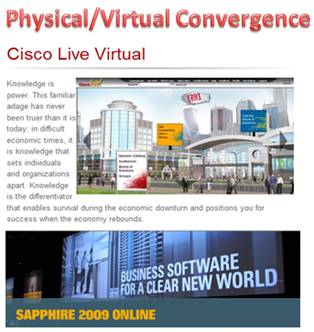
In May, SAP’s annual SAPPHIRE conference (SAPPHIRE 09) floored physically in Orlando, Florida, with a concurrent virtual event online.  This week, Cisco’s annual Cisco Live conference followed suit, with a physical event in San Francisco, California and a concurrent virtual event online.

Full disclosure: My company (InXpo) was the virtual event platform provider for both the SAPPHIRE and Cisco Live virtual events – and, I worked on the Cisco Live virtual event.

During a presentation at the Virtual Edge Summit in May, a presenter from SAP noted that considerations were made concerning the potential of cannibalization – whereby physical attendees may stay at home to attend virtually instead.  However, he noted that in reality, a combination of physical and virtual event extended the overall reach – and the virtual component served to augment the overall attendance count.  When combined (physical+virtual), this year’s attendee count for SAPPHIRE was the largest ever.

This week, I attended Cisco Live on-site, but spent most of my time online to support the virtual event.  However, in experiencing all the touch points of the event, it quickly occurred to me that the entire notion of physical vs. virtual is blurring – they’re coming together to form an aggregate attendee experience.

Some participants are not able to travel to the event’s venue – and as such, their only choice is to participate in a virtual component.  For those on-site, they can choose the attendee path that suits their preferences.  Perhaps that means attending the John Chambers keynote in person, grabbing a cup of coffee, visiting the World of Solutions (exhibit floor) and then returning to the hotel room to login to the virtual event, to follow up with a few exhibitors in their virtual booth.  Later, that same attendee may visit the customer apprecation event in Second Life, and then attend a tweetup at a nightclub (in person).  Here’s an image of my Second Life avatar at the Tuesday evening Second Life dance party:

The author's avatar with right hand raised

The author's avatar with right hand raised

To make this convergence really work, I believe the following should be done:

  1. Create a unique value proposition for each venue – virtual event, virtual world, physical event – do not simply re-purpose one into the other.  Dannette Veale explains it quite well in a Cisco Virtual Worlds blog entry, The Value of Virtual Events.
  2. Tie the venues together in a logical fashion – link the venues together where it makes sense.  Convergence should happen for a good reason – and not for the sake of convergence.
  3. Give the attendees freedom to choose – allow attendees to choose their own attendee path, without forcing them down any one direction.  Leave the hooks in place and each attendee will follow their own path.  Some physical event attendees may opt out of any convergence and focus 100% on the physical event.  Others may actively engage in the virtual event while on-site physically.  Either path is fine.
  4. Integrate social media across the spectrum – whether it’s Visible  Tweets displayed on a physical monitor or Facebook integration with the virtual event – integrating social media increases engagement within the attendee experience and also extends the reach of the event to networks of social networks.  Here’s an interesting example of user generated, social media at the physical event – a physical whiteboard that asked attendees to write about where they were in 1989:

whiteboard

In Cisco Live Virtual, elements of the physical event were streamed into the virtual event.  By doing so, virtual event attendees (who could not travel to San Francisco) were still able to get a taste of the physical event experience.  For instance, webcams were deployed throughout the physical event to stream in live feeds from the show floor – and to host personalized webcam chats with Cisco executives.  One of the webcams was pointed at this Solutions Theater – from which virtual event attendees had a continous live stream of presentations given throughout the day:

solutionstheater

Here are some of the ways I experienced physical/virtual event convergence:

  1. Watching John Chambers’ keynote presentation online, via a Live Webcast streamed into the virtual event (by On24).
  2. Viewing a Cisco Live Second Life session (LIVE!) from a booth in the virtual event – the session was broadcast by treet.tv in Quicktime – so users needed the Quicktime player but not the Second Life client application.
  3. Watching a live (physical) demo of Telepresence, which was broadcast via a Live Video Webcast, which was carried within the virtual event (many layers of convergence there).
  4. Participating in live chat sessions that Cisco executives (Carlos Dominguez and Padmasree Warrior [separately]) attended via webcam.  Attendees typed their questions (via text) and the executives answered via webcam / audio.  The executives answered just about every question posed, so it felt like a personal meet and greet with the executives.
  5. Walking past the NetQoS physical booth – and noticing one of their demo workstations displaying their booth in the virtual event.  Quite a good idea – host visitors to your physical booth and remind them of your presence in the virtual event.  That prospect can’t return to your physical booth next week (when the event is over), but they sure can visit your booth in the virtual event [at any time] to find the needed information.
  6. Reading one user’s in-show blog, where he asked physical attendees to name the “one [physical] booth that should not be missed”.  This particular user was not able to attend physically – but, he may be able to visit the virtual booths of the vendors recommended by his peers.

Moving forward, I expect to see many more events follow this model – whereby physical events will leverage virtual event and virtual worlds technologies to accomplish the following:

  1. Deliver additional value to the physical event
  2. Extend the reach of the event to a global audience
  3. Blend physical and virtual components to create a more compelling experience
  4. Drive stronger event revenue and ROI!

I hope to see you at a future event – I haven’t decided whether I’ll be there physically, virtually or both.


A Second Look At Second Life

June 3, 2009

Source: San Francsisco Business Times

Source: San Francsisco Business Times

“A lot of Silicon Valley has written Second Life off.  The tech world will have to revisit Second Life as a phenomenon in the next six months or so.”

Thus spoke Wagner James Au, noted virtual worlds author and blogger in a San Francisco  Business Times article on Second Life (note: the full article is available to paid subscribers only).  Au, who blogs at New World Notes about Second Life, notes in the article that Linden Lab CEO Mark Kingdon has renewed the Second Life brand that was created by founder Philip Rosedale.

While the revenue model for Twitter is slowly coming clearer (judging by the accounts in the business media), Linden Labs’ strategy under Kingdon is becoming quickly self-evident with the announcements of the past few months.  From my perspective, Kingdon’s growth strategy is around a few core pillars:

  1. Enterprise use of Second Life – makes sense, as enterprises and corporations can be monetized at a higher clip than individuals, artists, hobbyists, etc.  Enterprises (in the former of marketers) were a big portion of Second Life during its initial peak – and it seems the current focus is to bring marketers back into the fold, along with complementary uses in non-marketing disciplines (e.g. training, enablement, collaboration, etc.).  In the past 6 months, Linden Lab has hired 25 marketing and product people as part of their push for enterprise clients.  In addition, the company recently hired Amanda Van Nuys as Executive Director of Enterprise Marketing, signaling a further endorsement of the opportunity in the enterprise.
  2. Nebraska – an on-premises software version of Second Life  (compared to their Software as a Service model), which enterprises can run on their own servers behind the firewall.  IBM has been an active partner with Linden Lab on behind-the-firewall integration – the telltale sign will be how many other large enterprises opt for the Nebraska model.  For “behind the firewall” use, I have to think that we’re talking less about marketing and more about collaboration.
  3. Voice – not mentioned in the Business Times article, but Virtual Worlds News covered it well – Linden Lab is poised to go after the Skype market with capabilities to bridge voice calls and SMS messages between the real world and Second Life.  In the Virtual Worlds News article, Linden Lab Vice President of Platform and Technology Development Joe Miller notes, “The opportunity to monetize at a significant added value for our business is there”, regarding the opportunity in Voice.

IBM marrketing executive Karen Keeter notes in the San Francisco Business Times article that nearly 100 IBM’ers are “working on virtual world tools for commercial sale in Second Life and on other platforms”.  As such, IBM stands to achieve commercial gain from increased use (by enterpises) of Second Life and related virtual worlds.

In fact, it wouldn’t surprise me to see IBM leverage virtual worlds to generate services revenue.  Two things come to mind – IBM Global Services and IBM’s Smarter Planet initiative.  IBM Global Services could assist enterprises on their virtual worlds strategy (e.g. build me a virtual world representation of my data center, so that I can run heating and cooling simulations) – or, IBM could go in-world to enterprise’s private virtual worlds to provide traditional consulting services within the virtual world.

So a manufacturer who’s replicated their factory in a 3D world can have Global Services visit (in-world) to optimize their factory floor workflow.  Then, of course, Global Services could help facilitate the parallel action in the real world.  On the Smarter Planet project, IBM might create 3D models of the next generation power plant to show utilities how to become more energy efficient.  In a virutal world, I’m sure the possibilites are limitless.

Finally, Dan Parks of Virtualis is featured in the article.  Virtualis created a compound in Second Life with 34,000 square yards of meeting rooms.  Quite an interesting model – an event producer that leverages a re-usable area (virtually) to host meetings for corporate clients.  Companies who have done events with Virtualis include Deloitte, Oracle and Trend Micro.

I’d be interested in your thoughts – what do you think about the potential of Second Life for enterprises?

Related Links:

  1. Blog posting on Virtual Offices, with reference to Amanda Van Nuys’ use of Second Life
  2. Blog Posting: Virtualis and Trend Micro Put On Quite A Show
  3. Blog Posting: Philip Rosedale On Building A Business: Practice Extreme Transparency
  4. Blog Posting: IBM’s Second Life ROI: The Headline Beneath The Headline

Virtual Tradeshow Best Practices: Top 10 Exhibitor Tactics

May 20, 2009

At b-to-b virtual tradeshows (VTS), exhibitors compete for the attention and interest of the attendees.  And many times, the competition for attention occurs “against” the competitors of your business.  Thus, it’s even more important to make your mark, which places an onus on exhibitors to leverage new and creative ways to generate interest.  Here are Top 10 Exhibitor Tactics that I’ve observed while working with virtual tradeshow exhibitors.

  1. Set up a (physical) war room – it seems a bit contradictory, given that you’re exhibiting virtually, but if it’s practical to gather in a single location (physically), you’ll be more effective and coordinated.  As visitors pour into your booth and engage with you, it will be easy to shout aloud, “I’ll take this one” and have everyone immediately know what you’re referring to.  In addition, being together physically creates a buzz as the event goes on – you’ll hear cheers, shouts, jeers, etc. as activities unfold throughout the day.  I’ve participated in one and it does help with coordination and build camraderie.  Short of a physical gathering, another option is to keep a telephone conference bridge active throughout the day to coordinate activities.
  2. Send product experts into the Networking Lounge – you need to solicit your subject matter experts to participate in the virtual tradeshow in the first place.  And believe me, their presence will be worth it.  Send them into the lounge to soak in all the discussion – and encourage them to chime in.  The idea here is to demonstrate thought leadership and generate “organic interest” in your company and your company’s booth.  During one event I attended, an expert’s presence in the Lounge generated interest from an industry analyst, who set up a follow-up meeting (with the expert’s company) to further discuss their products and services.
  3. Leverage a compelling booth welcome – always make a good first impression for that first-time visitor.  Create a Flash video for your booth’s “front screen” that’s unique to the VTS – or, have your CTO or CEO (via greenscreen video) greet visitors with a short video welcome.
  4. Ad-hoc prize giveaways – drop a surprise on attendees and let them know that you’re giving away prizes in your booth.  Got leftover giveaways from a physical event?  Distribute that excess inventory to your virtual event visitors.  Draw them into the Group Chat in your booth and ask them to answer questions posted there (about your products and services)  in order to win.  You’ll end up not just with some happy booth visitors – but you’ll also have educated others who observed the group chat.
  5. Be practical with booth displays – if you have scheduled chats occuring in your booth – or, if you have distinguished experts staffing your booth, let visitors know!  How about an animated image that displays in the front screen of your booth, which rotates through the miscellaneous activites scheduled there that day.  Sometimes, the simplest and most practical approach is the most effective.
  6. Staff your booth with your product experts – for those experts that you send into the Networking Lounge – be sure they’re available to interact with your booth visitors as well.  When your expert has won over the respect of an attendee, then that attendee becomes more comfortable with your company’s products and services.  I’ve witnessed a few experts field requests for pricing information or a follow-up sales call.  While that’s best handled by a salesperson, it clearly demonstrates the effectiveness of having your products experts in your booth.  Another observation: if your experts are having engaging interactions with booth visitors, their presence will encourage repeat visits.
  7. Invite your company executives to participate – a virtual tradeshow affords your company executives with an easy and convenient way to connect directly with customers and prospects.  The attendees find the interactions engaging, as it’s not often they have direct access to your executives.  Additionally, your executives gain further appreciation of the virtual event via their first hand participation, which makes budget approvals quicker for subsequent events.
  8. Got extra books?  Give them away as prizes – first, you need to find the right book for the particular audience – one that will generate strong demand.  Then, by giving away a large number of them (50, 100, etc.), you generate interest because of the likelihood of winning one.  One event I attended awarded a free book to the first 100 booth visitors.  The particular book was authored by an industry expert whom all attendees were familiar with.  The first 100 visits occurred within minutes of the opening of the event!  Later in the day, visitors will still coming into the booth, asking if the book was still available.
  9. Functional avatar images – some exhibitors select their avatar image from the event platform’s image library.  Others upload a picture of themselves.  One exhibitor went a different route and created custom images that denoted the functional expertise of each exhibitor. The image had the company logo as a background, with text overlaid on top (e.g. “Product Expert”, “Integration Expert”, etc.).  Since attendees can determine your functional domain (by your avatar), they can immediately determine whether to interact with you.
  10. Use a “call to action” image in the final slide of a Live Webcast – want viewers to visit your booth at the conclusion of your Live Webcast?  Make your closing slide an image of the virtual environment, with a big arrow pointing to your booth’s location on the Exhibit Hall.  Title the slide, “Got more questions?  Visit our booth”.

So there you have it.  Try some of these tactics at your next virtual tradeshow and let me know how it goes!


My Earth Day Visit To IBM’s Green Data Center

April 22, 2009

Source: IBM Green Data Center in Second Life

Source: IBM Green Data Center in Second Life

To commemorate Earth Day 2009, I decided to head off this morning and visit IBM’s Green Data Center.  However, to ensure that my visit was carbon neutral, I left my car keys on the coffee table, grabbed my coffee mug and visited the data center in my pajamas.  My visit took place in the virtual world of Second Life, in which IBM has built an impressive Virtual Green Data Center.  The screen capture that you see above shows my visit to the data center lobby, with an interior design around a green (colored) theme [of course].

My interest in IBM’s Virtual Green Data Center was based on an article in Virtual Worlds News, which describes IBM’s partnership with Conversive on the deployment of automated avatars that “will greet users, answer basic questions, and direct them to other locations. The avatar also offers a guided tour”.  I did receive a welcome from the avatar and here’s the transcript of our chat session:

Source: Transcript of author's chat

Source: Transcript of author's chat

I’ll have to try again, but on this visit, the IBM Concierge did not respond to my inquiries.  My journey continued, nonetheless – upon opening the door to the data center’s mantrap (“a small room with double doors used to control entry to the data center and temperature levels”), I walked through the mantrap and into the data center.  Here’s the view from the first floor:

Source: First floor of IBM's Virtual Green Data Center

Source: First floor of IBM's Virtual Green Data Center

After walking past several racks filled with servers, I decided to teleport to the second floor.  Upon arriving there, I skimmed through a number of information kiosks placed there by IBM.  On a small display monitor mounted to the wall, I clicked to view some video footage from IBM executives.  I then walked over to additional information kiosks that provided customer case studies – highlighting success stories of IBM data center customers.

Interestingly, clicking on a kiosk that asked for feedback on my visit launched an external web page, on which IBM provided the survey questions.  I thought it would have been neater to capture my feedback in-world – but perhaps this capability (and the associated tracking and reporting) isn’t yet available in Second Life.

All in all, I was impressed with the layout of the data center, along with the information available.  I think that 3D virtual worlds are effective vehicles for explaining and promoting a company’s products and services.  That being said, I found it interesting that on Earth Day, I did not come across any other visitors – and, while the data center is supposed to be staffed 7×24 by live sales assistants / avatars, I did not see any of those, either.  I’ll return in a week or two to try again.