Virtual Events: Available In Many Flavors

August 25, 2009

Source: flickr (User: rkeohane)

Source: flickr (User: rkeohane)

In my Virtual Events Year In Review: 2009, I summarized key trends that I witnessed in the virtual events industry this year.  The trends for 2009 included global adoption, emergence of new industries (as virtual event show hosts), emergence of hybrid (virtual/physical) events, the shift to ongoing communities and the shift to multi-day events.  There was one trend I neglected to include – and it may be the number one trend for 2009: virtual events in many flavors (aka virtual events take on many shapes and sizes).

Virtual tradeshows still constitute the majority of virtual events in 2009 – however, new flavors emerged (or generated strong growth) in 2009.  Here’s how they’re different from virtual tradeshows:

  1. Virtual Job Fairs – first off, virtual job fairs are quite similar to virtual tradeshows, especially in structure.  There are exhibitor booths, lounges, presentations (live Webcasts or live Video), prize giveaways, a document Resource Center, etc.  Here’s a big difference with the job fair, however – attendees pursue the exhibitors more than the exhibitors pursue the attendees.  The virtual job fair brings a rather engaged attendee, who’s more keen to visit booths and interact with exhibitors (hiring companies) than typical virtual tradeshows.  Hosts of virtual job fairs will want to work with their virtual event platform provider to create unique tools/applications within the show – for instance, a resume wizard (builder), resume submission tools, attendee<->exhibitor match-making (i.e. find the right job for you – find the right candidate for the hiring company), etc.
  2. Virtual Sales Kickoff – that’s right, the annual sales meeting (for some companies) is moving 100% virtual.  Michael Doyle of Virtual Edge published an interesting article on Cisco’s Global Sales Experience.  For most companies, the goal of an annual sales meeting is to bring the entire salesforce together, reflect back on the past year (acknowledging and rewarding sales reps for their efforts) and talk about the year ahead (set priorities and goals).  Similar to a virtual tradeshow, education (e.g. live sessions) is a focus for this type of event.  Unlike a virtual tradeshow, however, there’s less pitching and selling (from exhibitors to attendees) and the need to network (e.g. find new contacts) is lessened.  It’s incumbent on show hosts to make the virtual sales meeting fun and engaging, as attendees are used to going out for dinner, drinks and parties after physical sales meetings.  Virtual cocktails don’t work too well, so be sure to make the virtual experience memorable and fun.
  3. Virtual Partner Summits – a virtual event platform makes perfect sense for a b-to-b vendor’s partner / reseller network – gather the network of partners virtually, give them the training and tools on your products and services and allow them to network with one another.  You improve relations between you and your partners – and, you encourage resellers to partner together to create joint solutions for the market.  Cisco Virtual Partner Summit ran concurrently with a Boston-based physical Partner Summit (June 2009).  Oracle has similar plans for a virtual partner summit.  PartnerPoint has created a 24×7 virtual community “to help connect Microsoft Customers with qualified Microsoft  Partners from around the globe”.  While virtual tradeshows tend to be “lead focused”, virtual partner summits revolve around networking among exhibitors [peers] – they’re unique in that the exhibitors and attendees are one and the same.

My prediction for 2010 – these three flavors will gain further adoption.  Virtual tradeshows will still carry the majority – however, we’ll be seeing more and more off these flavors, in the following order:

  1. Virtual Sales Kick-off
  2. Virtual Partner Summit
  3. Virtual Job Fair

Virtual Events: Year In Review 2009

August 18, 2009

virtually_actionpacked

Coming into this year, I considered 2009 a taking-off point for the virtual events industry.  Sure, virtual events and virtual tradeshows have been around for some time, but I felt 2009 would see enormous growth (in both event volume and in the breadth of industries entering the mix), as virtual event organizers (and virtual event platform providers) pushed the envelope with new technologies and new event models.

From my perspective, this has come to fruition – 2009 has had so much activity and excitement that I’ve decided to publish my year in review before the summer is out!  And maybe I should re-label this – I don’t intend to provide a review of the entire year – but rather, highlight the important trends that I’ve noticed in 2009:

  1. Virtual events go global – since I reside in the United States, it’s not surprising that many virtual events I hear about are produced by U.S.-based show hosts  (e.g. b-to-b publishers, corporations, etc. based here).  In 2009, I saw a marked increase in virtual events outside of the U.S. – including those for a global audience and those targeting a specific geography.  I saw a few “24 hour consecutive” virtual events that sought to follow the sun.  I saw the launch of ExpoNZ (a global showcase for New Zealand) and virtual job fairs in Europe, powered by IMASTE.  I expect to see this trend continue into 2010.
  2. Many new industries come on board – prior to 2009, b-to-b publishers and technology vendors took up the lion’s share of virtual events.  That’s no longer the case now.  In my Virtual Events Calendar, you’ll see events from the following industries: pharmaceutical, packaging, consumer goods, mortgage, travel, healthcare, retail, textile.  I’m sure there were other industries (not listed here) that saw their first virtual event in 2009 (e.g. auto, financial).  Expect this trend to continue as well – in 2010, additional industries will surely enter the mix.
  3. The emergence of hybrid events – it’s only logical to complement your physical event with a virtual component.  In the technology space, SAP and Cisco ran virtual events concurrent with their annual customer conferences.  In the minds of the virtual events industry, this trend is quite clear, as more and more physical events will be expected to have a virtual component.  I haven’t yet seen a scenario whereby a physical event was produced to complement an existing virtual event – so perhaps that’s a trend to come in 2010.
  4. The shift from event to ongoing community – the use of live show dates will continue with virtual events – but increasingly, show hosts are looking to take the audience generated for the event – and support post-event continuation, in the form of an ongoing community.  Virtual events are shifting from a single (or multi) day focus – to one of a 365 day/year community, sprinkled in with pre-scheduled live dates throughout the year.  Working hand-in-hand here is another important 2009 trend – the integration of social networks into virtual events.  Jeremiah Owyang had a very interesting blog posting on this topic.
  5. The shift from single-day to multi-day events – prior to 2009, the typical virtual event ran during the business hours of the show host’s local timezone (e.g. 9AM to 6PM ET).  In 2009, we witnessed some 24-hour consecutive virtual events, along with an increasing number of events that ran for 2 consecutive days or more.  Part of the multi-day trend runs in parallel with the hybrid event trend – for physical events that run multi-day, it’s only natural that a virtual event also span more than one day.

And that wraps up my 2009 trend watch for the virtual event industry.  Let me know which trends I missed!


Low Cost Options For Virtual Events And Communities

August 5, 2009

Source: flickr (User: businesspictures)

Source: flickr (User: businesspictures)

Can you run a virtual event with zero budget?  Maybe, but maybe not.  Let’s consider one use case – the B-to-B Editor or Editorial Director.  For the Editorial side of b-to-b publications, virtual events can be quite productive and rewarding.  They put you in direct contact with your readers, allowing you to engage via interactive tools (e.g. text or webcam chat) while both parties remain in the comfort of their office or home.

During the virtual event, attendees (who often come from across the globe, no matter what the time of day) can provide direct feedback to Editors regarding the event content, theme, speakers, presentations, etc.  Often, Editors will also receive input regarding the online content they’re publishing (on their web site) – and even find sources for upcoming articles.  I’ve spoken to a number of Editors who were thrilled about the attendee/reader interactions they experienced at a virtual event.

There’s an economic model to a virtual event, however – and that rests on the fact that the event needs to generate revenue – enough to cover the cost of the event, with room for a profit margin.  Thus, at a b-to-b publisher, it’s not the Editor that drives the virtual event, but rather the Publisher, VP Sales or Sales Director.  If there’s no forecasted revenue around a particular event topic, budget isn’t approved and the event has no funding to move forward.

I was recently contacted by an Editor, who was interested in pursuing virtual events (or virtual communities) – he wanted to facilitate interactions around new topics.  However, as with many new topics, they were not mature enough to achieve the right revenue model for the Publisher.  As such, the Editor asked me for available low cost (or no-cost) options.  Here were my initial responses:

  1. OpenSim – according to the FAQ, “OpenSim is a platform for operating a virtual world, and supports multiple independent regions connecting to a single centralized grid. This is somewhat similar to the web, where anyone can run their own web server, tied together through the internet. It can also be used to create a private grid, analogous to a private intranet.”  I noted that OpenSim has no hard cost, but there’s soft cost (e.g. your time).
  2. BlogTalkRadio – a web-based, free service that allows you to create your own Internet radio show.  Your host and your guests call into a standard telephone bridge and the audio is streamed over the web in real-time.  For the free model, you may have house ads served up around your content – there are premium service options available, however.

So my off-the-cuff response was based upon two concepts: (1) try out a no-cost, 3D virtual world environment and/or (2) generate a community discussion (via streaming audio) with no hard costs.  In thinking about my response further, however, I realized I could do better.  First, about OpenSim.  I think OpenSim is great, but it’s probably not the tool of choice in this particular scenario.

First, the build instructions and configuration instructions indicate to me that a fairly technical person  (e.g. SysAdmin) needs to build out your grid.  Second, end users (e.g. the Editor’s readers) need to install an OpenSim client in order to participate.  That might work in some industries (e.g. a gaming publication), but probably not for a b-to-b audience (as they rarely use an OpenSim / SecondLife client on their work computer).

BlogTalkRadio has a lot of potential – in fact, I think b-to-b publishers would be well served by hosting live broadcasts for their readership.  However, the nature of a call-in radio show (even if you have active callers participating) is fundamentally different from the private and group chat activity that occurs in a virtual event.

Source: Metaplace

Source: Metaplace

Taking all of these considerations into account, I felt that Metaplace might be an interesting solution – it allows the creation of a customized 3D world (with avatars) that requires no software download (as it’s Flash based) and can be easily embedded in web pages or blogs.  That may fit nicely at a b-to-b site – in relevant blog postings or article pages, you cam embed the Metaplace world.  So you pair your created 3D world (it’s theme) with content you’re already developing  for your sites – and then use reader traffic to drive participation in the Metaplace world.  And then that community can grow on its own (hopefully).  Again, no software download and no hard cost.

After all that, I’m still not satisfied with my answer – what tools or technologies would YOU recommend to this Editor?


Coming To A Physical Event Web Site Near You: Video, Blogs, Social Networks

July 23, 2009

Source: BtoB Media Business

Source: BtoB Media Business

In the current issue of BtoB Media Business, Charlotte Woodward published a cleverly named article, “Face to Facebook“, that highlights the incorporation (by physical event organizers) of digital technologies into the once-static event web site.  The inclusion of these technologies is helping show hosts extend the life of their events and support a 365 day/year experience – with a (hopefully) engaged online community to go along with it.

The article references the latest CEIR / GPJ research report:

Digital sponsorships contribute only about 7% of an event’s marketing budget, according to a recent report from the Center for Exhibition Industry Research and George P. Johnson. The study, “Digital+Exhibiting Marketing Insights 2009,” conducted online in April and May, surveyed 287 event managers and corporate brand exhibitors about the use of digital media.

As a result of the trends noted in the article, my belief is that in next year’s report, the percent of event marketing budget allocated  to digital will climb to 15-20%.  Why?  Because online/virtual will become a standard component of physical events.  The “new” event web sites of today – that include video, blogs, social networking, trackability, additional “impressions” for exhibitors, additional revenue for event organizers, etc. – could stand to benefit by leveraging a virtual event platform.  So rather than building your own event web site from scratch, you leverage virtual event/tradeshow technology to power the next generation “site”.

For the event organizer, the business model seems rather straightforward:

  1. Bundle sponsorship of the online community with the physical event sponsorship – upsell those low/mid-level sponsorship packages into a premium package, which includes a presence in the virtual component (e.g. full-blown virtual booth, signage within the environment, etc.).  You can create a “presence” for all of your physical event sponsors, but only those who have signed on for the full bundle will have real content behind the virtual booth storefront.  Those who opt not to purchase the bundle will have only their logo in the environment – a great way to incent the non-believers to enter the fray.
  2. Create value to attract online attendees – the online venue cannot solely be an area to appease exhibitors/sponsors.  In the same way you attract attendees to your physical event, you need to make it valuable for online attendees to visit your virtual community.  For me, this means a combination of compelling content (e.g. videos, articles, external links, etc.) and effective social/sharing tools (e.g. blogs, message boards, chat, etc.).

The incorporation (blending) of physical and virtual events creates very exciting possibilities.  Let’s consider what b-to-b publisher Hanley Wood is doing:

Additional improvements also integrate all the customer data Hanley Wood has collected, demonstrating to exhibitors and attendees who register that Hanley Wood remembers them and allowing the company to make recommendations based on a customer’s profile and history of participation at its events.

“We can put together some cross-show marketing, as well as up-sell the events that these people participate in,” Buraglio said.

The aggregation of attendee data from physical + virtual creates value:

  1. Attendees – by better understanding all of the touch points by an attendee (across physical + virtual), event organizers can more effectively package and target content that’s uniquely tailored to that attendee.  Give attendees precisely what they want (or need) and you create a more satisfied user, who will be more likely to stay engaged and return to the site frequently.
  2. Exhibitors/Advertisers – by building a complete picture of physical + virtual engagement from attendees, you can more intelligently plan and execute your lead follow-up paths.  If a user had her badge scanned at your physical booth, then entered your virtual booth to download 3 separate documents, she’s probably an advanced lead / “A” lead.

Related links

  1. Blog posting: The ABC’s Of Lead Follow-Up For Virtual Events
  2. Blog posting: The Convergence Of Physical Events And Virtual Events

Real-Time Search For Virtual Events

June 15, 2009

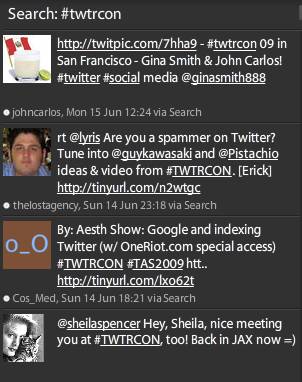
Among its many uses, Twitter has become an indispensable technology for event planners – whether the events are physical, virtual or mesh/hybrid.  Just about every event today defines a Twitter hashtag, which allows Twitter users (“tweeps”) to associate their tweets with the event.  If you want to follow comments about TWTRCON SF 09 (which is now over), just search for the hash tag “#twtrcon” in the Twitter client of your choosing.  Here’s how it looks for me in Tweetdeck:

tweetdeck_twtrcon

The great thing about Tweetdeck is that the “search view” updates in near-real-time, which means that as new tweets are posted with that hashtag, I see them appear in this particular search pane.  Periodically glancing at a hashtag search in Tweetdeck allows me to keep my finger on the pulse of a live event that might be occurring hundreds of miles away.

Similarly, I’ve attended physical events where I’ve spotted Tweetdeck running on attendees’ laptops – clearly, they’re tweeting about panel discussions, keynote presentations, etc. right there from the event itself.  Those who left their laptops tucked away are likely sending status updates from a Twitter client on their smartphone.

The beauty of Twitter is not just in its capability for organizing a global discussion around particular events – it’s also great for tracking what’s being discussed around a topic.  For a b-to-b marketer, you might want to know what’s being said about your products and services.  For a salesperson, you might want to know how the competition is positioning themselves.  Twitter allows you to search for that chatter in real-time – and, third party services (e.g. tweetbeep, twilert, etc.) allow you to set up agents to send you search results via email.

Now, let’s consider a virtual event.  With all due respect to great White Papers, Case Studies and Product Collateral, I find that the most interesting content at a virtual event is the group chat that occurs in booths and lounges (e.g. the Networking Lounge).  If microblogging content occurs in the statusphere, then I think of a virtual event’s chat content as the chat-o-sphere.

In a very active/engaging virtual event (e.g. lots of activity, plus a number of interesting Webcasts/Videocasts), it can be hard to keep up with all the interesting discussion in the chat-o-sphere.  If I’ve attended a 50-minute Webcast and return to the Lounge, I’ll often find 100 chat entries added since my last visit – it can be challenging to read through what I’ve missed.

Virtual event platforms may need to consider Twitter-like capabilities to search the chat-o-sphere in real-time – and, provide Tweetdeck-like widgets to keep real-time views on specific tags or search terms.  Exhibitors at a virtual event may be interested in real-time searches on the following terms (within a Lounge chat):

  1. Mentions of my company’s name
  2. Mentions of my own name
  3. Mentions of my competitor companies’ names
  4. Mentions of my products
  5. Mentions of my compentitors companies’ products

An exhibitor tracking these search terms can quickly send a product marketer, sales engineer, etc. into the Lounge to quickly address questions being posed – or, simply participate in the discussion.

What do you think about the chat-o-sphere in virtual events – is there value in real-time search against it?

Related Links

  1. NY Times: Hey, Just a Minute (or Why Google Isn’t Twitter)
  2. Blog posting: For Virtual Worlds Info, Here’s Whom I Follow on Twitter (and Why)
  3. Blog posting: Leverage Twitter for Virtual Tradeshow Outreach

Four Ways To Make Virtual Conferences Better

June 9, 2009

Nick Morgan, on the Conversation Starter blog at Harvard Business Publishing, wrote a recent posting titled “Three Ways To Make Conferences Better“.  To summarize, Nick’s suggestions are:

  1. Tell a unique story
  2. Make attendees active participants, rather than onlookers
  3. Leverage the gathered group to give something back to the community in which the conference is held

Nick’s blog posting served as inspiration for me – I’d like to cover ways to make virtual conferences better.  Virtual conferences (along with virtual tradeshows, virtual job fairs, etc.) do allow attendees to participate – in fact, some of the more interesting “content” in a virtual conference is the free form text chat that occurs in areas like the Networking Lounge.

And by its nature, a virtual conference gives back to the community in the form of carbon emission avoidance, time savings, convenience and productivity gains.  As for telling a unique story – that’s something I have not seen virtual conferences achieve.  But at the same time, I don’t think physical conferences do a good job of  this, either.

Without further ado, here’s my list:

  1. Leverage a Requests For Proposal (RFP) Tool for attendees – in a b-to-b virtual conference, you often find that the exhibitors offer a common set of products and services (they’re direct competitors).  As an attendee, the virtual conference affords me with a convenient and efficient means for comparison shopping.  So if I’m in the market for blade servers, I might want to spend time visiting numerous booths, downloading product collateral and chatting with some booth reps.  Instead, what if I could fill out an online form (within the virtual conference) and tell prospective vendors what I’m looking for?  Perhaps I need 1U blade servers with redundant power supplies and are remotely manageable.  I fill out my RFP form, check off the exhibitors that I’d like to receive my request and click “Submit”.  I then receive responses within the virtual conference environment from exhibitors – and start to create my short list, based on those responses.  As one can imagine, such a tool could greatly benefit attendees and exhibitors.
  2. Play some games – making games available within the virtual conference creates a sense of fun, which increases attendee satisfaction – this, in turn, increases retention and session time (attendees remain in the environment longer).  And of course, you’re not hosting the game solely for the sake of fun – you’re forcing participants to perform desired activities (e.g. visit a booth, view a Webcast, etc.) in order to advance within the game.  Again, win-win scenario – attendees and exhibitors benefit.
  3. Incorporate social media – attendees at physical conferences generate lots of Twitter, Facebook, etc. updates  from their PDAs.  In a virtual conference, it’s all too easy to remain well-connected with your social networks.  That being said, don’t force attendees to leave the virtual environment – instead, provide interfaces for them to post a status update directly from the virtual conference platform!  They should be able to tweet directly from the virtual conference, update their Facebook wall, etc.  This provides a convenience to the attendee and generates no-cost “PR” of the virtual conference across social networks.
  4. Embark with an Aardvark – a new service that describes itself this way —  “just send Aardvark a message through IM, like you do when talking to a friend.  Aardvark figures out who might be able to answer, and asks on your behalf — Aardvark is the hub.”  While it might be interesting to consider an integration directly from the virtual conference to the Aardvark service, it’s the concept that most interests me.  And that is, tapping into the collective wisdom assembled at a virtual conference in order to help attendees answer questions.  After all, most b-to-b virtual conference audiences login to the event with a common set of business or technical challenges.
Source: Aardvark (vark.com)

Source: Aardvark (vark.com)

Related Links

  1. Blog posting: Three Ways To Make Conferences Better
  2. Blog posting: Virtual Events And The Power Of Social Media (authored by me on my company’s blog)
  3. Blog posting: Cisco has integrated Twitter into their Cisco Live Virtual event
  4. About Us page: Aardvark

Virtual Event ROI

May 31, 2009

Virtual Edge 2009 Panel on Measurement & ROI

Virtual Edge 2009 Panel on Measurement & ROI

What’s a hot topic on the minds of virtual event marketers? I’ll give you a hint – it’s spelled R-O-I. At Virtual Edge 2009 in Santa Clara, CA, I participated in a panel discussion on the topic of virtual event ROI.  It’s pretty clear that virtual events are driving significant ROI today – signified by the interest in last week’s conference, the keen interest from marketers and the growth of the virtual event industry.  However, the audience questions from this panel discussion make it quite clear that ROI discussions and analysis need to advance to the next level.

Here were the 3 hot buttons raised by the audience:

  1. Tracking ROI via closed sales – yes, I know that virtual events will drive awareness, engagement and great overall statistics.  But at the end of the day, I need to know that my investment drove product sales.  And I’m just not sure I can quantify that today.
  2. Understanding user/activity profiles – my company wants to produce a virtual event for the C-level, but we just don’t know whether C-level employees will attend virtual events – and if they do, we certainly don’t know the typical activity profile of a C-level employee within a virtual event.  As such, we’re not sure we can recommend the investment to produce one.
  3. More meaningful engagement statistics – it’s great that I had 200 private chat sessions with attendees – but there’s a difference between a “I can’t find the auditorium” chat and a “can you provide me with pricing information” chat.  How do I make the distinction when analyzing my ROI?

Let’s address each of these hot buttons.

ROI via Closed Sales

Here’s where the platform provider needs to work hand in hand with the client.  First, the provider and client need to develop certain engagement patterns that are meaningful for the client.  One pattern may be as simple as, “attendee initiated a private chat with one of my booth reps”.  Another pattern might be, “attendee downloaded more than 5 documents from my booth and had more than 2 return visits”.  Once these patterns are defined, the following should occur:

  1. Platform provider – upon detection of a pattern match, insert (or update) a record in the client’s CRM system (e.g. Salesforce.com, Siebel, etc.).
  2. Client – have the processes and technologies in place for a timely response.  Then, have a secondary process to accurately track and measure the actions/outcome that result from the sales inquiry.

The job of the platform provider is to detect the engagement pattern and seamlessly update the client’s CRM system.  By handling the CRM import automatically, the platform provider is significantly accelerating the potential payoff (ROI) – since a marketer or sales rep is no longer required to manually import the sales opportunity from an Excel spreadsheet.

The client, then, needs a process to have the right person respond in a timely manner to the sales inquiry (e.g. Inside Sales, direct sales rep, etc.) and be able to track the eventual outcome.  The outcome then needs to be mapped back to the source (e.g. virtual event) – to complete the equation.  If these pieces work together, you’ll be able to track closed sales to your virtual event investment.

Activity Profiles

As noted during the Virtual Edge panel discussion, platform providers and clients will need to agree on the use of aggregate event data.  Today’s contracts specify that the client (event producer) owns all data on registrant profiles, activity data, etc.  To publish industry-wide data, it will be important for the lion’s share of clients and vendors to participate.

The data will not be as meaningful if large players (clients or vendors) are not part of the effort.  In addition, vendors and clients will need to agree on standard definitions – for instance, what is “C-level employee” defined as – and how do we map that definition back to registration fields?  A single vendor may have 10 clients – and 10 unique registration forms (with unique registration fields).

Unique registration fields make data aggregation challenging.  In addition, both clients and vendors will want to disclose (to virtual event attendees) that their activities will be utilized in reporting and analysis (at an aggregate level).  This discussion, in my mind, leads me to believe that an industry wide standards body is needed – an Internet Advertising Bureau (IAB) for virtual events.

More meaningful engagement tracking

On the specific topic of deciphering chat content, technology is beginning to emerge to perform natural language recognition.  In child-based virtual worlds, I’ve read that technology can attempt to detect the presence of child predators within virtual world environments (where text chat is occuring).  I believe this technology can be applied to the business setting of a virtual event – whereby the sales worthiness of a chat session can be rated.

Have a look at this very interesting article from The New York Times – Software That Guards Virtual Playgrounds.

On the disclosure side, I think we need to make attendees aware of the use of this technology – so that they understand that the private chat they engage in may be read by a computer.

These are all interesting topics for the industry to address – I believe that in doing so, we’ll advance the industry significantly – and generate even stronger growth than we’re already seeing.

Related Links

  1. Blog posting: Increase Your Virtual Event ROI
  2. Blog posting: Virtual Event Adoption by the C-Suite
  3. Blog posting: What CPL Should I Pay For VTS?

Virtual Tradeshow Best Practices: Top 10 Exhibitor Tactics

May 20, 2009

At b-to-b virtual tradeshows (VTS), exhibitors compete for the attention and interest of the attendees.  And many times, the competition for attention occurs “against” the competitors of your business.  Thus, it’s even more important to make your mark, which places an onus on exhibitors to leverage new and creative ways to generate interest.  Here are Top 10 Exhibitor Tactics that I’ve observed while working with virtual tradeshow exhibitors.

  1. Set up a (physical) war room – it seems a bit contradictory, given that you’re exhibiting virtually, but if it’s practical to gather in a single location (physically), you’ll be more effective and coordinated.  As visitors pour into your booth and engage with you, it will be easy to shout aloud, “I’ll take this one” and have everyone immediately know what you’re referring to.  In addition, being together physically creates a buzz as the event goes on – you’ll hear cheers, shouts, jeers, etc. as activities unfold throughout the day.  I’ve participated in one and it does help with coordination and build camraderie.  Short of a physical gathering, another option is to keep a telephone conference bridge active throughout the day to coordinate activities.
  2. Send product experts into the Networking Lounge – you need to solicit your subject matter experts to participate in the virtual tradeshow in the first place.  And believe me, their presence will be worth it.  Send them into the lounge to soak in all the discussion – and encourage them to chime in.  The idea here is to demonstrate thought leadership and generate “organic interest” in your company and your company’s booth.  During one event I attended, an expert’s presence in the Lounge generated interest from an industry analyst, who set up a follow-up meeting (with the expert’s company) to further discuss their products and services.
  3. Leverage a compelling booth welcome – always make a good first impression for that first-time visitor.  Create a Flash video for your booth’s “front screen” that’s unique to the VTS – or, have your CTO or CEO (via greenscreen video) greet visitors with a short video welcome.
  4. Ad-hoc prize giveaways – drop a surprise on attendees and let them know that you’re giving away prizes in your booth.  Got leftover giveaways from a physical event?  Distribute that excess inventory to your virtual event visitors.  Draw them into the Group Chat in your booth and ask them to answer questions posted there (about your products and services)  in order to win.  You’ll end up not just with some happy booth visitors – but you’ll also have educated others who observed the group chat.
  5. Be practical with booth displays – if you have scheduled chats occuring in your booth – or, if you have distinguished experts staffing your booth, let visitors know!  How about an animated image that displays in the front screen of your booth, which rotates through the miscellaneous activites scheduled there that day.  Sometimes, the simplest and most practical approach is the most effective.
  6. Staff your booth with your product experts – for those experts that you send into the Networking Lounge – be sure they’re available to interact with your booth visitors as well.  When your expert has won over the respect of an attendee, then that attendee becomes more comfortable with your company’s products and services.  I’ve witnessed a few experts field requests for pricing information or a follow-up sales call.  While that’s best handled by a salesperson, it clearly demonstrates the effectiveness of having your products experts in your booth.  Another observation: if your experts are having engaging interactions with booth visitors, their presence will encourage repeat visits.
  7. Invite your company executives to participate – a virtual tradeshow affords your company executives with an easy and convenient way to connect directly with customers and prospects.  The attendees find the interactions engaging, as it’s not often they have direct access to your executives.  Additionally, your executives gain further appreciation of the virtual event via their first hand participation, which makes budget approvals quicker for subsequent events.
  8. Got extra books?  Give them away as prizes – first, you need to find the right book for the particular audience – one that will generate strong demand.  Then, by giving away a large number of them (50, 100, etc.), you generate interest because of the likelihood of winning one.  One event I attended awarded a free book to the first 100 booth visitors.  The particular book was authored by an industry expert whom all attendees were familiar with.  The first 100 visits occurred within minutes of the opening of the event!  Later in the day, visitors will still coming into the booth, asking if the book was still available.
  9. Functional avatar images – some exhibitors select their avatar image from the event platform’s image library.  Others upload a picture of themselves.  One exhibitor went a different route and created custom images that denoted the functional expertise of each exhibitor. The image had the company logo as a background, with text overlaid on top (e.g. “Product Expert”, “Integration Expert”, etc.).  Since attendees can determine your functional domain (by your avatar), they can immediately determine whether to interact with you.
  10. Use a “call to action” image in the final slide of a Live Webcast – want viewers to visit your booth at the conclusion of your Live Webcast?  Make your closing slide an image of the virtual environment, with a big arrow pointing to your booth’s location on the Exhibit Hall.  Title the slide, “Got more questions?  Visit our booth”.

So there you have it.  Try some of these tactics at your next virtual tradeshow and let me know how it goes!


Virtual Event Adoption By The C-Suite (CIO, CMO, etc.)

May 8, 2009

In my former role as a b-to-b media industry product manager, I developed product packages that utilized audio podcasts for delivering IT-specific content to IT practitioners and IT managers.  The conventional wisdom at the time  (early on, at least) was, “CIO’s will not download and listen to podcasts”.  I wasn’t so sure about that – after all, podcasts made it easier for busy executives to consume content they wanted – when and where they wanted to consume it.  So why wouldn’t a busy executive leverage technology to make her day more efficient?

Lo and behold, a CIO speaker at an event I attended was asked about the different content types he leveraged to get his job done.  He mentioned that he takes a 30 minute ferry boat ride to and from work each day.  While most boat passengers are reading the daily newspaper, this CIO would listen to IT-specific podcasts on each ride – and, he insisted that each downloaded podcast be 30 minutes long (or less), so that he could listen its entirety on the ride.

With virtul events, I’ve heard from event organizers and event sponsors who wonder whether the CIO (and her companions in the C-Suite) will adopt virtual events and virtual tradeshows.  I think the answer is “yes”.  First, let’s characterize some of the C-Suite occupants:

  1. CEO – may be too busy to attend virtual events – but, will occasionally make the keynote appearance to kick off a virtual event.  Many CEO’s do not use a computer, but most carry PDAs.  This means that the path to CEO participation in virtual events may be via the PDA.
  2. CMO – they see the value of virtual events as a marketing and lead generation vehicle, so one of their key roles today is in funding and approving budget.  As for attendance, my feeling is that they’re interested in doing so.
  3. CIO – like with podcasts, virtual events enable and empower an executive.  The CIO can attend a virtual event to peer network with like-minded CIO’s and not miss a day in the office to do so.
  4. CTO – intimate with technology, the CTO is virtually a slam dunk to participate (pun intended).
  5. CFO – not so sure about CFO’s, but I will note that IBM Cognos produced a virtual event called Virtual Finance Forum 2009 that targeted finance executives.  Cognos produced the same event in 2008 as well.

B-to-B publishers have caught on to the notion that CIO’s will attend virtual events, as past virtual events have specifically targeted the CIO.  Two upcoming events are taking a similar approach:

  1. CIO Virtual Forum: Navigating Through Dynamic Times (May 19, 2009 – CIO.com and Cisco)
  2. CIO Summit:  Driving Business Value and Customer Value in the Global Economy (June 10, 2009 – InformationWeek)

In my experience with technology focused virtual events, I found that of all registrants, 7-9% had senior IT titles (CIO, CTO, VP of Technology, etc.).  So an event with 1,000 registrants would have 70-90 of them be CIO’s or CTO’s.  Why would the C-Suite attend a virtual event?  I think there are a few primary benefits:

  1. Conveniently network with like-minded peers – one of the draws of attending an event is the ability to network with other attendees.  With a virtual event, a busy executive can do so without losing a day outside the office.
  2. Efficiently connect with partners and customers – an online experience can’t re-create the dyamics of an in-person interaction, but it does allow a busy executive to connect with many more partners and customers than could have occurred in-person.
  3. Extend your social graph and social presence – some C-Suite execs have enthusiastically adopted Twitter, Facebook and other social networks.  Industry-specific virtual events allow the executive to further expand the social graph.  And of course, they’ll be tweeting about the event as soon as they login.

What has your experience been – has the C-Suite at your own company attended a virtual event?


Increase Your Virtual Event ROI: 10 Tips and Tactics

March 22, 2009

Source: Flickr (Ewan McIntosh)

Source: Flickr (Ewan McIntosh)

If you recently exhibited at a lead generation virtual event, then I’ve got some tips for you.  While most exhibitors consider the program “complete” at the conclusion of the live virtual event, your work is just beginning.  Outhustle your competition and you’ll generate more ROI, beating them to the punch on shared sales leads.  There are two primary strategies for generating a higher return on your investment:

  1. Leverage your existing investment to generate net new sales leads
  2. Better convert your existing sales leads

Leverage Existing Investment

  1. Convince the virtual event host to light up the environment – most virtual events remain “on demand” for 3 months after the live show date.  During those 3 months, you’ll see intermittent activity – some attendees return to visit your booth – some new leads sprinkle in, 1 here and 2 more a few days later.  Your event organizer should be incented to produce another “live date”, in which past attendees are invited to return – and, new registrants are invited to participate.  After all, the event organizer has fixed costs as well – and lighting up the show again means more revenue.  The organizer will want brand new content to draw users in (e.g. compelling Live Webcasts, like they used in the original event) – and you’ll want to leverage the same amount of booth reps to interact with attendees.
  2. Convince the virtual event host to support portable booths – you spent a lot of time getting your booth just right – selecting the right logo and Flash movie, finding relevant White Papers and producing some case studies just for the event.  Your booth is a great marketing vehicle and should be leveraged elsewhere – how about placing your booth on its own microsite – or, embedding the booth on your corporate web site?  The eco-friendly practice of re-use applies here as well.
  3. Syndicate booth content – for the White Papers, podcasts, Case Studies, etc. that you placed in your booth, syndicate them with the event organizer and related web and blog sites.  This broadens the reach of your content – and allows you to generate more sales leads.
  4. Syndicate Webcast content – if you had a speaking slot at the virtual event, ask the show host for a copy of the Webcast – then, host it on your corporate web site and syndicate it with the event organizer and related web sites.  Any content generated for the event should be re-used – it can generate new sales leads with minimal overhead or cost.
  5. Syndicate the supplemental Webcast content (in different forms) – convert your Webcast into an MP3 audio podcast and make that available on your web site along with the Webcast.  Syndicate the podcast as well, in case your target audience prefers the convenience of a download over the viewing of a streaming presentation.  Take the Q&A of the Webcast and transcribe that into a PDF or HTML document – and place this on your web site as well.  You get the idea here – spread your wings, without thinning the pocketbook.

Convert Existing Leads

  1. Find those Top 10 leads – whether you have an automated system or need to do this manually, comb through the wealth of engagement data that a virtual event provides and find those Top 10 leads.  These are the folks who Sales must call now.  Perhaps they downloaded 10 of your White Papers – or, perhaps they did a text chat with a booth rep and requested that a sales rep call.  Either way, they need immediate attention.  If you know the sales reps who should handle these leads, don’t be shy about personally walking the leads over to them and providing the details as to why the leads as so hot.
  2. Get the basics right in your follow-ups – if Inside Sales is following up by phone with some leads, make sure the reps have a script that covers the correct name of the virtual event – and arm them with some important details of the event (e.g. date, topics, speakers, etc.).  For email follow-up, be sure to include the virtual event title in the Subject line.  Always be sure to reference the context of the event in all of your touchpoints.
  3. Build customized follow-up paths based on prospect activity – again, whether it’s automated or manual, factor in the prospect’s specific activities within the live event and tailor the follow-up touchpoints based on that activity.  Study the 5 White Papers they downloaded and recommend a 6th that brings it all home.  Study the chat transcript with your booth rep and send an email follow-up that ties up any loose ends.  Believe me, the prospects will appreciate the personal attention and the value you deliver to them.
  4. Use the virtual event platform to faciliate your follow-up – your show host is keeping the environment open for 3 months – so it would be a shame not to leverage it for all its worth.  When you do secure a follow-up appointment – consider complementing your phone call by meeting your prospect back in the virtual event.  There, you can do text or webcam chat in an environment s/he is familiar with.  And perhaps you place some additional content in the booth for your prospect to review.
  5. Send small prizes to highly engaged prospects – not everyone could win a prize during the live event – so, find those top 10 leads – or, top 10 most engaged users (in your booth) and send them a memory stick or webcam.  As discussed, reference the context of the event in your communications.  Perhaps the memory stick contains additional White Papers that may be of interest.  Just make sure the touchpoint is personalized – and don’t send the prize just for the sake of sending something.

So there you have it.  Don’t forget that your campaign doesn’t end at the conclusion of the live virtual event.  That signals the starting point of the important phase – the one in which you’re head to head with the competition.  So make sure you score a higher ROI than they do.