Product Comparison Guides 2.0

February 20, 2009

In the world of Enterprise IT, sales cycles for IT products and services tend to be long and complex.  Decisions are made by committee (vs. by an individual) and the process follows an extended cycle that begins with problem definition, progresses to vendor selection and arrives at a final destination of price negotiation and purchase.  Once the problem has been defined, the committee identifies the set of vendors who provide applicable solutions.

It’s at this stage where technology publishers can often help, with the publication of product reviews and comparison guides.  Here’s an example of a product comparison guide for Hosted CRM, published by InsideCRM.com:

Source: InsideCRM.com (partial view of comparison guide)

Source: InsideCRM.com (partial view of comparison guide)

So this is Product Comparison Guide 1.0.  For version 1.5, you might host this guide on a web site (rather than a PDF) and allow readers to click over to the vendor’s web site — perhaps the vendor’s product page for their Hosted CRM offering.  Maybe you host a registration page and drive sales leads to the Hosted CRM providers.

Now, let’s take it to the next step.  Product Comparison Guide 2.0 is an interactive community site that’s powered by a virtual event platform.  Let’s imagine the same Hosted CRM guide – published as an SEO-friendly HTML page.  Perhaps you leave the high level product information on this page – just enough to entice the reader to continue.  The purpose of this page, then, is to drive traffic into your interactive comparison guide.

Once a user enters the interactive site, you collect some basic demographic information – enough to uniquely identify the user (and contact her), but not too much that the user abandons and leaves your site (e.g. first name, last name, title, email address).  And now, the full product details behind each solution is provided not by you – but, by the vendors themselves – in their product showcase virtual booth!

Within the booth, a vendor might provide:

  1. Detailed specifications about the product
  2. White Papers that describe how the product solves a given technology challenge
  3. Case Studies that describe how customers have used the product
  4. On-Demand Video and Webinars related to the product
  5. Sales and Marketing staff who staff the booth during business hours
  6. Group chat to allow visitors to interact with the vendor – and with each other

Especially in this economic environment, decisions on IT purchases are not taken lightly, even if the offering is a SaaS solution like Hosted CRM.  And what better way to connect with qualified sales prospects than engaging with them while they’re reviewing the solution space?  Having a user enter your staffed booth (to engage with you)  is a much stronger proposition than sending them to your corporate web site to peruse your content.

So vendors “win” in this scenario.  The publisher also wins!  The publisher can sell sponsorships of Product Comparison Guide 2.0, allowing vendors an assortment of features in the environment (e.g. vendor booth, advertising placements, speaking opportunities, etc.).  I’m sure that most vendors listed in your Product Comparison Guide 1.0 (that SEO-friendly web page) will feel pressured to have a virtual booth in the interactive environment – after all, what happens when users click into the environment and interact with your competitors?  Your absence results in a lost opportunity.

With Product Comparison Guide 2.0, the jobs of buyers and sellers now become much easier.


How To Market Your Virtual Event

February 18, 2009

marketing_sherpa

MarketingSherpa published an excellent primer on Virtual Event Marketing.  The 10 tactics listed were:

  1. Partner with assocations
  2. Invest in PR
  3. Get exhibitors involved
  4. Advertise on relevant web sites
  5. Market to internal email database
  6. Email registrants the day before and the day of an event
  7. Use social media to attract attendees
  8. Emphasize the value of the event
  9. Use the virtual event’s microsite
  10. Use sweepstakes as an incentive

Based on my involvement in marketing virtual events to an Information Technology (IT) audience, I’d like to add the following:

  1. Promote early and often – get your microsite launched up to 2 months prior to the live event.  Time is critical, because it gives you options to try different tactics, measure response rates and adapt accordingly.  If you leave yourself too little time, your flexibility is limited and your registrations will suffer.
  2. Invest in search engine optimization (SEO) – make sure your registration page and microsite are optimized for SEO.  For more insights into SEO for virtual events, see this blog posting: https://allvirtual.wordpress.com/2009/02/02/search-engine-optimization-seo-for-virtual-events/
  3. Invest in search engine marketing (SEM) – just like you’d buy keywords to drive visitors to your corporate web site – figure out which search terms are relevant to your virtual event and spend a little of your budget purchasing search engine keywords to drive clicks to your virtual event microsite or registration page.
  4. Use interactive technologies to draw attention – with the amount of email received by your target audience, it’s harder and harder to stick out from the crowd.  To do so, use interactive visuals like a screencast (to give users a sneak preview of what your virtual event environment looks like) or a short video clip embedded within an HTML email.
  5. Use a variety of promotional vehicles – email is the most heavily used, but not all of your users pay attention to promotional emails.  So try display ads, placement in e-Newsletters, text links on publisher web sites and sponsorship of relevant sections of web sites.
  6. Highlight the prominence of expert speakers – in some industries, a well-known speaker can generate the audience all by herself.  If you’ve secured such a speaker, be sure to promote her prominently.  In fact, use her name right in the Subject heading of your promotional emails.
  7. Highlight the ability to interact with executives and experts – once you landed that expert speaker, invite her to participate in the virtual event after her speaking appearance.  In fact, in lieu of a Q&A after the Webcast/Videocast, have her appear in the Networking Lounge to answer questions there (via text chat), interacting directly with the audience.  In addition, invite your executives to participate and interact with the audience.
  8. Display the list of exhibitors – as you sell sponsorships, display the list of companies who will be exhibiting.  That may convince some users that they need to attend – what better a way to narrow your purchasing decision than to “meet” with the candidate solutions providers in one fell swoop?
  9. Provide a sales contact for potential exhibitors – some registrants of your virtual event may represent companies who’d like to exhibit (sponsor).  So give them an email address or phone number and you might have just sold an additional sponsorship.

What has worked well in promoting your virtual events?


VMworld Complements Physical Conference With Virtual Conference

February 7, 2009

VMworld

Source: VMworld

What do you do when you produce the world’s leading virtualization conference?  You make it better, of course!  VMware teamed with Jive Software to take the once-per-year VMworld conference and extended it (online) into a 365-day-per-year, always-on community.  A Case Study on this initiative can be found here:

http://www.jivesoftware.com/customers/case-studies/vmware

And this quote from Eric Nielsen of VMware sums it all up:

We expanded the VMworld conference from a three day event for 15,000 to a 365 day/year destination for 50,000 virtualization professionals.   — Eric Nielsen, Director of Web Communities, VMware

So that’s a triple play for VMworld – by complementing their event online, they’ve generated a more than 3x increase of participating virtualization professionals.  As quoted in the Case Study, the VMworld.com community has 35,000 active members, generates 35,000 page views per day and 2,000 video views per day.

Quite an impressive level of activity.  A clear example of an active community at work – 35,000 page views (in a single day) is hard to come by with traditional b-to-b content.  However, in a highly active social community, the blog posts, discussion board entries, podcast downloads, video views, “ask the expert” questions, etc. – all contribute to traffic generation.

Just have a look at the volume of Discussion Board traffic:

VMworld.com - Discussion Board

Source: VMworld.com - Discussion Board

Now that’s an active community at work.  But there’s a chicken and egg problem – how do you generate an active community in the first place?  Well, the organizers of VMworld.com made the wise move to integrate a full suite of social networking tools – essentially building a mini-Facebook around the conference.  Tools available include:

  1. Discussion Boards
  2. Podcasts – both those produced for the conference, as well as third party / external podcasts
  3. Integration with social networking sites (e.g. Facebook, Twitter, etc.)
  4. Blogs – both in-house and third party
  5. Ask The Expert sessions and content
  6. Video
  7. Photo Wall (with pictures from the physical event)

VMworld.com also leveraged neat tools within Jive Software’s platform to encourage activity.  For instance, on a blog post, a user can click on “Watch This Blog Post” and be notified when comments are appended to that post.  Additionally, most content pages have a left-hand sidebar titled “More Like This”, which certainly encourages additional clicks and page views (it worked for me!).

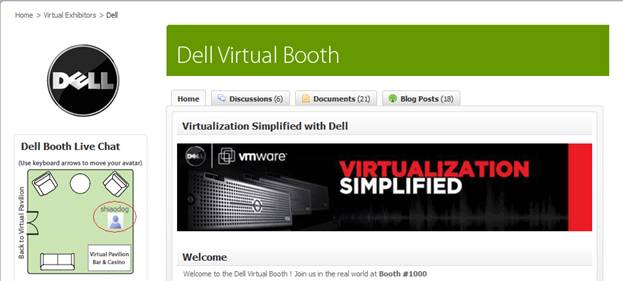
VMworld created virtual conference sponsorship packages for exhibitors, with pricing discounted if you’re already exhibiting at the VMworld physical conference.  3D style booths are planned – the current community features 2D style booths.  Here’s the Dell booth:

VMworld.com - Dell's Booth

Source: VMworld.com - Dell's Booth

This shows the top third of the booth – below it is Dell content, along with community content (blogs, discussion posts, etc.) around Dell topics. You’ll notice a “floor map” of the booth, which shows the physical location of my avatar.  Users utilize the arrow keys on their keyboard to move around within the booth.

VMworld Europe “floors” later this month (February 24-26) in Cannes.  If you’re lucky enough to get to Cannes, enjoy the show.  If you’re not able to attend, then go online and enjoy the online networking.  Registration for VMworld Europe can be found here:

http://vmworld.com/community/conferences/europe2009/


Search Engine Optimization (SEO) For Virtual Events

February 2, 2009

Flickr (martin.canchola)

Source: Flickr (martin.canchola)

These days, any publisher of information on the web is very keen to Search Engine Optimization (SEO).  If you build it (SEO) into your pages, they will come.  If you don’t, then you’re missing out on page views.  But, with all the effort we place on optimizing our web sites (e.g. corporate web sites, content sites, social media sites, etc.), how much SEO effort do we put into our virtual event pages?  I get the feeling that the answer today is “not much”.

For the external (non-private) virtual event, show organizers and exhibitors often judge success based on the number of registrations, attendees and interactions.  Basically, “the more, the better”.  However, what’s the largest source of registrations for most virtual events?  Outbound email promotions to (usually) large lists of users – where you’re hoping that some percentage of users open your email, click on the email and convert into a pre-registered attendee.  Very low on the list today is organic traffic from search engines like Google, Yahoo or MSN.

So the opportunity is quite large – improve the SEO of your virtual event and you can make a big impact on registrations, attendees and exhibitor satisfaction.  But where to start?  Well, first identify the pages on which to apply your SEO tactics.  For a virtual event, we’re usually talking about the microsite that describes your event – date, hours, speaker bios, etc..  The microsite often has separate tabs to list the event’s agenda, existing exhibitors, contacts for sponsorship info and (importantly) the event’s registration page.  All of these pages/tabs should have SEO applied.

A nice overview on SEO is titled “Search Engine Optimization 101” by Marketleap, a division of Acxiom Digital.  You’ll want to apply some of the basic concepts discussed here – including the right content on your virtual event pages; the use of meta tags; how to write good titles and strategic use of keywords.

Next, you’ll want to foster in-bound links to your virtual event microsite.  Promote the virtual event on your corporate web site (with a link).  Place links to the virtual event in your social networks (e.g. Twitter, Facebook, Linkedin, etc.).  Find blogs related to your industry and leave comments there.  Don’t blatantly promote your virtual event in the blog comment, but refer back to it (e.g. when leaving the comment, have your name be hyperlinked back to your virtual event’s microsite).  The more inbound links you can create, the higher your microsite will rank with the search engines.

Correction: comments you leave on other blogs can help with clicks (back to your blog), but do not help with SEO – most blog sites utilize a nofollow directive on the anchor tag, so search engines do not “follow” hyperlinks left in blog comments.

Finally, if your virtual event is not behind a registration wall (e.g. maybe it’s a 365 day, open environment), then make sure you provide “search engine friendly” content pages within the platform that search engine spiders can index.  Stay away from the Flash-heavy page and go with a flat, content-rich page.  Users will land here (from search engines), so be sure to provide easy navigation from this page to the main areas of the event (or environment).

For b-to-b virtual tradeshows, I’d estimate that well south of 10% of registrants are sourced from search engine traffic today.  Make it a goal at your next event to hit the 10% mark.  Your email lists will thank you.


Virtual Event Best Practices

January 23, 2009

With a number of virtual events on tap for 2009 (see the calendar of events here), marketers and exhibitors are busy preparing – assembling content for their booth, rounding up colleagues for “booth duty” and preparing the sales team for a burst of hot sales leads.  I’ve assembled past blog posts into a collection of virtual event best practices.  Without further ado:

  1. Bring the right people, have the right content (in your booth), perform the right actions and provide the right prizes (https://allvirtual.wordpress.com/2008/12/14/how-to-exhibit-at-b-to-b-virtual-tradeshows/)
  2. Utilize surveys to provide a deeper understanding of your customer prospects and generate insights back to your product management team (https://allvirtual.wordpress.com/2008/12/19/utilize-surveys-in-virtual-events/)
  3. Leverage Twitter – show-hosts can look to Twitter to expand the reach of the event’s audience and exhibitors can leverage Twitter to invite their followers to visit their booth at  the event (https://allvirtual.wordpress.com/2008/12/15/leverage-twitter-for-virtual-tradeshow-outreach/)
  4. It’s not always about “net new sales leads” – get closer to your existing customers (https://allvirtual.wordpress.com/2008/12/16/get-closer-to-your-customer-with-virtual-tradeshows/)
  5. Use treasure hunts to increase engagement (https://allvirtual.wordpress.com/2008/12/23/use-treasure-hunts-to-increase-engagement-in-virtual-events/)
  6. Have a process in place to handle the hot sales leads (https://allvirtual.wordpress.com/2008/12/31/how-to-handle-those-hot-virtual-tradeshow-sales-leads/)
  7. Utilize multiple metrics to judge success – Cost Per Lead (CPL) is the key metric for most marketers, but also consider other success metrics [e.g. quality of leads, conversion of inquiry to sales engagement, etc.] (https://allvirtual.wordpress.com/2008/12/28/what-cost-per-lead-cpl-should-i-pay-for-virtual-tradeshow-sponsorships/)

What best practices do you utilize at virtual events?  I welcome your input – feel free to drop a comment below.


How to Handle Those Hot Virtual Tradeshow Sales Leads

December 31, 2008

It’s the holy grail of online lead generation – you generate sales leads that pursue you and your company (rather than the other way around).  This holy grail scenario often plays out in B-to-B Virtual Tradeshows.  Some attendees come to the virtual event with approved budget, purchasing authority and a specific need.  As such, they’re shopping around with the various exhibitors to see who offers the solution that best fits their requirements.

These attendees will ask you (or your colleagues) very specific questions, covering technical specifications, product features and pricing.  At the conclusion of their visit, they may ask to be connected to a sales representative from your company.  How better can it get for you as an online marketer?  For this opportunity that fell into your lap – be sure to close the loop (with sales) on this lead or else the happy ending may be told by your competitor.

Here’s a sample chat that’s representative of what I’ve seen in virtual events:

Attendee: Thanks for the information about your products.
Exhibitor: You’re welcome!
Attendee: I’d like to set up a meeting to price out a configuration and discuss a few requirements that the product needs to meet
Exhibitor: Where are you based?
Attendee: New York City
Exhibitor: (a few minutes later) OK, the area sales manager for NYC is Bob Johnson.  His email address is bjohnson@acme.com and his phone number is 212-555-1212.
Attendee: Thanks, I’ll contact him.

Not good enough!  The exhibitor missed out on a golden opportunity here.  Additional steps that I’d recommend:

  1. Copy/paste the transcript of the chat and immediately email it to Bob Johnson
  2. Connect with Bob via email, IM, etc. – letting him know about the hot lead
  3. Update your CRM system (e.g. Salesforce.com, SalesLogix, etc.) with the transcript of the chat and a summary of the sales inquiry
  4. Urge Bob to follow up immediately with the attendee — let the attendee know (during the chat session) that “Bob is ready to take your call right now” – or, “Bob will call you first thing in the morning”
  5. Get Bob to login to the virtual event right now – you already know that there’s one hot lead from his territory – a sales opportunity waiting for Bob to close
  6. Provide your own contact info to the attendee, letting her know that you can be contacted if Bob cannot be reached

Remember, leads in a virtual tradeshow can be very hot.  Handle with care and don’t treat them like hot potatoes.  If you do, then your competitors may be eating your lunch.


What Cost Per Lead (CPL) Should I Pay for Virtual Tradeshow Sponsorships?

December 28, 2008


Flickr (TheTruthAbout)

Source: Flickr ("TheTruthAbout")

For online marketers responsible for lead generation, the name of the game is Cost Per Lead (CPL).  While it’s not the be-all, end-all, CPL is certainly top-of-mind for marketers – and in this economic environment, CPL is receiving heightened attention from the online marketer, her CMO and her CFO (and possibly even the CEO).

So let’s get the numbers out of the way first.  For B-to-B virtual tradeshows (VTS), I’ve seen CPL’s in a range of $15-$50 for worldwide leads.  The low end reflects events where the organizer has over-delivered on leads or priced the sponsorships reasonably (or both). The high end reflects a more focused event or an event that has slightly underdelivered.  I’ve seen a few events fall outside this range, with CPL’s as low as $10 (or even lower) and as high as $70.

So you’d want your sponsorship to be within this range.  But, I think that for VTS, “What is my CPL” is not the right question!  The following questions are more applicable:

  1. What’s the quality of the audience and does it match my target profile (e.g. geography, purchasing authority, has budget, etc.)
  2. What level of interactions did I have with the attendees
  3. What was my cost per sales engagement and how does that compare to my other marketing activities
  4. What was my cost per customer acquisition and how does that compare to my other marketing activities

So as an example, I’d be fine with paying a CPL of $60, if the resulting cost per sales engagement was lower than my other marketing programs. Remember a key point about these leads, though – they are shared with the other exhibitors at the event.  As such, it’s important to:

  • Distinguish your company at the event – attract visitors to your booth and generate interactions with sales prospects.  If you put in the hard work here, you can short-circuit the lead nurturing and lead follow-up stages – as you can find prospects who are in the later stages of their purchasing decisions and very receptive to hearing more from you.
  • Distinguish your company after the event – follow up with prospects intelligently and promptly.  Don’t forget that if you do your job at the event, then the after-event steps become much easier.

Like with most purchasing decisions, shop wisely – and rememer that there’s much more to the equation than just the CPL price tag.


Video Calling: Easier Done Than Said

December 27, 2008

Video calling has gotten to be very easy and convenient.  Chris O’Brien, in a Mercury News article, tells us about his mother’s adoption of Skype for video calls.  I have a similar arrangement, whereby we ring up my East Coast based parents for weekly Skype video calls (we’re on the West Coast).  It’s great to not only hear from family on a regular basis, but to see them as well – smiles, body language, their latest purchase, the kid’s latest art project, etc.  When our parents’ generation can configure and activate a service (like Skype), then it becomes prime time for widescale adoption.

And, technology is going to make it easier and easier.  I see desktop and laptop manufacturers bundling webcams and associated software, so that video calling is ready to go upon initial power-on of a new computer.  When I purchased an Acer Aspire One netbook this month, I noticed (only when opening the box) that it includes a built-in webcam.

With SightSpeed now part of Logitech, I wouldn’t be surprised to see a Logitech-powered bundle of video calling capabilities included in some makes of PCs or laptops.  I expect to see increased use of video calling in 2009, primarily at a consumer level.  It will be interesting to see if video calling emerges in the corporate space and whether it becomes useful (or popular) in venues like B-to-B virtual tradeshows.

Gotta go now – the parents are ringing me on Skype.


The Effect of “Online” on the Event Industry

December 18, 2008

Newspapers and other print-focused publications have been hit hard by the migration of readers to the Internet.  Is the event industry facing a similar challenge?  It seems so, especially in today’s economic climate, when travel costs are receiving heightened scrutiny from the CFO.  In a previous blog post, I predicted that 2009 would be the Year We Go Virtual, as we witness a very sharp decline in the number of face-to-face events.

In a blog post titled “Are bloggers & social networks killing the big shows?“, Robert Scoble (@scobleizer) presents a similar view.  To quote Robert:

My sponsor, Seagate, told me they are reducing their spend this year at CES. AMD and Delphi are doing the same thing and I’m hearing about many other companies who will either stop going, or reduce the size of their booths, either this year, if they could, or in 2010 (contracts make it tough to shrink booths as fast as companies might want).

And here’s one reason why:

What’s killing them? The Internet. You can launch a product live now from a living room. Thanks to Stickam, Ustream, Qik, Kyte, YouTube, Flixwagon, Viddler, Vimeo, SmugMug, etc and blogs.

I agree with Robert, though I’d add that in the B-to-B space, you might want to launch a product from a studio (vs. your living room) and extend the reach of social networks by partnering with B-to-B publishers in your space.  The fact remains, though, that there are low-cost means for capturing, publishing and distributing video and related multimedia for launching and evagenlizing your products and services.

And, with active social nets like Facebook and Twitter, you have a cost effective publishing system for quickly spreading the word, assuming you’re spreading the right message to the right people and not spamming the universe.  I’ve seen Virtual Tradeshows as a great vehicle for handling product launches – they include the live keynote video from an executive, the follow-on presentations (Webcasts/Videocasts) and the discussions/networking (online) that you’d typically see at a physical launch event.

Of course, when you’re online, everything can be tracked and reported on.  And, you extend the reach of the content/event beyond geographical boundaries.  As Robert said, I can pitch my product from my living room.  And an IT Pro in Hong Kong can be on the receiving end of my pitch!  Another benefit of online is passalong, which can make a video, podcast or virtual event go viral.  With physical events, that’s just not possible.

While the newspaper industry is still seeking a magic potion to shift their revenues from print to online, I think the event industry should consider 2009 as the year where complementary versions of their events get launched online.  After all, that’s where we all are.


Get Closer to Your Customer with Virtual Tradeshows

December 16, 2008

In B-to-B, the predominant use of Virtual Tradeshows (VTS) is in generating net new leads to fuel a sales pipeline.  I urge B-to-B marketers to dig deeper with your existing customer base.  After all, the customer that you know is more valuable than the sales prospect that you don’t.  Especially in this economic environment – I believe you can drive more business from existing customers than you can from generating brand new leads and trying to convert them into sales.

Ask yourself the simple question – how well do I really know my customers?  Or, perhaps ask a slightly harder question – how well do I understand my customers’ challenges today (vs. the challenges that existed when they purchased my product)?  I’d argue that now is different from then, especially in the IT space, where the rate of change is high.

So the approach is simple.  Get deeper penetration with your customers, drive deeper relationships and serve them better.  If you can hear and understand their challenges today, you can help them address these challenges (with your products and services).  You end up with customers who are happier and they end up buying more products and services from you.

How can you accomplish this these days?  Online.  Imagine coordinating an online event where Sales, Sales Engineering, Product Development and your executive team can convene online and connect with customers, customers, customers.  You can efficiently “publish” shiny new product guides, troubleshooting guides, case studies, etc.  And, you can interact with customers via private chat, group chat, the networking lounge, etc.  Of course, all those interactions are recorded, so it’s important to meet with your internal teams post-event and make sense of the collective input you received.  Then, act on it.

Go into such an event with two simple goals:

  • I want to hear from my customers
  • I want my customers to hear from me about products and services that they were not aware I provided

There’s also a win-win scenario that you could go for – floor a Custom Virtual Tradeshow that serves the dual purpose of generating net new sales leads and invite your customer base in.  Your content (and your people) provides information that is useful to both constituencies.  Prospects want to learn about your latest products and services – and I bet some of your customers do as well.

So go off and serve those customers – they’ll thank you for it in more ways than one.