Increase Your Virtual Event ROI: 10 Tips and Tactics

March 22, 2009

Source: Flickr (Ewan McIntosh)

Source: Flickr (Ewan McIntosh)

If you recently exhibited at a lead generation virtual event, then I’ve got some tips for you.  While most exhibitors consider the program “complete” at the conclusion of the live virtual event, your work is just beginning.  Outhustle your competition and you’ll generate more ROI, beating them to the punch on shared sales leads.  There are two primary strategies for generating a higher return on your investment:

  1. Leverage your existing investment to generate net new sales leads
  2. Better convert your existing sales leads

Leverage Existing Investment

  1. Convince the virtual event host to light up the environment – most virtual events remain “on demand” for 3 months after the live show date.  During those 3 months, you’ll see intermittent activity – some attendees return to visit your booth – some new leads sprinkle in, 1 here and 2 more a few days later.  Your event organizer should be incented to produce another “live date”, in which past attendees are invited to return – and, new registrants are invited to participate.  After all, the event organizer has fixed costs as well – and lighting up the show again means more revenue.  The organizer will want brand new content to draw users in (e.g. compelling Live Webcasts, like they used in the original event) – and you’ll want to leverage the same amount of booth reps to interact with attendees.
  2. Convince the virtual event host to support portable booths – you spent a lot of time getting your booth just right – selecting the right logo and Flash movie, finding relevant White Papers and producing some case studies just for the event.  Your booth is a great marketing vehicle and should be leveraged elsewhere – how about placing your booth on its own microsite – or, embedding the booth on your corporate web site?  The eco-friendly practice of re-use applies here as well.
  3. Syndicate booth content – for the White Papers, podcasts, Case Studies, etc. that you placed in your booth, syndicate them with the event organizer and related web and blog sites.  This broadens the reach of your content – and allows you to generate more sales leads.
  4. Syndicate Webcast content – if you had a speaking slot at the virtual event, ask the show host for a copy of the Webcast – then, host it on your corporate web site and syndicate it with the event organizer and related web sites.  Any content generated for the event should be re-used – it can generate new sales leads with minimal overhead or cost.
  5. Syndicate the supplemental Webcast content (in different forms) – convert your Webcast into an MP3 audio podcast and make that available on your web site along with the Webcast.  Syndicate the podcast as well, in case your target audience prefers the convenience of a download over the viewing of a streaming presentation.  Take the Q&A of the Webcast and transcribe that into a PDF or HTML document – and place this on your web site as well.  You get the idea here – spread your wings, without thinning the pocketbook.

Convert Existing Leads

  1. Find those Top 10 leads – whether you have an automated system or need to do this manually, comb through the wealth of engagement data that a virtual event provides and find those Top 10 leads.  These are the folks who Sales must call now.  Perhaps they downloaded 10 of your White Papers – or, perhaps they did a text chat with a booth rep and requested that a sales rep call.  Either way, they need immediate attention.  If you know the sales reps who should handle these leads, don’t be shy about personally walking the leads over to them and providing the details as to why the leads as so hot.
  2. Get the basics right in your follow-ups – if Inside Sales is following up by phone with some leads, make sure the reps have a script that covers the correct name of the virtual event – and arm them with some important details of the event (e.g. date, topics, speakers, etc.).  For email follow-up, be sure to include the virtual event title in the Subject line.  Always be sure to reference the context of the event in all of your touchpoints.
  3. Build customized follow-up paths based on prospect activity – again, whether it’s automated or manual, factor in the prospect’s specific activities within the live event and tailor the follow-up touchpoints based on that activity.  Study the 5 White Papers they downloaded and recommend a 6th that brings it all home.  Study the chat transcript with your booth rep and send an email follow-up that ties up any loose ends.  Believe me, the prospects will appreciate the personal attention and the value you deliver to them.
  4. Use the virtual event platform to faciliate your follow-up – your show host is keeping the environment open for 3 months – so it would be a shame not to leverage it for all its worth.  When you do secure a follow-up appointment – consider complementing your phone call by meeting your prospect back in the virtual event.  There, you can do text or webcam chat in an environment s/he is familiar with.  And perhaps you place some additional content in the booth for your prospect to review.
  5. Send small prizes to highly engaged prospects – not everyone could win a prize during the live event – so, find those top 10 leads – or, top 10 most engaged users (in your booth) and send them a memory stick or webcam.  As discussed, reference the context of the event in your communications.  Perhaps the memory stick contains additional White Papers that may be of interest.  Just make sure the touchpoint is personalized – and don’t send the prize just for the sake of sending something.

So there you have it.  Don’t forget that your campaign doesn’t end at the conclusion of the live virtual event.  That signals the starting point of the important phase – the one in which you’re head to head with the competition.  So make sure you score a higher ROI than they do.


Bringing Virtual Benefits To Business Travel

March 14, 2009

Source: Virgin America

Source: Virgin America

Recently, I embarked an a now-uncommon routine (for me) of a business trip – flying round trip on Virgin America, one of my favorite airlines.  Since most of my business these days is conducted virtually, the logistics of checking in at the airport, waiting in the security line, boarding the plane, checking into the hotel, etc. – gave me plenty of time to reflect on the dynamics of business travel.  Here are some observations:

  1. By its nature, business travel means that you’re constantly in close proximity to other businesspeople – some of whom are in your industry – or, could benefit you as a business partner (or vice versa)
  2. Those who are less outgoing / personable may only meet 2% of the fellow businesspeople they travel with – and really get to know only 1% (or less!)
  3. On my return flight to SFO, I’d guess that 1 out of every 15 people was a Silicon Valley entrepreneur.  If you were a start-up entrepreneur and on that flight, I’d guess that 1 out of every 25 on that plane was a Silicon Valley venture capitalist – or, someone who had funds to invest in your company

And while we’ve all heard stories about the sales deal or business partnership that was sourced by the “person next to me on the plane”, how many other business connections fall by the wayside because two or more individuals never connected?  Lots, I’m sure.  Technology helps flatten the world – but it can also be a further flattener to enable strangers in physical proximity to connect.

We do know that business travelers are quite active on social networks.  There are plenty of business travel blogs out there.  And, users of Facebook and Twitter are quite active while traveling.  They’re constantly chiming in from airports, conferences, hotels and restaurants.  They’ll also tell you whom they’re about to go in to meet with – and how it went.  So we know that busniesspeople are active on social networks during travel – but, how often are they engaging socially in person?

And there’s the irony – social media allows you to connect and socialize globally – but while you’re tweeting from your BlackBerry in the hotel lobby, might you be missing out on an introduction to a potential business partner who’s about to grab a cab to the same place you’re going?  Here’s where localized social media –  targeted at the local business traveler – could be a big win.

Some ideas:

  1. Virtual Flight Lounge, powered by Virgin America RED – when booking your Virgin America reservation online, Virgin asks you to opt in to their Linkedin connector – by opting in and supplying your Linkedin credentials, Virgin is able to capture key data from your Linkedin profile – and, obtain a list of your Linkedin connections.  Once on board, you pull up RED (Virgin’s in-flight entertainment system) and it displays Linkedin connections of your’s who are on the flight.  Additionally, it recommends business partners (with their seat numbers) based on a comparison of your profile against other profiles of passengers who also opted in.  If you’re interested, you can engage in RED’s seat-to-seat chat with your new-found friend.
  2. Marriott Virtual Lobby – when making your Marriott reservation online, you’re prompted to opt in to the hotel’s business networking feature.  You’re asked to provide information to populate a profile, such as what business you’re conducting, what business opportunities are you interested in, what are your food preferences, what are you in the market to purchase, etc.  Once you arrive at the hotel (and connect to the hotel’s paid wireless service, of course), you’re invited into a virtual lobby (similar to a virtual event), where you’re able to see all other guests who have opted in to the service.  You’re able to perform search, view guest profiles and participate in private and group chat (either via text or webcam).

In each scenario, the idea is that two or more potential business partners could discover one another (via their published profiles) – connect virutally and then arrange for the old-fashioned cocktail at the hotel bar or a steak dinner downtown.  That’s right, virtual begets physical.

Why would Virgin or Marriott do this?  The costs are fairly low (and fixed) – and can earn a high and recurring return – that being customer satisfaction and retention, which sure has a high ROI in this economic environment.  And what’s the value to the business traveler in opting in and using such a service?  Well, what’s the value of a new business partner or a new client?  I’m sure it’s much higher than the hard cost (zero) and worth the time and effort.

The concept here is similar to the popular “Who’s Close To Me” service provided by TripIt – but the difference is that here, you’re sourcing brand new business contacts, as opposed to discovering if your existing contacts are nearby.  So if I don’t bump into you in the security check at SFO, perhaps I’ll connect with you virtually and then grab a coffee with you in person.


Insights And Experiences From Virtual Worlds Experts

March 9, 2009

On Monday evening, I attended FountainBlue’s High Tech Entrepreneurs’ Forum at Microsoft’s Mountain View (CA) campus – the event was titled Virtual Worlds: The Hype, The Reality, The In-Between and was sponsored by Microsoft and TIPS Group.  FountainBlue, a “membership-based, for-profit, collaborative organization designed to positively impact the way people, businesses and organizations work,” has organized a new sub-group around virtual worlds, which officially launched coincident with Monday evening’s event.

FountainBlue landed a true All-Star panel of Virtual Worlds visionaries and experts.  Each panel member provided thoughts on virtual worlds and then took questions from the audience.  A summary of each panelist’s thoughts follows.

UPDATE: FountainBlue has posted a summary of this event on their blog.

Steve Nelson – EVP, Chief Strategy Officer, Clear Ink

Steve is EVP and Co-Founder of Clear Ink, an interactive agency based in Berkeley, CA, who has many “claims to fame” in Second Life development. Among their Second Life projects was a simulcast of the 2008 TED Conference (in Monterey), an appearance by Newt Gingrich in-world, the development of a virtual headquarters for Linden Labs and an in-world island in conjunction with the popular sitcom The Office.

Steve started with his definition of “virtual world” – a social platform that’s immediate and immersive – quite a relevant and apt definition, if you ask me.  Steve stressed the immersiveness of 3D virtual worlds by comparing a webinar viewed “standalone” with one viewed in-world.  Steve noted higher retention and recall rates of the in-world viewing – as viewers of traditional webinars are far from immersed – instead, they’re checking their email and multitasking with other apps on their workstation.

Steve noted that Clear Ink assists companies in virtual worlds via three e’s:

  1. Expectations
  2. Experience
  3. Experimentation

In closing, Steve noted five business models for generating revenue with virtual worlds:

  1. Own the virtual world platform
  2. Sell virtual goods
  3. Create virtual worlds tools and utilities
  4. Be an agency – design, consulting, etc.
  5. Use virtual worlds effectively as an enterprise – save money and be a more effective company

Robin Harper – Former VP of Marketing and Community Development, Linden Labs

Robin took us back to the very early days of Second Life and noted that in the initial development stage, Linden Labs thought the platform was about facilitating entertainment.  Fast forward to today and Robin believes that virtual worlds are so much more than entertainment.  In the past 18 months alone, Robin notes that growth in Second Life has been driven by education and enterprise (which each have grown by 2x in that period).  There is an increased use for simulation, prototyping, design and experiential learning.  60,000 residents are profitable (meaning they generate revenue that exceeds their land costs) and the top resident grossed over $1.7MM in US dollars (real money) by selling virtual shoes.

Robin notes that the power of virtual worlds lies in the collaborative tools that are provided with minimal constraints. She compared the development of virtual worlds to the development of third world countries – growth is facilitated by allowing residents to own their own land, own the intellectual property (of their land assets) and participate in an economy that fuels commerce.  Important areas of development today are “behind the firewall” applications, as well as interoperability across worlds.

UPDATE from Robin Harper: I’d like to clarify the statement attributed to me above. The figures I reported were originally estimates based on one quarter of data, so should not be taken as more than an annualized estimate. In addition, my reference to the sale of virtual shoes was in the context of the types of industries that are generating return in Second Life. In the top group of earners based on the estimates, most were involved in the land business, and a couple were in other businesses like events management and retail/virtual goods, including shoes. For more information, please see my blog: http://couldtherebewhales.blogspot.com/2009/03/correction.html

Michael Gialis – New Business Development, Sun Microsystems

Michael works in Sun Labs, with a focus on online gaming and virtual worlds.  Sun’s technologies in this space are Project Darkstar, Project Wonderland and Project Sun SPOT.  Michael notes that the #1 barrier to virtual worlds adoption is the non-intuitive nature of the client application.  Michael’s comments stirred some discussion among the panel regarding enhanced client capabilities, such as the use of sensors in lieu of keystrokes.  Robin noted that Mitch Kapor is experimenting with a 3D camera – when you smile, your avatar smiles. Some panelists, however, noted that some contexts may require separation between your true feelings and your avatar’s expressions – for instance, in a learning environment, you may not always want your true emotions to be on display.

Anne-Marie Roussel – Business Development Director, Microsoft

Anne-Marie manages Microsoft’s digital media portfolio, which includes Xbox, Zune and MediaRoom.  Anne-Marie noted Microsoft’s early efforts in the virtual world with its Flight Simulator game – which in turn led to the development of a product called Microsoft ESP (for 3D visualization).  Anne-Marie gave the interesting example of leveraging virtual worlds for training sales staff – if you sell Ferraris, then your clientele are much different from those buying Fords, so a virtual world can train sales staff on how to interact with prospective customers and face the sorts of questions/issues that Ferrari buyers are sure to present you with.  Anne-Marie spoke of Microsoft Virtual Earth and noted work being done to marry its 3D visual maps with crime scene data (to assist local law enforcement).

Susan Stucky – Manager, Service System Design, IBM Almaden Research Center

Susan noted that IBM’s involvement in virtual worlds is not to be a platform provider – instead, IBM is platform agnostic.  Susan’s interest in the virtual world is to achieve results that would be harder to accomplish in the real world.  One example noted was the practicing of negotiations of complex deals – reviewers (of the deal maker) could provide a virtual thumbs up or thumbs down.  Trainees could then replay the segment and view the feedback as it occurred.  Susan spoke of the need to capture data to better understand in-world behavior.  IBM Researchers developed technology to take audio chat, utilize voice-to-text to transcribe it and then perform unstructured text analysis to decipher patterns of behavior.  Susan also spoke of IBM’s Sametime 3D initiative and referenced the use of Second Life to facilitate a virtual meeting for IBM’s Academy of Technology.

If you’re interested in related events from FountainBlue, have a look at their events calendar.


Virtual Events For Online Dating

February 21, 2009

Source: Match.com

Source: Match.com

The Internet Dating industry has a conference called iDate.  This year, iDate 2009 is scheduled for Los Angeles, London and Miami.  The event is billed as “the largest conference that covers the business management for the Internet Dating and Social Networking Industries.”  iDate has launched a virtual conference to complement their physical events [see press release].

Perhaps at the iDate 2009 events, industry players can collaborate on leveraging virtual event platforms to faciliate online matchmaking.  What are some of the challenges of online matchmaking today?

  1. Interaction is via asynchronous messaging (either via email – or, via messaging within the service’s web site)
  2. You never get to learn much about potential mates besides what they’ve chosen to provide in their online profile
  3. You’re never sure if that uploaded picture is “true” – for singles of a more advanced age, perhaps the picture is one from 10 years ago
  4. You don’t truly get a feel for your potential mate prior to a phone call or in-person meet-up

So for the likes of eHarmony, Match.com, Yahoo Personals, etc. – why not organize virtual events for online matchmaking!  There would be numerous benefits:

  1. The game changer: webcams – require all participants to utilize a webcam.  Without one, you truly won’t know who’s on the other end of a chat window.  With one, you’ll be able to discover whether the picture (that attracted your attention) matches up with the individual who uploaded it.  And, you’re able to interact via spoken word to other attendees – and see their facial expressions.
  2. Global access, from home – the event would have elements of a physical meet-up, but attendees could participate from anywhere.  That being said, regionalized virtual events may be necessary, to facilitate match making of individuals within close geographic proximity.
  3. Profile matchmaking – some virtual event platforms already have this feature – for online dating, this is the secret sauce that differentiates one service over another.  For an eHarmony, perhaps they integrate their sophisticated algorithms into the event platform, so that attendees can be paired up in the virtual event like they are on eHarmony.com.
  4. Speed dating via webcam – facilitate five minute private webcam sessions between two attendees – after which, they’re rotated to brand new webcam partners.
  5. Post-event data portal – after the event, participants can login to a personalized web-based portal, where they can review all the interactions they had with other attendees.  If you met over 20 people online, you might need such a feature to remember whom you really liked!
  6. Find mates by observing – topical chat rooms could be organized (e.g. Music, Sports, Food, Travel), where attendees could congregate to chat about their hobbies and interests.  The chat need not be restricted to text – some platforms support multi-webcam rooms, where participants can speak and see the other participants.  By observing, one might find someone interesting/attractive – and later on, you can connect with that person privately (e.g. in a 1-on-1 chat).

For the online matchmaking service providers, virtual events provide a nice up-sell opportunity to complement subscription-based revenue.  To avoid canibalization of the subscription business, perhaps you only allow access to the virtual event for existing subscribers.

The virtual events could also serve to generate new subscriptions – imagine tying the event into Facebook’s ~175MM active users via Facebook Connect.  Attendees could see which of their Facebook friends are in the event – and, post updates back to their Wall, driving new users into the event (and hence, new subscriptions to your service).

So, time to get moving – millions of singles across the globe await!


Product Comparison Guides 2.0

February 20, 2009

In the world of Enterprise IT, sales cycles for IT products and services tend to be long and complex.  Decisions are made by committee (vs. by an individual) and the process follows an extended cycle that begins with problem definition, progresses to vendor selection and arrives at a final destination of price negotiation and purchase.  Once the problem has been defined, the committee identifies the set of vendors who provide applicable solutions.

It’s at this stage where technology publishers can often help, with the publication of product reviews and comparison guides.  Here’s an example of a product comparison guide for Hosted CRM, published by InsideCRM.com:

Source: InsideCRM.com (partial view of comparison guide)

Source: InsideCRM.com (partial view of comparison guide)

So this is Product Comparison Guide 1.0.  For version 1.5, you might host this guide on a web site (rather than a PDF) and allow readers to click over to the vendor’s web site — perhaps the vendor’s product page for their Hosted CRM offering.  Maybe you host a registration page and drive sales leads to the Hosted CRM providers.

Now, let’s take it to the next step.  Product Comparison Guide 2.0 is an interactive community site that’s powered by a virtual event platform.  Let’s imagine the same Hosted CRM guide – published as an SEO-friendly HTML page.  Perhaps you leave the high level product information on this page – just enough to entice the reader to continue.  The purpose of this page, then, is to drive traffic into your interactive comparison guide.

Once a user enters the interactive site, you collect some basic demographic information – enough to uniquely identify the user (and contact her), but not too much that the user abandons and leaves your site (e.g. first name, last name, title, email address).  And now, the full product details behind each solution is provided not by you – but, by the vendors themselves – in their product showcase virtual booth!

Within the booth, a vendor might provide:

  1. Detailed specifications about the product
  2. White Papers that describe how the product solves a given technology challenge
  3. Case Studies that describe how customers have used the product
  4. On-Demand Video and Webinars related to the product
  5. Sales and Marketing staff who staff the booth during business hours
  6. Group chat to allow visitors to interact with the vendor – and with each other

Especially in this economic environment, decisions on IT purchases are not taken lightly, even if the offering is a SaaS solution like Hosted CRM.  And what better way to connect with qualified sales prospects than engaging with them while they’re reviewing the solution space?  Having a user enter your staffed booth (to engage with you)  is a much stronger proposition than sending them to your corporate web site to peruse your content.

So vendors “win” in this scenario.  The publisher also wins!  The publisher can sell sponsorships of Product Comparison Guide 2.0, allowing vendors an assortment of features in the environment (e.g. vendor booth, advertising placements, speaking opportunities, etc.).  I’m sure that most vendors listed in your Product Comparison Guide 1.0 (that SEO-friendly web page) will feel pressured to have a virtual booth in the interactive environment – after all, what happens when users click into the environment and interact with your competitors?  Your absence results in a lost opportunity.

With Product Comparison Guide 2.0, the jobs of buyers and sellers now become much easier.


How To Market Your Virtual Event

February 18, 2009

marketing_sherpa

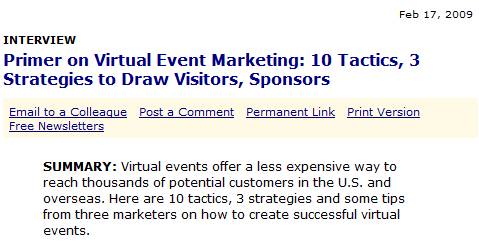
MarketingSherpa published an excellent primer on Virtual Event Marketing.  The 10 tactics listed were:

  1. Partner with assocations
  2. Invest in PR
  3. Get exhibitors involved
  4. Advertise on relevant web sites
  5. Market to internal email database
  6. Email registrants the day before and the day of an event
  7. Use social media to attract attendees
  8. Emphasize the value of the event
  9. Use the virtual event’s microsite
  10. Use sweepstakes as an incentive

Based on my involvement in marketing virtual events to an Information Technology (IT) audience, I’d like to add the following:

  1. Promote early and often – get your microsite launched up to 2 months prior to the live event.  Time is critical, because it gives you options to try different tactics, measure response rates and adapt accordingly.  If you leave yourself too little time, your flexibility is limited and your registrations will suffer.
  2. Invest in search engine optimization (SEO) – make sure your registration page and microsite are optimized for SEO.  For more insights into SEO for virtual events, see this blog posting: https://allvirtual.wordpress.com/2009/02/02/search-engine-optimization-seo-for-virtual-events/
  3. Invest in search engine marketing (SEM) – just like you’d buy keywords to drive visitors to your corporate web site – figure out which search terms are relevant to your virtual event and spend a little of your budget purchasing search engine keywords to drive clicks to your virtual event microsite or registration page.
  4. Use interactive technologies to draw attention – with the amount of email received by your target audience, it’s harder and harder to stick out from the crowd.  To do so, use interactive visuals like a screencast (to give users a sneak preview of what your virtual event environment looks like) or a short video clip embedded within an HTML email.
  5. Use a variety of promotional vehicles – email is the most heavily used, but not all of your users pay attention to promotional emails.  So try display ads, placement in e-Newsletters, text links on publisher web sites and sponsorship of relevant sections of web sites.
  6. Highlight the prominence of expert speakers – in some industries, a well-known speaker can generate the audience all by herself.  If you’ve secured such a speaker, be sure to promote her prominently.  In fact, use her name right in the Subject heading of your promotional emails.
  7. Highlight the ability to interact with executives and experts – once you landed that expert speaker, invite her to participate in the virtual event after her speaking appearance.  In fact, in lieu of a Q&A after the Webcast/Videocast, have her appear in the Networking Lounge to answer questions there (via text chat), interacting directly with the audience.  In addition, invite your executives to participate and interact with the audience.
  8. Display the list of exhibitors – as you sell sponsorships, display the list of companies who will be exhibiting.  That may convince some users that they need to attend – what better a way to narrow your purchasing decision than to “meet” with the candidate solutions providers in one fell swoop?
  9. Provide a sales contact for potential exhibitors – some registrants of your virtual event may represent companies who’d like to exhibit (sponsor).  So give them an email address or phone number and you might have just sold an additional sponsorship.

What has worked well in promoting your virtual events?


The Future Of Newspapers: Online, Interactive Communities

February 14, 2009

NYTimes.com

Source: NYTimes.com

There’s been much discussion about the future of newspapers.  Some have shuttered, others are struggling for their survival.  Business analysts and bloggers have even speculated on the future of The New York Times.  NYTimes.com had 14 million unique visitors in August 2008 (according to this Wikipedia entry).  Many web-centric businesses have been able to build large market capitalizations off a base of 14+M users.  So how can NYTimes.com monetize their users beyond display advertising?

Let’s see.  How about creating a community around these 14+M readers – and creating an interactive, real-time newspaper?  That’s right, folks.  I’m proposing that NYTimes.com be powered by a virtual event platform.  I’m NOT proposing a 3D environment with avatars.  Instead, I’m proposing a 2D “tradeshow-like” platform that would enable a business that’s rich in content (and, deep in Editorial talent) to best monetize their resources.

So let’s break down what this might look like:

  1. The newspaper’s main sections each map to “booths” within the platform – Of course, we’re not going to call these booths – I’m just drawing a parallel to the virtual tradeshow (VTS) model.  But, the functions and features here are the same that power a VTS booth.  So for NYTimes.com, there are “booths” labeled World, U.S., Politics, Business, Sports, etc. – you get the idea.
  2. The booth is the central holding place for that section’s content – Just like a newspaper has a front page – in a booth, the day’s content is rendered prominently as you enter – and, Editors swap out stale content (into the booth’s archive) for fresh content.
  3. Editors staff the booth and connect with readers – To me, this is the real game changer with this concept.  Editors (when time permits) can login to the environment and interact in real-time with readers.  What better a way to find out what your readers are interested in?  And, what better a way to find and connect with sources for you and your reporters?
  4. Readers interact with other readers – Another game changer here, as the platform would allow readers to tap into social networking to interact with other readers, all in the context of your content.  Valuable interactions keep those readers coming back in for more, creating site loyalty.

So imagine I enter the NYTimes.com Sports Booth – and I see this:

NYTimes.com

Source: NYTimes.com

I can click on Harvey Araton’s profile and read about Harvey’s interests and specialties.  If Harvey is online, perhaps I initiate a chat session with him – or, I drop him an in-show email to tell him I read his articles.  This provides a benefit for both of us – I feel directly connected with NYTimes.com – and, Harvey is able to efficiently connect directly with his readers.

Now granted, with 14+M people, it may be quite a challenge for Times Editors to spend time in an online community, juggling between user-initiated chats and their “real job”.  However, what if each attendee of this environment was a paying member?  Perhaps that changes the equation a bit.  So let’s talk about monetization opportunities:

  1. Advertising – NYTimes can sell “run of booth” or “run of platform” ads – and also offer up specific areas of the environnment for sponsorship (e.g. Networking Lounge sponsored by American Express).
  2. Direct Response – The platform (using a pay per click model) could house placements of advertiser content and drive clicks to advertiser web sites
  3. Subscription – Start off with a freemium model – anyone can access the environment at no cost, but certain features (e.g. access to premium content, ability to chat 1-on-1 with a Times Editor, ability to participate in real-time Q&A sessions, etc.) require a paid subscription
  4. A la carte content monetization – Why not create “booths” that house the entire archive of New York Times content.  Staff these booths with digital archivists, who can search through the virtual microfilm and find you the article you need.  Only premium (paid) members get access to these booths – and, you pay for each article that’s delivered from the archive.
NYTimes.com

Source: NYTimes.com

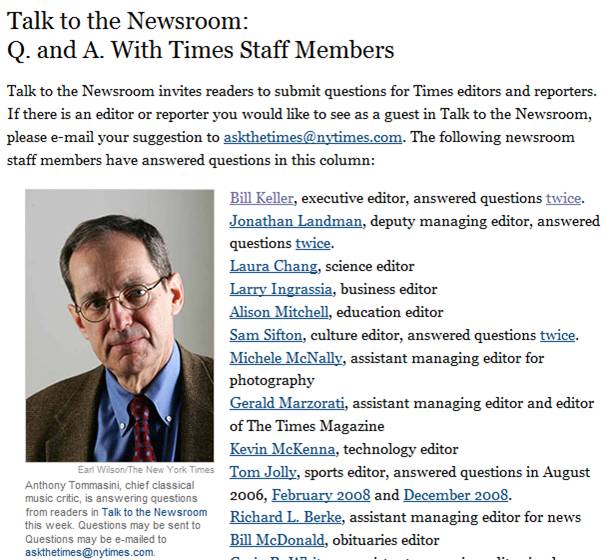
Now, let’s talk about the social media angle.  The Times could support the “Talk to the Newsroom” feature (above) via a real-time, text-based grroup chat!  They could even have the host be visible via a webcam, if so desired.  Here are some possibilities:

  1. Scheduled chat sessions with Editors, Publishers, executives, etc. (e.g. “Talk to the Newsroom”)
  2. Columnist and subscriber blogs – Published directly within the environment, with support for comments
  3. Forums around the paper’s main topics
  4. Presence indication – Provides readers with the feeling that they’re part of a global community. Reading the newspaper (which used to be a somewhat private experience) now becomes a communal one, where you’re reading, you’re sharing and you’re interacting – with other interested parties from around the world
  5. Real-time briefing rooms or crisis centers – Recall how quickly Twitter spread the news about the Mumbai terrorist attacks.  Why not have ad-hoc briefing rooms where NYTimes.com readers can engage around breaking news and current events?  In this scenario, the “daily newspaper” transforms into a real-time, 7×24 “always on” environment.

So some day, when I get my morning coffee and sit down with NYTimes.com, I’m hoping I’ll see you “there”.


Virtual Tradeshow Technologies

December 17, 2008

Virtual Worlds group

LinkedIn: Virtual Worlds group

I participate in a virtual worlds group over at LinkedIn.   A few members there asked me about a Virtual Tradeshow’s (VTS) underlying technologies.  I don’t pretend to know the full set of technologies that power a VTS, but I will list my Top 3 (in order of importance).

  1. The SaaS Engine Virtual Tradeshow platform providers often call this the “self service utility”.  What it boils down to is a 100% web-based interface that allows event organizers to build a VTS environment from scratch.  Every last detail of the event (down to the number of pixels to use on a particular image on the show floor) can be configured or selected via this web app.  While some clients will always want the extra attention of a “full service model” (where the VTS provider’s staff uses the same web app to build the entire show), consider the power of “self service” – VTS platform providers can scale their businesses by selling leases on their SaaS platform, where their clients do all the heavy lifting.  This means that the better you build this web app, your clients will create more events and they’ll create them more quickly.  This means more revenue and (possibly) earlier revenue recognition.
  2. The Chat system – Today, the power of a VTS lies largely in the text chat sessions that attendees engage in with exhibitors (or, attendee<->attendee sessions).  Platforms used to employ basic HTML to support chat, but the trend is towards client/server technologies, such as Flash Media Server (FMS).  The platform needs to account for corporate firewalls, as many firewalls are configured to block chat-like protocols – if your users cannot chat within a VTS, they lose out on a significant show feature.  If you employ a workaround – such as HTTP tunneling – beware, as some corporate firewalls can utilize deep packet inspection, to figure out that you’re trying to tunnel FMS within HTTP.  And, they then block those packets from reaching their destination, which means that chat fails.  Finally, as webcams and Skype-like video chat emerge in virtual tradeshows, keep in mind that moving from text chat to video chat means that you lose the ability to save a transcript of the chat.  This may be an opportunity for platform providers to support such a feature (e.g. auto-transcribe the audio from a video chat).
  3. Event Reporting – For event organizers, an open-ended web reporting system is useful.  Give them the ability to generate custom reports, kind of like a rudimentary business intelligence app.  For exhibitors, the creation of easy-to-understand canned reports is important.  For both organizers and exhibitors, the reporting system is critical.  Once the live event is over, the reports (and the data contained in them) are the “living record” of the show’s success and both constituencies will lean on the reports to derive their ROI on the event.

What technologies do you feel are important in a VTS?