COMDEX Re-Launches As A Virtual Trade Show

March 4, 2010

The virtual events industry had a lot of exciting moments over the past two years.  I believe we’ll look back upon today, however, as an one of the most important and historic moments for our industry.  Everything Channel (a UBM company) announced that they’re re-launching COMDEX as a 100% virtual trade show.

Press Release: Introducing the New COMDEX, the Next Generation in Virtual Events

During its heyday, COMDEX was the “go to” trade show in the computer and technology industry, “where all levels of manufacturers and developers of computers, peripherals, software, components and accessories came in direct contact with retailers, consultants and their competitors” (source: Wikipedia)

COMDEX was discontinued in 2004.  In 2006, UBM acquired the event assets of COMDEX via their purchase of MediaLive International Inc.  COMDEX Virtual will fit nicely in UBM’s Everything Channel business, whose objective is “accelerating technology sales” and whose publications include Channelweb and CRN.  This is very exciting news – I gave some thought to what this means to our industry.

Game Changer and Turning Point

Today’s news is nothing short of a game changer and turning point for our industry.  Virtual events have enjoyed growing adoption – initially from B2B publishers and recently from corporations.  Adoption rates have been particularly strong from the same technology vendors who used to exhibit at COMDEX.  Now, however, one of the most widely known event brands has made the move to embrace virtual.

COMDEX Virtual will be watched (and attended) closely by related event brands – its success will incent many more well-known event brands to come on board virtually.  Staying within the technology space, CES and Macworld may be encouraged to consider a hybrid model for their events, adding a virtual component to complement their in-person event.  Discontinued event brands may similarly move to re-launch as a virtual-only experience.

Confirmed: Options and Flexibility with Going Virtual

Virtual event technology afforded Everything Channel with a flexible way to bring back the COMDEX brand.  First, the costs are lower.  Second, the financial commitment around a physical event venue was avoided.  Third, a virtual event affords exhibitors with a convenient and cost-effective means to return to COMDEX.

Re-sellers and systems integrators tend to be small-to-medium sized businesses (SMB) – they operate “lean and mean” without an abundance of marketing budget.  In the past, their entire year’s marketing spend may have been put towards COMDEX.  Now, the same exhibitors can exhibit virtually and avoid the travel costs and “out of office” costs of sending their company representatives to Las Vegas – affording them remaining marketing dollars to use elsewhere.

With the flexibility afforded, COMDEX Virtual allows Everything Channel a convenient and efficient way to bring COMDEX back to life.  If the virtual event exceeds expectations, more options become available, such as a physical component to complement the virtual – creating a hybrid event after first testing the waters virtually.

Virtual Extensions

Industry observers have noted that more focused events (e.g. CES in consumer electronics and Interop in computer networking) began to steal interest away from COMDEX – many believed that it had become too broad.  Subsequent to its November 2010 launch, COMDEX Virtual may want to consider a series of smaller and more focused virtual events – around industry sectors or by specific geographies.

Additionally, virtual affords COMDEX the option of extending its presence globally – both via participation from a global audience, as well as regionalized virtual events that cater to specific regions (e.g. EMEA, Asia Pacific, etc.).  With the localization capabilities provided by virtual event platforms, attendees can choose the language in which they experience the event.
Unique, Branded Experiences

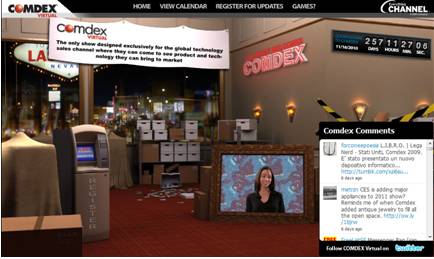
COMDEX had a unique brand – with COMDEX Virtual, there seems to be a clear desire to create a unique experience that carries unique and distinctive branding.  Put another way, COMDEX Virtual should not look like any other virtual event – it needs to stand apart.  As such, UBM Studios, a “creative and strategic marketing agency” will create original and highly engaging event areas for COMDEX Virtual, including the Grand Hall of Masters, Hospitality Suites and the CRN Test Center.

This is part of a continuing trend in our industry – the desire (and capability) of show hosts to create highly engaging and unique experiences that adhere to their branding guidelines – or, create new brand experiences.  As such, clients with the budget (or capabilities) will “in-source” the creative development and look to the virtual event platforms to “carry the payload” – providing the foundation on which the event rides, along with essential platform features and services.

Taking the game to the next level

To support the size and scale of COMDEX (virtually), event platforms will need to bring their “A game”.  If the event will house hundreds of exhibitors interacting with tens of thousands of attendees, the virtual event platform will need to deliver on performance, reliability and scalability.  In addition, useful platform features need to enable exhibitors to demonstrate their products and services.

Match-making tools should enable exhibitors to find the “right” attendees and for attendees to find and make useful business contacts.  Lastly, the platforms need to enable pervasive use of video – both on-demand video and live-streamed video.  After all, a key element of past COMDEX events was the ability to see, hear and engage (visually) with others.

Conclusion

The “countdown to COMDEX” is on – between now and November, I’m sure there’s plenty of work and planning to get done.  In the meantime, with today’s announcement alone, a bit of history has already been made.

Tweet this posting:


Evolving The Virtual Event Group Chat

February 26, 2010

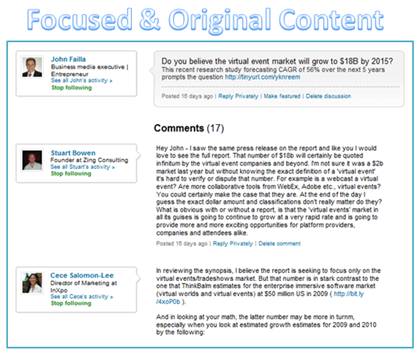
Excerpt of LinkedIn Discussion ("Virtual Events Forum")

For me, the best content in LinkedIn is found in Discussion threads in LinkedIn Groups to which I belong.  Why is the content so good?

  1. It has a precise focus that’s aligned with the charter or focus area of the group
  2. It’s based around timely topics (i.e. what group members are currently interested in discussing)
  3. It’s interactive with a loopback mechanism – there’s a dialog that unfolds – someone making a wild claim will be called on it and will need to return to the discussion to justify the claim (or, lose credibility by remaining silent)
  4. It’s the best form of “user generated content” – from subject matter experts and hands-on practitioners

As such, some content in LinkedIn Discussions can prove to be more useful and valuable than comparable content in related industry publications and web sites.  The LinkedIn Discussion thread is a great example of the “wisdom of the crowds” surpassing the knowledge of a handful of individuals.

Virtual Event Group Chat

While allowing for the fact that a portion of virtual event group chat is logistics-related (e.g. “I don’t hear the audio on the Live Webcast”), chat content related to the event’s theme (topic) comprises some of the most useful and compelling content in the entire event.  Why is that?  It’s for all the same reasons I list (above) for the LinkedIn discussion.

The challenge in leveraging an event’s group chat, however, is this:

If I’m not actively monitoring the group chat, how do I participate?

In my mind, the virtual event group chat needs to evolve to better serve attendees.

Group Chat Threading

Attendees may visit a group chat area (e.g. Networking Lounge), with an interest to discuss numerous topics (see example with LinkedIn Discussion topics, above).  In an unstructured group chat, the introductory chat message (to start the discussion) is likely to be “interrupted” with other, unrelated messages.  The result is some “scattering” of the chat content, with the possibility that a meaningful discussion (on the original topic) never happens.

Today’s “Wild, Wild West” of group chat needs to become threaded – the group chat’s user interface needs to allow participants to denote which message(s) they are commenting on – with the resulting “chat window” nesting (or otherwise grouping) messages within the same thread.  Additionally, the chat system should auto-populate information on which user one is responding to.  This way, participants no longer need to preface their comment with the name of the person they’re responding to.

A wealth of additional features become possible once this sort of threading feature is enabled.

Embraces and extends chat topics

I submit a chat message, asking if folks are interested in “Topic X”.  If no one answers me back within the next 10 minutes, that chat topic is dead.  Threaded chat, however, allows attendees to bring topics back from the dead.  If a visitor enters three hours later and decides to reply to my original message, that section of “threaded chat” can be moved to the “current timeline” in the group chat area – much in the same way a comment on a friend’s Facebook posting moves the original posting “up” in your News Feed.

Real-Time Search!

If I’m not able to dedicate the time to visit and monitor a group chat area, the next best thing would be a virtual event search function that provides real-time (or near-real-time) indexing of the group chat content.  Imagine the following capabilities:

  1. Exhibitor: perform searches on my company name – allows me to determine whether I need to enter the group chat to repsond
  2. Attendee: perform searches on topics that interest me – and be able to see the entire discussion thread on that topic
  3. Attendee: search on other attendees in my Buddy List – show me chat comments posted by my buddies
  4. Attendee: search discussion threads for comments posted subsequent to my own comments

Content Re-Use

For a B2B publisher – and, for some corporations – the content of selected discussion threads could be re-used and posted on the web as original (or, semi-original) content.  B2B sites often publish “how to guides” and best practices articles – discussion thread content (with the “right” mix of contributors) can be re-published on the web – or, used as the basis for a more in-depth article.

Conclusion

With group chat being one of the most valuable components of a virtual event, its features should evolve to better leverage the “wisdom of the crowds”.

Tweet this posting:


What Every Exhibitor Should Know About Virtual Events

February 17, 2010

The following is a guest post from Susan Friedmann.

In a recent webinar I conducted for TSEA (Trade Show Exhibitors Association), “What Every Exhibitor Should Know About Virtual Events,” I highlighted that virtual events can supplement, complement, or replace your physical event. However, I caution exhibitors not to replace their event without totally understanding what you are giving up. Realize that nothing can replace the face-to-face contact that you have at a physical event.

Nielsen Business Media (who organize many virtual tradeshows) have found that the virtual event experience might graphically mimic a tradeshow, but virtual events are currently primarily a social networking environment, especially for the under 50s (sorry to be an ageist).

Virtual events are gaining in popularity, which means as savvy marketers you just can’t ignore them, and hope that if you do, they’ll just go away. It’s just not going to happen.

While they may not replace physical events, the virtual counterparts are becoming more widely used to supplement face-to-face trade shows and conferences, as well as provide ongoing content and follow-up opportunities.

Finally, my all time favorite subject. Don’t have any of your team go on the live or virtual show floor without tradeshow training. It may seem simple to work a virtual show, but winging it will get you winging it results.

The key ingredient to engineer a successful event lies in the simple process of planning and preparation. Easy enough, yet very few exhibitors really take time to truly understand what this means.

Participating in virtual events means not only knowing, and understanding the technology platform, it also means honing the necessary skills for successful results.

Susan A. Friedmann (@TradeshowCoach), CSP (Certified Speaking Professional), is an internationally recognized expert and “how to” coach who has traveled the world helping companies achieve profitable results at tradeshows and events. She offers exhibitor training programs to increase results and focus on building better relationships with customers, prospects and advocates in the marketplace.


Virtual Edge Summit 2010

Susan and I will be presenting at the Virtual Edge Summit on February 23, 2010.

Register for the conference: http://virtualedgesummit.com/

Register for InXpoLive@VirtualEdge: http://bit.ly/InXpoLive_Blog

Tweet this posting:


Virtual Tradeshow Best Practices: Top 10 Exhibitor Tactics

May 20, 2009

At b-to-b virtual tradeshows (VTS), exhibitors compete for the attention and interest of the attendees.  And many times, the competition for attention occurs “against” the competitors of your business.  Thus, it’s even more important to make your mark, which places an onus on exhibitors to leverage new and creative ways to generate interest.  Here are Top 10 Exhibitor Tactics that I’ve observed while working with virtual tradeshow exhibitors.

  1. Set up a (physical) war room – it seems a bit contradictory, given that you’re exhibiting virtually, but if it’s practical to gather in a single location (physically), you’ll be more effective and coordinated.  As visitors pour into your booth and engage with you, it will be easy to shout aloud, “I’ll take this one” and have everyone immediately know what you’re referring to.  In addition, being together physically creates a buzz as the event goes on – you’ll hear cheers, shouts, jeers, etc. as activities unfold throughout the day.  I’ve participated in one and it does help with coordination and build camraderie.  Short of a physical gathering, another option is to keep a telephone conference bridge active throughout the day to coordinate activities.
  2. Send product experts into the Networking Lounge – you need to solicit your subject matter experts to participate in the virtual tradeshow in the first place.  And believe me, their presence will be worth it.  Send them into the lounge to soak in all the discussion – and encourage them to chime in.  The idea here is to demonstrate thought leadership and generate “organic interest” in your company and your company’s booth.  During one event I attended, an expert’s presence in the Lounge generated interest from an industry analyst, who set up a follow-up meeting (with the expert’s company) to further discuss their products and services.
  3. Leverage a compelling booth welcome – always make a good first impression for that first-time visitor.  Create a Flash video for your booth’s “front screen” that’s unique to the VTS – or, have your CTO or CEO (via greenscreen video) greet visitors with a short video welcome.
  4. Ad-hoc prize giveaways – drop a surprise on attendees and let them know that you’re giving away prizes in your booth.  Got leftover giveaways from a physical event?  Distribute that excess inventory to your virtual event visitors.  Draw them into the Group Chat in your booth and ask them to answer questions posted there (about your products and services)  in order to win.  You’ll end up not just with some happy booth visitors – but you’ll also have educated others who observed the group chat.
  5. Be practical with booth displays – if you have scheduled chats occuring in your booth – or, if you have distinguished experts staffing your booth, let visitors know!  How about an animated image that displays in the front screen of your booth, which rotates through the miscellaneous activites scheduled there that day.  Sometimes, the simplest and most practical approach is the most effective.
  6. Staff your booth with your product experts – for those experts that you send into the Networking Lounge – be sure they’re available to interact with your booth visitors as well.  When your expert has won over the respect of an attendee, then that attendee becomes more comfortable with your company’s products and services.  I’ve witnessed a few experts field requests for pricing information or a follow-up sales call.  While that’s best handled by a salesperson, it clearly demonstrates the effectiveness of having your products experts in your booth.  Another observation: if your experts are having engaging interactions with booth visitors, their presence will encourage repeat visits.
  7. Invite your company executives to participate – a virtual tradeshow affords your company executives with an easy and convenient way to connect directly with customers and prospects.  The attendees find the interactions engaging, as it’s not often they have direct access to your executives.  Additionally, your executives gain further appreciation of the virtual event via their first hand participation, which makes budget approvals quicker for subsequent events.
  8. Got extra books?  Give them away as prizes – first, you need to find the right book for the particular audience – one that will generate strong demand.  Then, by giving away a large number of them (50, 100, etc.), you generate interest because of the likelihood of winning one.  One event I attended awarded a free book to the first 100 booth visitors.  The particular book was authored by an industry expert whom all attendees were familiar with.  The first 100 visits occurred within minutes of the opening of the event!  Later in the day, visitors will still coming into the booth, asking if the book was still available.
  9. Functional avatar images – some exhibitors select their avatar image from the event platform’s image library.  Others upload a picture of themselves.  One exhibitor went a different route and created custom images that denoted the functional expertise of each exhibitor. The image had the company logo as a background, with text overlaid on top (e.g. “Product Expert”, “Integration Expert”, etc.).  Since attendees can determine your functional domain (by your avatar), they can immediately determine whether to interact with you.
  10. Use a “call to action” image in the final slide of a Live Webcast – want viewers to visit your booth at the conclusion of your Live Webcast?  Make your closing slide an image of the virtual environment, with a big arrow pointing to your booth’s location on the Exhibit Hall.  Title the slide, “Got more questions?  Visit our booth”.

So there you have it.  Try some of these tactics at your next virtual tradeshow and let me know how it goes!