To Promote Your Physical Or Virtual Event, Think Outside The Inbox

November 21, 2009

Source: flickr (User: Mzelle Biscotte)

For many, email is a constant stream, an endless loop – we receive too much of it, both “important” emails addressed directly to us and marketing emails that are sent as a result of opting in (or not) to past content, webinars, white papers and marketing lists.  Outbound, push-based email promotions face the following challenges:

  1. Imperfect delivery rates (mail server outages, spam filters, etc.)
  2. Decreasing open rates
  3. Perception of spam – if recipients don’t remember opting in to your list (even though they did), they’ll ignore your email – or, opt out from your list
  4. List fatigue due to overuse of marketing lists
  5. Decreasing click-thru rates (CTR) – once you’ve made it past delivery and open, recipients are clicking less on your embedded offers

Adding to this mix is the fact that many users now interact with brands (and by extension, promotional offers from brands) via their social networks, instead of email.  A user is more inclined to respond to an @reply or direct message (on Twitter) compared to a conventional email blast from a marketer.

Given all this, it surprises me that email is still a primary vehicle for promoting physical and virtual events.  Event marketers have much to gain by thinking outside the inbox.

Social media and social sharing

Your first step outside the inbox should be in the direction of social networks.  Build a presence in social communities and you’ll find that you naturally generate interest and awareness to your event.  Previously, I wrote about leveraging Twitter to promote your virtual event.  As Ian McGonnigal (GPJ) astutely pointed out, those same tactics apply quite well to physical events as well.

In addition to Twitter, consider the following:
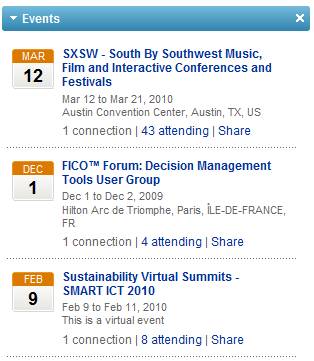
Create a LinkedIn Event entry for your event

  1. Create a LinkedIn Event for your event – a LinkedIn Event page allows you to post relevant information about your event on LinkedIn (e.g. date, event content, etc.) – LinkedIn members can then indicate whether they’ll be attending, not attending or “interested”.  This can be quite useful, as folks often attend events based on knowing whom else will be attending.  By creating a LinkedIn Event, you’ll receive the benefit of having LinkedIn auto-recommend your event to other members, assuming their profile is a “match” with the profile of your event.  Members may also utilize search and find your event.  More info can be found on the LinkedIn blog page announcing the Event feature.
  2. Post videos to YouTube – it’s the #2 search engine after all (behind parent Google), so having event videos posted on the site will generate traffic from the millions of folks who visit YouTube.com each day.  Record videos of your host, keynote speaker, group publisher, etc. talking about your upcoming event – if your keynote speaker has a prominent name, your videos will attract interest from users who search on that name.  When you have a critical mass of videos, create a YouTube channel.  About.com has a neat guide on how to do just that.
  3. Create a Facebook Fan page for your event – with a fan page, you’ll generate interest for your upcoming event – and, you’ll build an ongoing community that you’ll be able to continuously leverage!  The All Facebook blog has a nice guide on how to build a Facebook fan page.
  4. Leverage blogs – author a blog posting on your corporate blog – or, if you don’t have one, ask a relevant industry blog site whether you can author a guest posting.  Alternatively, leave a comment on postings from relevant industry blogs with a pointer (link) to your event.  The key here is not to over-promote your event – your first goal is to provide useful and relevant content/commentary with your event being a secondary (and subtle) mention.

SEO and in-bound links

If you pay attention to search engine optimization (SEO), your event page(s) will receive “organic” traffic – that is, traffic that finds you, rather than you finding the traffic (i.e. the “pull” from users searching, rather than the “push” from your email promotions).  Think about the search keywords that you’d want to associate with your event [e.g. when users are performing searches] and make sure the content on your event page is rich in those keywords.

To increase the page rank of your event page, increase the number of inbound links that point to your page.  A few simple ideas:

  1. For all of your social media efforts (listed above), make sure they provide links to your event page – shazam, you’ve just created a number of inbound links
  2. For event staff (especially those with large followings on Twitter), ask them to temporarily point the “web site” URL in their Twitter profile to the event page
  3. Ask partners, associates, even clients to post a URL from their web site(s) to your event page
  4. Add a “Share on Facebook” capability on your event page – this may result in page rank benefit as search engines begin to index Facebook wall posts – until then, what this really does is generate awareness and outreach of your event to users’ Facebook friends.  If a potential attendee visits your event page and shares the page with her 100 Facebook friends, then you’ve just received 100 free advertising impressions

Advertise

Some affordable options to consider:

  1. Facebook advertising – purchase targeted ads on Facebook.  For a physical event, you can target by geography (e.g. starting with users who are geographically close to your event site).  For a virtual event, geography is less important, so you may want to target based on attributes in the users’ Facebook profiles.  You can pay per view (of the ad) or per click (on the ad), so the terms are flexible.  eHow has a good overview on Facebook advertising.
  2. Content syndication – purchase web syndication with online publishers in your industry – get your event listed in their directories, content sites, etc.  They may charge you per click or per lead (completed registration).  Not only can this generate registrants for your event, but it also improves your page rank by generating more inbound links to your event page.

Hopefully I’ve covered a few “outside the inbox” options for you to consider – certainly continue to promote your event via email – however, use some of these options to lighten the load a bit on your email marketing lists.


Popular Virtual Event Blog Postings

November 19, 2009

This blog's WordPress Dashboard statistics

One of the most enjoyable aspects of virtual events blogging (for me) is the ability to observe which postings “work” and which postings don’t work.  I’ve come to learn that my intuition is often off – postings that I think will generate a lot of traffic don’t, while postings that I thought were marginal become very popular.

For instance, I wrote a posting on the concept of applying Web 2.0 to webinars – it was one of my better pieces of work, but the blogosphere voted with their mouse clicks and (unless we had an issue with counting / undercounting of votes) it didn’t even scratch the Top 10 list of posts [over the past 3 months].

With social media sharing these days, I found that the biggest factor in which posts receive traffic (relative to others) is how and where a given posting is shared.  All it takes is a few retweets from prominent Twitter users (i.e. with 20,000 followers each) to drive a lot of page views to a particular blog posting.  Or, someone posts your blog entry to a sharing site, such as StumbleUpon or digg – you’ll see traffic spike when that occurs.

Another factor is search engine optimization (SEO) – with some of my blog postings, I referenced people, places, certain virtual worlds, etc. – and received search engine traffic from users searching on those terms.

Examples include: Gregory House, My Little Pony (they have a virtual world), Online Dating, Club Penguin.  Some of those blog postings were marginal at best – but they continue to draw traffic to this day – by virtue of having common search engine terms in their content.

Here’s a listing of the Top 5 blog postings (on this blog) over the past 3 months – as measured by the number of page views:

  1. How To Promote Your Virtual Event On Twitter – the key point in this posting – to be able to best leverage Twitter, you need to work hard to build the right “following” first.  This posting received top billing (of traffic) by virtue of tweets/retweets, along with some postings to digg.
  2. Virtual Tradeshow Best Practices: Top 10 Exhibitor Tactics – written back in May, this is always a popular one – it has a fair number of in-bound links and also gets a lot of search engine traffic.
  3. The Advantages Of Virtual Meetings – I provided commentary around a Forbes Insights piece that presented the case for face-to-face meetings.  This gets a lot of its traffic via inbound links.
  4. Virtual Worlds: Where We Were, Where We’re Going, What Does It Mean to YOU? – a guest post by Linda Holroyd, CEO of FountainBlue.  Linda may not have known it at the time, but her posting is an SEO hotbed – it contains lots of relevant terms related to virtual worlds – and, lists the names of many industry executives and entrepreneurs (and their companies).  So this blog posting receives traffic when users search for those individuals’ names or company names.
  5. Hey Kids! I’ve Got a Virtual World For You – it’s like a boomerang (it keeps coming back) – I wrote this back in January and the posting can still make this Top 5 list of the past 3 months.  The reason?  It’s rich in search-friendly terms (Club Penguin, Webkinz, My Little Pony, Cabbage Patch, Beanie Babies, etc.) – I suppose I’ve managed to extend the reach of this blog to parents, who are performing searches on children’s toys!

So there you have it.  I’d love to hear from you – what’s been your favorite blog posting?


The Social Media Landscape

November 9, 2009

I get a lot of enjoyment following trends and developments in social media and social networks – it’s an exciting time, with things moving so quickly.  Keeping up with the pace of change is part of the fun.  I’ve written a blog posting over on the InXpo blog – where I cover some recent developments in social media:

  1. Twitter Lists
  2. Social Search
  3. Inter-connectedness
  4. Mobile

blogposting_img

The blog posting is titled, “Making Sense Of The Ever-Changing Social Media Landscape“.


Leverage Twitter Lists For Your Physical Or Virtual Event

November 7, 2009

twitterList_img

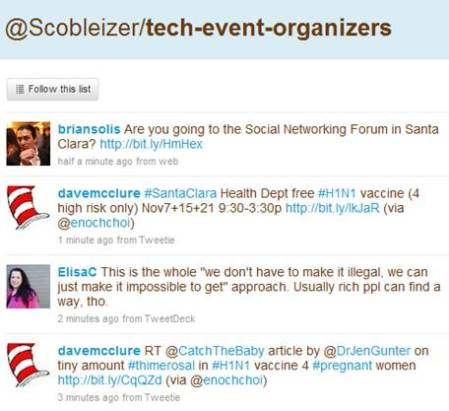
Robert Scoble's tech-event-organizers Twitter List

What’s a very simple yet effective way to integrate the new Twitter Lists feature into your event?  Here’s what you can do:

  1. Define your event hash tag (a “must do” for any event!)
  2. Create a Twitter List for your event
  3. If your company or event already has a Twitter ID (“brand”), connect it to that ID (e.g. twitter.com/<your-brand>/<your-event-list>)
  4. On your registration page, ask registrants to supply their Twitter ID
  5. Manually or automatically populate your Twitter List directly from registration!

As part of the Twitter API, there are methods in place to interact with Twitter Lists (look in the documentation for List Methods, List Members Methods, List Subscribers Methods).  As such, you could automate this process by having your registration page utilize the Twitter List API to auto-populate your list directly from registration.

In addition, you could use the Twitter API to inform registrants which of their Twitter friends or followers are (a) also registered and (b) already a member of the Twitter List.  Here are benefits of leveraging a Twitter List for you event:

Registrants promote the event on your behalf

It’s the crowdsourcing method for generating awareness – allow the participants to spread the word on their own.  After all, the combined reach of your registrants is far greater than your own.  By referencing your Twitter list on your registration page, users who supply their Twitter ID will likely go straight from registration completion to the Twitter list to (a) confirm that they’re now a member of the list and (b) skim through the pre-existing messages.

The concept is similar to a pre-event bulletin board or forum – the beauty of using Twitter, however, is that unlike a forum (which needs a critical mass of initial postings before it really takes off), a Twitter list is “pre-seeded” from the natural activity of the list members’ tweets.  You can be sure that as users register for your event, they’ll first tweet that they “just registered” – and then, continue to tweet about the event (especially as the event date draws near).  You’ll want to encourage all registrants to include your event hash tag when they tweet.

Facilitates pre-event networking among registrants

Whether physical or virtual, a key reason people attend events is the networking aspect – being able to meet, connect and interact with others, to discuss common business challenges – and to extend their social graphs.  Too often, however, one arrives at an event with no idea whom else is attending.  A Twitter List changes the game – you’ll not only know the identity of folks who are attending, but you’ll feel like you know them very well.

Consider friends or family members that you follow on Twitter or Facebook – do you find that you come to learn and understand them more via status updates than interacting with them day-to-day (or over the years)?  It’s remarkable how social network connections can generate a more complete picture of an individual.  With pre-registrants to an event, you may find that you’re really getting to know individuals, based on their intra-day status updates and industry thoughts.

This will lead to events whereby attendees will have pre-arranged meet-ups and appointments (with other attendees) in advance, making their event experience more rewarding.  Perhaps someone will build an integration from Twitter List pages to LinkedIn, so that event registrants can also extend their LinkedIn connections directly from the event’s Twitter List.

Allows exhibitors to get to know registrants/attendees

This will need to be managed/handled properly, as registrants surely wouldn’t welcome unsolicited pitches from exhibitors before they’ve even attended the event – but, imagine the potential for exhibitors.  You get to know the users who are attending the event.  Perhaps you create booth content or special offers that are tailored to what you’ve learned about your upcoming booth visitors.  Did they talk about pricing challenges in your market?  Well, how about an event-exclusive price break on your product, which you announce at the event?

If users commented about technical challenges using your product, bring the right specialists into your booth so that you directly address this pre-event feedback.  Lastly, exhibitors can seed some “must meet” lists based on the registrants who are tweeting within the list – build a profile of interesting users and ask your booth reps to be on alert if those individuals visit your booth.

Can you believe it?  Something as simple as a Twitter List can go a long way to making everyone happy: registrants/attendees, exhibitors and … YOU.

Related links

  1. 10 Ways You Can Use Twitter Lists (Mashable)
  2. Five Essential Twitter Lists For Every Event (CrowdVine)

How To Promote Your Virtual Event On Twitter

October 26, 2009

tweetdeckIMG

With a rapidly growing and highly engaged user base, Twitter can be a great vehicle for driving registrations and attendance to your next virtual event.  Here’s a step-by-step guide on how to get that done:

  1. Find your target audience on Twitter – first, of course, you need to define the target audience of your virtual event.  Once you do, go seek them out on Twitter – you don’t need to engage with them on Twitter just yet, but you can start following them – and identify the “places” where they tend to congregate (e.g. read their tweets, click through on links they’re sharing, read their blogs, attend chats they participate in, etc.).  You may find that by following folks, they’ll follow you back – and, may engage with you on their own.  Next, leverage Twitter’s search capabilities – search on key terms associated with your virtual event and observe who’s tweeting about them.  Sign up for a service like tweetbeep and you’ll receive daily email alerts with all tweets about your selected terms.  Start following the folks who seem to know what they’re talking about, as your virtual event may be of interest to them.
  2. Identify Twitter users whom your target audience follows – if you handled Step #1 well, then you’ve half-way completed this step already.  By researching topics (and users) on Twitter, you’ll begin to build an authority map – those with more authority on topics tend to have more followers.  Identify users whom your target audience is following – then, determine which users they’re following (and so on).  You’re now starting to build potential promoters who can help in the outreach efforts of your virtual event.
  3. Leverage prominent or active tweeters in your own company – is your CEO or VP Marketing an active tweeter?  If so, them reach out to their multitude of followers to promote the virtual event.  On your corporate web site, use a service such as TweepML to share a list of your company’s Twitter users – giving web site visitors a single-click option to start following every member of that list!
  4. Identify other prominent / relevant Twitter users – find prominent industry bloggers and start reading their blogs.  Engage with them by leaving comments on their blogs or send them @replies via Twitter.  Making these folks aware of your virtual event is a good thing (e.g. perhaps they’ll attend) – having them promote the event on your behalf is even better.
  5. Build your Twitter following – if you’ll be using a corporate branded Twitter account to focus your marketing efforts, use the aforementioned steps to start building your list of followers.  For me, quality always trumps quantity with Twitter followers – I’d rather have the right people follow my corporate branded account than have 200 “non relevant” folks follow me (in the hopes that I’ll follow them back).  Especially with a corporate Twitter account – make every tweet count.  Potential followers will often review your last 5 or last 10 tweets – if you tweet too often about breakfast or the weather, then you will NOT be followed.
  6. Start promoting by adding value – first, you never want to over-promote your virtual event.  Doing so will only turn users off from your corporate branded Twitter account.  Each time you promote the virtual event, you want to add value.  So again, make every tweet (promotion) account and give users something useful each time.  Similarly, ask your fellow promoters to start spreading the word – and suggest phrases or facts they should be using in their tweets.  Use a link shortener such as bit.ly and track the number of clicks you generate – this way, you can start to determine what’s working and what’s not working.
  7. Define (and use) your virtual event’s hash tag – make sure all tweets (e.g. from you, your colleagues and your fellow promoters) utilize the hash tag that you’ve created for your virtual event.  Ask your event’s exhibitors to pitch in as well – have them tweet about their presence at the event.  Once you’ve seeded the discussion with your event’s hash tag, you may see the interaction and commentary spread – if a few prominent tweeters jump in (e.g. >100,000 followers) and their tweets are then re-tweeted by other prominent tweeters, then awareness of your virtual event can spread beyond even your wildest dreams.
  8. Leverage other (relevant) hash tags – the hash tag can be a wildly effective means for promoting content to indirect followers – I may only have a few hundred followers, but if I post something insightful with the #eventprofs hash tag, I may have my message seen by the 50,000 (this number used merely as an example) users who monitor that hash tag.  Make sure the hash tag is relevant to your virtual event – assuming it is, including that hash tag along with your event’s tag. [Addendum, 10/27/09: be careful not to over-promote to the related hash tags, as constant promotion of your virtual event will surely turn off the followers of that hash tag – you’ll even receive backlash from them]
  9. Think outside the box – instead of continually pointing users to the registration page for your virtual event, try to mix things up – link to other areas, such as: short video of the keynote speaker; text quote from a prominent presenter; a testimonial (quote) from a pre-registered attendee; a twitpic (image) of the event’s show floor or auditorium; a page that lists titles or companies who have already registered.  Of course, on all of these pages, place a link to your event’s registration page.
  10. Have fun – Twitter can be an effective business tool – but remember, it’s also fun!

Tweet this posting:

How To Promote Your #Virtual Event On Twitter: http://bit.ly/n74Aj #eventprofs

tweetthis_img


What Virtual Events Can Learn From Twitter

October 13, 2009

Virtual Events - Twitter

Virtual Events - Twitter

In 2009, Twitter has taken the world by storm – in fact, it wouldn’t surprise me if Time magazine named Twitter their Person of the Year.  In my opinion, Twitter’s success hinges on its simplicity, celebrity (use by celebrities, that is) and portability (users stay connected to the service from nearly anywhere).

While virtual events have been around for a few years – they too took the world by storm in 2009 – mostly, the business-to-business world.  As we look forward into 2010, here’s what virtual events can learn from Twitter:

  1. 140 characters or less – I often find it a challenge to condense my thought into 140 characters – the usual trick is to lean on acronyms (or abridged versions of words) to get under the limit.  The better approach is to be more efficient, using less words to make the same point.  While I still get frustrated at times (having to distill my thought down to 140 characters) – other times, I find that my message comes across clearer and more elegant in the shorter form.  In virutal events, a lot of chatter (e.g. group chat in the Lounge) is long-winded.  It would be interesting to participate in a group chat in which each chat message was limited to 140 characters.  I get the feeling that the chat would be much more enjoyable and productive.
  2. Application Programming Interface (API) – Twitter was recently valued at $1B – it couldn’t have possibly reached that valuation without it’s excellent API and the rich ecosystem that’s been created by developers and start-ups.  The API has made possible desktop clients such as Tweetdeck and Seesmic Desktop, along with numerous third party services, such as Tweetbeep, Twimailer and many more.  Virtual event platform providers should look to “open up” their platform via API’s – allowing show hosts and exhibitors to tap into underlying registration data; customize the look and feel of their events; and develop functional mini-apps that ride on top of the platform.  As Twitter discovered, opening up the platform creates a “wealth” of opportunity.
  3. Mobile support – Twitter’s API allow for applications like TwitterBerry (for BlackBerry) and Tweetie (for iPhone).  Users are increasingly on the go these days – whereby less and less interaction with the web occurs from their desk and keyboard.  Virtual event platforms that can extend their reach to smartphones will stand to benefit greatly – adoption will increase, as will average session time and overall session counts.  Twitter also integrates with the Short Messaging Service (SMS) – making access nearly universal (e.g. from non-smartphone cell phones).  Perhaps there are capabilities in a virtual event that can also be triggered via “commands” transmitted via SMS.
  4. Connecting with others – Twitter’s growth in 2009 has resulted from (a) needing to connect with your friends, family and colleagues who are already on the service and (b) a desire to “follow” celebrities or sports figures.  In business-to-business virtual events, you won’t have this same sort of dynamic (wanting to follow others) – however, the platforms can do a better job of finding and recommending folks you should be following or connected to.  For instance, a CIO at a small-and-medium sized business (SMB) may want to know that a CIO from another SMB company is also in attendance.
  5. Self service / self starter – Many companies are now active on Twitter, to provide customer outreach, customer service, outbound marketing and even e-commerce sales.  Other than learning the basics of social media and Twitter etiquette, the process to get started with Twitter is very straightforward.  Virtual event platform providers ought to provide a means for curious/inquisitive users to set themselves up with a test event – some day, configuring your virtual event (a basic one, at least) should be analogous to creating a new blog in WordPress.

And there you have it – adopt these five principles and your virtual event platform may some day be worth $1B as well!


From Web 2.0 to Webinar 2.0

September 28, 2009

Source: flickr (User: Werkplay)

Source: flickr (User: Werkplay)

In this age of social sharing, participation, “users as publishers”, Facebook updates and Twitter tweets, the webinar is a seeming anachronism.  In your typical 60 minute webinar, the presenters speak for 45-50 minutes – and the only “participation” from the audience occurs when the presenter selects your question to be answered.  Users are not able to see questions submitted by other viewers – in fact, they rarely know how many other users are also viewing the webinar.

At the Feeding the SAP Ecosystem blog, there’s an interesting posting titled “SAP Virtual Events: A Work in Progress“.  Here’s a great quote about webinars:

Or the presenters drone on too long, overloading the audience with slides and not coming up for air until there is a few minutes left and the participants are too burned out to even attempt a last minute question. Webinars that incorporate reader chat and questions throughout the broadcast, rather than exiling them to a shrinking time slot at the end, are much more effective.

I agree wholeheartedly with this observation.  I believe that webinars can be much more engaging if they adopted an unconference model.  According to Wikipedia, “an unconference is a facilitated, participant-driven conference centered around a theme or purpose”.  As a webinar presenter (or sponsor), you’ll still want to define the topic and prepare a set of slides to reinforce your speaking points and presentation objectives.

But, what if you were to hand over some control back to the audience?  It requires a leap of faith, I know.  But when the audience is directly involved, I think you create a more rewarding user experience – and, you stand to benefit as well.  User involvement should directly result in engagement, retention and satisfaction.

Here are some simple ideas from Web 2.0 that can be applied to create Webinar 2.0:

  1. Audience drives the content selection – the presenter flips through two potential slides to the audience and then pushes out a survey to the audience.  The survey prompts the audience to select which slide they’d like to see covered.  The presenter then publishes the survey results and advances to the slide that won the vote.  This addresses one issue I’ve had with webinars – I attended the live webinar because the topic intrigued me; however, the content didn’t quite hit the mark.  If presenters gave more control and input to the audience, they’d have a better chance of giving viewers what they want.
  2. Audience members render their own slides – akin to a virtual meeting (e.g. WebEx, GoToMeeting, Adobe Connect), where the meeting host passes control to another participant, who then shares his/her desktop.  For webinar platforms that support this, imagine how powerful this could be.  Viewers would need to know to come prepared with slide content – but imagine the presenter asking for real-world case studies of a given technology and allowing a viewer to render a slide about his real-world implementation experience.  Again, this is a leap of faith and a “risk factor” in surrendering control of the content.  However, isn’t that what Web 2.0 is all about?
  3. Better balance between PowerPoint content and Q&A – a typical webinar has an 80/20 split (or more) between the PowerPoint presentation and Q&A.  I think it should be more like 50/50.  Scheduling frequent pauses (to answer questions) provides a lot of value to viewers – it means that they don’t have to wait until the 50 minute mark to have questions answered – and it signals to the audience that the presenters are “listening” to them.  Along these same lines, the webinar platform should allow all viewers to see all questions submitted by attendees.  And to cap it all off, follow up after the webinar by publishing an FAQ – list commonly asked questions along with their answers.
  4. Answer questions coming from the statusphere – define a Twitter hashtag for your webinar and have staff available to monitor the tweets – then, have presenters address and answer interesting questions that were posed via Twitter (and other social tools).  This allows you to extend the audience of your webinar – and engage with users who might not be able to attend.  Additionally, have staff members tweet back (with the answers), so that users monitoring the tweet stream know that you’re not only listening, but participating back.

I’m sure we’ve just gotten started – what tactics do you have to recommend for bringing Web 2.0 to Webinar 2.0?


How To Create A Vibrant (And Virtual) Business Community

September 25, 2009

Source: flickr (User: Samuele Storari)

Source: flickr (User: Samuele Storari)

The virtual events industry got its start in replications of a physical trade show or conference – the very first virtual events were virtual tradeshows, whereby platform providers re-created the look and feel of a physical trade show within a web-based environment.  These sorts of virtual events continue to gain traction and I expect to see continued growth as additional corporations (and entire industries) enter the mix this year and into 2010.

Due to the flexible nature of virtual event platforms, however, we’re seeing parallel growth occurring via many other virtual applications that ride atop the same shared infrastructure and platform.  As I wrote in a blog posting titled “Virtual Events: Available In Many Flavors“, we’re seeing virtual job fairs, virtual sales kickoffs and virtual partner summits running on vendors’ virtual event platforms.

Another application/venue that’s gained traction in 2009 is the virtual business community.  Rather than a discrete and fixed event that occurs over a live date (or a series of live dates), the virtual business community is a 365 day/year service that users leverage for explicit business benefits.  In my opinion, the Intranet of 2001-2008 will be moving towards virtual business communities, powered by the same platforms that service virtual tradeshows.

For me, the concept of intranet does not inspire much excitement or enthusiasm.  I’ve used intranets to find information (specifications, pricing, a phone number, etc.), but have never yearned to log into the intranet while bringing up my morning email.  “It’s just there” was the mentality I used to have.  I believe that virtual event platforms can create a vibrant and virtual business community, significantly moving the intranet concept up the value chain.  In fact, the business community becomes a virtual office, tearing down physical walls (and cubicles) to turn a globally distributed workforce into a close-knit and collaborative team.

Here are key tactics in building a vibrant business community:

Get users to keep coming back

You want your user base to login to the business community each morning before they even fire up their email client.  In fact, a truly successful business community may support email-like communications within the platform, making users less dependent on email.  To get your users to return over and over, you need:

  1. Content – it needs to be timely, relevant and useful.  Business-critical content should be housed here – the type of information that users need to get their job done – pricing sheets, internal contact information, customer contact information, product documentation, competitive analysis, etc.  Don’t lose sight of the timely angle – have your executives post company updates/news and make them available via videocasts or video webcam.
  2. Network effect – a bit of a chicken-and-egg problem here – but, you need to get a critical mass of engaged and sought-after employees interacting in the business community.  Once you have that critical mass, you’ll see the community grow, as the “draw” will be access to and interactions with key colleagues.  This is the same network effect that AOL Instant Messenger, Facebook and Twitter enjoyed – users sign up because their friends, family or colleagues were already there.
  3. Enable social and interactive tools – today’s intranet needs to be empowered with the capabilities of AIM, Skype, Twitter and Facebook.  This way, I not only find documents to download, but I interact with key people who have the answers I need.  If I’m a product manager and need an answer from a lead software developer, he might not answer my phone call or return my email right away, but if I connect with him via text or video chat, perhaps he will.  After all, I’m finding him in an (online) environment that he’s most comfortable operating in.

Enterprise-enable your Business Community

Today’s most successful social networking sites/services are used in a consumer setting (i.e. friends and family) – ask yourself what makes them successful and determine how those features can be adopted in a 100% (internal) business social network.  I could see parallels of the following services made available internally within the business community platform:

  1. flickr
  2. Yahoo Answers
  3. Skype
  4. Facebook
  5. Twitter
  6. StumbleUpon
  7. del.icio.us
  8. Google
  9. digg

The key, I believe, is not just to enable social tools for the sake of being social – it’s to enable social tools while simultaneously connecting those tools to your business applications and business processes.  Possible ideas:

  1. Integration with your HR / Human Capital Database – if you have a rich profile on each employee (birth date, interests, job function, etc.), expose shareable information within your social tools and auto-fill that information to make it convenient for all users.  So if I’m sending out an internal tweet, my user ID is hyperlinked to a rich profile that describes all shareable information about me and my job role.
  2. Integration with CRM Database – are users posting links to industry news and analysis?  How about doing a keyword search by company and matching those up to sales opportunities in your CRM database?  If an article was posted about Acme Corporation’s latest product launch, let Acme’s sales rep know, so that she can contact them about applicable services that you offer.
  3. Integration with ERP systems – perhaps a crazy idea, but what if you could tweet about your latest business trip and have the expense management system parse your (internal) tweet and auto-generate a row in your online expense report?

All told, the possibilities are endless and quite exciting.  I foresee the virtual business community (powered by a virtual event platform) to be a significant trend in the coming year.  I believe this to be the future of the intranet for 2010 and beyond.


How To Run A Virtual Event Command Center

September 19, 2009

Source: flickr (User: Verizon Business)

Source: flickr (User: Verizon Business)

Your extended team worked weeks and months to plan and strategize for your virtual event – now, it’s time to deliver.  While your attendees enjoy the convenience of joining the virtual event from anywhere, the functional leads on your team ought to convene in a single physical location while supporting the event.  As I wrote in a posting on Virtual Tradeshow Best Practices, it’s a good idea to set up a virtual event war room – or, what I prefer to call a Command Center.

The notion is ironic – attendees gather virtually, but the support team gathers in person?  Well, there’s tremendous value to face-to-face when supporting a large scale event.  The benefits include:

  1. Instant communication – If I discover an important issue, I can yell out my discovery and have the entire room hear me.  Those responsible for addressing the issue can jump right onto it.  I suppose you could set up an audio conference bridge to accomplish this sort of coordination, but sitting around the table (in the same room) makes it all the more convenient.
  2. Better facilitates instant collaboration and problem solving – if there’s an issue that requires triage, I can lean over and look over the shoulder at my colleague’s monitor.  We can troubleshoot the issue together and call over other functional leads as necessary.
  3. Quick turnaround on requests –  in any virtual event, there’s a series of requests that one functional team requires another to implement.  Rather than handle the request communications via email or IM, it can be easier to walk to the other side of the room, communicate what’s needed and receive instant confirmation that the request is being addressed.
  4. Builds camraderie – whether it’s the large cheer in the room when the two thousandth attendee enters or the laughing and joking at a team member’s expense, being in the same physical location builds a sense of team closeness and camraderie that’s hard to achieve over a conference bridge.

I fully expect that technologies will emerge to make a virtual command center an intriguing possibility – for now, however, I’m a firm believer in gathering the support team face-to-face.  Here are some best practices in configuring and running the command center:

  1. Carefully select the command center staff – you don’t want too many people in the room – however, you do want a lead from each functional area (e.g. Operations, Engineering, Marketing, Strategy, Communications, Support, etc.).  Make sure the right staffers are present – and communicate to the rest of the extended team via IM, email and virtual meetings.
  2. Arrange the command center seating strategically – similar to how a business might arrange employees’ cubicle assignments, determine the common collaboration paths – and seat applicable combinations of people close to one another.  This way, Operations doesn’t need to walk across the room to huddle with Engineering – instead, they can tap one another on the shoulder.
  3. Configure large-screen displays with dashboards – use the displays to show the virtual event in action – also create dashboards of key metrics that allow the team to spot trends or issues.  For instance, a real-time graph of simultaneous users can flag a system issue if the upward trend line suddenly drops.  Additionally, use displays to monitor attendee feedback, such as chat room activity and Twitter comments.
  4. Schedule regular checkpoint meetings – make sure the team has a chance to stop what they’re doing and take a step back to collectively review where things stand.  You want to provide a summary of recent happenings (or metrics), highlight issues that need addressing and identify any key trends for the team to be aware of.  Take a moment to review your key metrics and ask all functional leads to provide an update.  With everyone moving at a fast pace, it’s important to pause and get a handle on the bigger picture.

And finally, what’s one last benefit of the command center?  At the successful conclusion of your big event, you all get to go out together for the celebratory dinner.


Virtual And Social Technologies: A Perfect Fit

August 12, 2009

virtual_social

Jeremiah Owyang has an interesting posting on his Web Strategy blog titled “Web Strategy: How To Integrate Social Technologies with Virtual Events“.  Jeremiah notes that the integration of social technologies should apply to both virtual and physical events – by way of these principles:

Three Principles Of Modern Events
To be successful, virtual –and real world– event planners must abide by the following principles:
1. Events should integrate with existing communities and social networks where they exist.
2. Events should have a strategy that includes the before and after –not just during.
3. The audience can assert control over the event, so encourage audience participation and know when to get out of the way.

I left the following comment for Jeremiah:

blog_comment

I’m a big fan of social networks – today, my primary networks are Twitter, Facebook and Linkedin.  That being said, I’ve considered today’s social networks to be a Version 1.0 of Web 2.0.  Now that social networks have built a critical mass of audience/community, I think that some key technologies can advance us to Version 2.0 of Web 2.0.  Some examples:

  1. Presence Indication – While Jeremiah blogs that email was the first social network, I think of instant messaging as the dawn of social networking.  So all the way back in the mid 90’s, we had a technology to allow us to connect with friends, family and colleagues – and, provide presence indication.  I knew if my mom, colleague or best friend was online – and if they were online, they could indicate to me whether they were available or “Away from my desk”.  While some social network sites include in-page presence indication (including Facebook, with its Facebook Chat), I’m surprised that presence indication (and chat) have not been more tightly integrated into the core service of social networks.  If I’m running a social network site, but my users are using AOL IM or Skype for presence indication and text/webcam chat, then I’d want to build better presence/chat tools into my core platform.  Or, integrate existing technology, so that my users launch their IM client within my service.
  2. Personalized Spaces – Facebook has done a great job in allowing me to post pictures, videos, links, status updates, etc.  What about blending the existing technologies/applications within Facebook with virtual world technologies to create a virtual room (for personal use) or a virtual office (for b-to-b use).  Vivaty is thinking along these lines, as they’ve integrated their 3D virtal world technology into Facebook.  So within Facebook, I can build a personalized room with Vivaty and invite my friends (or colleagues) to visit and interact with the objects I’ve placed in that room (e.g. perhaps a link to a movie review).
  3. Profile Matchmaking to Extend Your Network – Virtual Event technologies have their roots in b-to-b use, in which virtual event show hosts tend to collect a deep registration profile on attendees.  This provides data points that allow the virtual event platform to recommend  like-minded attendees (who have similar profiles).  For personal use of social networks, matchmaking may not be relevant – you know whom your friends and family are and you’re probably not inclined to go find new friends (with the exception of a social site for online dating).  In a b-to-b setting, however (e.g. Linkedin), profile matching can be very powerful, as it allows you the potential to extend your network.  B-to-b networking sites that combine presence with matchmaking can create a powerful combination – imagine that I find like-minded people.  Instead of pressuring them to accept me as a connection, I can chat with them (based on presence indication) and introduce myself.  Later, both parties may be comfortable enough to become connections within that social network.

I’d be interested in your thoughts – what related technologies should social network sites look to build or integrate?