Introducing Virtual Trade Show 2.0

May 7, 2011

Photo credit: “LAUNCH Music Conference” on flickr.

Introduction

In the virtual extension of this booth (above), will I be able to play all those cool-looking guitars?

Previously, I wrote about ways in which the physical event experience can be brought to virtual events.  Then, I attended one of the world’s largest and most prominent trade shows, NAB Show in Las Vegas.  Based on that experience, I’ve concluded that there’s so much more that virtual trade shows should be offering.

There’s nothing quite like the face-to-face experience of a physical trade show. Whether you’re producing a 100% virtual trade show or providing a digital extension to your physical trade show, I build upon my previous  post to consider additional ways to bring face-to-face experiences online.  That’s right, it’s Virtual Trade Show 2.0.

Private Meeting Rooms for Key Clients & Prospects

Physical trade shows are great for providing TLC for your VIP (“tender love & care” for your “very important people”).  When your executives invite key prospects, clients or partners into a private meeting room, it results in some “intimacy” (away from the hustle and bustle of your booth) and it signals to visitors that they’re important. In this way, trade shows are great for establishing, and then developing relationships.

In a virtual trade show, private meeting rooms could be a feature for premium-level exhibitor sponsorships. They’d allow you to have “multi party” dialog (i.e. your executives and your visitors), in an area that’s separate from the virtual booth.  To encourage the “intimacy,” all parties should be encouraged to enable their webcam, so that they can be seen and heard. Sight and sound builds relationships better than the keyboard.

Touch and Feel the Products


What do you sell?” – in a virtual trade show, you explain your product offerings – or, you point to documents and links in your booth. In a physical trade show, you bring your products to the prospects and have them touch and feel them. Throughout NAB Show, exhibitors were doing demos of their software, removing line cards from servers and showing off their latest chips, devices and doo-dads.

Virtual trade shows need to provide a better “touch and feel” experience.  Exhibitors should have the capability of placing 2D, interactive representations of their products in their virtual booth and allow exhibit staff to show visitors how the product works.  To date, virtual trade shows are all about the “tell”, but they should move to the “show and tell” and then the “show, tell and play.”

Relevant Technologies

Some technologies that may enable this include Equipment Simulations, LLC – check out their LiveDrive demo, which allows you to interact with a fire engine.  Another technology to watch is Kaon v-Stream – Kaon pioneered the use of interactive kiosks and v-Stream now enables a similar experience, delivered over the web.

Exhibitors Make an Impact by Delivering Core Services

Too often in virtual trade shows, there’s a “wall” that separates the core elements of the show from the exhibitors. The problem here is that exhibitors “fund” the show, which means that the show won’t go on without happy exhibitors.  As such, exhibitors ought to be integrated into the experience, so that they become “core” to the show.

As an example, the image (above) is not the food court at NAB Show. It’s one half of an exhibitor’s booth!  Judging by the crowd that stopped by for a bite or a drink, this exhibitor became a “core element.”  And you can bet that after many visitors finished their snack, they walked across the way to learn more about the exhibitor’s products and services.

Virtual trade show producers will need to find ways to integrate exhibitors into the core experience, without allowing the exhibitors to be too promotional (it’s a delicate balance).  Sponsoring a “virtual food court” would be one thing, but having exhibitor staff “hound” all visitors with private chat requests would not be wise.

Conclusion

Trade shows have a rich history that goes back hundreds (thousands?) of years.  Virtual trade shows have a history of less than ten years. It’s time to draw upon history to help shape the future.  Leave a comment below and share your thoughts on how you’d design virtual trade show 2.0!


For Virtual Events, The Mobile Revolution Has Arrived

May 4, 2011

Introduction

In the early days of virtual events (i.e. a few years ago), we used to say that users could attend a virtual event “from anywhere.” Of course, that wasn’t entirely true, as “anywhere” usually meant at a location with “fixed” (vs. roaming) Internet connectivity and “chained” to a desktop or laptop on a desk.

Tablet devices are quickly becoming pervasive and I believe (as do the analysts) that they’ll come to dominate the enterprise in short order.  Many of the emails I receive (at work) these days are stamped with “Sent from my iPad” or “Sent from my Android device”.

The Power of the Tablet

In the enterprise, we may very well be experiencing the last cycle for desktops and laptops. When the tenure of your current laptop “expires,” your IT Department may be moving you to a tablet device, such as the iPad, or one of the many Android-based tablets.  These tablets come packed with a number of key features:

  1. A form factor that further enables mobility
  2. A form factor that encourages simultaneous, “multi person” use
  3. Location awareness
  4. Pervasive connectivity, via 3G (and other) networks

What This Means for Virtual Events

For virtual events, this truly means that one can attend “from anywhere” – on the treadmill at the gym, walking along a sandy beach or sitting on your  train commute into the city.  Mobile access to virtual events mean added convenience for attendees – and, potentially higher ROI for event organizers and exhibitors.

Why?  Because mobile can create higher attendance rates.  And, exhibitors can now staff their booth and engage with visitors from anywhere.  In fact, at a hybrid event, a marketer can staff her physical booth, walk down the show floor (with tablet in hand) and staff the virtual booth at the same time!

Location Innovation

As more users attend virtual events from tablets, expect to see innovation in how events leverage users’ location data (when users opt in to share that information, of course).  Ever enter a virtual event’s Networking Lounge and observe how users are asking where everyone else is from?

Now, imagine a Google Map that shows where all virtual attendees are located geographically.  In addition, imagine hybrid events, where on-site attendees could use a tablet application to show virtual attendees where (on the show floor) they happen to be.

Demo Time

In the video (below), my INXPO colleague John Leahy shows how you can attend a virtual trade show from the iPad.


Chapter 6: Generate Sales Leads With Virtual Events

April 28, 2011

Introduction

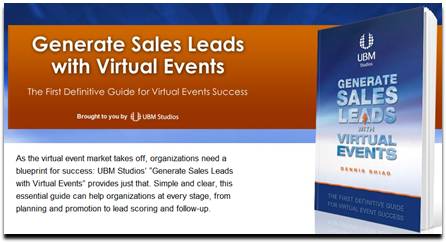
“As the virtual event market takes off, organizations need a blueprint for success: UBM Studios’ “Generate Sales Leads with Virtual Events” provides just that. Simple and clear, this essential guide can help organizations at every stage, from planning and promotion to lead scoring and follow-up.”

Chapter Excerpt

UBM Studios has published an edition of my book, “Generate Sales Leads With Virtual Events”. Chapter 6 of the book is titled “Engage with Virtual Event Attendees.”

One of the most critical elements of this chapter is the section that covers roles and responsibilities of your booth staffers. Especially for virtual events that draw large crowds, having a coordinated team leads to more goals in the net. And to continue that analogy, as the leader of your internal team, you need to serve as the head coach.

This entire chapter is now available to you. Visit the UBM Studios page for more info:

http://www.ubmstudios.com/sales_leads_book.htm


A Flight Attendant Call Button for Virtual Events

April 22, 2011

Introduction

On a recent flight, the passenger in front of me pressed the flight attendant call button as we neared cruising altitude.  As I heard the “ding” and saw the light turn on, a light bulb came on in my own head.  The pressing of the call button sends two signals:

  1. “I’m here”
  2. I need assistance (i.e. “Please engage with me”)

Let’s consider how a flight attendant call button can be added to virtual events.

Technical Support

To receive technical support in a virtual event, you need to go find help, usually in the form of a Help Desk.  On an airplane, it’s more efficient for the help to come to you – far simpler than having you get up, disturb the passengers in your row and walk down the aisle.  In a virtual event, you’re often busy viewing sessions, engaging with exhibitors or chatting with fellow attendees. Wouldn’t it be so much more convenient if the help would come to you?

Virtual events could include a “call button” that attendees could click.  Staffers providing technical support at the event would see the attendee added to a queue, along with an audio cue (the “ding”).  Attendees could be provided with the option of including a one-sentence description of their issue, prior to clicking the call button.  From here, support staff would connect directly with the requesting user, to assist them one-on-one.

Engage with Exhibitors

Similar to “technical support finding you,” attendees looking to engage with multiple exhibitors could opt in to invite exhibitors to connect with them.  An “exhibitor call button” could be clicked that would signal to all booth staffers that particular attendees could be contacted.

If an exhibitor engaged with a requesting attendee via private chat, the “call button” would be turned off, until that private chat concluded.  In many ways, this mechanism would be more efficient for attendees, compared to visiting assorted booths and engaging with the staffers in each one.  A more sophisticated call button could allow users to specify which type of exhibitors they’d like to engage with.

Engage with Attendees

Engagement with other attendees is typically done via group chat and private chat.  But how do you know whom you should have 1:1 chats with?  An attendee call button could let others know, “I’m here” and  “engage with me.”

The attendee call button could include a one-sentence description of the user’s interests.  All users who pressed the call button could be listed in a Lounge – and mousing over the users’ profile images could display their names, titles and one-sentence descriptions.  The attendee call button can spur more connections and networking than the typical Networking Lounge.

Conclusion

All too often in virtual events, we “venture out” to find people and information (e.g. exhibitors and attendees). Instead, a simple call button could turn the tables, allowing the people, at least, to come seek you out – and engage.

What do you think – would you use the call button feature  in a virtual event?  Leave a comment below.


A New Approach to Virtual Trade Show Booth Surveys

April 19, 2011

Introduction

Surveys should not be difficult to operate! Too often, however, they are. For virtual trade shows, booth surveys can complement the demographic data (collected during registration) with psychographic data to help you further qualify your virtual trade show leads.  In this post, I introduce a new approach to the virtual trade show booth survey.

Make it Fun

Surveys are no fun.  As a first step, don’t call your’s a “survey”.  If you sell B2B products, call it a “Readiness Assessment” instead. Then, make it fun. Introduce a host or hostess (audio voiceover) who talks to the end user after each step, cracking jokes along the way.

Develop humorous text or imagery, to encourage users to unmute their speakers.  After every few questions, pipe some humor into the process. For instance, insert a text bubble that reads, “4 out of 5 of virtual event attendees surveyed indicate that they … dislike surveys!”

Provide Instant Feedback

When you complete most surveys, the feedback you receive is, “Thank you for participating in our survey.”  The new approach to the booth survey leverages numerical weightings to each multiple-choice answer.  You design the survey questions (and the answers), so that the answers are summed up to a total “score.”

Next, capitalize on the current popularity of badges (a la Foursquare) and assign ranges of scores to custom-designed badges.  For instance, in our B2B Readiness Assessment, the badges could be:

  1. The Dunno Badge (“I don’t know if I’m ready or not”)
  2. The Boyfriend Badge (“I don’t know if I’m ready to commit”)
  3. The Trooper Badge (“I think I’m ready, let’s do it”)
  4. The Honeymoon Badge (“Let’s skip straight to the honeymoon”)

(Note: use of sarcasm for demonstration purposes – may not be appropriate for a B2B setting.)

Your Ticket to Lead Qualification

When you designed your survey questions to add up to a score, did it seem like lead scoring?  It should have!  Just as you’d calculate an “A lead” based on their activity in your virtual booth, you badges become a form of a lead score.  If you’re implementing lead scoring for your booth visitors, you can augment scores with badge information.

For instance, “A leads” who completed your survey and received the “Honeymoon Badge” are the cream of the crop.  They receive higher priority than other “A leads” who received the Trooper, Boyfriend or Dunno badges.

Be Prescriptive on Next Steps

Surveys provide little to no information on next steps.  Since your survey is labeled a “readiness assessment,” you ought to prescribe the next steps to the user.

Our new approach assigns a specific piece of content to each badge.  For instance, users with the Dunno Badge receive the “Widgets for Dummies” eBook, while Honeymoon Badge users receive the “Widget Implementation, Volume I” white paper.  By giving users a clear follow-up plan, you’re delivering tremendous value in exchange for filling out the survey.

Conclusion

The new approach to booth surveys can create a win/win/win scenario.  First, by making it enticing and fun, you generate more survey completions. Next, by mapping each survey responder to a badge, you provide instant lead qualification (which helps you).  And finally, by prescribing a follow-up plan for each badge, you provide value back to the user, while conveniently leading them down the sales cycle.


Hybrid Events Roundtable: Help Us Determine the Questions

March 31, 2011

Hybrid Events Roundtable - Help Us Determine the Questions

Introduction

I’ll be moderating a Focus Roundtable, “Best Practices for Your Next Hybrid Event.” The Roundtable will feature Dave Lutz (Velvet Chainsaw Consulting), Malcolm Lotzof (INXPO) and Samuel Smith (Interactive Meeting Technology, LLC).  We’d like you to shape the questions that get asked to this esteemed panel.

How to Participate

There are a number of ways to participate.

1) Provide your input on Focus.com.

I’ve posted four questions that I may ask to the panel.  Write an answer to the question (on Focus), letting us know which of the four questions you’d like me to ask – and why.  To post an answer, you’ll need to sign up to become a Focus.com member.

2) Vote via Twtpoll.

I’ve posted the same four questions on Twtpoll (Twitter poll).  Visit the Twtpoll page to view the current results – and, to log your own vote.

The Roundtable Flow

The Roundtable is scheduled  for April 6th (Wednesday) at 11AM PT.  Anyone can access the Roundtable via telephone:

Toll-free Dial-In Number: (866) 951-1151
International Dial-In Number: (201) 590-2255
Conference # : 4999006

All callers (besides the speakers) will be muted.  However, you will be seen and heard via Twitter.  Use Twitter hash tag #FocusRT to ask questions of the panel – and to provide comments.  I plan to ask four questions:

  1. Question with the most votes (Focus.com plus Twtpoll)
  2. Question from the Twitter audience (#FocusRT), selected by me
  3. Question with the second most votes (Focus.com plus Twtpoll)
  4. Question from the Twitter audience (#FocusRT), selected by me

As an alternative, feel free to leave a comment below with your panel question (for those of you not inclined to tweet your question).  Hope to “see” you during the roundtable!


Virtual and Hybrid Events Are On The Agenda

March 28, 2011

Virtual and Hybrid Events Are On The Agenda

Introduction

Spring has sprung, which means that the year’s event schedule is now in full swing.  What’s a topic that’s getting a lot of attention?  Virtual and hybrid events.  In the past few weeks alone, virtual and hybrid events have sprung up as session topics in numerous industry events and  meetings.

International Confex, March 2011, London

International Confex took place March 1-3, 2011 in London.  According to the event’s web site, “More than 12,000 people attended the event to see the latest innovations and services in the events industry.”  The event included the following sessions:

  1. “Using virtual worlds to extend reach of events and venues”
  2. “What price for technology – why going virtual can wind up costing more than face to face” (Note: “Contrarian” to virtual, but I’d like to hear more)
  3. “A master class in blending live with online technology presented in association with Eventia”
  4. “Virtual meetings demystified” (featuring my colleague, Chris Meyer of INXPO)

For more information: View the event’s full session agenda.

MTO Summit, March 2011, Chicago

MTO Summit took place March 21-22, 2011 in Chicago.  This event focuses on meeting technology, so it’s no surprise that this year’s Chicago event included a session on virtual events.  The session was titled “How to Make Virtual Events Satisfy Customers and Deliver Profitability,” and featured the following speakers:

  1. Warwick Davies, The Event Mechanic!
  2. Michael Doyle, Virtual Edge Institute
  3. Kenji Haroutunian, Outdoor Nielsen Expositions Sports Group
  4. Michael Kushner, UBM
  5. Stephen Lieber, HIMSS

For more information: View the session listing.

A summary of the session from BizBash: “MTO Summit Addresses Value of Virtual Events, Future of Mobile Apps

Exhibitor 2011, March 2011, Las Vegas

Exhibitor 2011, now in its 23rd year, kicks into gear this week in Las Vegas.  On March 31st, Mike Mraz will lead a session titled “The NEW Tools for Trade Show Success”.  One of the topics Mike will cover during this 90 minute session is “The appeal of virtual trade shows”.

For more information: View the session listing.

EastVirtual Event Workshop, May 2011, Washington D.C.

It’s nice to see workshops 100% focused around virtual event strategies and production.  Earlier this month, Virtual Edge Institute announced a Digital Event Strategist Certification (my thoughts on the certification).

The EastVirtual Event Workshop is a “one-day, face-to-face educational seminar,” that “helps associations go from little or no virtual event knowledge to knowing the first steps for building a 30-day implementation strategy.” It’s a 1-day workshop – and it looks interesting.

For more information: View the workshop web site.

Conclusion

Virtual event planners have more information and tools than ever before.  That being said, we need more discussion, more workshops and more tools. Drop a comment below and let us know what information and tools you need.


5 Tips for Your Virtual Booth

March 21, 2011

5 Tips for Your Virtual Booth

Introduction

During the ski season, I spend a lot of time on Interstate 80 in California.  When I’m unfortunate to get stuck in “stop and go” traffic, it makes me realize the effectiveness of highway billboard ads.  At the same time, however, I find that  the majority of ads are poorly done and only a handful truly resonate with me.

I also got to thinking about the similarity between highway billboard ads and the signage in booths at virtual trade shows.  In both cases, the “target audience” is highly transient, moving from one location to another. As on a highway, you may zip right past a sign (or booth) without event noticing it. With foot on the brake pedal, I pondered how the concepts behind effective billboard ads can apply to the design of your virtual booth.

1) It’s not about you.

Advertisers (exhibitors) all too often think in their own terms, when they should be thinking on their audience’s terms.  Remember that prospects don’t care about your product offerings, they care about how to solve their business challenges.  So talk to them about them and not about you.

Jiffy Lube had an effective billboard.  It said, “My time matters.”  Instead of talking at you (i.e. “Your time matters”), they put the advertisement in your own voice.  In doing so, they made it about you, and not about them.

2) Make your audience interpret a bit.

My favorite billboard ad was from ING Direct.  It said, “Drive Safely“.  That’s it!  The vast space of a billboard ad, consumed by two words. My first reaction was, “Thanks!” and my second reaction was, “Hmm, drive safely … and my money is also safe with ING.”  The impact of an ad is enhanced when viewers need to think in order to interpret its message.

3) Eliminate the Gobbledygook.

David Meerman Scott (@dmscott) wrote about The Gobbledygook Manifesto, a set of overused and cliched business terms. While I don’t see much gobbledygook on highway billboards, I see them in virtual booths.  As I mention in point #1, “it’s not about you”, so speak in terms that your audience understands. More often than not, that’s plain English (substitute your local language here).

4) Invite rather than declare.

Unlike a billboard ad where viewers can zoom by at 55 MPH (or higher), a virtual booth’s signage can invite visitors to start a conversation with your company. Rather than declaring your “market leading product” via gobbledygook, invite visitors to speak to you about their business challenges.

Remember, it’s all about their challenges and not about your products.  If your products can help address those challenges, then you may have a sales opportunity. But don’t assume that “everything fits” at the outstart.

5) Less is more.

As Jiffy Lube and ING Direct demonstrated, eloquence is all about short and sweet, not about wordiness.  Twitter taught us to go 140 characters or less – with billboard ads and booth signage, think about 14 characters or less.

Conclusion

Keep some of these principles in mind as you build your next virtual booth.  If your visitors are flying by at 55 MPH, make your booth that highway lookout, where they stop the car, pull over and stay for a while.


A Virtual Blog Posting

March 14, 2011

A Virtual Blog Posting

Introduction

We’ve been well served by the term “virtual events” and by its related siblings, “virtual trade shows”, “virtual career fairs”, “virtual sales kick-off meetings” and the like. The industry has been using these terms for the past 5+ years and we’ve seen gains in understanding, recognition and awareness (of the terms).

Time for a New Name?

I was happy to see that Virtual Edge Institute’s new certification is called Digital Event Strategist and not Virtual Event Strategist.  I think it’s time to consider a shift in terminology, away from the adjective “virtual”.

Is this a virtual blog posting?  Well, no, I hope not.  I’d like for it to be real.  According to the “virtual” entry on thesaurus.com, the antonyms for “virtual” include: actual, authentic and real.

Is the event running on a virtual platform?  Well, no – the platform is real, or so I hope.

Need to have the on-site team coordinate with the virtual team?  May not need to, if the virtual team isn’t real.

Want to create virtual experiences?  I hope you’re creating real experiences, experienced digitally.

Practical Limitations

Having made my point, I understand that we can’t simply turn on a dime and change terminology right away. First, it would create confusion among prospects, as well as people who are newly considering “virtual” technologies.  And while the term “digital events” seems on target, “digital trade shows”, “digital career fairs” and “digital sales kick-off meetings” don’t quite do it for me.

Your Thoughts?

Leave a comment below to share your thoughts – should we keep the “virtual” terminology? If not, what new terminology would you suggest?

Related: A posting from Mike McCurry, “Meeting Attendees: It’s About My Experience, Not My Location!


Marketing Roundtable on Virtual Events and Digital Communities

March 10, 2011

Marketing Roundtable on Virtual Events and Digital Communities

Introduction

On March 16, I’ll be speaking at the Focus Marketing Roundtable: The Next Generation of Virtual Events and Digital Communities.  The panel will be moderated by Shannon Ryan (@brandrelevance) and feature Dannette Veale (@dveale), Michael Doyle (@virtualedge), Paul Salinger (@psalinger) and myself.  The Roundtable happens on a teleconference, while questions are submitted via Twitter (hash tag: #FocusRT).

When
March 16, 2011
1PM PT / 4PM ET

Where
Toll-free Dial-In Number: (866) 951-1151
International Dial-In Number: (201) 590-2255
Conference # : 4999006

Roundtable Topics

Topics up for discussion include:

  1. Must-know 2011 trends in virtual events and digital communities.
  2. How to garner corporate support and leverage virtual/digital environments to address objectives across the organization.
  3. Essential tips for transforming your environment into an “always-on” brand experience.

You can RSVP via LinkedIn here: http://events.linkedin.com/Focus-Marketing-Roundtable-Next/pub/585008

And finally, for more info, visit FOCUS.com: http://www.focus.com/events/marketing/focus-marketing-roundtable-next-generation-virtual-events-an/

Conclusion

Hope to “see” you there – in the meantime, for any questions, tweet them with hash tag #FocusRT.