Introducing Virtual Trade Show 2.0

May 7, 2011

Photo credit: “LAUNCH Music Conference” on flickr.

Introduction

In the virtual extension of this booth (above), will I be able to play all those cool-looking guitars?

Previously, I wrote about ways in which the physical event experience can be brought to virtual events.  Then, I attended one of the world’s largest and most prominent trade shows, NAB Show in Las Vegas.  Based on that experience, I’ve concluded that there’s so much more that virtual trade shows should be offering.

There’s nothing quite like the face-to-face experience of a physical trade show. Whether you’re producing a 100% virtual trade show or providing a digital extension to your physical trade show, I build upon my previous  post to consider additional ways to bring face-to-face experiences online.  That’s right, it’s Virtual Trade Show 2.0.

Private Meeting Rooms for Key Clients & Prospects

Physical trade shows are great for providing TLC for your VIP (“tender love & care” for your “very important people”).  When your executives invite key prospects, clients or partners into a private meeting room, it results in some “intimacy” (away from the hustle and bustle of your booth) and it signals to visitors that they’re important. In this way, trade shows are great for establishing, and then developing relationships.

In a virtual trade show, private meeting rooms could be a feature for premium-level exhibitor sponsorships. They’d allow you to have “multi party” dialog (i.e. your executives and your visitors), in an area that’s separate from the virtual booth.  To encourage the “intimacy,” all parties should be encouraged to enable their webcam, so that they can be seen and heard. Sight and sound builds relationships better than the keyboard.

Touch and Feel the Products
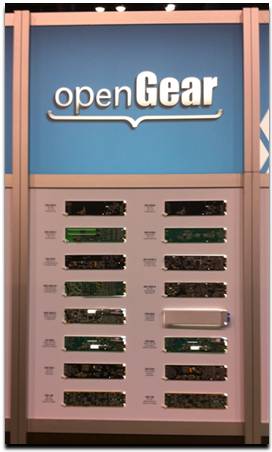

What do you sell?” – in a virtual trade show, you explain your product offerings – or, you point to documents and links in your booth. In a physical trade show, you bring your products to the prospects and have them touch and feel them. Throughout NAB Show, exhibitors were doing demos of their software, removing line cards from servers and showing off their latest chips, devices and doo-dads.

Virtual trade shows need to provide a better “touch and feel” experience.  Exhibitors should have the capability of placing 2D, interactive representations of their products in their virtual booth and allow exhibit staff to show visitors how the product works.  To date, virtual trade shows are all about the “tell”, but they should move to the “show and tell” and then the “show, tell and play.”

Relevant Technologies

Some technologies that may enable this include Equipment Simulations, LLC – check out their LiveDrive demo, which allows you to interact with a fire engine.  Another technology to watch is Kaon v-Stream – Kaon pioneered the use of interactive kiosks and v-Stream now enables a similar experience, delivered over the web.

Exhibitors Make an Impact by Delivering Core Services

Too often in virtual trade shows, there’s a “wall” that separates the core elements of the show from the exhibitors. The problem here is that exhibitors “fund” the show, which means that the show won’t go on without happy exhibitors.  As such, exhibitors ought to be integrated into the experience, so that they become “core” to the show.

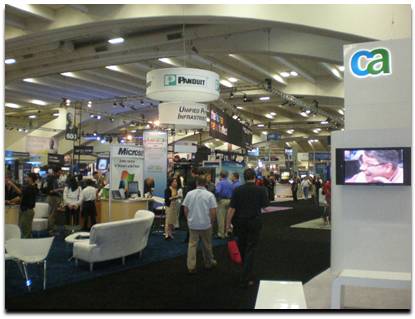
As an example, the image (above) is not the food court at NAB Show. It’s one half of an exhibitor’s booth!  Judging by the crowd that stopped by for a bite or a drink, this exhibitor became a “core element.”  And you can bet that after many visitors finished their snack, they walked across the way to learn more about the exhibitor’s products and services.

Virtual trade show producers will need to find ways to integrate exhibitors into the core experience, without allowing the exhibitors to be too promotional (it’s a delicate balance).  Sponsoring a “virtual food court” would be one thing, but having exhibitor staff “hound” all visitors with private chat requests would not be wise.

Conclusion

Trade shows have a rich history that goes back hundreds (thousands?) of years.  Virtual trade shows have a history of less than ten years. It’s time to draw upon history to help shape the future.  Leave a comment below and share your thoughts on how you’d design virtual trade show 2.0!


For Virtual Events, The Mobile Revolution Has Arrived

May 4, 2011

Introduction

In the early days of virtual events (i.e. a few years ago), we used to say that users could attend a virtual event “from anywhere.” Of course, that wasn’t entirely true, as “anywhere” usually meant at a location with “fixed” (vs. roaming) Internet connectivity and “chained” to a desktop or laptop on a desk.

Tablet devices are quickly becoming pervasive and I believe (as do the analysts) that they’ll come to dominate the enterprise in short order.  Many of the emails I receive (at work) these days are stamped with “Sent from my iPad” or “Sent from my Android device”.

The Power of the Tablet

In the enterprise, we may very well be experiencing the last cycle for desktops and laptops. When the tenure of your current laptop “expires,” your IT Department may be moving you to a tablet device, such as the iPad, or one of the many Android-based tablets.  These tablets come packed with a number of key features:

  1. A form factor that further enables mobility
  2. A form factor that encourages simultaneous, “multi person” use
  3. Location awareness
  4. Pervasive connectivity, via 3G (and other) networks

What This Means for Virtual Events

For virtual events, this truly means that one can attend “from anywhere” – on the treadmill at the gym, walking along a sandy beach or sitting on your  train commute into the city.  Mobile access to virtual events mean added convenience for attendees – and, potentially higher ROI for event organizers and exhibitors.

Why?  Because mobile can create higher attendance rates.  And, exhibitors can now staff their booth and engage with visitors from anywhere.  In fact, at a hybrid event, a marketer can staff her physical booth, walk down the show floor (with tablet in hand) and staff the virtual booth at the same time!

Location Innovation

As more users attend virtual events from tablets, expect to see innovation in how events leverage users’ location data (when users opt in to share that information, of course).  Ever enter a virtual event’s Networking Lounge and observe how users are asking where everyone else is from?

Now, imagine a Google Map that shows where all virtual attendees are located geographically.  In addition, imagine hybrid events, where on-site attendees could use a tablet application to show virtual attendees where (on the show floor) they happen to be.

Demo Time

In the video (below), my INXPO colleague John Leahy shows how you can attend a virtual trade show from the iPad.


A Flight Attendant Call Button for Virtual Events

April 22, 2011

Introduction

On a recent flight, the passenger in front of me pressed the flight attendant call button as we neared cruising altitude.  As I heard the “ding” and saw the light turn on, a light bulb came on in my own head.  The pressing of the call button sends two signals:

  1. “I’m here”
  2. I need assistance (i.e. “Please engage with me”)

Let’s consider how a flight attendant call button can be added to virtual events.

Technical Support

To receive technical support in a virtual event, you need to go find help, usually in the form of a Help Desk.  On an airplane, it’s more efficient for the help to come to you – far simpler than having you get up, disturb the passengers in your row and walk down the aisle.  In a virtual event, you’re often busy viewing sessions, engaging with exhibitors or chatting with fellow attendees. Wouldn’t it be so much more convenient if the help would come to you?

Virtual events could include a “call button” that attendees could click.  Staffers providing technical support at the event would see the attendee added to a queue, along with an audio cue (the “ding”).  Attendees could be provided with the option of including a one-sentence description of their issue, prior to clicking the call button.  From here, support staff would connect directly with the requesting user, to assist them one-on-one.

Engage with Exhibitors

Similar to “technical support finding you,” attendees looking to engage with multiple exhibitors could opt in to invite exhibitors to connect with them.  An “exhibitor call button” could be clicked that would signal to all booth staffers that particular attendees could be contacted.

If an exhibitor engaged with a requesting attendee via private chat, the “call button” would be turned off, until that private chat concluded.  In many ways, this mechanism would be more efficient for attendees, compared to visiting assorted booths and engaging with the staffers in each one.  A more sophisticated call button could allow users to specify which type of exhibitors they’d like to engage with.

Engage with Attendees

Engagement with other attendees is typically done via group chat and private chat.  But how do you know whom you should have 1:1 chats with?  An attendee call button could let others know, “I’m here” and  “engage with me.”

The attendee call button could include a one-sentence description of the user’s interests.  All users who pressed the call button could be listed in a Lounge – and mousing over the users’ profile images could display their names, titles and one-sentence descriptions.  The attendee call button can spur more connections and networking than the typical Networking Lounge.

Conclusion

All too often in virtual events, we “venture out” to find people and information (e.g. exhibitors and attendees). Instead, a simple call button could turn the tables, allowing the people, at least, to come seek you out – and engage.

What do you think – would you use the call button feature  in a virtual event?  Leave a comment below.


A New Approach to Virtual Trade Show Booth Surveys

April 19, 2011

Introduction

Surveys should not be difficult to operate! Too often, however, they are. For virtual trade shows, booth surveys can complement the demographic data (collected during registration) with psychographic data to help you further qualify your virtual trade show leads.  In this post, I introduce a new approach to the virtual trade show booth survey.

Make it Fun

Surveys are no fun.  As a first step, don’t call your’s a “survey”.  If you sell B2B products, call it a “Readiness Assessment” instead. Then, make it fun. Introduce a host or hostess (audio voiceover) who talks to the end user after each step, cracking jokes along the way.

Develop humorous text or imagery, to encourage users to unmute their speakers.  After every few questions, pipe some humor into the process. For instance, insert a text bubble that reads, “4 out of 5 of virtual event attendees surveyed indicate that they … dislike surveys!”

Provide Instant Feedback

When you complete most surveys, the feedback you receive is, “Thank you for participating in our survey.”  The new approach to the booth survey leverages numerical weightings to each multiple-choice answer.  You design the survey questions (and the answers), so that the answers are summed up to a total “score.”

Next, capitalize on the current popularity of badges (a la Foursquare) and assign ranges of scores to custom-designed badges.  For instance, in our B2B Readiness Assessment, the badges could be:

  1. The Dunno Badge (“I don’t know if I’m ready or not”)
  2. The Boyfriend Badge (“I don’t know if I’m ready to commit”)
  3. The Trooper Badge (“I think I’m ready, let’s do it”)
  4. The Honeymoon Badge (“Let’s skip straight to the honeymoon”)

(Note: use of sarcasm for demonstration purposes – may not be appropriate for a B2B setting.)

Your Ticket to Lead Qualification

When you designed your survey questions to add up to a score, did it seem like lead scoring?  It should have!  Just as you’d calculate an “A lead” based on their activity in your virtual booth, you badges become a form of a lead score.  If you’re implementing lead scoring for your booth visitors, you can augment scores with badge information.

For instance, “A leads” who completed your survey and received the “Honeymoon Badge” are the cream of the crop.  They receive higher priority than other “A leads” who received the Trooper, Boyfriend or Dunno badges.

Be Prescriptive on Next Steps

Surveys provide little to no information on next steps.  Since your survey is labeled a “readiness assessment,” you ought to prescribe the next steps to the user.

Our new approach assigns a specific piece of content to each badge.  For instance, users with the Dunno Badge receive the “Widgets for Dummies” eBook, while Honeymoon Badge users receive the “Widget Implementation, Volume I” white paper.  By giving users a clear follow-up plan, you’re delivering tremendous value in exchange for filling out the survey.

Conclusion

The new approach to booth surveys can create a win/win/win scenario.  First, by making it enticing and fun, you generate more survey completions. Next, by mapping each survey responder to a badge, you provide instant lead qualification (which helps you).  And finally, by prescribing a follow-up plan for each badge, you provide value back to the user, while conveniently leading them down the sales cycle.


5 Tips for Your Virtual Booth

March 21, 2011

5 Tips for Your Virtual Booth

Introduction

During the ski season, I spend a lot of time on Interstate 80 in California.  When I’m unfortunate to get stuck in “stop and go” traffic, it makes me realize the effectiveness of highway billboard ads.  At the same time, however, I find that  the majority of ads are poorly done and only a handful truly resonate with me.

I also got to thinking about the similarity between highway billboard ads and the signage in booths at virtual trade shows.  In both cases, the “target audience” is highly transient, moving from one location to another. As on a highway, you may zip right past a sign (or booth) without event noticing it. With foot on the brake pedal, I pondered how the concepts behind effective billboard ads can apply to the design of your virtual booth.

1) It’s not about you.

Advertisers (exhibitors) all too often think in their own terms, when they should be thinking on their audience’s terms.  Remember that prospects don’t care about your product offerings, they care about how to solve their business challenges.  So talk to them about them and not about you.

Jiffy Lube had an effective billboard.  It said, “My time matters.”  Instead of talking at you (i.e. “Your time matters”), they put the advertisement in your own voice.  In doing so, they made it about you, and not about them.

2) Make your audience interpret a bit.

My favorite billboard ad was from ING Direct.  It said, “Drive Safely“.  That’s it!  The vast space of a billboard ad, consumed by two words. My first reaction was, “Thanks!” and my second reaction was, “Hmm, drive safely … and my money is also safe with ING.”  The impact of an ad is enhanced when viewers need to think in order to interpret its message.

3) Eliminate the Gobbledygook.

David Meerman Scott (@dmscott) wrote about The Gobbledygook Manifesto, a set of overused and cliched business terms. While I don’t see much gobbledygook on highway billboards, I see them in virtual booths.  As I mention in point #1, “it’s not about you”, so speak in terms that your audience understands. More often than not, that’s plain English (substitute your local language here).

4) Invite rather than declare.

Unlike a billboard ad where viewers can zoom by at 55 MPH (or higher), a virtual booth’s signage can invite visitors to start a conversation with your company. Rather than declaring your “market leading product” via gobbledygook, invite visitors to speak to you about their business challenges.

Remember, it’s all about their challenges and not about your products.  If your products can help address those challenges, then you may have a sales opportunity. But don’t assume that “everything fits” at the outstart.

5) Less is more.

As Jiffy Lube and ING Direct demonstrated, eloquence is all about short and sweet, not about wordiness.  Twitter taught us to go 140 characters or less – with billboard ads and booth signage, think about 14 characters or less.

Conclusion

Keep some of these principles in mind as you build your next virtual booth.  If your visitors are flying by at 55 MPH, make your booth that highway lookout, where they stop the car, pull over and stay for a while.


How Your Virtual Event Can Benefit From Personalized Guides

March 2, 2011

Add Personalized Guides to Your Virtual Event

Introduction

In virtual events, there are staffers to “patrol” the event and assist attendees who have technical and logistical issues.  Beyond the logistical matters, however, how much do event planners invest towards the end-to-end attendee experience?

And, how often do staffers provide tips and guidance on the more strategic elements of an event: which sessions to attend, what content to download, which exhibitors to visit and which attendees to meet with? The answer: probably not enough.

An Idea, Sparked by Metaverse Mod Squad

I was struck by this missing element while reading a New York Times article, “A Patrol for the Web’s Playgrounds.” The article profiles Metaverse Mod Squad, a company that provides clients with moderators to “patrol” their web sites and virtual worlds.  Amy Pritchard (@AmyMMS), the company’s chief executive, had a great quote:

“We found if we greeted people, told them what they could do, gave them an event card and introduced them to other people, they had more fun.”

I think the same benefit can apply to B2B virtual events, where “fun” (in the sentence above) could be replaced with “getting more value out of the event”.

Benefit #1: Better Orientation of New Visitors

After logging in to a virtual event, attendees typically see a video greeting, either in an embedded video player, or via a host/hostess who was filmed against a “greenscreen” and overlaid on top of the environment.  The “New Greenscreen” are real, live “greeters”, who welcome visitors to the virtual event and chat with them, either via text or audio/video.

The “New Greenscreen” is like a host or hostess at a cocktail party.  They take your coat and point you to where the action is happening.  To support large audiences, the greeters can hold group sessions.  They can let the gathered audience know “what’s hot” (e.g. details on the session that is coming up next) and ask attendees what they’re looking to get out of the event.

As they learn more about the visitors, the greeters can suggest exhibitors to visit, sessions to attend and event content to download. Already, you’re providing attendees with a lot more usefulness than the typical video greeting, which is targeted to a broad audience and not an individual (who has unique needs and goals).

Benefit #2: Better Connect Attendees to One Another

A significant benefit of events (whether they’re physical or virtual) is the ability to network with like-minded (or perhaps different minded) attendees. In a virtual event, I may “seek and find” other attendees via social network integration, via group chat and perhaps via search.  But the connections are somewhat random and serendipitous.

The event’s personalized guides could serve as “business-oriented matchmakers”, pairing attendees with one another. I once attended a physical networking event and told the host that I work in the Marketing function at a start-up.  She immediately introduced me to a consultant who helps companies launch new  products – and, asked if my company was looking to hire, since there were executive recruiters in attendance.

Without the proactive host, my introduction to the consultant may never have happened. In a similar way, the personalized guides, upon understanding attendees’ business goals (and challenges), could pair them with exhibitors whose products or services address those challenges.

The guides could have a special designation on their profile (analogous to wearing a “Staff” shirt at a physical event), so that attendees know to accept their chat requests – and, so that they can be proactively contacted by other attendees.

Benefit #3: Get Help from the Concierge(s) at The Information Desk

Personalized guides would all have their “presence indicators” (i.e. whether they’re online) appear at The Information Desk. This area becomes the one-stop shop for both technical support and “concierge” services.  Need a recommendation between the two sessions airing simultaneously? Visit the Information Desk and get an informed opinion.

Looking for exhibitors who provide certain solutions?  Ask your friendly guide at The Information Desk.  Looking for that “kitchen design consultant” to map out the schedule and activities for your entire day?  No worries, the concierge at the desk who assemble a “user journey” for you.

Conclusion

Virtual events do not employ this sort of service today, but I think that attendees will find it valuable. Of course, doing this will result in additional cost for the event producer, but it may pay off in the long run, based on attendee satisfaction.  Let me know your thoughts in the comments section below – will this work?


5 Virtual Events Postings You May Have Missed

February 23, 2011

5 Virtual Events Postings You May Have Missed

Introduction

In the rush to get caught up with RSS feeds (that I routinely neglect when busy), I unintentionally skip articles and postings that I’d find quite interesting and valuable. With that in mind, I thought I’d round up recent virtual events postings (from this blog) that you may have otherwise missed.  And yes, I do still use an RSS reader.

1) Interactive Emails and Potential Use in Virtual Event Promotions

Virtual Event Email Promotions and Hotmail Active Views

Like banner ads, email marketing and email (in general), response rates tend to decline over time.  The use of interactive elements (within the email) could be a big win – and this certainly applies to virtual event email promotions. Here’s a link to the full posting:

https://allvirtual.wordpress.com/2011/01/14/virtual-event-email-promotions-and-hotmail-active-views/

2) Virtual Event Lead Management

Virtual Event Lead Management

I outline the “drive-by viewing” that you often see at virtual events and note that those visitors are names, not leads.  I also introduce the notion of curating your leads, as if they were fine art.  Here’s a link to the full posting:

https://allvirtual.wordpress.com/2011/01/22/book-supplement-virtual-event-lead-management-leadmanagement/

3) Why I’m There on Pure Virtual Events

I wrote a counterpoint to an article from Velvet Chainsaw’s Dave Lutz on the topic of pure virtual events. While I’m a firm believer in hybrid events, I also believe in the benefits of “pure” virtual events.  Here’s a link to the full posting:

http://inxpo.wordpress.com/2011/01/27/why-im-there-on-pure-virtual-events/

4) Can I Get a Woo Hoo for Virtual Events?

Can I Get a Woo Hoo for Virtual Events

I loved the tactics used by a department store to encourage customers to contribute (to a charity) at the cash register. I loved it so much, in fact, that I decided to draw parallels with the store’s tactics and apply them towards the planning and promotion of virtual events.  Here’s a link to the full posting:

https://allvirtual.wordpress.com/2011/02/07/can-i-get-a-woo-hoo-for-virtual-events/

5) Use Virtual Booths to Complement Your Physical Booths

Use Virtual Booths to Follow Up with Leads from Your Physical Booth

I outline ways in which a virtual booth can allow trade show exhibitors to distribute content, nurture leads and engage with prospects in real-time (after the event).  Here’s a link to the full posting:

https://allvirtual.wordpress.com/2011/01/30/use-virtual-booths-to-follow-up-with-leads-from-your-physical-booth/

Conclusion

If you liked any of these postings, but missed them when they were originally published, subscribe to the It’s All Virtual RSS feed.  If you do subscribe, but “Mark All As Read” in a rush to get caught up, I forgive you (I know the feeling).


Book Supplement: Virtual Event Lead Management (#leadmanagement)

January 22, 2011

Introduction

In “Generate Sales Leads With Virtual Events,” Chapter 6 is titled “Score and Follow Up with Leads”.  This really could have been Chapter 7 – and instead, Chapter 6 could have focused on important steps to consider before scoring.  Before you import your virtual event leads into your CRM system, consider these important steps first.

Step #1: Beware of the “Drive-By Viewing”

Someone visited your virtual booth – congratulations! Not so fast.  Make sure the booth visit was not a “drive-by viewing”.  I define a drive-by viewing as:

  1. One (and only one) visit to your booth
  2. “Visit time” of 5 minutes or less
  3. No engagement with others while in the booth (e.g. group chat, private chat)
  4. No interaction with booth content (e.g. booth tabs, documents, links, etc.)

I see plenty of drive-by viewings from booth visitors. Some visitors simply want to see which companies are exhibiting at the virtual event.  And, some virtual platforms have “previous” and “next” buttons in the virtual booths, which means that drive-by visitors may simply be doing a quick tour of all booths.

Drive-by visitors are not leads – they’re NAMES!  My recommendation for drive-by visitors:

  1. Go ahead and import them into your CRM system
  2. Schedule a “thanks for visiting” email
  3. Using simple text links, provide them with a few options (e.g. receive more content, schedule an appointment, etc.)
  4. Respond accordingly – and, if they do not open the email or respond to the offers, cease communications [for now] and nurture them over the long term

Step #2: Beware of Existing Leads and Business Partners

Your virtual event leads can look like a pile of dominoes.  You may not be aware that within that pile of dominoes are existing sales prospects, along with current customers and business partners.  When you exhibit at a virtual event, your sales team is inclined to invite current prospects to come visit – and, your existing customers and partners are inclined to stop in to see what’s new.

Warning: LEAD IMPORT CAN BE DANGEROUS TO YOUR HEALTH.

If you don’t manage your leads well, you may import “hot prospects” (who are already in your CRM system) and trigger a follow-up email to them.  The result is a turning back of the clock with those prospects – imagine finalizing your purchase decision, only to have one of the potential vendors call on you and ask if you’re in the market for their product!

Personal Story: I attended a virtual trade show and did a “drive-by viewing” through an exhibitor’s booth.  I’ve been a long-time subscriber to this exhibitor’s email newsletter and know some of the employees there.  My drive-by viewing was done simply to see who was staffing the booth.

A few days later, I received an email from the exhibitor, asking if I’d like more information.  This exhibitor probably should have known that I was a long-time subscriber – and, routinely click on the links in their newsletter.  Given this, the follow-up should have been more tailored, or skipped entirely.  If I was contemplating a purchase  decision with this exhibitor, that follow-up email could have cost them my business.

Step #3: Build and Import Engagement Profiles

Virtual event platforms have built-in RFID, which means that all interactions from sales prospects (with your content) are tracked and recorded.  The platforms assemble a detailed “engagement profile” for you – the worst thing you can do is throw away that profile when the lead is imported into your CRM system.  My guess is that the majority of marketers today do just that.

Instead, create custom fields in your CRM system to capture this data (e.g. number of visits, documents downloaded, transcripts of chats, etc.).  The more data, the more informed your sales team.  Just like an auto insurer reviews your past driving record and a loan officer reviews your past credit history, your sales team should have the benefit of a prospect’s past engagement data.

Step #4: Curate Leads as You Would Fine Art

You can automate portions of lead management, but you can’t automate the entire process.  It’s easy to automate the de-duping process, which ensures that new records are not created in your CRM system when there’s an existing lead record.

However, it’s not as easy to automate the business intelligence that needs to be applied to your leads (e.g. you can’t do AI on your BI). Examples of business intelligence rules:

  1. Knowing (and spotting) competitors
  2. Knowing (and spotting) existing business partners
  3. Knowing (and spotting) industry experts, analysts, media [who should not be followed up with]
  4. Spotting “creatively submitted” leads, such as “Mick E. Mouse” or “Barack Obama”

Sure, you can automate part of this by filtering on a list of company names, but there are bound to be some leads that slip through the cracks.

For instance, users may have a typo in their company name – or, may list their company differently that what you’ve entered in your filter list.  Your leads are the lifeblood of your business, so you should curate them as if they were fine art.  This means that manual review will always be a part of the lead management process.

Conclusion

Lead Management is not easy.  However, perform these steps before your first virtual event lead hits your CRM system – and you’ll be better off.  Your sales team will receive a far higher percentage of qualified leads – and they’ll thank you for that.


The Virtual Book Tour

January 21, 2011

Introduction

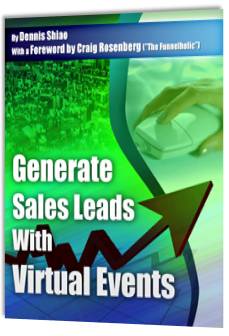
I recently read the excellent book “The On-Demand Brand: 10 Rules for Digital Marketing Success in an Anytime, Everywhere World,” by Rick Mathieson. In addition, I published my own book, “Generate Sales Leads With Virtual Events”.

To uphold the “on-demand brand” of the new book, I’ve decided to forego the traditional book tour. Instead, I’ll embark on a virtual book tour.  I consider the virtual book tour a “virtual event”, which is what my book is about, after all.

Virtual Book Tour

OK, so it’s not even a full blown virtual tour, I admit. That may come, some day.  In the meantime, I will be handing out 5 free copies of the book.  Here’s how you can grab a copy:

  1. Visit the book’s Facebook page.
  2. “Like” the book’s Facebook page. If you’ve previously “Liked” the page, I thank you for that – as a special reward, skip to step #3.
  3. Post a “valid question” about the book to the Facebook page’s Wall.

“Valid questions” must show that you’ve read the description of the book – and, understand the premise. I promise to answer all questions deemed valid.

How to get your copy

The first 5 people to complete the three steps (above) will receive a free copy of the book, which includes free shipping to the address of your choosing.

Unfortunately, I need to restrict the free shipping offer to continental U.S.  only – I’ll contact you to arrange shipping if you’re a winner who resides outside of the U.S.