Bringing Virtual Benefits To Business Travel

March 14, 2009

Source: Virgin America

Source: Virgin America

Recently, I embarked an a now-uncommon routine (for me) of a business trip – flying round trip on Virgin America, one of my favorite airlines.  Since most of my business these days is conducted virtually, the logistics of checking in at the airport, waiting in the security line, boarding the plane, checking into the hotel, etc. – gave me plenty of time to reflect on the dynamics of business travel.  Here are some observations:

  1. By its nature, business travel means that you’re constantly in close proximity to other businesspeople – some of whom are in your industry – or, could benefit you as a business partner (or vice versa)
  2. Those who are less outgoing / personable may only meet 2% of the fellow businesspeople they travel with – and really get to know only 1% (or less!)
  3. On my return flight to SFO, I’d guess that 1 out of every 15 people was a Silicon Valley entrepreneur.  If you were a start-up entrepreneur and on that flight, I’d guess that 1 out of every 25 on that plane was a Silicon Valley venture capitalist – or, someone who had funds to invest in your company

And while we’ve all heard stories about the sales deal or business partnership that was sourced by the “person next to me on the plane”, how many other business connections fall by the wayside because two or more individuals never connected?  Lots, I’m sure.  Technology helps flatten the world – but it can also be a further flattener to enable strangers in physical proximity to connect.

We do know that business travelers are quite active on social networks.  There are plenty of business travel blogs out there.  And, users of Facebook and Twitter are quite active while traveling.  They’re constantly chiming in from airports, conferences, hotels and restaurants.  They’ll also tell you whom they’re about to go in to meet with – and how it went.  So we know that busniesspeople are active on social networks during travel – but, how often are they engaging socially in person?

And there’s the irony – social media allows you to connect and socialize globally – but while you’re tweeting from your BlackBerry in the hotel lobby, might you be missing out on an introduction to a potential business partner who’s about to grab a cab to the same place you’re going?  Here’s where localized social media –  targeted at the local business traveler – could be a big win.

Some ideas:

  1. Virtual Flight Lounge, powered by Virgin America RED – when booking your Virgin America reservation online, Virgin asks you to opt in to their Linkedin connector – by opting in and supplying your Linkedin credentials, Virgin is able to capture key data from your Linkedin profile – and, obtain a list of your Linkedin connections.  Once on board, you pull up RED (Virgin’s in-flight entertainment system) and it displays Linkedin connections of your’s who are on the flight.  Additionally, it recommends business partners (with their seat numbers) based on a comparison of your profile against other profiles of passengers who also opted in.  If you’re interested, you can engage in RED’s seat-to-seat chat with your new-found friend.
  2. Marriott Virtual Lobby – when making your Marriott reservation online, you’re prompted to opt in to the hotel’s business networking feature.  You’re asked to provide information to populate a profile, such as what business you’re conducting, what business opportunities are you interested in, what are your food preferences, what are you in the market to purchase, etc.  Once you arrive at the hotel (and connect to the hotel’s paid wireless service, of course), you’re invited into a virtual lobby (similar to a virtual event), where you’re able to see all other guests who have opted in to the service.  You’re able to perform search, view guest profiles and participate in private and group chat (either via text or webcam).

In each scenario, the idea is that two or more potential business partners could discover one another (via their published profiles) – connect virutally and then arrange for the old-fashioned cocktail at the hotel bar or a steak dinner downtown.  That’s right, virtual begets physical.

Why would Virgin or Marriott do this?  The costs are fairly low (and fixed) – and can earn a high and recurring return – that being customer satisfaction and retention, which sure has a high ROI in this economic environment.  And what’s the value to the business traveler in opting in and using such a service?  Well, what’s the value of a new business partner or a new client?  I’m sure it’s much higher than the hard cost (zero) and worth the time and effort.

The concept here is similar to the popular “Who’s Close To Me” service provided by TripIt – but the difference is that here, you’re sourcing brand new business contacts, as opposed to discovering if your existing contacts are nearby.  So if I don’t bump into you in the security check at SFO, perhaps I’ll connect with you virtually and then grab a coffee with you in person.


Join A Group To Collaborate On Virtual Events

February 23, 2009

Over the past few months, I’ve observed an increasing amount of chatter within Twitter (the popular micro-blogging service) regarding virtual events and virtual tradeshows.  In many cases, Twitter users who are considering their first virtual event will submit a tweet such as, “considering my first virtual event.  Anyone have information on best practices?”.  I chime in when I can, but Twitter and its 140 character limit does not facilitate much in the way of extended dialog.

In fact, when two or more Twitter users need to delve deep on a topic, the next step is usually to “connect offline”.  Similarly, this blog is a useful vehicle for the communication of my thoughts and ideas – but isn’t great for facilitating discussion.  Despite the comment feature of blogs, there hasn’t been much extended discussion here, by way of commenters.

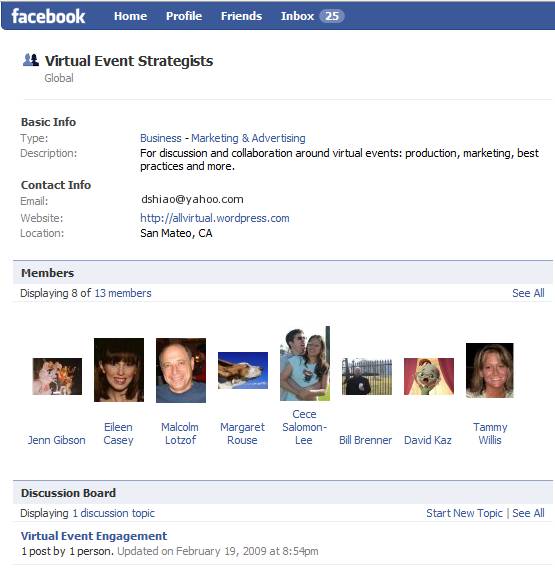
So I decided to create a Facebook Group to address these challenges – it’s called Virtual Event Strategists and is open to anyone interested (you need a Facebook account to join).  Here’s a snapshot of the group page:

Source: Virtual Event Strategists' Group Page

Source: Virtual Event Strategists' Group Page

Why a Facebook Group?  A few reasons:

  1. The 175MM active users (of Facebook) – most readers of this blog are likely on Facebook – if not, let me know why not!
  2. Threaded discussions – are you a first-timer in virtual events?  Well, starting up a threaded discussion may be just the thing to do
  3. The Wall – post miscellaneous thoughts and ideas about virtual events
  4. Post Links – let us know what interesting blogs or articles you’re reading about virtual events
  5. Post Video – Facebook has a convenient video recording and hosting capability – plug in a webcam and start using it

In fact, I’ll be doing brief “Virtual Event Tip of the Day” video clips on the Group page.  Here’s one of my first video clips, where I talk about the use of prizes in virtual events:

fb_video

I’ve seeded the site with some initial content – but, what I’d most like is to hear from all of you.  So, start some discussions, post some videos, post some links.  The group page is:

http://www.new.facebook.com/group.php?gid=52325833170#/home.php?ref=home

Let’s collaborate and learn together – see you there!


The Future Of Newspapers: Online, Interactive Communities

February 14, 2009

NYTimes.com

Source: NYTimes.com

There’s been much discussion about the future of newspapers.  Some have shuttered, others are struggling for their survival.  Business analysts and bloggers have even speculated on the future of The New York Times.  NYTimes.com had 14 million unique visitors in August 2008 (according to this Wikipedia entry).  Many web-centric businesses have been able to build large market capitalizations off a base of 14+M users.  So how can NYTimes.com monetize their users beyond display advertising?

Let’s see.  How about creating a community around these 14+M readers – and creating an interactive, real-time newspaper?  That’s right, folks.  I’m proposing that NYTimes.com be powered by a virtual event platform.  I’m NOT proposing a 3D environment with avatars.  Instead, I’m proposing a 2D “tradeshow-like” platform that would enable a business that’s rich in content (and, deep in Editorial talent) to best monetize their resources.

So let’s break down what this might look like:

  1. The newspaper’s main sections each map to “booths” within the platform – Of course, we’re not going to call these booths – I’m just drawing a parallel to the virtual tradeshow (VTS) model.  But, the functions and features here are the same that power a VTS booth.  So for NYTimes.com, there are “booths” labeled World, U.S., Politics, Business, Sports, etc. – you get the idea.
  2. The booth is the central holding place for that section’s content – Just like a newspaper has a front page – in a booth, the day’s content is rendered prominently as you enter – and, Editors swap out stale content (into the booth’s archive) for fresh content.
  3. Editors staff the booth and connect with readers – To me, this is the real game changer with this concept.  Editors (when time permits) can login to the environment and interact in real-time with readers.  What better a way to find out what your readers are interested in?  And, what better a way to find and connect with sources for you and your reporters?
  4. Readers interact with other readers – Another game changer here, as the platform would allow readers to tap into social networking to interact with other readers, all in the context of your content.  Valuable interactions keep those readers coming back in for more, creating site loyalty.

So imagine I enter the NYTimes.com Sports Booth – and I see this:

NYTimes.com

Source: NYTimes.com

I can click on Harvey Araton’s profile and read about Harvey’s interests and specialties.  If Harvey is online, perhaps I initiate a chat session with him – or, I drop him an in-show email to tell him I read his articles.  This provides a benefit for both of us – I feel directly connected with NYTimes.com – and, Harvey is able to efficiently connect directly with his readers.

Now granted, with 14+M people, it may be quite a challenge for Times Editors to spend time in an online community, juggling between user-initiated chats and their “real job”.  However, what if each attendee of this environment was a paying member?  Perhaps that changes the equation a bit.  So let’s talk about monetization opportunities:

  1. Advertising – NYTimes can sell “run of booth” or “run of platform” ads – and also offer up specific areas of the environnment for sponsorship (e.g. Networking Lounge sponsored by American Express).
  2. Direct Response – The platform (using a pay per click model) could house placements of advertiser content and drive clicks to advertiser web sites
  3. Subscription – Start off with a freemium model – anyone can access the environment at no cost, but certain features (e.g. access to premium content, ability to chat 1-on-1 with a Times Editor, ability to participate in real-time Q&A sessions, etc.) require a paid subscription
  4. A la carte content monetization – Why not create “booths” that house the entire archive of New York Times content.  Staff these booths with digital archivists, who can search through the virtual microfilm and find you the article you need.  Only premium (paid) members get access to these booths – and, you pay for each article that’s delivered from the archive.
NYTimes.com

Source: NYTimes.com

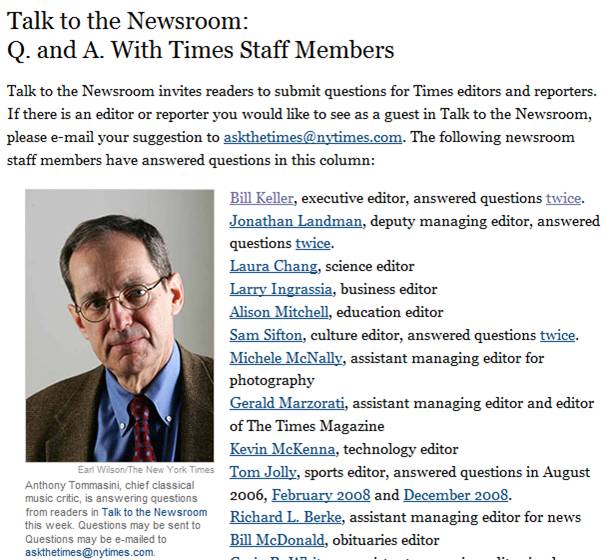
Now, let’s talk about the social media angle.  The Times could support the “Talk to the Newsroom” feature (above) via a real-time, text-based grroup chat!  They could even have the host be visible via a webcam, if so desired.  Here are some possibilities:

  1. Scheduled chat sessions with Editors, Publishers, executives, etc. (e.g. “Talk to the Newsroom”)
  2. Columnist and subscriber blogs – Published directly within the environment, with support for comments
  3. Forums around the paper’s main topics
  4. Presence indication – Provides readers with the feeling that they’re part of a global community. Reading the newspaper (which used to be a somewhat private experience) now becomes a communal one, where you’re reading, you’re sharing and you’re interacting – with other interested parties from around the world
  5. Real-time briefing rooms or crisis centers – Recall how quickly Twitter spread the news about the Mumbai terrorist attacks.  Why not have ad-hoc briefing rooms where NYTimes.com readers can engage around breaking news and current events?  In this scenario, the “daily newspaper” transforms into a real-time, 7×24 “always on” environment.

So some day, when I get my morning coffee and sit down with NYTimes.com, I’m hoping I’ll see you “there”.


VMworld Complements Physical Conference With Virtual Conference

February 7, 2009

VMworld

Source: VMworld

What do you do when you produce the world’s leading virtualization conference?  You make it better, of course!  VMware teamed with Jive Software to take the once-per-year VMworld conference and extended it (online) into a 365-day-per-year, always-on community.  A Case Study on this initiative can be found here:

http://www.jivesoftware.com/customers/case-studies/vmware

And this quote from Eric Nielsen of VMware sums it all up:

We expanded the VMworld conference from a three day event for 15,000 to a 365 day/year destination for 50,000 virtualization professionals.   — Eric Nielsen, Director of Web Communities, VMware

So that’s a triple play for VMworld – by complementing their event online, they’ve generated a more than 3x increase of participating virtualization professionals.  As quoted in the Case Study, the VMworld.com community has 35,000 active members, generates 35,000 page views per day and 2,000 video views per day.

Quite an impressive level of activity.  A clear example of an active community at work – 35,000 page views (in a single day) is hard to come by with traditional b-to-b content.  However, in a highly active social community, the blog posts, discussion board entries, podcast downloads, video views, “ask the expert” questions, etc. – all contribute to traffic generation.

Just have a look at the volume of Discussion Board traffic:

VMworld.com - Discussion Board

Source: VMworld.com - Discussion Board

Now that’s an active community at work.  But there’s a chicken and egg problem – how do you generate an active community in the first place?  Well, the organizers of VMworld.com made the wise move to integrate a full suite of social networking tools – essentially building a mini-Facebook around the conference.  Tools available include:

  1. Discussion Boards
  2. Podcasts – both those produced for the conference, as well as third party / external podcasts
  3. Integration with social networking sites (e.g. Facebook, Twitter, etc.)
  4. Blogs – both in-house and third party
  5. Ask The Expert sessions and content
  6. Video
  7. Photo Wall (with pictures from the physical event)

VMworld.com also leveraged neat tools within Jive Software’s platform to encourage activity.  For instance, on a blog post, a user can click on “Watch This Blog Post” and be notified when comments are appended to that post.  Additionally, most content pages have a left-hand sidebar titled “More Like This”, which certainly encourages additional clicks and page views (it worked for me!).

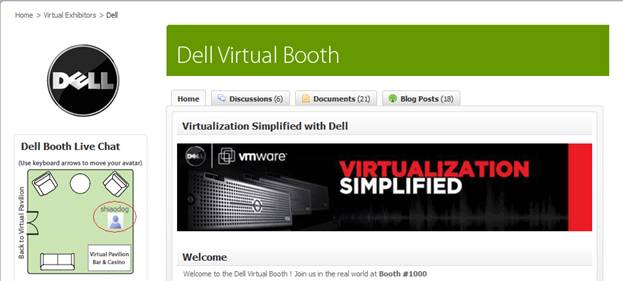
VMworld created virtual conference sponsorship packages for exhibitors, with pricing discounted if you’re already exhibiting at the VMworld physical conference.  3D style booths are planned – the current community features 2D style booths.  Here’s the Dell booth:

VMworld.com - Dell's Booth

Source: VMworld.com - Dell's Booth

This shows the top third of the booth – below it is Dell content, along with community content (blogs, discussion posts, etc.) around Dell topics. You’ll notice a “floor map” of the booth, which shows the physical location of my avatar.  Users utilize the arrow keys on their keyboard to move around within the booth.

VMworld Europe “floors” later this month (February 24-26) in Cannes.  If you’re lucky enough to get to Cannes, enjoy the show.  If you’re not able to attend, then go online and enjoy the online networking.  Registration for VMworld Europe can be found here:

http://vmworld.com/community/conferences/europe2009/


Search Engine Optimization (SEO) For Virtual Events

February 2, 2009

Flickr (martin.canchola)

Source: Flickr (martin.canchola)

These days, any publisher of information on the web is very keen to Search Engine Optimization (SEO).  If you build it (SEO) into your pages, they will come.  If you don’t, then you’re missing out on page views.  But, with all the effort we place on optimizing our web sites (e.g. corporate web sites, content sites, social media sites, etc.), how much SEO effort do we put into our virtual event pages?  I get the feeling that the answer today is “not much”.

For the external (non-private) virtual event, show organizers and exhibitors often judge success based on the number of registrations, attendees and interactions.  Basically, “the more, the better”.  However, what’s the largest source of registrations for most virtual events?  Outbound email promotions to (usually) large lists of users – where you’re hoping that some percentage of users open your email, click on the email and convert into a pre-registered attendee.  Very low on the list today is organic traffic from search engines like Google, Yahoo or MSN.

So the opportunity is quite large – improve the SEO of your virtual event and you can make a big impact on registrations, attendees and exhibitor satisfaction.  But where to start?  Well, first identify the pages on which to apply your SEO tactics.  For a virtual event, we’re usually talking about the microsite that describes your event – date, hours, speaker bios, etc..  The microsite often has separate tabs to list the event’s agenda, existing exhibitors, contacts for sponsorship info and (importantly) the event’s registration page.  All of these pages/tabs should have SEO applied.

A nice overview on SEO is titled “Search Engine Optimization 101” by Marketleap, a division of Acxiom Digital.  You’ll want to apply some of the basic concepts discussed here – including the right content on your virtual event pages; the use of meta tags; how to write good titles and strategic use of keywords.

Next, you’ll want to foster in-bound links to your virtual event microsite.  Promote the virtual event on your corporate web site (with a link).  Place links to the virtual event in your social networks (e.g. Twitter, Facebook, Linkedin, etc.).  Find blogs related to your industry and leave comments there.  Don’t blatantly promote your virtual event in the blog comment, but refer back to it (e.g. when leaving the comment, have your name be hyperlinked back to your virtual event’s microsite).  The more inbound links you can create, the higher your microsite will rank with the search engines.

Correction: comments you leave on other blogs can help with clicks (back to your blog), but do not help with SEO – most blog sites utilize a nofollow directive on the anchor tag, so search engines do not “follow” hyperlinks left in blog comments.

Finally, if your virtual event is not behind a registration wall (e.g. maybe it’s a 365 day, open environment), then make sure you provide “search engine friendly” content pages within the platform that search engine spiders can index.  Stay away from the Flash-heavy page and go with a flat, content-rich page.  Users will land here (from search engines), so be sure to provide easy navigation from this page to the main areas of the event (or environment).

For b-to-b virtual tradeshows, I’d estimate that well south of 10% of registrants are sourced from search engine traffic today.  Make it a goal at your next event to hit the 10% mark.  Your email lists will thank you.


Virtual Event Best Practices

January 23, 2009

With a number of virtual events on tap for 2009 (see the calendar of events here), marketers and exhibitors are busy preparing – assembling content for their booth, rounding up colleagues for “booth duty” and preparing the sales team for a burst of hot sales leads.  I’ve assembled past blog posts into a collection of virtual event best practices.  Without further ado:

  1. Bring the right people, have the right content (in your booth), perform the right actions and provide the right prizes (https://allvirtual.wordpress.com/2008/12/14/how-to-exhibit-at-b-to-b-virtual-tradeshows/)
  2. Utilize surveys to provide a deeper understanding of your customer prospects and generate insights back to your product management team (https://allvirtual.wordpress.com/2008/12/19/utilize-surveys-in-virtual-events/)
  3. Leverage Twitter – show-hosts can look to Twitter to expand the reach of the event’s audience and exhibitors can leverage Twitter to invite their followers to visit their booth at  the event (https://allvirtual.wordpress.com/2008/12/15/leverage-twitter-for-virtual-tradeshow-outreach/)
  4. It’s not always about “net new sales leads” – get closer to your existing customers (https://allvirtual.wordpress.com/2008/12/16/get-closer-to-your-customer-with-virtual-tradeshows/)
  5. Use treasure hunts to increase engagement (https://allvirtual.wordpress.com/2008/12/23/use-treasure-hunts-to-increase-engagement-in-virtual-events/)
  6. Have a process in place to handle the hot sales leads (https://allvirtual.wordpress.com/2008/12/31/how-to-handle-those-hot-virtual-tradeshow-sales-leads/)
  7. Utilize multiple metrics to judge success – Cost Per Lead (CPL) is the key metric for most marketers, but also consider other success metrics [e.g. quality of leads, conversion of inquiry to sales engagement, etc.] (https://allvirtual.wordpress.com/2008/12/28/what-cost-per-lead-cpl-should-i-pay-for-virtual-tradeshow-sponsorships/)

What best practices do you utilize at virtual events?  I welcome your input – feel free to drop a comment below.


For Virtual Worlds Info, Here’s Whom I Follow on Twitter (and Why)

January 16, 2009

Author's "Twitter Home"

Source: Author's "Twitter Home"

The pace of change and innovation is quite brisk in the area of virtual worlds and virtual tradeshows.  How does one keep up with the pace? One tool that I use is Twitter, the popular and very useful microblogging platform.  As it relates to virtual worlds, my uses of Twitter are:

  1. Find the news of the day – I check Twitter (and FriendFeed, too) with my morning coffee, in the same way I might have walked down the driveway to pick up the morning newspaper (when I was a kid, of course!).  My RSS feeds in Google Reader are good, but I often find more applicable and more timely virtual worlds news via the folks I follow on Twitter.
  2. Stay connected with the metaverse – I discover the influencers (and, who may soon be an influencer) and keep tabs on the chatter and commentary related to virtual worlds.
  3. Distribute information – Guy Kawasaki has blogged about how he leverages his Twitter network to generate interest in Alltop.com.  You can find one relevant post here: http://blog.guykawasaki.com/2008/12/how-to-use-twit.html.  I’ll often let my Twitter followers know about new blog posts that I’ve authored.  In fact, you may notice that I’ve done just that for this blog posting!
  4. Source new business contacts and leads – Twitter moves in two directions – you follow (and receive benefits from) others, but you ought to “give back” and share information that the community (and your followers) may find useful.  When you do that, you find that your list of followers starts growing magically (Twitter users are eager to follow others have a way of finding you), which, in turn, expands your universe of potential business partners.  In fact, you may find that business opportunities will come finding you, without any action on your part (aside from being active on Twitter) – it’s happened to me, for sure.

I follow 253 people on Twitter.  Among those, I’ll provide a short list of the folks I follow specifically for virtual worlds info (and why):

  1. @malburns: Mal Burns has made 29,696 updates on Twitter, most of which are about virtual worlds news.  I don’t quite know how he can be so prodigious, but I do know that I check his tweets to get the latest news each day.  For virtual worlds, he’s my Daily News and New York Times in one
  2. @epredator: Ian Hughes is a metaverse evangelist at IBM (based in the UK) and a blogger at eightbar – he has lots of interesting insights into the metaverse.  See related interviews that I did with Ian: Part 1 and Part 2
  3. @NickWilson and @OnderSkall – Nick Wilson and Caleb Booker (OnderSkall) are executives at Clever Zebra, a virtual worlds business.  Caleb publishes a weekly “Business in Virtual Worlds News Roundup” on his blog that’s loaded with lots of useful links and articles.  Here’s a sample: http://www.calebbooker.com/blog/2009/01/11/business-in-virtual-worlds-news-roundup-jan-5-11-2009/
  4. @skribe – skribe Forti is a Digital Media Consultant at Skribe Productions – he has his fingers on the pulse of the (virtual) world
  5. @Dusanwriter – Doug Thompson is CEO of Remedy Communications who travels in the virtual world as Dusan Writer.  He blogs about virtual worlds at http://dusanwriter.com/
  6. @reubstock – Reuben Steiger is CEO of Millions of Us (http://millionsofus.com/blog/)
  7. ADDED: @Consiliera – Gaby K. Benkwitz is “Futurist, consultant, educator” who links to articles and blog entries about the metaverse.  I also subscribe to her excellent newsfeed on Friendfeed: http://friendfeed.com/rooms/metaversenews

I’m sure I’m missing some key people – so drop a comment below to let me know whom else I should be following for virtual worlds info – and, I’ll follow them!

Of course, if you want to follow me, I’m at @dshiao.


The Effect of “Online” on the Event Industry

December 18, 2008

Newspapers and other print-focused publications have been hit hard by the migration of readers to the Internet.  Is the event industry facing a similar challenge?  It seems so, especially in today’s economic climate, when travel costs are receiving heightened scrutiny from the CFO.  In a previous blog post, I predicted that 2009 would be the Year We Go Virtual, as we witness a very sharp decline in the number of face-to-face events.

In a blog post titled “Are bloggers & social networks killing the big shows?“, Robert Scoble (@scobleizer) presents a similar view.  To quote Robert:

My sponsor, Seagate, told me they are reducing their spend this year at CES. AMD and Delphi are doing the same thing and I’m hearing about many other companies who will either stop going, or reduce the size of their booths, either this year, if they could, or in 2010 (contracts make it tough to shrink booths as fast as companies might want).

And here’s one reason why:

What’s killing them? The Internet. You can launch a product live now from a living room. Thanks to Stickam, Ustream, Qik, Kyte, YouTube, Flixwagon, Viddler, Vimeo, SmugMug, etc and blogs.

I agree with Robert, though I’d add that in the B-to-B space, you might want to launch a product from a studio (vs. your living room) and extend the reach of social networks by partnering with B-to-B publishers in your space.  The fact remains, though, that there are low-cost means for capturing, publishing and distributing video and related multimedia for launching and evagenlizing your products and services.

And, with active social nets like Facebook and Twitter, you have a cost effective publishing system for quickly spreading the word, assuming you’re spreading the right message to the right people and not spamming the universe.  I’ve seen Virtual Tradeshows as a great vehicle for handling product launches – they include the live keynote video from an executive, the follow-on presentations (Webcasts/Videocasts) and the discussions/networking (online) that you’d typically see at a physical launch event.

Of course, when you’re online, everything can be tracked and reported on.  And, you extend the reach of the content/event beyond geographical boundaries.  As Robert said, I can pitch my product from my living room.  And an IT Pro in Hong Kong can be on the receiving end of my pitch!  Another benefit of online is passalong, which can make a video, podcast or virtual event go viral.  With physical events, that’s just not possible.

While the newspaper industry is still seeking a magic potion to shift their revenues from print to online, I think the event industry should consider 2009 as the year where complementary versions of their events get launched online.  After all, that’s where we all are.


Leverage Twitter for Virtual Tradeshow Outreach

December 15, 2008

When Sarah Lacy interviewed Mark Zuckerberg on-stage at South by Southwest Interactive this past March, rumblings spread throughout the audience regarding Lacy’s interview style.  A few in the audience extended the rumblings online via Twitter – and from there, Twitter’s network effect quickly spread the commentary across the globe.  The power of Twitter (and related social networks) can be a real boon to B-to-B events, precisely because of the network effect:

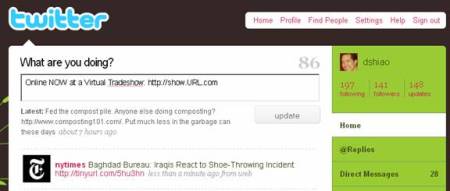
So let’s imagine I’m logged in to a Live Virtual Tradeshow (VTS).  I’m visiting exhibitor booths, viewing Live Webcasts and interacting with peers.  All in all, I’m enjoying myself.  I want to spread the word to friends and colleagues.  One quick (and efficient) way to do that is to post a message to Twitter.

Twitter home page

Twitter home page

I can “tweet” about the Virtual Tradeshow and pass along a URL to my 141 followers.  If any of those followers likes the recommendation, they can “retweet” my message to their followers.  If 5 of my followers spread the word and they each have an average of 100 followers, then my message had a potential audience of 141 + (5 * 100) = 641.  And that doesn’t even count any downstream distribution via my followers’ followers.  If my tweet happens to be picked up by a Twitter power user, my message could be seen by her 10,000 followers!

You can see how quickly and efficiently information is published.  And that’s the beauty of the network effect.  As I amass more followers – and, as more users sign up with Twitter – the potential audience of my “tweets” grows exponentially.  The result is a powerful tool for B-to-B marketers and publishers, if used right.  Publishers need to grow their audience in order to grow their revenue – new audience results in more page views, more ad impressions delivered, more online sales leads.  Where can you find that audience?  On social networks like Twitter.

VTS platform providers may want to consider:

  1. A “post to Twitter” utility within the VTS – make it convenient for VTS attendees to post a message to Twitter, including an auto-shortened URL (so their followers can access the event)
  2. A “Twitter reflector” that takes selected chat messages from the VTS and posts them to Twitter.  Imagine a user engaged in a “group chat” area who wants to share her insight simultaneously to the VTS attendees and her Twitter followers.  Allow her an easy way to do that.  Again, include a shortened URL that points back to the event

Of course, Twitter is not the only social network out there (I haven’t even mentioned Facebook and its 130MM users).  So while I’ve outlined a few ideas that are specific to Twitter, the bigger picture concept is about integrating the VTS platform with an assortment of networks.  The trick will be to pick the right ones.

You can follow me on Twitter here: http://twitter.com/dshiao