#eventprofs Profile: Jenise Fryatt (@JeniseFryatt) on Event Evolution and More

August 5, 2011

“Events will change, but they will also thrive because nothing is more satisfying than turning our online relationships into real-life face to face friendships”

Introduction

Jenise Fryatt (@JeniseFryatt, @IconPresentsAV) is Co-Owner and Marketing Director for Icon Presentations, an independent audio visual company that provides sound, video, projection & lighting support for events. Jenise is based in Southern California. Online, however, you can find her everywhere.

Jenise founded the #EIR movement by creating the associated hash tag and promoting Twitter users who “Engage, Inform and Retweet.” She’s a power user and influencer in the #eventprofs community, sharing a constant stream of useful resources that rivals the pace of Jeff Hurt (@JeffHurt).

In addition, Jenise is Community Manager for Engage365, an online community for event professionals that focuses on technology and innovation. She’s also a co-organizer for Event Camp Europe, taking place this Fall in London.

Thoughts on: Event Camp

Event Camp is a collection of events that was formed by the #eventprofs community on Twitter. Its mission is “to bring together like-minded professionals, to share best practices, and learn new strategies, for leveraging social media and technology to create enhanced event experiences.”

Event Camp Twin Cities (#ectc11) is fast approaching and Jenise recommends you attend. “Last year ECTC blew everyone away with its masterful hybrid event presentation,” said Jenise. “I’m happy to say that this year I will be sharing improv concepts and a game or two with the ECTC participants,” continued Jenise.

Event Camp East Coast gives event pros the opportunity to experience a completely attendee-driven event.  According to Jenise, “That one changed my life last year starting me on a new career path sharing improv games with non-performers.“

Thoughts on: Hybrid Events

Jenise attended her first hybrid event in 2010 (Event Camp).  She was immediately captivated by the power of hybrid events. “I particularly like what people like Emilie Barta (@EmilieBarta) have done to improve the presentation quality by blending platforms and including remote and onsite audiences as participants in one event,” said Jenise.

Thoughts on: Event Evolution

Jenise is excited by the movement in the event industry to “recognize and make use of the collective knowledge of our event participants.” According to Jenise, “I have performed and studied improv for several years and know first-hand that magic happens when you give a group the proper tools for collaborating and just let them go.”

I expect this model of active attendee involvement to accelerate. Millenials, who grew up with the web at their fingertips, are frustrated by passive audience models. Jenise expects to see “creativity in new technology and formats like virtual events, gaming elements in events and participant driven events.”

Thoughts on: Event Evolution for Associations

“One thing to watch is the threat that these new ways of meeting and collaborating so easily and inexpensively pose to the traditional ways associations are run.  Associations will have to evolve to remain relevant. Events will change, but they will also thrive because nothing is more satisfying than turning our online relationships into real-life face to face friendships.”

Thoughts on: Social Marketing for Small Business

To market a small business online, Jenise partakes in a steady diet of content creation. She maintains two blogs, Sound n’ Sight and Eventprov. She uses Twitter to promote her blog posts – and at the same time, uses Twitter to share related content that clients may find useful.

Jenise guest blogs whenever asked, moderates Twitter chats for #eventprofs and #Engage365 and regularly posts on Facebook, LinkedIn and Google+. Like I said earlier, she’s everywhere. It’s hard work, but it pays off for Icon Presentations. According to Jenise, “We now rank #1 for almost all of our key words. And I have had many business opportunities as a result of my online friendships.”

For other small businesses looking to market themselves online, Jenise has this bit of sage advice: “Change your perception about marketing.  It’s not about one-way broadcasting anymore.  It’s about building relationships with potential clients as well as those who will help to sing your praises.”

Thoughts on: Google+

Jenise has been experimenting with Google+, noting that the most active people are the early-adopter, social media geek types. So far, she likes how Google+ combines some of her favorite attributes of Facebook and Twitter.

She’s excited by Google Hangouts, the group video feature of Google+. “A few of my online friends and I have been meeting for group video chats for more than a year and have struggled with tech difficulties on several platforms we’ve tried. When we tried Hangouts it was easy and all the tech problems were gone.”

Related Resources

  1. Web site: Icon Presentations
  2. Blog: Sound n’ Sight
  3. Blog: Eventprov
  4. Web site: Engage365
  5. Web site: Event Camp Twin Cities

Subscribe

Did you enjoy this blog posting? Subscribe to the feed here: https://allvirtual.wordpress.com/feed/


Book Review: Delivering Happiness by Tony Hsieh (@Zappos)

July 30, 2011

Pictured: My hand, simulating the Facebook “Like” icon.

Disclosure: This post contains affiliate links to the book’s listing on Amazon.com.

Reviewed: “Delivering Happiness: A Path to Profits, Passion and Purpose” by Tony Hsieh, CEO of Zappos, Inc.

Introduction

I enjoyed reading “Delivering Happiness” more than any other book of the past five years. It’s not your typical “business book.” Rather, it includes key insights that you can apply to your own business, but it provides so much more.

It covers culture, happiness, theories of happiness, inside stories about Zappos and entertaining stories about Hsieh’s life. Rather than provide a formal review, I’ll highlight sections that I found particularly interesting.

Great Stories

In the first paragraph of Chapter 1, we find the heading “Worm Farm.” Hsieh writes that at age 9, his parents spent $33.45 “for a box of mud that was guaranteed to contain at least one hundred earthworms.”

Hsieh built a worm box and every day he’d dump a few raw egg yolks on top of the “farm,” in hopes that the worms would reproduce. After 30 days, Hsieh checked on his “crop”, only to discover that the worms were all gone. He had placed chicken wire beneath the mud, and the worms had all escaped.

According to Hsieh, “my burgeoning worm empire was officially out of business.”  A book that begins with a story about a worm farm. I was immediately hooked.

The Inside Scoop

In this era of “inbox overload,” we tend to bad-mouth email. But reading this book made me realize how powerful email can be as an archival tool. Emails capture a moment in time and are great at telling stories. Hsieh supplements his great stories by including archived emails.

Hsieh includes emails from the earliest days of Zappos, through to 2009, when Zappos joined forces with Amazon. Hsieh includes his company-wide email concerning the Amazon transaction, which was posted publicly to the Zappos blog.

In addition to email as a storytelling tool, Hsieh draws upon the extended Zappos team to tell their own stories. As an example, page 61 features “My First Shoe Show as a Zappos Employee, by Fred,” which was contributed by Fred Mossler, a member of the founding team.

The Culture Book

The Culture Book started with a simple idea from Hsieh, “We should just ask all of our employees to write a few paragraphs about what the Zappos culture means to them, and compile it all into a book.”

The Culture Book is published once a year and contributions from employees are not edited or censored. The book documents how the Zappos culture evolves over time. In addition, the process of compiling the book has the positive side effect of gaining insights into employee satisfaction. Complaints and criticism, for instance, can serve as a wake-up call on a particular issue.

If you visit the Culture Book web site, you can fill in your mailing address to receive a free copy of the book!

Risking It All to Chase a Dream

All entrepreneurs chase dreams. When they reach a critical juncture, however, some entrepreneurs cut their losses, while others risk it all and forge ahead. Hsieh and his team are obviously the latter – they were down to 2 weeks of cash and Hsieh needed to sell a loft (40 percent below the price he paid for it) to keep the company afloat.

Hsieh writes, “Even if Zappos failed, we would know that we had done everything we could to chase a dream we believed in.”

A Movement to Deliver Happiness

“Delivering Happiness” is more than a book. It’s now a movement. On the movement’s web site, you can join an online community, take a pledge, read real stories,  submit your own story and find in-person meetups to connect with other deliverers of happiness.

Related Resources

  1. Buy the Book: On Amazon
  2. The book’s web site.
  3. Delivering Happiness Movement on Twitter (@DHMovement).
  4. Delivering Happiness on Facebook.
  5. How Twitter Can Make You a Better (and Happier) Person” – article by Tony Hsieh.
  6. The Zappos blog.
  7. A page showing tweets from Zappos employees.

Subscribe

Did you enjoy this blog posting? Subscribe to the feed here: https://allvirtual.wordpress.com/feed/

Note: I invite you to connect with me on .


Virtual Events Q&A

July 27, 2011

Read the full Q&A: http://www.icon-presentations.com/blog/bid/40930/Virtual-Events-for-eventprofs-Q-A-with-Dennis-Shiao

Introduction

Icon Presentations is “one of the country’s presentation leaders specializing in projection and wide screen video blending.” Jenise Fryatt (@IconPresentsAV) is with Icon Presentations, where she authors the Sound n’ Sight blog.  I had the privilege of doing a Q&A with Jenise on her blog, on the topic of virtual events.

Q&A

I provided answers to the following questions:

  1. Can you define “virtual event”?
  2. What do you think is the biggest myth about virtual events?
  3. What do event professionals need to learn about them?
  4. Can virtual events help planners to show a measurable return on investment for their clients?
  5. How do you determine which kind of virtual event will best meet your needs?
  6. What resources would you suggest for event professionals who want to learn more about virtual events?

To read my answers, view the full blog posting at Sound n’ Sight.


Why Twitter Should Stay at 140 Characters

July 23, 2011

Introduction

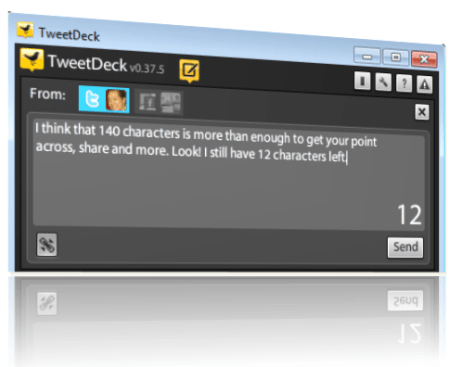
I’m selfish. I like Twitter just the way it is, which means that it should retain its 140 character limit on tweets. On Slate.com, Farhad Manjoo (@fmanjoo) wrote a piece titled “The End of 140.” Twitter’s 140 character limit relates to the 160 characters available in SMS messages (text messages), for which the service was originally designed.

Manjoo argues that “very few Twitter users now access the system through SMS” and the 140 characters “prevents meaningful interaction between users.” Manjoo urges Twitter to consider a doubling of the character limit, from 140 to 280 characters. I hereby present my reasons for Twitter to “keep it the way it is.”

Makes Us Better Writers and Sharers

When all you have is 140 characters, you get right to the point. Extraneous details get dropped and you become a “pro at prose.” When tweets are more efficient, you win, and more importantly, your followers win. The world would be a better place if other content (e.g. TV commercials, marketing content, conference calls [ha ha]) were limited to 140 characters!

Of course, as Manjoo rightly points out, it does happen that the 140 character limit “turns otherwise straightforward thoughts into a bewildering jumble of txtese.” But I think 140 characters raises the bar and challenges users to do better. Manjoo cites a sample tweet from Senator @ChuckGrassley:

“Pres Obama while u sightseeing in Paris u said ‘time to delvr on health care’ When you are ‘ hammer’ u think everything is NAIL I’m no NAIL.”

Here’s how I would have written the tweet:

“President Obama said: ‘Time to deliver on health care.’ When you’re a hammer, you think everything is a NAIL. I’m no NAIL.”

Eliminated some extraneous details and I’m left with 18 characters to spare. This can work at 140, right?

Link Sharing Works Great As Is

Let’s face it – Twitter is used by many to find and share content. The current system works great. Users post an article title, sprinkle in a few words of commentary and then provide a shortened link to the page. Perhaps they’ll append a hash tag or two. In a world of 280 available characters, tweets become messier and users become lazier.

So I have 140 extra characters? I can keep that long URL unshortened. I can add a few more random thoughts. Yes! I can append another 5 hash tags that are not related. With 140 characters, I can promote a blog posting as such:

In This Era of Digital and Social, The Extended Family is Closer than Ever: http://bit.ly/oySJ18

With 280 characters, it’s too easy for that to become:

In This Era of Digital and Social, The Extended Family is Closer than Ever: https://allvirtual.wordpress.com/2011/07/16/in-this-era-of-digital-and-social-the-extended-family-is-closer-than-ever/

The former is more elegant and easier to parse.

280 Characters Fundamentally Changes Things

And that brings me to perhaps the most important point. Moving from 140 to 280 characters would fundamentally change the entire Twitter experience. It would turn Twitter from micro-blogging to mini-blogging. With 2x the available capacity (per tweet), browsing through your tweetstream takes on a whole new feeling.

Instead of scrolling past short, concrete thoughts, you’d now see short thoughts intermixed with longer thoughts (that could ramble on). With Twitter at 140, I can scan. With Twitter at 280, I’d have to read. And reading through a tweetstream would significantly slow me down and make Twitter less useful for me.

Conclusion

Dear Twitter, I like you (love you?) at 140 characters. Three cheers for the status quo.

Feel free to tweet that. You’ll have 52 extra characters.

Related Content

  1. Why changing Twitter’s 140-character limit is a dumb idea, by Matthew Ingram at GigaOM.

Subscribe

Did you enjoy this blog posting? Subscribe to the feed here: https://allvirtual.wordpress.com/feed/


Share Ideas Across iPads with Idea Flight

July 19, 2011

Introduction

According to a blog post introducing the service, Idea Flight “is a new tool to share ideas, presentations, documents, designs, and whatever else you can think of easily from one iPad to many. It enables one person, whom we call the Pilot, to control the screens of multiple iPads, whom we call the Passengers.”

The iPad app was developed within Conde Nast, by a small team focused on creating new digital opportunities for the company. “The inability to give controlled design presentations on the iPad” was a business challenge that inspired team member Don Eschenauer (Director of Design) to create the app.

Internal Pre-Launch

Prior to launching the app in the iTunes App Store, Idea Flight underwent a pre-launch beta internally, with users representing Sales, Design and Project Management.

Juliana Stock, Senior Director, Marketing & Product Development, indicates that the pre-launch helped their “discovery and roadmap validation” and that Conde Nast colleagues “tell us they use it in their personal lives to share photos or at their kids’ schools.”

Use Cases

Stock envisions the app being used “anywhere people have a lead who wants to keep everyone on the same page.” Potential users include:

  1. Education
  2. Cultural institutions
  3. Museums
  4. Choirs
  5. Sales teams
  6. Real estate brokers
  7. Event planners
  8. Companies that license computers and tablets
  9. Small businesses

Beyond Sharing

In an insightful post about the technical considerations behind Idea Flight, Robert Tolar Haining, the team’s Technical Architect, described the scenario that led to the app’s LinkedIn integration (i.e. a new employee who, during a meeting, asked Robert whom was speaking). The “passengers” in Idea Flight sign in to their LinkedIn account and the flight “manifest” lists information pulled from passengers’ LinkedIn profiles.

So the app goes beyond sharing to also address connecting. According to Stock, “as more people rely on devices for creation, communication and connecting, this app triangulates all three” [source of quote].

My Take on: Market Fit

Currently, Idea Flight works over WiFi and Bluetooth and supports a maximum of 15 passengers. As such, it’s suited to small, in-person gatherings and is not competitive with online meeting software, such as WebEx or GoToMeeting (both of whom already have iPad apps and allow presenters to share their entire desktop).

Improving small, face-to-face meetings” may be a good niche market to hone in on, with broader aspirations to follow later on. To achieve broader adoption, the team will want to look beyond the iPad, to support Android tablets and perhaps smaller form-factor devices (e.g. smartphones).

My Take on: Additional Use Cases

We’re sure to see many innovative uses of Idea Flight. Here are two that immediately come to mind for me.

College Lectures

For professors who are so inclined (and for schools with a high adoption of iPads among students), the whiteboard/blackboard goes away. Instead, the day’s lecture is prepared on an iPad, which enables the professors to embed hyperlinks to related content.  For instance, on the first day of class, professors often provide the list of required textbooks. These could be embedded in the PDF that is shared with passengers (students).

In addition, future revisions of Idea Flight could allow for the professor to push out exercises (e.g. quizzes, related reading, etc.) that students are asked to participate in. I’ll call this “hands on learning, enabled with a swipe”.

Conferences and Trade Shows

With iPads becoming prevalent at physical conferences and trade shows, Idea Flight could create a virtual event layered on top of the physical event.

First, attendees at the back of the room could view the presentation on their iPad, rather than squinting at faraway display monitors. Next, publishing the “manifest” to all “passengers” could allow attendees to view the LinkedIn identities of everyone else (connected to the service), enabling a stream of comments and connections.

More Efficient Meetings

New features could make all meetings more efficient. For instance, a “feedback loop” could allow passengers to vote up/down a particular slide, giving the pilot real-time feedback on the presentation.

In addition, a “raise hand” indicator could signal questions to the presenters, without having to interrupt them in mid-speech. Finally, a “leave a note” system could allow passengers to leave comment(s) on particular pages, that presenters could review during (or after) the meeting.

Conclusion

I’m interested in watching the adoption of Idea Flight, including the innovative uses that arise. Use the comments section below to let me know if you’ve tried it.

Watch a Short Video on Idea Flight

Related Resources

  1. Blog posting, “Charting the Course” (on Idea Flight)
  2. Blog posting, “Introducing Idea Flight for iPad
  3. The technical approach behind Idea Flight
  4. The team behind Idea Flight
  5. Idea Flight brochure [PDF]

Subscribe

Did you enjoy this blog posting? Subscribe to the feed here: https://allvirtual.wordpress.com/feed/


In This Era of Digital and Social, The Extended Family is Closer than Ever

July 16, 2011

Note: I found this image to be perfect for this post; however, I have no known relation to the nice couple pictured.

Introduction

While nuclear families remain in one household, doesn’t it seem like our extended families spread further and further away from us over the years? Weddings, job transfers, lifestyle moves, home upgrade/downsizing, etc. – they pull our extended families in all sorts of directions, both within the States and across the globe.

And yet, with today’s prevalence of broadband, mobile technologies and social tools, doesn’t it feel like we’re as close as ever? How great is that.

Analog Days

Back when I was in elementary school, I remember recording audio tapes with my sister (in Chinese) that my mom would send to our maternal grandmother. Wouldn’t it be great for her to hear her U.S.-raised grandchildren attempt to speak Mandarin? Some two weeks later, grandma would get the tapes in the mail and be able to play them.

Fast forward to today, where my daughter leaves comments for her grandmother on Facebook (via my account), records a video greeting for her via my smartphone, or simply “dials” her up for a real-time video chat via Skype. In this era of digital and social, interactions are in real-time (when we want them to be) and we know more about our extended family than ever before.

I’ll highlight some of the tools that my extended family uses to stay in touch.

Photo and Status Sharing on Facebook

I once read a quote from a prominent executive, who noted that he learned more about his daughters in a few months on Facebook than he learned over all the years raising them. Isn’t that amazing? For people I’m closest to, I’ll learn things on Facebook that I otherwise would not have learned seeing them day in and day out.

In my extended family, photo and status sharing on Facebook has been great for daughters, sons, cousins, aunts, uncles and grandparents to have a sense of what’s going on in everyone’s lives.

Related Post: Why Facebook Is The World’s Largest Virtual Event.

Photo and Video Capture via Handheld Devices

From the iPhone’s high-quality camera to Flip video recorders, it’s easier than ever to record special moments wherever you happen to be: at home, on vacation, at graduation, or watching baby’s first steps.  The image and video quality captured by handheld devices has never been better.

In addition, the ability to instantly share, via email, Facebook, Twitter, etc. has allowed extended family members to “participate” in the moment a few seconds after it happened.  My mom, who would receive frequent Flip video footage of granddaughters on each coast, once remarked that “I love the Flip, it’s allowed me to watch my granddaughters develop.”

Real-Time Video Chat via Skype

My extended family is a big fan of Skype. We tend to do synchronized video calls, where we pick a set time to call one another. We have three generations of the family using it, from grandchildren through to their grandparents. It’s really a lot of fun to observe grandparents video chatting with their grandchildren.

While I don’t expect the grandparents in our family to be enabled with mobile video, I do expect the younger generations of the family to practice more and more “spur of the moment” video calling, via Facetime, Skype for iPhone/Android and related technologies.

Related Post: How Mobile Video Changes Things.

Email

Email is the original “connector” for my extended family and for many others. Email continues to serve a purpose. It’s often used to ask a question of other family members (where, perhaps, Facebook is not the right tool).

And it’s a common distribution vehicle for much of the sharing we do (i.e. you want some more private sharing options beyond Facebook). But it’s interesting how email usage within the extended family is down a bit, due to the extensive sharing via Facebook, Skype, etc.

Conclusion

It’s a great time for extended families. With the combination of broadband, digital and social, go ahead and move halfway across the world – we can remain as close as ever.

Use the comments area below to let me know how your extended family stays in touch! Thank you.

Subscribe

Did you enjoy this blog posting? Subscribe to the feed here: https://allvirtual.wordpress.com/feed/


How Mobile Video Changes Things

July 15, 2011

Photo credit: Tommyvos on flickr.

Note: This is a collaborative blog post authored by Jim Reilly (@oldantler) and me.

Introduction

In the first generation of web-based video calling, families could stay in touch (e.g. Skype), while companies could conduct business meetings over several locations (e.g. Polycom, Cisco Telepresence, etc.). Mobile-based video calling options dramatically changes things.

iPhone users can now call one another via the pre-installed Facetime app, as long as both parties are connected to a WiFi network. With Skype app (iPhone, Android and Symbian), Skype users can video-call one another from their smarthphone over WiFi or 3G. Let’s consider a few use cases to demonstrate how mobile video changes things.

Calling Home While on Business Travel

Let’s say Mom has gone on a business trip for a few weeks. In a typical scenario, Mom calls home each night to check in with Dad and the kids. If Mom has her PC with Skype installed, perhaps they do a video call every other night. Now, imagine Mom has an iPhone. She connects to her hotel’s WiFi network and dials up her daughter at home using Facetime. The daughter has an iPod Touch and is connected to the WiFi network at home.

Now, Mom and daughter can see and hear one another. And with mobile, they can now see their surrounding environments as they walk about. When Mom asks, “Are you taking good care of my garden?”, the daughter can walk to the garden and give Mom a close-up view of the vegetables. When the daughter asks, “How is your hotel room?”, Mom can give her a quick tour.

Buying a New House Before Relocating

When a family relocates to another part of the country, the husband or wife typically heads out before the rest of the family, to secure housing and get things set up. This can make home-buying a challenge, as both spouses are not able to see the house before making a decision. Mobile video changes that.

Now, the husband can land in the new city, make appointments with a realtor, then video-call his wife to view the houses together. He can take his wife through the family room, kids’ bedrooms and yard.  While the listing page (on the web) for the house may provide panoramic, 360 degree views of the home, the mobile video-call transforms the 360 degree view from an “on-demand viewing” to a live guided tour.

Repairing a Server in The Data Center

A server has gone down and the only engineer available is the most junior member of your IT team. Not to fear – have him initiate a video call once he arrives. From there, senior members of your team can provide direction on how to fix the server.

The junior engineer powers down the server, then pulls out the blade server in slot 2. He points his smartphone at the server as the senior members explain how to carefully extract the card. Note that in this scenario, mounting the phone on a tripod would be helpful, to free up the junior engineer’s hands!

Emergency Services

A member of the public comes across an unconscious person in the street, dials the emergency services and is not only sent animated instructions to their phone, but the trained medical staff taking the call gives advice based on video observation of the subject, not just vague description. Vital minutes are saved to administer the correct first aid and potentially saves the person’s life.

Turning Trade Shows into Hybrid Events

Video calling can connect trade show and conference attendees with remote users who were not able to attend in person. The on-site attendee can take the remote attendee on a walk down the exhibit floor.

Exhibitors can take prospects through a tour of their booth, showing them their latest product offerings (in the same way you’d do in person). If the remote attendee switched to a desktop (e.g. with Skype), s/he could even conduct interviews with on-site attendees and post the interviews on a web site or blog. Mobile video allows the physical event experience to be shared with anyone.

Enhancing the Experience with Augmented Reality

With the development of augmented reality (AR), the examples above become even more useful and compelling: in home buying the video tour is augmented with room dimensions, distances from local amenities and details of local crime rates; in repairing the server the nearest spares supplier can be identified and the replacement part purchased there and then; and with trade shows, the video of a stand or product is enhanced with background information, case studies, product specifications, availability and costs.

Further Thought

We are talking about delivering these services over the top (OTTP) of the mobile networks. Where the future possibilities get really exciting are when these services are delivered as an integral part of an intelligent, mobile network.

The network knows a lot about the customer and hence it can prioritise and contextualise the experience. Frightening? Too Big Brother? Or the best way to filter information when we are exposed to ‘way too much’ content and have less and less time to sift through it and consume what we select?

Conclusion

When video arrived on the web, it changed things. Mobile video has arrived in the form of smartphone apps that are “detached” from the “web.” While we’ve listed just a few examples (above), our belief is that mobile video will have a far greater impact on communications than web video. The world becomes flatter and flatter by the day.

Subscribe

Did you enjoy this blog posting? Subscribe to the feed here: https://allvirtual.wordpress.com/feed/


A Look at The Future of Online Instruction

July 9, 2011

Photo credit: abbynormy on flickr.

Note: This is a collaborative blog posting made possible by PBworks. The concept behind this posting began with an innocent tweet from a few weeks back, in which I noted that my daughter asked me for knitting instruction.

Introduction

Want to learn how to knit, but don’t have an instructor available? The first place you’d probably turn is your preferred search engine. And after a search or two, you’d likely come across KnittingHelp.com.

On this site, you can find written content, a forum and a collection of excellent how-to videos. And while the content and videos are quite good, what if you wanted a little more hand-holding?

For instance, elementary or middle school students looking to knit for the first time may not know where to start. They’d prefer an after-school class or private instruction to get them started. Let’s consider a few web-based solutions that could address these aspiring knitters.

Real-Time Video Instruction

Instead of “on-demand videos” (the KnittingHelp.com model), a student could connect with an instructor over a real-time video conference, using systems such as Skype or Facetime.

A flexible webcam would work best, one that can seamlessly alternate between two angles: (a) a view of the participant’s face and (b) a view of the knitting needles. This way, the session can begin with instructor and student seeing each other face to face, which is important to establishing a comfort level with one another.

Then, with both webcams focused on their respective knitting needles, the instructor could perform a few steps, while watching the student follow along. Real-time video (and audio) allows the instructor to provide constant and immediate feedback, which can facilitate more productive learning.

Real-Time Immersive Knitting

Next, imagine a 3D immersive environment, in which the instructor’s avatar meets the student’s avatar. Using mouse or keyboard controls to manipulate the knitting needles and yarn, the instructor and student can take turns with “immersive knitting.”

Much like an online meeting in which the presenter “passes the ball,” the instructor can “pass the needle” to the student to take control and practice knitting. While the immersiveness can be useful to visualize the proper knitting procedure, it’s not as effective as handling the needles and yarn with one’s own hands.

(A comment from Jim Reilly [Twitter])

“I see this as having little value – why use a new language (using computer keys) to knit, so that you then have to translate back to the original language (knitting needles) when you actually want to learn the skill and create something real?

I would also suggest including an example of how this technology could be employed so the motions detected through the motion sensors could be translated, through a modified knitting machine (substitute potter’s wheel for another of your examples) to deliver a product, almost in real-time, on the other side of the world.

The possibilities for physically disabled people to use the immersive environment and associated tools to create art and functional items is also worthy of note.”

Real-Time Immersive Knitting with Motion Detection

This scenario can be thought of as “3D immersive environment meets Microsoft Kinect.” Imagine the same 3D immersive environment, but using a motion-sensing device such as Microsoft’s Kinect.

Now, you can handle virtual knitting needles and watch the resulting scarf and sweater on the screen.  A Kinect device on the instructor’s workstation allows her to “take control” of the knitting. Together, instructor and student can knit collaboratively – imagine the interesting sweaters and garments they could create and then sell in Second Life or IMVU!

Alternatively, imagine a “real” (physical) ball of yarn, with “real” (physical) needles, working in conjunction with a motion detection system. As the student knits, the instructor sees a digital representation of the yarn/needles and can provide instruction based on the student’s knitting motions.

But Can Knitting Students “Really” Learn this Way?

(The following segment was contributed by Heidi Thorne [website] [Twitter])

When I was about 9, I learned to knit from my dad (yes, my dad!). That was in the physical “real” space. When I didn’t know how to do something, I could ask OR I referred to books. My how things have changed! It would have been so helpful to have a KnittingHelp.com resource around.

Interestingly, I didn’t learn to do the stitches (English) exactly as shown in the video. It looks somewhat awkward. But I think it points to an important aspect of online instruction, whether it be online video, real-time immersive, or with motion detection: It standardizes the way things are done, detail by detail.

Old-time (like 40-50 years ago) books would show here’s what the work looks like at step 1, then what it should look like at step 2, and the part between step 1 and 2 was somewhat of a mystery. It’s really difficult to turn mystery into mastery! So in that sense, yes, I think these new virtual learning models have incredible potential.

As noted earlier, knitting, like many other tactile arts, is difficult to translate into mouse and keyboard controls. So the real-time immersive knitting, without motion detection, has limited utility in this case. A 3D immersive environment which uses Microsoft Kinect type technology presents possibilities.

But, again, learning to deal with the tactile sensation of fibers, which can be uniquely uneven by default or design, is missing. It’s similar to driver’s ed simulators. Yes, you can drive along perfectly and the virtual traffic behaves. In the real world, well, traffic is less polite.

In sum, I believe that these technologies are excellent for early learning experiences since they take away some of the bumps and bruises that go with it, creating confidence through success on a small scale and at a faster pace.

“Hands-On” Practice

(The following segment was contributed by Jenise Fryatt [website] [Twitter])

I believe there is great value in methods of teaching that actually give you practice while using your hands. I believe there is research that shows that using your hands actually helps the brain to think better. http://www.washingtonpost.com/wp-srv/style/longterm/books/chap1/hand.htm

I also believe that when the mind experiences the sensation of doing something, whether it be flying a plane in a simulation or laughing at failure in an improv game, the same neural pathways are created as are created in real life. Thus games and simulations can be amazingly effective teaching tools. I don’t think we’ve even begun to explore all they may be capable of accomplishing.

Conclusion

In addition to knitting instruction, the technology models we’ve outlined (above) could also apply to guitar instruction, pottery, painting and more. With technologies such as video, 3D immersion and motion detection, the possibilities are seemingly endless.

Subscribe

Did you enjoy this blog posting? Subscribe to the feed here: https://allvirtual.wordpress.com/feed/


Why Facebook Is The World’s Largest Virtual Event

July 5, 2011

Introduction

I define a virtual event as “a web and occasion-based gathering that facilitates information sharing, collaboration and interaction.” Virtual events typically involve hundreds, if not thousands of simultaneous users.

Facebook enables the very same information sharing, collaboration and interaction, but does so on top of a user base of 700+ million registered users and 500 million active users.

Facebook is by far the world’s largest virtual event.  The “Facebook virtual event” is a perpetual motion machine that runs 24x7x365. If Facebook were a city, it would be The Big Apple (the city that never sleeps).

Millions of Simultaneous Users

Of Facebook’s 500 million active users, 50% (250 million) log on during any given day (source: Facebook statistics page). For highly active Facebook users, “being awake” or “being online” equate to “being on Facebook,” whether from their desktop computer at work or the mobile device in their pocket.

Of the 250 million users who login to Facebook, let’s assume that 25% are currently asleep (after all, 70% of Facebook users are outside of the United States). That leaves us with 187.5 million users. Of those, let’s say 50% are not currently on Facebook – perhaps they’re at work, or otherwise occupied. We’ll say the remaining 50% are online and “actively engaged” with Facebook.

Our non-scientific analysis leads us to conclude that there are approximately 93.75 million users online right now on Facebook.

Virtual “Events” for Brands (aka Status-casting)

Facebook isn’t a single virtual event, of course. It’s a collection of ad hoc, “spur of the moment” events that any person (or page) can create.

Brands now leverage their Facebook Pages for real-time engagement with fans, customers and prospects. In the past, brands tried to broadcast their message to the world (e.g. a TV commercial). Today with Facebook, they can status-cast.

I define a Facebook status-cast as a wall post that invites fans/followers to view content and provide input. On a brand page with a large following, a status-cast can generate hundreds of comments and thousands of “Likes” within a few minutes of the original post. Brands who status-cast typically share content that’s “on demand” (e.g. a video highlight from the game), but it’s also possible to stream live video from your brand page, as the Obama administration has done on the White House Facebook Page.

Virtual Events for Users

Beyond viewing friends’ status updates and checking out their photos, look at all of the “tools” at my disposal (above) as a Facebook user. It’s no wonder why users “stay on” Facebook for so long. I can:

  1. Look for upcoming Events
  2. Chat (in real-time) with Friends
  3. Play games
  4. Share my “game status” with Friends, or invite them to help
  5. Ask a Facebook Question
  6. Join new Groups
  7. See what my favorite brands are up to
  8. “Check in” (from my mobile device)
  9. Look for Deals
  10. Find new Apps

Conclusion

The world’s largest virtual event is one that never ends. Facebook started as a way to connect with friends and share status updates and photos. Today, it serves as The World’s Fair, online.

Subscribe

Did you enjoy this blog posting? Subscribe to the feed here: https://allvirtual.wordpress.com/feed/

Note: I invite you to connect with me on .


Let’s Collaborate on The Next Few Blog Postings

June 29, 2011

Photo credit: Donkey Hotey on flickr.

I WANT YOU

I’d like to author my next few blog postings collaboratively. I’ve developed the “shell” for two postings and am making the content available for anyone to edit (via a wiki).

I’ll play the role of Editor. If your contributions are relevant to the topic of each post, I’m not likely to change anything. Inappropriate comments will be deleted.  If I accept your contribution, I’ll list your name and contact info (if you desire) in the blog posting.

Next Steps

I’ve started blog postings on “learning to knit online” and “how mobile video changes things.” Here are the wiki pages:

Wiki: How to Learn Knitting Online

Wiki: How Mobile Video Changes Things

By default, you’ll land on the “View” tab, in which you can read the draft posting.  To contribute to the posting, click on the “Edit” tab (immediately to the right of the “View” tab).

The wiki is hosted by PBworks and if you don’t have a PBworks login, you’ll be prompted to create one.

I’m looking forward to collaborating!