From Virtual Events To Virtual Business Communities

May 31, 2010

Increasingly, virtual event planners are keeping their virtual events “open” year-round.  The model is evolving from a focus on the annual live event to a focus on the overall business environment, which has live events scheduled throughout the year.

Hence the progression – first, the virtual environment is kept open year-round (“Come in, we’re open”).  From there, virtual event planners become virtual community managers to evolve the environment into an active and engaged community.

Your virtual business community is quite similar to a social network (e.g. Facebook, Twitter, etc.).  Thus, look to those social networks for effective community building and networking tactics.

Content

“Traditional” content forms the foundation of your business community: on-demand webcasts, videos, documents, articles, etc.  That being said “non-traditional” content is what makes a community shine and prosper – it includes other members and their associated user-generated content (e.g. 1:1 and group chat, message boards, blogs and old-fashioned community discussion).

Users may be drawn into your community for the professionally produced content – what makes them stay, however, are the connections with other members and the business conversations that unfold.
Draw them in – with Email

Some community sites (e.g. Facebook) are fortunate enough to have members login as their first stop on the web each day – today, it’s not likely that a virtual business community can achieve the same loyalty.  The key, then, is to provide community members with reasons to return, login and participate.

Email may be considered old fashioned by some, but it still works.  Want proof?   Look no further than Facebook, Twitter and LinkedIn, which all use email effectively to notify members of activity and bring members back into the community.  Examples:

  1. Facebook – I receive email when a Facebook friend has commented on my Wall posting – additionally, when I submit a comment on a friend’s posting, I receive email when subsequent comments are posted.
  2. Twitter – I receive email when new users follow me on Twitter; in addition, when a user sends me a “direct message” (DM), I receive an email with the text of the DM.
  3. LinkedIn – When I comment on a LinkedIn Discussion thread (in a LinkedIn Group), I can opt in to receive email notifications on subsequent comments posted.  This way, I’m instantly notified as other group members comment on my comment, with the email containing the text of the submitted comment.

For your virtual business community, utilize similar email notifications to alert members of new activity and draw them back in to the environment.

Once they’re in, keep them Engaged

Now that you’ve successfully drawn members into the community, keep them active and engaged.  Build tools like the Facebook Status Bar:

The Notification component of the status bar is an area that I check each time I login to Facebook – I want to know who’s “liked” my comment, picture, video or link – and what they wrote about it.

Notifications keeps you engaged once you’re in – and can even serve to draw you there (in the first place).  I occasionally login to Facebook solely to check for new Notifications!

Mobile Integration – Draw them in, from their device

Facebook, LinkedIn, Twitter, Foursquare, etc. provide a variety of mobile apps, developed by the companies themselves and by third party developers.  With mobile apps and mobile clients, members can stay constantly connected to their social networks and communities – they can always stay “in touch”, literally and figuratively.

With a virtual business community, mobile integration does not need to be about 3D spaces, multimedia or immersiveness – things we often associate with virtual events and virtual worlds.  Some day, we may be able to experience full immersiveness on a mobile device.  But in a business community, it’s more about user-to-user connections at a more basic level – e.g. the likes of Twitter @replies and Facebook wall discussions.

Conclusion

Our industry still centers around the occasion-based virtual event – as event planners begin to morph into event-based community managers, they’ll need to map out tools and technologies to keep their communities active, engaged and coming back.  Should be a fun ride.

Tweet this posting:


Virtual Events And Facebook

May 20, 2010

With 400 million active users worldwide (and counting), Facebook is enormous – in fact, Facebook recently surpassed Google as the #1 web site in the U.S. (as measured by visits).

While recent announcements have stirred up privacy concerns and caused some users to delete their accounts, Facebook continues to generate millions of new sign-ups per day.  All of us know friends, family and colleagues who use the site on a daily (or hourly) basis.

Let’s consider avenues for virtual event planners to tap into the power that Facebook can provide.

Integration 0.1: Share on Facebook

More than half of my Facebook friends (54%) are work-related acquaintances – current colleagues, current business partners, former colleagues and former business partners.  The balance (46%) are friends and family.  I’m by no means the “average” Facebook user.  I believe the typical user tends towards a 65%/35% split between family/friends and work – and, uses Facebook for a family and friend focus rather than work.

That being said, it’s clear to me that Facebook users “friend” their work contacts – and I believe that over time, a growing percentage of your Facebook friends will be work-related contacts, as our personal and work lives blend and mix online.

What does this mean for virtual events?  With a B2B focus (today), this means that a “viable” audience exists (on Facebook) for you to share the virtual events that you’re attending.  Virtual event platforms should make it easy to “share the event” on Facebook, in the same way that users share a web site’s movie review, restaurant listing or product listing.

To make virtual event sharing effective, the “shared items” should include:

  1. A simple and easy to understand title (Facebook grabs the “page title” from the virtual event page you’re sharing)
  2. A suitably sized image (on Facebook, the “sharer” can choose among the images listed on the shared page)
  3. A hyperlink for interested users

If done right, 20 attendees might share your virtual event with their 200 Facebook friends – and you’ve just allowed your audience to promote your event (on your behalf) to 4,000 potential attendees (who otherwise would not have known about your event).

Integration 1.0: Live Stream Box

CBSSports.com used it for live streaming of NCAA March Madness – so did CNN.com for the live stream of President Obama’s inauguration.  As the name implies, Facebook’s Live Stream Box is useful for the “streaming” of “live” events or occasions.  The stream box provides an “Everyone Watching” tab – to submit a comment to that tab, users must authenticate to Facebook.  Even if you don’t have a Facebook account, you’ll still be able to view the running commentary from “Everyone Watching”.

Comments posted to the “Everyone Watching” tab (in the virtual event) also appear on the submitting user’s Facebook Wall.  Thus, participation in a Live Stream Box helps promote the virtual event – users’ comments appear in the News Feed of their Facebook friends, which generates awareness of the virtual event.

Facebook members have the added benefit of a “Friends” tab, which allows users to view their Facebook News Feed, right there from the stream box.  In a virtual event, the Live Stream Box can be placed in the Auditorium (where live sessions are broadcast), the Lounge (where visitors drop by to engage with one another) or Exhibitor Booths (where booth visitors can engage with the Exhibitor – and, one another).

Integration 2.0: Open Graph

“Share on Facebook” goes in one direction (the sharer -> her friends); “Live Stream Box” combines multi-directional interaction with a corresponding one-way share.  Facebook’s Open Graph API, announced in April 2010 at Facebook’s F8 Developer Conference, takes things to the next level.

Now, users can go beyond sharing “the event” and be much more granular in what they “like” (recommend/share) in a virtual event.  I may “like” a session, a virtual booth, a document, or even another user.  And with the Open Graph, I need not share each and every “like”, posting it to my Facebook Wall.  Instead, the “likes” can be aggregated (e.g. by the virtual event platform).

Now, when I login to the virtual event, I may choose to view the activities (and likes) of Facebook friends who opted in to the sharing service.  When I’m making a purchasing decision on a complex product or service, I can poll my Facebook friends to see who’s in the same boat.  If a former colleague attended a virtual trade show in the morning, I may login during the afternoon to view the sessions and exhibitor booths that she “liked”.

Taken at a more granular level, I may choose to see the specific product collateral that she “liked” in the virtual event, or seek out the exhibitor representative that she chatted with and “liked”.  By leaning on those whom I trust, my journey through a virtual trade show just got more productive.

Conclusion

Facebook and its 400+ million users cannot be ignored.  There will be more and more business decisions guided (and made) on Facebook – it can be a great place to “share” your virtual event, both the event as a whole and individual elements within it.

Tweet this posting:


Virtual Events In Europe: Best Practices, Learnings And Observations

April 19, 2010

The following is a guest post from Miguel Arias of IMASTE.

In the past months we have delivered a virtual career fair in partnership with Monster.com in various European countries. After a number of successful events in France, United Kingdom, Ireland and Italy (and with the imminent launch of the German version and preparations underway for the Polish and Czech versions), it is time to evaluate the project.

With a reach of over 400,000 unique attendees and more than 200 participating exhibitors to date, the Monster European virtual job fairs have become a very relevant case study about the way virtual events and tradeshows are being hold in Europe.

There are a few issues that I would like to point out:

Market differences within Europe

The fact that each of those markets has a different language is a known fact, which demands a certain level of customisation capabilities in the virtual event platform. This affects not only the code language but also all the 3D environments, interfaces size, fonts, etc.

And some of the countries have many official languages; therefore virtual event platforms need to have “real time” Multilanguage capabilities.

But, there are some other subtle differences that may have a big impact for virtual event production and development. For instance, legal differences lead to changes in the résumé data model and in different levels of integration with the partner´s databases.

Different customer expectations

The penetration and market awareness of virtual events is different in the UK, France and Italy. This leads to relevant gaps in terms of pricing, willingness to pay or expected features for the potential customers in each of those countries. Live interaction seems to be more relevant in UK or France, while an immersive user experience ranks higher in the Italian market.

We have also observed that French companies are keener to virtual stand customisations than British companies. It is difficult to generalise, but there seem to be some trends there.

Different marketing approach

In line with the last idea, the effectiveness of some marketing tools is quite diverse. The use of social media to promote the event has proven more successful in our French events than in other countries, while the effect of SEO/SEM strategies have worked better in UK. There is a need of knowing which are the best specific web traffic drivers of each country, to ensure high quality attendees in each event.

Vendor – client relationship

Since virtual events are “live” events, there is a need of a common trust between the event producer and the virtual event vendor. In order to build this relationship, factors like distance, time zone sharing and face-to-face trainings, meetings and follow up are very relevant.

We hired native country managers in Imaste for the French and British market, and will be doing the same with the Italian and German market in the following weeks.

To summarise, I would say that, the Monster Virtual Career fairs, in spite of being delivered for the same company and being the same type of event, implied an important percentage of adaptation and flexibility in each country. And the personal relations that go with a good level of service, involve a cultural understanding of country related particularities.

I believe that Europe can’t be considered a homogeneous market as the US is. American vendors should take this into account when entering the continental Europe market.

About Miguel Arias

Miguel Arias founded IMASTE in 2003 in hopes of building a bridge between companies and university graduates via live career fairs. Over the years, IMASTE has evolved to become one of the major agents in the virtual trade shows and events market, with successful projects in various European and South American countries

IMASTE is a Spanish company, European leading provider of virtual events, 3D online environments and online trade-shows, which connect, inform and engage visitors and exhibitors. IMASTE´s customized solutions reduce travel costs and are environmentally friendly, while our customers are able to generate leads, networking, increase online sales chances and communicate projects or services globally.

IMASTE has delivered more than 100 successful virtual events for global clients across the globe. You may find more info in http://www.imaste-ips.com

Miguel holds a MEng in Civil Engineering from Universidad Politecnica de Madrid and a Professional MBA from the Instituto de Empresa Business School.

Related links:

http://www.monster-edays.fr/2010/printemps/

http://www.monstervirtualjobfair.com/DEMO/

http://www.fieralavoromonster.it/

http://blog.imaste-ips.com

http://www.imaste-ips.com


How To Use Twitter For Virtual Event User Support

March 8, 2010

End user support for virtual events has traditionally been provided via a small number of channels: email and telephone support (which is especially useful for users having issues entering the virtual event) and “in-show support”, which is typically provided in a “help booth” within the virtual event.  With growing use of social media, however, attendees are leveraging their social network tools to request (and receive) user support.

From my observations, Twitter is the most widely used social network for virtual event support requests (today) – however, I wouldn’t be surprised to see increased “calls for help” via Facebook and LinkedIn.  This posting provides tips and best practices on providing virtual event end user support via Twitter.

Create/Establish a Twitter Account

Users can’t find you on Twitter if you’re not there, which means that if you don’t already have a presence on Twitter, you’ll need to create one.  I recommend a Twitter ID that incorporates your company name – or, the product, platform or service that you provide (if that’s different from your company name).  In addition, be transparent about the contributors (employees) who tweet on behalf of your company and brand.

Create A Real-Time Dashboard (of  tweets)

Configure your Twitter client (e.g. TweetDeck, Seesmic, etc.) with the relevant search terms and hash tags related to your virtual event.  At minimum, you’ll want to monitor the following:

  1. @Replies sent to your Twitter account (in TweetDeck, the column is labeled “Mentions”)
  2. A search on the hash tag for your virtual event
  3. A search on your company name – or, the name of your platform, product or service
  4. A search on the virtual event’s name or title

If it helps you stay more focused, delete columns that are unrelated to the virtual event – the result will be a single app that consolidates all “chatter” related to your event.  I recommend that you monitor for new tweets every 15 minutes while the event is live.

Allocate Proper Staffing & Get Started Early

In the same manner that you allocate support staff to booths, email inboxes and telephones, be sure to allocate staff to “Twitter support”.  You want to get up and running early – I recommend monitoring Twitter at least one full hour before the official opening of your virtual event.  Virtual event producers typically allow exhibitors into the environment prior to attendees – so during the “early period”, be on the look-out for tweets from exhibitors who may need assistance finding their way into their virtual booths.

Have at least one person who is “primary” for Twitter support throughout the event day.  And, know that Twitter users expect quick turnaround to their tweets.  Trend setters such as @comcastcares have provided highly responsive and immediate customer care on Twitter, which has raised the bar for everyone else.  Users on Twitter have come to expect similar care and responsiveness.

If you do not respond within 15-20 minutes of users’ original tweet, they may issue a subsequent tweet, letting the “world” (e.g. their followers + users who are following the event’s hash tag) know that they’ve received no response from the event provider.  So be sure to provide prompt service – if your customer care is prompt and effective, you’ll be rewarded.  Users are just as quick to say “thanks” (on Twitter) and acknowledge the great service you provide.

Following Up With A User

I prefer to handle support issues via 1-on-1 care.  Before you contact the user, review their Twitter profile – as background to your upcoming dialog, it’s good to know the user’s company, title and number of Twitter followers.  I like to know if the user has an audience of 100 on Twitter – or, an audience of 100,000.  In addition, read the user’s last 10-15 tweets, to get to know his/her interests, hot buttons, etc.

Now you’re ready to make contact.  I prefer to connect directly – a direct message on Twitter (if the user is following you), a direct email (if you have his/her email address) or a private chat within the virtual event (if the user is logged in at the time).  If none of these channels are available to you, send the user a public message on Twitter and provide your direct contact info (e.g. your email address).

It’s important to personalize your brand, letting users know that there are “real people” behind your corporate Twitter account – and, providing them with a direct means for getting in touch.

1-on-1 Triage

To prepare you for a “triage session” with your end user, I like the have the following information available via URLs that I can provide to the user:

  1. Technical requirements for accessing/attending the virtual event
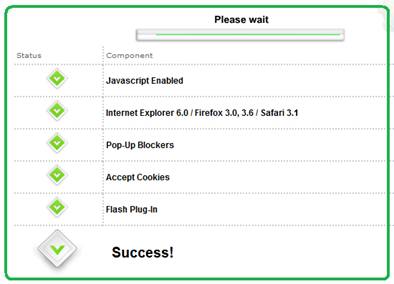
  2. Automated system check that allows a user to test their system
  3. Frequently Asked Questions (FAQ) related to the virtual event
  4. A “contact us” page related to end user support (e.g. providing an email address, phone number, etc.)

In addition, be sure to have higher level “support experts” available in case you need to delegate a sophisticated system issue.  The experts should be available within the virtual event – or, be available “on call” to jump in as needed.

Post-Resolution

Once you’ve resolved a user’s issue, follow them on Twitter – this allows them to send you direct messages.  And, it allows you to be quickly apprised of any subsequent issues they may come across.  Later on in the day, check if the user is logged in to the virtual event – if so, send a private chat request and politely ask how the event is going.  It’s always good for users to know that you’re actively supporting the event and genuinely interested in their satisfaction.

On Twitter, respond to each and every end user “tweet” – mention that the issue is resolved and invite the user to contact you back as needed.  Be careful, however, not to include the event’s hash tag on all of these follow-up tweets.  As the virtual event platform, you do not want to have a significant presence in the hash tag’s tweetstream.  Rather, only include the hash tag if your tweet relates to system-wide updates (applicable to all or most users).

The occasional update (with the hash tag) shows users that you’re listening – and replying to every single tweet shows your followers that you are responsive to each issue that arises.

The Entire Team Contributes

If your virtual event support staff is comprised of active Twitter users, encourage them to tweet about the event – have them highlight interesting sessions, pass along comments from enthusiastic attendees or simply state that they’re having a great time.  This helps promote the event itself – and, highlights the depth of the team behind the event support.  Take it a step further and create a Twitter List of your staff – allowing interested users to follow your employees tweets via a list.

Conclusion

The world is going social, which means that user support and customer service need to be “socially listening” (and responding).  Get ahead of the curve – be sure to support your next virtual event on Twitter.

Tweet this posting:


2010 Trend Watch: Virtual Events

February 25, 2010

Source: flickr (User: b.frahm)

For the virtual events industry, the premier face-to-face event of the year is Virtual Edge Summit, the “summit on virtual events, marketing & communities”.  Virtual Edge 2010 concluded earlier this week – the face-to-face event floored in Santa Clara, CA, while several vendors provided virtual components, allowing remote (virtual) attendees to participate in the experience.  The event saw record crowds from attendees, exhibitors and presenters.

From my observations at this year’s event, the following are a set of emerging trends in the industry.

Beyond Novelty Phase

Judging by the turn-out alone, the virtual event industry has officially “graduated” beyond the novelty phase.  Awareness of virtual events has broadened – now, when I meet someone at a social gathering and describe what I do for a living, the blank stare of years past has become a “oh yes, I’ve attended one of those”.

The increase of awareness (and, perceived importance) could be seen in the amount of coverage that Virtual Edge 2010 received – an increase in the number of publications (on-site), bloggers (both on-site and virtually) and analysts (both on-site and virtually).  Lastly, the volume of tweets (via hash tag: #ve10) was 5-10 times greater than last year – with more tweets per person and many more people tweeting.

With that being said, there are enormous untapped and unexplored markets, which will provide the industry much of its growth in 2010 and beyond.

More Players Emerge

I noticed a near doubling in the number of exhibitors this year, which means that new/emerging vendors significantly developed (or expanded) their virtual event capabilities – or, from a marketing standpoint, they determined it was the right time to get their products and services in front of this audience.

Last year, the exhibitors were fairly homogeneous – they provide apples-to-apples solutions and directly compete with one another.  This year, the breadth of solutions offerings (from the exhibitors) has expanded – some exhibitors do not necessarily compete directly with one another.

In some cases, a client may use one vendor for a particular type of virtual event and a different vendor in another type of event.  The result?  More “burden” on the attendees (buyers) to understand the solutions offered and determine which solution best fits their needs.  This affords some  industry players (agencies, consultants) a great opportunity to help clients and prospects navigate the waters.

Early Adopters Become Industry Thought Leaders

Practitioners (especially some of the early adopters in our industry) are quickly becoming the thought leaders and “go to source” for ideas, expertise and wisdom.  Many of these thought-leading practitioners were on stage this week – they were very generous with their sharing of experiences.  And, more than ever, they know precisely what they want from their vendors (which is a great thing for those in the vendor space).

In the early days, the practitioner would ask the vendor, “show me what you have” or “show me what you can do’.  Today, the tables have been turned.  Practitioners (clients) are now telling the vendors, “let me tell you what I need” or “make this experiential vision come to life for me”. This is an important aspect of the industry’s evolution – vendors crafting innovation via direct input from practitioners (as opposed to creating “innovation in a vacuum”).

3D Immersiveness

Interest in 3D immersiveness is picking up.  In fact, at Virtual Edge this year, roughly 20% of the session content involved 3D / immersiveness and a formal “Business 3Di” track was created.  The 3Di track featured practitioners, along with vendors such as Linden Lab, Teleplace, Altadyn, Digitell and web.alive (Avaya).  Like last year, Digitell provided a simulcast of the event proceedings into their 3D immersive platform (VirtualU).

Those are the “pure play” immersive environments.  In addition, virtual event platforms are coming on board as well.  In my 2010 predictions on virtual events, I wrote, “(virtual event) platforms take first step towards immersiveness”.  This prediction has come true.

It’s interesting, however – some vendors have a clear vision of what immersiveness enables for exhibitors and attendees of virtual events, while others appear to be adding immersiveness for the sake of adding it (i.e. lacking a clear and compelling use case).  It’s in the best interest of virtual event vendors to explore and enable immersiveness via specific client use cases – this way, the capabilities are added to meet a client need – and, serve as a reference (to the rest of the industry) on the true value delivered via immersiveness.

Social Media Integration

2009 was a monumental year in the evolution of both social media and virtual events.  In 2010, there continues to be a lot of talk about both topics – including discussion around how they integrate with one another.  Social media (and related social networks) were central to the discussion in many workshops and breakout sessions.

And of course, social networking was flourishing in and around the event, with a high volume of tweets, a fair number of Facebook status updates and (I’m sure) lots of LinkedIn connections made.  While I am not aware of any groundbreaking announcements from Virtual Edge on social media integration, I’d expect that platforms enable more and more social networking as 2010 unfolds.  I expect to see the platforms themselves becomes more social (natively) and increase the depth of their integration with third party social networks.  Twitter, Facebook and LinkedIn are commonly mentioned – but expect to see industry-specific, niche networks and communities integrated as well.

Industry Ecosystem Begins to Take Shape

Virtual event platform vendors have established a number of strategic partnerships to extend account/client reach and grow/scale business opportunities.  Most of those partners were present at Virtual Edge – and a number of partners had prominent speaking roles in the sessions.  By this time next year, even more partners will enter the space and appear at the event.

Additionally, smaller businesses (and individuals as well) are seeking to leverage opportunities within virtual events to bring in new business – or sign on for consulting roles.  The list includes video production companies, design agencies, digital signage providers, freelance producers/writers/story-tellers, streaming providers and emerging social network / community sites.  As these “players” look to get a small piece of the industry pie, they serve to grow the overall ecosystem of this industry.

Finally, hands-on practitioners are finding a fluid and welcoming job market, despite the less inviting macro job environment.  Virtual events are still new enough that production staff, developers and strategic consultants have highly specialized knowledge and skills – as such, they’re able to quickly transition from their existing (or past) role to a new vendor, service provider or practitioner (client side).  Most of the vendors in the space are aggressively hiring, which means that savvy job seekers leveraged the conference to generate meaningful employment leads.

Conclusion

It’s an exciting time in our industry – I’m looking forward to seeing how things shape up for Virtual Edge 2011.

Tweet this posting:


The Future Of Virtual Events

February 1, 2010

There’s no time like the present … to think about the future.  I previously wrote about predictions for the virtual event industry in 2010 – those predictions were based around a short-term outlook and have a reasonable chance of coming true.  Now, I’d like to weigh in on 2011 (and beyond) and discuss where the industry (and the technology behind it) may be heading.

Virtual Event technology moves “closer” to the end user

To spur increased adoption, the virtual event experience will move closer to the end user.  To move closer, the browser-based experience of today will be complemented by numerous apps that live outside of the browser.  A relevant analogy is Twitter, which could not have achieved its place in the world on twitter.com alone – its power is broadened with desktop clients such as TweetDeck and Seesmic.  Possibilities include:

  1. Browser toolbars that encapsulate a subset of virtual event functionality (OK, we’re still within a browser here – so consider this an initial step only).
  2. Desktop applications – initially, these apps may provide a real-time dashboard for attendees, exhibitor or show hosts.  You’ll get to keep tabs on activity within a virtual event without having to be logged into the event (from your browser).  Subsequently, the apps will become more sophisticated and take on more of the virtual event platform’s features.
  3. Asynchronous alerting services – attendees, exhibitors and show hosts will be able to configure alerts that inform them of important activities.  The alerts will have numerous transport mechanisms – email, SMS text message or social media notification (e.g. a direct message on Twitter).

Virtual Events Go Mobile

Related to “getting closer” to the end user, mobile is the “elephant in the room” for virtual events.  The mobile apps will start off quite simple – think again of the dashboard app, which provides a real-time view of what’s going on within the event.

Building onto the dashboard will be basic interactivity (e.g. text chat) – allowing attendees and exhibitors the ability to chat with others.  An exhibitor, for instance, can now staff her booth “on the go” from her iPhone.

As we look to 2011 and beyond, I see a clear shift in the computing landscape, whereby more and more “computing” moves from the desktop and laptop and on to mobile devices.  In this decade, the smartphone becomes the PC of the past decade.

The challenge for virtual event platform providers is to determine where to place their bets (investments) across iPhone, Android, BlackBerry, Symbian, Windows Mobile and Palm.

Tighter Integration Inside The Firewall

Virtual events see major adoption from multinational corporations, who leverage the events for internal-facing communication and collaboration (e.g. sales kick-off meetings, human resources programs, learning programs, executive briefings, team/departmental meetings, etc.).  Corporations will begin to request the following:

  1. Integration with other enterprise applications (which often sit inside the firewall)
  2. Tighter security measures

This drive from corporations will cause virtual event technology to morph a bit, shifting from a 100% software as a service (SaaS) model to a hybrid model that combines SaaS with on-premise software.

At first, integration points to a company’s enterprise apps may reside “on premise” on corporate servers – subsequently, corporations may require the underlying virtual event platform be hosted inside the firewall – a model that mirrors Linden Lab and their Second Life Enterprise.

Augmented Virtuality

Virtual events and in-person events meet augmented reality – resulting in “augmented virtuality”.  I previously wrote that 2010 is The Year of The Hybrid Event.  There will come a day when every in-person event has a virtual component.  With existing smartphone technology and the emergence of augmented reality – we’ll soon hit a sweet spot whereby in-person event attendees will wield enormous power in the palm of their hands.

Physical event attendees will begin to experience an event through the lens of their smartphone – holding up the smartphone at any location and seeing overlays of relevant information.

Augmented virtuality will blend augmented reality with the virtual event platform – elements of the virtual event appear as overlays on the smartphone (e.g. the virtual booth is layered on top of the smartphone’s view of the physical booth – and virtual staffers are displayed as being available [via the smarthphone] if the in-person staffers are busy).

Bye Bye, “Virtual Events”

Based on the trends I’ve outlined, by 2011 (if not sooner), we’ll no longer refer to “virtual events”.  Instead, they’ll have “grown up” and migrated into a broader category of business or collaboration application.  Virtual event technology becomes a toolset in a larger ecosystem – or, they’re integrated into a broader suite of tools (rather than being a standalone solution).

Conclusions

In a few years, these will no longer be your mother’s virtual events!  The industry and technology will change, morph and adapt to suit the needs of the market.  Let’s all be thankful that we’re along for the ride.

Tweet this posting:


2009 Year In Review: Virtual Events

December 24, 2009

2009 was a landmark year for the virtual events industry – early adopters expanded their virtual event initiatives and leveraged the technology in innovative ways.  Many industries (and associated corporations) entered the mix, producing their first ever virtual event in 2009.  Despite the economy (or perhaps aided by the downturn), virtual event platform providers enjoyed healthy growth in client demand, event volume and revenue.  The platform market expanded beyond the U.S., with the emergence of new platforms in Europe and New Zealand.  We even had the industry’s first ever face-to-face event, the Virtual Edge Summit (U.S. – Santa Clara, CA).

To get a better sense of how 2009 unfolded, I reviewed the past 12 months of postings on this blog and sought to categorize the trends and patterns.

Source: flickr (User: Linzi's Cakes)

Assorted Shapes and Sizes

In the early days, the industry was all about virtual tradeshows.  During 2007-2008, new event types were spawned – and in 2009, we saw many more instances of non-tradeshow events: virtual job fairs, virtual sales meetings, virtual partner summits.  In addition, we saw innovative concepts applied in hybrid events – where event planners staged concurrent physical and virtual events.  I wrote about learnings and observations from Cisco Live and Networkers Virtual, in which virtual and physical blended together.  In 2010, I expect to see many more hybrid events, with event planners leveraging creative ways to tie virtual together with physical.  In fact, I believe 2010 will be The Year of The Hybrid Event.

In addition to the assorted event types – we’re starting to see the use of virtual event technology to support ongoing business communities.  The community concept makes a lot of sense in conjunction with physical or virtual events – instead of “going dark” between live event dates, event planners can leverage the “platform” to keep the community interaction and dialog going – where the events serve as “momentum points” to drive continued activity within the online business community.  I brainstormed about tactics that could be applied to sustain virtual business community loyalty.

Social Media and Twitter

With all due respect to Facebook and other services, I believe 2009 was The Year of Twitter.  There are many ways in which Twitter can be leveraged for virtual events – here are a few ideas that I blogged about:

  1. Leverage Twitter for Virtual Tradeshow Outreach
  2. How to Promote Your Virtual Event on Twitter
  3. Leverage Twitter Lists for your Physical or Virtual Event

Virtual event platforms have integrated with Twitter and other social networks – in 2010, I see the breadth and depth of integration expanding.  The expansion will be fueled both by interest (from the virtual event platforms and from clients) as well as richer interfaces (APIs) from the social network sites.  For instance, LinkedIn recently announced an open API for their platform.

In parallel to virtual events, 2009 was a watershed year for social gaming (e.g. Zynga, Playdom and other sites).  In 2010, we’ll see virtual event platforms leverage gaming for a mix of fun and business use.  I wrote about the reasons that virtual events should incorporate gaming.  Lastly, I believe the tried and true webinar needs to become more social – webinars need to encourage and support more participation from the audience.

The market extends beyond the U.S.

In 2009, virtual events platform vendors emerged globally – in order of appearance in this blog:

  1. ExpoNZ – New Zealand
  2. IMASTE – Spain
  3. Ubivent – Germany

I expect to see a few more virtual event platforms emerge in Europe in 2010 – Asia Pac is sure to see local entrants as well.

Virtual Event Best Practices

I wrote a lot about virtual event best practices in the past 12 months. Here’s a selection of the more popular postings:

  1. Virtual Event Best Practices
  2. How to Market your Virtual Event
  3. Best Practices for Virtual Tradeshow Exhibitors
  4. Lead Follow-Up for Virtual Events
  5. Assemble the Right Team for your Virtual Event
  6. Increase Your Virtual Event ROI
  7. Think Outside the Inbox for Virtual Event Promotion
  8. How to Run a Virtual Event Command Center

Happy Holidays to all.  2009 was a great year for virtual events.  And I have news for you – 2010 will be even better!


The Social Media Landscape

November 9, 2009

I get a lot of enjoyment following trends and developments in social media and social networks – it’s an exciting time, with things moving so quickly.  Keeping up with the pace of change is part of the fun.  I’ve written a blog posting over on the InXpo blog – where I cover some recent developments in social media:

  1. Twitter Lists
  2. Social Search
  3. Inter-connectedness
  4. Mobile

blogposting_img

The blog posting is titled, “Making Sense Of The Ever-Changing Social Media Landscape“.


Leverage Twitter Lists For Your Physical Or Virtual Event

November 7, 2009

twitterList_img

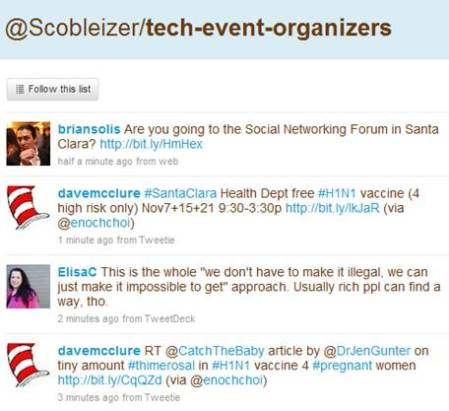
Robert Scoble's tech-event-organizers Twitter List

What’s a very simple yet effective way to integrate the new Twitter Lists feature into your event?  Here’s what you can do:

  1. Define your event hash tag (a “must do” for any event!)
  2. Create a Twitter List for your event
  3. If your company or event already has a Twitter ID (“brand”), connect it to that ID (e.g. twitter.com/<your-brand>/<your-event-list>)
  4. On your registration page, ask registrants to supply their Twitter ID
  5. Manually or automatically populate your Twitter List directly from registration!

As part of the Twitter API, there are methods in place to interact with Twitter Lists (look in the documentation for List Methods, List Members Methods, List Subscribers Methods).  As such, you could automate this process by having your registration page utilize the Twitter List API to auto-populate your list directly from registration.

In addition, you could use the Twitter API to inform registrants which of their Twitter friends or followers are (a) also registered and (b) already a member of the Twitter List.  Here are benefits of leveraging a Twitter List for you event:

Registrants promote the event on your behalf

It’s the crowdsourcing method for generating awareness – allow the participants to spread the word on their own.  After all, the combined reach of your registrants is far greater than your own.  By referencing your Twitter list on your registration page, users who supply their Twitter ID will likely go straight from registration completion to the Twitter list to (a) confirm that they’re now a member of the list and (b) skim through the pre-existing messages.

The concept is similar to a pre-event bulletin board or forum – the beauty of using Twitter, however, is that unlike a forum (which needs a critical mass of initial postings before it really takes off), a Twitter list is “pre-seeded” from the natural activity of the list members’ tweets.  You can be sure that as users register for your event, they’ll first tweet that they “just registered” – and then, continue to tweet about the event (especially as the event date draws near).  You’ll want to encourage all registrants to include your event hash tag when they tweet.

Facilitates pre-event networking among registrants

Whether physical or virtual, a key reason people attend events is the networking aspect – being able to meet, connect and interact with others, to discuss common business challenges – and to extend their social graphs.  Too often, however, one arrives at an event with no idea whom else is attending.  A Twitter List changes the game – you’ll not only know the identity of folks who are attending, but you’ll feel like you know them very well.

Consider friends or family members that you follow on Twitter or Facebook – do you find that you come to learn and understand them more via status updates than interacting with them day-to-day (or over the years)?  It’s remarkable how social network connections can generate a more complete picture of an individual.  With pre-registrants to an event, you may find that you’re really getting to know individuals, based on their intra-day status updates and industry thoughts.

This will lead to events whereby attendees will have pre-arranged meet-ups and appointments (with other attendees) in advance, making their event experience more rewarding.  Perhaps someone will build an integration from Twitter List pages to LinkedIn, so that event registrants can also extend their LinkedIn connections directly from the event’s Twitter List.

Allows exhibitors to get to know registrants/attendees

This will need to be managed/handled properly, as registrants surely wouldn’t welcome unsolicited pitches from exhibitors before they’ve even attended the event – but, imagine the potential for exhibitors.  You get to know the users who are attending the event.  Perhaps you create booth content or special offers that are tailored to what you’ve learned about your upcoming booth visitors.  Did they talk about pricing challenges in your market?  Well, how about an event-exclusive price break on your product, which you announce at the event?

If users commented about technical challenges using your product, bring the right specialists into your booth so that you directly address this pre-event feedback.  Lastly, exhibitors can seed some “must meet” lists based on the registrants who are tweeting within the list – build a profile of interesting users and ask your booth reps to be on alert if those individuals visit your booth.

Can you believe it?  Something as simple as a Twitter List can go a long way to making everyone happy: registrants/attendees, exhibitors and … YOU.

Related links

  1. 10 Ways You Can Use Twitter Lists (Mashable)
  2. Five Essential Twitter Lists For Every Event (CrowdVine)

From Web 2.0 to Webinar 2.0

September 28, 2009

Source: flickr (User: Werkplay)

Source: flickr (User: Werkplay)

In this age of social sharing, participation, “users as publishers”, Facebook updates and Twitter tweets, the webinar is a seeming anachronism.  In your typical 60 minute webinar, the presenters speak for 45-50 minutes – and the only “participation” from the audience occurs when the presenter selects your question to be answered.  Users are not able to see questions submitted by other viewers – in fact, they rarely know how many other users are also viewing the webinar.

At the Feeding the SAP Ecosystem blog, there’s an interesting posting titled “SAP Virtual Events: A Work in Progress“.  Here’s a great quote about webinars:

Or the presenters drone on too long, overloading the audience with slides and not coming up for air until there is a few minutes left and the participants are too burned out to even attempt a last minute question. Webinars that incorporate reader chat and questions throughout the broadcast, rather than exiling them to a shrinking time slot at the end, are much more effective.

I agree wholeheartedly with this observation.  I believe that webinars can be much more engaging if they adopted an unconference model.  According to Wikipedia, “an unconference is a facilitated, participant-driven conference centered around a theme or purpose”.  As a webinar presenter (or sponsor), you’ll still want to define the topic and prepare a set of slides to reinforce your speaking points and presentation objectives.

But, what if you were to hand over some control back to the audience?  It requires a leap of faith, I know.  But when the audience is directly involved, I think you create a more rewarding user experience – and, you stand to benefit as well.  User involvement should directly result in engagement, retention and satisfaction.

Here are some simple ideas from Web 2.0 that can be applied to create Webinar 2.0:

  1. Audience drives the content selection – the presenter flips through two potential slides to the audience and then pushes out a survey to the audience.  The survey prompts the audience to select which slide they’d like to see covered.  The presenter then publishes the survey results and advances to the slide that won the vote.  This addresses one issue I’ve had with webinars – I attended the live webinar because the topic intrigued me; however, the content didn’t quite hit the mark.  If presenters gave more control and input to the audience, they’d have a better chance of giving viewers what they want.
  2. Audience members render their own slides – akin to a virtual meeting (e.g. WebEx, GoToMeeting, Adobe Connect), where the meeting host passes control to another participant, who then shares his/her desktop.  For webinar platforms that support this, imagine how powerful this could be.  Viewers would need to know to come prepared with slide content – but imagine the presenter asking for real-world case studies of a given technology and allowing a viewer to render a slide about his real-world implementation experience.  Again, this is a leap of faith and a “risk factor” in surrendering control of the content.  However, isn’t that what Web 2.0 is all about?
  3. Better balance between PowerPoint content and Q&A – a typical webinar has an 80/20 split (or more) between the PowerPoint presentation and Q&A.  I think it should be more like 50/50.  Scheduling frequent pauses (to answer questions) provides a lot of value to viewers – it means that they don’t have to wait until the 50 minute mark to have questions answered – and it signals to the audience that the presenters are “listening” to them.  Along these same lines, the webinar platform should allow all viewers to see all questions submitted by attendees.  And to cap it all off, follow up after the webinar by publishing an FAQ – list commonly asked questions along with their answers.
  4. Answer questions coming from the statusphere – define a Twitter hashtag for your webinar and have staff available to monitor the tweets – then, have presenters address and answer interesting questions that were posed via Twitter (and other social tools).  This allows you to extend the audience of your webinar – and engage with users who might not be able to attend.  Additionally, have staff members tweet back (with the answers), so that users monitoring the tweet stream know that you’re not only listening, but participating back.

I’m sure we’ve just gotten started – what tactics do you have to recommend for bringing Web 2.0 to Webinar 2.0?