My Thoughts on Virtual Edge Institute’s Digital Event Strategist Certification

March 9, 2011

My Thoughts on Virtual Edge Institute's Digital Event Strategist Certification

Introduction

Virtual Edge Institute announced a Digital Event Strategist certification.  The certification will launch in June at the PCMA Education Conference in Baltimore.  This signals an important development in the evolution of our industry.  Here are the phases that I anticipate seeing.

Phase I: Focus on Education and Training

The Virtual Edge Institute (VEI) certification program is the only structured and formalized training program in the digital events space today.  As a result, it will be quite attractive to “newbies” looking to get into the industry (i.e. land their first job). It will also attract experienced digital events professionals who’d like to sharpen their skills or take their knowledge and capabilities to the next level.

I expect that participants in the certification program will also benefit from the opportunity to connect and collaborate with industry peers. While the industry is still small, it can be challenging to meet and connect with the folks doing the same job (as you) at other companies. I’d expect VEI to build community programs around their certification, such as groups (within their existing web site), LinkedIn groups, etc.

Phase II: Focus on the Certification for Career Advancement

While the focus on Phase I was to receive basic education, the program advances to Phase II once a critical mass of professionals achieve certification.  As with any certification program, the early days involve a “chicken and egg” phenomenon, whereby the certification doesn’t take hold until enough people enroll – and, people hold off on enrolling until they see enough “others” doing it.

How can you tell when Phase II arrives? When employers of digital event strategists make the certification a difference maker in the hiring process – and, when the strategists “headline” the certification on their resume or LinkedIn profile.  When we reach this phase, strategists will be compelled to enroll in the program in order to stay current with best practices – and, to advance their careers.

Phase III: Specialization and Standards

As a certification (and the corresponding industry) grows, it often necessitates specialization, as a broad program may no longer be sufficient to address specialized skills.  In digital events, I anticipate specialized certification in the areas of rich media production, hybrid events, mobile technologies and project management.  That’s right – I think it makes sense to have a certification around project management of digital events.

In addition to certification, it would make sense for VEI to define and develop standards for the industry – things like standardization of terminology (e.g. exactly how do you define “virtual event”), the definition and publishing of ROI models, and comparative benchmarks that buyers can use to evaluate digital event platforms and services.

Conclusion

I’m looking forward to the launch of this certification program. While it will be interesting to look at uptake when this program rolls out in June, I’m sure the true impact of the program will be over the long term.


How Your Virtual Event Can Benefit From Personalized Guides

March 2, 2011

Add Personalized Guides to Your Virtual Event

Introduction

In virtual events, there are staffers to “patrol” the event and assist attendees who have technical and logistical issues.  Beyond the logistical matters, however, how much do event planners invest towards the end-to-end attendee experience?

And, how often do staffers provide tips and guidance on the more strategic elements of an event: which sessions to attend, what content to download, which exhibitors to visit and which attendees to meet with? The answer: probably not enough.

An Idea, Sparked by Metaverse Mod Squad

I was struck by this missing element while reading a New York Times article, “A Patrol for the Web’s Playgrounds.” The article profiles Metaverse Mod Squad, a company that provides clients with moderators to “patrol” their web sites and virtual worlds.  Amy Pritchard (@AmyMMS), the company’s chief executive, had a great quote:

“We found if we greeted people, told them what they could do, gave them an event card and introduced them to other people, they had more fun.”

I think the same benefit can apply to B2B virtual events, where “fun” (in the sentence above) could be replaced with “getting more value out of the event”.

Benefit #1: Better Orientation of New Visitors

After logging in to a virtual event, attendees typically see a video greeting, either in an embedded video player, or via a host/hostess who was filmed against a “greenscreen” and overlaid on top of the environment.  The “New Greenscreen” are real, live “greeters”, who welcome visitors to the virtual event and chat with them, either via text or audio/video.

The “New Greenscreen” is like a host or hostess at a cocktail party.  They take your coat and point you to where the action is happening.  To support large audiences, the greeters can hold group sessions.  They can let the gathered audience know “what’s hot” (e.g. details on the session that is coming up next) and ask attendees what they’re looking to get out of the event.

As they learn more about the visitors, the greeters can suggest exhibitors to visit, sessions to attend and event content to download. Already, you’re providing attendees with a lot more usefulness than the typical video greeting, which is targeted to a broad audience and not an individual (who has unique needs and goals).

Benefit #2: Better Connect Attendees to One Another

A significant benefit of events (whether they’re physical or virtual) is the ability to network with like-minded (or perhaps different minded) attendees. In a virtual event, I may “seek and find” other attendees via social network integration, via group chat and perhaps via search.  But the connections are somewhat random and serendipitous.

The event’s personalized guides could serve as “business-oriented matchmakers”, pairing attendees with one another. I once attended a physical networking event and told the host that I work in the Marketing function at a start-up.  She immediately introduced me to a consultant who helps companies launch new  products – and, asked if my company was looking to hire, since there were executive recruiters in attendance.

Without the proactive host, my introduction to the consultant may never have happened. In a similar way, the personalized guides, upon understanding attendees’ business goals (and challenges), could pair them with exhibitors whose products or services address those challenges.

The guides could have a special designation on their profile (analogous to wearing a “Staff” shirt at a physical event), so that attendees know to accept their chat requests – and, so that they can be proactively contacted by other attendees.

Benefit #3: Get Help from the Concierge(s) at The Information Desk

Personalized guides would all have their “presence indicators” (i.e. whether they’re online) appear at The Information Desk. This area becomes the one-stop shop for both technical support and “concierge” services.  Need a recommendation between the two sessions airing simultaneously? Visit the Information Desk and get an informed opinion.

Looking for exhibitors who provide certain solutions?  Ask your friendly guide at The Information Desk.  Looking for that “kitchen design consultant” to map out the schedule and activities for your entire day?  No worries, the concierge at the desk who assemble a “user journey” for you.

Conclusion

Virtual events do not employ this sort of service today, but I think that attendees will find it valuable. Of course, doing this will result in additional cost for the event producer, but it may pay off in the long run, based on attendee satisfaction.  Let me know your thoughts in the comments section below – will this work?


5 Virtual Events Postings You May Have Missed

February 23, 2011

5 Virtual Events Postings You May Have Missed

Introduction

In the rush to get caught up with RSS feeds (that I routinely neglect when busy), I unintentionally skip articles and postings that I’d find quite interesting and valuable. With that in mind, I thought I’d round up recent virtual events postings (from this blog) that you may have otherwise missed.  And yes, I do still use an RSS reader.

1) Interactive Emails and Potential Use in Virtual Event Promotions

Virtual Event Email Promotions and Hotmail Active Views

Like banner ads, email marketing and email (in general), response rates tend to decline over time.  The use of interactive elements (within the email) could be a big win – and this certainly applies to virtual event email promotions. Here’s a link to the full posting:

https://allvirtual.wordpress.com/2011/01/14/virtual-event-email-promotions-and-hotmail-active-views/

2) Virtual Event Lead Management

Virtual Event Lead Management

I outline the “drive-by viewing” that you often see at virtual events and note that those visitors are names, not leads.  I also introduce the notion of curating your leads, as if they were fine art.  Here’s a link to the full posting:

https://allvirtual.wordpress.com/2011/01/22/book-supplement-virtual-event-lead-management-leadmanagement/

3) Why I’m There on Pure Virtual Events

I wrote a counterpoint to an article from Velvet Chainsaw’s Dave Lutz on the topic of pure virtual events. While I’m a firm believer in hybrid events, I also believe in the benefits of “pure” virtual events.  Here’s a link to the full posting:

http://inxpo.wordpress.com/2011/01/27/why-im-there-on-pure-virtual-events/

4) Can I Get a Woo Hoo for Virtual Events?

Can I Get a Woo Hoo for Virtual Events

I loved the tactics used by a department store to encourage customers to contribute (to a charity) at the cash register. I loved it so much, in fact, that I decided to draw parallels with the store’s tactics and apply them towards the planning and promotion of virtual events.  Here’s a link to the full posting:

https://allvirtual.wordpress.com/2011/02/07/can-i-get-a-woo-hoo-for-virtual-events/

5) Use Virtual Booths to Complement Your Physical Booths

Use Virtual Booths to Follow Up with Leads from Your Physical Booth

I outline ways in which a virtual booth can allow trade show exhibitors to distribute content, nurture leads and engage with prospects in real-time (after the event).  Here’s a link to the full posting:

https://allvirtual.wordpress.com/2011/01/30/use-virtual-booths-to-follow-up-with-leads-from-your-physical-booth/

Conclusion

If you liked any of these postings, but missed them when they were originally published, subscribe to the It’s All Virtual RSS feed.  If you do subscribe, but “Mark All As Read” in a rush to get caught up, I forgive you (I know the feeling).


Can I Get A Woo Hoo For Virtual Events?

February 7, 2011

Introduction

At department stores and supermarkets, I’m often asked to make a small donation to a charity at the cash register.  Truth be told, I often choose not to donate. The other day, however, I encountered a scenario in which 100% of customers donated – and, I went to the checkout counter asking if I could donate.

How They Did It

The store was able to accomplish this with a fairly simple tactic.  After each donation, the cashier would get on the loud speaker and proclaim, “We just got another donation to the American Heart Association! Can I get a woo hoo?”  The request was then followed with a loud “woo hoo!” from a number of people.  While shopping, customers would hear these announcements every few minutes.

How could I possibly relate this to virtual events? Well, like an email promotion for your virtual event, the donation was a call to action, in which potential donors needed to understand the value of taking action. Let’s consider some of the particulars.

Be Different

Announcements over the loudspeaker have been done before, but the use of the “woo hoo” was different.  Every time the “woo hoo” was announced, I got a chuckle out of it and other customers did as well.  While requesting a “woo hoo” for your virtual event may not be effective, consider ways in which your marketing and promotion can stand out from the many emails in everyone’s inbox.

Reward Users

Give value back to your users.  For the donation, the reward was very basic and yet, customers continually opted to receive it.  When I approached the cash register, I told the cashier that their “system” was quite clever.  Her response was, “So, do you want your woo hoo?” The donation, while important, become secondary to the acknowledgement.

Involve Your Team

At the store, managers had party horns – when a “woo hoo” was announced, the managers would yell “woo hoo!” and then blow the party horns.  It felt like a New Year’s Eve party and the horns added to the awareness and fun.  For a virtual event, encourage your team to share and promote the event within their social circles, both offline and online.  With the vast reach of social networks in the online world, your own team can make a big difference.

Make Participation Infectious

This can be challenging to achieve – after all, you just can’t “make a video go viral”.  That being said, I believe that our natural inclination is to “follow the herd”, which is one reason the donation did so well.  People donated because everyone else was.  But, it had to be easy (the donation was simply added to your purchase at the register) and it had to be well promoted and shared (the loudspeaker).  With these elements in place, along with “being different”, the store got every single customer to donate.

Conclusion

Instead of doing the same thing over and over when marketing your virtual event, consider new and creative ways to involve your audience, reward them and keep them coming back.  If you can achieve infectious participation, you won’t need to send out as many email blasts.


A Virtual Events Calendar … Maintained By You

February 4, 2011

Introduction

I put up a Virtual Events Calendar on this blog in 2009.  Back then, it was fairly easy to know (and find) the majority of virtual events that were being produced in the U.S.  But my, how the industry has grown! I kept the calendar fairly up to date in 2009 and 2010, but as we head further into 2011, I’m finding it harder to keep the calendar current.

Community Management

So keeping with the trends we’re seeing across the web today, I decided to move the calendar to a wiki, which allows anyone to add their virtual event(s) to the calendar.

Sure, this can lead to spam and promotion, but as we saw with Wikipedia, a workable wiki requires an active community of “editors” to keep things on track.  As such, I’ll be checking to make sure the calendar doesn’t get spammed – and I hope some of you join me to assist in “checks and balances”.

Without further ado, you can find the wiki style virtual events calendar at:

http://allvirtual.pbworks.com/w/page/35815064/Virtual-Events-Calendar

Click on the “Edit” tab, sign up for a PBworks account (if you don’t already have one) and make your edits!


The Future Will See You Now

February 2, 2011

The following is a guest post by Pooky Amsterdam (@PookyMedia).

Introduction

It was Joannis Kepleri in 1634 that first wrote of weightlessness in his book Somnium, or Dream. About a hundred years later, Jonathan Swift would write of two moons of Mars (which would take another 150 years to discover) and Laputa, an island where residents have geometric modeling and knowledge engines.

Jules Verne wrote of rockets, propulsion, undersea mining and a raft of creations too numerous to list. Science Fiction writers have contributed to future ideas and innovation since the genre was invented. Writers from HG Wells, whose babel machine presaged television, to Gene Rodenberry, whose Star Trek imagined so much, have infused our minds with imaginary and fantastic invention.

The Creative Process

And these ideas are taken further, and form the seeds of reality as it will come to be.  Such is the creative process, it must begin somewhere. Paper and pencil allows for anything to be “made,” after being seen in the mind’s eye. You can use words to create anything, then use paper to draw how it looks in two dimensions. What if you can go right to a 3D world, and build futuristic cities, design outfits for the year 3011, and actually design the people who would wear them?

Today you could make those visions and drawings reality in an expensive CGI kind of way, or you could use a graphic novel kind of approach to tell your story while showing vivid creations.  The mind is not now nor has it ever been limited to contemporary tools for story telling or fantastic creations.  Words have sufficed to ensnare the imagination, and immerse the audience since the first campfire. Now we are living and socializing around a virtual campfire, but it glows just as brightly when we gaze into it.

The Virtual World

As it has been said that we didn’t create the universe, so we can not fully understand it. Yet we have created the virtual world, in which we can create anything imaginable. This is done with what are free building tools, in the 3D world of Second Life. While much is recreated to reflect the outworld reality of the residents’ lives, there are opportunities for fantasy, science fiction and historic role-play which are met.  Enthusiastically talented, the creators of Second Life’s vast and stunning array of virtual goods and content contribute much.

The legacy of science fiction has inspired many people to carve out tracks of the grid for space bases, futuristic cities and to sell everything from starships to transporters. All while wearing the latest 2520 fashion. While books give much for our mind’s eye to describe, it is thought out before us. Being able to immerse in a 3D world with other people provides a level of visual storytelling which is unique to us. And that can be unique every day.

A number of traditional media programs have spawned new virtual worlds like the upcoming BattleStar Gallactica, Star Trek, and Star Wars – Clone Wars. What Second Life provides is a way to create a new vision and interpretation, not just re-create and role-play within it. There is a pool of resources within people’s minds that can and is crafted into being. That they can also be sold as an incentive and this encourages a new way of manifesting the future. There are designers and builders in Second Life creating assets and adventures which reflect the same design traditions of classic sci-fi, yet made out of prims.

A New Episode

They also provide a great backdrop and wealth for films. The Future will See You Now is the title of a new episode in our ongoing webseries, Time Travelers, for iHelpLoan and SLFC. Films can not be made without sets, costumes, props and all that makes for great visual story-telling. I feel lucky to be part of this kind of creative world which inspires.

Related Links

  1. Our web site: http://www.pookymediafilms.com/
  2. Our YouTube video: http://www.youtube.com/watch?v=6RR_xohMrvU


Book Supplement: Virtual Event Lead Management (#leadmanagement)

January 22, 2011

Introduction

In “Generate Sales Leads With Virtual Events,” Chapter 6 is titled “Score and Follow Up with Leads”.  This really could have been Chapter 7 – and instead, Chapter 6 could have focused on important steps to consider before scoring.  Before you import your virtual event leads into your CRM system, consider these important steps first.

Step #1: Beware of the “Drive-By Viewing”

Someone visited your virtual booth – congratulations! Not so fast.  Make sure the booth visit was not a “drive-by viewing”.  I define a drive-by viewing as:

  1. One (and only one) visit to your booth
  2. “Visit time” of 5 minutes or less
  3. No engagement with others while in the booth (e.g. group chat, private chat)
  4. No interaction with booth content (e.g. booth tabs, documents, links, etc.)

I see plenty of drive-by viewings from booth visitors. Some visitors simply want to see which companies are exhibiting at the virtual event.  And, some virtual platforms have “previous” and “next” buttons in the virtual booths, which means that drive-by visitors may simply be doing a quick tour of all booths.

Drive-by visitors are not leads – they’re NAMES!  My recommendation for drive-by visitors:

  1. Go ahead and import them into your CRM system
  2. Schedule a “thanks for visiting” email
  3. Using simple text links, provide them with a few options (e.g. receive more content, schedule an appointment, etc.)
  4. Respond accordingly – and, if they do not open the email or respond to the offers, cease communications [for now] and nurture them over the long term

Step #2: Beware of Existing Leads and Business Partners

Your virtual event leads can look like a pile of dominoes.  You may not be aware that within that pile of dominoes are existing sales prospects, along with current customers and business partners.  When you exhibit at a virtual event, your sales team is inclined to invite current prospects to come visit – and, your existing customers and partners are inclined to stop in to see what’s new.

Warning: LEAD IMPORT CAN BE DANGEROUS TO YOUR HEALTH.

If you don’t manage your leads well, you may import “hot prospects” (who are already in your CRM system) and trigger a follow-up email to them.  The result is a turning back of the clock with those prospects – imagine finalizing your purchase decision, only to have one of the potential vendors call on you and ask if you’re in the market for their product!

Personal Story: I attended a virtual trade show and did a “drive-by viewing” through an exhibitor’s booth.  I’ve been a long-time subscriber to this exhibitor’s email newsletter and know some of the employees there.  My drive-by viewing was done simply to see who was staffing the booth.

A few days later, I received an email from the exhibitor, asking if I’d like more information.  This exhibitor probably should have known that I was a long-time subscriber – and, routinely click on the links in their newsletter.  Given this, the follow-up should have been more tailored, or skipped entirely.  If I was contemplating a purchase  decision with this exhibitor, that follow-up email could have cost them my business.

Step #3: Build and Import Engagement Profiles

Virtual event platforms have built-in RFID, which means that all interactions from sales prospects (with your content) are tracked and recorded.  The platforms assemble a detailed “engagement profile” for you – the worst thing you can do is throw away that profile when the lead is imported into your CRM system.  My guess is that the majority of marketers today do just that.

Instead, create custom fields in your CRM system to capture this data (e.g. number of visits, documents downloaded, transcripts of chats, etc.).  The more data, the more informed your sales team.  Just like an auto insurer reviews your past driving record and a loan officer reviews your past credit history, your sales team should have the benefit of a prospect’s past engagement data.

Step #4: Curate Leads as You Would Fine Art

You can automate portions of lead management, but you can’t automate the entire process.  It’s easy to automate the de-duping process, which ensures that new records are not created in your CRM system when there’s an existing lead record.

However, it’s not as easy to automate the business intelligence that needs to be applied to your leads (e.g. you can’t do AI on your BI). Examples of business intelligence rules:

  1. Knowing (and spotting) competitors
  2. Knowing (and spotting) existing business partners
  3. Knowing (and spotting) industry experts, analysts, media [who should not be followed up with]
  4. Spotting “creatively submitted” leads, such as “Mick E. Mouse” or “Barack Obama”

Sure, you can automate part of this by filtering on a list of company names, but there are bound to be some leads that slip through the cracks.

For instance, users may have a typo in their company name – or, may list their company differently that what you’ve entered in your filter list.  Your leads are the lifeblood of your business, so you should curate them as if they were fine art.  This means that manual review will always be a part of the lead management process.

Conclusion

Lead Management is not easy.  However, perform these steps before your first virtual event lead hits your CRM system – and you’ll be better off.  Your sales team will receive a far higher percentage of qualified leads – and they’ll thank you for that.


The Virtual Book Tour

January 21, 2011

Introduction

I recently read the excellent book “The On-Demand Brand: 10 Rules for Digital Marketing Success in an Anytime, Everywhere World,” by Rick Mathieson. In addition, I published my own book, “Generate Sales Leads With Virtual Events”.

To uphold the “on-demand brand” of the new book, I’ve decided to forego the traditional book tour. Instead, I’ll embark on a virtual book tour.  I consider the virtual book tour a “virtual event”, which is what my book is about, after all.

Virtual Book Tour

OK, so it’s not even a full blown virtual tour, I admit. That may come, some day.  In the meantime, I will be handing out 5 free copies of the book.  Here’s how you can grab a copy:

  1. Visit the book’s Facebook page.
  2. “Like” the book’s Facebook page. If you’ve previously “Liked” the page, I thank you for that – as a special reward, skip to step #3.
  3. Post a “valid question” about the book to the Facebook page’s Wall.

“Valid questions” must show that you’ve read the description of the book – and, understand the premise. I promise to answer all questions deemed valid.

How to get your copy

The first 5 people to complete the three steps (above) will receive a free copy of the book, which includes free shipping to the address of your choosing.

Unfortunately, I need to restrict the free shipping offer to continental U.S.  only – I’ll contact you to arrange shipping if you’re a winner who resides outside of the U.S.


Virtual Event Email Promotions and Hotmail Active Views

January 14, 2011

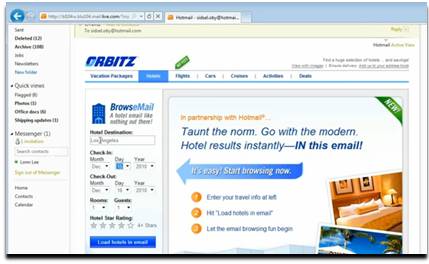
Note: Image sourced from a Hotmail YouTube video.

Introduction

The Hotmail Team has introduced an interactive email technology called Active Views.  The technology allows recipients of Active Views emails (within Hotmail) to interact with the email itself.

Hotmail showed examples of two of their early partners, Orbitz and Monster.  Recipients of the emails could search a flight (in the Orbitz email) or search for jobs (in the Monster email).

Interactive Emails and Virtual Event Promotions

Interactive email technologies present interesting possibilities for virtual event email promotions – and, more broadly, for any email promotion that seeks to elicit a response.  Imagine the following for virtual event email promotions:

  1. Register for the virtual event
  2. Enter your Twitter, Facebook, LinkedIn, etc. identity and see which of your followers, friends, connections, etc. have already registered
  3. Navigate through the session schedule and indicate which sessions you’re interested in attending
  4. Complete your attendee profile – upload your image/photo and add a short bio
  5. Social sharing – let your social networks know that you’re interested in the event – or, that you’ve just registered

The possibilities are endless.

Considerations

  1. Only Hotmail “trusted parties” can utilize Active Views
  2. The technology is platform-specific (it’s limited to Hotmail)
  3. The technology is new and largely untested (at a large scale)
  4. It remains to be seen how well the technology functions across platforms (e.g. email clients, operating systems, tablet devices, etc.)
  5. While security provisions are in place, it may open a window for providers of phishing and malware

Related Links

  1. Active Views introduction on the Inside Windows Live blog
  2. TechCrunch: “Hotmail Active Views Look To Make Email Interactive
  3. ClickZ: “Hotmail Active Views Revives E-mail Innovation in 2011