April 21, 2009
In 2009, I’ve seen a surge in the volume of content published around virtual events and virtual worlds – coverage in mainstream media, blog postings, videos, podcasts and even entirely new web sites developed to cover these specific industries. It’s all great – but with a rising volume of information comes the challenge of how to efficiently stay current. I’ll highlight a few social media services that I use to keep current on events, track emerging technologies and find relevant commentary on all things virtual.
- Twitter (http://www.twitter.com) – I published a prior blog posting regarding some of the specific people I follow on Twitter for virtual worlds information. To stay current on virtual worlds, find the authorities in that space and start reading their blogs or articles. If you like what you find, see if they publish their Twitter handle – or, search for it yourself – and start following them. I can easily stay current on virtual worlds by following a few select experts. Their posts to interesting content serve as a virtual wire service for me (pun intended).
- Tweetbeep (http://www.tweetbeep.com) – I follow over 300 people on Twitter. And as you may know, some of the A-level Tweeps obtain that status because of their verbosity. I tend to notice that a core set of 15-20 people (that I’m following) contribute about 80% of the tweets that I scan at any moment. What’s the downside to this? Well, that virtual events pioneer who only sends 2 tweets per day gets lost in the shuffle, as I’ll miss his tweets. That’s why I use Tweetbeep to set up Twitter alerts by email – it’s like a Google Alerts for Twitter. I set up search terms such as “virtual event”, “virtual tradeshow”, “virtual worlds” – and when I wake up in the morning, the alerts are there in my email inbox. Now, if that pioneer tweets about virtual events, I’ll know what he said. Also, I do have parallel Google Alerts configured, so that I learn about new content that Google has crawled on these same search terms.
- Google Reader (http://google.com/reader) – I’ll find blogs and web sites that focus on virtual – and subscribe to them (via RSS) in Google Reader. This requires a bit more time, to skim through RSS headlines and determine what’s worth reading (similar to scanning an email inbox). So it’s not quite as efficient as Tweetbeep or Google Alerts, but very valuable nonetheless.
- Friendfeed (http://friendfeed.com) – similar to Twitter, but also different – I find myself following a unique set of people on Friendfeed – and the neat thing with this service is that I can see not only their tweets, but links they’re reading via Google Reader and pages they’ve bookmarked with del.icio.us, to name a few. In addition, I’ll check in on a Friendfeed Room called Metaverse News, where Gaby Benkwitz posts links to interesting articles about the virtual world.
- Facebook (http://facebook.com) – I created a Virtual Events Strategists Facebook Group – so I’ll check in there from time to time to see what’s been posted by group members (articles, images, questions, etc.) – and I’ll try to contribute to the group by posting articles that I’m reading about the industry. I’ve also noticed that virtual event producers are leveraging Facebook Groups to promote their event – which is neat.
- Linkedin (http://linkedin.com) – I’ll use Linkedin to connect with folks I meet in the industry – and to keep current, I’ll check in on a few Linkedin Groups when I can (e.g. Virtual Worlds, Virtual Edge, Virtuual Events Forum, Event Managers, etc.). Some groups tend to be more “spammy” than others – so I’ll find those with the best signal-to-noise-ratio and receive postings via a weekly digest email.
All in all, this probably involves a bit more effort than it needs to – that’s why I think the future of staying current will be about services like Tweetbeep and Google Alerts – you configure what you want to see and an “agent” goes out, finds it and delivers it to your doorstep. Virtually, of course!
 4 Comments |
  Virtual Worlds | Tagged: Facebook, Friendfeed, Google Alerts, Linkedin, Metaverse News, social networks, Tweetbeep, Twitter, Virtual Events, virtual tradeshows, Virtual Worlds, Web 2.0 |
  Permalink
 Posted by Dennis Shiao
April 19, 2009

Source: LiveOps
In a recent New York Times article titled “Software That Monitors Your Work, Wherever You Are“, Damon Darlin profiles the technology and business model of LiveOps, a start-up based in Santa Clara, California. LiveOps is in the call center business – without having a central call center. Instead, they employ 20,000 home-based agents, who work as independent consultants for the company. Sound different? Well, it doesn’t end there. The “brains” behind the service is software – what Darlin terms the “real middle manager”.
Maynard Webb, CEO of LiveOps, explains how the software works:
The software moves a company beyond simple cost-cutting. Mr. Webb says greater efficiencies can be found because the company’s software measures the results from each agent according to criteria determined by the client. If a client wants agents to persuade callers to buy additional products, the software tracks that — and then directs calls to the agents who do it best. Those agents prosper.
In the virtual events I’ve participated in, I’ve seen a wide variety of exhibitor personas. The most effective exhibitors were the true subject matter experts – they have a wealth of information to share with prospects, potential partners and even competitors. And they’re the rock stars of their virtual booth – highly in-demand and running a mile a minute trying to handle the influx of private and group chat requests.
What makes them rock stars is not just their expertise – it’s really their expertise combined with their desire to network, assist and collaborate. They not only respond quickly to private chat questions, but they’re proactively commenting in group chats. On the other extreme, I’ve seen the “don’t call one me” persona – analogous to the right fielder on the softball team who hopes the ball is not hit his way. These exhibitors bring a limited scope of knowledge, combined with little desire to interact.
Perhaps virtual event platforms should adopt the LiveOps model – route the inquiries and chat requests to those exhibitors who are most likely to achieve the desired outcome. Here’s how it might work:
- Build rating and request functions into the chat application – without some explicit indication from the attendee (booth visitor), the only way to know if the exhibitor (booth rep) was effective is to use natural language processing to interpret the content of the chat (which, indeed, would be a neat feature!). Instead, build actions into the chat function, as dictated by the exhibitor. One action might be “rate this chat session” or “rate this booth rep” – the data would be used to determine the worthiness of the rep for subsequent chats. Another action might be “request more product information” – whereby clicks would increase the effectiveness rating of the booth rep.
- Define metrics to rate booth rep effectiveness – examples may include “mean time to answer a private chat request”, “mean time to a ‘request more info’ click” (where shorter times might be considered better) or “mean rating score”. Of course, for booth reps who receive neither ratings nor requests for more info, perhaps the absence of action works against them.
- Distinguish the highest rated booth reps – just like department stores and supermarkets have the “Employee of the Month” parking spot or picture – virtual event standouts should be recognized as well. Allow the highest rated booth reps to have a specially desigated avatar image (or logo) indicating that they provide excellent service.
Let me know what you think – would such a rating system help improve interactions between virtual event booth visitors and booth reps?
Leave a Comment » | Virtual Tradeshows (VTS) | Tagged: booth rep, booth visitor, chat, LiveOps, ratings, virtual call center, Virtual Events, virtual tradeshows | Permalink
Posted by Dennis Shiao
April 1, 2009

Source: MarketingProfs
If you’re an online marketer, you might want to attend “Digital Marketing World – Spring 2009” today. It’s free to attend and the only travel required is to click on over to it (it’s a virtual event). If you’re not already registered, there’s an event registration page that you can fill out – and then enter the show right away. The event generated over 12,000 pre-registered users – so, come on in and join plenty of your online marketing colleagues.
David Plouffe, Campaign Manager for Barack Obama’s 2008 Presidential Campaign is doing a video keynote presentation to kick things off. I’ve seen lots of excellent chat occuring while David was speaking – many of the comments were around David’s presentation material around social media:
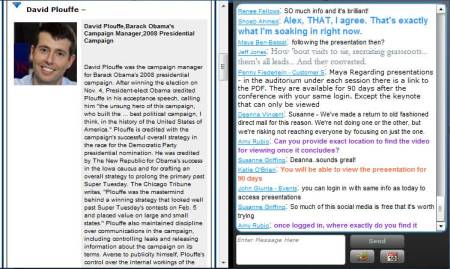
Source: screenshot captured during MarketingProfs' virtual event
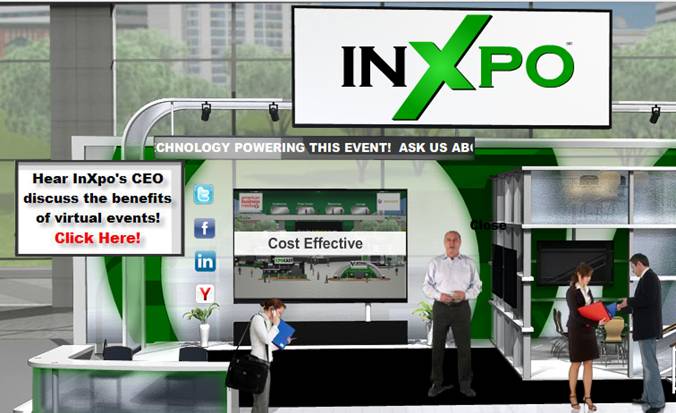
I’m online as an exhibitor at this event – so if you decide to join, come say hi – I’ll be in the InXpo booth:
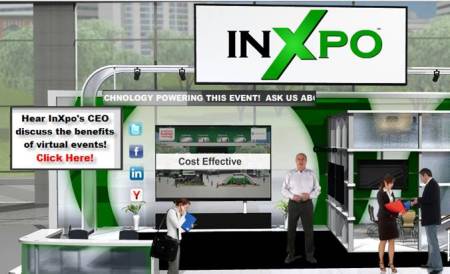
Source: InXpo's booth at MarketingProfs' virtual event
Leave a Comment » | Virtual Tradeshows (VTS) | Tagged: chat, MarketingProfs, Obama, Virtual Events, virtual tradeshows | Permalink
Posted by Dennis Shiao
March 24, 2009
Source: GlobalPost
In a previous blog posting, I wrote that newspapers could leverage virtual event platforms to transform the reader experience from one of unidirectional consumption to an interactive community of participation and engagement. In an article titled “A Web Site’s For-Profit Approach to World News “, the New York Times highlights Boston-based GlobalPost. The good folks at GlobalPost are clearly thinking outside the “print box”, with an approach that mirrors (somewhat) some of the points I made in my original blog posting.
For one, GlobalPost has deployed a freemium model, built upon a wealth of freely available, advertising supported content. The premium service comes into play with a service called Passport, which, as eloquently stated by GlobalPost, “offers an entrée into GlobalPost’s inner circle”. According to the New York Times article:
Passport subscribers, who pay as much as $199 a year, can suggest article ideas. “If you are a member, you have a voice at the editorial meeting,” although the site will decide which stories to pursue, said Charles Sennott, a GlobalPost founder and its executive editor. He said Passport is meant to “create a feeling of community” for subscribers who might otherwise see newsrooms as “impenetrable and fortresslike.”
On the GlobalPost Passport web page titled “Benefits of Membership“, one can discover further detalis about the access afforded to Passport subscribers:
Passport also gives you a significant voice in the news. We invite you to join us in reinventing the media equation, empowering members for the Web 2.0 era. Instead of the old top-down model where editors decide what you need to read, as a Passport member you play an unprecedented role in shaping the stories that get covered, via ForeignDesk, Correspondent Calls and Newsmaker Interviews. Simply put, it’s access that gives you an edge.
While GlobalPost would need to find a business model to profitably support this – I can envision the use of a virtual event platform to serve as the foundation for their interactive community. By “profitably support”, I mean that the additional cost (e.g. virtual event platform, higher costs for editorial staff, etc.) would need to be weighed against the additional revenue.
But that being said, the use of a virtual event platform could facilitate:
- Direct, interactive access from Passport subscribers to GlobalPost’s Editorial Staff – in the form of text chat (both private and group), webcam chat (both private and group), forums and blogs (in the platform), etc. What better a way to shape the editorial focus than for the Passport members (the most loyal of readers) to engage directly with the folks responsible for producing the content.
- Direct engagement among Passport subsribers – generate and sustain subscriber loyalty and retention by allowing them to connect with one another. After all, two subscribers who visit the “United Kingdom” section of GlobalPost.com likely have common things to discuss.
- Drive incremental revenue by upselling your Passport subscribers – one you have a loyal following of Passport subscribers, upsell them into higher and higher premium services – e.g. scheduled video chat sessions with your Publisher; access to exclusive content; access to all archived content, etc.
Kudos to GlobalPost on their somewhat contrarian model – and best of luck on the new site and success of Passport.
1 Comment | Virtual Tradeshows (VTS) | Tagged: chat, Editorial, engagement, GlobalPost, New York Times, platform providers, Publisher, Virtual Events, virtual tradeshows | Permalink
Posted by Dennis Shiao
March 22, 2009

Source: Flickr (Ewan McIntosh)
If you recently exhibited at a lead generation virtual event, then I’ve got some tips for you. While most exhibitors consider the program “complete” at the conclusion of the live virtual event, your work is just beginning. Outhustle your competition and you’ll generate more ROI, beating them to the punch on shared sales leads. There are two primary strategies for generating a higher return on your investment:
- Leverage your existing investment to generate net new sales leads
- Better convert your existing sales leads
Leverage Existing Investment
- Convince the virtual event host to light up the environment – most virtual events remain “on demand” for 3 months after the live show date. During those 3 months, you’ll see intermittent activity – some attendees return to visit your booth – some new leads sprinkle in, 1 here and 2 more a few days later. Your event organizer should be incented to produce another “live date”, in which past attendees are invited to return – and, new registrants are invited to participate. After all, the event organizer has fixed costs as well – and lighting up the show again means more revenue. The organizer will want brand new content to draw users in (e.g. compelling Live Webcasts, like they used in the original event) – and you’ll want to leverage the same amount of booth reps to interact with attendees.
- Convince the virtual event host to support portable booths – you spent a lot of time getting your booth just right – selecting the right logo and Flash movie, finding relevant White Papers and producing some case studies just for the event. Your booth is a great marketing vehicle and should be leveraged elsewhere – how about placing your booth on its own microsite – or, embedding the booth on your corporate web site? The eco-friendly practice of re-use applies here as well.
- Syndicate booth content – for the White Papers, podcasts, Case Studies, etc. that you placed in your booth, syndicate them with the event organizer and related web and blog sites. This broadens the reach of your content – and allows you to generate more sales leads.
- Syndicate Webcast content – if you had a speaking slot at the virtual event, ask the show host for a copy of the Webcast – then, host it on your corporate web site and syndicate it with the event organizer and related web sites. Any content generated for the event should be re-used – it can generate new sales leads with minimal overhead or cost.
- Syndicate the supplemental Webcast content (in different forms) – convert your Webcast into an MP3 audio podcast and make that available on your web site along with the Webcast. Syndicate the podcast as well, in case your target audience prefers the convenience of a download over the viewing of a streaming presentation. Take the Q&A of the Webcast and transcribe that into a PDF or HTML document – and place this on your web site as well. You get the idea here – spread your wings, without thinning the pocketbook.
Convert Existing Leads
- Find those Top 10 leads – whether you have an automated system or need to do this manually, comb through the wealth of engagement data that a virtual event provides and find those Top 10 leads. These are the folks who Sales must call now. Perhaps they downloaded 10 of your White Papers – or, perhaps they did a text chat with a booth rep and requested that a sales rep call. Either way, they need immediate attention. If you know the sales reps who should handle these leads, don’t be shy about personally walking the leads over to them and providing the details as to why the leads as so hot.
- Get the basics right in your follow-ups – if Inside Sales is following up by phone with some leads, make sure the reps have a script that covers the correct name of the virtual event – and arm them with some important details of the event (e.g. date, topics, speakers, etc.). For email follow-up, be sure to include the virtual event title in the Subject line. Always be sure to reference the context of the event in all of your touchpoints.
- Build customized follow-up paths based on prospect activity – again, whether it’s automated or manual, factor in the prospect’s specific activities within the live event and tailor the follow-up touchpoints based on that activity. Study the 5 White Papers they downloaded and recommend a 6th that brings it all home. Study the chat transcript with your booth rep and send an email follow-up that ties up any loose ends. Believe me, the prospects will appreciate the personal attention and the value you deliver to them.
- Use the virtual event platform to faciliate your follow-up – your show host is keeping the environment open for 3 months – so it would be a shame not to leverage it for all its worth. When you do secure a follow-up appointment – consider complementing your phone call by meeting your prospect back in the virtual event. There, you can do text or webcam chat in an environment s/he is familiar with. And perhaps you place some additional content in the booth for your prospect to review.
- Send small prizes to highly engaged prospects – not everyone could win a prize during the live event – so, find those top 10 leads – or, top 10 most engaged users (in your booth) and send them a memory stick or webcam. As discussed, reference the context of the event in your communications. Perhaps the memory stick contains additional White Papers that may be of interest. Just make sure the touchpoint is personalized – and don’t send the prize just for the sake of sending something.
So there you have it. Don’t forget that your campaign doesn’t end at the conclusion of the live virtual event. That signals the starting point of the important phase – the one in which you’re head to head with the competition. So make sure you score a higher ROI than they do.
2 Comments | Virtual Tradeshows (VTS) | Tagged: B-to-B, chat, Cost Per Lead, CPL, engagement, Flash, light up, sales prospects, show host, virtual event organizer, Virtual Events, virtual tradeshows, white papers | Permalink
Posted by Dennis Shiao
February 26, 2009
I created an open Facebook group for Virtual Event Strategists – my goal with this group is to foster discussion and collaboration around virtual event strategies and best practices. I’ve seeded the content on the group page by developing a series of Virtual Event Best Practices videos – short, 2-3 minute clips where I cover one particular best practice each day.
Since Facebook provides a very convenient video recording and upload utility (right there from the Group page – for anyone who has a webcam), my hope is that other group members will start contributing their own thoughts via video. Or, start posing questions to the group via video (if not text). A YouTube-like channel for Virtual Events sounds good to me!
I thought I’d post links to some of the videos I’ve produced to date. Of course, to view subsequent videos, be sure to become a member of the Group – it’s open for anyone to join.

In this first video (click on the image above), I talk about how to effectively use prize giveaways in your virtual event.

In this video (above), I discuss the importance of “promotion source” tracking and data analysis.

And in this final video (where I got all dressed up), I talk about ways to dress up your virtual event.
If you view the videos, be sure to let me know what you liked or disliked – thanks!
Leave a Comment » | Virtual Tradeshows (VTS) | Tagged: best practices, Facebook, prizes, video, Virtual Events, virtual tradeshows | Permalink
Posted by Dennis Shiao
February 23, 2009
Over the past few months, I’ve observed an increasing amount of chatter within Twitter (the popular micro-blogging service) regarding virtual events and virtual tradeshows. In many cases, Twitter users who are considering their first virtual event will submit a tweet such as, “considering my first virtual event. Anyone have information on best practices?”. I chime in when I can, but Twitter and its 140 character limit does not facilitate much in the way of extended dialog.
In fact, when two or more Twitter users need to delve deep on a topic, the next step is usually to “connect offline”. Similarly, this blog is a useful vehicle for the communication of my thoughts and ideas – but isn’t great for facilitating discussion. Despite the comment feature of blogs, there hasn’t been much extended discussion here, by way of commenters.
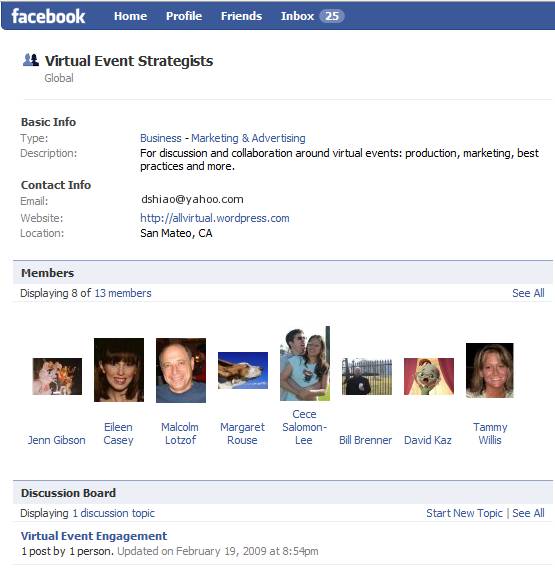
So I decided to create a Facebook Group to address these challenges – it’s called Virtual Event Strategists and is open to anyone interested (you need a Facebook account to join). Here’s a snapshot of the group page:

Source: Virtual Event Strategists' Group Page
Why a Facebook Group? A few reasons:
- The 175MM active users (of Facebook) – most readers of this blog are likely on Facebook – if not, let me know why not!
- Threaded discussions – are you a first-timer in virtual events? Well, starting up a threaded discussion may be just the thing to do
- The Wall – post miscellaneous thoughts and ideas about virtual events
- Post Links – let us know what interesting blogs or articles you’re reading about virtual events
- Post Video – Facebook has a convenient video recording and hosting capability – plug in a webcam and start using it
In fact, I’ll be doing brief “Virtual Event Tip of the Day” video clips on the Group page. Here’s one of my first video clips, where I talk about the use of prizes in virtual events:

I’ve seeded the site with some initial content – but, what I’d most like is to hear from all of you. So, start some discussions, post some videos, post some links. The group page is:
http://www.new.facebook.com/group.php?gid=52325833170#/home.php?ref=home
Let’s collaborate and learn together – see you there!
Leave a Comment » | Virtual Tradeshows (VTS) | Tagged: Facebook, social networks, The Wall, tip of the day, Twitter, video, Virtual Events, virtual tradeshows, webcam | Permalink
Posted by Dennis Shiao
February 21, 2009

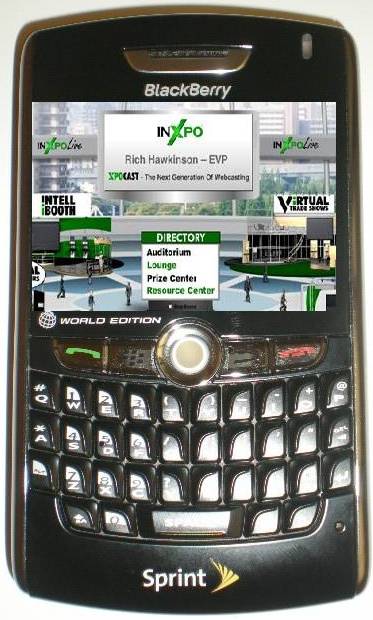
Some day soon: virtual event on PDA?
Whether it’s business use or personal use, we’ve begun to expect that applications on our PDA’s mirror those available on our PC’s and laptops. For business, it’s largely corporate email today – the ability to read and respond (around the clock, I might add!). For personal use, it’s email (e.g. Yahoo Mail, Gmail, etc.), instant messaging, web browsing and (of course) interacting with our social media sites.
I recently purchased a BlackBerry 8830 – my first step (after verifying that calls to my cellular number were ported over to the BlackBerry) was to set up access to my corporate email. After that, the series of steps I embarked on were not unlike the set-up of a new PC or laptop – downloading applications that I’ve become accustomed to. The short list so far is:
- AOL Instant Messenger (AIM)
- A Twitter client (I selected TwitterBerry)
- The Facebook client for BlackBerry
With this collection of apps, I’m able to be on the go, but stay connected with corporate and personal email, stay in touch with friends and colleagues via AIM and keep tabs on my social networks (next up: the BlackBerry client for Netflix). Virtual events are a combination of business and social networking applications. Thus, I believe that pretty soon, business users will come to expect virtual events to work on their PDA’s.
Attendees would be able to visit vendor booths and peruse vendor content (while on the go) and exhibitors would be able to interact with booth visitors via a wireless connection. The “live date” of a virtual event is often planned months in advance – and often times, scheduling conflicts arise for exhibitors – whether it be an important client meeting or attendance at a physical event. I’m sure that exhibitors would value the convenience of doing basic booth duty from their PDA.
But how do we get there? First, formats like Flash (Adobe), Silverlight (Microsoft) and even JavaFX (Sun) will need stronger support and adoptoin onto PDA devices. From doing a quick set of Google searches, the adoption (and support) doesn’t seem quite there today. Here’s hopinng for a better tomorrow – where I’ll be seeing you at a virtual event … from our PDA’s.
1 Comment | Virtual Tradeshows (VTS) | Tagged: blackberry, Flash, IM, javafx, silverlight, Virtual Events, virtual tradeshows, wireless | Permalink
Posted by Dennis Shiao
February 18, 2009

MarketingSherpa published an excellent primer on Virtual Event Marketing. The 10 tactics listed were:
- Partner with assocations
- Invest in PR
- Get exhibitors involved
- Advertise on relevant web sites
- Market to internal email database
- Email registrants the day before and the day of an event
- Use social media to attract attendees
- Emphasize the value of the event
- Use the virtual event’s microsite
- Use sweepstakes as an incentive
Based on my involvement in marketing virtual events to an Information Technology (IT) audience, I’d like to add the following:
- Promote early and often – get your microsite launched up to 2 months prior to the live event. Time is critical, because it gives you options to try different tactics, measure response rates and adapt accordingly. If you leave yourself too little time, your flexibility is limited and your registrations will suffer.
- Invest in search engine optimization (SEO) – make sure your registration page and microsite are optimized for SEO. For more insights into SEO for virtual events, see this blog posting: https://allvirtual.wordpress.com/2009/02/02/search-engine-optimization-seo-for-virtual-events/
- Invest in search engine marketing (SEM) – just like you’d buy keywords to drive visitors to your corporate web site – figure out which search terms are relevant to your virtual event and spend a little of your budget purchasing search engine keywords to drive clicks to your virtual event microsite or registration page.
- Use interactive technologies to draw attention – with the amount of email received by your target audience, it’s harder and harder to stick out from the crowd. To do so, use interactive visuals like a screencast (to give users a sneak preview of what your virtual event environment looks like) or a short video clip embedded within an HTML email.
- Use a variety of promotional vehicles – email is the most heavily used, but not all of your users pay attention to promotional emails. So try display ads, placement in e-Newsletters, text links on publisher web sites and sponsorship of relevant sections of web sites.
- Highlight the prominence of expert speakers – in some industries, a well-known speaker can generate the audience all by herself. If you’ve secured such a speaker, be sure to promote her prominently. In fact, use her name right in the Subject heading of your promotional emails.
- Highlight the ability to interact with executives and experts – once you landed that expert speaker, invite her to participate in the virtual event after her speaking appearance. In fact, in lieu of a Q&A after the Webcast/Videocast, have her appear in the Networking Lounge to answer questions there (via text chat), interacting directly with the audience. In addition, invite your executives to participate and interact with the audience.
- Display the list of exhibitors – as you sell sponsorships, display the list of companies who will be exhibiting. That may convince some users that they need to attend – what better a way to narrow your purchasing decision than to “meet” with the candidate solutions providers in one fell swoop?
- Provide a sales contact for potential exhibitors – some registrants of your virtual event may represent companies who’d like to exhibit (sponsor). So give them an email address or phone number and you might have just sold an additional sponsorship.
What has worked well in promoting your virtual events?
2 Comments | Virtual Tradeshows (VTS) | Tagged: B-to-B, chat, screencast, SEM, SEO, Virtual Events, virtual tradeshows | Permalink
Posted by Dennis Shiao
February 16, 2009
Some of us learn through observation – and I’ve had the privilege of observing (and learning from) many corporations in their use of virtual events and virtual worlds. First, I will provide “newbie” corporations with some pointers on how to best leverage virtual events (by way of links to some past blog posts). Then, I will summarize some recent examples of virtual events (and virtual worlds) by corporations – all of which I admired.
How to Leverage Virtual Events
- Get closer to your customers – by understanding customers’ current challenges (which may differ from the challenges they faced when they originally purchased your product), you can create solutions, make your customers more satisfied and generate additional revenue (https://allvirtual.wordpress.com/2008/12/16/get-closer-to-your-customer-with-virtual-tradeshows/)
- Launch your next product – whether you complement your physical launch – or, do it exclusively online, the virtual event platform allows you to conveniently launch your next product online to a global audience – and, track all the interactions generated with customers, sales prospects and analysts/press (https://allvirtual.wordpress.com/2008/12/22/launch-your-next-product-online/)
Virtual Events: How Corporations Are Leveraging Them
- Quest Software produces an annual virtual event titled Quest Connect to provide information on their products and services (https://allvirtual.wordpress.com/2009/01/02/marketers-as-event-organizers/)
- Lenovo utilized Nortel’s 3D-based web.alive platform to drive interest and product sales of its laptops during (and after) CES 2009 (https://allvirtual.wordpress.com/2009/01/08/review-lenovos-elounge-virtual-world/)
- Adobe held a virtual product launch in Second Life to complement their real-world launch of eLearning Suite (https://allvirtual.wordpress.com/2009/01/25/adobes-real-world-launch-is-suppplemented-with-virtual-launch/)
- Trend Micro teamed with Virtualis to host an internal training event titled Trend Technical University in Second Life (https://allvirtual.wordpress.com/2009/02/05/virtualis-and-trend-micro-put-on-quite-a-show/)
- VMware launched an online companion to their physical VMworld conference, running on Jive Software’s platform (https://allvirtual.wordpress.com/2009/02/07/vmworld-complements-physical-conference-with-virtual-conference/)
So if you’re a newbie on virtual events, read up on what these companies have done – and decide whether (and how) virtual events and virtual worlds can benefit your company. Better yet, if you have ideas on new ways corporations can leverage virtual events, be sure to leave a comment below. Either way, I’m excited to see and hear about the new things that are in store.
1 Comment | Virtual Tradeshows (VTS) | Tagged: 3D, Second Life, Virtual Events, virtual tradeshows | Permalink
Posted by Dennis Shiao







 It's All Virtual