Why B2B Webinars Stink And How To Change Them

April 30, 2011

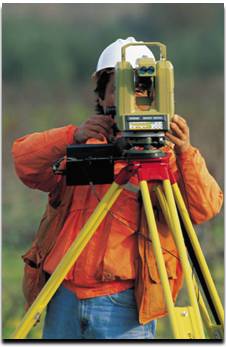
Pictured: Audience members in a typical B2B Webinar.

Introduction

We all attended lectures in college that seemed to go on for hours without end. The professor was dry and not engaging.  Today’s B2B webinars are similar to college lectures – they’re long, they’re often dry and they do not invite attendees to participate (aside from those 10 minutes of Q&A at the very end). In today’s world of social engagement, B2B webinars should be more Twitter chat than college lecture.

The Need for Change

Too many of today’s B2B webinars amount to a product pitch.  If you’re fortunate enough to have 10% of your audience be “late stage” leads (for your product offering), then a product pitch may be effective, if it delivers the information needed to make a final decision.

What about the other 90%, however?  They range from early stage to mid-stage, so they’re not ready for a product pitch. Instead, they probably have some questions that your presenter(s) could answer. So instead of lecturing to them, invite them to join you in a conversation.

How to Change: Engage Your Audience Ahead of Time

I don’t know why some webinar presenters guard their presentation like it contains the secret location of The Fountain of Youth. These days, transparency rules, so why not show your potential audience what you plan to talk about? You’ll gain valuable feedback to ensure that your message delivers on what your audience wants.

So post the preso on the web.  Allow anyone to comment on each slide.  Then, allow users who have registered for the webinar (perhaps you’ll need to assign them a login/password) the ability to edit your slide a la wiki (i.e. so that changes can be tracked and backed out). Now, you’re really onto something: a presentation tuned to what your audience wants. And, by engaging your audience beforehand, you increase the chances that they’ll attend the webinar.

How to Change: Conversations, Not Presentations

Your webinar viewers could be twiddling their thumbs or typing away on their keyboards (back to you). The choice is your’s, which would you prefer? Webinars should evolve to conversations, not presentations.  Similarly, the slide deck should evolve, too.  The new slide deck doesn’t include deep information about your products.  Instead, it lists “topics for discussion,” that cover issues relevant to your prospects. If you’ve engaged with your audience beforehand, then you already know what topics they’d like you to cover.

Of course, presenters should still have the opportunity to tell their story, but the story should enable the conversation and not define it. So tell a short story, have it seed the discussion and then invite your viewers to join the conversation.  Do this by embedding chat rooms, tweet streams and other relevant social networks directly into the webinar console. Your viewers will thank you – and, they’ll learn a lot from the other viewers, too.

The Benefits of Change

  1. Pre-webinar engagement can lead to higher registration and attendance numbers.
  2. Your viewers leave happier.
  3. You generate engaged prospects, not a generic list of leads.
  4. By engaging with your prospects, you’re able to better qualify them!
  5. By starting a conversation, you enable your sales team to continue that conversation.

Demand Generation Conference

I’ll be speaking at DemandCon in San Francisco on May 20, 2011, on the topic of demand generation and virtual events. In my session, I hope to avoid the same sins that I’ve outlined in this posting.


Chapter 6: Generate Sales Leads With Virtual Events

April 28, 2011

Introduction

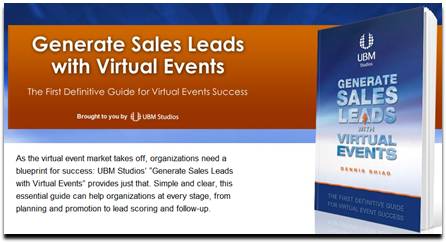
“As the virtual event market takes off, organizations need a blueprint for success: UBM Studios’ “Generate Sales Leads with Virtual Events” provides just that. Simple and clear, this essential guide can help organizations at every stage, from planning and promotion to lead scoring and follow-up.”

Chapter Excerpt

UBM Studios has published an edition of my book, “Generate Sales Leads With Virtual Events”. Chapter 6 of the book is titled “Engage with Virtual Event Attendees.”

One of the most critical elements of this chapter is the section that covers roles and responsibilities of your booth staffers. Especially for virtual events that draw large crowds, having a coordinated team leads to more goals in the net. And to continue that analogy, as the leader of your internal team, you need to serve as the head coach.

This entire chapter is now available to you. Visit the UBM Studios page for more info:

http://www.ubmstudios.com/sales_leads_book.htm


Case Study: Trade Show Lead Generation with American Express OPEN

April 26, 2011

Introduction

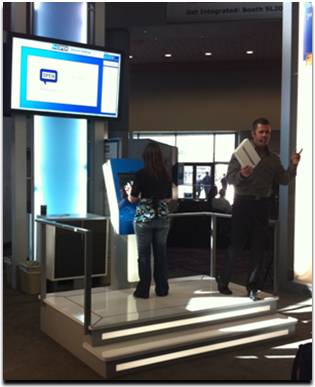
At NAB Show 2011 in Las Vegas, American Express OPEN (@OPENForum) created a game-based attraction in a lobby area that generated nearly a thousand (my estimate) sales leads.  Attendees were invited to play a Memory Match game, with an iPad 2 awarded to each day’s top performer. Read further for my thoughts on what made their approach so effective.

How They Attracted a Crowd

At any trade show, whether it’s physical or virtual, you want to attract a crowd to your space (or booth). To attract interest, location sure helps. The OPEN attraction was located in the lobby, right beyond the entrance and adjacent to the Information Desk.  Location goes only so far, however – you need to give attendees a reason to walk over to see what’s going on. OPEN achieved this with a prominent physical structure, along with an engaging host.

The host engaged simultaneously with the player and the audience, rooting the player along, while playing things up to the crowd, to generate excitement. Since the host spoke into a microphone, he garnered the attention of attendees who were walking by.

How They Tapped Into Attendees’ Competitive Juices

The brilliance of OPEN’s Memory Match game was the “score” (the time it took you to complete all matches – the lower the time, the better) and the leaderboard.  If the top score was “35 seconds,” then each contestant knew that they had to beat 35 seconds in order to win the iPad 2 (or, at least to attain the top spot on the leaderboard).

With a typical booth giveaway, you drop your business card in a fishbowl and hope that your name gets picked. The OPEN giveaway was different, because it tapped into the competitive spirit in all of us.  Contestants feel like they can control their destiny, unlike the random pick out of a bowl.  And, they’re presented with a clear goal in mind.

The game dynamic created a byproduct: an intense amount of excitement each time someone set the new “record”.  A woman who obtained the top time of the day jumped and screamed her way off the platform, as the crowd roared. It was like Tiger Woods sinking a birdie putt at The Majors – and, it drew further interest from passersby.

How They Captured Leads

Before beginning the Memory Match game, contestants needed to enter their information on the game console – the process was quite similar to filling out a registration page.  While leads from viewers (in the “audience”) were presumably not captured, all attendees who played the Memory Match left their name and contact information.  By providing a fun experience to visitors, OPEN can expect a stronger response from sales prospects compared to a more conventional show presence (i.e. without the game).

How They Provided Instant Gratification

Only a single visitor would win the iPad 2 each day, which means that 99% of visitors would go home empty handed. Not so with OPEN: they occasionally handed out $10 Starbucks cards to those contestants who showed their AmEx card. A great way to send visitors away happy, and to reinforce the notion that “membership has its privileges.”

Conclusion: Apply This to Your Virtual or Physical Trade Show Booth

Things to consider for your next trade show, whether it’s virtual or physical:

  1. Figure out how to attract attention.
  2. Tap into the competitive spirit of your visitors.
  3. Make sure your visitors have fun.
  4. Make sure a portion of your visitors leave happy.
  5. Optimize your lead gathering process.

A Flight Attendant Call Button for Virtual Events

April 22, 2011

Introduction

On a recent flight, the passenger in front of me pressed the flight attendant call button as we neared cruising altitude.  As I heard the “ding” and saw the light turn on, a light bulb came on in my own head.  The pressing of the call button sends two signals:

  1. “I’m here”
  2. I need assistance (i.e. “Please engage with me”)

Let’s consider how a flight attendant call button can be added to virtual events.

Technical Support

To receive technical support in a virtual event, you need to go find help, usually in the form of a Help Desk.  On an airplane, it’s more efficient for the help to come to you – far simpler than having you get up, disturb the passengers in your row and walk down the aisle.  In a virtual event, you’re often busy viewing sessions, engaging with exhibitors or chatting with fellow attendees. Wouldn’t it be so much more convenient if the help would come to you?

Virtual events could include a “call button” that attendees could click.  Staffers providing technical support at the event would see the attendee added to a queue, along with an audio cue (the “ding”).  Attendees could be provided with the option of including a one-sentence description of their issue, prior to clicking the call button.  From here, support staff would connect directly with the requesting user, to assist them one-on-one.

Engage with Exhibitors

Similar to “technical support finding you,” attendees looking to engage with multiple exhibitors could opt in to invite exhibitors to connect with them.  An “exhibitor call button” could be clicked that would signal to all booth staffers that particular attendees could be contacted.

If an exhibitor engaged with a requesting attendee via private chat, the “call button” would be turned off, until that private chat concluded.  In many ways, this mechanism would be more efficient for attendees, compared to visiting assorted booths and engaging with the staffers in each one.  A more sophisticated call button could allow users to specify which type of exhibitors they’d like to engage with.

Engage with Attendees

Engagement with other attendees is typically done via group chat and private chat.  But how do you know whom you should have 1:1 chats with?  An attendee call button could let others know, “I’m here” and  “engage with me.”

The attendee call button could include a one-sentence description of the user’s interests.  All users who pressed the call button could be listed in a Lounge – and mousing over the users’ profile images could display their names, titles and one-sentence descriptions.  The attendee call button can spur more connections and networking than the typical Networking Lounge.

Conclusion

All too often in virtual events, we “venture out” to find people and information (e.g. exhibitors and attendees). Instead, a simple call button could turn the tables, allowing the people, at least, to come seek you out – and engage.

What do you think – would you use the call button feature  in a virtual event?  Leave a comment below.


Job Posting: Virtual Experience Openings at GPJ

April 20, 2011

Disclosure: I’m employed by INXPO, a partner of George P. Johnson.

Introduction

We at George P Johnson are growing our virtual experience business significantly. We are looking for several positions that would fall into our Digital Experience Group. These positions range from virtual producers to virtual strategists who want to join a group and company that supports some of the biggest clients in the world.

Job Requirements

If you have experience in virtual production, virtual management, and/or virtual strategy, we want to hear from you. Whether you are looking for contracting positions or full time, we want to hear from you.

Some of the skills we are looking for as we build out:

  1. Consult with clients on virtual experience strategy for occasion-based events or persistent environments.
  2. Work with clients to ensure experiences deliver on client goals within technology capabilities and timeframe.
  3. Manage clients’ virtual events
  4. Educate and enable clients throughout the lifecycle of the virtual engagement.
  5. Contribute to the practice by developing and deploying methodology deliverables, training and mentoring other members of the team, and suggesting and implementing improvements to practice management and operational practices such as time tracking, resource allocation, skills management, and other operational systems and processes.
  6. Contributor to the development of Virtual Experience proposals, scopes of work, and estimates.

Open positions are based in our San Carlos, CA office, in Northern California.

Contact

If you want to talk, contact Lori Guy at lori.guy@gpj.com

About George P. Johnson

George P. Johnson (GPJ) is one of the largest experience marketing agencies in the world, with more than 1,000 employees across 29 offices in 9 countries (Australia, India, Singapore, China, Germany, Switzerland, Japan, the United Kingdom and the United States) with alliances in France, Italy, Korea, and Taiwan. The Digital Team is all about remote engagement and fanatical about creating amazing experiences. You will be part of this; a critical part of a growing digital practice focused on solidifying our leadership in strategy and delivery of virtual experiences worldwide for some of the most recognizable brands on the planet. Time to get dirty. Time to make a difference. Time to have fun.


A New Approach to Virtual Trade Show Booth Surveys

April 19, 2011

Introduction

Surveys should not be difficult to operate! Too often, however, they are. For virtual trade shows, booth surveys can complement the demographic data (collected during registration) with psychographic data to help you further qualify your virtual trade show leads.  In this post, I introduce a new approach to the virtual trade show booth survey.

Make it Fun

Surveys are no fun.  As a first step, don’t call your’s a “survey”.  If you sell B2B products, call it a “Readiness Assessment” instead. Then, make it fun. Introduce a host or hostess (audio voiceover) who talks to the end user after each step, cracking jokes along the way.

Develop humorous text or imagery, to encourage users to unmute their speakers.  After every few questions, pipe some humor into the process. For instance, insert a text bubble that reads, “4 out of 5 of virtual event attendees surveyed indicate that they … dislike surveys!”

Provide Instant Feedback

When you complete most surveys, the feedback you receive is, “Thank you for participating in our survey.”  The new approach to the booth survey leverages numerical weightings to each multiple-choice answer.  You design the survey questions (and the answers), so that the answers are summed up to a total “score.”

Next, capitalize on the current popularity of badges (a la Foursquare) and assign ranges of scores to custom-designed badges.  For instance, in our B2B Readiness Assessment, the badges could be:

  1. The Dunno Badge (“I don’t know if I’m ready or not”)
  2. The Boyfriend Badge (“I don’t know if I’m ready to commit”)
  3. The Trooper Badge (“I think I’m ready, let’s do it”)
  4. The Honeymoon Badge (“Let’s skip straight to the honeymoon”)

(Note: use of sarcasm for demonstration purposes – may not be appropriate for a B2B setting.)

Your Ticket to Lead Qualification

When you designed your survey questions to add up to a score, did it seem like lead scoring?  It should have!  Just as you’d calculate an “A lead” based on their activity in your virtual booth, you badges become a form of a lead score.  If you’re implementing lead scoring for your booth visitors, you can augment scores with badge information.

For instance, “A leads” who completed your survey and received the “Honeymoon Badge” are the cream of the crop.  They receive higher priority than other “A leads” who received the Trooper, Boyfriend or Dunno badges.

Be Prescriptive on Next Steps

Surveys provide little to no information on next steps.  Since your survey is labeled a “readiness assessment,” you ought to prescribe the next steps to the user.

Our new approach assigns a specific piece of content to each badge.  For instance, users with the Dunno Badge receive the “Widgets for Dummies” eBook, while Honeymoon Badge users receive the “Widget Implementation, Volume I” white paper.  By giving users a clear follow-up plan, you’re delivering tremendous value in exchange for filling out the survey.

Conclusion

The new approach to booth surveys can create a win/win/win scenario.  First, by making it enticing and fun, you generate more survey completions. Next, by mapping each survey responder to a badge, you provide instant lead qualification (which helps you).  And finally, by prescribing a follow-up plan for each badge, you provide value back to the user, while conveniently leading them down the sales cycle.


Broadcasting Live from NAB Show 2011

April 10, 2011

Introduction

What happens in Vegas no longer stays in Vegas. In fact, with hybrid events, Vegas events are coming to a screen near you, whether that’s your desktop, laptop or tablet.  I’m off to Vegas to be a part of INXPO’s hybrid booth at NAB Show 2011.

Streaming Live

On Monday and Tuesday, April 11-12, 2011, we’ll be broadcasting live from Las Vegas, via a virtual environment called INXPOLIVE.  Register for free here:

http://inxpolive.com

We’ll be featuring live interviews with attendees and exhibitors of NAB Show – and provide “a taste” of NAB Show Virtual View, the online extension to NAB Show, which goes live on May 12, 2011.

Join Us In Person or Virtually

If you’ll be at the show, drop a comment below to let us know if you’d like to chat with us on camera. If you’re not able to join us in Las Vegas, we hope to see you there, virtually.