Virtual Event Evolution

June 28, 2010

In a prior blog posting, I promoted a wiki that I created that allows us to collaborate on the evolution of virtual event platforms.  The wiki received some very thoughtful contributions.

Miguel Arias (IMASTE) added several insights via the wiki. In the paragraph “Make it easier to experience” he writes:

Along with a simplification of interfaces and the use of usability and navigation conventions, many customers and users seem to be demanding more immersive environments. While presenting a brand and hosting an interactive experience in a convention centre, it seems an interesting field to add some real-time rendered environments using engines like papervision3D or Unity3D. This said, it is unlikely that avatar based real time rendered environments will make it a a mainstream audience. Mainly considering plugin or applets downloads, system performance and learning curve barriers.

In the paragraph “Make it easier to experience” he writes:

The most relevant virtual event platforms will introduce or already have Facebook connect and twitter connect, and they will need to move to even wider standards like OpenID. On the other hand, deskopt or mobile widgets to control your stand usage, statistics and reporting will be a must. Lastly, the platforms will have extense APIs to manage their integration with various social networks, corporate databases, physical event managing software, etc.

Miguel then added a new paragraph:

Make the platform more adaptable for different customer needs and different usage

There are so many different kind of virtual events: trade shows, conferences, job fairs, corporate events, webinars, congresses… that vendors should decide in which market niche they are going to play. We will see generic platforms and other vendors delivering a tailored solution for one or many of the previous choices. It will become more and more complex to provide physical event managers with the features they need to handle their hybrid events at the same time as the platform is able to cope with the extensive data handling of the virtual job fair, or the networking tools of a professional tradeshow.

Steve Gogolak  (Cramer) also added several insights via the wiki. In the paragraph “Make it easier to access” he writes:

For public events, ease of registration is a must. Using open methods for registering and/or connecting social networks have three-fold benefits:

  1. Registration is faster because basic information can be provided by services like LinkedIn, Facebook, etc. Shorter registration forms increase completion, period.
  2. Intelligence gathered by the platform about the user’s existing social graph can enhance the experience within the event by automatically creating connections with other attendees based on that user’s connection outside the platform. This will lead to more networking and awareness of actual people within the environment.
  3. Users opting into connections at the point of registration allows platforms to create publishable actions that can be spit out to twitter and facebook news feeds that can increase viral awareness of the event. Marketing automation at its best.

In the paragraph “Make the experience available on more devices” he writes:

One of the key areas where mobile can play a huge role is the “reminder” needs that come from tons of scheduled activities within virtual events. If attendees have the ability to build out a personalized agenda before the event and opt-in to either SMS reminders or download some kind of app that will push notifications at them throughout the day, it would be much easier to create a flexible agenda. Currently we’re cramming so much into the shortest amount of time because we’re afraid of losing people. If only we had better planning and reminding tools, driven by devices that never leave our pocket!

In the paragraph “Make the platform more adaptable for different customer needs and different usage” that Miguel created, Steve writes:

Take a hint from Apple’s “face time”. Video chat will, without a doubt, increase the effectiveness of networking. It is the one key element that can be introduced that will get critics to come around to the idea that networking in an online environment can be as effective as the cocktail hour of a physical event.

To view the fruits of our collaboration, you can read the wiki page here:

http://allvirtual.pbworks.com/How-Vendors-Should-Evolve-Their-Virtual-Event-Platforms

By default, you’ll be taken to the “VIEW” tab – to contribute, click on the “EDIT” tab. We’d love to hear (read) your thoughts!

Tweet this posting:


What I’ve Been Tweeting (Edition 1.0)

June 25, 2010

Because tweets are temporal, while blog postings are permalinked…

Selected musings and sharings, all done in 140 characters or less – for a full subscription (at absolutely no cost), follow me at @dshiao.

What I’ve Been Tweeting

Virtual Events

  1. #Telepresence In #Virtual Events With @G2Events: http://bit.ly/bcALWq #eventprofs
  2. Lots of #virtual events this month – see calendar: http://bit.ly/6IYdC5 | just added CSCO Summit & Retail Marketing events
  3. @VirtualEdge highlights @CiscoLive 2010, with thoughts from @dveale: http://bit.ly/bSjeJw
  4. Let’s collaborate on the evolution of #virtual events – info: http://bit.ly/brNUGE & wiki: http://bit.ly/9AF7JU #eventprofs
  5. 5 Tips For A Successful Virtual Trade Show by @funnelholic: http://bit.ly/ciApcx
  6. Maximizing the #ROI of #Virtual Trade Shows – Tips from the Trenches: http://bit.ly/9nBATP (by @ellehwoulfe) #eventprofs
  7. A @Focus discussion on #virtual events & what works: http://bit.ly/drin3W (via @funnelholic) #eventprofs
  8. Making Virtual Event Connections”: @dveale on Twitter/Facebook/LinkedIn integration into @CiscoLive Virtual: http://bit.ly/ao0Ibm

Social Media

  1. #socialmedia will shift from specialized machinery in hands of few to Swiss Army knife in hands of many (my take from #ragancisco)
  2. Just noticed: @Yelp now has “Follow This Reviewer”, a “Compliment” button on each review and a type of badge (“Elite ’10”)
  3. Expect @Groupon to ramp up on social: “Most people who use Groupon don’t realize it’s a group purchasing site” (said CEO in @NYTimes)
  4. RT @samueljsmith: Free Report: #SocialMedia in the New Event World http://ow.ly/1YOg4 #eventprofs #mpi RT @ericlukazewski
  5. YouTube Gets a Cloud-Based Video Editor: http://bit.ly/9z3BFS (from @RWW – good stuff, @YouTube)
  6. Fabulous: Inside @Gatorade’s Social Media Command Center from @Mashable: http://bit.ly/9Ma4d8
  7. “8 Interesting Media Offerings on LinkedIn”: http://www.clickz.com/3640716 (by @HarryJGold) – @LinkedIn has a white paper program

Cloudforce 2010

  1. Salesforce doing demo of Chatter app for iPad – planning to release later this year #Cloudforce #Cloud2
  2. Dell is on stage doing demo of Chatter running on the new Dell Streak (Android tablet) – 5 inch form factor #Cloudforce
  3. Neat things from #Cloudforce keynote: #Chatter demo on web, iPad; Jigsaw integration; Service Cloud 2 demo
  4. My learning from #Cloudforce: the cloud can move business “chatter” from a backchannel to an always-on channel
  5. Salesforce using 40-50 percent less email since they enabled #Chatter internally #Cloudforce
  6. #Chatter used to collaborate and share docs within a business – who’s thankful? The Exchange Administrator

Product Ideas

  1. Idea to promote businesses: design floor tiles with embedded QR codes – some patterns I see already look like them 😉
  2. Product idea: Twitter Funnel Server. Why? Because without one, companies would feel like they’re drinking from a firehose

General

  1. How iPhone 4 Could Change Augmented Reality: http://bit.ly/cbgxw8 (via @RWW) #AR
  2. RT @ojchiang: Watch The World Cup Through Your Video Game Console « Velocity – Forbes.com http://bit.ly/diu67X #worldcup
  3. A click is like a first date – it may be your only chance to make a first impression (via @ClickZ article)
  4. New term for startups who do not invest capital wisely: they operate at “broke-even” 😉
  5. Over breakfast, my first grader was talking about bloggers. Asked her to define “blogger” – her answer, “someone who blocks the road”

5 Tips For A Successful Virtual Trade Show

June 22, 2010

The following is a guest post from Craig Rosenberg.

On the 29th of June from 8AM to 4PM Pacific, I’ll be running my first virtual trade show: Mastering Lead Management.  At Focus, the company I work for, we’ve been doing webinars for our clients for years. But this virtual event is our first day-long comprehensive show.  To differentiate and make it as successful as possible, there were a few critical decisions we made during the show’s development:

We called it an interactive summit — To us, a virtual trade show or trades hows in general give the impression of a vendor bazaar where everyone’s main goal of the event is to get buyers introduced to vendors. Buyers expect more.

We leveraged all unbiased, third party content (no vendor pitches) — We have sponsors, but our approach to any content we create is all about making it “buyer-helpful,” that is, information that helps buyers do their jobs better or make more informed purchasing decisions.

We gave all sponsors full booth functionality — Instead of worrying about creating different pricing schemes for different features in the booth, we gave everyone everything we could.

    We think these decisions are at least in part the reason why we’ve garnered thousands of registrants to the event so far. Based on what I’ve learned and past experience with all kinds of trade shows, here are my 5 tips for successful virtual trade shows:

    1. It’s all about the content, it’s always about the content – All the blog posts and marketing we find today about virtual events is about minimizing environmental impact, shrinking travel budgets, etc.  While I think these points are interesting, we believe that if the content is compelling, they will come.  Think about it, despite all the marketing we are producing about people avoiding live events, they go and they go because they see value.  White papers, webinars, you name it, they all still work. But it’s about the content. Why would virtual events be different?  The answer is they are not.
    2. It’s all about the variety and volume of content – A virtual summit gives you multiple opportunities to peak a buyers interest with all kinds of content.  In a white paper or a webinar, it’s a one-shot deal.
    3. Content drives the types of leads you get – The biggest factor for the future of the virtual trade show market is ROI.  I can tell you that if you try to be something for everyone, then that’s what you’ll get.  Guess what, that is the problem with the traditional trade show market.  For successful lead generation, I’d suggest creating more targeted content and be prepared for less numbers.
    4. Virtual events are scoring machines – From a lead management perspective, virtual shows provide amazing activity data on attendees.  There is a lot of content available to participants and a lot of opportunities for interactivity. All of this should be collected and sent to whomever cares, such as sponsors.
    5. Understand why trade shows don’t work – This is a bit of a “reset” of the points above, but trade show attendance isn’t only down because of shrinking travel budgets. Trade shows are down because buyers have A LOT of choices for content to do their job better.  15 years ago, trade shows had a pretty solid hold on information. Now with the internet, information is everywhere without the time and resource commitments that make it harder for live trade shows to compete. What can you learn?  Well, people aren’t going to come to your event just because your show is virtual (and you don’t want them to), they are going to come because they see value.

    Craig Rosenberg is Author of The Funnelholic, his very popular B2B sales and marketing blog. He is also Vice President of Products and Services at Focus where he oversees product creation, management, and delivery. Prior to Focus, Craig spent years as a consultant for SalesRamp where he designed, built and managed lead-generation and inside sales strategies and processes for high-tech startups.

    During that time, Craig built lead generation machines at over 25 different companies in a variety of different high-tech verticals ranging from business applications to IT infrastructure. Because of his extensive experience, Craig acts as an advisor to Focus‘s clients, helping them solve a variety of different marketing and demand-generation challenges  You can visit Craig’s B2B Demand Generation Blog at www.funnelholic.com.

    Tweet this posting:


    Let’s Collaborate On: Evolution Of Virtual Event Platforms

    June 21, 2010

    Let’s collaborate on how virtual event platforms (and their associated experiences) should evolve.  I’ve set up a wiki on PBworks that will allow all of you to chime in with your thoughts.  Here’s the link to the wiki – I invite you all in, to add your thoughts and make edits:

    Be part of a collaborative blog posting

    http://allvirtual.pbworks.com/How-Vendors-Should-Evolve-Their-Virtual-Event-Platforms

    To edit the wiki page, you’ll need to register for a free account with PBworks.  Suggested ways to participate:

    1. Edit any of the existing material
    2. Add new paragraphs or sections
    3. Delete existing material (although I’d rather you re-write existing material than delete it outright)

    Below, I’ve posted the current text of the wiki page.  If you have thoughts on this topic, be sure to visit the wiki and chime in! Based on the amount of activity this week, I may choose the publish the final version of this post here on this blog.  All contributors will be acknowledged.  If you do not wish acknolwedgement, simply skip the inclusion of your name in the list (bel0w).

    Lastly, if you’d like to contribute, but would rather not use a wiki, leave a comment below and I’ll apply your comment(s) to the wiki (with proper acknowledgement).

    Initial Draft – Visit the wiki to add your thoughts

    To evolve their platforms for enhanced experiences and broader adoption, virtual event platforms should consider the following:

    Make it easier to experience

    Most virtual event platforms are easy to use – on a first-time visit, users tend to grasp the overall user experience and can figure out where to go (and how).  That being said, for wide scale adoption, virtual events needs to be as easy as Facebook.  That is, our grandmothers need to be able to access the site and figure things out.  On Facebook, grandmothers can update their profile, read their “friends” posts and write updates to their Walls.  Can a grandmother login to a virtual event, update her profile and participate in a group chat?  We’re not so sure.  Similarly, navigation and interactions need to be easier.  Most virtual events are intuitive to navigate (e.g. Lobby, Auditorium,  Lounge, etc.) – but may not be so intuitive with regard to message boards, chat, blogging, rating, etc.

    Make it easier to find

    The typical “location” of a virtual event is quickly becomin outdated – microsite with registration page, with no ability to experience the event prior to completing all mandatory registration fields. The registration page serves as a “wall” not only to potential attendees, but to search engines as well.  Virtual event platforms need to move “outside the wall” and expose their technology on Facebook, on blogs and on publisher web sites.  Platforms should widen their distribution via widgets, embed code and application programming interfaces (API’s).  Facebook is not limited to Facebook.com – it has Facebook Connect, Facebook Open Graph and much more.  Virtual events platforms, on the other hand, seem to be restricted to “VirtualEventPlatform.com”

    Make the experience available on more devices

    Most virtual event platforms support Windows, Mac and Linux.  They need to support more platforms, especially mobile.  On the mobile front, it’s important to consider iPhone/iPad, Android, BlackBerry, Symbian, Windows 7 Phone and WebOS (listed in our order of importance).  To start, we don’t believe the entire virrual event experience needs to be “ported” to mobile devices -rather, vendors should determine the most critical features for attendees and exhibitors – and prioritize based on importance.  For instance, chat is an important element of virtual events, so why not make a mobile app that allows exhibitors to staff their booth via their smartphone.

    Make the platform more adaptable and flexible

    Related to our point about mobile support, platform vendors have important decisions to make regarding the development platforms.  Virtual event platforms today are based on Flash, Silverlight, Java and JavaFX.  Are those the “right” platform technologies for the future – or, should platforms move in the direction of HTML5?  Does a combination off HTML5, Javascript and Ajax create a more adaptable and flexible platform?  What do we “lose” by shifting away from Flash, Silverlight, etc.?  And what are the mobile implications with the chosen direction?  All good questions for the platform vendors to consider.

    This article was developed collaboratively via PBworks.  Contributors to this article include:

    1. Dennis Shiao, Blogger at “It’s All Virtual”
    2. <YOUR NAME HERE>

    Tweet this posting:


    Mid-Year Report Card: 2010 Virtual Events Predictions

    June 9, 2010

    At the end of 2009, I posted my 2010 predictions for the virtual events industry.  Now that we’re nearly half done with 2010 (can you believe that), I decided to provide a self-assessment for my predictions.

    Overall, I’ve decided on a grade of “B” (I’m an easy grader) – which may improve based on the second half of the year.  Let’s review the individual predictions.

    Video Integration (Grade: B)

    I wrote:

    In 2010, I believe that the virtual event platforms will integrate with third party video conferencing technologies in a big way – stirred largely by client demand for it.

    While video conferencing integration has not (yet!) been implemented on a wide scale, we witnessed the first occurrence of telepresence enablement in a virtual event.

    The Sustainability Virtual Summit: Smart ICT was produced by G2 Events, “featuring telepresence enablement, allowing roundtable and panel discussions to be broadcast between panelists in remote locations worldwide (first in a virtual event)”.

    I attended the event and viewed a number of telepresence-enabled sessions.  While impressive, it should be noted that my prediction was around “incorporation of multi-party, HD video conferencing”, whereas the Sustainability Virtual Summit event enabled telepresence via “simulive” playback of pre-recorded sessions.

    Multi-party HD video conferencing over the public Internet is likely a few years away – instead, we’ll likely see multi-party (with virtual event integration) enabled in a corporate setting, with its tighter controls over available bandwidth – and, with the option to distribute the video conferencing streams via IP multicast.

    Global Players (Grade: B)

    I wrote:

    I expect to see another European-based platform emerge in 2010, along with one or more in Asia Pac.

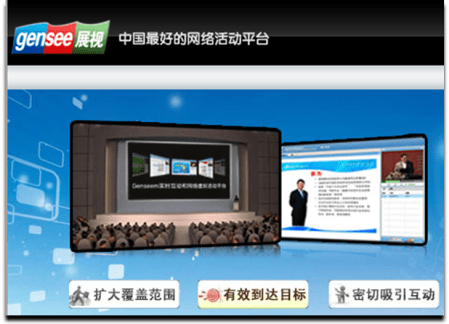
    Gensee, based in China, provides a “Web Virtual Events Platform”.  The market for virtual events in China seems to be less developed than in the U.S. and Europe – as such, Gensee may be well positioned to capitalize on any uptick in adoption (in China), as their platform was built to serve a Chinese audience.

    “China has more than 400 million internet users, with Flash based virtual games and social network services very popular, although with its own flavors and local providers”, notes Benjamin Chen, CEO of Gensee Technology.

    Chen continues, “China has many economic centers and many enterprises have geographically dispersed customers and employees. I already see great demands to complement physical trade shows, expos, events and e-learning with virtual components”.

    VisualMente is another European player in the virtual events space – they’re based on Spain and have done virtual event campaigns for BlackBerry, among others.

    To be fair, both Gensee and VisualMente were around when my predictions were made, so I didn’t technically predict their emergence.  That being said, I do believe in the trend that more and more players will enter the space, with a growing number of vendors outside of the U.S.  The U.S. is the most developed market to date (relatively speaking) – which means that even larger opportunities lie abroad.

    If you’re aware of additional virtual event players (outside of the U.S.), please leave information in the comments section below – thanks.

    Source: Cisco Live and Networkers Virtual

    Response Rates (Grade: A)

    While I can’t provide insight for “relative response rates” on audience generation for virtual events in 2010, I did write the following:

    Virtual event show hosts will need to consider the incorporation of gaming, the creation of affinity programs and more.

    Cisco Live and Networkers Virtual is incorporating gaming into their upcoming event – Dannette Veale (Cisco) published a post regarding  objectives and considerations behind enabling gaming in that event.  I should disclose that I’m with INXPO, the virtual event platform that’s hosting this event – and we’re big believers in social gaming in virtual events.  So my prediction was a bit self serving.

    I do believe in the effectiveness of gaming, especially in a virtual event or virtual business environment (e.g. for learning, retention, sponsor interaction, etc.) – as such, I expect to see an increasing amount of games (especially games with a social component) enabled in virtual events going forward.

    Some vendors will integrate them into the core platform, while others will start by creating “one off” games that are loosely coupled with the underlying event platform.

    Immersiveness (Grade: A)

    In the U.S., the Virtual Edge Summit is the annual face-to-face event in the virtual events industry.  New this year was a “Business 3Di Track”, demonstrating the growing interest in immersiveness [see full program here].  I wrote:

    Client interest and demand will drive some platforms to add immersive capabilities in 2010.  I don’t expect a software download, however – it would serve platforms well to support the immersive experience within their existing framework (e.g. Flash, JavaFX, Silverlight).

    One of the exhibitors at Virtual Edge was Altadyn, who provides an offering called 3DXplorer – “the first ‘browser-based’ and ‘installation-free’ solution which enables a 3D interactive and fully immersive experience, accessible from any corporate or individual computer”.

    In addition to Altadyn, one of the “pure play 2D event platforms” (at Virtual Edge) provided a demo of immersive capabilities they’ve incorporated into their platform.  I expect to see more experimentation and deployment in the second half of this year.

    Consolidation (Grade: C)

    I wrote:

    We’ll see the merging or acquiring of virtual event platform companies.

    Since neither of these has yet to come true in 2010, this grade really could be an “F” or an “Incomplete”.  I’m still holding firm on this prediction, however, as I do expect some M&A activity in the second half of the year.

    Conclusion

    The first half of 2010 sure has flown by – on the predictions front, I’m looking decent so far at the half-way mark.  I’m expecting an eventful second half (pun intended).  What are your expectations for the second half of this year in our industry?  Leave your thoughts below in the comments section.

    Tweet this posting:


    How To Leverage LinkedIn For Your Virtual Event

    May 26, 2010

    With over 65 million registered users worldwide, LinkedIn has become an essential destination where business professionals connect and network.  Make it easy for attendees to connect and engage with their LinkedIn network and virtual event planners have much to gain.

    The good news is that LinkedIn provides several convenient integration points – there are LinkedIn Events, LinkedIn Widgets and a full-blown Application Programming Interface (API).  Let’s consider a few possibilities.

    LinkedIn Events

    To promote your event, create a LinkedIn Event – it’s easy to “Add an Event” once logged in to LinkedIn.  Complete a few input fields and within 5 minutes, your event record is created.  There is a check box for “This is a virtual event” – you’ll obviously want to select that.  Once created, your event will appear at http://events.linkedin.com and be searchable by all LinkedIn members.

    Your next step is to generate awareness of your event to LinkedIn members.  On your LinkedIn Event creation confirmation page, you’ll have the option of sharing the Event with selected LinkedIn contacts – and/or advertising the event with LinkedIn’s DirectAds advertising system.  In addition to these options, consider promoting the event to relevant LinkedIn Groups, including those that your company has created – or is active on.

    As LinkedIn members find your LinkedIn Event, you’ll begin to generate registrations – members can also denote whether they’re “Attending”, “Interested” or “Not Attending”.  If they’re “Attending”, they can further define their role at the event (e.g. “Attending”, “Presenting” or “Exhibiting”).

    Note that a member can denote that they’re “Attending” your virtual event (on LinkedIn), but will still need to complete your event’s registration page, typically hosted on your site or your vendor’s site and separate from LinkedIn.

    Once a few members denote that they’re “Attending” your virtual event, LinkedIn’s sharing features kick in – as you see above, I can “Browse Events” and view all upcoming events that a LinkedIn connection (or connections) is attending.  I can click on the LinkedIn Event record to view all attendees – and, I can view which of my connections plans to attend.

    This could help in two ways – first, knowing that other like-minded professionals are attending may tip the scales in favor of my own registration and attendance.  Second, I now know (in advance) that one or more of my connections plan to attend, so I’ll be on the look-out for them within the virtual environment.  Or, I may email them on the live event date to ask for their early impressions.

    Here’s a useful article: Promote Your Event Using LinkedIn Events Application

    LinkedIn as Your Registration Page

    Registration page abandonment is a concern for all virtual event hosts – use a form that’s too long and potential registrants may give up and never return.  LinkedIn has a Profile API that can be used to retrieve certain attributes from a LinkedIn member’s profile.

    The first step for users, of course, is to authenticate to their LinkedIn account, granting the virtual event platform permission to access their LinkedIn profile.  Once authenticated, the virtual events platform can use the Profile API to obtain some profile attributes.  This should cover 40-50% of a typical event’s registration questions.

    By making it convenient for registrants, you’ll see a higher conversion rate and generate more registrations.  You’ll need to balance that by collecting additional information (that exhibitors may need) once registrants login to the event (e.g. email address, which the Profile API does not provide, street address, zip code, qualifying questions, etc.).

    LinkedIn Widgets

    LinkedIn makes it easy for you to incorporate functionality by way of Javascript-based widgets – LinkedIn provides you with a few lines of Javascript and you embed the code on your web page (or virtual event page).  There are three widgets currently available: Company Insider (see how many connections you have at a particular company), Profile (display a user’s LinkedIn profile) and Share on LinkedIn (share content with your LinkedIn Connections or Groups).

    Your virtual event’s registration page is a logical place to embed the “Share on LinkedIn” widget – users registering for your event can share it with their LinkedIn network – or, with particular LinkedIn groups to which they belong.  As shown above, members can share the page via status update (on LinkedIn), via a posting to a selected LinkedIn Group or by emailing selected connections.

    The registration page is the one page where sharing makes sense – the rest of the event sits behind the registration page.  Thus, sharing pages from within the event are less useful, since recipients would first need to complete the registration page prior to seeing the “shared content”.

    Searching for LinkedIn Connections within the event

    I occasionally attend a virtual event where I come across a former colleague in the Networking Lounge or in an exhibitor’s booth.  If not for the random encounter, I would have never known s/he was attending the same event.  The virtual event platform ought to provide me with the ability to search my LinkedIn Connections and then check to see if any of them are registered or online (right now!).

    This would be useful for:

    1. Attendees – have the opportunity to connect with a former colleague or business partner, right there in the virtual event.  Additionally, be able to compare notes on exhibitors, sessions, etc. with folks you know.
    2. Exhibitors – invite contacts (connections) to visit you in your virtual booth and get them caught up on your latest product offerings.  Also, be alerted to existing customers and business partners who are attending – whom you may not have known were online in the environment.
    3. Show Hosts – be alerted to business contacts who are attending your event – and be able to check in with them (or connect with them afterwards) to ask about the event experience.

    Conclusion

    Leveraging LinkedIn can bring many benefits to a virtual event planner – you can generate awareness and additional registrations via LinkedIn Events and the “Share on LinkedIn” widget; you can create an accelerated registration process for your users (and generate additional registrations along the way) and you can create enhanced engagement within the event by allowing attendees to discover their peers and business partners.  Give some of these ideas a try and let me know how they worked out!

    Tweet this posting:


    Virtual Events And Facebook

    May 20, 2010

    With 400 million active users worldwide (and counting), Facebook is enormous – in fact, Facebook recently surpassed Google as the #1 web site in the U.S. (as measured by visits).

    While recent announcements have stirred up privacy concerns and caused some users to delete their accounts, Facebook continues to generate millions of new sign-ups per day.  All of us know friends, family and colleagues who use the site on a daily (or hourly) basis.

    Let’s consider avenues for virtual event planners to tap into the power that Facebook can provide.

    Integration 0.1: Share on Facebook

    More than half of my Facebook friends (54%) are work-related acquaintances – current colleagues, current business partners, former colleagues and former business partners.  The balance (46%) are friends and family.  I’m by no means the “average” Facebook user.  I believe the typical user tends towards a 65%/35% split between family/friends and work – and, uses Facebook for a family and friend focus rather than work.

    That being said, it’s clear to me that Facebook users “friend” their work contacts – and I believe that over time, a growing percentage of your Facebook friends will be work-related contacts, as our personal and work lives blend and mix online.

    What does this mean for virtual events?  With a B2B focus (today), this means that a “viable” audience exists (on Facebook) for you to share the virtual events that you’re attending.  Virtual event platforms should make it easy to “share the event” on Facebook, in the same way that users share a web site’s movie review, restaurant listing or product listing.

    To make virtual event sharing effective, the “shared items” should include:

    1. A simple and easy to understand title (Facebook grabs the “page title” from the virtual event page you’re sharing)
    2. A suitably sized image (on Facebook, the “sharer” can choose among the images listed on the shared page)
    3. A hyperlink for interested users

    If done right, 20 attendees might share your virtual event with their 200 Facebook friends – and you’ve just allowed your audience to promote your event (on your behalf) to 4,000 potential attendees (who otherwise would not have known about your event).

    Integration 1.0: Live Stream Box

    CBSSports.com used it for live streaming of NCAA March Madness – so did CNN.com for the live stream of President Obama’s inauguration.  As the name implies, Facebook’s Live Stream Box is useful for the “streaming” of “live” events or occasions.  The stream box provides an “Everyone Watching” tab – to submit a comment to that tab, users must authenticate to Facebook.  Even if you don’t have a Facebook account, you’ll still be able to view the running commentary from “Everyone Watching”.

    Comments posted to the “Everyone Watching” tab (in the virtual event) also appear on the submitting user’s Facebook Wall.  Thus, participation in a Live Stream Box helps promote the virtual event – users’ comments appear in the News Feed of their Facebook friends, which generates awareness of the virtual event.

    Facebook members have the added benefit of a “Friends” tab, which allows users to view their Facebook News Feed, right there from the stream box.  In a virtual event, the Live Stream Box can be placed in the Auditorium (where live sessions are broadcast), the Lounge (where visitors drop by to engage with one another) or Exhibitor Booths (where booth visitors can engage with the Exhibitor – and, one another).

    Integration 2.0: Open Graph

    “Share on Facebook” goes in one direction (the sharer -> her friends); “Live Stream Box” combines multi-directional interaction with a corresponding one-way share.  Facebook’s Open Graph API, announced in April 2010 at Facebook’s F8 Developer Conference, takes things to the next level.

    Now, users can go beyond sharing “the event” and be much more granular in what they “like” (recommend/share) in a virtual event.  I may “like” a session, a virtual booth, a document, or even another user.  And with the Open Graph, I need not share each and every “like”, posting it to my Facebook Wall.  Instead, the “likes” can be aggregated (e.g. by the virtual event platform).

    Now, when I login to the virtual event, I may choose to view the activities (and likes) of Facebook friends who opted in to the sharing service.  When I’m making a purchasing decision on a complex product or service, I can poll my Facebook friends to see who’s in the same boat.  If a former colleague attended a virtual trade show in the morning, I may login during the afternoon to view the sessions and exhibitor booths that she “liked”.

    Taken at a more granular level, I may choose to see the specific product collateral that she “liked” in the virtual event, or seek out the exhibitor representative that she chatted with and “liked”.  By leaning on those whom I trust, my journey through a virtual trade show just got more productive.

    Conclusion

    Facebook and its 400+ million users cannot be ignored.  There will be more and more business decisions guided (and made) on Facebook – it can be a great place to “share” your virtual event, both the event as a whole and individual elements within it.

    Tweet this posting:


    Virtual Events 101: Tips For Creating Your Virtual Event Survey

    May 16, 2010

    Satisfaction surveys are a key tool in a virtual event planner’s arsenal.  Among their many benefits, a virtual event survey can serve to:

    1. Gain valuable feedback to improve the experience for subsequent virtual events
    2. Gain data, insights and comments that can be leveraged for public relations and future sales/sponsorship opportunities
    3. Establish a baseline of metrics that can be used to gauge your virtual event on an ongoing basis (e.g. overall event ratings, speaker satisfaction ratings)

    Here are some tips to consider when creating your event’s satisfaction survey.

    Determine what’s important to you

    Identify the key components of the virtual event experience – those elements that are most important to you.  Then, incorporate survey questions around those components.  Samples include:

    1. Content
    2. Sessions
    3. Navigation
    4. Exhibitors
    5. Event duration
    6. Event time (i.e. time of day)
    7. Helpfulness of online event staff

    Don’t wait until after the event!

    During the planning process, you should be defining overall objectives for your virtual event.  Craft your survey questions during the planning process – the survey, then, becomes one means by which you evaluate whether the event met your defined objectives.  Sending a follow-up email (with the survey) after the event is fine – but, be sure to make the survey available within the event experience – either via a built-in feature of the virtual event platform, or by incorporating a third party survey, such as SurveyMonkey or Zoomerang.

    Without being intrusive, make the survey “hard to miss” from within the virtual event experience – consider placing links to the survey in the event’s main navigation and in banner ads, your Help Booth and Auditorium.  If the virtual event platform supports it, schedule a periodic “notification pop-up” to inform attendees of the existence of the survey.

    Stay true to your survey goals

    Remember that a survey is about collecting input and not about qualifying leads and prospects.  Avoid asking qualifying questions in the survey (e.g. “Would you like a sales representative to contact you about ..”) and stick to the goal of understanding the attendee’s overall experience. A survey that’s disguised as a qualifying form will turn off potential submitters – and you’ll likely end up with fewer completions than you had planned.

    Similarly, determine whether you want to request “attributes” from survey submitters (industry, country, email address, etc.) or allow submitters to be completely anonymous.  Submitter attributes allow you to segment the survey responses by “qualifier” (e.g. event ratings by industry), while an “anonymous survey” may yield more submissions.

    Easy to complete

    Place a reasonable limit on the number of survey questions and the number of survey pages.  I’d recommend no more than 10 questions and no more than 2 survey pages (e.g. a limit of 2 survey pages with 5 questions on each page).  Pay attention to the question wording – don’t write an essay on the question or in the multiple choice selections.

    Use a combination of quantitative measures (e.g. a rating from 1 to 5) so that you can track particular metrics over time – and qualitative input, such as a free-form text box that invites submitters to leave feedback in the form of a comment.  Try to estimate the amount of time required to complete the full survey and provide that up front to survey takers (e.g. “Spend five minutes – provide us with valuable feedback to improve the event experience for you”).

    Include an incentive

    Incent survey respondents by offering some value in return.  You could provide a small offer to all submitters (perhaps a $5 gift card) – or, offer a larger prize that’s awarded by random drawing.  Consider the trade-off with an incentive – while you’ll generate more survey submissions, the integrity or quality of the survey data may be slightly compromised, as some users will quickly complete the survey (via random selections) simply to qualify for the prize.

    Define your action and response plan up front

    A survey serves you limited purpose if you don’t follow up and respond to the collected feedback.  When creating the survey questions, determine the actions that will be taken based on the responses.  For instance, for quantitative measures, define your targets (e.g. an average satisfaction rating of 4.0 [on a scale of 1.0 – 5.0]).  If you score lower than your target, drill down to determine why and apply those learnings to your next event.

    If your attendees rated your event low on navigation, determine whether that was the “fault” of the event platform, your own experience design or both.  For attendee feedback focused on the platform, hold a meeting with your virtual event platform provider to discuss further – they’ll appreciate the input and may already have plans (in the product pipeline) to address the concerns.

    Conclusion

    Surveys can be effective tools for virtual events – be sure to align your survey questions to your overall goals, make it easy and convenient for event attendees to complete it and properly follow up on the feedback delivered.  Keep using surveys for subsequent events, so that they get better and better (and better).

    Related Links

    1. Browse the Virtual Events 101 Index Page
    2. Download the eBook, “Virtual Events: Ready, Set, Go

    Note: I invite you to connect with me on .


    Virtual Events 101: What Is A Virtual Event?

    May 12, 2010

    Definitions, definitions.  Terms can be best explained by breaking them down into their component parts.

    “Virtual event” – let’s cover the second part first, the “event”.  An “event” can mean many things to many people; however, I like the following definition from Dictionary.com:

    Source: Dictionary.com

    An event is “something that occurs in a certain place during a particular interval of time”.  With a virtual event, the same definition applies – however, the “certain place” happens to be “online” or “on the web”.  For “virtual event”, the Dictionary.com definition could be re-worded to:

    something that occurs in a certain web destination during a particular interval of time

    Of course, like any loosely worded definition, many “things” fit this description, which you and I typically would not consider a virtual event (e.g. a multi-party instant messenger chat qualifies, but isn’t typically considered a virtual event).  In my mind, a virtual event is

    a web and occasion-based gathering that facilitates information sharing, collaboration and interaction.

    To date, the look and feel of virtual events have been modeled after a physical counterpart (e.g. a trade show, user conference, sales meeting or job fair).  As the industry evolves, the experience will evolve as well – and unique, web-based experiences will emerge.  For instance, expect to see virtual trade shows that look and feel nothing like their physical counterpart (hence the power of the web).

    There are no “bare minimum requirements” for a virtual event (e.g. Auditorium, Exhibit Hall, Networking Lounge, Booth) – an experience with no Auditorium and no booths can still qualify.  Virtual events come in many flavors – with many more on the way.  There are a variety of use cases and objectives that can be achieved virtually.

    Virtual events are known for the following benefits:

    1. Green technology that minimizes carbon emissions
    2. Supports a global audience
    3. Convenience – participate from your home, office, beach
    4. Ongoing showcase – the event is not required to be “torn down” at the conclusion of the live date(s)
    5. Granular engagement tracking – activity is recorded an deep engagement profiles generated

    Variations

    While virtual events occur on the web without a physical (face-to-face) component, some event planners are creating hybrid event experiences, whereby a face-to-face event is combined with a virtual component.  The virtual component can occur before, during or after the face-to-face event – when done concurrent to the physical event, interesting opportunities arise for blending the physical and virtual experiences.

    While events occur “during a particular interval of time”, some virtual event planners are creating 365 day/year virtual communities, which have a focus around periodic “events”.  So rather than create a virtual event that’s live for a single day, event planners create an evergreen (and virtual) business community that sees consistent activity throughout the year, with spikes of activity during scheduled days of “live event activity”.

    Conclusion

    Virtual events are here to stay – the broad definition of a virtual event will hold – however, more specific definitions will morph over time, as the industry and experience grow and evolve.  Tomorrow’s virtual events may look (and feel) nothing like today’s.

    Related Links

    1. Browse the Virtual Events 101 Index Page
    2. Download the eBook, “Virtual Events: Ready, Set, Go

    Note: I invite you to connect with me on .


    Virtual Events 101: Tips For Planning Your Virtual Event

    May 7, 2010

    Previously, I provided tips on selecting a virtual event platform.  In that posting, I covered team, technology and customer service considerations for selecting a platform.  Now, I’d like to cover the very important process of planning your virtual event.  A successful virtual event originates with a sound, strategic plan – one that’s researched, developed and documented well before the topic of platform selection is even broached.

    Virtual events involve technology – however, as with physical events, it’s about the experience first.  Technology, while important, is there to provide the means to address your experiential goals.  Get the planning done right and technology decisions will fall out naturally from there.

    Understand Your Audience

    A virtual event planner must act like a product manager – to build the best “product” (i.e. event), you need to first understand your target audience / target customer.

    Product managers need to employ “customer empathy”, while virtual event planners need to employ “attendee empathy”.  Product managers develop user personas – profiles of different users of the product.  Similarly, you ought to create attendee personas.

    Identify the attendee profiles – and for each profile, document the “average user”.  Questions you ought to ask about your audience:

    1. Are they inclined to experience an event virtually?
    2. What topics/subjects are they most interested in?
    3. What online sites do they frequent the most?
    4. When they’re not online, what are they doing?
    5. How do they prefer to consume content?
    6. How do they prefer to interact with one another?
    7. What would prevent them from interacting, engaging, etc. online?
    8. What motivates them?
    9. What is their preferred form of reward (e.g. recognition, money, etc.)?
    10. How do you hold their attention?

    There are many more questions you could ask.  Understanding your audience is one of the most important planning steps, so make sure you invest the right amount of time and energy here.  When done, document your “audience profiles” and share the document with your extended team.  Ensure you’re all on the same page with regard to your target audience.

    Identify Your Funding Sources

    The virtual event never happens if you’re not able to pay for its costs.  Are you an association that aims to fund the event with association or per-event fees?   Are you a non-profit organization who submitted a bid for a grant?  Or, are you a B2B publisher who aims to fund the event by selling sponsorships at a virtual trade show?

    For virtual trade shows, identify possible exhibiting companies and forecast the amount of revenue you can generate from the sponsorships.  Review past events you’ve produced (whether physical or virtual) – and, review competitors’ trade shows to see which companies are exhibiting at them.

    Regardless of the scenario, ensure that your funding model is identified – and, that the funds are “firm”.  It does you no good to spend a month profiling your target audience, only to have that work go to waste when you’re not able to obtain funding for the event.  If possible, seek to have your funds secured before you begin the subsequent planning steps.

    Define your Format, Venue, Style, Personality

    There are many types of virtual events: virtual trade shows, virtual career fairs, virtual product launches, etc.  Chances are, you already have a format in mind and that’s good.  Following that, however, you ought to consider the additional details of the design, style and personality of your virtual event.

    The most direct (and cost effective) approach is to select from the pre-existing “event templates” of your virtual event platform provider.  They’ll allow you to select a theme from their template library and you can apply customizations on top of the base image.  While this approach is time and cost efficient, keep in mind that it’s more challenging to distinguish your event, especially if your competitor uses the same platform and selects the same theme.

    If you have the budget (and time) to create a unique experience, consider the venue and theme – a virtual experience is not bound by physical space limitations (or, by gravity), so there are endless possibilities.  Do you want an outer space experience?  Perhaps not, but that’s possible if you so choose.

    If budget allows, consult with a creative agency or design firm – you’ll first want to “storyboard” the event experience in the same way you’d map out a new web site.  In addition to event components, storyboard the user journey and user experience – map out how you’d like attendees to move through your environment.

    Identify the Event’s Content

    Most virtual event planners associate “content” with “sessions” (e.g. Webcasts, Videocasts, etc.).  Sessions are indeed important – invest the time and effort to identify hot topics, develop session tracks and recruit speakers and presenters.  Once that’s complete, identify additional content formats to include:

    1. Break-out Sessions
    2. Training Sessions
    3. Scheduled Chats
    4. Quizzes
    5. Games

    Virtual events no longer need to be focused around the session schedule – as you can see from the list above, many content formats are available – and some are more effective at engaging and involving the audience.

    Identify Potential Dates

    Who knew that virtual event planning would be similar to wedding planning?  With regard to date selection, your first step is “conflict avoidance”.  You want to eliminate important dates within your organization (e.g. the date of your annual customer conference) – as well as important dates within your industry.  Then, review competitive events and related events in your industry, as you want to avoid those too.

    Finally, consider seasonality dependencies, such as the December religious holidays or the week leading to Labor Day (in the U.S.), during which many families with school kids are out of town.

    Once you’ve done the “elimination” of dates, consider events or occasions that would work well for your event – you might want to plan your virtual event around an existing physical event of your’s – or, plan for event around a key product launch you have scheduled two quarters from now.

    Identify the Event’s Duration

    Single-day events are the most common today.  Your event, however, should have a duration that’s driven by your goals and objectives.  For instance, if you have more content than can be consumed (or scheduled) in a single day, consider the multi-day event.  If your event is based around an ongoing game, with points accrued over days (or weeks), then the game parameters will dictate the event duration.

    For multi-day events, be sure you have an audience engagement strategy in place to incent Day 1 attendees to return for Day 2 (and Day 3, etc.).  In addition, keep in mind that multi-day events require staffing and support to be available for each live date, which adds hard and soft costs to the equation.

    Conclusion

    Hold your horses! Technology is fun and exciting, but before you jump into that step, be sure to spend the necessary time and effort to complete the planning steps outlined here.  In the end, you’ll be rewarded with a successful event.

    Related Links

    1. Browse the Virtual Events 101 Index Page
    2. Download the eBook, “Virtual Events: Ready, Set, Go

    Note: I invite you to connect with me on .