Virtual Event Evolution

June 28, 2010

In a prior blog posting, I promoted a wiki that I created that allows us to collaborate on the evolution of virtual event platforms.  The wiki received some very thoughtful contributions.

Miguel Arias (IMASTE) added several insights via the wiki. In the paragraph “Make it easier to experience” he writes:

Along with a simplification of interfaces and the use of usability and navigation conventions, many customers and users seem to be demanding more immersive environments. While presenting a brand and hosting an interactive experience in a convention centre, it seems an interesting field to add some real-time rendered environments using engines like papervision3D or Unity3D. This said, it is unlikely that avatar based real time rendered environments will make it a a mainstream audience. Mainly considering plugin or applets downloads, system performance and learning curve barriers.

In the paragraph “Make it easier to experience” he writes:

The most relevant virtual event platforms will introduce or already have Facebook connect and twitter connect, and they will need to move to even wider standards like OpenID. On the other hand, deskopt or mobile widgets to control your stand usage, statistics and reporting will be a must. Lastly, the platforms will have extense APIs to manage their integration with various social networks, corporate databases, physical event managing software, etc.

Miguel then added a new paragraph:

Make the platform more adaptable for different customer needs and different usage

There are so many different kind of virtual events: trade shows, conferences, job fairs, corporate events, webinars, congresses… that vendors should decide in which market niche they are going to play. We will see generic platforms and other vendors delivering a tailored solution for one or many of the previous choices. It will become more and more complex to provide physical event managers with the features they need to handle their hybrid events at the same time as the platform is able to cope with the extensive data handling of the virtual job fair, or the networking tools of a professional tradeshow.
Steve Gogolak  (Cramer) also added several insights via the wiki. In the paragraph “Make it easier to access” he writes:

For public events, ease of registration is a must. Using open methods for registering and/or connecting social networks have three-fold benefits:

  1. Registration is faster because basic information can be provided by services like LinkedIn, Facebook, etc. Shorter registration forms increase completion, period.
  2. Intelligence gathered by the platform about the user’s existing social graph can enhance the experience within the event by automatically creating connections with other attendees based on that user’s connection outside the platform. This will lead to more networking and awareness of actual people within the environment.
  3. Users opting into connections at the point of registration allows platforms to create publishable actions that can be spit out to twitter and facebook news feeds that can increase viral awareness of the event. Marketing automation at its best.

In the paragraph “Make the experience available on more devices” he writes:

One of the key areas where mobile can play a huge role is the “reminder” needs that come from tons of scheduled activities within virtual events. If attendees have the ability to build out a personalized agenda before the event and opt-in to either SMS reminders or download some kind of app that will push notifications at them throughout the day, it would be much easier to create a flexible agenda. Currently we’re cramming so much into the shortest amount of time because we’re afraid of losing people. If only we had better planning and reminding tools, driven by devices that never leave our pocket!

In the paragraph “Make the platform more adaptable for different customer needs and different usage” that Miguel created, Steve writes:

Take a hint from Apple’s “face time”. Video chat will, without a doubt, increase the effectiveness of networking. It is the one key element that can be introduced that will get critics to come around to the idea that networking in an online environment can be as effective as the cocktail hour of a physical event.

To view the fruits of our collaboration, you can read the wiki page here:

http://allvirtual.pbworks.com/How-Vendors-Should-Evolve-Their-Virtual-Event-Platforms

By default, you’ll be taken to the “VIEW” tab – to contribute, click on the “EDIT” tab. We’d love to hear (read) your thoughts!

Tweet this posting:


What I’ve Been Tweeting (Edition 1.0)

June 25, 2010

Because tweets are temporal, while blog postings are permalinked…

Selected musings and sharings, all done in 140 characters or less – for a full subscription (at absolutely no cost), follow me at @dshiao.

What I’ve Been Tweeting

Virtual Events

  1. #Telepresence In #Virtual Events With @G2Events: http://bit.ly/bcALWq #eventprofs
  2. Lots of #virtual events this month – see calendar: http://bit.ly/6IYdC5 | just added CSCO Summit & Retail Marketing events
  3. @VirtualEdge highlights @CiscoLive 2010, with thoughts from @dveale: http://bit.ly/bSjeJw
  4. Let’s collaborate on the evolution of #virtual events – info: http://bit.ly/brNUGE & wiki: http://bit.ly/9AF7JU #eventprofs
  5. 5 Tips For A Successful Virtual Trade Show by @funnelholic: http://bit.ly/ciApcx
  6. Maximizing the #ROI of #Virtual Trade Shows – Tips from the Trenches: http://bit.ly/9nBATP (by @ellehwoulfe) #eventprofs
  7. A @Focus discussion on #virtual events & what works: http://bit.ly/drin3W (via @funnelholic) #eventprofs
  8. Making Virtual Event Connections”: @dveale on Twitter/Facebook/LinkedIn integration into @CiscoLive Virtual: http://bit.ly/ao0Ibm

Social Media

  1. #socialmedia will shift from specialized machinery in hands of few to Swiss Army knife in hands of many (my take from #ragancisco)
  2. Just noticed: @Yelp now has “Follow This Reviewer”, a “Compliment” button on each review and a type of badge (“Elite ’10”)
  3. Expect @Groupon to ramp up on social: “Most people who use Groupon don’t realize it’s a group purchasing site” (said CEO in @NYTimes)
  4. RT @samueljsmith: Free Report: #SocialMedia in the New Event World http://ow.ly/1YOg4 #eventprofs #mpi RT @ericlukazewski
  5. YouTube Gets a Cloud-Based Video Editor: http://bit.ly/9z3BFS (from @RWW – good stuff, @YouTube)
  6. Fabulous: Inside @Gatorade’s Social Media Command Center from @Mashable: http://bit.ly/9Ma4d8
  7. “8 Interesting Media Offerings on LinkedIn”: http://www.clickz.com/3640716 (by @HarryJGold) – @LinkedIn has a white paper program

Cloudforce 2010

  1. Salesforce doing demo of Chatter app for iPad – planning to release later this year #Cloudforce #Cloud2
  2. Dell is on stage doing demo of Chatter running on the new Dell Streak (Android tablet) – 5 inch form factor #Cloudforce
  3. Neat things from #Cloudforce keynote: #Chatter demo on web, iPad; Jigsaw integration; Service Cloud 2 demo
  4. My learning from #Cloudforce: the cloud can move business “chatter” from a backchannel to an always-on channel
  5. Salesforce using 40-50 percent less email since they enabled #Chatter internally #Cloudforce
  6. #Chatter used to collaborate and share docs within a business – who’s thankful? The Exchange Administrator

Product Ideas

  1. Idea to promote businesses: design floor tiles with embedded QR codes – some patterns I see already look like them 😉
  2. Product idea: Twitter Funnel Server. Why? Because without one, companies would feel like they’re drinking from a firehose

General

  1. How iPhone 4 Could Change Augmented Reality: http://bit.ly/cbgxw8 (via @RWW) #AR
  2. RT @ojchiang: Watch The World Cup Through Your Video Game Console « Velocity – Forbes.com http://bit.ly/diu67X #worldcup
  3. A click is like a first date – it may be your only chance to make a first impression (via @ClickZ article)
  4. New term for startups who do not invest capital wisely: they operate at “broke-even” 😉
  5. Over breakfast, my first grader was talking about bloggers. Asked her to define “blogger” – her answer, “someone who blocks the road”

It’s All Shareable (Tweet Highlights, June 2010)

June 8, 2010

Because tweets are temporal, while blog postings are permalinked…

Selected musings and sharings, all done in 140 characters or less – for a full subscription (at absolutely no cost), follow me at @dshiao.

It’s All Shareable: June 2010

Virtual Events

  1. My 2010 Virtual Event Predictions: http://bit.ly/84yTKt (2010 almost half over, time to grade myself!)
  2. @SecondLife tries for a second coming (from @EntMagazine): http://bit.ly/dck524 (w/quote from @EricaDriver)
  3. RT @mike_arias: 10 Conversion rate optimisation tips for #virtual events http://is.gd/cpFDn
  4. Gaming and #virtual events – read about strategy & tactics from @CiscoLive: http://bit.ly/dfaRYq (by @dveale) #eventprofs
  5. For virtual events, users tweet first, email your support team later (so make sure you’re monitoring)
  6. A mid-year report card on my 2010 #virtual events predictions: http://bit.ly/a1p0o7 #eventprofs

Social Media

  1. Twitter: Is Marketing Doing It Wrong?: http://bit.ly/cUbSZs (agreed on all 3 points, @aprildunford)
  2. How @Houlihans used a @Ning social network & email mkting to connect w/customers: http://bit.ly/d9fUFx (by @AnnaMariaVirzi of @ClickZ)
  3. (Makes sense) RT @OpenTable: RT @Yelp: No reservations about it: Yelp integrates OpenTable reservations http://bit.ly/yelpopentable
  4. RT @iandavmcg: 9 Anti-Social Behaviors: Oscar’s Guide to Social Networking at Events http://bit.ly/c1zGtH http://bit.ly/cNhnB6
  5. From @WashingtonPost: What sites such as Facebook and Google know and whom they tell: http://bit.ly/cB5dub

Product Ideas

  1. If your app supports multi language, use a “Switch back to ..” link and render it in the “switched from” language
  2. Idea: in Outlook, support tabs (like browsers do) so I can keep multiple folders open – wonder if that’s already in Office 2010
  3. Idea: in “wall discussions”, allow a “flag for follow-up” (signal others). Users login & check wall posts they were flagged in
  4. Idea: Social game for @dictionarycom – when using site, share word (but not defn) w/FB friends – one w/closest definition recvs “points”

General

  1. “Know what you don’t know”, says @CiscoSystems CEO Chambers in @Newsweek interview: http://bit.ly/cXSJl4
  2. What’s your favorite single-letter-single-number conference: f8, D8, E3, G7? Other?
  3. (Excellent preso on V1 products!) RT @danolsen: Posted slides from my #SVPMA #prodmgmt talk: http://bit.ly/V1-PM
  4. Webinars w/o webinar platform? Office 2010 has support (in PowerPoint) for broadcasting over web – can’t view animations, though
  5. Neat: Toolbox: A Workshop for Startups (June 12, Palo Alto, CA): http://toolbox.eventbrite.com/ #prodmgmt #prodmktg
  6. RT @jowyang: Do It Right: How To Successfully Produce A Webinar: Follow the “Ten P’s” http://bit.ly/9DkTBD
  7. Healing by 2-Way Video – The Rise of Telemedicine: http://nyti.ms/9unn0C

From Virtual Events To Virtual Business Communities

May 31, 2010

Increasingly, virtual event planners are keeping their virtual events “open” year-round.  The model is evolving from a focus on the annual live event to a focus on the overall business environment, which has live events scheduled throughout the year.

Hence the progression – first, the virtual environment is kept open year-round (“Come in, we’re open”).  From there, virtual event planners become virtual community managers to evolve the environment into an active and engaged community.

Your virtual business community is quite similar to a social network (e.g. Facebook, Twitter, etc.).  Thus, look to those social networks for effective community building and networking tactics.

Content

“Traditional” content forms the foundation of your business community: on-demand webcasts, videos, documents, articles, etc.  That being said “non-traditional” content is what makes a community shine and prosper – it includes other members and their associated user-generated content (e.g. 1:1 and group chat, message boards, blogs and old-fashioned community discussion).

Users may be drawn into your community for the professionally produced content – what makes them stay, however, are the connections with other members and the business conversations that unfold.

Draw them in – with Email

Some community sites (e.g. Facebook) are fortunate enough to have members login as their first stop on the web each day – today, it’s not likely that a virtual business community can achieve the same loyalty.  The key, then, is to provide community members with reasons to return, login and participate.

Email may be considered old fashioned by some, but it still works.  Want proof?   Look no further than Facebook, Twitter and LinkedIn, which all use email effectively to notify members of activity and bring members back into the community.  Examples:

  1. Facebook – I receive email when a Facebook friend has commented on my Wall posting – additionally, when I submit a comment on a friend’s posting, I receive email when subsequent comments are posted.
  2. Twitter – I receive email when new users follow me on Twitter; in addition, when a user sends me a “direct message” (DM), I receive an email with the text of the DM.
  3. LinkedIn – When I comment on a LinkedIn Discussion thread (in a LinkedIn Group), I can opt in to receive email notifications on subsequent comments posted.  This way, I’m instantly notified as other group members comment on my comment, with the email containing the text of the submitted comment.

For your virtual business community, utilize similar email notifications to alert members of new activity and draw them back in to the environment.

Once they’re in, keep them Engaged

Now that you’ve successfully drawn members into the community, keep them active and engaged.  Build tools like the Facebook Status Bar:

The Notification component of the status bar is an area that I check each time I login to Facebook – I want to know who’s “liked” my comment, picture, video or link – and what they wrote about it.

Notifications keeps you engaged once you’re in – and can even serve to draw you there (in the first place).  I occasionally login to Facebook solely to check for new Notifications!

Mobile Integration – Draw them in, from their device

Facebook, LinkedIn, Twitter, Foursquare, etc. provide a variety of mobile apps, developed by the companies themselves and by third party developers.  With mobile apps and mobile clients, members can stay constantly connected to their social networks and communities – they can always stay “in touch”, literally and figuratively.

With a virtual business community, mobile integration does not need to be about 3D spaces, multimedia or immersiveness – things we often associate with virtual events and virtual worlds.  Some day, we may be able to experience full immersiveness on a mobile device.  But in a business community, it’s more about user-to-user connections at a more basic level – e.g. the likes of Twitter @replies and Facebook wall discussions.

Conclusion

Our industry still centers around the occasion-based virtual event – as event planners begin to morph into event-based community managers, they’ll need to map out tools and technologies to keep their communities active, engaged and coming back.  Should be a fun ride.

Tweet this posting:


What Can Be Better: Social Networks, Social Games, Virtual Events

May 4, 2010

Social networks, social games and virtual events are coming together.  Today, INXPO announced the INXPO Social Suite, which brings social networks and social gaming directly into the INXPO virtual events platform.

Over on the InXpo blog (Virtual Insights), I provide details on how we’re making these powerful forces come together.

Here’s a link to the full blog posting: Introducing INXPO Social Suite

Tweet this posting:


How To Use Twitter For Virtual Event User Support

March 8, 2010

End user support for virtual events has traditionally been provided via a small number of channels: email and telephone support (which is especially useful for users having issues entering the virtual event) and “in-show support”, which is typically provided in a “help booth” within the virtual event.  With growing use of social media, however, attendees are leveraging their social network tools to request (and receive) user support.

From my observations, Twitter is the most widely used social network for virtual event support requests (today) – however, I wouldn’t be surprised to see increased “calls for help” via Facebook and LinkedIn.  This posting provides tips and best practices on providing virtual event end user support via Twitter.

Create/Establish a Twitter Account

Users can’t find you on Twitter if you’re not there, which means that if you don’t already have a presence on Twitter, you’ll need to create one.  I recommend a Twitter ID that incorporates your company name – or, the product, platform or service that you provide (if that’s different from your company name).  In addition, be transparent about the contributors (employees) who tweet on behalf of your company and brand.

Create A Real-Time Dashboard (of  tweets)

Configure your Twitter client (e.g. TweetDeck, Seesmic, etc.) with the relevant search terms and hash tags related to your virtual event.  At minimum, you’ll want to monitor the following:

  1. @Replies sent to your Twitter account (in TweetDeck, the column is labeled “Mentions”)
  2. A search on the hash tag for your virtual event
  3. A search on your company name – or, the name of your platform, product or service
  4. A search on the virtual event’s name or title

If it helps you stay more focused, delete columns that are unrelated to the virtual event – the result will be a single app that consolidates all “chatter” related to your event.  I recommend that you monitor for new tweets every 15 minutes while the event is live.

Allocate Proper Staffing & Get Started Early

In the same manner that you allocate support staff to booths, email inboxes and telephones, be sure to allocate staff to “Twitter support”.  You want to get up and running early – I recommend monitoring Twitter at least one full hour before the official opening of your virtual event.  Virtual event producers typically allow exhibitors into the environment prior to attendees – so during the “early period”, be on the look-out for tweets from exhibitors who may need assistance finding their way into their virtual booths.

Have at least one person who is “primary” for Twitter support throughout the event day.  And, know that Twitter users expect quick turnaround to their tweets.  Trend setters such as @comcastcares have provided highly responsive and immediate customer care on Twitter, which has raised the bar for everyone else.  Users on Twitter have come to expect similar care and responsiveness.

If you do not respond within 15-20 minutes of users’ original tweet, they may issue a subsequent tweet, letting the “world” (e.g. their followers + users who are following the event’s hash tag) know that they’ve received no response from the event provider.  So be sure to provide prompt service – if your customer care is prompt and effective, you’ll be rewarded.  Users are just as quick to say “thanks” (on Twitter) and acknowledge the great service you provide.

Following Up With A User

I prefer to handle support issues via 1-on-1 care.  Before you contact the user, review their Twitter profile – as background to your upcoming dialog, it’s good to know the user’s company, title and number of Twitter followers.  I like to know if the user has an audience of 100 on Twitter – or, an audience of 100,000.  In addition, read the user’s last 10-15 tweets, to get to know his/her interests, hot buttons, etc.

Now you’re ready to make contact.  I prefer to connect directly – a direct message on Twitter (if the user is following you), a direct email (if you have his/her email address) or a private chat within the virtual event (if the user is logged in at the time).  If none of these channels are available to you, send the user a public message on Twitter and provide your direct contact info (e.g. your email address).

It’s important to personalize your brand, letting users know that there are “real people” behind your corporate Twitter account – and, providing them with a direct means for getting in touch.

1-on-1 Triage

To prepare you for a “triage session” with your end user, I like the have the following information available via URLs that I can provide to the user:

  1. Technical requirements for accessing/attending the virtual event
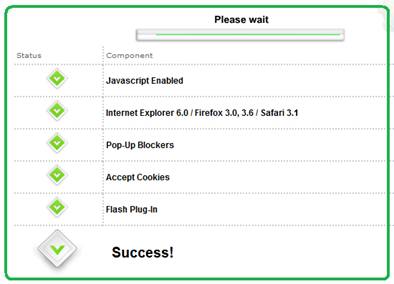
  2. Automated system check that allows a user to test their system
  3. Frequently Asked Questions (FAQ) related to the virtual event
  4. A “contact us” page related to end user support (e.g. providing an email address, phone number, etc.)

In addition, be sure to have higher level “support experts” available in case you need to delegate a sophisticated system issue.  The experts should be available within the virtual event – or, be available “on call” to jump in as needed.

Post-Resolution

Once you’ve resolved a user’s issue, follow them on Twitter – this allows them to send you direct messages.  And, it allows you to be quickly apprised of any subsequent issues they may come across.  Later on in the day, check if the user is logged in to the virtual event – if so, send a private chat request and politely ask how the event is going.  It’s always good for users to know that you’re actively supporting the event and genuinely interested in their satisfaction.

On Twitter, respond to each and every end user “tweet” – mention that the issue is resolved and invite the user to contact you back as needed.  Be careful, however, not to include the event’s hash tag on all of these follow-up tweets.  As the virtual event platform, you do not want to have a significant presence in the hash tag’s tweetstream.  Rather, only include the hash tag if your tweet relates to system-wide updates (applicable to all or most users).

The occasional update (with the hash tag) shows users that you’re listening – and replying to every single tweet shows your followers that you are responsive to each issue that arises.

The Entire Team Contributes

If your virtual event support staff is comprised of active Twitter users, encourage them to tweet about the event – have them highlight interesting sessions, pass along comments from enthusiastic attendees or simply state that they’re having a great time.  This helps promote the event itself – and, highlights the depth of the team behind the event support.  Take it a step further and create a Twitter List of your staff – allowing interested users to follow your employees tweets via a list.

Conclusion

The world is going social, which means that user support and customer service need to be “socially listening” (and responding).  Get ahead of the curve – be sure to support your next virtual event on Twitter.

Tweet this posting:


FountainBlue High Tech Entrepreneur Forum: From Free-mium to Premium

February 12, 2010

Based in Silicon Valley, FountainBlue “supports collaborative innovation, one conversation, one leader, one organization at a time through our monthly events, our dynamic communities, our ongoing discussions on entrepreneurial issues, our invitation-only CEO forums, and through our consulting services.”

FountainBlue Entrepreur Forums launched in 2006 – on average, they attract 50-150 entrepreneurs, intrapreneurs and investors.  I attended an Entrepreneur Forum in 2009 entitled, “Virtual Worlds: The Hype, The Reality, The In-Between” and found the presentations engaging and the post-event networking enjoyable.

The next Entrepreneur Forum takes place on March 8th, “From Free-mium to Premium“:

Overview

Experienced entrepreneurs still standing after the recent tsunami know that you have to prove you can be resourceful and build product and sign on customers despite the economic conditions!

A popular way to bring in customers, gather feedback and build momentum is to adopt a ‘free-mium to premium’ model, letting most users try basic versions of a solution for free and incentivizing some to upgrade to full-featured functionality, paying for the service.

But rare is the company able to successful do this. This panel will feature entrepreneurial companies who have done this and are willing to share their secrets.

The Panel

  1. Facilitator Sergio Monslave, Principal, Norwest Venture Partners
  2. Panelist Will Cheung, Founder, DuffelUp (@WillCheung)
  3. Panelist Daniel Cheng, Graystripe
  4. Panelist Donna Novitsky, CEO, BigTent (@bigtentdonna)
  5. Panelist Entrepreneur – MMO/Virtual World Entrepreneur

Courtesy of Google Maps

Date & Time: Monday, March 8 from 5:30 until 8:00 p.m.
Location: Cooley Godward Kronish, LLP, 3175 Hanover Street in Palo Alto
Audience: Early-Stage, Funding-Bound Clean Energy, High Tech and Life Science Entrepreneurs and Intrapreneurs

Registration

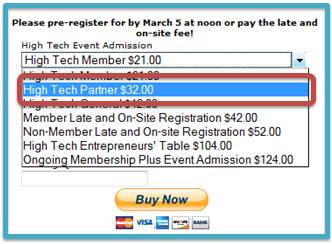
FoutainBlue will plant a tree for everyone who pre-registers by noon on 3/5 using the PayPal link at http://www.sventrepreneurs.com.

Note: Readers of this blog are eligible to receive the “High Tech Partner” rate of US $32 for this event – select the $32 option (above) when processing your payment.

I’ll be attending this event – if you plan to attend as well, send me a message on Twitter (@dshiao) – additionally, feel free to follow FountainBlue (@foutainblue).  Hope to meet / see you there.

Register for the event:

http://www.sventrepreneurs.com


How 3D Virtual Worlds Can Be More Like Twitter And Facebook

February 8, 2010

3D Virtual Worlds Diagram

Facebook and Twitter have taught us that people of all ages love to utilize the web for self-expression, connecting and staying in touch.  3D virtual worlds have similar characteristics: the ability for self-expression via customized avatars and the creation of your own ‘island’; the ability to connect with friends (or meet people you’d never get a chance to meet in the real world); and the ability to be part of a vibrant community.

In addition, 3D virtual worlds offer a fully immersive environment, that allows you to escape from the real world – and, experience virtual representations of real-world locations. For virtual worlds experiencing declining usage, however, “community” becomes a challenge to maintain (i.e. imagine using Facebook when none of your friends or family are using it).

Mark Kingdon (in-world: “M Linden“), the CEO of Linden Lab, laid out his vision of Second Life’s evolution, tying it in with the recent acquisition of Avatars United.

M. Linden on Community:

“When we talk to the users who sign up but then decide not to stay, they say they left, in part, because they had a hard time finding people to hang out with. Either their friends weren’t there, or they have a hard time meeting new ones inworld, or sometimes both.  We need to fix this.”

M. Linden on Social Sharing:

“Another part of the “social glue” of any community is the concept of sharing.  Inworld, it’s easy to share and we’ll make it even easier.  But sharing between Second Life and the larger social Web is not as easy.  As an avid photographer (well, aspiring to be avid), I’d love to be able to easily share my snapshots from Second Life with my friends on other Web services, and be able to watch a feed of the people I’m interested in.”

Reaction

Kingdon’s blog posting generated a wealth of comments from the Second Life community – I’d characterize the comments as mixed to fairly positive.  My own reaction to the blog posting was very positive – my use of Second Life (and other virtual worlds) would increase based on my knowledge of in-world events/happenings attended by members of my social graph.

Here are my thoughts on how to increase community engagement and social sharing in a 3D virtual world.

Facebook and Twitter

Direct Integration with Twitter, Facebook

With Avatars United, according to Kingdon, “you’ll start to build an activity feed (similar to Facebook or Twitter) that keeps you in closer touch with the people you’re connected to in Second Life.” While I see value in a single feed that aggregates content from multiple social networks, I see equal (if not more) value in direct integration of Twitter, Facebook, etc., into the virtual world.

The Twitter API and Facebook Connect make doing so fairly straightforward.  A B2B company with an island in Second Life may want to integrate a Twitter stream that displays tweets related to the company.  Similarly, the company could prompt visitors to tweet about their visit and have that message be distributed to all of the visitor’s followers on Twitter.

By enabling this, the owner of the island generates “free” promotion to the social web – and, the underlying platform gains wider reach as well.  A relevant analogy is Ustream’s Social Stream, which allows viewers to “chat with your friends over Twitter” while they’re viewing a live video.

On the Facebook front, imagine if the virtual world platform enabled Facebook Connect, thus allowing residents to sign in to Facebook and find a list of their Facebook friends who are also residents.  Then, imagine showing users a real-time list of their Facebook friends who are in-world right now, with “links” to teleport to the friends’ locations.

Borrowing from another popular service (Foursquare or Gowalla), the virtual world platform could enable residents to “check in” at different locations (islands).  Broadcasting their whereabouts to their social graph may result in more “planned encounters” within the virtual world.  If my friends just checked in to “virtual island”, I may choose to teleport and join them there if I happen to be free.

“I Like It!”

Virtual worlds could create a stronger “shared experience” by allowing visitors to leave a trail of breadcrumbs reflecting their visited locations.  If I “friend” someone in-world – or, if an in-world resident is a Facebook friend of mine, then I might want to follow the path they took during their last session.  Additionally, the platform could support location endorsements, in the same way Facebook allows me to “like” a friend’s wall posting.

As I enter a location in the virtual world, I can see whether members of my social graph previously visited – and, what their comments were.  Alternatively, I could see a list of all past visitors – with a link to view their in-world avatar and profile.  If a past visitor panned a location, but I enjoyed it, allow me to send an offline message to that user, who can read my message the next time she logs in.  This allows me to connect with other users even when they’re not online (a form of virtual world email).

Source: flickr (User: Indiewench)

Virtual World Closed-Circuit TV

Business owners leverage closed-circuit TV technology to perform surveillance of their store front or office.  Wouldn’t a similar service be useful for virtual world residents, especially those who “own” an island?  While we tend to be online during our waking hours, it may not be practical to be in-world all the time.  How about a virtual world thin client – it provides a read-only “view” of a given location, similar to closed-circuit TV.

Since it doesn’t allow you to navigate, teleport, interact with others, etc. – the client is entirely lightweight and can sit in a corner of your desktop with only a portion of the CPU/RAM consumed by the full-blown client.  So if you’re interested in a given location, the closed-circuit TV can alert you to visitors – and with one click, the thin client can launch the full client and teleport you to the location.

Services (like this one) that can instantaneously connect users are a win-win – they generate more logins to the platform and enable more connections, upon which a stronger sense of community develops.  Alternatively, the virtual world platform can provide even more lightweight notification mechanisms: it can generate an email, Twitter direct message or Facebook email whenever a user enters a designated space.  The notification could contain a link that teleports the recipient into that space to connect with the current visitor(s).

Embed Web Content In-World

As Twitter and Facebook have demonstrated, users of social services are inclined to share interesting content, often in the form of web links.  Within a virtual world, “sharing” often results in the launching of a web browser to render the shared page.  Why not provide sharing capabilities that render the shared content on an in-world wall or projection screen?  This keeps users engaged, while retaining their attention in-world.  Building upon this, I may want to look up Facebook friends and be taken to all locations in which they shared content in-world (as I have an interest in what my friends are reading and sharing).

On Demand TV (for Virtual Worlds)

Facebook has a great utility that allows me to record a video on my laptop’s webcam, upload it to Facebook and share it on Facebook.  Virtual world platforms should enable users to press a “record” button and have their current session saved for later playback.  Perhaps I’m attending an in-world concert or watching a keynote presentation – capturing a recording of the session allows me to share it with members of my social graph who weren’t able to attend.  Treet TV provides similar services (with professional quality) – this capability empowers end users to create on-demand programming with the click of a mouse.

Conclusion

3D virtual worlds have a lot to offer already – by adopting useful social sharing services, they can tap into the phenomenon (social media) that’s the force behind many of today’s most popular web sites.

Related Links

  1. Wagner James Au in New World Notes, “How To Make Second Life Truly Mass Market, Part 1: Deep Integration With Facebook

Tweet this posting:


The Future Of Virtual Events

February 1, 2010

There’s no time like the present … to think about the future.  I previously wrote about predictions for the virtual event industry in 2010 – those predictions were based around a short-term outlook and have a reasonable chance of coming true.  Now, I’d like to weigh in on 2011 (and beyond) and discuss where the industry (and the technology behind it) may be heading.

Virtual Event technology moves “closer” to the end user

To spur increased adoption, the virtual event experience will move closer to the end user.  To move closer, the browser-based experience of today will be complemented by numerous apps that live outside of the browser.  A relevant analogy is Twitter, which could not have achieved its place in the world on twitter.com alone – its power is broadened with desktop clients such as TweetDeck and Seesmic.  Possibilities include:

  1. Browser toolbars that encapsulate a subset of virtual event functionality (OK, we’re still within a browser here – so consider this an initial step only).
  2. Desktop applications – initially, these apps may provide a real-time dashboard for attendees, exhibitor or show hosts.  You’ll get to keep tabs on activity within a virtual event without having to be logged into the event (from your browser).  Subsequently, the apps will become more sophisticated and take on more of the virtual event platform’s features.
  3. Asynchronous alerting services – attendees, exhibitors and show hosts will be able to configure alerts that inform them of important activities.  The alerts will have numerous transport mechanisms – email, SMS text message or social media notification (e.g. a direct message on Twitter).

Virtual Events Go Mobile

Related to “getting closer” to the end user, mobile is the “elephant in the room” for virtual events.  The mobile apps will start off quite simple – think again of the dashboard app, which provides a real-time view of what’s going on within the event.

Building onto the dashboard will be basic interactivity (e.g. text chat) – allowing attendees and exhibitors the ability to chat with others.  An exhibitor, for instance, can now staff her booth “on the go” from her iPhone.

As we look to 2011 and beyond, I see a clear shift in the computing landscape, whereby more and more “computing” moves from the desktop and laptop and on to mobile devices.  In this decade, the smartphone becomes the PC of the past decade.

The challenge for virtual event platform providers is to determine where to place their bets (investments) across iPhone, Android, BlackBerry, Symbian, Windows Mobile and Palm.

Tighter Integration Inside The Firewall

Virtual events see major adoption from multinational corporations, who leverage the events for internal-facing communication and collaboration (e.g. sales kick-off meetings, human resources programs, learning programs, executive briefings, team/departmental meetings, etc.).  Corporations will begin to request the following:

  1. Integration with other enterprise applications (which often sit inside the firewall)
  2. Tighter security measures

This drive from corporations will cause virtual event technology to morph a bit, shifting from a 100% software as a service (SaaS) model to a hybrid model that combines SaaS with on-premise software.

At first, integration points to a company’s enterprise apps may reside “on premise” on corporate servers – subsequently, corporations may require the underlying virtual event platform be hosted inside the firewall – a model that mirrors Linden Lab and their Second Life Enterprise.

Augmented Virtuality

Virtual events and in-person events meet augmented reality – resulting in “augmented virtuality”.  I previously wrote that 2010 is The Year of The Hybrid Event.  There will come a day when every in-person event has a virtual component.  With existing smartphone technology and the emergence of augmented reality – we’ll soon hit a sweet spot whereby in-person event attendees will wield enormous power in the palm of their hands.

Physical event attendees will begin to experience an event through the lens of their smartphone – holding up the smartphone at any location and seeing overlays of relevant information.

Augmented virtuality will blend augmented reality with the virtual event platform – elements of the virtual event appear as overlays on the smartphone (e.g. the virtual booth is layered on top of the smartphone’s view of the physical booth – and virtual staffers are displayed as being available [via the smarthphone] if the in-person staffers are busy).

Bye Bye, “Virtual Events”

Based on the trends I’ve outlined, by 2011 (if not sooner), we’ll no longer refer to “virtual events”.  Instead, they’ll have “grown up” and migrated into a broader category of business or collaboration application.  Virtual event technology becomes a toolset in a larger ecosystem – or, they’re integrated into a broader suite of tools (rather than being a standalone solution).

Conclusions

In a few years, these will no longer be your mother’s virtual events!  The industry and technology will change, morph and adapt to suit the needs of the market.  Let’s all be thankful that we’re along for the ride.

Tweet this posting:


How Virtual Events Can Adopt Location Based Services

January 28, 2010

These days, it seems the social web is like real estate – it’s all about location, location, location.  Foursquare, Gowalla and Loopt are gaining popularity as location based, mobile social services.  Yelp has rolled out Yelp Check-ins, which mirror a popular activity on the aforementioned services.  Twitter added location awareness to its API in 2009.  Facebook, some speculate, may enter the fray with their own location based services.

So how would it be possible to enable Location Based Services in a virtual event?  Well, consider that location tracking is inherent to the virtual event platform – in other words, it has a built-in GPS for all users!  I wrote previously about gaming in virtual events – that gaming can generate  retention, engagement, enjoyment and loyalty.  Location Based Services, in the form of competition and gaming, can achieve all of these benefits.  Let’s take a look at how.

Source: flickr (User: dvxfilmerdoug)

It Starts With The Buddy List

Users first need to build their social graph.  This can be accomplished with a virtual event platform’s “buddy list” feature – all users in your buddy list would receive status notifications from the location system.  The notifications would be sent to users within the virtual event (if you’re logged in).  Once you log out, you can opt to receive status notifications via email.  This way, even if you’re no longer in the event, you can receive updates (via email) on what your buddies are up to.

Build A Reward System

Next, a reward system serves as an incentive for users to participate.  The concept is similar to the becoming “mayor” of a location on Foursquare.  In a virtual event, perhaps you allow privileged users (who have achieved a certain status) to obtain a badge – whereby the badge can superimposed on their avatar image – or, listed on their profile page.  In addition to the badge system, a master leaderboard (and perhaps segmented leaderboards) should be utilized, allowing users to track their performance relative to other users.

The Virtual Trade Show

First, the notion of a social graph in a virtual trade show may be an upfront challenge.  At most trade shows, you may know a handful of colleagues or associates who are also attending – but for the most part, everyone else is a stranger (to start).  Thus, a system may need to be in place first to encourage users to add other users to their buddy list.

Assuming you can achieve decent-sized buddy lists, then the “check-in” becomes quite relevant in a virtual trade show.  Each visit that I make to an event area can be tracked (by the platform) as a check-in – allowing my buddies to know what areas I visited – and, where I am right now.  Secondly, I might leave a review or comment about a particular area – perhaps I enjoyed the content in an exhibitor’s booth – or, I didn’t find a Webcast to be all that useful.  When my buddies enter those same areas, they can then view the comments I left them from my prior check-ins.  Thus, when a buddy enters the same exhibitor booth, she knows that I visited earlier and enjoyed the content there.

Exhibitors could then sponsor areas of the event (besides their own booth) – the Lounge, Auditorium, Resource Center, etc.  Then, attendees can vie to become the “mayor” of a given area.  At the end of the live event, perhaps the mayor of the Lounge receives a prize that’s awarded by the Lounge’s sponsor – and to receive the prize, agrees to have a short conversation with that sponsor.  Already, you can begin to see how this location “app” can generate additional activity and engagement.

Source: flickr (User: Live Solutions)

The Virtual Sales Conference

In a virtual sales conference (and related corporate events), attendees naturally have a large list of potential buddies – the trick is to incent the attendees to populate that list within the virtual event.  Alternatively, management may choose to pre-select the buddy lists by organizing the sales force into teams – whereby your buddy list is pre-seeded with your fellow team members.  The location app is all about checking in (with each other) and sharing information towards gaining points for your team.  In this manner, the location app helps encourage learning and collaboration, making the virtual sales conference more effective.

Social Networks

For certain types of events (e.g. virtual trade shows), integrating the location system with users’ social networks can be powerful.  For instance, a check-in to the keynote presentation can auto-generate a tweet out to the attendee’s Twitter followers – providing a registration link to the event.  Similarly, a check-in at an exhibitor’s booth may prompt the user whether she wants to post an update to her Facebook wall.  In summary, the location service should facilitate sharing not just within the virtual event, but to external social networks as well.

Prevent Gaming (of the System)

The virtual events platform will need to carefully build the measurement and scoring methodologies to ensure that the “game is not gamed”.  In the real world, there is overhead involved in becoming the mayor of a watering hole – in the virtual world, clicking 50 times to enter an exhibitor’s booth is quite easy.  The scoring system ought to consider rate limits, as well as threshold values around selected activities.  Additionally, becoming “mayor” should factor in actions that are not as “game-able” as mouse clicks or visits.

Conclusion

There’s  probably a lot of work to enable the underlying platform to accomplish this – however, such a system can go a long way to achieving retention, engagement, enjoyment and loyalty.

Tweet this posting: