Virtual Events 101: Tips For Selecting A Virtual Event Platform

April 22, 2010

Disclosure: I work for a virtual event platform vendor (InXpo).

The increase in demand for virtual events brings with it a common question: “Which virtual event platform should I select?“.  Some clients find a vendor and stick with them – others will end up doing business with all the major platform vendors.  My preference would be to find a long-term partner and stick with them, as changing vendors can be painful for all involved.

For me, selecting a virtual event platform comes down to six P’s: People, Platform, Production, Price, Process and Partners

People

While virtual events encompass a wide range of innovative technologies, we’re very much a services industry today.  This is never more true than on a client’s very first virtual event on a given platform – that first event is all about the platform vendor’s team working closely with the client to jointly achieve the client’s overall goals (and produce a great show, event or community).

In this model (in which that platform vendor handles 75-100% of the production activities), the customer experience is entirely defined by the services (and service level) provided by the vendor.  Providing an extraordinary level of customer care requires that the vendors’ company culture be built around servicing the customer – in a manner similar to how Nordstrom, Disney and Zappos have done it.

Of course, a great customer experience is ultimately delivered by individuals, which means that vendors with the right people, the right knowledge and the right experience really make a difference.  And that spans the entire spectrum, from Client Services to Development to Marketing to Finance to Legal – all departments in a company end up “touching” the customer in some way.

When considering a particular platform, I suggest you request a profile of the team (i.e. the individuals) behind the vendor’s services – and if you’re far enough in the sales pipeline, information on the specific individuals who will be assigned to your account.  Similarly, when speaking to other clients of the vendor, be sure to ask about the type of customer experience they received.

Platform

Now that we’ve covered the services piece, the underlying technology comes next.  The evolution of our industry will see a shift from 80% vendor-producing events (today) to 80% client-self-producing events in a few years.  As that shift unfolds, the industry will move away a bit from its services focus – technology then becomes a critical factor, with nothing more important that the technology to enable the self-servicing itself.

The first challenge you’ll face is that platform comparison is entirely qualitative today – there are no quantitative measurements on the technology (yet), like you have with computer hardware (e.g. megahertz, FLOPS, etc.).  While there are key quantitative metrics (e.g. %-availability, peak simultaneous users supported, etc.) – today, the claims are just that – with no independent, third party verification.

Given this, you’ll have to rely on other companies who have been clients of the platforms – try to find a company if your industry (even a competitor) who has produced an event similar in scope to your’s.  For instance, if you’re doing a virtual product launch in the pharmaceutical industry, try to find similar customer references – you’ll receive better and more direct insights than if you speak to a technology company who did a virtual sales kick-off meeting on the same platform.

I base my platform criteria around the following:

Flexibility – You want the ability to shape and mold the platform in a way that suits your unique requirements – this may include seamless integration of third party technologies or it may mean customization of features or layout that suit your unique needs.

Reliability – The platform must be available when you need it – and that includes everything from the event environment itself, to the registration system, to the reporting system, to the email system.

Scalability – The ability to scale up to tens of thousands of simultaneous users (if your event requires it).

Production

As you become a steady producer of virtual events (e.g. 1-2 events per year to start, growing to 5-10+ events per year), you’ll likely want to shift production from the vendor’s team to your’s.  In doing so, you’ll take on more control over the timing and delivery – and, save on cost (to the vendor – obviously, you need to staff appropriately to make this shift occur).

Keeping this eventual path in mind, you’ll want to select a vendor with strong “self service” capabilities.  The capabilities should allow you to create unique experiences – with the growth of virtual events, it serves you no good if your event looks identical to your competitors’ events. The platform should allow you the highest level of customization directly without custom development.

Any virtual event platform can create a highly unique experience – but if that’s accomplished via custom development, then the model is not scalable and repeatable – and you’ll end up paying the vendor dearly (on the custom development costs).
Price

As with all purchasing decisions, price is always a key factor – you likely have a budget in place (either set by yourself or your management) and ultimately, the vendor’s price needs to fit your budget.  However, pricing should be a secondary focus – first make sure you have the right vendor on people, platform, production, etc. – then, for those who “make the cut”, determine which ones fit into your budget.

If you’re willing to make an investment beyond a single event, most vendors are open to negotiating volume discounts, based on the size of your commitment.  Be sure to ask the vendor about event costs if/when you shift production to your own team.  You may be pleasantly surprised.  Lastly, think twice if your selected vendor has a price that’s significantly lower than the rest of the pack.  Sure, they may be very incented to get your business, just make sure you don’t “get what you pay for” – use those customer references to ensure the vendor can meet your key requirements capably.

Process

“Process” goes back to my first point about “People” and the production of your very first event.  It’s critical that the vendor have an established process for getting you from the starting line to the finish line – it should be based around project management best practices, while being flexible enough to adapt to unexpected developments or changes.  In fact, the vendor ought to show you a project planning template or timeline, so ask them for a sample to see their “execution lifecycle”.

In addition, give higher marks to those vendors who have successfully produced virtual events in your market – they’ll be able to take their learnings from the prior events and apply them to your’s – the process will be based on prior learnings and the vendor already has a sense for how the event execution process will unfold.

Partners

Most virtual event platform vendors provide a somewhat specialized offering: the virtual event technology (and production) itself.  The vendors then rely on a set of partner companies to fill in the gaps (e.g. A/V, streaming, experiential marketing, strategy consulting, etc.).  Do you need an “agency” to manage your overall event experience creation and execution?  Or, are you planning to do hundreds of on-site video captures and want the resulting footage streamed within your virtual event?

Determine your entire set of needs, then review the vendors for their own capabilities – along with whom they’ve partnered with.  Chances are that by combining the vendor and its partners, you’ll have a comprehensive solution to suit all of your needs.  Find out from the vendor whether all the “books” run through them (e.g. general contractor model) or whether you should make separate arrangements with the individual partners.

Conclusion

Like any other major purchasing decision, selecting a virtual event platform vendor (and partner) can be a daunting task.  A vendor with strong grades on the six P’s will serve you well.  What other selection criteria have you used?

Related Links

  1. Browse the Virtual Events 101 Index Page
  2. Download the eBook, “Virtual Events: Ready, Set, Go

Note: I invite you to connect with me on .


Job Posting: Virtual Event Contractor (SF Bay Area)

April 21, 2010

Position: Virtual Event Contractor

Focus (focus.com) is looking for a contractor to act as a Project Manager for a major virtual event scheduled for the end of June.  The event will be a virtual trade show with multiple vendor sponsors and a attendee goal of 5,000.

The Project Manager will be in charge of producing the entire event (with support).

Responsibilities

  1. Create speaking agenda – organizing 5-7 expert web presentations
  2. Audience Development – work with the Focus email and partner network teams to ensure maximum registrations and attendees
  3. Work cross-functionally with audience development, content and expert presenters
  4. Onboarding sponsors
  5. Produce and coordinate event

Requirements:

  1. Virtual event experience
  2. Strong product management skills
  3. Media background

Candidates local to the San Francisco Bay Area (US) are preferred.

Please submit resumes to: Craig Rosenberg (crosenberg@focus.com)

About Focus

Source: http://www.focus.com/about/

Focus is a private venture-funded company in San Francisco that was founded in August 2005 by a team committed to making world-class business expertise universally available.

Today, Focus is the world’s fastest-growing business research and media company. Focus.com features high-quality research, 1:1 briefings with analysts, and a thriving community of business and technology professionals. Whether it’s data-driven product research, topical briefs, or expert answers to your questions, the information on Focus is sourced from real experts in their fields – professionals like you. Best of all, it’s free and available to everyone who needs help making better business decisions. That’s why millions of professionals continue to rely on Focus.


Virtual Events In Europe: Best Practices, Learnings And Observations

April 19, 2010

The following is a guest post from Miguel Arias of IMASTE.

In the past months we have delivered a virtual career fair in partnership with Monster.com in various European countries. After a number of successful events in France, United Kingdom, Ireland and Italy (and with the imminent launch of the German version and preparations underway for the Polish and Czech versions), it is time to evaluate the project.

With a reach of over 400,000 unique attendees and more than 200 participating exhibitors to date, the Monster European virtual job fairs have become a very relevant case study about the way virtual events and tradeshows are being hold in Europe.

There are a few issues that I would like to point out:

Market differences within Europe

The fact that each of those markets has a different language is a known fact, which demands a certain level of customisation capabilities in the virtual event platform. This affects not only the code language but also all the 3D environments, interfaces size, fonts, etc.

And some of the countries have many official languages; therefore virtual event platforms need to have “real time” Multilanguage capabilities.

But, there are some other subtle differences that may have a big impact for virtual event production and development. For instance, legal differences lead to changes in the résumé data model and in different levels of integration with the partner´s databases.

Different customer expectations

The penetration and market awareness of virtual events is different in the UK, France and Italy. This leads to relevant gaps in terms of pricing, willingness to pay or expected features for the potential customers in each of those countries. Live interaction seems to be more relevant in UK or France, while an immersive user experience ranks higher in the Italian market.

We have also observed that French companies are keener to virtual stand customisations than British companies. It is difficult to generalise, but there seem to be some trends there.

Different marketing approach

In line with the last idea, the effectiveness of some marketing tools is quite diverse. The use of social media to promote the event has proven more successful in our French events than in other countries, while the effect of SEO/SEM strategies have worked better in UK. There is a need of knowing which are the best specific web traffic drivers of each country, to ensure high quality attendees in each event.

Vendor – client relationship

Since virtual events are “live” events, there is a need of a common trust between the event producer and the virtual event vendor. In order to build this relationship, factors like distance, time zone sharing and face-to-face trainings, meetings and follow up are very relevant.

We hired native country managers in Imaste for the French and British market, and will be doing the same with the Italian and German market in the following weeks.

To summarise, I would say that, the Monster Virtual Career fairs, in spite of being delivered for the same company and being the same type of event, implied an important percentage of adaptation and flexibility in each country. And the personal relations that go with a good level of service, involve a cultural understanding of country related particularities.

I believe that Europe can’t be considered a homogeneous market as the US is. American vendors should take this into account when entering the continental Europe market.

About Miguel Arias

Miguel Arias founded IMASTE in 2003 in hopes of building a bridge between companies and university graduates via live career fairs. Over the years, IMASTE has evolved to become one of the major agents in the virtual trade shows and events market, with successful projects in various European and South American countries

IMASTE is a Spanish company, European leading provider of virtual events, 3D online environments and online trade-shows, which connect, inform and engage visitors and exhibitors. IMASTE´s customized solutions reduce travel costs and are environmentally friendly, while our customers are able to generate leads, networking, increase online sales chances and communicate projects or services globally.

IMASTE has delivered more than 100 successful virtual events for global clients across the globe. You may find more info in http://www.imaste-ips.com

Miguel holds a MEng in Civil Engineering from Universidad Politecnica de Madrid and a Professional MBA from the Instituto de Empresa Business School.

Related links:

http://www.monster-edays.fr/2010/printemps/

http://www.monstervirtualjobfair.com/DEMO/

http://www.fieralavoromonster.it/

http://blog.imaste-ips.com

http://www.imaste-ips.com


Virtual Events 101: Tips For Building Your Virtual Booth

April 13, 2010

Your company is exhibiting at a virtual event and you’ve been assigned the responsibility of building your company’s virtual booth.  You’ve had plenty of experience assembling a physical booth, but never before have you built one virtually.  What’s your first step?  To immediately resist the urge to start the virtual build.

Set/Confirm Objectives & Goals

The objectives and goals for your virtual booth should align with the goals for your company’s participation in the virtual event. If you do not set the direction yourself, be sure to round up the necessary decision makers and have a documented set of goals – publish them internally and be sure that all stakeholders have a copy.  Sample goals include:

  1. Obtain contact information from “X” number of prospects
  2. Generate “Y” number of meaningful prospect engagements in-booth
  3. Yield “Z” number of qualified sales opportunities
  4. Generate “X%” of brand uplift, as measured by “Y”

It’s absolutely critical that goal definition be your first step, as it drives the decisions you make regarding the build-out of your virtual booth.

Content is King

The main elements of a virtual booth are (1) content [e.g. images, signage, videos, documents, links, etc.] and (2) virtual booth staffers.  Your first job is “content curator” – review all content available and be selective about which content you’ll place in your booth.  It all goes back to the defined goals – the content you select should align with the goals.

So if your goal is demand generation, find the same White Papers that your marketing team is using to generate sales leads across the web.  If your goal is driving awareness around a product launch, grab that 2 minute video of your product manager and have it auto-play when visitors enter your booth.  Besides documents in your marketing library, be sure to cobble together useful links on your web site, along with third party articles, blog postings and product reviews that reinforce your objectives.

Booth Labels Are Like Headlines

Content in a booth is typically housed behind a set of “booth labels”.  Your next job is one of headline writer – you’ll want to craft captivating “headlines” for the booth label, along with attention-grabbing titles (and descriptions) for the underlying content items.  You’re like the home page editor for your favorite content site – you need to figure out how to write headlines (titles) that will grab your visitors’ attention.

While you certainly want to avoid the “bait and switch” (e.g. writing a label/title that intentionally deceives), your labels need not literally reflect the underlying content. For example, if you assemble a set of blog postings from your company’s blog, you need not label these “Blog Postings”. Instead, organize the blog postings into themes – a set of postings on best practices could simply be labeled “Best Practices” in your booth.

While I suggest you do not change booth labels while the event is live (that would significantly confuse your booth’s repeat visitors), you’ll want to review the activity reports from your booth to learn from the labeling decisions that you made.  You’ll begin to figure out what worked and what didn’t – and can use those learnings for your next event to more effectively use labels/headlines to achieve your goals.

Use A Call To Action – Not A Declaration

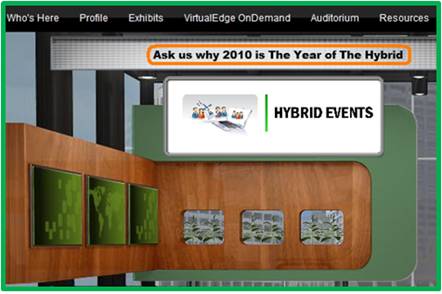
For signage within the virtual booth, I prefer to use a call to action (e.g. “Ask Us Why 2010 is The Year of The Hybrid” above) over a declaration. So instead of declaring, “The world’s leading producer of plastic widgets”, try a call to action, “Ask us why plastic widgets are the new metal widgets”.  The call to action initiates a conversation with your visitors, rather than telling them what they should know.  If visitors enter your booth’s group chat and proactively ask the question stated in your call to action, then give yourself a pat on the back.

Stand Out From The Crowd

You’ll likely have competitors exhibiting in their own virtual booths, which means that a key part of your job is to figure out how to separate your booth (and company) from the crowd.  Greenscreen video (aka an embedded video greeter) has been used at enough virtual booths that it won’t make your booth any different.

Instead, try an offbeat video that’s not yet made its way to YouTube.  Or, how about an avatar of your CEO whose mouth movements are synchronized to the words s/he is speaking.  Perhaps an animated avatar is the new greenscreen.  Thinking further outside the box, how about bringing one of your products to life – personalizing that product to the point where it speaks and delivers a message to visitors.  A good example (in general – not in a virtual event) is the DCX Man character created by Brocade:

Source: Brocade (dcxman.com)

Further information can be found here: http://www.dcxman.com/whois_dcxman.html

Optimize Your Content For Search

Search Engine Optimization (SEO) is not the sole domain of your web site or blog – it applies to virtual events as well.  How can this be?  Well, most virtual event platforms provide basic and advance search capabilities – they index all content in the event (e.g. documents, links, Webcasts, etc.) and some platforms even index the contents of uploaded documents.

As a result, keep SEO in mind for selecting documents to include in your booth, along with the labels, titles and abstracts that you use to catalog your booth content.  Taking a step back, be sure to write an SEO-optimized description for your company and booth – if attendees search for a key term and your booth is at the top of the search results, then all is good in the world.

Subject Matter Experts as Booth Staffers

While you’ll certainly want sales reps and sales engineers as booth staffers, it’s critical to work subject matter experts into the staffing schedule.  A visitor who asks specific product or service questions is a hot prospect – and telling that prospect “let me get back to you with an answer to your question” becomes a lost opportunity.  Even worse, that opportunity could fall into the lap of your competitor, whose booth is only one click away.

If you’re a technology vendor, try to have your product manager, chief engineer or event your CTO available within the booth.  While some technology folks may not be comfortable face-to-face with a customer, most feel quite at home in a text chat session.

Optimizing For: Demand Generation

If you’re looking to generate sales leads, cobble up all your best lead gen content – the latest White Papers, Case Studies, product sheets, videos, podcasts, customer testimonials, etc.  Be liberal and selective at the same time – that is, ensure there is a good mix of content choices, but be religious in making sure the content you select aligns with your goals – and relates to the theme of the virtual event.  The beauty of a virtual event is that registration occurs once – but all activity with your content is tracked.  So you’ll have rich activity profiles at your disposal to help you separate the cream of the crop leads from the visitors who came simply to enter your prize drawing.

Optimizing For: Thought Leadership

Are some of your co-workers experts or luminaries within your industry?  If yes, then have them be staffers within your booth!  Visitors will have a natural inclination to engage with them – and they’ll be able to funnel the ripest opportunities to sales reps within your booth.  If your employees have not achieved rock star status within your industry, leverage some of the luminaries to produce content on your behalf.

Perhaps it’s a research report authored by an industry expert – or, a video interview (hosted by the expert) with your CEO.  Better yet, a Webcast within the virtual event that features the expert(s) who provide a presentation prior to your own speakers.  If the experts are available to attend the virtual event, invite them to provide Q&A within your booth, as they’ll serve to draw interest and engagement from visitors.

Conclusion

While much of the logistics occur “online”, building a virtual booth will take longer than you think (if done right).  Be sure to clearly define your goals first – then, make sure your booth achieves those goals.  Take planned breaks from the virtual build to assess whether your booth aligns with the stated goals.  Finally, be sure to study activity data from the live event so you can make improvements for your next event!

Related Links

  1. Browse the Virtual Events 101 Index Page
  2. Download the eBook, “Virtual Events: Ready, Set, Go

Note: I invite you to connect with me on .


Bringing The Physical Event Experience To Virtual Events

March 30, 2010

Source: flickr (User: cafebiz08)

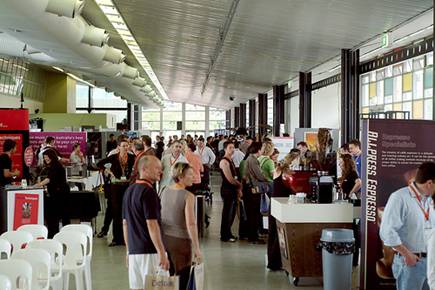
Virtual trade shows got their start by creating 2D graphical replicas of physical trade shows: exhibit halls, booths, auditoriums, lounges, etc.  Most users are “wowed” in their first experience attending a virtual trade show – they enjoy the quality of the user interface and often comment that they felt like “they were  there” at a physical event.

Exhibitors, too, find the virtual trade show experience to be quite enjoyable – at the same time, they often highlight important differences between exhibiting virtually vs. physically.  In a physical event, for instance, you have some amount of guaranteed foot traffic on the show floor – a portion of which will naturally wander into your booth.  The “efficiency” of a virtual event means that users only enter your booth by explicitly clicking into it.  In a physical event, exhibitors can greet prospects with a friendly handshake – in a virtual event, the exhibitor may never see the prospect’s face.

How can virtual event platforms incorporate aspects of the physical event experience?   Let’s consider a few ideas.

Source: flickr (User: ExhibitPeople)

How To: Gain Virtual Foot Traffic to Booths

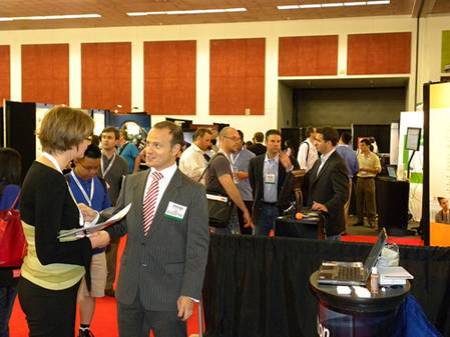
On a crowded show floor at a physical event, an exhibitor knows that some percentage of attendees will visit their booth – additionally, exhibitors can increase their investment and receive strategic placement on the floor (e.g. near the entrance, near areas where food and drink are served, etc.).  In a physical event, as attendees walk towards (or past) your booth, there are tactics to catch their attention (e.g. making eye contact, telling them about a special sales offer, showing T-shirts that you’re giving away, complementing them on their laptop bag, etc.).  In a virtual event, you never see someone “passing by” your booth – they click directly to where they want to go.

The Guided Random Walk

Virtual event platforms could re-create the leisurely stroll down the show floor aisles.  Clicking on a “take me on a guided booth tour” button could allow the platform to become the auto-pilot and guide the attendee to the “store front” of randomly selected  booths.  At each  “stop”, the attendee is presented with an overview of the exhibitor, the products/services they provide and a list of staffers with whom they can engage.  The attendee can click to enter the booth – or, continue on with the “walk”.

Once they enter a booth, attendees would see a “resume walk” button to return to the guided tour.  Additionally, the virtual event platform could collect “interests” on the registration form (or on the attendee’s profile) to more efficiently recommend exhibitors (on the tour) to attendees.  Since most virtual attendees prefer to visit only those areas that interest them, this service would be completely optional.

Strategic Offer Placement

Virtual event platforms provide many avenues and areas for exhibitor branding and promotion (e.g. banner ads, jumbotron, etc.) – similar to a physical booth located near the food and drink, virtual event show hosts could map out the event hot spots (e.g. lobby, auditorium, etc.) and provide sponsorship opportunities for exhibitors.  For instance, the Auditorium could display banner ads that drive traffic to premium sponsors’ booths.  Since the virtual attendee is bound to navigate through key areas  (e.g. the Auditorium), promotions in those areas creates the equivalent of “passerby traffic” in a physical event.

Webcast Exit Actions

Imagine taking all attendees of a physical conference session and teleporting them to a specific sponsor’s booth at the conclusion of the session.  Well, a virtual event makes such teleporting possible.  If an exhibitor is presenting in one of the event’s Webcasts, have the virtual event platform provide an “exit action” to drive Webcast viewers to the exhibitor’s booth when it concludes.   Be sure to instruct the Webcast presenter(s) to inform viewers that additional questions can be addressed within the booth at the conclusion of the Webcast.  And, be sure those presenters also “exit” into their booth to provide the answers!

Source: flickr (User: SESConferenceSeries)

How To: Gauge Visitor Interest

When an attendee visits your physical booth, you can quickly judge their interest level based on facial expression and body language.  While these signals are not available from virtual booth visitors, you certainly can decipher interest based on the visitors’ mouse clicks.  Eloqua developed the concept of digital body language – and it applies directly to virtual booth visitors – “Digital body language can arm sales people with deep insights into the areas and levels of interest of every prospect.” (source: Eloqua)

The virtual event platform could provide real-time profiling of booth visitors, based on the actions they’re taking within the booths.  Inactive visitors can probably be left alone, whereas highly active users (lots of document views, document downloads, web site views, chat requests, etc.) may literally be raising their hand to engage in a conversation.

The virtual event platform could first characterize the nature of the prospect’s interest (e.g. map the requested documents to high level “interest categories” defined by the show host) and then place a subtle offer in front of the visitor (e.g. “An online representative is available to answer questions about telepresence – click here to engage in a 1:1 chat”).

Since this feature could be deemed too “Big Brother” by attendees, it would have to be tested (to gather feedback) and/or have an explicit opt-in setting that allows attendees to enable or disable the feature.

How To: Connect with Interested Attendees

During periods of high activity in a physical booth, visitors often walk up, see that all staffers are speaking with other attendees and decide to move on to the next booth.  Perhaps  later in the day, the same visitor returns to see if any staffers are available.  The observant exhibitor may recognize the visitor (from her prior visit) – and if so, provide special attention to her (since she made the effort to visit the booth and return a second time).

In a virtual event, all activity is tracked, which means that observant exhibitors need only turn to the services of the platform to let them know about repeat visitors.  Virtual event platforms ought to explicitly track repeat visitors and alert booth staff accordingly – perhaps the platform plays one audio alert for the first time visit  – and separate audio alert for the repeat visitor.

Additionally, the platform could allow exhibitors to build in rules and offers based on the amount of repeat visits.  For instance, on the fifth visit to the booth (within the same day), the visitor could be offered to download a free copy of the exhibitor’s software.  Exhibitors  could then leverage the resulting action to qualify the worthiness of the prospect (e.g. visited my booth 5 times + downloaded a copy of my software = have a sales rep follow up tomorrow).

Source: flickr (User: bilateral)

How To: Create Better Attendee Networking

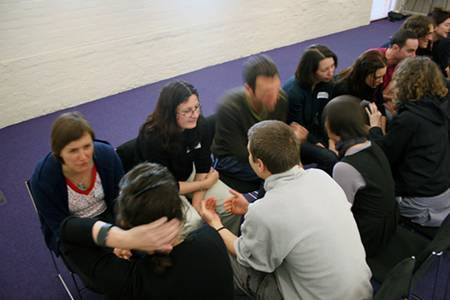
One of the key attractions to an event is the ability for attendees to network with like-minded professionals – exchanging ideas, thoughts and business cards.  In a physical event, there are many “transitory phases”, where attendees migrate from one locale to another.  These phases create opportunities to meet or “bump into” random strangers.

That being said, meeting at a physical event is largely inefficient, based on the random nature of the meet-up.  Who knows if you’ll meet someone aligned with your interests or an uninteresting individual who’s there only for the free cocktails?  A virtual event can leverage the information available in user profiles to make meet-ups a bit less random – and far better “matched”.

In virtual, we can skip past the not-so-subtle glance at another attendee’s badge label – instead, we can auto-recommend like-minded individuals.  In my mind, the single most effective feature of LinkedIn is the “People You May Know” listing in the upper right of your LinkedIn home page.  Virtual events ought to create recommendations (of other attendees) with the same effectiveness.

The recommendation engine could be combined with an interface similar to ChatRoulette – whereby attendees enable their webcam and rotate through and chat with other attendees in roulette-type fashion.  It may not be quite the same as the physical experience, but the use of webcam can add a whole lot more than just text chat.

Conclusion

While it’s still true that virtual events can never replace the handshake – there are benefits of physical events that if modeled and implemented properly, can be a boon for virtual events.


How To Use Twitter For Virtual Event User Support

March 8, 2010

End user support for virtual events has traditionally been provided via a small number of channels: email and telephone support (which is especially useful for users having issues entering the virtual event) and “in-show support”, which is typically provided in a “help booth” within the virtual event.  With growing use of social media, however, attendees are leveraging their social network tools to request (and receive) user support.

From my observations, Twitter is the most widely used social network for virtual event support requests (today) – however, I wouldn’t be surprised to see increased “calls for help” via Facebook and LinkedIn.  This posting provides tips and best practices on providing virtual event end user support via Twitter.

Create/Establish a Twitter Account

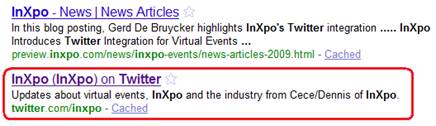
Users can’t find you on Twitter if you’re not there, which means that if you don’t already have a presence on Twitter, you’ll need to create one.  I recommend a Twitter ID that incorporates your company name – or, the product, platform or service that you provide (if that’s different from your company name).  In addition, be transparent about the contributors (employees) who tweet on behalf of your company and brand.

Create A Real-Time Dashboard (of  tweets)

Configure your Twitter client (e.g. TweetDeck, Seesmic, etc.) with the relevant search terms and hash tags related to your virtual event.  At minimum, you’ll want to monitor the following:

  1. @Replies sent to your Twitter account (in TweetDeck, the column is labeled “Mentions”)
  2. A search on the hash tag for your virtual event
  3. A search on your company name – or, the name of your platform, product or service
  4. A search on the virtual event’s name or title

If it helps you stay more focused, delete columns that are unrelated to the virtual event – the result will be a single app that consolidates all “chatter” related to your event.  I recommend that you monitor for new tweets every 15 minutes while the event is live.

Allocate Proper Staffing & Get Started Early

In the same manner that you allocate support staff to booths, email inboxes and telephones, be sure to allocate staff to “Twitter support”.  You want to get up and running early – I recommend monitoring Twitter at least one full hour before the official opening of your virtual event.  Virtual event producers typically allow exhibitors into the environment prior to attendees – so during the “early period”, be on the look-out for tweets from exhibitors who may need assistance finding their way into their virtual booths.

Have at least one person who is “primary” for Twitter support throughout the event day.  And, know that Twitter users expect quick turnaround to their tweets.  Trend setters such as @comcastcares have provided highly responsive and immediate customer care on Twitter, which has raised the bar for everyone else.  Users on Twitter have come to expect similar care and responsiveness.

If you do not respond within 15-20 minutes of users’ original tweet, they may issue a subsequent tweet, letting the “world” (e.g. their followers + users who are following the event’s hash tag) know that they’ve received no response from the event provider.  So be sure to provide prompt service – if your customer care is prompt and effective, you’ll be rewarded.  Users are just as quick to say “thanks” (on Twitter) and acknowledge the great service you provide.

Following Up With A User

I prefer to handle support issues via 1-on-1 care.  Before you contact the user, review their Twitter profile – as background to your upcoming dialog, it’s good to know the user’s company, title and number of Twitter followers.  I like to know if the user has an audience of 100 on Twitter – or, an audience of 100,000.  In addition, read the user’s last 10-15 tweets, to get to know his/her interests, hot buttons, etc.

Now you’re ready to make contact.  I prefer to connect directly – a direct message on Twitter (if the user is following you), a direct email (if you have his/her email address) or a private chat within the virtual event (if the user is logged in at the time).  If none of these channels are available to you, send the user a public message on Twitter and provide your direct contact info (e.g. your email address).

It’s important to personalize your brand, letting users know that there are “real people” behind your corporate Twitter account – and, providing them with a direct means for getting in touch.

1-on-1 Triage

To prepare you for a “triage session” with your end user, I like the have the following information available via URLs that I can provide to the user:

  1. Technical requirements for accessing/attending the virtual event
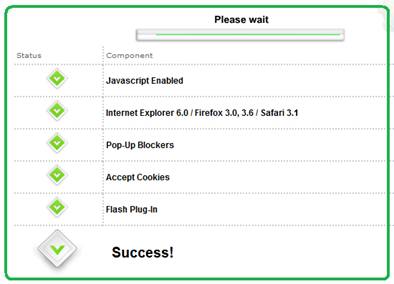
  2. Automated system check that allows a user to test their system
  3. Frequently Asked Questions (FAQ) related to the virtual event
  4. A “contact us” page related to end user support (e.g. providing an email address, phone number, etc.)

In addition, be sure to have higher level “support experts” available in case you need to delegate a sophisticated system issue.  The experts should be available within the virtual event – or, be available “on call” to jump in as needed.

Post-Resolution

Once you’ve resolved a user’s issue, follow them on Twitter – this allows them to send you direct messages.  And, it allows you to be quickly apprised of any subsequent issues they may come across.  Later on in the day, check if the user is logged in to the virtual event – if so, send a private chat request and politely ask how the event is going.  It’s always good for users to know that you’re actively supporting the event and genuinely interested in their satisfaction.

On Twitter, respond to each and every end user “tweet” – mention that the issue is resolved and invite the user to contact you back as needed.  Be careful, however, not to include the event’s hash tag on all of these follow-up tweets.  As the virtual event platform, you do not want to have a significant presence in the hash tag’s tweetstream.  Rather, only include the hash tag if your tweet relates to system-wide updates (applicable to all or most users).

The occasional update (with the hash tag) shows users that you’re listening – and replying to every single tweet shows your followers that you are responsive to each issue that arises.

The Entire Team Contributes

If your virtual event support staff is comprised of active Twitter users, encourage them to tweet about the event – have them highlight interesting sessions, pass along comments from enthusiastic attendees or simply state that they’re having a great time.  This helps promote the event itself – and, highlights the depth of the team behind the event support.  Take it a step further and create a Twitter List of your staff – allowing interested users to follow your employees tweets via a list.

Conclusion

The world is going social, which means that user support and customer service need to be “socially listening” (and responding).  Get ahead of the curve – be sure to support your next virtual event on Twitter.

Tweet this posting:


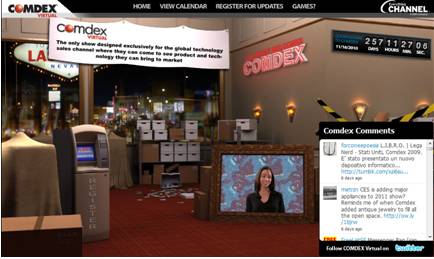
COMDEX Re-Launches As A Virtual Trade Show

March 4, 2010

The virtual events industry had a lot of exciting moments over the past two years.  I believe we’ll look back upon today, however, as an one of the most important and historic moments for our industry.  Everything Channel (a UBM company) announced that they’re re-launching COMDEX as a 100% virtual trade show.

Press Release: Introducing the New COMDEX, the Next Generation in Virtual Events

During its heyday, COMDEX was the “go to” trade show in the computer and technology industry, “where all levels of manufacturers and developers of computers, peripherals, software, components and accessories came in direct contact with retailers, consultants and their competitors” (source: Wikipedia)

COMDEX was discontinued in 2004.  In 2006, UBM acquired the event assets of COMDEX via their purchase of MediaLive International Inc.  COMDEX Virtual will fit nicely in UBM’s Everything Channel business, whose objective is “accelerating technology sales” and whose publications include Channelweb and CRN.  This is very exciting news – I gave some thought to what this means to our industry.

Game Changer and Turning Point

Today’s news is nothing short of a game changer and turning point for our industry.  Virtual events have enjoyed growing adoption – initially from B2B publishers and recently from corporations.  Adoption rates have been particularly strong from the same technology vendors who used to exhibit at COMDEX.  Now, however, one of the most widely known event brands has made the move to embrace virtual.

COMDEX Virtual will be watched (and attended) closely by related event brands – its success will incent many more well-known event brands to come on board virtually.  Staying within the technology space, CES and Macworld may be encouraged to consider a hybrid model for their events, adding a virtual component to complement their in-person event.  Discontinued event brands may similarly move to re-launch as a virtual-only experience.

Confirmed: Options and Flexibility with Going Virtual

Virtual event technology afforded Everything Channel with a flexible way to bring back the COMDEX brand.  First, the costs are lower.  Second, the financial commitment around a physical event venue was avoided.  Third, a virtual event affords exhibitors with a convenient and cost-effective means to return to COMDEX.

Re-sellers and systems integrators tend to be small-to-medium sized businesses (SMB) – they operate “lean and mean” without an abundance of marketing budget.  In the past, their entire year’s marketing spend may have been put towards COMDEX.  Now, the same exhibitors can exhibit virtually and avoid the travel costs and “out of office” costs of sending their company representatives to Las Vegas – affording them remaining marketing dollars to use elsewhere.

With the flexibility afforded, COMDEX Virtual allows Everything Channel a convenient and efficient way to bring COMDEX back to life.  If the virtual event exceeds expectations, more options become available, such as a physical component to complement the virtual – creating a hybrid event after first testing the waters virtually.

Virtual Extensions

Industry observers have noted that more focused events (e.g. CES in consumer electronics and Interop in computer networking) began to steal interest away from COMDEX – many believed that it had become too broad.  Subsequent to its November 2010 launch, COMDEX Virtual may want to consider a series of smaller and more focused virtual events – around industry sectors or by specific geographies.

Additionally, virtual affords COMDEX the option of extending its presence globally – both via participation from a global audience, as well as regionalized virtual events that cater to specific regions (e.g. EMEA, Asia Pacific, etc.).  With the localization capabilities provided by virtual event platforms, attendees can choose the language in which they experience the event.

Unique, Branded Experiences

COMDEX had a unique brand – with COMDEX Virtual, there seems to be a clear desire to create a unique experience that carries unique and distinctive branding.  Put another way, COMDEX Virtual should not look like any other virtual event – it needs to stand apart.  As such, UBM Studios, a “creative and strategic marketing agency” will create original and highly engaging event areas for COMDEX Virtual, including the Grand Hall of Masters, Hospitality Suites and the CRN Test Center.

This is part of a continuing trend in our industry – the desire (and capability) of show hosts to create highly engaging and unique experiences that adhere to their branding guidelines – or, create new brand experiences.  As such, clients with the budget (or capabilities) will “in-source” the creative development and look to the virtual event platforms to “carry the payload” – providing the foundation on which the event rides, along with essential platform features and services.

Taking the game to the next level

To support the size and scale of COMDEX (virtually), event platforms will need to bring their “A game”.  If the event will house hundreds of exhibitors interacting with tens of thousands of attendees, the virtual event platform will need to deliver on performance, reliability and scalability.  In addition, useful platform features need to enable exhibitors to demonstrate their products and services.

Match-making tools should enable exhibitors to find the “right” attendees and for attendees to find and make useful business contacts.  Lastly, the platforms need to enable pervasive use of video – both on-demand video and live-streamed video.  After all, a key element of past COMDEX events was the ability to see, hear and engage (visually) with others.

Conclusion

The “countdown to COMDEX” is on – between now and November, I’m sure there’s plenty of work and planning to get done.  In the meantime, with today’s announcement alone, a bit of history has already been made.

Tweet this posting:


Evolving The Virtual Event Group Chat

February 26, 2010

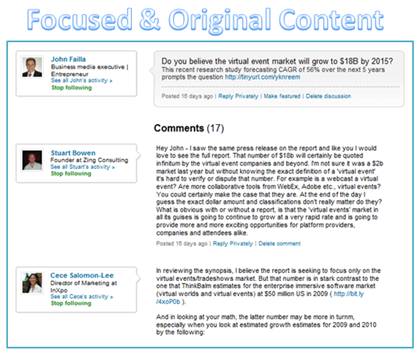
Excerpt of LinkedIn Discussion ("Virtual Events Forum")

For me, the best content in LinkedIn is found in Discussion threads in LinkedIn Groups to which I belong.  Why is the content so good?

  1. It has a precise focus that’s aligned with the charter or focus area of the group
  2. It’s based around timely topics (i.e. what group members are currently interested in discussing)
  3. It’s interactive with a loopback mechanism – there’s a dialog that unfolds – someone making a wild claim will be called on it and will need to return to the discussion to justify the claim (or, lose credibility by remaining silent)
  4. It’s the best form of “user generated content” – from subject matter experts and hands-on practitioners

As such, some content in LinkedIn Discussions can prove to be more useful and valuable than comparable content in related industry publications and web sites.  The LinkedIn Discussion thread is a great example of the “wisdom of the crowds” surpassing the knowledge of a handful of individuals.

Virtual Event Group Chat

While allowing for the fact that a portion of virtual event group chat is logistics-related (e.g. “I don’t hear the audio on the Live Webcast”), chat content related to the event’s theme (topic) comprises some of the most useful and compelling content in the entire event.  Why is that?  It’s for all the same reasons I list (above) for the LinkedIn discussion.

The challenge in leveraging an event’s group chat, however, is this:

If I’m not actively monitoring the group chat, how do I participate?

In my mind, the virtual event group chat needs to evolve to better serve attendees.

Group Chat Threading

Attendees may visit a group chat area (e.g. Networking Lounge), with an interest to discuss numerous topics (see example with LinkedIn Discussion topics, above).  In an unstructured group chat, the introductory chat message (to start the discussion) is likely to be “interrupted” with other, unrelated messages.  The result is some “scattering” of the chat content, with the possibility that a meaningful discussion (on the original topic) never happens.

Today’s “Wild, Wild West” of group chat needs to become threaded – the group chat’s user interface needs to allow participants to denote which message(s) they are commenting on – with the resulting “chat window” nesting (or otherwise grouping) messages within the same thread.  Additionally, the chat system should auto-populate information on which user one is responding to.  This way, participants no longer need to preface their comment with the name of the person they’re responding to.

A wealth of additional features become possible once this sort of threading feature is enabled.

Embraces and extends chat topics

I submit a chat message, asking if folks are interested in “Topic X”.  If no one answers me back within the next 10 minutes, that chat topic is dead.  Threaded chat, however, allows attendees to bring topics back from the dead.  If a visitor enters three hours later and decides to reply to my original message, that section of “threaded chat” can be moved to the “current timeline” in the group chat area – much in the same way a comment on a friend’s Facebook posting moves the original posting “up” in your News Feed.

Real-Time Search!

If I’m not able to dedicate the time to visit and monitor a group chat area, the next best thing would be a virtual event search function that provides real-time (or near-real-time) indexing of the group chat content.  Imagine the following capabilities:

  1. Exhibitor: perform searches on my company name – allows me to determine whether I need to enter the group chat to repsond
  2. Attendee: perform searches on topics that interest me – and be able to see the entire discussion thread on that topic
  3. Attendee: search on other attendees in my Buddy List – show me chat comments posted by my buddies
  4. Attendee: search discussion threads for comments posted subsequent to my own comments

Content Re-Use

For a B2B publisher – and, for some corporations – the content of selected discussion threads could be re-used and posted on the web as original (or, semi-original) content.  B2B sites often publish “how to guides” and best practices articles – discussion thread content (with the “right” mix of contributors) can be re-published on the web – or, used as the basis for a more in-depth article.

Conclusion

With group chat being one of the most valuable components of a virtual event, its features should evolve to better leverage the “wisdom of the crowds”.

Tweet this posting:


2010 Trend Watch: Virtual Events

February 25, 2010

Source: flickr (User: b.frahm)

For the virtual events industry, the premier face-to-face event of the year is Virtual Edge Summit, the “summit on virtual events, marketing & communities”.  Virtual Edge 2010 concluded earlier this week – the face-to-face event floored in Santa Clara, CA, while several vendors provided virtual components, allowing remote (virtual) attendees to participate in the experience.  The event saw record crowds from attendees, exhibitors and presenters.

From my observations at this year’s event, the following are a set of emerging trends in the industry.

Beyond Novelty Phase

Judging by the turn-out alone, the virtual event industry has officially “graduated” beyond the novelty phase.  Awareness of virtual events has broadened – now, when I meet someone at a social gathering and describe what I do for a living, the blank stare of years past has become a “oh yes, I’ve attended one of those”.

The increase of awareness (and, perceived importance) could be seen in the amount of coverage that Virtual Edge 2010 received – an increase in the number of publications (on-site), bloggers (both on-site and virtually) and analysts (both on-site and virtually).  Lastly, the volume of tweets (via hash tag: #ve10) was 5-10 times greater than last year – with more tweets per person and many more people tweeting.

With that being said, there are enormous untapped and unexplored markets, which will provide the industry much of its growth in 2010 and beyond.

More Players Emerge

I noticed a near doubling in the number of exhibitors this year, which means that new/emerging vendors significantly developed (or expanded) their virtual event capabilities – or, from a marketing standpoint, they determined it was the right time to get their products and services in front of this audience.

Last year, the exhibitors were fairly homogeneous – they provide apples-to-apples solutions and directly compete with one another.  This year, the breadth of solutions offerings (from the exhibitors) has expanded – some exhibitors do not necessarily compete directly with one another.

In some cases, a client may use one vendor for a particular type of virtual event and a different vendor in another type of event.  The result?  More “burden” on the attendees (buyers) to understand the solutions offered and determine which solution best fits their needs.  This affords some  industry players (agencies, consultants) a great opportunity to help clients and prospects navigate the waters.

Early Adopters Become Industry Thought Leaders

Practitioners (especially some of the early adopters in our industry) are quickly becoming the thought leaders and “go to source” for ideas, expertise and wisdom.  Many of these thought-leading practitioners were on stage this week – they were very generous with their sharing of experiences.  And, more than ever, they know precisely what they want from their vendors (which is a great thing for those in the vendor space).

In the early days, the practitioner would ask the vendor, “show me what you have” or “show me what you can do’.  Today, the tables have been turned.  Practitioners (clients) are now telling the vendors, “let me tell you what I need” or “make this experiential vision come to life for me”. This is an important aspect of the industry’s evolution – vendors crafting innovation via direct input from practitioners (as opposed to creating “innovation in a vacuum”).

3D Immersiveness

Interest in 3D immersiveness is picking up.  In fact, at Virtual Edge this year, roughly 20% of the session content involved 3D / immersiveness and a formal “Business 3Di” track was created.  The 3Di track featured practitioners, along with vendors such as Linden Lab, Teleplace, Altadyn, Digitell and web.alive (Avaya).  Like last year, Digitell provided a simulcast of the event proceedings into their 3D immersive platform (VirtualU).

Those are the “pure play” immersive environments.  In addition, virtual event platforms are coming on board as well.  In my 2010 predictions on virtual events, I wrote, “(virtual event) platforms take first step towards immersiveness”.  This prediction has come true.

It’s interesting, however – some vendors have a clear vision of what immersiveness enables for exhibitors and attendees of virtual events, while others appear to be adding immersiveness for the sake of adding it (i.e. lacking a clear and compelling use case).  It’s in the best interest of virtual event vendors to explore and enable immersiveness via specific client use cases – this way, the capabilities are added to meet a client need – and, serve as a reference (to the rest of the industry) on the true value delivered via immersiveness.

Social Media Integration

2009 was a monumental year in the evolution of both social media and virtual events.  In 2010, there continues to be a lot of talk about both topics – including discussion around how they integrate with one another.  Social media (and related social networks) were central to the discussion in many workshops and breakout sessions.

And of course, social networking was flourishing in and around the event, with a high volume of tweets, a fair number of Facebook status updates and (I’m sure) lots of LinkedIn connections made.  While I am not aware of any groundbreaking announcements from Virtual Edge on social media integration, I’d expect that platforms enable more and more social networking as 2010 unfolds.  I expect to see the platforms themselves becomes more social (natively) and increase the depth of their integration with third party social networks.  Twitter, Facebook and LinkedIn are commonly mentioned – but expect to see industry-specific, niche networks and communities integrated as well.

Industry Ecosystem Begins to Take Shape

Virtual event platform vendors have established a number of strategic partnerships to extend account/client reach and grow/scale business opportunities.  Most of those partners were present at Virtual Edge – and a number of partners had prominent speaking roles in the sessions.  By this time next year, even more partners will enter the space and appear at the event.

Additionally, smaller businesses (and individuals as well) are seeking to leverage opportunities within virtual events to bring in new business – or sign on for consulting roles.  The list includes video production companies, design agencies, digital signage providers, freelance producers/writers/story-tellers, streaming providers and emerging social network / community sites.  As these “players” look to get a small piece of the industry pie, they serve to grow the overall ecosystem of this industry.

Finally, hands-on practitioners are finding a fluid and welcoming job market, despite the less inviting macro job environment.  Virtual events are still new enough that production staff, developers and strategic consultants have highly specialized knowledge and skills – as such, they’re able to quickly transition from their existing (or past) role to a new vendor, service provider or practitioner (client side).  Most of the vendors in the space are aggressively hiring, which means that savvy job seekers leveraged the conference to generate meaningful employment leads.

Conclusion

It’s an exciting time in our industry – I’m looking forward to seeing how things shape up for Virtual Edge 2011.

Tweet this posting:


What Every Exhibitor Should Know About Virtual Events

February 17, 2010

The following is a guest post from Susan Friedmann.

In a recent webinar I conducted for TSEA (Trade Show Exhibitors Association), “What Every Exhibitor Should Know About Virtual Events,” I highlighted that virtual events can supplement, complement, or replace your physical event. However, I caution exhibitors not to replace their event without totally understanding what you are giving up. Realize that nothing can replace the face-to-face contact that you have at a physical event.

Nielsen Business Media (who organize many virtual tradeshows) have found that the virtual event experience might graphically mimic a tradeshow, but virtual events are currently primarily a social networking environment, especially for the under 50s (sorry to be an ageist).

Virtual events are gaining in popularity, which means as savvy marketers you just can’t ignore them, and hope that if you do, they’ll just go away. It’s just not going to happen.

While they may not replace physical events, the virtual counterparts are becoming more widely used to supplement face-to-face trade shows and conferences, as well as provide ongoing content and follow-up opportunities.

Finally, my all time favorite subject. Don’t have any of your team go on the live or virtual show floor without tradeshow training. It may seem simple to work a virtual show, but winging it will get you winging it results.

The key ingredient to engineer a successful event lies in the simple process of planning and preparation. Easy enough, yet very few exhibitors really take time to truly understand what this means.

Participating in virtual events means not only knowing, and understanding the technology platform, it also means honing the necessary skills for successful results.

Susan A. Friedmann (@TradeshowCoach), CSP (Certified Speaking Professional), is an internationally recognized expert and “how to” coach who has traveled the world helping companies achieve profitable results at tradeshows and events. She offers exhibitor training programs to increase results and focus on building better relationships with customers, prospects and advocates in the marketplace.


Virtual Edge Summit 2010

Susan and I will be presenting at the Virtual Edge Summit on February 23, 2010.

Register for the conference: http://virtualedgesummit.com/

Register for InXpoLive@VirtualEdge: http://bit.ly/InXpoLive_Blog

Tweet this posting: